
Help us keep the list up to date and submit new video software here.
Tool
Description
Type
Rating
Reviews
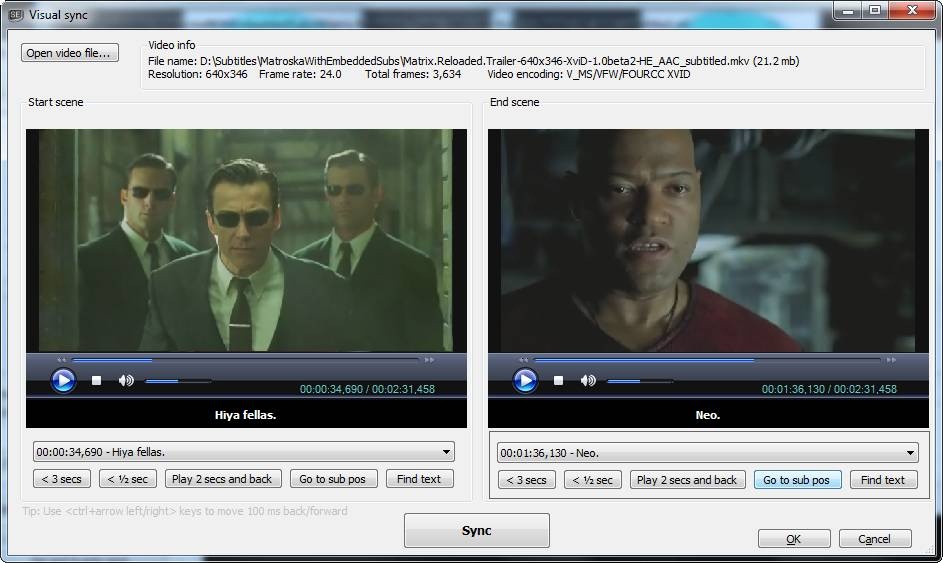
Subtitle Edit is a free editor for video subtitles - a subtitle editor. With SE you can easily adjust a subtitle if it is out of sync with the video and much more. Visually sync/adjust a subtitle (start/end position and speed). Import Blu-ray SUP titles or VobSub sub/idx binary subtitles and OCR to text srt subtitles. SUP to SRT, SUB to SRT. DVD to SRT. Requires Microsoft .NET Framework Version 10 or later.
Free software
OS:


File size: 53MB
Portable version
Old versions
Version history
Alternative software
OS:
File size: 53MB
Portable version
Old versions
Version history
Alternative software
Screenshots
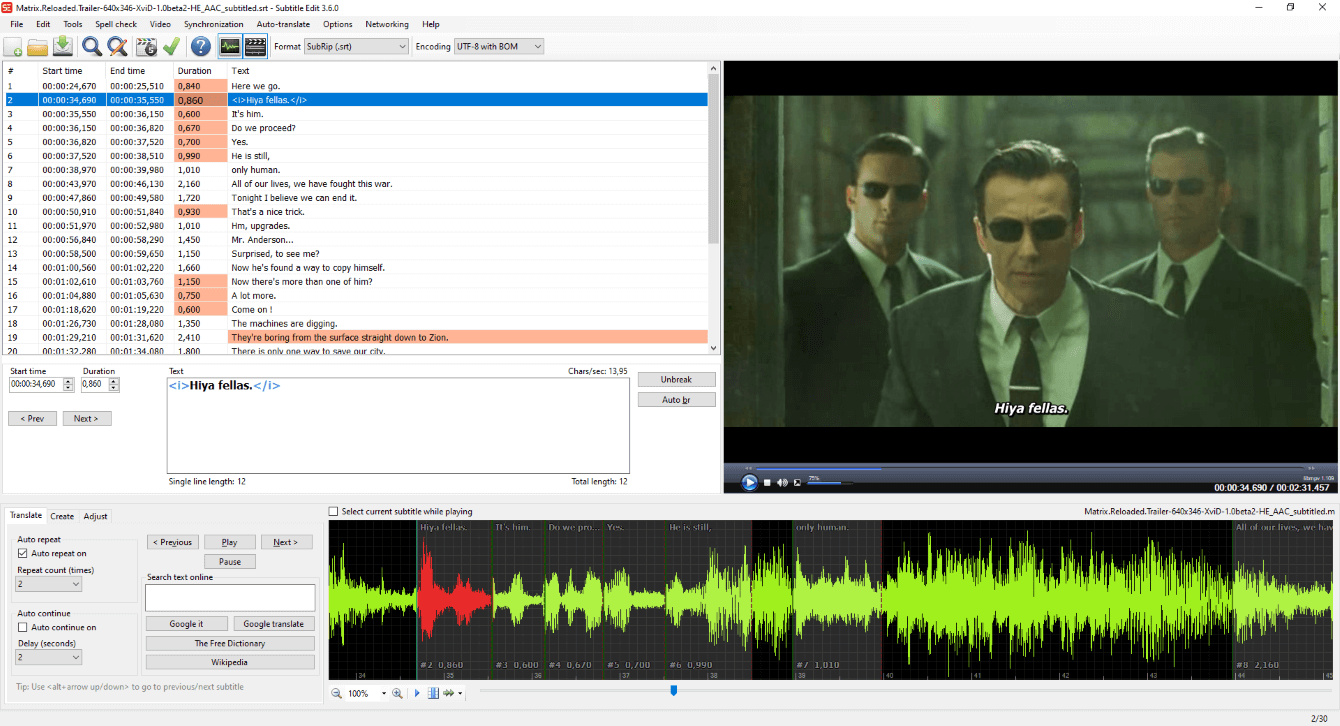
Latest version
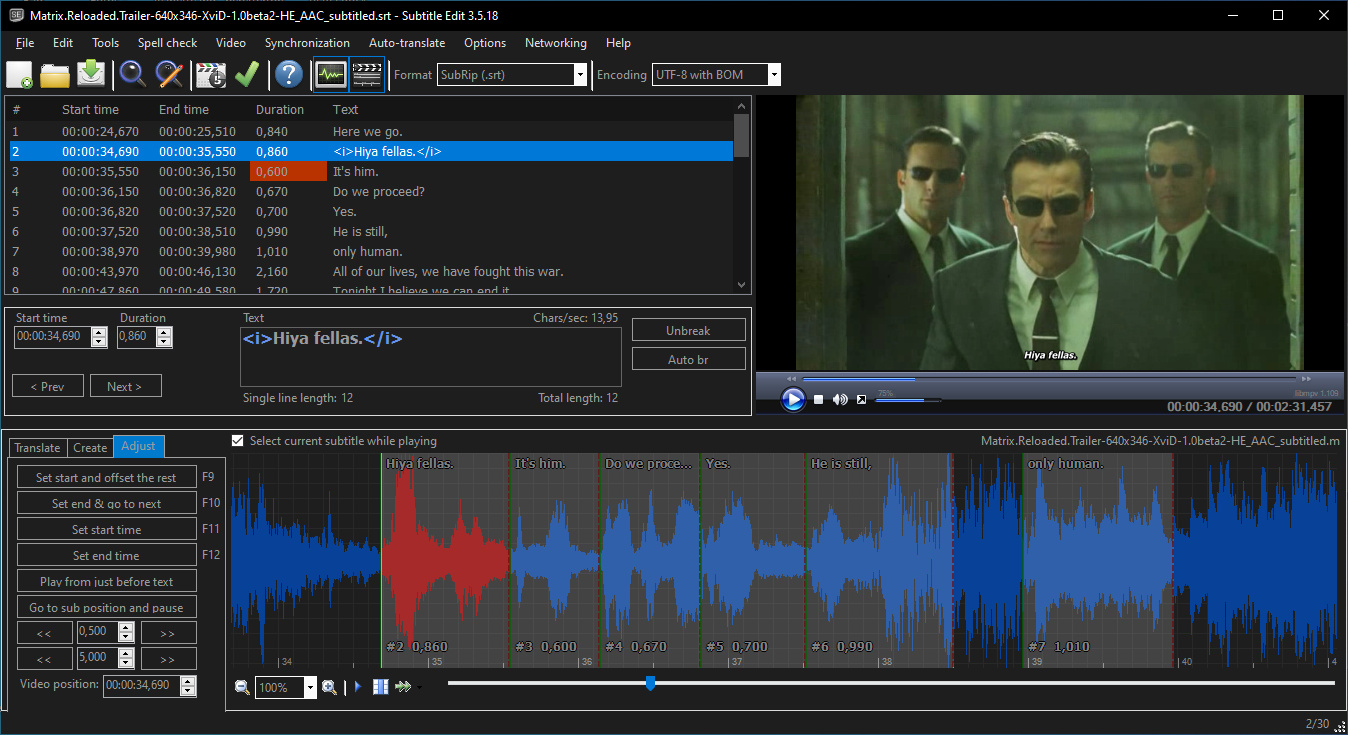
Download
Download Subtitle Edit 5.1.0 Windows 64-bit 53MB Win64
Download Subtitle Edit 5.1.0 Mac Silicon ARM 64-bit 124MB MacARM64
Download Subtitle Edit 5.1.0 Mac Intel 64-bit 144MB Mac64
Download Subtitle Edit 5.1.0 Linux 64-bit 114MB Linux64
Download Beta, Portable and other versions
Portable 
Download Subtitle Edit 5.1.0 Portable Windows ARM 64-bit 53MB WinARM64
Portable Download Subtitle Edit 5.1.0 Linux ARM 53MB Linux ARM64
Download Subtitle Edit 4.0.16 Windows 10MB Win
Download Subtitle Edit 4.0.16 Portable Windows 11MB Win
Portable Download old versions

Software License
Supported operating systems
Mac OS Linux Version history / Release notes / Changelog / What's New
v5.1.0 (29th of July 2026)
Subtitle Edit 5.1 is the first feature release after 5.0, collecting the work of
15 betas and 18 release candidates. A summary of the changes since v5.0.0
(full details in the pre-release entries below):
* AI review (Tools > AI review) - proofread subtitles with a local LLM via llama.cpp or Ollama, with a before/after grid and an editable prompt
* AI assistant in the subtitle text box - quick actions like fix spelling/grammar, reading speed and change tone
* Auto-translate: new generic OpenAI-compatible engine, remote llama.cpp server option, DeepL formality picker, and many new local models (TranslateGemma, Gemma 4, Hy-MT2, Qwen 3.5/3.6, Aya Expanse)
* Auto-translate: retry with backoff on rate-limited (429) LLM engines, show the API URL in error details, and fix engines that ignored a custom URL
* Speech to text: new engines and models - MOSS-Transcribe-Diarize with speaker labels, OpenRouter and Alibaba Qwen3-ASR online engines, and Parakeet, Kyutai, SenseVoice, ARK-ASR and Cohere models - plus live progress for all CrispASR engines, and the input language is remembered again
* Text to speech: new MOSS-TTS engine with zero-shot voice cloning and a target language dropdown, new Q6_K/Q8_0 quants, a big window overhaul, and a large bug-fix pass across the engines and the review window
* OCR: new CrispEmbed local OCR engine (GLM-OCR, GOT-OCR2, Qwen3-VL), llama.cpp OCR vision models in Batch convert and seconv, a "Show only forced subtitles" filter, and histogram-based color isolation for VobSub/DVD subtitles
* New formats: EBU-TT-D (read/write), IMSC 1.1 image profile export, and "DVD sup (MuxMan/Scenarist)" image-based export
* macOS: multi-window support - "File -> New window" opens an independent editor window
* New "file saved" prompt with file info, copy path and Play/Open - used across text to speech and the video tools
* Waveform: SE4-style center/lock scrubbing (paused and while playing), configurable toolbar with seek and play buttons, drag a multi-line selection to shift time codes together
* Subtitle text box: new native tag-coloring text box - IME/CJK input, right-to-left and live spell check now work with color tags enabled
* Live spell check in the subtitle grid context menu, spell check window fixes, MS Word engine fixes, and new Georgian, Armenian, Luxembourgish and Faroese dictionaries
* Fix common errors: reworked fix list with category chips, sortable columns and live counts - and unticked fixes are no longer applied
* Shortcuts window: categories with icons, sortable columns, better search - plus many new SE4-parity shortcuts (column shortcuts, set start and go to next, play previous/next, extend, and more)
* Subtitle grid: type-a-number line navigation, alternating row colors, text fit setting (clip/wrap/ellipsis), and "Insert subtitle after current line..." keeping the inserted file's own time codes
* Auto-save of the open subtitle file (Options > General)
* Right-to-left: mirrored grid columns, content direction in text boxes, and an ASSA karaoke RTL option
* Accessibility: menu bar activation via Alt/F10, and named controls for screen readers across the app
* Image-based subtitle editor: PGS position monitor, adjust color for selected lines, change speed, and HTML index export
* Point sync and visual sync: sorted sync points, re-pointing, delete via menu/keyboard, and a time code box for the sync point
* Split/re-balance long lines: respect the single line max length
* Auto-trim white space: use the detected language, so Dutch keeps " 's"
* Network: always bypass the proxy for local (loopback) URLs, and proxy password/crash fixes
* Performance: non-English start-up about 3.5x faster, 10-25x faster auto line-breaking, much faster subtitle grid and waveform rendering, faster .srt/ASSA loading and MP4 parsing, and a wide allocation-cutting pass (source-generated regexes, reused StringBuilders) - thx ivandrofly
* Stability: hundreds of fixes, including a 46-bug codebase sweep, an async/await bug hunt, and hardened binary subtitle parsers
* Command line (seconv): llama.cpp auto-translate and OCR, image output styling options, fix-common-errors profile settings in --settings JSON, VobSub/.idx fixes, and clear errors on malformed SCC input
* The libse core library is now published on NuGet
* New UI languages: Arabic, Turkish, Persian, Traditional Chinese, Indonesian, Vietnamese, Greek and Thai - and all language files synced with English (3,000+ strings)
* Updated engines: CrispASR v0.8.24, llama.cpp b10142 (with a CUDA 13 build on Windows), whisper.cpp v1.9.1, CrispEmbed v0.16.1, Qwen3 ASR CPP v0.1.7 and yt-dlp 2026.07.04
A big thank you to everyone who tested the pre-releases, reported issues and
contributed code and translations - and a special thanks to Anthropic for
sponsoring a Claude subscription :)
v5.1.0-rc18 (28th of July 2026)
* Set sync point: add a time code box so the sync point can be typed directly (SE4 parity)
* Fix CrispASR text to speech freezing the app on every generation - thx subof
* Speech to text: point at the Model field when an OpenAI-compatible server rejects it - thx acc4github
* Surround only the selected text with music symbols - thx fraternl
* Fix common errors: flash "Analyzing..." on every re-scan - thx Davanix
* Restore the SE4 order of the two split items in the text box right-click menu - thx Chouu
* Fix truncated labels and narrow controls in two spell check dialogs - thx bovirus
* Fix the subtitle grid scroll bar paging past the cursor when holding the trough - thx ivandrofly
* Fill in the missing Dutch translations - thx Albertos22
* Update the Italian translation - thx bovirus
* Improve the Polish translation of the OCR embedded subtitles dialog - thx potplayer-fanpack
v5.1.0-rc17 (27th of July 2026)
* Update llama.cpp to b10142 and offer the CUDA 13 build on Windows
* Update CrispASR to v0.8.23 - fixes garbled/hung CosyVoice3, Qwen3-TTS and Zonos audio on the Vulkan build, and voice cloning now needs to be enabled in settings - thx CrispStrobe
* Add 4 Parakeet and 1 Kyutai speech-to-text model to the CrispASR engines
* MOSS-TTS: add a target language dropdown, so cross-lingual voice clones are no longer heavily accented - thx subof
* Fix CosyVoice3, VoxCPM2 and F5-TTS asking for a voice transcription the voice pack already ships, and fix ref-text cues being dropped when one was a substring of a word in another
* Speech to text: don't fail the Faster-Whisper model download when preprocessor_config.json is missing - thx oep42
* Speech to text: make online/OpenAI-compatible server failures readable, and send the audio file last - thx acc4github
* Restore type-a-number line navigation in the subtitle grid - thx SiriosDev
* Fix common errors: show a green check and "Nothing to fix" when a re-scan finds nothing - thx Davanix
* Fix auto-imported Matroska tracks staying "Untitled" until the first save - thx Davanix
* Keep the selected audio track when going fullscreen or undocking - thx routineCode
* Update the OCR fix replace list with new entries - thx diomed
* Update the French translation - thx Need74
* Linux/macOS: stop the app data folder from being resolved against the working directory - thx ivandrofly
v5.1.0-rc16 (26th of July 2026)
* Add Georgian, Armenian, Luxembourgish and Faroese spell check dictionaries
* Update the Qwen3 ASR CPP engine to v0.1.7 - fixes the discrete GPU (Vulkan) crash - thx HanRU01
* Auto-hide the mouse cursor in fullscreen video - thx Davanix
* Batch convert: let Delete remove the selected files - thx SiriosDev
* Batch convert: keep the ASSA settings between sessions - thx SiriosDev
* Fix script alignment desyncing on the second sentence in "Import plain text" align-via-speech-to-text - thx subof
* Fix Alt+drag killing all shortcuts, and run alignment shortcuts in the text box - thx torvchen
* MS Word spell check: check words in a range so the selected dictionary language is used, and recover a dead Word session - thx sergechaly
* Fix OCR "add to user dictionary" not advancing to the next word - thx Rumbah2
* Fix false-positive ¿que -> ¿qué accenting in the Spanish OCR fix list - thx fraternl
* Qwen3 ASR: report the exit code and suggest the CPU build when a GPU run crashes - thx HanRU01
* Performance: 10-25x faster auto line-breaking, faster .srt reading, waveform render and subtitle grid, and linear adjust-display-time/set-fixed-duration/remove-empty-lines
v5.1.0-rc15 (25th of July 2026)
* Add Indonesian, Vietnamese, Greek, and Thai UI translations
* Update llama.cpp to b10103
* Auto-translate via DeepSeek: turn off the new default thinking mode for instant translations again, and migrate the retired deepseek-chat/deepseek-reasoner model IDs - thx itallfelldown5241023
* Export plain text: word wrap the preview, and remember the window position and size - thx subof
* Apply the saved volume to all video player windows - thx CDoggyDog62
* Shortcuts window: darker category text in light mode, wider category column and button hints - thx GrampaWildWilly
* Subtitle grid menu: keep Styles/Actors at the top and move the dictionary picker down
* Allow Escape to close the source view window - thx ivandrofly
* Fix undo deleting all lines of the original subtitle in translation mode - thx abasameer
* Fix the MS Word spell check engine checking against Word's default language instead of the selected dictionary - thx sergechaly
* Fix AltGr shortcut handling racing with typing - thx Ironship
* Fix out-of-range parsing of culture names with unbalanced parentheses - thx ivandrofly
* Performance: micro-optimize hot UI helpers, and deserialize JSON directly from streams - thx ivandrofly
* seconv: fix VobSub OCR isolation, MKV VobSub passthrough, durations and silent drops - thx albino1
* seconv: fix dump-settings mangling non-ASCII characters on Windows - thx Hlsgs
* seconv: use canonical kebab-case flags...
Subtitle Edit 5.1 is the first feature release after 5.0, collecting the work of
15 betas and 18 release candidates. A summary of the changes since v5.0.0
(full details in the pre-release entries below):
* AI review (Tools > AI review) - proofread subtitles with a local LLM via llama.cpp or Ollama, with a before/after grid and an editable prompt
* AI assistant in the subtitle text box - quick actions like fix spelling/grammar, reading speed and change tone
* Auto-translate: new generic OpenAI-compatible engine, remote llama.cpp server option, DeepL formality picker, and many new local models (TranslateGemma, Gemma 4, Hy-MT2, Qwen 3.5/3.6, Aya Expanse)
* Auto-translate: retry with backoff on rate-limited (429) LLM engines, show the API URL in error details, and fix engines that ignored a custom URL
* Speech to text: new engines and models - MOSS-Transcribe-Diarize with speaker labels, OpenRouter and Alibaba Qwen3-ASR online engines, and Parakeet, Kyutai, SenseVoice, ARK-ASR and Cohere models - plus live progress for all CrispASR engines, and the input language is remembered again
* Text to speech: new MOSS-TTS engine with zero-shot voice cloning and a target language dropdown, new Q6_K/Q8_0 quants, a big window overhaul, and a large bug-fix pass across the engines and the review window
* OCR: new CrispEmbed local OCR engine (GLM-OCR, GOT-OCR2, Qwen3-VL), llama.cpp OCR vision models in Batch convert and seconv, a "Show only forced subtitles" filter, and histogram-based color isolation for VobSub/DVD subtitles
* New formats: EBU-TT-D (read/write), IMSC 1.1 image profile export, and "DVD sup (MuxMan/Scenarist)" image-based export
* macOS: multi-window support - "File -> New window" opens an independent editor window
* New "file saved" prompt with file info, copy path and Play/Open - used across text to speech and the video tools
* Waveform: SE4-style center/lock scrubbing (paused and while playing), configurable toolbar with seek and play buttons, drag a multi-line selection to shift time codes together
* Subtitle text box: new native tag-coloring text box - IME/CJK input, right-to-left and live spell check now work with color tags enabled
* Live spell check in the subtitle grid context menu, spell check window fixes, MS Word engine fixes, and new Georgian, Armenian, Luxembourgish and Faroese dictionaries
* Fix common errors: reworked fix list with category chips, sortable columns and live counts - and unticked fixes are no longer applied
* Shortcuts window: categories with icons, sortable columns, better search - plus many new SE4-parity shortcuts (column shortcuts, set start and go to next, play previous/next, extend, and more)
* Subtitle grid: type-a-number line navigation, alternating row colors, text fit setting (clip/wrap/ellipsis), and "Insert subtitle after current line..." keeping the inserted file's own time codes
* Auto-save of the open subtitle file (Options > General)
* Right-to-left: mirrored grid columns, content direction in text boxes, and an ASSA karaoke RTL option
* Accessibility: menu bar activation via Alt/F10, and named controls for screen readers across the app
* Image-based subtitle editor: PGS position monitor, adjust color for selected lines, change speed, and HTML index export
* Point sync and visual sync: sorted sync points, re-pointing, delete via menu/keyboard, and a time code box for the sync point
* Split/re-balance long lines: respect the single line max length
* Auto-trim white space: use the detected language, so Dutch keeps " 's"
* Network: always bypass the proxy for local (loopback) URLs, and proxy password/crash fixes
* Performance: non-English start-up about 3.5x faster, 10-25x faster auto line-breaking, much faster subtitle grid and waveform rendering, faster .srt/ASSA loading and MP4 parsing, and a wide allocation-cutting pass (source-generated regexes, reused StringBuilders) - thx ivandrofly
* Stability: hundreds of fixes, including a 46-bug codebase sweep, an async/await bug hunt, and hardened binary subtitle parsers
* Command line (seconv): llama.cpp auto-translate and OCR, image output styling options, fix-common-errors profile settings in --settings JSON, VobSub/.idx fixes, and clear errors on malformed SCC input
* The libse core library is now published on NuGet
* New UI languages: Arabic, Turkish, Persian, Traditional Chinese, Indonesian, Vietnamese, Greek and Thai - and all language files synced with English (3,000+ strings)
* Updated engines: CrispASR v0.8.24, llama.cpp b10142 (with a CUDA 13 build on Windows), whisper.cpp v1.9.1, CrispEmbed v0.16.1, Qwen3 ASR CPP v0.1.7 and yt-dlp 2026.07.04
A big thank you to everyone who tested the pre-releases, reported issues and
contributed code and translations - and a special thanks to Anthropic for
sponsoring a Claude subscription :)
v5.1.0-rc18 (28th of July 2026)
* Set sync point: add a time code box so the sync point can be typed directly (SE4 parity)
* Fix CrispASR text to speech freezing the app on every generation - thx subof
* Speech to text: point at the Model field when an OpenAI-compatible server rejects it - thx acc4github
* Surround only the selected text with music symbols - thx fraternl
* Fix common errors: flash "Analyzing..." on every re-scan - thx Davanix
* Restore the SE4 order of the two split items in the text box right-click menu - thx Chouu
* Fix truncated labels and narrow controls in two spell check dialogs - thx bovirus
* Fix the subtitle grid scroll bar paging past the cursor when holding the trough - thx ivandrofly
* Fill in the missing Dutch translations - thx Albertos22
* Update the Italian translation - thx bovirus
* Improve the Polish translation of the OCR embedded subtitles dialog - thx potplayer-fanpack
v5.1.0-rc17 (27th of July 2026)
* Update llama.cpp to b10142 and offer the CUDA 13 build on Windows
* Update CrispASR to v0.8.23 - fixes garbled/hung CosyVoice3, Qwen3-TTS and Zonos audio on the Vulkan build, and voice cloning now needs to be enabled in settings - thx CrispStrobe
* Add 4 Parakeet and 1 Kyutai speech-to-text model to the CrispASR engines
* MOSS-TTS: add a target language dropdown, so cross-lingual voice clones are no longer heavily accented - thx subof
* Fix CosyVoice3, VoxCPM2 and F5-TTS asking for a voice transcription the voice pack already ships, and fix ref-text cues being dropped when one was a substring of a word in another
* Speech to text: don't fail the Faster-Whisper model download when preprocessor_config.json is missing - thx oep42
* Speech to text: make online/OpenAI-compatible server failures readable, and send the audio file last - thx acc4github
* Restore type-a-number line navigation in the subtitle grid - thx SiriosDev
* Fix common errors: show a green check and "Nothing to fix" when a re-scan finds nothing - thx Davanix
* Fix auto-imported Matroska tracks staying "Untitled" until the first save - thx Davanix
* Keep the selected audio track when going fullscreen or undocking - thx routineCode
* Update the OCR fix replace list with new entries - thx diomed
* Update the French translation - thx Need74
* Linux/macOS: stop the app data folder from being resolved against the working directory - thx ivandrofly
v5.1.0-rc16 (26th of July 2026)
* Add Georgian, Armenian, Luxembourgish and Faroese spell check dictionaries
* Update the Qwen3 ASR CPP engine to v0.1.7 - fixes the discrete GPU (Vulkan) crash - thx HanRU01
* Auto-hide the mouse cursor in fullscreen video - thx Davanix
* Batch convert: let Delete remove the selected files - thx SiriosDev
* Batch convert: keep the ASSA settings between sessions - thx SiriosDev
* Fix script alignment desyncing on the second sentence in "Import plain text" align-via-speech-to-text - thx subof
* Fix Alt+drag killing all shortcuts, and run alignment shortcuts in the text box - thx torvchen
* MS Word spell check: check words in a range so the selected dictionary language is used, and recover a dead Word session - thx sergechaly
* Fix OCR "add to user dictionary" not advancing to the next word - thx Rumbah2
* Fix false-positive ¿que -> ¿qué accenting in the Spanish OCR fix list - thx fraternl
* Qwen3 ASR: report the exit code and suggest the CPU build when a GPU run crashes - thx HanRU01
* Performance: 10-25x faster auto line-breaking, faster .srt reading, waveform render and subtitle grid, and linear adjust-display-time/set-fixed-duration/remove-empty-lines
v5.1.0-rc15 (25th of July 2026)
* Add Indonesian, Vietnamese, Greek, and Thai UI translations
* Update llama.cpp to b10103
* Auto-translate via DeepSeek: turn off the new default thinking mode for instant translations again, and migrate the retired deepseek-chat/deepseek-reasoner model IDs - thx itallfelldown5241023
* Export plain text: word wrap the preview, and remember the window position and size - thx subof
* Apply the saved volume to all video player windows - thx CDoggyDog62
* Shortcuts window: darker category text in light mode, wider category column and button hints - thx GrampaWildWilly
* Subtitle grid menu: keep Styles/Actors at the top and move the dictionary picker down
* Allow Escape to close the source view window - thx ivandrofly
* Fix undo deleting all lines of the original subtitle in translation mode - thx abasameer
* Fix the MS Word spell check engine checking against Word's default language instead of the selected dictionary - thx sergechaly
* Fix AltGr shortcut handling racing with typing - thx Ironship
* Fix out-of-range parsing of culture names with unbalanced parentheses - thx ivandrofly
* Performance: micro-optimize hot UI helpers, and deserialize JSON directly from streams - thx ivandrofly
* seconv: fix VobSub OCR isolation, MKV VobSub passthrough, durations and silent drops - thx albino1
* seconv: fix dump-settings mangling non-ASCII characters on Windows - thx Hlsgs
* seconv: use canonical kebab-case flags...
View full changelog
All features
Create/adjust/sync/translate subtitle lines
Convert between SubRib, MicroDVD, Advanced Sub Station Alpha, Sub Station Alpha, D-Cinema, SAMI, you-tube sbv, and many more (300+ different formats!)
Cool audio visualizer control - can display wave form and/or spectrogram
Video player uses mpv, DirectShow, or VLC media player
Visually sync/adjust a subtitle (start/end position and speed)
Audio to text (speech recognition) via Whisper or Vosk/Kaldi
Auto Translation via Google translate
Rip subtitles from a (decrypted) dvd
Import and OCR VobSub sub/idx binary subtitles
Import and OCR Blu-ray .sup files - bd sup reading is based on Java code from BDSup2Sub by 0xdeadbeef)
Can open subtitles embedded inside Matroska files
Can open subtitles (text, closed captions, VobSub) embedded inside mp4/mv4 files
Can open/OCR XSub subtitles embedded inside divx/avi files
Can open/OCR DVB and teletext subtitles embedded inside .ts/.m2ts (Transport Stream) files
Can open/OCR Blu-ray subtitles embedded inside .m2ts (Transport Stream) files
Can read and write both UTF-8 and other unicode files and ANSI (support for all languages/encodings on the pc!)
Sync: Show texts earlier/later + point synchronization + synchronization via other subtitle
Merge/split subtitles
Adjust display time
Fix common errors wizard
Spell checking via Libre Office dictionaries (many dictionaries available)
Remove text for hear impaired (HI)
Renumbering
Effects: Typewriter and karaoke
History/undo manager (Undo=Ctrl+z, Redo=Ctrl+y)
Compare subtitles
Multiple search and replace
Change casing using names dictionary
Merge short lines/split long lines
Export to PNG images (+bdn xml), Adobe Encore FAB image script, VobSub, Blu-ray sup, EBU stl, PAC, and plain text
Convert between SubRib, MicroDVD, Advanced Sub Station Alpha, Sub Station Alpha, D-Cinema, SAMI, you-tube sbv, and many more (300+ different formats!)
Cool audio visualizer control - can display wave form and/or spectrogram
Video player uses mpv, DirectShow, or VLC media player
Visually sync/adjust a subtitle (start/end position and speed)
Audio to text (speech recognition) via Whisper or Vosk/Kaldi
Auto Translation via Google translate
Rip subtitles from a (decrypted) dvd
Import and OCR VobSub sub/idx binary subtitles
Import and OCR Blu-ray .sup files - bd sup reading is based on Java code from BDSup2Sub by 0xdeadbeef)
Can open subtitles embedded inside Matroska files
Can open subtitles (text, closed captions, VobSub) embedded inside mp4/mv4 files
Can open/OCR XSub subtitles embedded inside divx/avi files
Can open/OCR DVB and teletext subtitles embedded inside .ts/.m2ts (Transport Stream) files
Can open/OCR Blu-ray subtitles embedded inside .m2ts (Transport Stream) files
Can read and write both UTF-8 and other unicode files and ANSI (support for all languages/encodings on the pc!)
Sync: Show texts earlier/later + point synchronization + synchronization via other subtitle
Merge/split subtitles
Adjust display time
Fix common errors wizard
Spell checking via Libre Office dictionaries (many dictionaries available)
Remove text for hear impaired (HI)
Renumbering
Effects: Typewriter and karaoke
History/undo manager (Undo=Ctrl+z, Redo=Ctrl+y)
Compare subtitles
Multiple search and replace
Change casing using names dictionary
Merge short lines/split long lines
Export to PNG images (+bdn xml), Adobe Encore FAB image script, VobSub, Blu-ray sup, EBU stl, PAC, and plain text
Sections/Browse similar tools
Alternative to Subtitle Edit
(Latest version updated)Aegisub (Jul 11, 2026)
AHD Subtitles Maker (Apr 30, 2022)
DivXLand Media Subtitler (Apr 16, 2021)
DVDSubEdit (Sep 6, 2011)
Jubler (Jul 1, 2026)
Sub Station Alpha (Jun 27, 2000)
SubExtractor (Jan 26, 2013)
SubRip (Nov 14, 2018)
Subtitld (Mar 9, 2023)
Subtitle Workshop (May 25, 2026)
Txt2VobSub (Jun 9, 2016)
VobSub (Dec 11, 2002)
Guides and How to's
How to sync a subtitle using Subtitle Edit
- ReadSubtitle Edit video tutorials
View all guides with guide description here
Acronyms / Also Known As
Download Subtitle Edit Portable download from the Download links under Download and Download other versions!
Notify me when software updated or report software
| 86 reviews, Showing 1 to 5 reviews |
Using for quite some time and love it. Really the best so far.
Moving from v4 to v5, the visual sync is not working with subtitle opened.
Moving from v4 to v5, the visual sync is not working with subtitle opened.
Review by on
Jul 30, 2026 Version: 5.1
OS: Windows 11 64-bit Ease of use: 10/10
Functionality: 10/10
Value for money: 10/10
Overall: 10/10
Rating by kepler42 on
Nov 1, 2025 Version: 4.0.14
OS: Windows 10 64-bit Ease of use: 7/10
Functionality: 9/10
Value for money: 10/10
Overall: 9/10
A very good software
Review by jopavirando on
Oct 16, 2025 Version: 4.0.13
OS: Windows 11 64-bit Ease of use: 10/10
Functionality: 10/10
Value for money: 10/10
Overall: 10/10
Rating by Denis on
Sep 9, 2024 Version: 4.0.8
OS: Windows 11 64-bit Ease of use: 9/10
Functionality: 9/10
Value for money: 10/10
Overall: 9/10
Excellent software getting better and better.
Thank you so much for having added the convertion of graphic subtitles to other graphics formats. Much appreciated.
Thank you so much for having added the convertion of graphic subtitles to other graphics formats. Much appreciated.
Review by Michel on
Apr 13, 2024 Version: 4.0.4
OS: Windows 11 64-bit Ease of use: 9/10
Functionality: 9/10
Value for money: 10/10
Overall: 9/10
| 86 reviews, Showing 1 to 5 reviews |
| 1 tool hits, Showing 1 to 1 tools |
Explanation:
NEW SOFTWARE= New tool since your last visit
NEW VERSION= New version since your last visit
NEW REVIEW= New review since your last visit
NEW VERSION= New version
Latest version
Version number / Beta version number / Update version number and when it whas released.
Type and download
NO MORE UPDATES? = The software hasn't been updated in over 2 years.
NO LONGER DEVELOPED = The software hasn't been updated in over 5 years.
RECENTLY UPDATED = The software has been updated the last 31 days.
Freeware = Download Free software.
Freeware Trialware = Download Free software but some parts are trial/shareware.
Free software = Download Free software and also open source code also known as FOSS (Free and Open Source Software).
Free software Trialware = Download Free software and also open source code but some parts are trial/shareware.
Freeware Ads = Download Free software but supported by advertising, usually with a included browser toolbar. It may be disabled when installing or after installation.
Free software Ads = Free Download software and open source code but supported by advertising, usually with a included browser toolbar. It may be disabled when installing or after installation.
Trialware = Also called shareware or demo. Free Trial version available for download and testing with usually a time limit or limited functions.
Payware = No demo or trial available.
Portable version = A portable/standalone version is available. No installation is required.
v1.0.1 = Latest version available.
Download beta = It could be a Beta, RC(Release Candidate) or an Alpha / Nightly / Unstable version of the software.
Download 15MB = A direct link to the software download.
Win = Windows download version for 32-bit and 64-bit Windows.
Win64 = Windows 64-bit download version for 64-bit Windows.
WinARM64 = Windows 64-bit ARM download version for Windows ARM64/AArch64.
Mac = Mac download version for 64-bit Mac OS Intel/ARM64/AArch64.
MacARM64 = Mac Silicon download version for 64-bit Mac OS ARM64/AArch64.
Mac64 = Mac OS download version for 64-bit Intel Mac OS.
Linux = Linux download version.
Linux64 = Linux download version for 64bit Linux.
Linux ARM = Linux download version for Linux ARM64/AArch64.
Portable = Portable version. No installation is required.
Ad-Supported = The software is bundled with advertising. Be careful when you install the software and disable addons that you don't want!
Visit developers site = A link to the software developer site.
Download (mirror link) = A mirror link to the software download. It may not contain the latest versions.
Download old versions = Free downloads of previous versions of the program.
Download 64-bit version = If you have a 64bit operating system you can download this version.
Download portable version = Portable/Standalone version meaning that no installation is required, just extract the files to a folder and run directly.
Portable version available = Download the portable version and you can just extract the files and run the program without installation.
Old versions available = Download old versions of the program.
Version history available = Complete changelog on our site.
= Windows version available.
= Mac OS version available.
= Linux version available.
Our hosted software are virus and malware scanned with several antivirus programs using www.virustotal.com. (NOTE! Just one virustotal warning is 99.9% a false positive. And some software might receive 2-6 warnings but it's if they are not all same virus/trojan then it's 99% false positives.)
Rating
Rating from 0-10.
NEW SOFTWARE= New tool since your last visit
NEW VERSION= New version since your last visit
NEW REVIEW= New review since your last visit
NEW VERSION= New version
Latest version
Version number / Beta version number / Update version number and when it whas released.
Type and download
NO MORE UPDATES? = The software hasn't been updated in over 2 years.
NO LONGER DEVELOPED = The software hasn't been updated in over 5 years.
RECENTLY UPDATED = The software has been updated the last 31 days.
Freeware = Download Free software.
Freeware Trialware = Download Free software but some parts are trial/shareware.
Free software = Download Free software and also open source code also known as FOSS (Free and Open Source Software).
Free software Trialware = Download Free software and also open source code but some parts are trial/shareware.
Freeware Ads = Download Free software but supported by advertising, usually with a included browser toolbar. It may be disabled when installing or after installation.
Free software Ads = Free Download software and open source code but supported by advertising, usually with a included browser toolbar. It may be disabled when installing or after installation.
Trialware = Also called shareware or demo. Free Trial version available for download and testing with usually a time limit or limited functions.
Payware = No demo or trial available.
Portable version = A portable/standalone version is available. No installation is required.
v1.0.1 = Latest version available.
Download beta = It could be a Beta, RC(Release Candidate) or an Alpha / Nightly / Unstable version of the software.
Download 15MB = A direct link to the software download.
Win = Windows download version for 32-bit and 64-bit Windows.
Win64 = Windows 64-bit download version for 64-bit Windows.
WinARM64 = Windows 64-bit ARM download version for Windows ARM64/AArch64.
Mac = Mac download version for 64-bit Mac OS Intel/ARM64/AArch64.
MacARM64 = Mac Silicon download version for 64-bit Mac OS ARM64/AArch64.
Mac64 = Mac OS download version for 64-bit Intel Mac OS.
Linux = Linux download version.
Linux64 = Linux download version for 64bit Linux.
Linux ARM = Linux download version for Linux ARM64/AArch64.
Portable = Portable version. No installation is required.
Ad-Supported = The software is bundled with advertising. Be careful when you install the software and disable addons that you don't want!
Visit developers site = A link to the software developer site.
Download (mirror link) = A mirror link to the software download. It may not contain the latest versions.
Download old versions = Free downloads of previous versions of the program.
Download 64-bit version = If you have a 64bit operating system you can download this version.
Download portable version = Portable/Standalone version meaning that no installation is required, just extract the files to a folder and run directly.
Portable version available = Download the portable version and you can just extract the files and run the program without installation.
Old versions available = Download old versions of the program.
Version history available = Complete changelog on our site.
= Windows version available. = Mac OS version available. = Linux version available.Our hosted software are virus and malware scanned with several antivirus programs using www.virustotal.com. (NOTE! Just one virustotal warning is 99.9% a false positive. And some software might receive 2-6 warnings but it's if they are not all same virus/trojan then it's 99% false positives.)
Rating
Rating from 0-10.
Browse software by sections
All In One Blu-ray Converters (9)
All In One DVD Converters (12)
All In One MKV to MP4, Blu-ray, UHD (11)
All In One Video Converters (19)
Animation (3D, 2D Animation) (12)
Audio Editors (22)
Audio Encoders (80)
Audio Players (19)
Authoring (Blu-ray, UHD, AVCHD) (13)
Authoring (DivX) (4)
Authoring (DVD) (26)
Authoring (SVCD, VCD) (9)
Bitrate Calculators (7)
Blu-ray to AVI, MKV, MP4 (15)
Blu-ray to Blu-ray, AVCHD (10)
Burn (CD,DVD,Blu-ray) (24)
Camcorders, DV, HDV, AVCHD (31)
Capture TV, DVD, VCR (30)
CD, DVD, Blu-ray recovery (3)
Codec Packs (6)
All In One DVD Converters (12)
All In One MKV to MP4, Blu-ray, UHD (11)
All In One Video Converters (19)
Animation (3D, 2D Animation) (12)
Audio Editors (22)
Audio Encoders (80)
Audio Players (19)
Authoring (Blu-ray, UHD, AVCHD) (13)
Authoring (DivX) (4)
Authoring (DVD) (26)
Authoring (SVCD, VCD) (9)
Bitrate Calculators (7)
Blu-ray to AVI, MKV, MP4 (15)
Blu-ray to Blu-ray, AVCHD (10)
Burn (CD,DVD,Blu-ray) (24)
Camcorders, DV, HDV, AVCHD (31)
Capture TV, DVD, VCR (30)
CD, DVD, Blu-ray recovery (3)
Codec Packs (6)
Codec, Video Identifiers (31)
Codecs (67)
Decrypters (DVD Rippers) (16)
Decrypters (UHD, Blu-ray Rippers) (8)
DigitalTV, DVB, IPTV (39)
DVD to DVD (20)
DVD to MP4, MKV, H264, H265 (16)
DVD to VCD, SVCD (5)
DVD to XviD, AVI, DivX (16)
ISO, Image (15)
Linux Video Tools (212)
MacOS Video Tools (246)
Media (Blu-ray, DVD, CD) (9)
Media Center, HTPC (24)
Other Useful Tools (140)
Photo Blu-ray, DVD, SlideShow (8)
Portable (Mobile, PSP) (35)
Region Free Tools (5)
Screen capture , Screen recording (26)
Screenshots , Thumbnails (13)
Codecs (67)
Decrypters (DVD Rippers) (16)
Decrypters (UHD, Blu-ray Rippers) (8)
DigitalTV, DVB, IPTV (39)
DVD to DVD (20)
DVD to MP4, MKV, H264, H265 (16)
DVD to VCD, SVCD (5)
DVD to XviD, AVI, DivX (16)
ISO, Image (15)
Linux Video Tools (212)
MacOS Video Tools (246)
Media (Blu-ray, DVD, CD) (9)
Media Center, HTPC (24)
Other Useful Tools (140)
Photo Blu-ray, DVD, SlideShow (8)
Portable (Mobile, PSP) (35)
Region Free Tools (5)
Screen capture , Screen recording (26)
Screenshots , Thumbnails (13)
Subtitle Editors, Converters (71)
Tag Editors (4)
Video De, Multiplexers (66)
Video Editors (Advanced, NLE) (35)
Video Editors (Basic) (56)
Video Editors (H264, MP4, MKV, MTS) (19)
Video Editors (Lossless) (4)
Video Editors (MPG, DVD) (16)
Video Editors (WMV, AVI) (15)
Video Encoders (AV1, VP8, VP9) (2)
Video Encoders (AVI, WMV) (38)
Video Encoders (H264, H265, MP4, MKV) (45)
Video Encoders (MPG, DVD) (23)
Video Encoders , Converters (155)
Video Frameservers (9)
Video Players (49)
Video Repair, Fix (24)
Video Scripting (10)
Video Streaming (20)
Video Streaming Downloaders (101)
Tag Editors (4)
Video De, Multiplexers (66)
Video Editors (Advanced, NLE) (35)
Video Editors (Basic) (56)
Video Editors (H264, MP4, MKV, MTS) (19)
Video Editors (Lossless) (4)
Video Editors (MPG, DVD) (16)
Video Editors (WMV, AVI) (15)
Video Encoders (AV1, VP8, VP9) (2)
Video Encoders (AVI, WMV) (38)
Video Encoders (H264, H265, MP4, MKV) (45)
Video Encoders (MPG, DVD) (23)
Video Encoders , Converters (155)
Video Frameservers (9)
Video Players (49)
Video Repair, Fix (24)
Video Scripting (10)
Video Streaming (20)
Video Streaming Downloaders (101)