
Help us keep the list up to date and submit new video software here.
Tool
Description
Type
Rating
Reviews
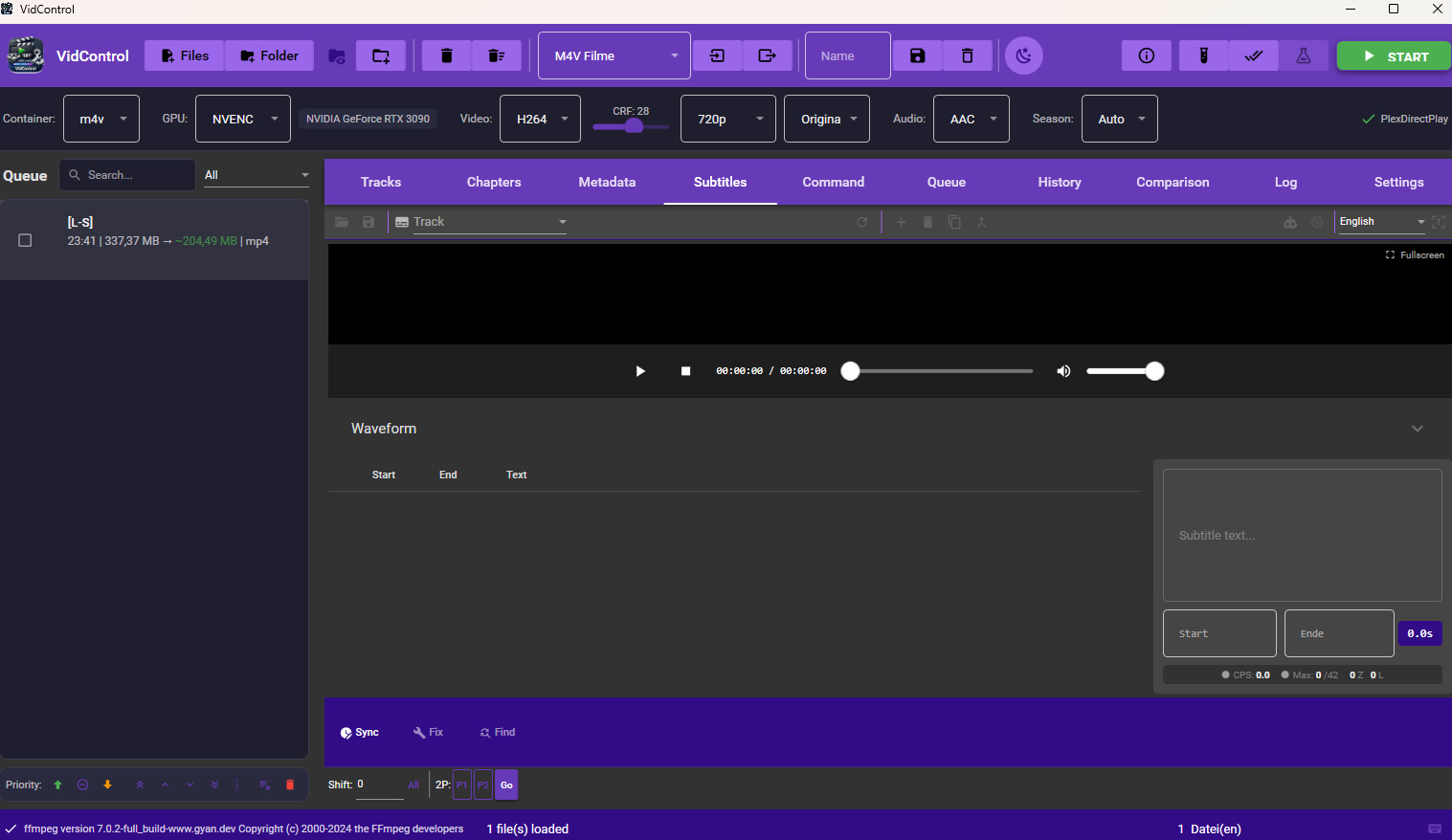
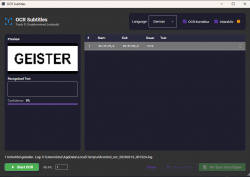
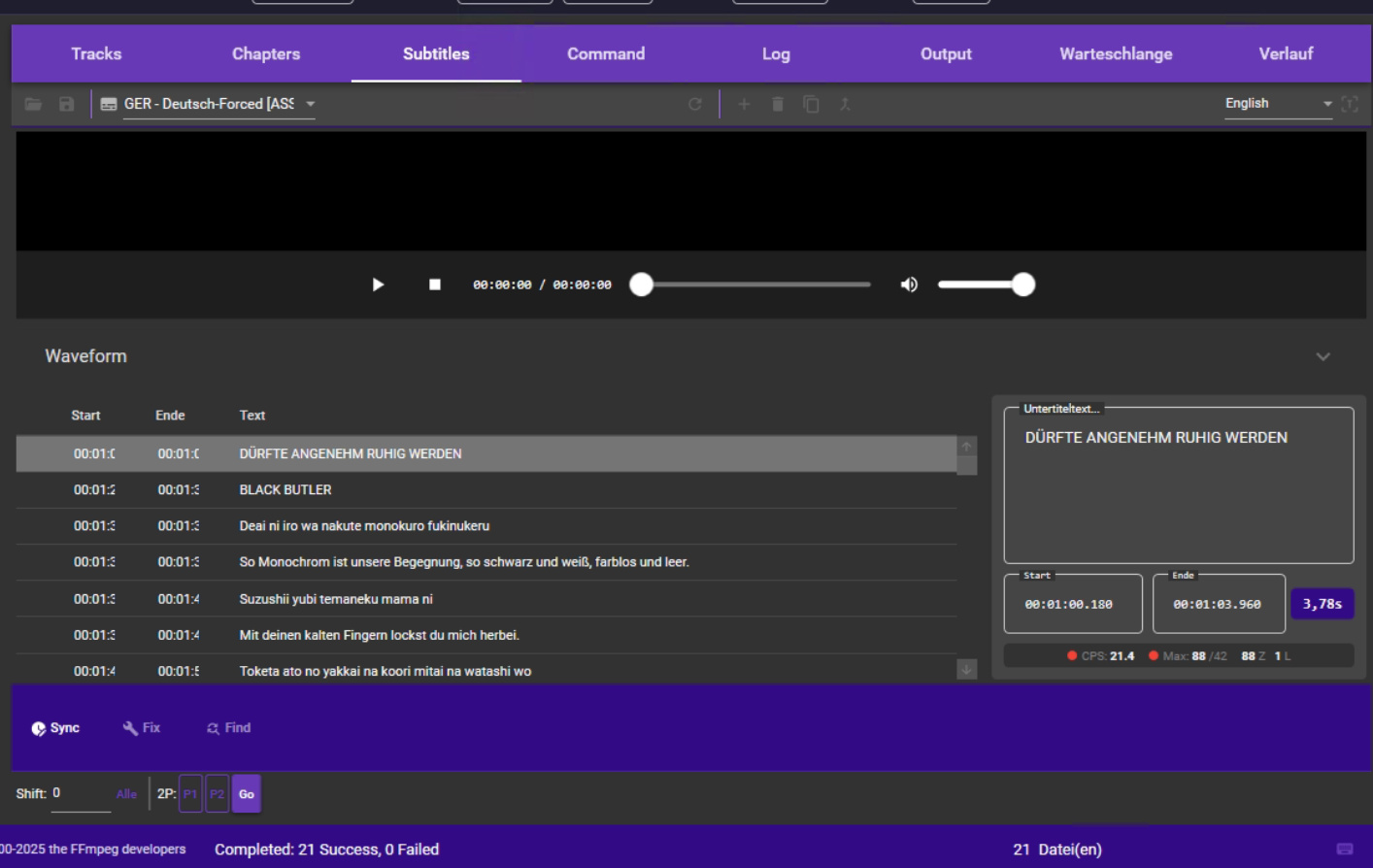
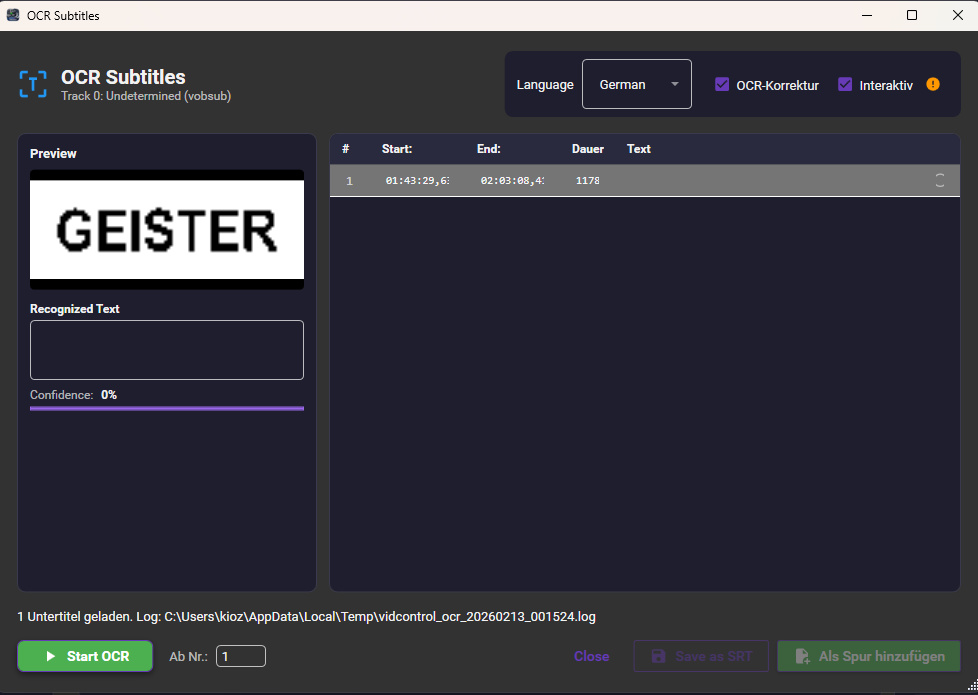
VidControl is a free all-in-one video converter. CPU Encoding, Hardware-accelerated encoding with NVIDIA NVENC, AMD AMF, and Intel QSV for maximum speed. Subtitle Editor, Built-in editor with OCR recognition (Tesseract), spell checking, and batch processing. Batch Queue, Queue multiple files and let them process automatically one after another. Encoding Presets, Predefined and custom presets for quick setup – from CRF values to audio settings. Crop Editor, Visual crop editor with preview and automatic black bar detection. Watch Folders, Folder monitoring: New files are automatically detected and added to the queue. Requires ffmpeg!
Freeware
OS:
File size: 70MB
Portable version
Old versions
Version history
OS:
File size: 70MB
Portable version
Old versions
Version history
Screenshots
Latest version
Download
Download VidControl 2.9.64 64-bit 71MB Win64
Portable 
Download old versions

Software License
Supported operating systems
Version history / Release notes / Changelog / What's New
v2.9.64
2026-08
Subtitles – Forced alignment (new): real per-word timings taken straight from the audio, computed locally (uses the GPU, falls back to CPU), for English, Chinese and Japanese — for clean karaoke and more accurate lyrics timing
Subtitles – SDH annotations (new): detects sounds like [Music]/[Applause]/[Laughter] in dialogue gaps and inserts them automatically as hearing-impaired cues
Subtitles – Style/design editor (new): a full editor with font, colours, outline/shadow, alignment and live preview; right-click a line “Edit design”
Subtitles – new tools: “Fix common errors” (single and batch), bilingual subtitles, Romaji/transliteration (CJK), name and colour speakers, karaoke timing
Editor – fine-tune timing from the keyboard: pick the start/end cell, then Shift/Ctrl/Alt + /
Preview – choose the audio track on videos with multiple audio tracks
Improved – unified OCR spell-check (corrections reliably land in the word lists), easier-to-grab editor splitters, lyrics intro offset auto-corrected
Fixed – subtitle overlay in video mode was stuck top-left and undraggable; various robustness in track rules, undo and background processing
2026-08
Subtitles – Forced alignment (new): real per-word timings taken straight from the audio, computed locally (uses the GPU, falls back to CPU), for English, Chinese and Japanese — for clean karaoke and more accurate lyrics timing
Subtitles – SDH annotations (new): detects sounds like [Music]/[Applause]/[Laughter] in dialogue gaps and inserts them automatically as hearing-impaired cues
Subtitles – Style/design editor (new): a full editor with font, colours, outline/shadow, alignment and live preview; right-click a line “Edit design”
Subtitles – new tools: “Fix common errors” (single and batch), bilingual subtitles, Romaji/transliteration (CJK), name and colour speakers, karaoke timing
Editor – fine-tune timing from the keyboard: pick the start/end cell, then Shift/Ctrl/Alt + /
Preview – choose the audio track on videos with multiple audio tracks
Improved – unified OCR spell-check (corrections reliably land in the word lists), easier-to-grab editor splitters, lyrics intro offset auto-corrected
Fixed – subtitle overlay in video mode was stuck top-left and undraggable; various robustness in track rules, undo and background processing
View full changelog
All features
Video Encoding
H.264, H.265 (HEVC), and AV1 support
GPU encoding: NVIDIA NVENC, AMD AMF, Intel QSV
CRF mode for constant quality
Audio: AAC, AC3, Opus – or passthrough
Multiple audio and subtitle tracks
Automatic GPU/hardware detection
Subtitles
VobSub & PGS image subtitle OCR (Tesseract)
Built-in SRT editor with waveform display
Hunspell spell checking (DE/EN)
Batch OCR for complete series
Custom name list for OCR correction
Native MKV parsing without external tools
Workflow
Drag & drop import
Batch queue with auto processing
Watch folders – automatic monitoring
Custom encoding presets
Smart output naming
Encoding history with statistics
H.264, H.265 (HEVC), and AV1 support
GPU encoding: NVIDIA NVENC, AMD AMF, Intel QSV
CRF mode for constant quality
Audio: AAC, AC3, Opus – or passthrough
Multiple audio and subtitle tracks
Automatic GPU/hardware detection
Subtitles
VobSub & PGS image subtitle OCR (Tesseract)
Built-in SRT editor with waveform display
Hunspell spell checking (DE/EN)
Batch OCR for complete series
Custom name list for OCR correction
Native MKV parsing without external tools
Workflow
Drag & drop import
Batch queue with auto processing
Watch folders – automatic monitoring
Custom encoding presets
Smart output naming
Encoding history with statistics
Sections/Browse similar tools
Guides and How to's
Notify me when software updated or report software
| 3 reviews, Showing 1 to 3 reviews |
Rating by banita on
May 28, 2026 Version: VidControl 2.9.13
OS: Windows 11 64-bit Ease of use: 6/10
Functionality: 5/10
Value for money: 8/10
Overall: 6/10
1. The English version is not fully translated from German
2. Some of the default settings e.g. OCR is by default German
3. I could find no way to adjust the output file location or name, at least it isn't intuitive.
Other than that an exciting GUI for ffmpeg.
Appreciate the OCR and Plex / File server compatibility
Nice looking, clean interface.
2. Some of the default settings e.g. OCR is by default German
3. I could find no way to adjust the output file location or name, at least it isn't intuitive.
Other than that an exciting GUI for ffmpeg.
Appreciate the OCR and Plex / File server compatibility
Nice looking, clean interface.
Review by blud7 on
May 28, 2026 Version: 2.9.13 (May 28, 2026)
OS: Windows 11 64-bit Ease of use: 7/10
Functionality: 10/10
Value for money: 10/10
Overall: 8/10
Very good soft,but sharpen filter dont working
Review by Rot on
Feb 18, 2026 Version: VidControl 2.5.0
OS: Windows 11 64-bit Ease of use: 8/10
Functionality: 9/10
Value for money: 8/10
Overall: 8/10
| 3 reviews, Showing 1 to 3 reviews |
| 1 tool hits, Showing 1 to 1 tools |
Explanation:
NEW SOFTWARE= New tool since your last visit
NEW VERSION= New version since your last visit
NEW REVIEW= New review since your last visit
NEW VERSION= New version
Latest version
Version number / Beta version number / Update version number and when it whas released.
Type and download
NO MORE UPDATES? = The software hasn't been updated in over 2 years.
NO LONGER DEVELOPED = The software hasn't been updated in over 5 years.
RECENTLY UPDATED = The software has been updated the last 31 days.
Freeware = Download Free software.
Freeware Trialware = Download Free software but some parts are trial/shareware.
Free software = Download Free software and also open source code also known as FOSS (Free and Open Source Software).
Free software Trialware = Download Free software and also open source code but some parts are trial/shareware.
Freeware Ads = Download Free software but supported by advertising, usually with a included browser toolbar. It may be disabled when installing or after installation.
Free software Ads = Free Download software and open source code but supported by advertising, usually with a included browser toolbar. It may be disabled when installing or after installation.
Trialware = Also called shareware or demo. Free Trial version available for download and testing with usually a time limit or limited functions.
Payware = No demo or trial available.
Portable version = A portable/standalone version is available. No installation is required.
v1.0.1 = Latest version available.
Download beta = It could be a Beta, RC(Release Candidate) or an Alpha / Nightly / Unstable version of the software.
Download 15MB = A direct link to the software download.
Win = Windows download version for 32-bit and 64-bit Windows.
Win64 = Windows 64-bit download version for 64-bit Windows.
WinARM64 = Windows 64-bit ARM download version for Windows ARM64/AArch64.
Mac = Mac download version for 64-bit Mac OS Intel/ARM64/AArch64.
MacARM64 = Mac Silicon download version for 64-bit Mac OS ARM64/AArch64.
Mac64 = Mac OS download version for 64-bit Intel Mac OS.
Linux = Linux download version.
Linux64 = Linux download version for 64bit Linux.
Linux ARM = Linux download version for Linux ARM64/AArch64.
Portable = Portable version. No installation is required.
Ad-Supported = The software is bundled with advertising. Be careful when you install the software and disable addons that you don't want!
Visit developers site = A link to the software developer site.
Download (mirror link) = A mirror link to the software download. It may not contain the latest versions.
Download old versions = Free downloads of previous versions of the program.
Download 64-bit version = If you have a 64bit operating system you can download this version.
Download portable version = Portable/Standalone version meaning that no installation is required, just extract the files to a folder and run directly.
Portable version available = Download the portable version and you can just extract the files and run the program without installation.
Old versions available = Download old versions of the program.
Version history available = Complete changelog on our site.
= Windows version available.
 = Mac OS version available.
 = Linux version available.
Our hosted software are virus and malware scanned with several antivirus programs using www.virustotal.com. (NOTE! Just one virustotal warning is 99.9% a false positive. And some software might receive 2-6 warnings but it's if they are not all same virus/trojan then it's 99% false positives.)
Rating
Rating from 0-10.
NEW SOFTWARE= New tool since your last visit
NEW VERSION= New version since your last visit
NEW REVIEW= New review since your last visit
NEW VERSION= New version
Latest version
Version number / Beta version number / Update version number and when it whas released.
Type and download
NO MORE UPDATES? = The software hasn't been updated in over 2 years.
NO LONGER DEVELOPED = The software hasn't been updated in over 5 years.
RECENTLY UPDATED = The software has been updated the last 31 days.
Freeware = Download Free software.
Freeware Trialware = Download Free software but some parts are trial/shareware.
Free software = Download Free software and also open source code also known as FOSS (Free and Open Source Software).
Free software Trialware = Download Free software and also open source code but some parts are trial/shareware.
Freeware Ads = Download Free software but supported by advertising, usually with a included browser toolbar. It may be disabled when installing or after installation.
Free software Ads = Free Download software and open source code but supported by advertising, usually with a included browser toolbar. It may be disabled when installing or after installation.
Trialware = Also called shareware or demo. Free Trial version available for download and testing with usually a time limit or limited functions.
Payware = No demo or trial available.
Portable version = A portable/standalone version is available. No installation is required.
v1.0.1 = Latest version available.
Download beta = It could be a Beta, RC(Release Candidate) or an Alpha / Nightly / Unstable version of the software.
Download 15MB = A direct link to the software download.
Win = Windows download version for 32-bit and 64-bit Windows.
Win64 = Windows 64-bit download version for 64-bit Windows.
WinARM64 = Windows 64-bit ARM download version for Windows ARM64/AArch64.
Mac = Mac download version for 64-bit Mac OS Intel/ARM64/AArch64.
MacARM64 = Mac Silicon download version for 64-bit Mac OS ARM64/AArch64.
Mac64 = Mac OS download version for 64-bit Intel Mac OS.
Linux = Linux download version.
Linux64 = Linux download version for 64bit Linux.
Linux ARM = Linux download version for Linux ARM64/AArch64.
Portable = Portable version. No installation is required.
Ad-Supported = The software is bundled with advertising. Be careful when you install the software and disable addons that you don't want!
Visit developers site = A link to the software developer site.
Download (mirror link) = A mirror link to the software download. It may not contain the latest versions.
Download old versions = Free downloads of previous versions of the program.
Download 64-bit version = If you have a 64bit operating system you can download this version.
Download portable version = Portable/Standalone version meaning that no installation is required, just extract the files to a folder and run directly.
Portable version available = Download the portable version and you can just extract the files and run the program without installation.
Old versions available = Download old versions of the program.
Version history available = Complete changelog on our site.
= Windows version available. = Mac OS version available. = Linux version available.Our hosted software are virus and malware scanned with several antivirus programs using www.virustotal.com. (NOTE! Just one virustotal warning is 99.9% a false positive. And some software might receive 2-6 warnings but it's if they are not all same virus/trojan then it's 99% false positives.)
Rating
Rating from 0-10.
Browse software by sections
All In One Blu-ray Converters (9)
All In One DVD Converters (12)
All In One MKV to MP4, Blu-ray, UHD (11)
All In One Video Converters (19)
Animation (3D, 2D Animation) (12)
Audio Editors (22)
Audio Encoders (80)
Audio Players (19)
Authoring (Blu-ray, UHD, AVCHD) (13)
Authoring (DivX) (4)
Authoring (DVD) (26)
Authoring (SVCD, VCD) (9)
Bitrate Calculators (7)
Blu-ray to AVI, MKV, MP4 (15)
Blu-ray to Blu-ray, AVCHD (10)
Burn (CD,DVD,Blu-ray) (24)
Camcorders, DV, HDV, AVCHD (31)
Capture TV, DVD, VCR (30)
CD, DVD, Blu-ray recovery (3)
Codec Packs (6)
All In One DVD Converters (12)
All In One MKV to MP4, Blu-ray, UHD (11)
All In One Video Converters (19)
Animation (3D, 2D Animation) (12)
Audio Editors (22)
Audio Encoders (80)
Audio Players (19)
Authoring (Blu-ray, UHD, AVCHD) (13)
Authoring (DivX) (4)
Authoring (DVD) (26)
Authoring (SVCD, VCD) (9)
Bitrate Calculators (7)
Blu-ray to AVI, MKV, MP4 (15)
Blu-ray to Blu-ray, AVCHD (10)
Burn (CD,DVD,Blu-ray) (24)
Camcorders, DV, HDV, AVCHD (31)
Capture TV, DVD, VCR (30)
CD, DVD, Blu-ray recovery (3)
Codec Packs (6)
Codec, Video Identifiers (31)
Codecs (67)
Decrypters (DVD Rippers) (16)
Decrypters (UHD, Blu-ray Rippers) (8)
DigitalTV, DVB, IPTV (39)
DVD to DVD (20)
DVD to MP4, MKV, H264, H265 (16)
DVD to VCD, SVCD (5)
DVD to XviD, AVI, DivX (16)
ISO, Image (15)
Linux Video Tools (213)
MacOS Video Tools (244)
Media (Blu-ray, DVD, CD) (9)
Media Center, HTPC (24)
Other Useful Tools (140)
Photo Blu-ray, DVD, SlideShow (8)
Portable (Mobile, PSP) (35)
Region Free Tools (5)
Screen capture , Screen recording (26)
Screenshots , Thumbnails (13)
Codecs (67)
Decrypters (DVD Rippers) (16)
Decrypters (UHD, Blu-ray Rippers) (8)
DigitalTV, DVB, IPTV (39)
DVD to DVD (20)
DVD to MP4, MKV, H264, H265 (16)
DVD to VCD, SVCD (5)
DVD to XviD, AVI, DivX (16)
ISO, Image (15)
Linux Video Tools (213)
MacOS Video Tools (244)
Media (Blu-ray, DVD, CD) (9)
Media Center, HTPC (24)
Other Useful Tools (140)
Photo Blu-ray, DVD, SlideShow (8)
Portable (Mobile, PSP) (35)
Region Free Tools (5)
Screen capture , Screen recording (26)
Screenshots , Thumbnails (13)
Subtitle Editors, Converters (72)
Tag Editors (4)
Video De, Multiplexers (66)
Video Editors (Advanced, NLE) (35)
Video Editors (Basic) (56)
Video Editors (H264, MP4, MKV, MTS) (19)
Video Editors (Lossless) (4)
Video Editors (MPG, DVD) (16)
Video Editors (WMV, AVI) (15)
Video Encoders (AV1, VP8, VP9) (2)
Video Encoders (AVI, WMV) (38)
Video Encoders (H264, H265, MP4, MKV) (45)
Video Encoders (MPG, DVD) (23)
Video Encoders , Converters (155)
Video Frameservers (9)
Video Players (48)
Video Repair, Fix (24)
Video Scripting (10)
Video Streaming (20)
Video Streaming Downloaders (100)
Tag Editors (4)
Video De, Multiplexers (66)
Video Editors (Advanced, NLE) (35)
Video Editors (Basic) (56)
Video Editors (H264, MP4, MKV, MTS) (19)
Video Editors (Lossless) (4)
Video Editors (MPG, DVD) (16)
Video Editors (WMV, AVI) (15)
Video Encoders (AV1, VP8, VP9) (2)
Video Encoders (AVI, WMV) (38)
Video Encoders (H264, H265, MP4, MKV) (45)
Video Encoders (MPG, DVD) (23)
Video Encoders , Converters (155)
Video Frameservers (9)
Video Players (48)
Video Repair, Fix (24)
Video Scripting (10)
Video Streaming (20)
Video Streaming Downloaders (100)