
Help us keep the list up to date and submit new video software here.
Tool
Description
Type
Rating
Reviews
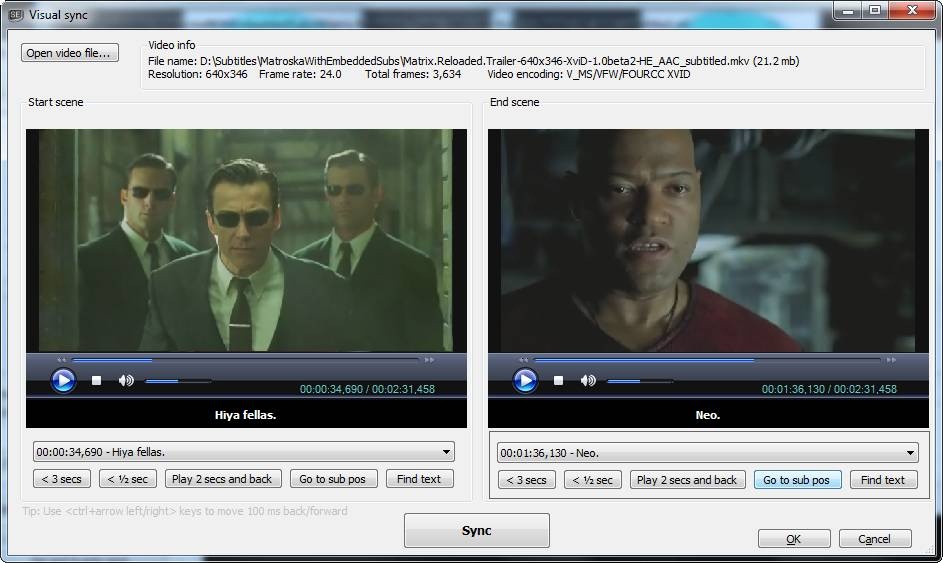
Subtitle Edit is a free editor for video subtitles - a subtitle editor. With SE you can easily adjust a subtitle if it is out of sync with the video and much more. Visually sync/adjust a subtitle (start/end position and speed). Import Blu-ray SUP titles or VobSub sub/idx binary subtitles and OCR to text srt subtitles. SUP to SRT, SUB to SRT. DVD to SRT. Requires Microsoft .NET Framework Version 10 or later.
Free software
OS:


File size: 56MB
Beta version
Portable version
Old versions
Version history
Alternative software
OS:
File size: 56MB
Beta version
Portable version
Old versions
Version history
Alternative software
Screenshots
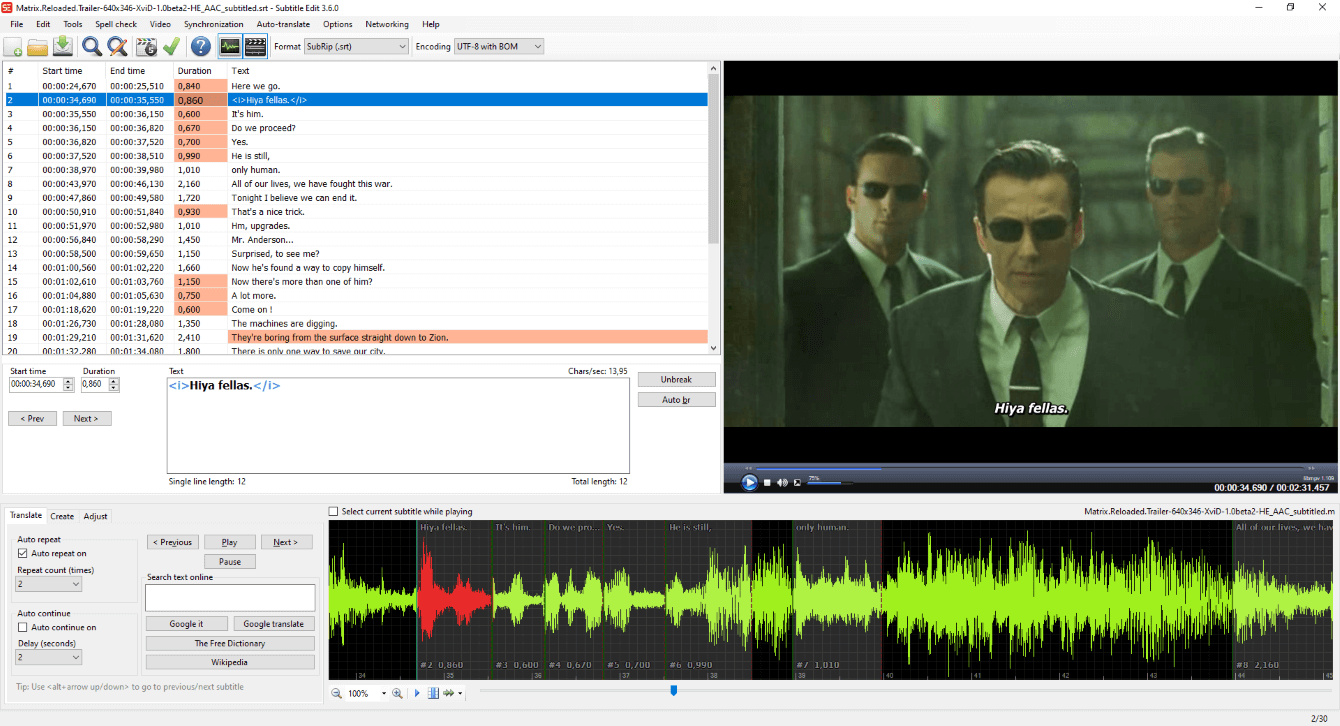
Latest version
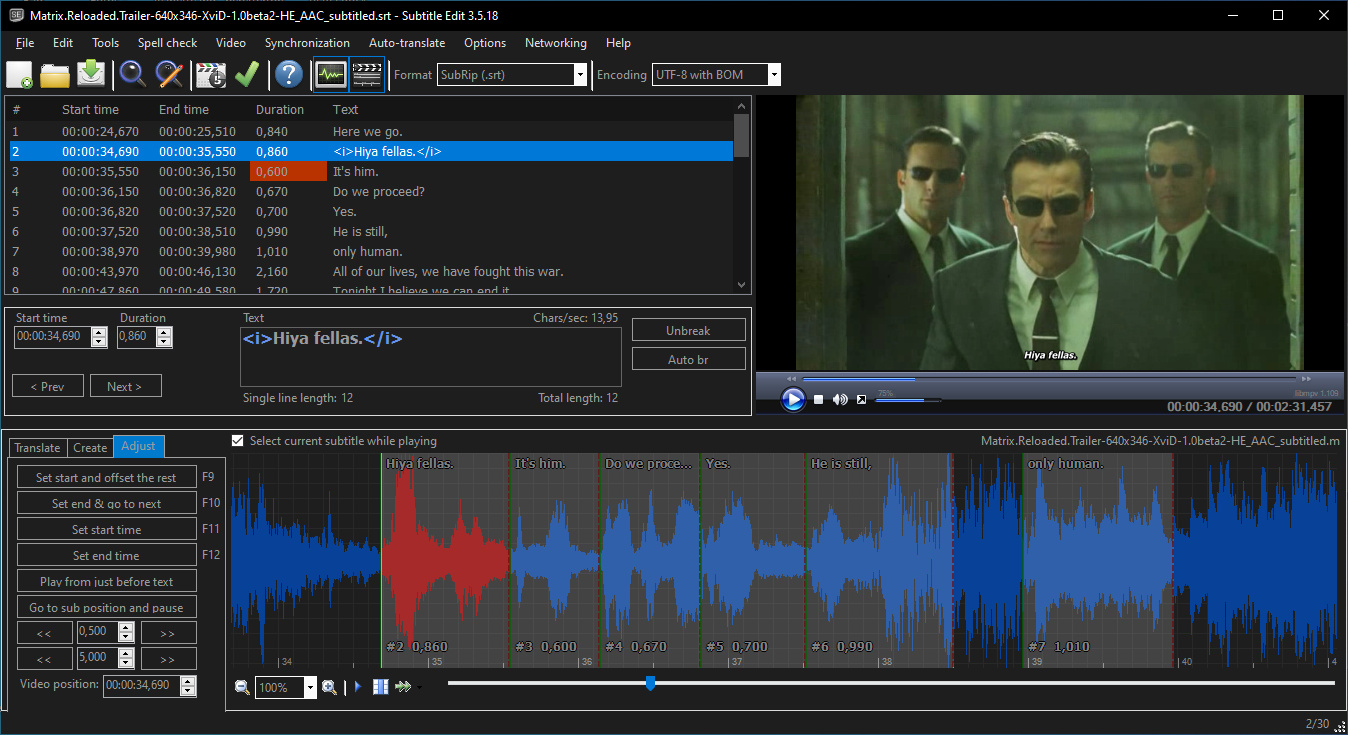
Download
Download Subtitle Edit 5.3.0 Windows 64-bit 57MB Win64
Download Subtitle Edit 5.3.0 Mac Silicon ARM 64-bit 129MB MacARM64
Download Subtitle Edit 5.3.0 Mac Intel 64-bit 148MB Mac64
Download Subtitle Edit 5.3.0 Linux 64-bit 129MB Linux64
Flatpak Download Beta, Portable and other versions
Portable 
Download Subtitle Edit 5.3.0 Portable Windows ARM 64-bit 57MB WinARM64
Portable Download Subtitle Edit 5.3.0 Linux ARM 56MB Linux ARM64
Download Subtitle Edit 5.4.0 Beta 5 Windows 64-bit 56MB Win64
Download Subtitle Edit 5.4.0 Beta 5 Portable Windows 64-bit 56MB Win64
Portable Download Subtitle Edit 5.4.0 Beta 5 Mac Silicon ARM 56MB MacARM64
Download Subtitle Edit 5.4.0 Beta 5 Mac 56MB Mac
Download Subtitle Edit 5.4.0 Beta 5 Linux 56MB Linux
FlatpakDownload Subtitle Edit 4.0.16 Windows
Download Subtitle Edit 4.0.16 Windows portable
Download old versions

Software License
Supported operating systems
Mac OS Linux Version history / Release notes / Changelog / What's New
v5.4.0-beta5 (22nd of October 2026)
* Add Video OCR: scan only chosen time ranges - thx kadrimarzouki
* Add Auto-translate: "Translate rows" context menu item for multiple selected rows
* Add Settings: Windows window rendering mode (fixes desktop background bleeding through) - thx 114562175
* Add ASSA draw: "Animated clip art" section in Shapes
* Add Pastel and Nord themes: own icon sets
* UI font size is now set in px, and dialog text follows it - thx GrampaWildWilly
* Full screen video: controls fade in over the video, bigger, also on native players - thx benshgit
* Set position: frame taken from the paused player, faster ffmpeg fallback - thx 114562175
* Forced aligner: show why the engine failed, stop early on repeated crashes
* Multiple replace: Enter in filter and empty type-in row, regex whole word
* Language auto-detect: Persian with Arabic ye/kaf, Russian with hard sign
* Text to speech: audio.cpp model downloads pinned to a fixed revision - thx ProjectKTC
* Fix VibeVoice (CrispASR) Q8_0/Q4_K model integrity check failure - thx mh82
* Fix rule profile applied at startup without being chosen
* Fix failed reload of a file changed outside SE letting the next save overwrite it
* Fix column paste ignoring the video offset from copy
* Fix Set position click-to-place snapping to top-left or undoing other edits
* Fix SubRip reader regressions and ITT header timing round trip
* Fix OCR fix removing space before French closing quote
* Fix main window fields not following a UI font size change
* Fix Settings category navigation scroll alignment - thx pdjdev
* Update Italian translation - thx bovirus
* Update Japanese translation - thx hisui3393
* Update Korean translation - thx 12si27
* Update Polish translation - thx potplayer-fanpack
v5.4.0-beta4 (21st of October 2026)
* Add Midnight Cinema and Sakura themes, theme background art for video/waveform, Cycle theme shortcut
* Add Syntax coloring: color the gap when it falls inside a user-defined range (ms or frames)
* Add Set position: SE4-style click-to-place mode, toggle to hide selection box, remember window size - thx 114562175
* Add Video player: optional playback speed button - thx benshgit
* Add Spell check: remove words from the dictionary (Word lists "Removed from dictionary") - thx fraternl
* Add setting: split at video and text box position keeps text at caret end - thx kadrimarzouki
* Copy from the grid includes the video offset, pasting SE's own copy removes it again
* One 13 px text size for all windows, main window in the editor look - thx GrampaWildWilly
* SubRip reader rewritten: tolerant of damaged files, 2.6-12x faster
* Set position: opens at once, frame rendered in the background, arrow keys nudge right away
* Batch convert: change frame rate saves at the target frame rate - thx michi987654
* ITT: source header timing parameters follow the current frame rate - thx michi987654
* OCR replace lists: fix rules that damage correct text (10 languages), Dutch GLM-OCR word errors - thx fraternl
* OCR fix: keep Dutch "Eén" - thx fraternl
* Text to speech: context line on its own row, long video names trimmed
* Performance: name casing, speech to text names, teletext, OCR splitter
* Fix crashes and hangs found by fuzzing subtitle format parsers
* Update Hungarian translation
* Update Italian translation - thx bovirus
* Update Japanese translation - thx hisui3393
* Update Polish translation - thx potplayer-fanpack
v5.4.0-beta3 (20th of October 2026)
* Add Settings: visual theme picker with preview cards
* Add Nord theme
* Add iTunes Timed Text: export presets, template-file header source and default color in File > Properties - thx michi987654
* Add Speech to text: Danish fine-tuned Qwen3 ASR 0.6B model
* Add ASSA/SSA styles: category picker back, font name + color sample columns, resizable lists - thx bichitoxxx
* Multiple replace: category list + flat rules list with a type-in row, like SE4 - thx kadrimarzouki
* Editor look now follows the Font scale (%) setting - thx bichitoxxx
* Language auto-detect: everyday words for 30 languages, letter rules for Cyrillic (incl. Macedonian/Serbian), Baltic, Afrikaans/Dutch and Arabic script
* Qwen3 ASR: update qwen3-asr.cpp to v0.1.10 (mel filterbank fix, beam search), pass the selected language
* OCR fix engine: image-matcher I/l and spacing repairs, lone slash kept - thx fraternl
* More windows use the shared editor look helpers (button bars, check-box cells, video dialog switches) - thx ivandrofly
* Fix Qwen3 ASR "<asr_text>" marker in output with older engine builds
* Fix compact numeric field borders in the editor look - thx pdjdev
* Add Romanian translation - thx cosstell62-hash
* Update Italian translation - thx bovirus
* Update Japanese translation - thx hisui3393
v5.4.0-beta2 (19th of October 2026)
* Add Multiple replace: "Add rules" window for typing a list of find/replace pairs, toolbar "New rule" button, F2 and Cmd shortcuts - thx kadrimarzouki
* Add setting for what to do when the subtitle file is changed by another program: reload if nothing is unsaved, always ask, or do nothing - thx kadrimarzouki
* Add ask before saving over a subtitle file changed outside Subtitle Edit - thx kadrimarzouki
* Add waveform toolbar item "Rule profile" (hidden by default, enable in Configure toolbar items) - thx torvchen
* Add "Ignore custom tags (regex)" rule setting for character counts and CPS - thx chip00-dot
* Add Speech to text: custom GGUF models for Qwen3 ASR CPP with header validation - thx ScienceZone
* Add Text box: record speech to text box button via microphone (off by default, Options > Appearance)
* Add Remux video: caption time offset for broadcast .scc/.mcc files (suggested from the first time code) - thx MaxBunny1786
* Add Check for updates: settings gear for startup check and release channel - thx ivandrofly
* Add Batch convert: search box for the functions, shorter rows, presets below the list
* Add Batch convert: resizable splitter between file list and functions - thx ivandrofly
* Add nOCR: more Latin.nocr glyphs (Avatar periods/commas, em dash, short-tailed Q, touching pairs)
* Editor look palette now follows the theme, dark background color and system accent - thx pdjdev
* Editor look for the message box and the transcription progress window; more minor UI fixes (download title, burn-in effect switches, disabled text boxes, OCR database, move captions)
* Prevent sleep during the remaining long video jobs (generate/re-encode/cut/remux video, embedded subtitles, transparent subtitles, shot changes, video OCR, sync audio, background music) - thx ArcherLegend
* Batch convert/seconv: skip "Fix right-to-left" on subtitles without right-to-left text
* MCC/SMPTE 291M: parse CDP packets with an optional time code section - thx MaxBunny1786
* nOCR: challenge a loose upright match with the straightened glyph, split touching italic letters, match baseline marks by baseline, italic word spacing, dashes beside quotes, false spaces inside numbers, lost spaces after overhanging f/r/t - thx fraternl, Codling
* OCR fix engine: slash as italic i/I/l, "#" between letters as apostrophe, closing tag slash, sans-serif capital I ("lk" -> "Ik"), wide-set ellipsis ". . ." - thx fraternl
* Auto-wrap while typing: leave pre-existing long lines alone - thx kadrimarzouki
* Export plain text: label merge option "Merge all lines" like SE4 - thx vivadavid
* Update audio.cpp runtime to v0.9.2-drama3 (2026-10-19)
* Fix waveform click inside a subtitle shifting its timing - thx 114562175, ChristosBouronikos
* Fix "Select current subtitle while playing" lost after a settings import - thx kadrimarzouki
* Fix imported layout sizes and waveform zoom lost after a settings import - thx kadrimarzouki
* Fix live spell check underlining the original text column in translation mode - thx kadrimarzouki
* Fix nOCR 2x2 "character" prompted for the foot cut off "a", "R", "x" - thx Codling
* Fix nOCR "Number of pixels is space" combo not showing the selected value - thx Codling
* Fix DashScope OSS multipart uploads for Qwen3-ASR - thx Gh-Shinku
* Update Japanese translation - thx hisui3393
* Update Korean translation - thx 12si27
v5.4.0-beta1 (18th of October 2026)
* Add "Sync subtitle to audio" (Video > More): ffsubsync-style offset and frame rate detection
* Add "Sync audio track" (Video > More): shift one audio track with live preview
* Add export of D-Cinema SMPTE 2014 as MXF track file (SMPTE ST 429-5), text and image subtitles, also in seconv
* Add "Export Excel dialogue list" (.xlsx) with chosen columns
* Add Remux video: CEA-608/708 as SEI captions in .mp4 - thx MaxBunny1786
* Add "Check for updates": install and restart (Windows installer, Linux tarball, macOS)
* Add Voxtral TTS (audio.cpp) engine, audio.cpp runtime 2026-10-16 (v0.9.2)
* Add "Custom error rules": regex rules that color lines as errors - thx JohnLawes
* Add "Auto-wrap while typing" setting (Options > General) - thx kadrimarzouki
* Add "Apply advanced effect": CapCut-style gallery and six new caption effects
* Add Batch convert: plain text options - thx vivadavid
* Add Batch convert: run batch-capable plugins
* Add "Open from URL": cookies from browser and bot-check hint - thx aresstokrat
* Add video player: optional previous/next subtitle and toggle subtitles buttons - thx benshgit
* Add llama.cpp OCR models QARI-OCR 0.2.2.1 (Arabic), LightOnOCR-3 4B and 0.8B; thin border instead of square for HunyuanOCR and QARI - thx fraternl
* Add shortcuts "split line at video position / text box cursor / both, go to second part and play" - thx LeonCheung
* Add shortcuts to move selected/following/all lines one frame back/forward - thx Kimsihong
* Add shortcut "move text before cursor position to previous subtitle" - thx LeonCheung
* Add shortcuts to copy plain text (text and original)
* Add "Has errors" rule to Modify selection - thx fointypinger
*...
* Add Video OCR: scan only chosen time ranges - thx kadrimarzouki
* Add Auto-translate: "Translate rows" context menu item for multiple selected rows
* Add Settings: Windows window rendering mode (fixes desktop background bleeding through) - thx 114562175
* Add ASSA draw: "Animated clip art" section in Shapes
* Add Pastel and Nord themes: own icon sets
* UI font size is now set in px, and dialog text follows it - thx GrampaWildWilly
* Full screen video: controls fade in over the video, bigger, also on native players - thx benshgit
* Set position: frame taken from the paused player, faster ffmpeg fallback - thx 114562175
* Forced aligner: show why the engine failed, stop early on repeated crashes
* Multiple replace: Enter in filter and empty type-in row, regex whole word
* Language auto-detect: Persian with Arabic ye/kaf, Russian with hard sign
* Text to speech: audio.cpp model downloads pinned to a fixed revision - thx ProjectKTC
* Fix VibeVoice (CrispASR) Q8_0/Q4_K model integrity check failure - thx mh82
* Fix rule profile applied at startup without being chosen
* Fix failed reload of a file changed outside SE letting the next save overwrite it
* Fix column paste ignoring the video offset from copy
* Fix Set position click-to-place snapping to top-left or undoing other edits
* Fix SubRip reader regressions and ITT header timing round trip
* Fix OCR fix removing space before French closing quote
* Fix main window fields not following a UI font size change
* Fix Settings category navigation scroll alignment - thx pdjdev
* Update Italian translation - thx bovirus
* Update Japanese translation - thx hisui3393
* Update Korean translation - thx 12si27
* Update Polish translation - thx potplayer-fanpack
v5.4.0-beta4 (21st of October 2026)
* Add Midnight Cinema and Sakura themes, theme background art for video/waveform, Cycle theme shortcut
* Add Syntax coloring: color the gap when it falls inside a user-defined range (ms or frames)
* Add Set position: SE4-style click-to-place mode, toggle to hide selection box, remember window size - thx 114562175
* Add Video player: optional playback speed button - thx benshgit
* Add Spell check: remove words from the dictionary (Word lists "Removed from dictionary") - thx fraternl
* Add setting: split at video and text box position keeps text at caret end - thx kadrimarzouki
* Copy from the grid includes the video offset, pasting SE's own copy removes it again
* One 13 px text size for all windows, main window in the editor look - thx GrampaWildWilly
* SubRip reader rewritten: tolerant of damaged files, 2.6-12x faster
* Set position: opens at once, frame rendered in the background, arrow keys nudge right away
* Batch convert: change frame rate saves at the target frame rate - thx michi987654
* ITT: source header timing parameters follow the current frame rate - thx michi987654
* OCR replace lists: fix rules that damage correct text (10 languages), Dutch GLM-OCR word errors - thx fraternl
* OCR fix: keep Dutch "Eén" - thx fraternl
* Text to speech: context line on its own row, long video names trimmed
* Performance: name casing, speech to text names, teletext, OCR splitter
* Fix crashes and hangs found by fuzzing subtitle format parsers
* Update Hungarian translation
* Update Italian translation - thx bovirus
* Update Japanese translation - thx hisui3393
* Update Polish translation - thx potplayer-fanpack
v5.4.0-beta3 (20th of October 2026)
* Add Settings: visual theme picker with preview cards
* Add Nord theme
* Add iTunes Timed Text: export presets, template-file header source and default color in File > Properties - thx michi987654
* Add Speech to text: Danish fine-tuned Qwen3 ASR 0.6B model
* Add ASSA/SSA styles: category picker back, font name + color sample columns, resizable lists - thx bichitoxxx
* Multiple replace: category list + flat rules list with a type-in row, like SE4 - thx kadrimarzouki
* Editor look now follows the Font scale (%) setting - thx bichitoxxx
* Language auto-detect: everyday words for 30 languages, letter rules for Cyrillic (incl. Macedonian/Serbian), Baltic, Afrikaans/Dutch and Arabic script
* Qwen3 ASR: update qwen3-asr.cpp to v0.1.10 (mel filterbank fix, beam search), pass the selected language
* OCR fix engine: image-matcher I/l and spacing repairs, lone slash kept - thx fraternl
* More windows use the shared editor look helpers (button bars, check-box cells, video dialog switches) - thx ivandrofly
* Fix Qwen3 ASR "<asr_text>" marker in output with older engine builds
* Fix compact numeric field borders in the editor look - thx pdjdev
* Add Romanian translation - thx cosstell62-hash
* Update Italian translation - thx bovirus
* Update Japanese translation - thx hisui3393
v5.4.0-beta2 (19th of October 2026)
* Add Multiple replace: "Add rules" window for typing a list of find/replace pairs, toolbar "New rule" button, F2 and Cmd shortcuts - thx kadrimarzouki
* Add setting for what to do when the subtitle file is changed by another program: reload if nothing is unsaved, always ask, or do nothing - thx kadrimarzouki
* Add ask before saving over a subtitle file changed outside Subtitle Edit - thx kadrimarzouki
* Add waveform toolbar item "Rule profile" (hidden by default, enable in Configure toolbar items) - thx torvchen
* Add "Ignore custom tags (regex)" rule setting for character counts and CPS - thx chip00-dot
* Add Speech to text: custom GGUF models for Qwen3 ASR CPP with header validation - thx ScienceZone
* Add Text box: record speech to text box button via microphone (off by default, Options > Appearance)
* Add Remux video: caption time offset for broadcast .scc/.mcc files (suggested from the first time code) - thx MaxBunny1786
* Add Check for updates: settings gear for startup check and release channel - thx ivandrofly
* Add Batch convert: search box for the functions, shorter rows, presets below the list
* Add Batch convert: resizable splitter between file list and functions - thx ivandrofly
* Add nOCR: more Latin.nocr glyphs (Avatar periods/commas, em dash, short-tailed Q, touching pairs)
* Editor look palette now follows the theme, dark background color and system accent - thx pdjdev
* Editor look for the message box and the transcription progress window; more minor UI fixes (download title, burn-in effect switches, disabled text boxes, OCR database, move captions)
* Prevent sleep during the remaining long video jobs (generate/re-encode/cut/remux video, embedded subtitles, transparent subtitles, shot changes, video OCR, sync audio, background music) - thx ArcherLegend
* Batch convert/seconv: skip "Fix right-to-left" on subtitles without right-to-left text
* MCC/SMPTE 291M: parse CDP packets with an optional time code section - thx MaxBunny1786
* nOCR: challenge a loose upright match with the straightened glyph, split touching italic letters, match baseline marks by baseline, italic word spacing, dashes beside quotes, false spaces inside numbers, lost spaces after overhanging f/r/t - thx fraternl, Codling
* OCR fix engine: slash as italic i/I/l, "#" between letters as apostrophe, closing tag slash, sans-serif capital I ("lk" -> "Ik"), wide-set ellipsis ". . ." - thx fraternl
* Auto-wrap while typing: leave pre-existing long lines alone - thx kadrimarzouki
* Export plain text: label merge option "Merge all lines" like SE4 - thx vivadavid
* Update audio.cpp runtime to v0.9.2-drama3 (2026-10-19)
* Fix waveform click inside a subtitle shifting its timing - thx 114562175, ChristosBouronikos
* Fix "Select current subtitle while playing" lost after a settings import - thx kadrimarzouki
* Fix imported layout sizes and waveform zoom lost after a settings import - thx kadrimarzouki
* Fix live spell check underlining the original text column in translation mode - thx kadrimarzouki
* Fix nOCR 2x2 "character" prompted for the foot cut off "a", "R", "x" - thx Codling
* Fix nOCR "Number of pixels is space" combo not showing the selected value - thx Codling
* Fix DashScope OSS multipart uploads for Qwen3-ASR - thx Gh-Shinku
* Update Japanese translation - thx hisui3393
* Update Korean translation - thx 12si27
v5.4.0-beta1 (18th of October 2026)
* Add "Sync subtitle to audio" (Video > More): ffsubsync-style offset and frame rate detection
* Add "Sync audio track" (Video > More): shift one audio track with live preview
* Add export of D-Cinema SMPTE 2014 as MXF track file (SMPTE ST 429-5), text and image subtitles, also in seconv
* Add "Export Excel dialogue list" (.xlsx) with chosen columns
* Add Remux video: CEA-608/708 as SEI captions in .mp4 - thx MaxBunny1786
* Add "Check for updates": install and restart (Windows installer, Linux tarball, macOS)
* Add Voxtral TTS (audio.cpp) engine, audio.cpp runtime 2026-10-16 (v0.9.2)
* Add "Custom error rules": regex rules that color lines as errors - thx JohnLawes
* Add "Auto-wrap while typing" setting (Options > General) - thx kadrimarzouki
* Add "Apply advanced effect": CapCut-style gallery and six new caption effects
* Add Batch convert: plain text options - thx vivadavid
* Add Batch convert: run batch-capable plugins
* Add "Open from URL": cookies from browser and bot-check hint - thx aresstokrat
* Add video player: optional previous/next subtitle and toggle subtitles buttons - thx benshgit
* Add llama.cpp OCR models QARI-OCR 0.2.2.1 (Arabic), LightOnOCR-3 4B and 0.8B; thin border instead of square for HunyuanOCR and QARI - thx fraternl
* Add shortcuts "split line at video position / text box cursor / both, go to second part and play" - thx LeonCheung
* Add shortcuts to move selected/following/all lines one frame back/forward - thx Kimsihong
* Add shortcut "move text before cursor position to previous subtitle" - thx LeonCheung
* Add shortcuts to copy plain text (text and original)
* Add "Has errors" rule to Modify selection - thx fointypinger
*...
View full changelog
All features
Create/adjust/sync/translate subtitle lines
Convert between SubRib, MicroDVD, Advanced Sub Station Alpha, Sub Station Alpha, D-Cinema, SAMI, you-tube sbv, and many more (300+ different formats!)
Cool audio visualizer control - can display wave form and/or spectrogram
Video player uses mpv, DirectShow, or VLC media player
Visually sync/adjust a subtitle (start/end position and speed)
Audio to text (speech recognition) via Whisper or Vosk/Kaldi
Auto Translation via Google translate
Rip subtitles from a (decrypted) dvd
Import and OCR VobSub sub/idx binary subtitles
Import and OCR Blu-ray .sup files - bd sup reading is based on Java code from BDSup2Sub by 0xdeadbeef)
Can open subtitles embedded inside Matroska files
Can open subtitles (text, closed captions, VobSub) embedded inside mp4/mv4 files
Can open/OCR XSub subtitles embedded inside divx/avi files
Can open/OCR DVB and teletext subtitles embedded inside .ts/.m2ts (Transport Stream) files
Can open/OCR Blu-ray subtitles embedded inside .m2ts (Transport Stream) files
Can read and write both UTF-8 and other unicode files and ANSI (support for all languages/encodings on the pc!)
Sync: Show texts earlier/later + point synchronization + synchronization via other subtitle
Merge/split subtitles
Adjust display time
Fix common errors wizard
Spell checking via Libre Office dictionaries (many dictionaries available)
Remove text for hear impaired (HI)
Renumbering
Effects: Typewriter and karaoke
History/undo manager (Undo=Ctrl+z, Redo=Ctrl+y)
Compare subtitles
Multiple search and replace
Change casing using names dictionary
Merge short lines/split long lines
Export to PNG images (+bdn xml), Adobe Encore FAB image script, VobSub, Blu-ray sup, EBU stl, PAC, and plain text
Convert between SubRib, MicroDVD, Advanced Sub Station Alpha, Sub Station Alpha, D-Cinema, SAMI, you-tube sbv, and many more (300+ different formats!)
Cool audio visualizer control - can display wave form and/or spectrogram
Video player uses mpv, DirectShow, or VLC media player
Visually sync/adjust a subtitle (start/end position and speed)
Audio to text (speech recognition) via Whisper or Vosk/Kaldi
Auto Translation via Google translate
Rip subtitles from a (decrypted) dvd
Import and OCR VobSub sub/idx binary subtitles
Import and OCR Blu-ray .sup files - bd sup reading is based on Java code from BDSup2Sub by 0xdeadbeef)
Can open subtitles embedded inside Matroska files
Can open subtitles (text, closed captions, VobSub) embedded inside mp4/mv4 files
Can open/OCR XSub subtitles embedded inside divx/avi files
Can open/OCR DVB and teletext subtitles embedded inside .ts/.m2ts (Transport Stream) files
Can open/OCR Blu-ray subtitles embedded inside .m2ts (Transport Stream) files
Can read and write both UTF-8 and other unicode files and ANSI (support for all languages/encodings on the pc!)
Sync: Show texts earlier/later + point synchronization + synchronization via other subtitle
Merge/split subtitles
Adjust display time
Fix common errors wizard
Spell checking via Libre Office dictionaries (many dictionaries available)
Remove text for hear impaired (HI)
Renumbering
Effects: Typewriter and karaoke
History/undo manager (Undo=Ctrl+z, Redo=Ctrl+y)
Compare subtitles
Multiple search and replace
Change casing using names dictionary
Merge short lines/split long lines
Export to PNG images (+bdn xml), Adobe Encore FAB image script, VobSub, Blu-ray sup, EBU stl, PAC, and plain text
Sections/Browse similar tools
Alternative to Subtitle Edit
(Latest version updated)Aegisub (Oct 17, 2026)
AHD Subtitles Maker (Apr 30, 2022)
DivXLand Media Subtitler (Apr 16, 2021)
DVDSubEdit (Sep 6, 2011)
Jubler (Jul 1, 2026)
Sub Station Alpha (Jun 27, 2000)
SubExtractor (Jan 26, 2013)
SubRip (Nov 14, 2018)
Subtitld (Apr 23, 2026)
Subtitle Workshop (Oct 17, 2026)
Txt2VobSub (Jun 9, 2016)
VobSub (Dec 11, 2002)
Guides and How to's
How to sync a subtitle using Subtitle Edit
- ReadSubtitle Edit video tutorials
View all guides with guide description here
Acronyms / Also Known As
Download Subtitle Edit Portable download from the Download links under Download and Download other versions!
Notify me when software updated or report software
| 87 reviews, Showing 1 to 5 reviews |
For a tool I've been using for so long, the changes were generally unwarranted and didn't improve my workflow. I have hundreds of custom rules set that won't carry onto 5.1.0. Had to downgrade back to 4.
Review by kagetsu on
Aug 3, 2026 Version: 5.1.0
OS: Windows 10 64-bit Ease of use: 5/10
Functionality: 5/10
Value for money: 10/10
Overall: 5/10
Using for quite some time and love it. Really the best so far.
Moving from v4 to v5, the visual sync is not working with subtitle opened.
Moving from v4 to v5, the visual sync is not working with subtitle opened.
Review by on
Jul 30, 2026 Version: 5.1
OS: Windows 11 64-bit Ease of use: 10/10
Functionality: 10/10
Value for money: 10/10
Overall: 10/10
Rating by kepler42 on
Nov 1, 2025 Version: 4.0.14
OS: Windows 10 64-bit Ease of use: 7/10
Functionality: 9/10
Value for money: 10/10
Overall: 9/10
A very good software
Review by jopavirando on
Oct 16, 2025 Version: 4.0.13
OS: Windows 11 64-bit Ease of use: 10/10
Functionality: 10/10
Value for money: 10/10
Overall: 10/10
Rating by Denis on
Sep 9, 2024 Version: 4.0.8
OS: Windows 11 64-bit Ease of use: 9/10
Functionality: 9/10
Value for money: 10/10
Overall: 9/10
| 87 reviews, Showing 1 to 5 reviews |
| 1 tool hits, Showing 1 to 1 tools |
Explanation:
NEW SOFTWARE= New tool since your last visit
NEW VERSION= New version since your last visit
NEW REVIEW= New review since your last visit
NEW VERSION= New version
Latest version
Version number / Beta version number / Update version number and when it whas released.
Type and download
NO MORE UPDATES? = The software hasn't been updated in over 2 years.
NO LONGER DEVELOPED = The software hasn't been updated in over 5 years.
RECENTLY UPDATED = The software has been updated the last 31 days.
Freeware = Download Free software.
Freeware Trialware = Download Free software but some parts are trial/shareware.
Free software = Download Free software and also open source code also known as FOSS (Free and Open Source Software).
Free software Trialware = Download Free software and also open source code but some parts are trial/shareware.
Freeware Ads = Download Free software but supported by advertising, usually with a included browser toolbar. It may be disabled when installing or after installation.
Free software Ads = Free Download software and open source code but supported by advertising, usually with a included browser toolbar. It may be disabled when installing or after installation.
Trialware = Also called shareware or demo. Free Trial version available for download and testing with usually a time limit or limited functions.
Payware = No demo or trial available.
Portable version = A portable/standalone version is available. No installation is required.
v1.0.1 = Latest version available.
Download beta = It could be a Beta, RC(Release Candidate) or an Alpha / Nightly / Unstable version of the software.
Download 15MB = A direct link to the software download.
Win = Windows download version for 32-bit and 64-bit Windows.
Win64 = Windows 64-bit download version for 64-bit Windows.
WinARM64 = Windows 64-bit ARM download version for Windows ARM64/AArch64.
Mac = Mac download version for 64-bit Mac OS Intel/ARM64/AArch64.
MacARM64 = Mac Silicon download version for 64-bit Mac OS ARM64/AArch64.
Mac64 = Mac OS download version for 64-bit Intel Mac OS.
Linux = Linux download version.
Linux64 = Linux download version for 64bit Linux.
Linux ARM = Linux download version for Linux ARM64/AArch64.
Portable = Portable version. No installation is required.
Ad-Supported = The software is bundled with advertising. Be careful when you install the software and disable addons that you don't want!
Visit developers site = A link to the software developer site.
Download (mirror link) = A mirror link to the software download. It may not contain the latest versions.
Download old versions = Free downloads of previous versions of the program.
Download 64-bit version = If you have a 64bit operating system you can download this version.
Download portable version = Portable/Standalone version meaning that no installation is required, just extract the files to a folder and run directly.
Portable version available = Download the portable version and you can just extract the files and run the program without installation.
Old versions available = Download old versions of the program.
Version history available = Complete changelog on our site.
= Windows version available.
= Mac OS version available.
= Linux version available.
Our hosted software are virus and malware scanned with several antivirus programs using www.virustotal.com. (NOTE! Just one virustotal warning is 99.9% a false positive. And some software might receive 2-6 warnings but it's if they are not all same virus/trojan then it's 99% false positives.)
Rating
Rating from 0-10.
NEW SOFTWARE= New tool since your last visit
NEW VERSION= New version since your last visit
NEW REVIEW= New review since your last visit
NEW VERSION= New version
Latest version
Version number / Beta version number / Update version number and when it whas released.
Type and download
NO MORE UPDATES? = The software hasn't been updated in over 2 years.
NO LONGER DEVELOPED = The software hasn't been updated in over 5 years.
RECENTLY UPDATED = The software has been updated the last 31 days.
Freeware = Download Free software.
Freeware Trialware = Download Free software but some parts are trial/shareware.
Free software = Download Free software and also open source code also known as FOSS (Free and Open Source Software).
Free software Trialware = Download Free software and also open source code but some parts are trial/shareware.
Freeware Ads = Download Free software but supported by advertising, usually with a included browser toolbar. It may be disabled when installing or after installation.
Free software Ads = Free Download software and open source code but supported by advertising, usually with a included browser toolbar. It may be disabled when installing or after installation.
Trialware = Also called shareware or demo. Free Trial version available for download and testing with usually a time limit or limited functions.
Payware = No demo or trial available.
Portable version = A portable/standalone version is available. No installation is required.
v1.0.1 = Latest version available.
Download beta = It could be a Beta, RC(Release Candidate) or an Alpha / Nightly / Unstable version of the software.
Download 15MB = A direct link to the software download.
Win = Windows download version for 32-bit and 64-bit Windows.
Win64 = Windows 64-bit download version for 64-bit Windows.
WinARM64 = Windows 64-bit ARM download version for Windows ARM64/AArch64.
Mac = Mac download version for 64-bit Mac OS Intel/ARM64/AArch64.
MacARM64 = Mac Silicon download version for 64-bit Mac OS ARM64/AArch64.
Mac64 = Mac OS download version for 64-bit Intel Mac OS.
Linux = Linux download version.
Linux64 = Linux download version for 64bit Linux.
Linux ARM = Linux download version for Linux ARM64/AArch64.
Portable = Portable version. No installation is required.
Ad-Supported = The software is bundled with advertising. Be careful when you install the software and disable addons that you don't want!
Visit developers site = A link to the software developer site.
Download (mirror link) = A mirror link to the software download. It may not contain the latest versions.
Download old versions = Free downloads of previous versions of the program.
Download 64-bit version = If you have a 64bit operating system you can download this version.
Download portable version = Portable/Standalone version meaning that no installation is required, just extract the files to a folder and run directly.
Portable version available = Download the portable version and you can just extract the files and run the program without installation.
Old versions available = Download old versions of the program.
Version history available = Complete changelog on our site.
= Windows version available. = Mac OS version available. = Linux version available.Our hosted software are virus and malware scanned with several antivirus programs using www.virustotal.com. (NOTE! Just one virustotal warning is 99.9% a false positive. And some software might receive 2-6 warnings but it's if they are not all same virus/trojan then it's 99% false positives.)
Rating
Rating from 0-10.
Browse software by sections
All In One Blu-ray Converters (9)
All In One DVD Converters (12)
All In One MKV to MP4, Blu-ray, UHD (11)
All In One Video Converters (19)
Animation (3D, 2D Animation) (13)
Audio Editors (23)
Audio Encoders (80)
Audio Players (19)
Authoring (Blu-ray, UHD, AVCHD) (13)
Authoring (DivX) (4)
Authoring (DVD) (26)
Authoring (SVCD, VCD) (9)
Bitrate Calculators (7)
Blu-ray to AVI, MKV, MP4 (15)
Blu-ray to Blu-ray, AVCHD (10)
Burn (CD,DVD,Blu-ray) (24)
Camcorders, DV, HDV, AVCHD (31)
Capture TV, DVD, VCR (30)
CD, DVD, Blu-ray recovery (3)
Codec Packs (6)
All In One DVD Converters (12)
All In One MKV to MP4, Blu-ray, UHD (11)
All In One Video Converters (19)
Animation (3D, 2D Animation) (13)
Audio Editors (23)
Audio Encoders (80)
Audio Players (19)
Authoring (Blu-ray, UHD, AVCHD) (13)
Authoring (DivX) (4)
Authoring (DVD) (26)
Authoring (SVCD, VCD) (9)
Bitrate Calculators (7)
Blu-ray to AVI, MKV, MP4 (15)
Blu-ray to Blu-ray, AVCHD (10)
Burn (CD,DVD,Blu-ray) (24)
Camcorders, DV, HDV, AVCHD (31)
Capture TV, DVD, VCR (30)
CD, DVD, Blu-ray recovery (3)
Codec Packs (6)
Codec, Video Identifiers (31)
Codecs (67)
Decrypters (DVD Rippers) (16)
Decrypters (UHD, Blu-ray Rippers) (8)
DigitalTV, DVB, IPTV (40)
DVD to DVD (20)
DVD to MP4, MKV, H264, H265 (16)
DVD to VCD, SVCD (5)
DVD to XviD, AVI, DivX (16)
ISO, Image (14)
Linux Video Tools (220)
MacOS Video Tools (252)
Media (Blu-ray, DVD, CD) (9)
Media Center, HTPC (25)
Other Useful Tools (136)
Photo Blu-ray, DVD, SlideShow (8)
Portable (Mobile, PSP) (35)
Region Free Tools (5)
Screen capture , Screen recording (25)
Screenshots , Thumbnails (13)
Codecs (67)
Decrypters (DVD Rippers) (16)
Decrypters (UHD, Blu-ray Rippers) (8)
DigitalTV, DVB, IPTV (40)
DVD to DVD (20)
DVD to MP4, MKV, H264, H265 (16)
DVD to VCD, SVCD (5)
DVD to XviD, AVI, DivX (16)
ISO, Image (14)
Linux Video Tools (220)
MacOS Video Tools (252)
Media (Blu-ray, DVD, CD) (9)
Media Center, HTPC (25)
Other Useful Tools (136)
Photo Blu-ray, DVD, SlideShow (8)
Portable (Mobile, PSP) (35)
Region Free Tools (5)
Screen capture , Screen recording (25)
Screenshots , Thumbnails (13)
Subtitle Editors, Converters (72)
Tag Editors (4)
Video Compare Software (6)
Video Demultiplexers, Multiplexers (66)
Video Editors (Advanced, NLE) (37)
Video Editors (Basic) (57)
Video Editors (H264, MP4, MKV, MTS) (19)
Video Editors (Lossless) (5)
Video Editors (MPG, DVD) (16)
Video Editors (WMV, AVI) (15)
Video Encoders (AV1, VP8, VP9) (2)
Video Encoders (AVI, WMV) (38)
Video Encoders (H264, H265, MP4, MKV) (45)
Video Encoders (MPG, DVD) (23)
Video Encoders , Converters (156)
Video Frameservers (9)
Video Players (48)
Video Repair, Fix (24)
Video Scripting (10)
Video Streaming (20)
Tag Editors (4)
Video Compare Software (6)
Video Demultiplexers, Multiplexers (66)
Video Editors (Advanced, NLE) (37)
Video Editors (Basic) (57)
Video Editors (H264, MP4, MKV, MTS) (19)
Video Editors (Lossless) (5)
Video Editors (MPG, DVD) (16)
Video Editors (WMV, AVI) (15)
Video Encoders (AV1, VP8, VP9) (2)
Video Encoders (AVI, WMV) (38)
Video Encoders (H264, H265, MP4, MKV) (45)
Video Encoders (MPG, DVD) (23)
Video Encoders , Converters (156)
Video Frameservers (9)
Video Players (48)
Video Repair, Fix (24)
Video Scripting (10)
Video Streaming (20)