
Help us keep the list up to date and submit new video software here.
Tool
Description
Type
Rating
Reviews
tsMuxer is a Transport Stream muxer. Remux/mux elementary streams, EVO/VOB/MPG, MKV/MKA, MP4/MOV, TS, M2TS to TS to M2TS. Supported video codecs H.264/AVC, H.265/HEVC, VC-1, MPEG2. Supported audio codecs AAC, AC3 / E-AC3(DD+), DTS/ DTS-HD. Ability to set muxing fps manually and automatically, Ability to change level for H.264 streams, Ability to shift a sound tracks, Ability to extract DTS core from DTS-HD, Ability to join files. Output/Author to compliant Blu-ray Disc or AVCHD. Blu-ray 3D support in version 1.11+.
Free software
OS:


File size: 12MB
Portable version
Other versions
Old versions
Version history
Alternative software
OS:
File size: 12MB
Portable version
Other versions
Old versions
Version history
Alternative software
Screenshots
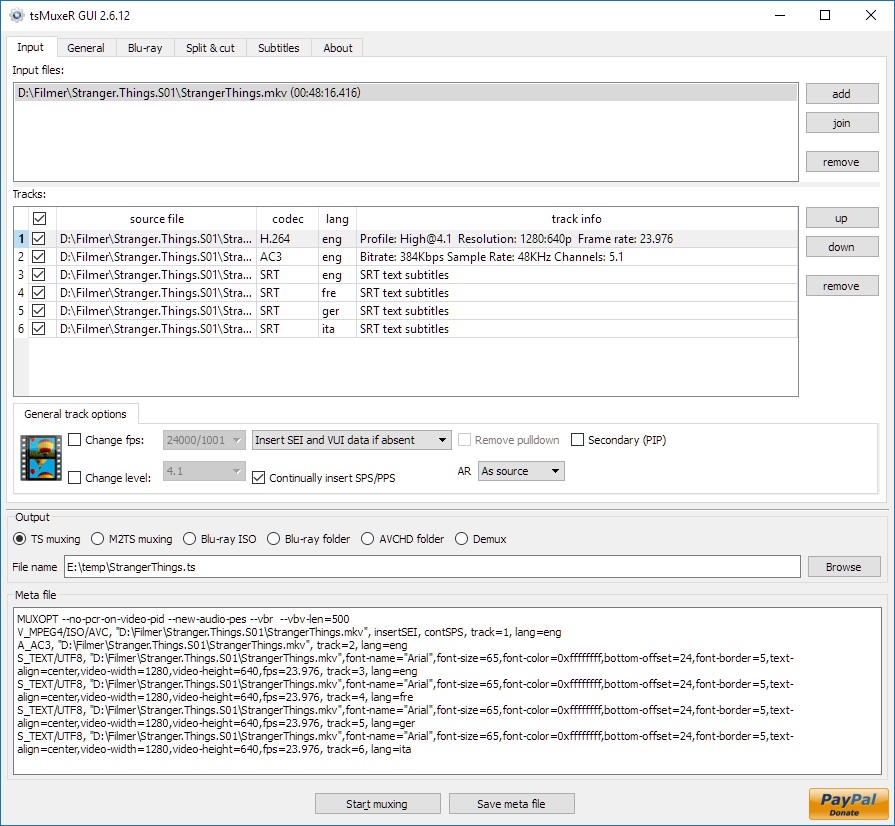
Latest version
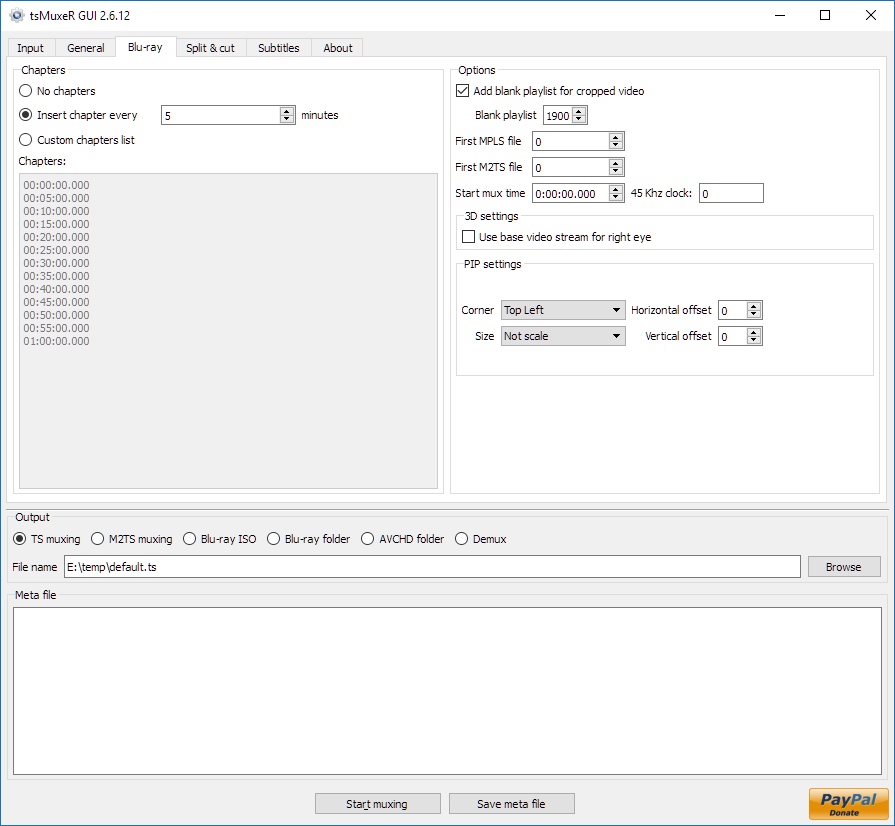
Download
Download tsMuxeR 2.18.4 Windows 64-bit 12MB Win64
Portable 
Download tsMuxeR 2.18.4 Windows 12MB Win
Portable Download tsMuxeR 2.18.4 Mac Silicon ARM 64-bit 12MB MacARM64
Download tsMuxeR 2.18.4 Mac Intel 64-bit 12MB Mac64
Download tsMuxeR 2.18.4 Linux 64-bit 12MB Linux64
Download Beta, Update and other versions
Download tsMuxeR 2.7.0 Original Windows 64-bit 12MB Win64
Download tsMuxeR 2.7.0 Original Windows 7MB Win
Download tsMuxeR 2.7.0 Original Mac 57MB Mac
Download tsMuxeR 2.7.0 Original Linux 33MB Linux
Download the tsMuxer 2.7.0 source code
Download the tsMuxer 2.7.2 fork source code
Download old versions

Software License
Supported operating systems
Mac OS Linux More information and other downloads
Download Tsmuxer for Mac OSX Snow Leopard here
If you have problems playing your Blu-ray on Panasonic players then try reauthor it with Free AVCHD Editor. Read this forum thread for information.
If you have problems playing your Blu-ray on Panasonic players then try reauthor it with Free AVCHD Editor. Read this forum thread for information.
Version history / Release notes / Changelog / What's New
tsMuxeR 2.18.4
A 3D disc can now be wrapped into an ISO without writing its video twice.
New: --3d-single-copy
A 3D Blu-ray stores its video ONCE and gives it three names. The base view and the dependent view are cut into chunks and written alternately, and that single run of sectors is what the .ssif names. The same sectors are addressed again as two .m2ts, one naming only the base chunks and one only the dependent chunks, so a 2D player opens the base .m2ts and never sees the rest.
Copying all three by name writes the video twice. 2.18.3 started reporting that; this writes it once instead, so all three names resolve to the same sectors again, as on the source disc.
tsMuxeR --bdmv-to-iso --3d-single-copy <BDMV_folder> out.iso
Both facts it needs are stated on the disc, so nothing is guessed: the clip info file lists where the chunks divide, and the playlist names which two clips pair up. A group whose five files are not all present, or whose two views are not cut into the same number of chunks, is left alone and copied as found.
Off by default. Without it the image is byte for byte what it was before.
Measured on a six-group 3D structure, with 1, 2, 2, 4, 4 and 4 chunk pairs:
without 366,084,096 bytes, every chunk of video present TWICE
with 188,088,320 bytes, every chunk present ONCE, dependent view first
All 18 files read back byte for byte identical to the source, checked twice with two independent readers: 7-Zip, and the operating system's own UDF driver, which is what a player uses.
Then on a full-size 3D structure, 852 files and 40.8 GiB, its main title interleaved in 1,774 chunk pairs:
image 43,796,791,296 bytes, against 43,800,002,560 for the source it was built from
a plain copy would have written 87.2 GB
files 852 of 852 byte for byte identical, 0 different, 0 missing, 0 added
The source stores its video once, and the rebuilt image lands 3.21 MB from the same size, which is the difference in UDF overhead and nothing else. 0 added says the source's own BACKUP came through untouched rather than being regenerated.
The 3D authoring path was verified, not changed
tsMuxeR has authored 3D discs from streams for years, and createInterleavedFile is shared between that path and the new one, so it was run rather than assumed. Muxing the two views of a 3D source to a Blu-ray ISO gives a base view and a dependent view whose sizes sum to the .ssif exactly, inside an image too small to hold the video twice, with the dependent chunk first. Building a disc that way and then copying it with --3d-single-copy returns every file byte for byte.
Note that only a Blu-ray ISO can hold this. Two files sharing one run of sectors is a property of the UDF image; a folder on an ordinary filesystem cannot express it.
Fixed: an interleaved 3D file could be built wrong instead of refused
createInterleavedFile guarded its two preconditions with assertions, which a release build removes. Both mean the interleave cannot be described: unequal piece counts leave chunks with no partner, and a part-sector piece cannot be addressed by a non-final allocation descriptor. Building it anyway produces a file of exactly the right length with its two halves out of step, which no size check catches and no reader reports. Both conditions now say what is wrong and refuse.
The 3D authoring path calls the same function and ignored its result, which was reasonable while the only outcome was an assertion a release build deletes. It acts on a refusal now: carrying on past one would end the build with "Mux successful complete" while leaving a zero-length .ssif in the image, which is a 3D disc that cannot play, reported as a success.
The BDMV folder to ISO tab has a checkbox for it
The option was reachable only from the command line, and that tab is where someone wrapping a 3D disc actually is. One checkbox next to the other build options, off like the option itself, with a tooltip explaining the three names. Translated into all eight interface languages.
Fixed: leaving out the output path printed one character
--bdmv-to-iso was only routed to its own handler when at least four arguments came with it, so a call that forgot the output path fell through to the ordinary muxing path, which tried to open --bdmv-to-iso as a meta file and printed a single character of the resulting exception. The mode is routed on its own name now, and all three of --bdmv-to-iso, one argument and three arguments print what the mode expects.
Fixed: the layer-break guard could move a UDF structure and corrupt files
This is not a 3D fault. It was found while testing the 3D authoring path, but it reproduces on an ordinary copy with --3d-single-copy off and no 3D content involved.
Who it reaches. It needs a disc of roughly 7,000 files or more, with --layer-break-guard or --inner-only in use. For scale, a full feature disc measured here holds 852 files, about a ninth of that, so an ordinary disc was never at risk. If you built an image far larger than that with an earlier version, a BD-J disc for instance, the result is worth checking. The damage is silent: the build reports success and the files look normal.
The UDF unique-id mapping file lives at a fixed address just past the metadata partition, and it is written at the very end of the build by seeking BACK to it. FileEntryInfo::write consults the layer-break guard on every write, so a guard zone that reached back that far padded the mapping file FORWARD, out of its own home and into the data area.
The guard exists to move file data off the sectors around a layer transition. A volume structure has nowhere else it may live, so moving one does not protect it, it destroys the image. The guard is now suppressed while such a structure is written.
The metadata region grows with the file count, so the two eventually meet. Measured on a 12,005 file tree with --inner-only on a BD50, which is a supported combination and not a contrived one:
before the mapping file's home is sector 12,928, the guard's before-zone begins at 8,704,
so the structure was written at sector 24,429,792 and four navigation files
(index.bdmv, MovieObject.bdmv and both .clpi) came back wrong
after 12,005 of 12,005 files byte for byte identical
Also visible on a small tree with a hand-set early break, where it silently replaced the first sector of the first file with a descriptor: eight break positions from 700 to 2000 sectors are now byte-exact where four of them were not.
Fixed: a layer-break guard could land inside a 3D chunk
3D only, and only with a guard in use. The guard pad is laid down wherever the copy write that reaches the zone happens to begin, and a chunk larger than the 16 MB copy buffer takes several writes, so the pad could fall inside a chunk. The interrupted view then gained a piece its partner did not have and the group could not be rebuilt at all. Reproduced on real chunk tables, which have 125 chunks over 16 MB in the main title alone:
Can't interleave BDMV/STREAM/SSIF/00019.ssif: 5 pieces against 4
The pad is now placed at the boundary between one pair of chunks and the next, where both views are between pieces and stay in step. Verified with the pad falling both before a group and inside one, byte exact in each case.
A 3D disc can now be wrapped into an ISO without writing its video twice.
New: --3d-single-copy
A 3D Blu-ray stores its video ONCE and gives it three names. The base view and the dependent view are cut into chunks and written alternately, and that single run of sectors is what the .ssif names. The same sectors are addressed again as two .m2ts, one naming only the base chunks and one only the dependent chunks, so a 2D player opens the base .m2ts and never sees the rest.
Copying all three by name writes the video twice. 2.18.3 started reporting that; this writes it once instead, so all three names resolve to the same sectors again, as on the source disc.
tsMuxeR --bdmv-to-iso --3d-single-copy <BDMV_folder> out.iso
Both facts it needs are stated on the disc, so nothing is guessed: the clip info file lists where the chunks divide, and the playlist names which two clips pair up. A group whose five files are not all present, or whose two views are not cut into the same number of chunks, is left alone and copied as found.
Off by default. Without it the image is byte for byte what it was before.
Measured on a six-group 3D structure, with 1, 2, 2, 4, 4 and 4 chunk pairs:
without 366,084,096 bytes, every chunk of video present TWICE
with 188,088,320 bytes, every chunk present ONCE, dependent view first
All 18 files read back byte for byte identical to the source, checked twice with two independent readers: 7-Zip, and the operating system's own UDF driver, which is what a player uses.
Then on a full-size 3D structure, 852 files and 40.8 GiB, its main title interleaved in 1,774 chunk pairs:
image 43,796,791,296 bytes, against 43,800,002,560 for the source it was built from
a plain copy would have written 87.2 GB
files 852 of 852 byte for byte identical, 0 different, 0 missing, 0 added
The source stores its video once, and the rebuilt image lands 3.21 MB from the same size, which is the difference in UDF overhead and nothing else. 0 added says the source's own BACKUP came through untouched rather than being regenerated.
The 3D authoring path was verified, not changed
tsMuxeR has authored 3D discs from streams for years, and createInterleavedFile is shared between that path and the new one, so it was run rather than assumed. Muxing the two views of a 3D source to a Blu-ray ISO gives a base view and a dependent view whose sizes sum to the .ssif exactly, inside an image too small to hold the video twice, with the dependent chunk first. Building a disc that way and then copying it with --3d-single-copy returns every file byte for byte.
Note that only a Blu-ray ISO can hold this. Two files sharing one run of sectors is a property of the UDF image; a folder on an ordinary filesystem cannot express it.
Fixed: an interleaved 3D file could be built wrong instead of refused
createInterleavedFile guarded its two preconditions with assertions, which a release build removes. Both mean the interleave cannot be described: unequal piece counts leave chunks with no partner, and a part-sector piece cannot be addressed by a non-final allocation descriptor. Building it anyway produces a file of exactly the right length with its two halves out of step, which no size check catches and no reader reports. Both conditions now say what is wrong and refuse.
The 3D authoring path calls the same function and ignored its result, which was reasonable while the only outcome was an assertion a release build deletes. It acts on a refusal now: carrying on past one would end the build with "Mux successful complete" while leaving a zero-length .ssif in the image, which is a 3D disc that cannot play, reported as a success.
The BDMV folder to ISO tab has a checkbox for it
The option was reachable only from the command line, and that tab is where someone wrapping a 3D disc actually is. One checkbox next to the other build options, off like the option itself, with a tooltip explaining the three names. Translated into all eight interface languages.
Fixed: leaving out the output path printed one character
--bdmv-to-iso was only routed to its own handler when at least four arguments came with it, so a call that forgot the output path fell through to the ordinary muxing path, which tried to open --bdmv-to-iso as a meta file and printed a single character of the resulting exception. The mode is routed on its own name now, and all three of --bdmv-to-iso, one argument and three arguments print what the mode expects.
Fixed: the layer-break guard could move a UDF structure and corrupt files
This is not a 3D fault. It was found while testing the 3D authoring path, but it reproduces on an ordinary copy with --3d-single-copy off and no 3D content involved.
Who it reaches. It needs a disc of roughly 7,000 files or more, with --layer-break-guard or --inner-only in use. For scale, a full feature disc measured here holds 852 files, about a ninth of that, so an ordinary disc was never at risk. If you built an image far larger than that with an earlier version, a BD-J disc for instance, the result is worth checking. The damage is silent: the build reports success and the files look normal.
The UDF unique-id mapping file lives at a fixed address just past the metadata partition, and it is written at the very end of the build by seeking BACK to it. FileEntryInfo::write consults the layer-break guard on every write, so a guard zone that reached back that far padded the mapping file FORWARD, out of its own home and into the data area.
The guard exists to move file data off the sectors around a layer transition. A volume structure has nowhere else it may live, so moving one does not protect it, it destroys the image. The guard is now suppressed while such a structure is written.
The metadata region grows with the file count, so the two eventually meet. Measured on a 12,005 file tree with --inner-only on a BD50, which is a supported combination and not a contrived one:
before the mapping file's home is sector 12,928, the guard's before-zone begins at 8,704,
so the structure was written at sector 24,429,792 and four navigation files
(index.bdmv, MovieObject.bdmv and both .clpi) came back wrong
after 12,005 of 12,005 files byte for byte identical
Also visible on a small tree with a hand-set early break, where it silently replaced the first sector of the first file with a descriptor: eight break positions from 700 to 2000 sectors are now byte-exact where four of them were not.
Fixed: a layer-break guard could land inside a 3D chunk
3D only, and only with a guard in use. The guard pad is laid down wherever the copy write that reaches the zone happens to begin, and a chunk larger than the 16 MB copy buffer takes several writes, so the pad could fall inside a chunk. The interrupted view then gained a piece its partner did not have and the group could not be rebuilt at all. Reproduced on real chunk tables, which have 125 chunks over 16 MB in the main title alone:
Can't interleave BDMV/STREAM/SSIF/00019.ssif: 5 pieces against 4
The pad is now placed at the boundary between one pair of chunks and the next, where both views are between pieces and stay in step. Verified with the pad falling both before a group and inside one, byte exact in each case.
View full changelog
All features
Supported incoming formats:
* TS;
* M2TS;
* Blu-ray;
* Demux option.
Supported videocodecs:
* H.264
* Microsoft VC-1;
* MPEG-2.
Supported audiocodecs:
* AAC;
* AC3 / E-AC3(DD+);
* Dolby True HD (for streams with AC3 core only);
* DTS/ DTS-HD;
* LPCM.
Supported subtitle types:
* M2TS Presentation graphic stream.
* SRT text subtitles
Supported containers and formats:
* Elementary stream;
* Transport stream TS and M2TS;
* Program stream EVO/VOB/MPG;
* Matroska MKV/MKA;
* MP4/MOV
Main features:
* Automatic or manual fps adjustment while mixing;
* Level changing as well as SEI, SPS/PPS elements and NAL unit delimiter cycle insertion while mixing H.264;
* Audio tracks and subtitles time shifting;
* Ability to extract DTS core from DTS-HD;
* Ability to extract AC3 core from True-HD;
* Ability to join files;
* Ability to adjust fps for subtitles;
* Ability to convert LPCM streams into WAVE and vice versa;
* Track language information injection into blu-ray structure and TS header;
* Ability to cut source files;
* Ability to split output file;
* Ability to detect audio delay for TS/M2TS/MPG/VOB/EVO sources;
* Ability to remove pulldown info from stream;
* Ability to open Blu-ray playlist (MPLS) files;
* Ability to convert SRT subtitles to PGS;
* Tags for SRT subtitles support - tags for changing font, color, size, etc.; tag's syntax is similar to HTML;
* United cross-platform GUI - Windows, Linux, MacOS.
* TS;
* M2TS;
* Blu-ray;
* Demux option.
Supported videocodecs:
* H.264
* Microsoft VC-1;
* MPEG-2.
Supported audiocodecs:
* AAC;
* AC3 / E-AC3(DD+);
* Dolby True HD (for streams with AC3 core only);
* DTS/ DTS-HD;
* LPCM.
Supported subtitle types:
* M2TS Presentation graphic stream.
* SRT text subtitles
Supported containers and formats:
* Elementary stream;
* Transport stream TS and M2TS;
* Program stream EVO/VOB/MPG;
* Matroska MKV/MKA;
* MP4/MOV
Main features:
* Automatic or manual fps adjustment while mixing;
* Level changing as well as SEI, SPS/PPS elements and NAL unit delimiter cycle insertion while mixing H.264;
* Audio tracks and subtitles time shifting;
* Ability to extract DTS core from DTS-HD;
* Ability to extract AC3 core from True-HD;
* Ability to join files;
* Ability to adjust fps for subtitles;
* Ability to convert LPCM streams into WAVE and vice versa;
* Track language information injection into blu-ray structure and TS header;
* Ability to cut source files;
* Ability to split output file;
* Ability to detect audio delay for TS/M2TS/MPG/VOB/EVO sources;
* Ability to remove pulldown info from stream;
* Ability to open Blu-ray playlist (MPLS) files;
* Ability to convert SRT subtitles to PGS;
* Tags for SRT subtitles support - tags for changing font, color, size, etc.; tag's syntax is similar to HTML;
* United cross-platform GUI - Windows, Linux, MacOS.
Sections/Browse similar tools
All In One MKV to MP4/Blu-ray/UHD
Authoring (Blu-ray/UHD/AVCHD)
DigitalTV/DVB/IPTV
Linux Video Tools
MacOS Video Tools
Video De/Multiplexers
Alternative to tsMuxeR
(Latest version updated)Clown_BD (May 31, 2013)
Free AVCHD Editor (Jun 9, 2011)
MakeMKV (Jun 15, 2026)
multiAVCHD (Jul 4, 2012)
ToNMT UI (Jun 1, 2009)
TsRemux (Apr 20, 2010)
Guides and How to's
Adding a subtitle on a Blu-ray Disc keeping the original menu
- ReadBasic Guide for HDV to Blu-ray
- ReadBlu-ray to MKV with optional multi-language audio/subtitle support
- ReadConvert MKV to AVCHD for PS3 and Blu-ray
- ReadHow to add menus to avcHD without re-encode the files
- ReadHow to convert a Blu-ray disc into a .MKV 720P file
- ReadHow to Decrypt/store/play Blu-Ray and HD-DVD Discs
- ReadHow to rip a Blu-ray disc and remux it to MKV
- ReadMKV H.264/AVC to VC-1 Conversion Guide
- ReadtsMuxeR video tutorials
View all guides with guide description here
Tool features - Convert
M2TS to AVCHD, M2TS to Blu-ray, MKV to AVCHD, MKV to Blu-ray, MTS to AVCHD, MTS to Blu-ray, TS to AVCHD, TS to Blu-ray
Acronyms / Also Known As
Download tsMuxeR Portable download from the Download links under Download and Download other versions!
Notify me when software updated or report software
| 119 reviews, Showing 1 to 5 reviews |
Looking forward to trying this release. The link to the developers page should probably be changed to this release (https://github.com/teaching-droid/tsMuxer/releases/).
Review by mail2tom on
Jul 25, 2026 Version: tsMuxeR 2.11.0 fork
OS: Windows 11 64-bit Ease of use: 5/10
Functionality: 9/10
Value for money: 10/10
Overall: 7/10
Excellent tool! I use it for all bluray remuxes. I thought the development was no longer, but found this fork.
Still some very simple features that I'm missing that I believe the developer would implement without trouble.
Where can I post to the developer(s)?
Still some very simple features that I'm missing that I believe the developer would implement without trouble.
Where can I post to the developer(s)?
Review by O2 on
Jul 21, 2026 Version: 2.7.2-dev
OS: Windows 11 64-bit Ease of use: 8/10
Functionality: 5/10
Value for money: 8/10
Overall: 8/10
Rating by on
Jul 1, 2025 Version: 2.7
OS: Windows 11 64-bit Ease of use: 1/10
Functionality: 1/10
Value for money: 1/10
Overall: 1/10
No support for Atmos. Hope this will be supported in the next update. Fantastic software.
Review by Roger Jacobsen on
Sep 4, 2024 Version: 2.6.12
OS: Windows 11 64-bit Ease of use: 9/10
Functionality: 9/10
Value for money: 10/10
Overall: 9/10
Would be good if the program could read the subtitle in VOB format which is often in MKV files
Review by Johan on
Jul 6, 2024 Version: 2.6.12
OS: Windows 11 64-bit Ease of use: 10/10
Functionality: 10/10
Value for money: 10/10
Overall: 10/10
| 119 reviews, Showing 1 to 5 reviews |
| 1 tool hits, Showing 1 to 1 tools |
Explanation:
NEW SOFTWARE= New tool since your last visit
NEW VERSION= New version since your last visit
NEW REVIEW= New review since your last visit
NEW VERSION= New version
Latest version
Version number / Beta version number / Update version number and when it whas released.
Type and download
NO MORE UPDATES? = The software hasn't been updated in over 2 years.
NO LONGER DEVELOPED = The software hasn't been updated in over 5 years.
RECENTLY UPDATED = The software has been updated the last 31 days.
Freeware = Download Free software.
Freeware Trialware = Download Free software but some parts are trial/shareware.
Free software = Download Free software and also open source code also known as FOSS (Free and Open Source Software).
Free software Trialware = Download Free software and also open source code but some parts are trial/shareware.
Freeware Ads = Download Free software but supported by advertising, usually with a included browser toolbar. It may be disabled when installing or after installation.
Free software Ads = Free Download software and open source code but supported by advertising, usually with a included browser toolbar. It may be disabled when installing or after installation.
Trialware = Also called shareware or demo. Free Trial version available for download and testing with usually a time limit or limited functions.
Payware = No demo or trial available.
Portable version = A portable/standalone version is available. No installation is required.
v1.0.1 = Latest version available.
Download beta = It could be a Beta, RC(Release Candidate) or an Alpha / Nightly / Unstable version of the software.
Download 15MB = A direct link to the software download.
Win = Windows download version for 32-bit and 64-bit Windows.
Win64 = Windows 64-bit download version for 64-bit Windows.
WinARM64 = Windows 64-bit ARM download version for Windows ARM64/AArch64.
Mac = Mac download version for 64-bit Mac OS Intel/ARM64/AArch64.
MacARM64 = Mac Silicon download version for 64-bit Mac OS ARM64/AArch64.
Mac64 = Mac OS download version for 64-bit Intel Mac OS.
Linux = Linux download version.
Linux64 = Linux download version for 64bit Linux.
Linux ARM = Linux download version for Linux ARM64/AArch64.
Portable = Portable version. No installation is required.
Ad-Supported = The software is bundled with advertising. Be careful when you install the software and disable addons that you don't want!
Visit developers site = A link to the software developer site.
Download (mirror link) = A mirror link to the software download. It may not contain the latest versions.
Download old versions = Free downloads of previous versions of the program.
Download 64-bit version = If you have a 64bit operating system you can download this version.
Download portable version = Portable/Standalone version meaning that no installation is required, just extract the files to a folder and run directly.
Portable version available = Download the portable version and you can just extract the files and run the program without installation.
Old versions available = Download old versions of the program.
Version history available = Complete changelog on our site.
= Windows version available.
= Mac OS version available.
= Linux version available.
Our hosted software are virus and malware scanned with several antivirus programs using www.virustotal.com. (NOTE! Just one virustotal warning is 99.9% a false positive. And some software might receive 2-6 warnings but it's if they are not all same virus/trojan then it's 99% false positives.)
Rating
Rating from 0-10.
NEW SOFTWARE= New tool since your last visit
NEW VERSION= New version since your last visit
NEW REVIEW= New review since your last visit
NEW VERSION= New version
Latest version
Version number / Beta version number / Update version number and when it whas released.
Type and download
NO MORE UPDATES? = The software hasn't been updated in over 2 years.
NO LONGER DEVELOPED = The software hasn't been updated in over 5 years.
RECENTLY UPDATED = The software has been updated the last 31 days.
Freeware = Download Free software.
Freeware Trialware = Download Free software but some parts are trial/shareware.
Free software = Download Free software and also open source code also known as FOSS (Free and Open Source Software).
Free software Trialware = Download Free software and also open source code but some parts are trial/shareware.
Freeware Ads = Download Free software but supported by advertising, usually with a included browser toolbar. It may be disabled when installing or after installation.
Free software Ads = Free Download software and open source code but supported by advertising, usually with a included browser toolbar. It may be disabled when installing or after installation.
Trialware = Also called shareware or demo. Free Trial version available for download and testing with usually a time limit or limited functions.
Payware = No demo or trial available.
Portable version = A portable/standalone version is available. No installation is required.
v1.0.1 = Latest version available.
Download beta = It could be a Beta, RC(Release Candidate) or an Alpha / Nightly / Unstable version of the software.
Download 15MB = A direct link to the software download.
Win = Windows download version for 32-bit and 64-bit Windows.
Win64 = Windows 64-bit download version for 64-bit Windows.
WinARM64 = Windows 64-bit ARM download version for Windows ARM64/AArch64.
Mac = Mac download version for 64-bit Mac OS Intel/ARM64/AArch64.
MacARM64 = Mac Silicon download version for 64-bit Mac OS ARM64/AArch64.
Mac64 = Mac OS download version for 64-bit Intel Mac OS.
Linux = Linux download version.
Linux64 = Linux download version for 64bit Linux.
Linux ARM = Linux download version for Linux ARM64/AArch64.
Portable = Portable version. No installation is required.
Ad-Supported = The software is bundled with advertising. Be careful when you install the software and disable addons that you don't want!
Visit developers site = A link to the software developer site.
Download (mirror link) = A mirror link to the software download. It may not contain the latest versions.
Download old versions = Free downloads of previous versions of the program.
Download 64-bit version = If you have a 64bit operating system you can download this version.
Download portable version = Portable/Standalone version meaning that no installation is required, just extract the files to a folder and run directly.
Portable version available = Download the portable version and you can just extract the files and run the program without installation.
Old versions available = Download old versions of the program.
Version history available = Complete changelog on our site.
= Windows version available. = Mac OS version available. = Linux version available.Our hosted software are virus and malware scanned with several antivirus programs using www.virustotal.com. (NOTE! Just one virustotal warning is 99.9% a false positive. And some software might receive 2-6 warnings but it's if they are not all same virus/trojan then it's 99% false positives.)
Rating
Rating from 0-10.
Browse software by sections
All In One Blu-ray Converters (9)
All In One DVD Converters (12)
All In One MKV to MP4, Blu-ray, UHD (11)
All In One Video Converters (19)
Animation (3D, 2D Animation) (12)
Audio Editors (22)
Audio Encoders (80)
Audio Players (19)
Authoring (Blu-ray, UHD, AVCHD) (13)
Authoring (DivX) (4)
Authoring (DVD) (26)
Authoring (SVCD, VCD) (9)
Bitrate Calculators (7)
Blu-ray to AVI, MKV, MP4 (15)
Blu-ray to Blu-ray, AVCHD (10)
Burn (CD,DVD,Blu-ray) (24)
Camcorders, DV, HDV, AVCHD (31)
Capture TV, DVD, VCR (30)
CD, DVD, Blu-ray recovery (3)
Codec Packs (6)
All In One DVD Converters (12)
All In One MKV to MP4, Blu-ray, UHD (11)
All In One Video Converters (19)
Animation (3D, 2D Animation) (12)
Audio Editors (22)
Audio Encoders (80)
Audio Players (19)
Authoring (Blu-ray, UHD, AVCHD) (13)
Authoring (DivX) (4)
Authoring (DVD) (26)
Authoring (SVCD, VCD) (9)
Bitrate Calculators (7)
Blu-ray to AVI, MKV, MP4 (15)
Blu-ray to Blu-ray, AVCHD (10)
Burn (CD,DVD,Blu-ray) (24)
Camcorders, DV, HDV, AVCHD (31)
Capture TV, DVD, VCR (30)
CD, DVD, Blu-ray recovery (3)
Codec Packs (6)
Codec, Video Identifiers (31)
Codecs (67)
Decrypters (DVD Rippers) (16)
Decrypters (UHD, Blu-ray Rippers) (8)
DigitalTV, DVB, IPTV (39)
DVD to DVD (20)
DVD to MP4, MKV, H264, H265 (16)
DVD to VCD, SVCD (5)
DVD to XviD, AVI, DivX (16)
ISO, Image (15)
Linux Video Tools (212)
MacOS Video Tools (243)
Media (Blu-ray, DVD, CD) (9)
Media Center, HTPC (24)
Other Useful Tools (140)
Photo Blu-ray, DVD, SlideShow (8)
Portable (Mobile, PSP) (35)
Region Free Tools (5)
Screen capture , Screen recording (26)
Screenshots , Thumbnails (13)
Codecs (67)
Decrypters (DVD Rippers) (16)
Decrypters (UHD, Blu-ray Rippers) (8)
DigitalTV, DVB, IPTV (39)
DVD to DVD (20)
DVD to MP4, MKV, H264, H265 (16)
DVD to VCD, SVCD (5)
DVD to XviD, AVI, DivX (16)
ISO, Image (15)
Linux Video Tools (212)
MacOS Video Tools (243)
Media (Blu-ray, DVD, CD) (9)
Media Center, HTPC (24)
Other Useful Tools (140)
Photo Blu-ray, DVD, SlideShow (8)
Portable (Mobile, PSP) (35)
Region Free Tools (5)
Screen capture , Screen recording (26)
Screenshots , Thumbnails (13)
Subtitle Editors, Converters (72)
Tag Editors (4)
Video De, Multiplexers (66)
Video Editors (Advanced, NLE) (35)
Video Editors (Basic) (56)
Video Editors (H264, MP4, MKV, MTS) (19)
Video Editors (Lossless) (4)
Video Editors (MPG, DVD) (16)
Video Editors (WMV, AVI) (15)
Video Encoders (AV1, VP8, VP9) (2)
Video Encoders (AVI, WMV) (38)
Video Encoders (H264, H265, MP4, MKV) (45)
Video Encoders (MPG, DVD) (23)
Video Encoders , Converters (155)
Video Frameservers (9)
Video Players (48)
Video Repair, Fix (24)
Video Scripting (10)
Video Streaming (20)
Video Streaming Downloaders (100)
Tag Editors (4)
Video De, Multiplexers (66)
Video Editors (Advanced, NLE) (35)
Video Editors (Basic) (56)
Video Editors (H264, MP4, MKV, MTS) (19)
Video Editors (Lossless) (4)
Video Editors (MPG, DVD) (16)
Video Editors (WMV, AVI) (15)
Video Encoders (AV1, VP8, VP9) (2)
Video Encoders (AVI, WMV) (38)
Video Encoders (H264, H265, MP4, MKV) (45)
Video Encoders (MPG, DVD) (23)
Video Encoders , Converters (155)
Video Frameservers (9)
Video Players (48)
Video Repair, Fix (24)
Video Scripting (10)
Video Streaming (20)
Video Streaming Downloaders (100)