
Help us keep the list up to date and submit new video software here.
Try DVDFab and copy all Ultra HD Blu-rays and DVDs / remove Cinavia protection! Download free trial.
Tool
Description
Type
Rating
Reviews
Gharmonize is a video downloader. Seamlessly download content from YouTube, YouTube Music, and major platforms like X, Facebook, Instagram, Vimeo, Dailymotion, and TikTok. Leverage Spotify, Apple Music, and Deezer for intelligent metadata matching and track discovery — then fetch high-quality media via yt-dlp. Includes DRM-free disc ripping, iPhone / Android ringtone output, and blazing-fast GPU-accelerated transcoding, all powered by a robust and reliable processing engine.
Free software
OS:

File size: 95MB
Portable version
Version history
Alternative software
OS:
File size: 95MB
Portable version
Version history
Alternative software
Screenshots
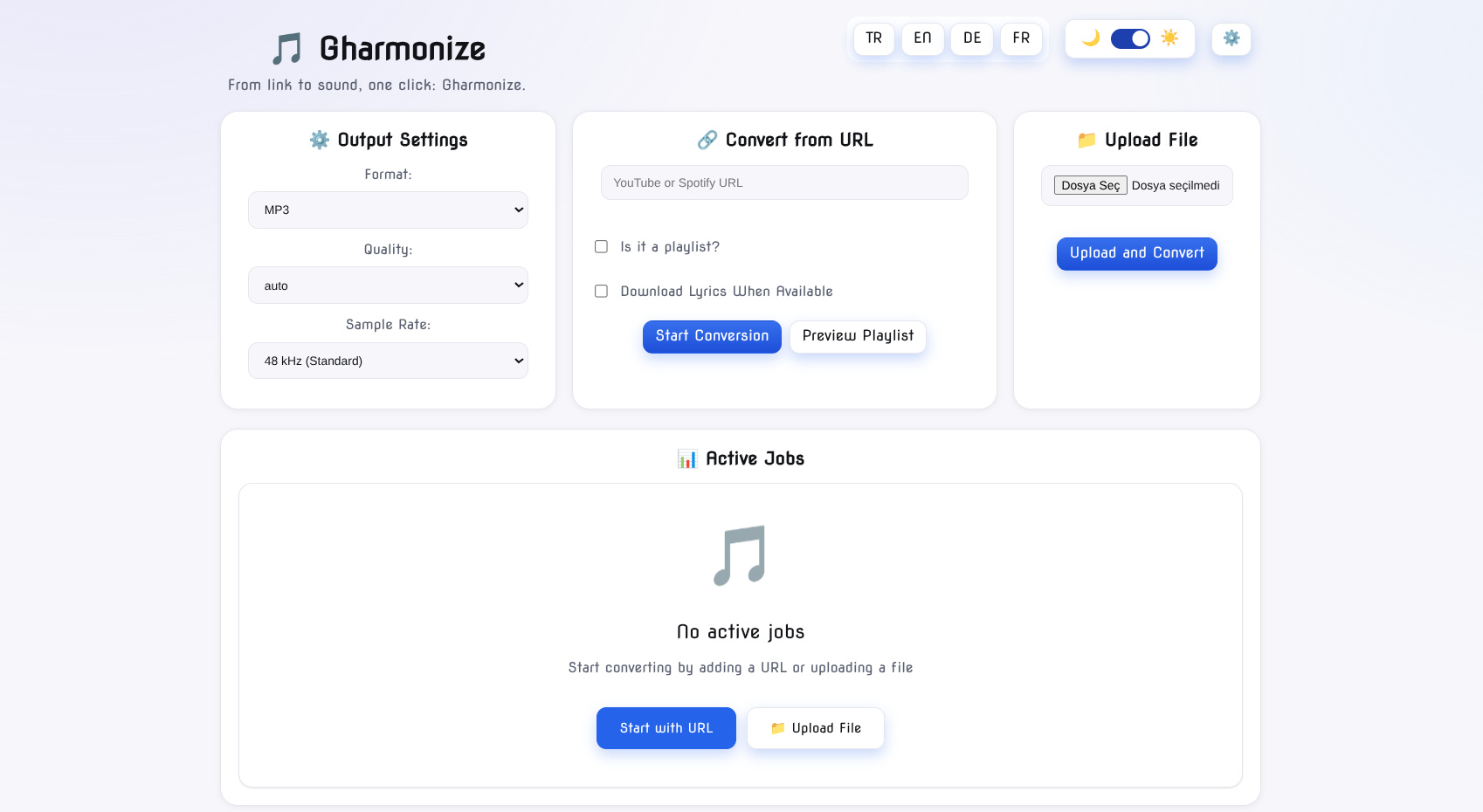

Latest version

Download
Download Gharmonize 1.4.0 Windows 64-bit 95MB Win64
Download Gharmonize 1.4.0 Linux 64-bit 95MB Linux64
AppImage Download Portable and other versions
Portable 
Software License
Supported operating systems
Linux Version history / Release notes / Changelog / What's New
Gharmonize v1.4.0
Gharmonize v1.4.0 expands the music pipeline with TIDAL and SoundCloud support, introduces a new bulk music text import workflow, improves YouTube matching reliability, and adds several queue, background processing, and UI improvements.
Highlights
TIDAL Support
Gharmonize can now process TIDAL music metadata and collections through the mapped-music pipeline.
TIDAL track metadata support
Collection processing
Source metadata normalization
Integration with the existing music matching and download workflow
SoundCloud Support
SoundCloud is now supported as an additional music source.
Supported content includes:
Individual tracks
Sets / playlists
Profile collections
Popular tracks
Normalized source metadata
Safer YouTube Matching
YouTube matching has been significantly improved across:
Spotify
Apple Music
Deezer
TIDAL
SoundCloud
Bulk text imports
Matching improvements include:
Duration validation
Better candidate ranking
Safer fallback queries
Retry handling
Cache revalidation
Protection against unrelated long-form matches
More tolerant title normalization and safe spelling variants
These changes reduce incorrect matches while still allowing useful fallback searches when an exact result is unavailable.
Bulk Music Text Import
A new bulk music import workflow is now available in both Classic UI and YTLive.
You can paste lists such as:
Enigma – Return to Innocence
Vangelis – Conquest of Paradise
Bar Manço – Gülpembe
Cem Karaca – Tamirci Çra
Gharmonize will automatically:
Parse the artist and track names
Find safe YouTube / YouTube Music matches
Display matching progress per track
Add matched tracks to the download pipeline
Download them using the selected output format
Large lists can be pasted directly, making it easy to import recommendations generated by ChatGPT or other sources.
Smarter List Parsing
The importer supports:
Numbered lists
Markdown-formatted lists
Artist – Track
Artist — Track
Artist - Track
Optional descriptions after the track name
Turkish and international characters
Long artist and track names
Shared Music Queue
Classic UI and YTLive now share the same music import queue and state.
This means you can:
Add a list in Classic UI
Switch to YTLive
Continue viewing the same list
Keep existing matches
Resume canceled jobs without repeating the entire matching process
Existing queue state is migrated automatically.
Background Matching
Bulk music matching now runs independently from the import modal.
Closing the modal no longer stops the operation.
You can close and reopen the interface while matching continues in the background, and Gharmonize will restore:
Matching progress
Matched tracks
Unmatched tracks
Job state
Queue & Auto-Remove Improvements
Queue cleanup behavior has been improved.
The URL queue and bulk text import queue now operate independently.
When working in the URL tab, only URL jobs are processed.
When working in the Music List tab, only bulk music entries are processed.
Automatic cleanup can remove completed and unmatched items while preserving failed or canceled entries that may need to be retried.
UI Improvements
The bulk import interface now includes:
Larger scrollable track lists
Per-track status indicators
Matching
Matched
Completed
Not Found
Disabled action controls while an operation is active
Background progress restoration
Auto-hiding completion messages
Improved modal sizing
Shared state between Classic UI and YTLive
Download Pipeline Reliability
Additional safeguards were added around yt-dlp and FFmpeg processing.
Improvements include:
yt-dlp watchdog handling
FFmpeg watchdog handling
Protection against stalled workers
Safer retries
Improved failure recovery
These changes help prevent individual downloads from blocking an entire job.
Dependency Updates
Electron updated from 44.1.1 44.3.0
Includes automated Dependabot maintenance
Changes Included
[feat: add bulk music text import, shared queue state, background matching, and UI fixes](https://github.com/G-grbz/Gharmonize/commit/6e03f24f5e2140052de0d8aae2c4c1c1d1ccf8d1)
[feat(music): add TIDAL and SoundCloud support with safer YouTube matching](https://github.com/G-grbz/Gharmonize/commit/53a53060e20f789c2c5fcebd1a66ea994428a573)
[chore(deps-dev): bump Electron from 44.1.1 to 44.3.0](https://github.com/G-grbz/Gharmonize/commit/e7861402526d50c8f579fcae151497c35ee397d1)
Gharmonize v1.4.0 expands the music pipeline with TIDAL and SoundCloud support, introduces a new bulk music text import workflow, improves YouTube matching reliability, and adds several queue, background processing, and UI improvements.
Highlights
TIDAL Support
Gharmonize can now process TIDAL music metadata and collections through the mapped-music pipeline.
TIDAL track metadata support
Collection processing
Source metadata normalization
Integration with the existing music matching and download workflow
SoundCloud Support
SoundCloud is now supported as an additional music source.
Supported content includes:
Individual tracks
Sets / playlists
Profile collections
Popular tracks
Normalized source metadata
Safer YouTube Matching
YouTube matching has been significantly improved across:
Spotify
Apple Music
Deezer
TIDAL
SoundCloud
Bulk text imports
Matching improvements include:
Duration validation
Better candidate ranking
Safer fallback queries
Retry handling
Cache revalidation
Protection against unrelated long-form matches
More tolerant title normalization and safe spelling variants
These changes reduce incorrect matches while still allowing useful fallback searches when an exact result is unavailable.
Bulk Music Text Import
A new bulk music import workflow is now available in both Classic UI and YTLive.
You can paste lists such as:
Enigma – Return to Innocence
Vangelis – Conquest of Paradise
Bar Manço – Gülpembe
Cem Karaca – Tamirci Çra
Gharmonize will automatically:
Parse the artist and track names
Find safe YouTube / YouTube Music matches
Display matching progress per track
Add matched tracks to the download pipeline
Download them using the selected output format
Large lists can be pasted directly, making it easy to import recommendations generated by ChatGPT or other sources.
Smarter List Parsing
The importer supports:
Numbered lists
Markdown-formatted lists
Artist – Track
Artist — Track
Artist - Track
Optional descriptions after the track name
Turkish and international characters
Long artist and track names
Shared Music Queue
Classic UI and YTLive now share the same music import queue and state.
This means you can:
Add a list in Classic UI
Switch to YTLive
Continue viewing the same list
Keep existing matches
Resume canceled jobs without repeating the entire matching process
Existing queue state is migrated automatically.
Background Matching
Bulk music matching now runs independently from the import modal.
Closing the modal no longer stops the operation.
You can close and reopen the interface while matching continues in the background, and Gharmonize will restore:
Matching progress
Matched tracks
Unmatched tracks
Job state
Queue & Auto-Remove Improvements
Queue cleanup behavior has been improved.
The URL queue and bulk text import queue now operate independently.
When working in the URL tab, only URL jobs are processed.
When working in the Music List tab, only bulk music entries are processed.
Automatic cleanup can remove completed and unmatched items while preserving failed or canceled entries that may need to be retried.
UI Improvements
The bulk import interface now includes:
Larger scrollable track lists
Per-track status indicators
Matching
Matched
Completed
Not Found
Disabled action controls while an operation is active
Background progress restoration
Auto-hiding completion messages
Improved modal sizing
Shared state between Classic UI and YTLive
Download Pipeline Reliability
Additional safeguards were added around yt-dlp and FFmpeg processing.
Improvements include:
yt-dlp watchdog handling
FFmpeg watchdog handling
Protection against stalled workers
Safer retries
Improved failure recovery
These changes help prevent individual downloads from blocking an entire job.
Dependency Updates
Electron updated from 44.1.1 44.3.0
Includes automated Dependabot maintenance
Changes Included
[feat: add bulk music text import, shared queue state, background matching, and UI fixes](https://github.com/G-grbz/Gharmonize/commit/6e03f24f5e2140052de0d8aae2c4c1c1d1ccf8d1)
[feat(music): add TIDAL and SoundCloud support with safer YouTube matching](https://github.com/G-grbz/Gharmonize/commit/53a53060e20f789c2c5fcebd1a66ea994428a573)
[chore(deps-dev): bump Electron from 44.1.1 to 44.3.0](https://github.com/G-grbz/Gharmonize/commit/e7861402526d50c8f579fcae151497c35ee397d1)
View full changelog
All features
YouTube / YouTube Music downloads for single items, playlists, and mixes
YTLive — a dedicated music-first UI for YouTube discovery, playback, and queueing
X (Twitter) / Facebook / Instagram / Vimeo / Dailymotion / TikTok download and conversion flows
Spotify, Apple Music, and Deezer mapping for track / playlist / album workflows
Phone ringtone output for iPhone (.m4r) and Android (.mp3)
Audio and video conversion powered by FFmpeg, with FPS/A-V sync presets for AC3 / EAC3 / AAC
GPU acceleration for local transcoding — NVENC, VAAPI, Intel QSV
DRM-free disc ripping with stream selection in the Web UI
Runtime binary management for ffmpeg, ffprobe, mkvmerge, yt-dlp, and deno
Job engine for batch processing, progress tracking, and reliability
YTLive — a dedicated music-first UI for YouTube discovery, playback, and queueing
X (Twitter) / Facebook / Instagram / Vimeo / Dailymotion / TikTok download and conversion flows
Spotify, Apple Music, and Deezer mapping for track / playlist / album workflows
Phone ringtone output for iPhone (.m4r) and Android (.mp3)
Audio and video conversion powered by FFmpeg, with FPS/A-V sync presets for AC3 / EAC3 / AAC
GPU acceleration for local transcoding — NVENC, VAAPI, Intel QSV
DRM-free disc ripping with stream selection in the Web UI
Runtime binary management for ffmpeg, ffprobe, mkvmerge, yt-dlp, and deno
Job engine for batch processing, progress tracking, and reliability
Sections/Browse similar tools
Alternative to Gharmonize
(Latest version updated)NickVision Parabolic (May 24, 2026)
YTSage (Sep 18, 2026)
Guides and How to's
Notify me when software updated or report software
| 3 reviews, Showing 1 to 3 reviews |
Rating by ma3rt on
Mar 22, 2026 Version: 1.2.3
OS: Windows 11 64-bit Ease of use: 10/10
Functionality: 10/10
Value for money: 10/10
Overall: 10/10
Rating by on
Dec 20, 2025 Version: 1.7
OS: Windows 10 Ease of use: 10/10
Functionality: 10/10
Value for money: 10/10
Overall: 10/10
Rating by ggrbz on
Dec 15, 2025 Version: 1.07
OS: Windows 10 64-bit Ease of use: 10/10
Functionality: 10/10
Value for money: 10/10
Overall: 10/10
| 3 reviews, Showing 1 to 3 reviews |
| 1 tool hits, Showing 1 to 1 tools |
Explanation:
NEW SOFTWARE= New tool since your last visit
NEW VERSION= New version since your last visit
NEW REVIEW= New review since your last visit
NEW VERSION= New version
Latest version
Version number / Beta version number / Update version number and when it whas released.
Type and download
NO MORE UPDATES? = The software hasn't been updated in over 2 years.
NO LONGER DEVELOPED = The software hasn't been updated in over 5 years.
RECENTLY UPDATED = The software has been updated the last 31 days.
Freeware = Download Free software.
Freeware Trialware = Download Free software but some parts are trial/shareware.
Free software = Download Free software and also open source code also known as FOSS (Free and Open Source Software).
Free software Trialware = Download Free software and also open source code but some parts are trial/shareware.
Freeware Ads = Download Free software but supported by advertising, usually with a included browser toolbar. It may be disabled when installing or after installation.
Free software Ads = Free Download software and open source code but supported by advertising, usually with a included browser toolbar. It may be disabled when installing or after installation.
Trialware = Also called shareware or demo. Free Trial version available for download and testing with usually a time limit or limited functions.
Payware = No demo or trial available.
Portable version = A portable/standalone version is available. No installation is required.
v1.0.1 = Latest version available.
Download beta = It could be a Beta, RC(Release Candidate) or an Alpha / Nightly / Unstable version of the software.
Download 15MB = A direct link to the software download.
Win = Windows download version for 32-bit and 64-bit Windows.
Win64 = Windows 64-bit download version for 64-bit Windows.
WinARM64 = Windows 64-bit ARM download version for Windows ARM64/AArch64.
Mac = Mac download version for 64-bit Mac OS Intel/ARM64/AArch64.
MacARM64 = Mac Silicon download version for 64-bit Mac OS ARM64/AArch64.
Mac64 = Mac OS download version for 64-bit Intel Mac OS.
Linux = Linux download version.
Linux64 = Linux download version for 64bit Linux.
Linux ARM = Linux download version for Linux ARM64/AArch64.
Portable = Portable version. No installation is required.
Ad-Supported = The software is bundled with advertising. Be careful when you install the software and disable addons that you don't want!
Visit developers site = A link to the software developer site.
Download (mirror link) = A mirror link to the software download. It may not contain the latest versions.
Download old versions = Free downloads of previous versions of the program.
Download 64-bit version = If you have a 64bit operating system you can download this version.
Download portable version = Portable/Standalone version meaning that no installation is required, just extract the files to a folder and run directly.
Portable version available = Download the portable version and you can just extract the files and run the program without installation.
Old versions available = Download old versions of the program.
Version history available = Complete changelog on our site.
= Windows version available.
 = Mac OS version available.
= Linux version available.
Our hosted software are virus and malware scanned with several antivirus programs using www.virustotal.com. (NOTE! Just one virustotal warning is 99.9% a false positive. And some software might receive 2-6 warnings but it's if they are not all same virus/trojan then it's 99% false positives.)
Rating
Rating from 0-10.
NEW SOFTWARE= New tool since your last visit
NEW VERSION= New version since your last visit
NEW REVIEW= New review since your last visit
NEW VERSION= New version
Latest version
Version number / Beta version number / Update version number and when it whas released.
Type and download
NO MORE UPDATES? = The software hasn't been updated in over 2 years.
NO LONGER DEVELOPED = The software hasn't been updated in over 5 years.
RECENTLY UPDATED = The software has been updated the last 31 days.
Freeware = Download Free software.
Freeware Trialware = Download Free software but some parts are trial/shareware.
Free software = Download Free software and also open source code also known as FOSS (Free and Open Source Software).
Free software Trialware = Download Free software and also open source code but some parts are trial/shareware.
Freeware Ads = Download Free software but supported by advertising, usually with a included browser toolbar. It may be disabled when installing or after installation.
Free software Ads = Free Download software and open source code but supported by advertising, usually with a included browser toolbar. It may be disabled when installing or after installation.
Trialware = Also called shareware or demo. Free Trial version available for download and testing with usually a time limit or limited functions.
Payware = No demo or trial available.
Portable version = A portable/standalone version is available. No installation is required.
v1.0.1 = Latest version available.
Download beta = It could be a Beta, RC(Release Candidate) or an Alpha / Nightly / Unstable version of the software.
Download 15MB = A direct link to the software download.
Win = Windows download version for 32-bit and 64-bit Windows.
Win64 = Windows 64-bit download version for 64-bit Windows.
WinARM64 = Windows 64-bit ARM download version for Windows ARM64/AArch64.
Mac = Mac download version for 64-bit Mac OS Intel/ARM64/AArch64.
MacARM64 = Mac Silicon download version for 64-bit Mac OS ARM64/AArch64.
Mac64 = Mac OS download version for 64-bit Intel Mac OS.
Linux = Linux download version.
Linux64 = Linux download version for 64bit Linux.
Linux ARM = Linux download version for Linux ARM64/AArch64.
Portable = Portable version. No installation is required.
Ad-Supported = The software is bundled with advertising. Be careful when you install the software and disable addons that you don't want!
Visit developers site = A link to the software developer site.
Download (mirror link) = A mirror link to the software download. It may not contain the latest versions.
Download old versions = Free downloads of previous versions of the program.
Download 64-bit version = If you have a 64bit operating system you can download this version.
Download portable version = Portable/Standalone version meaning that no installation is required, just extract the files to a folder and run directly.
Portable version available = Download the portable version and you can just extract the files and run the program without installation.
Old versions available = Download old versions of the program.
Version history available = Complete changelog on our site.
= Windows version available. = Mac OS version available. = Linux version available.Our hosted software are virus and malware scanned with several antivirus programs using www.virustotal.com. (NOTE! Just one virustotal warning is 99.9% a false positive. And some software might receive 2-6 warnings but it's if they are not all same virus/trojan then it's 99% false positives.)
Rating
Rating from 0-10.
Browse software by sections
All In One Blu-ray Converters (9)
All In One DVD Converters (12)
All In One MKV to MP4, Blu-ray, UHD (11)
All In One Video Converters (19)
Animation (3D, 2D Animation) (12)
Audio Editors (22)
Audio Encoders (80)
Audio Players (19)
Authoring (Blu-ray, UHD, AVCHD) (13)
Authoring (DivX) (4)
Authoring (DVD) (26)
Authoring (SVCD, VCD) (9)
Bitrate Calculators (7)
Blu-ray to AVI, MKV, MP4 (15)
Blu-ray to Blu-ray, AVCHD (10)
Burn (CD,DVD,Blu-ray) (24)
Camcorders, DV, HDV, AVCHD (31)
Capture TV, DVD, VCR (30)
CD, DVD, Blu-ray recovery (3)
Codec Packs (6)
All In One DVD Converters (12)
All In One MKV to MP4, Blu-ray, UHD (11)
All In One Video Converters (19)
Animation (3D, 2D Animation) (12)
Audio Editors (22)
Audio Encoders (80)
Audio Players (19)
Authoring (Blu-ray, UHD, AVCHD) (13)
Authoring (DivX) (4)
Authoring (DVD) (26)
Authoring (SVCD, VCD) (9)
Bitrate Calculators (7)
Blu-ray to AVI, MKV, MP4 (15)
Blu-ray to Blu-ray, AVCHD (10)
Burn (CD,DVD,Blu-ray) (24)
Camcorders, DV, HDV, AVCHD (31)
Capture TV, DVD, VCR (30)
CD, DVD, Blu-ray recovery (3)
Codec Packs (6)
Codec, Video Identifiers (31)
Codecs (67)
Decrypters (DVD Rippers) (16)
Decrypters (UHD, Blu-ray Rippers) (8)
DigitalTV, DVB, IPTV (39)
DVD to DVD (20)
DVD to MP4, MKV, H264, H265 (16)
DVD to VCD, SVCD (5)
DVD to XviD, AVI, DivX (16)
ISO, Image (15)
Linux Video Tools (214)
MacOS Video Tools (246)
Media (Blu-ray, DVD, CD) (9)
Media Center, HTPC (24)
Other Useful Tools (140)
Photo Blu-ray, DVD, SlideShow (8)
Portable (Mobile, PSP) (35)
Region Free Tools (5)
Screen capture , Screen recording (25)
Screenshots , Thumbnails (13)
Codecs (67)
Decrypters (DVD Rippers) (16)
Decrypters (UHD, Blu-ray Rippers) (8)
DigitalTV, DVB, IPTV (39)
DVD to DVD (20)
DVD to MP4, MKV, H264, H265 (16)
DVD to VCD, SVCD (5)
DVD to XviD, AVI, DivX (16)
ISO, Image (15)
Linux Video Tools (214)
MacOS Video Tools (246)
Media (Blu-ray, DVD, CD) (9)
Media Center, HTPC (24)
Other Useful Tools (140)
Photo Blu-ray, DVD, SlideShow (8)
Portable (Mobile, PSP) (35)
Region Free Tools (5)
Screen capture , Screen recording (25)
Screenshots , Thumbnails (13)
Subtitle Editors, Converters (72)
Tag Editors (4)
Video De, Multiplexers (66)
Video Editors (Advanced, NLE) (35)
Video Editors (Basic) (56)
Video Editors (H264, MP4, MKV, MTS) (19)
Video Editors (Lossless) (4)
Video Editors (MPG, DVD) (16)
Video Editors (WMV, AVI) (15)
Video Encoders (AV1, VP8, VP9) (2)
Video Encoders (AVI, WMV) (38)
Video Encoders (H264, H265, MP4, MKV) (45)
Video Encoders (MPG, DVD) (23)
Video Encoders , Converters (156)
Video Frameservers (9)
Video Players (48)
Video Repair, Fix (24)
Video Scripting (10)
Video Streaming (20)
Video Streaming Downloaders (99)
Tag Editors (4)
Video De, Multiplexers (66)
Video Editors (Advanced, NLE) (35)
Video Editors (Basic) (56)
Video Editors (H264, MP4, MKV, MTS) (19)
Video Editors (Lossless) (4)
Video Editors (MPG, DVD) (16)
Video Editors (WMV, AVI) (15)
Video Encoders (AV1, VP8, VP9) (2)
Video Encoders (AVI, WMV) (38)
Video Encoders (H264, H265, MP4, MKV) (45)
Video Encoders (MPG, DVD) (23)
Video Encoders , Converters (156)
Video Frameservers (9)
Video Players (48)
Video Repair, Fix (24)
Video Scripting (10)
Video Streaming (20)
Video Streaming Downloaders (99)