
Help us keep the list up to date and submit new video software here.
Try StreamFab Downloader and download streaming video from Netflix, Amazon, Youtube! Download free trial.
Tools with M2TS to AVCHD support:
| 1 tool hits, Showing 1 to 1 tools |
Tool
Description
Type
Rating
Reviews
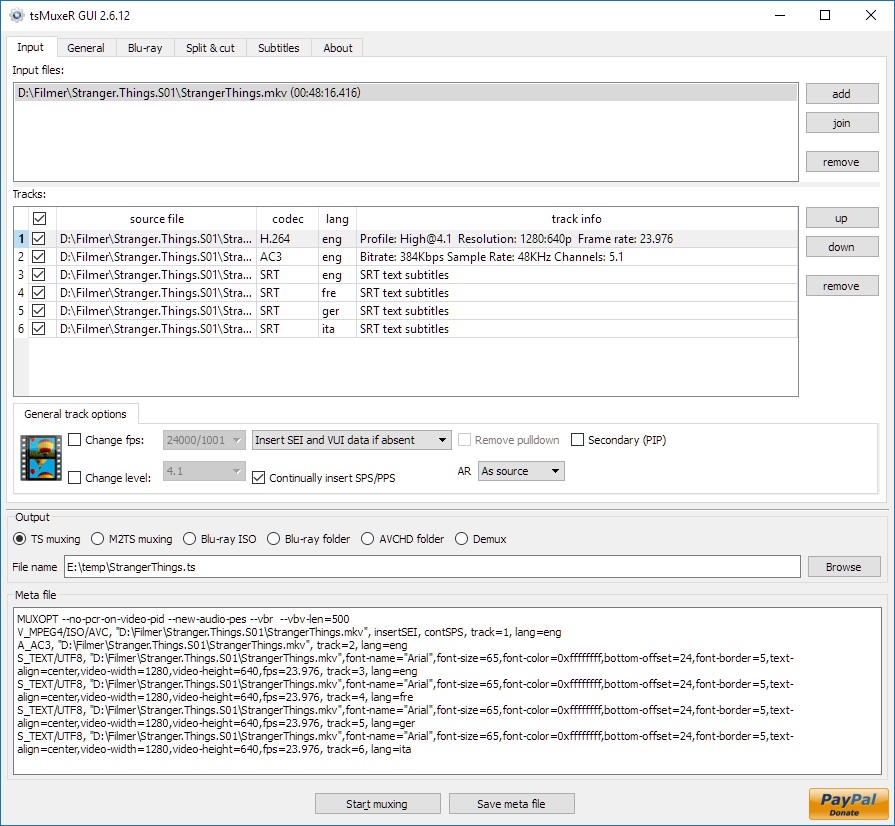
tsMuxer is a Transport Stream muxer. Remux/mux elementary streams, EVO/VOB/MPG, MKV/MKA, MP4/MOV, TS, M2TS to TS to M2TS. Supported video codecs H.264/AVC, H.265/HEVC, VC-1, MPEG2. Supported audio codecs AAC, AC3 / E-AC3(DD+), DTS/ DTS-HD. Ability to set muxing fps manually and automatically, Ability to change level for H.264 streams, Ability to shift a sound tracks, Ability to extract DTS core from DTS-HD, Ability to join files. Output/Author to compliant Blu-ray Disc or AVCHD. Blu-ray 3D support in version 1.11+.
Free software
OS:


File size: 12MB
Portable version
Other versions
Old versions
Version history
Alternative software
OS:
File size: 12MB
Portable version
Other versions
Old versions
Version history
Alternative software
Screenshots
Latest version
Download
Download tsMuxeR 2.18.16 Windows 64-bit 12MB Win64
Portable 
Download tsMuxeR 2.18.16 Windows 12MB Win
Portable Download tsMuxeR 2.18.16 Mac Silicon ARM 64-bit 12MB MacARM64
Download tsMuxeR 2.18.16 Linux 64-bit 12MB Linux64
Download Beta, Update and other versions
Download tsMuxeR 2.7.0 Original Windows 64-bit 12MB Win64
Download tsMuxeR 2.7.0 Original Windows 7MB Win
Download tsMuxeR 2.7.0 Original Mac 57MB Mac
Download tsMuxeR 2.7.0 Original Linux 33MB Linux
Download the tsMuxer 2.7.0 source code
Download the tsMuxer 2.7.2 fork source code
Download old versions

Software License
Supported operating systems
Mac OS Linux More information and other downloads
Download Tsmuxer for Mac OSX Snow Leopard here
If you have problems playing your Blu-ray on Panasonic players then try reauthor it with Free AVCHD Editor. Read this forum thread for information.
If you have problems playing your Blu-ray on Panasonic players then try reauthor it with Free AVCHD Editor. Read this forum thread for information.
Version history / Release notes / Changelog / What's New
tsMuxeR 2.18.16
Sixteen changes, close behind 2.18.15: thirteen faults and three new things.
Most of it comes from one report about Matroska output that turned out to hold six separate faults, and from a question about chapters added to the end of it.
There is no Intel macOS build this time either. Homebrew has dropped support for Intel Macs, and the Intel build gets its font library from it, so that half of the macOS job still does not run. Apple Silicon is unaffected and is here as usual. If you are on an Intel Mac, 2.18.14 is still available and still works; a way to build without Homebrew is being looked at.
Fixed
Matroska output timed AVC pictures at half rate. An H.264 source came out reading 12.000 fps and a few seconds long, with the picture and the sound otherwise intact. Whether picture order counts by one or by two is a property of the stream, and the check that works it out only ever ran when writing a transport stream. It runs for every output now. Transport stream output is unchanged.
A mux that stopped before its source was finished still reported success. The log said the mux had completed even when most of the input had never been read. It now stops with an error saying how far it got. Cutting a mux short on purpose, with a start or an end time, is unaffected.
Matroska chapters carried no names. The writer put out the times and nothing else, so names were lost in every remux and came back as Chapter 01 and so on. Names are written now, each with the language it was written in. This closes the gap mentioned in the demux entry of 2.18.15.
The window offered chapters only when the output was a disc. Matroska holds chapters perfectly well, but the choices were greyed out for it, so the only way to set them was the command line. They are offered for a Matroska output now.
The chapter list box could not be edited when the list came from the source. A disc folder or an MKV filled the box in and then would not let you change it. You can edit it now, and what you leave in it is what gets written.
The Strikethrough tick on a text subtitle did nothing. The window and the muxer spelled the setting differently, so it was written and then ignored. The two agree now, and the tick works.
The window wrote a subtitle setting that nothing has ever read. It sent an alignment value no version of tsMuxeR understands. It is no longer written, and no output changes, because nothing was using it.
A default track could not be turned off. default= was read as present or absent, so any value at all meant yes and there was no way to say no. It is read for its value now, and none, no, 0, false and off all mean no.
A Matroska to Matroska remux did not keep the default track the source chose. The flag the source carried was not carried through, so a different track could end up marked. It follows the source now.
A subtitle drawn into pictures was declared in the file as text. When an SRT is rendered to picture subtitles for a Matroska output, the track was still labelled as a text track, which players then read wrongly. A track is declared as what it holds now.
The log called a text subtitle PGS. While drawing an SRT into pictures the progress line named the wrong format. It says what it is really doing now.
The help for --layer-break-lbn offered a value that could not work. It printed the default as 12,219,392, but a comma separates values in that option, so pasting the help's own figure asked for three layer breaks, at sectors 12, 219 and 392, and the guard band was written into the middle of the disc instead of at the layer change. The run still reported success. The help now writes the number without grouping and gives a worked example for each disc size. A sector of zero or less is refused on the command line as well, which it was not before, and a break far too small to be a layer boundary now warns and names the comma as the likely cause.
The playlist called a single layer Dolby Vision stream an enhancement layer. A profile 8 or profile 5 stream was written into the playlist as though a base layer sat beside it, which is true only of profile 7. Single layer discs are described correctly now, and discs without Dolby Vision are unchanged.
New
--chapters-file reads a chapter file, and a demux writes one. It takes the simple text form that eac3to and MKVToolNix produce, and Matroska XML as mkvextract writes it, including a file with a byte order mark. A demux now also writes chapters.xml, which keeps the names; chapters.txt is still written as before.
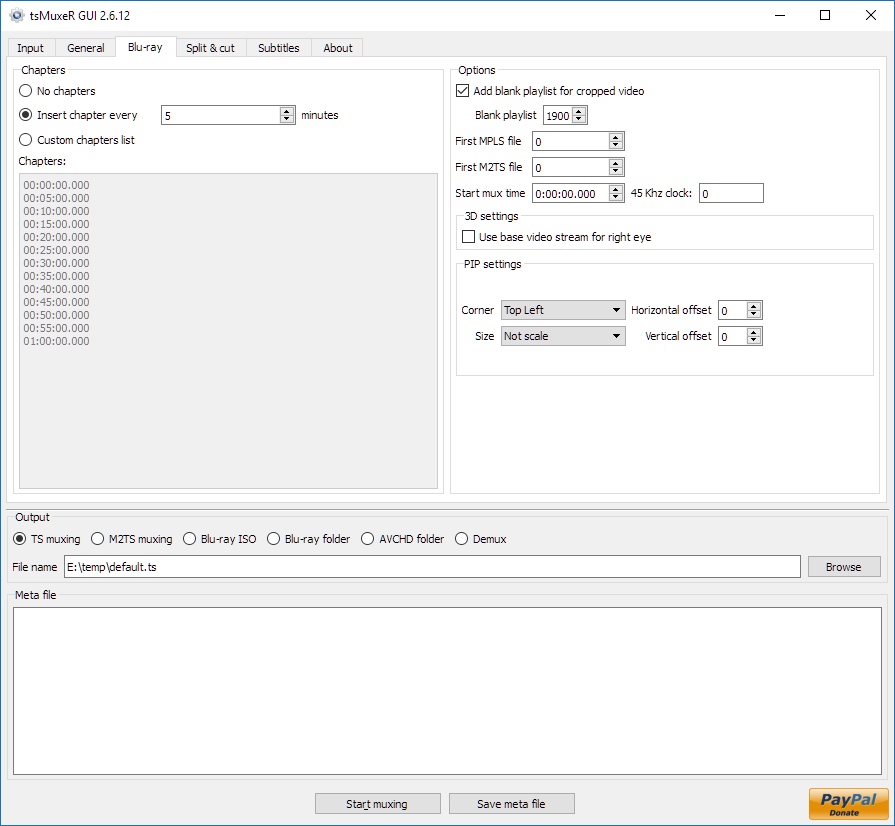
A chapter file can be dropped on the chapter list box, or pasted into it. Drop it on the list of times on the Blu-ray tab: the times appear and the custom chapters choice is ticked for you. Pasting CHAPTER01= lines works as they stand, with nothing to strip by hand first. A list that came from a file is put in order and has repeats removed.
A Dolby Vision stream with no picture for players that cannot read it now says so. Profile 5 carries no fallback, so equipment without Dolby Vision shows nothing at all. The log warns when it sees one, instead of quietly writing a disc that plays on some players and not on others.
Sixteen changes, close behind 2.18.15: thirteen faults and three new things.
Most of it comes from one report about Matroska output that turned out to hold six separate faults, and from a question about chapters added to the end of it.
There is no Intel macOS build this time either. Homebrew has dropped support for Intel Macs, and the Intel build gets its font library from it, so that half of the macOS job still does not run. Apple Silicon is unaffected and is here as usual. If you are on an Intel Mac, 2.18.14 is still available and still works; a way to build without Homebrew is being looked at.
Fixed
Matroska output timed AVC pictures at half rate. An H.264 source came out reading 12.000 fps and a few seconds long, with the picture and the sound otherwise intact. Whether picture order counts by one or by two is a property of the stream, and the check that works it out only ever ran when writing a transport stream. It runs for every output now. Transport stream output is unchanged.
A mux that stopped before its source was finished still reported success. The log said the mux had completed even when most of the input had never been read. It now stops with an error saying how far it got. Cutting a mux short on purpose, with a start or an end time, is unaffected.
Matroska chapters carried no names. The writer put out the times and nothing else, so names were lost in every remux and came back as Chapter 01 and so on. Names are written now, each with the language it was written in. This closes the gap mentioned in the demux entry of 2.18.15.
The window offered chapters only when the output was a disc. Matroska holds chapters perfectly well, but the choices were greyed out for it, so the only way to set them was the command line. They are offered for a Matroska output now.
The chapter list box could not be edited when the list came from the source. A disc folder or an MKV filled the box in and then would not let you change it. You can edit it now, and what you leave in it is what gets written.
The Strikethrough tick on a text subtitle did nothing. The window and the muxer spelled the setting differently, so it was written and then ignored. The two agree now, and the tick works.
The window wrote a subtitle setting that nothing has ever read. It sent an alignment value no version of tsMuxeR understands. It is no longer written, and no output changes, because nothing was using it.
A default track could not be turned off. default= was read as present or absent, so any value at all meant yes and there was no way to say no. It is read for its value now, and none, no, 0, false and off all mean no.
A Matroska to Matroska remux did not keep the default track the source chose. The flag the source carried was not carried through, so a different track could end up marked. It follows the source now.
A subtitle drawn into pictures was declared in the file as text. When an SRT is rendered to picture subtitles for a Matroska output, the track was still labelled as a text track, which players then read wrongly. A track is declared as what it holds now.
The log called a text subtitle PGS. While drawing an SRT into pictures the progress line named the wrong format. It says what it is really doing now.
The help for --layer-break-lbn offered a value that could not work. It printed the default as 12,219,392, but a comma separates values in that option, so pasting the help's own figure asked for three layer breaks, at sectors 12, 219 and 392, and the guard band was written into the middle of the disc instead of at the layer change. The run still reported success. The help now writes the number without grouping and gives a worked example for each disc size. A sector of zero or less is refused on the command line as well, which it was not before, and a break far too small to be a layer boundary now warns and names the comma as the likely cause.
The playlist called a single layer Dolby Vision stream an enhancement layer. A profile 8 or profile 5 stream was written into the playlist as though a base layer sat beside it, which is true only of profile 7. Single layer discs are described correctly now, and discs without Dolby Vision are unchanged.
New
--chapters-file reads a chapter file, and a demux writes one. It takes the simple text form that eac3to and MKVToolNix produce, and Matroska XML as mkvextract writes it, including a file with a byte order mark. A demux now also writes chapters.xml, which keeps the names; chapters.txt is still written as before.
A chapter file can be dropped on the chapter list box, or pasted into it. Drop it on the list of times on the Blu-ray tab: the times appear and the custom chapters choice is ticked for you. Pasting CHAPTER01= lines works as they stand, with nothing to strip by hand first. A list that came from a file is put in order and has repeats removed.
A Dolby Vision stream with no picture for players that cannot read it now says so. Profile 5 carries no fallback, so equipment without Dolby Vision shows nothing at all. The log warns when it sees one, instead of quietly writing a disc that plays on some players and not on others.
View full changelog
All features
Supported incoming formats:
* TS;
* M2TS;
* Blu-ray;
* Demux option.
Supported videocodecs:
* H.264
* Microsoft VC-1;
* MPEG-2.
Supported audiocodecs:
* AAC;
* AC3 / E-AC3(DD+);
* Dolby True HD (for streams with AC3 core only);
* DTS/ DTS-HD;
* LPCM.
Supported subtitle types:
* M2TS Presentation graphic stream.
* SRT text subtitles
Supported containers and formats:
* Elementary stream;
* Transport stream TS and M2TS;
* Program stream EVO/VOB/MPG;
* Matroska MKV/MKA;
* MP4/MOV
Main features:
* Automatic or manual fps adjustment while mixing;
* Level changing as well as SEI, SPS/PPS elements and NAL unit delimiter cycle insertion while mixing H.264;
* Audio tracks and subtitles time shifting;
* Ability to extract DTS core from DTS-HD;
* Ability to extract AC3 core from True-HD;
* Ability to join files;
* Ability to adjust fps for subtitles;
* Ability to convert LPCM streams into WAVE and vice versa;
* Track language information injection into blu-ray structure and TS header;
* Ability to cut source files;
* Ability to split output file;
* Ability to detect audio delay for TS/M2TS/MPG/VOB/EVO sources;
* Ability to remove pulldown info from stream;
* Ability to open Blu-ray playlist (MPLS) files;
* Ability to convert SRT subtitles to PGS;
* Tags for SRT subtitles support - tags for changing font, color, size, etc.; tag's syntax is similar to HTML;
* United cross-platform GUI - Windows, Linux, MacOS.
* TS;
* M2TS;
* Blu-ray;
* Demux option.
Supported videocodecs:
* H.264
* Microsoft VC-1;
* MPEG-2.
Supported audiocodecs:
* AAC;
* AC3 / E-AC3(DD+);
* Dolby True HD (for streams with AC3 core only);
* DTS/ DTS-HD;
* LPCM.
Supported subtitle types:
* M2TS Presentation graphic stream.
* SRT text subtitles
Supported containers and formats:
* Elementary stream;
* Transport stream TS and M2TS;
* Program stream EVO/VOB/MPG;
* Matroska MKV/MKA;
* MP4/MOV
Main features:
* Automatic or manual fps adjustment while mixing;
* Level changing as well as SEI, SPS/PPS elements and NAL unit delimiter cycle insertion while mixing H.264;
* Audio tracks and subtitles time shifting;
* Ability to extract DTS core from DTS-HD;
* Ability to extract AC3 core from True-HD;
* Ability to join files;
* Ability to adjust fps for subtitles;
* Ability to convert LPCM streams into WAVE and vice versa;
* Track language information injection into blu-ray structure and TS header;
* Ability to cut source files;
* Ability to split output file;
* Ability to detect audio delay for TS/M2TS/MPG/VOB/EVO sources;
* Ability to remove pulldown info from stream;
* Ability to open Blu-ray playlist (MPLS) files;
* Ability to convert SRT subtitles to PGS;
* Tags for SRT subtitles support - tags for changing font, color, size, etc.; tag's syntax is similar to HTML;
* United cross-platform GUI - Windows, Linux, MacOS.
Sections/Browse similar tools
All In One MKV to MP4/Blu-ray/UHD
Authoring (Blu-ray/UHD/AVCHD)
DigitalTV/DVB/IPTV
Linux Video Tools
MacOS Video Tools
Video Demultiplexers/Multiplexers
Alternative to tsMuxeR
(Latest version updated)Clown_BD (May 31, 2013)
Free AVCHD Editor (Jun 9, 2011)
MakeMKV (Sep 20, 2026)
multiAVCHD (Jul 4, 2012)
ToNMT UI (Jun 1, 2009)
TsRemux (Apr 20, 2010)
Guides and How to's
Adding a subtitle on a Blu-ray Disc keeping the original menu
- ReadBasic Guide for HDV to Blu-ray
- ReadBlu-ray to MKV with optional multi-language audio/subtitle support
- ReadConvert MKV to AVCHD for PS3 and Blu-ray
- ReadHow to add menus to avcHD without re-encode the files
- ReadHow to convert a Blu-ray disc into a .MKV 720P file
- ReadHow to Decrypt/store/play Blu-Ray and HD-DVD Discs
- ReadHow to rip a Blu-ray disc and remux it to MKV
- ReadMKV H.264/AVC to VC-1 Conversion Guide
- ReadtsMuxeR video tutorials
View all guides with guide description here
Tool features - Convert
M2TS to AVCHD, M2TS to Blu-ray, MKV to AVCHD, MKV to Blu-ray, MTS to AVCHD, MTS to Blu-ray, TS to AVCHD, TS to Blu-ray
Acronyms / Also Known As
Download tsMuxeR Portable download from the Download links under Download and Download other versions!
Notify me when software updated or report software
| 119 reviews, Showing 1 to 5 reviews |
Looking forward to trying this release. The link to the developers page should probably be changed to this release (https://github.com/teaching-droid/tsMuxer/releases/).
Review by mail2tom on
Jul 25, 2026 Version: tsMuxeR 2.11.0 fork
OS: Windows 11 64-bit Ease of use: 5/10
Functionality: 9/10
Value for money: 10/10
Overall: 7/10
Excellent tool! I use it for all bluray remuxes. I thought the development was no longer, but found this fork.
Still some very simple features that I'm missing that I believe the developer would implement without trouble.
Where can I post to the developer(s)?
Still some very simple features that I'm missing that I believe the developer would implement without trouble.
Where can I post to the developer(s)?
Review by O2 on
Jul 21, 2026 Version: 2.7.2-dev
OS: Windows 11 64-bit Ease of use: 8/10
Functionality: 5/10
Value for money: 8/10
Overall: 8/10
Rating by on
Jul 1, 2025 Version: 2.7
OS: Windows 11 64-bit Ease of use: 1/10
Functionality: 1/10
Value for money: 1/10
Overall: 1/10
No support for Atmos. Hope this will be supported in the next update. Fantastic software.
Review by Roger Jacobsen on
Sep 4, 2024 Version: 2.6.12
OS: Windows 11 64-bit Ease of use: 9/10
Functionality: 9/10
Value for money: 10/10
Overall: 9/10
Would be good if the program could read the subtitle in VOB format which is often in MKV files
Review by Johan on
Jul 6, 2024 Version: 2.6.12
OS: Windows 11 64-bit Ease of use: 10/10
Functionality: 10/10
Value for money: 10/10
Overall: 10/10
| 119 reviews, Showing 1 to 5 reviews |
| 1 tool hits, Showing 1 to 1 tools |
Explanation:
NEW SOFTWARE= New tool since your last visit
NEW VERSION= New version since your last visit
NEW REVIEW= New review since your last visit
NEW VERSION= New version
Latest version
Version number / Beta version number / Update version number and when it whas released.
Type and download
NO MORE UPDATES? = The software hasn't been updated in over 2 years.
NO LONGER DEVELOPED = The software hasn't been updated in over 5 years.
RECENTLY UPDATED = The software has been updated the last 31 days.
Freeware = Download Free software.
Freeware Trialware = Download Free software but some parts are trial/shareware.
Free software = Download Free software and also open source code also known as FOSS (Free and Open Source Software).
Free software Trialware = Download Free software and also open source code but some parts are trial/shareware.
Freeware Ads = Download Free software but supported by advertising, usually with a included browser toolbar. It may be disabled when installing or after installation.
Free software Ads = Free Download software and open source code but supported by advertising, usually with a included browser toolbar. It may be disabled when installing or after installation.
Trialware = Also called shareware or demo. Free Trial version available for download and testing with usually a time limit or limited functions.
Payware = No demo or trial available.
Portable version = A portable/standalone version is available. No installation is required.
v1.0.1 = Latest version available.
Download beta = It could be a Beta, RC(Release Candidate) or an Alpha / Nightly / Unstable version of the software.
Download 15MB = A direct link to the software download.
Win = Windows download version for 32-bit and 64-bit Windows.
Win64 = Windows 64-bit download version for 64-bit Windows.
WinARM64 = Windows 64-bit ARM download version for Windows ARM64/AArch64.
Mac = Mac download version for 64-bit Mac OS Intel/ARM64/AArch64.
MacARM64 = Mac Silicon download version for 64-bit Mac OS ARM64/AArch64.
Mac64 = Mac OS download version for 64-bit Intel Mac OS.
Linux = Linux download version.
Linux64 = Linux download version for 64bit Linux.
Linux ARM = Linux download version for Linux ARM64/AArch64.
Portable = Portable version. No installation is required.
Ad-Supported = The software is bundled with advertising. Be careful when you install the software and disable addons that you don't want!
Visit developers site = A link to the software developer site.
Download (mirror link) = A mirror link to the software download. It may not contain the latest versions.
Download old versions = Free downloads of previous versions of the program.
Download 64-bit version = If you have a 64bit operating system you can download this version.
Download portable version = Portable/Standalone version meaning that no installation is required, just extract the files to a folder and run directly.
Portable version available = Download the portable version and you can just extract the files and run the program without installation.
Old versions available = Download old versions of the program.
Version history available = Complete changelog on our site.
= Windows version available.
= Mac OS version available.
= Linux version available.
Our hosted software are virus and malware scanned with several antivirus programs using www.virustotal.com. (NOTE! Just one virustotal warning is 99.9% a false positive. And some software might receive 2-6 warnings but it's if they are not all same virus/trojan then it's 99% false positives.)
Rating
Rating from 0-10.
NEW SOFTWARE= New tool since your last visit
NEW VERSION= New version since your last visit
NEW REVIEW= New review since your last visit
NEW VERSION= New version
Latest version
Version number / Beta version number / Update version number and when it whas released.
Type and download
NO MORE UPDATES? = The software hasn't been updated in over 2 years.
NO LONGER DEVELOPED = The software hasn't been updated in over 5 years.
RECENTLY UPDATED = The software has been updated the last 31 days.
Freeware = Download Free software.
Freeware Trialware = Download Free software but some parts are trial/shareware.
Free software = Download Free software and also open source code also known as FOSS (Free and Open Source Software).
Free software Trialware = Download Free software and also open source code but some parts are trial/shareware.
Freeware Ads = Download Free software but supported by advertising, usually with a included browser toolbar. It may be disabled when installing or after installation.
Free software Ads = Free Download software and open source code but supported by advertising, usually with a included browser toolbar. It may be disabled when installing or after installation.
Trialware = Also called shareware or demo. Free Trial version available for download and testing with usually a time limit or limited functions.
Payware = No demo or trial available.
Portable version = A portable/standalone version is available. No installation is required.
v1.0.1 = Latest version available.
Download beta = It could be a Beta, RC(Release Candidate) or an Alpha / Nightly / Unstable version of the software.
Download 15MB = A direct link to the software download.
Win = Windows download version for 32-bit and 64-bit Windows.
Win64 = Windows 64-bit download version for 64-bit Windows.
WinARM64 = Windows 64-bit ARM download version for Windows ARM64/AArch64.
Mac = Mac download version for 64-bit Mac OS Intel/ARM64/AArch64.
MacARM64 = Mac Silicon download version for 64-bit Mac OS ARM64/AArch64.
Mac64 = Mac OS download version for 64-bit Intel Mac OS.
Linux = Linux download version.
Linux64 = Linux download version for 64bit Linux.
Linux ARM = Linux download version for Linux ARM64/AArch64.
Portable = Portable version. No installation is required.
Ad-Supported = The software is bundled with advertising. Be careful when you install the software and disable addons that you don't want!
Visit developers site = A link to the software developer site.
Download (mirror link) = A mirror link to the software download. It may not contain the latest versions.
Download old versions = Free downloads of previous versions of the program.
Download 64-bit version = If you have a 64bit operating system you can download this version.
Download portable version = Portable/Standalone version meaning that no installation is required, just extract the files to a folder and run directly.
Portable version available = Download the portable version and you can just extract the files and run the program without installation.
Old versions available = Download old versions of the program.
Version history available = Complete changelog on our site.
= Windows version available. = Mac OS version available. = Linux version available.Our hosted software are virus and malware scanned with several antivirus programs using www.virustotal.com. (NOTE! Just one virustotal warning is 99.9% a false positive. And some software might receive 2-6 warnings but it's if they are not all same virus/trojan then it's 99% false positives.)
Rating
Rating from 0-10.
Browse software by sections
All In One Blu-ray Converters (9)
All In One DVD Converters (12)
All In One MKV to MP4, Blu-ray, UHD (11)
All In One Video Converters (19)
Animation (3D, 2D Animation) (12)
Audio Editors (22)
Audio Encoders (80)
Audio Players (19)
Authoring (Blu-ray, UHD, AVCHD) (13)
Authoring (DivX) (4)
Authoring (DVD) (26)
Authoring (SVCD, VCD) (9)
Bitrate Calculators (7)
Blu-ray to AVI, MKV, MP4 (15)
Blu-ray to Blu-ray, AVCHD (10)
Burn (CD,DVD,Blu-ray) (24)
Camcorders, DV, HDV, AVCHD (31)
Capture TV, DVD, VCR (30)
CD, DVD, Blu-ray recovery (3)
Codec Packs (6)
All In One DVD Converters (12)
All In One MKV to MP4, Blu-ray, UHD (11)
All In One Video Converters (19)
Animation (3D, 2D Animation) (12)
Audio Editors (22)
Audio Encoders (80)
Audio Players (19)
Authoring (Blu-ray, UHD, AVCHD) (13)
Authoring (DivX) (4)
Authoring (DVD) (26)
Authoring (SVCD, VCD) (9)
Bitrate Calculators (7)
Blu-ray to AVI, MKV, MP4 (15)
Blu-ray to Blu-ray, AVCHD (10)
Burn (CD,DVD,Blu-ray) (24)
Camcorders, DV, HDV, AVCHD (31)
Capture TV, DVD, VCR (30)
CD, DVD, Blu-ray recovery (3)
Codec Packs (6)
Codec, Video Identifiers (31)
Codecs (67)
Decrypters (DVD Rippers) (16)
Decrypters (UHD, Blu-ray Rippers) (8)
DigitalTV, DVB, IPTV (40)
DVD to DVD (20)
DVD to MP4, MKV, H264, H265 (16)
DVD to VCD, SVCD (5)
DVD to XviD, AVI, DivX (16)
ISO, Image (14)
Linux Video Tools (215)
MacOS Video Tools (247)
Media (Blu-ray, DVD, CD) (9)
Media Center, HTPC (24)
Other Useful Tools (136)
Photo Blu-ray, DVD, SlideShow (8)
Portable (Mobile, PSP) (35)
Region Free Tools (5)
Screen capture , Screen recording (25)
Screenshots , Thumbnails (13)
Codecs (67)
Decrypters (DVD Rippers) (16)
Decrypters (UHD, Blu-ray Rippers) (8)
DigitalTV, DVB, IPTV (40)
DVD to DVD (20)
DVD to MP4, MKV, H264, H265 (16)
DVD to VCD, SVCD (5)
DVD to XviD, AVI, DivX (16)
ISO, Image (14)
Linux Video Tools (215)
MacOS Video Tools (247)
Media (Blu-ray, DVD, CD) (9)
Media Center, HTPC (24)
Other Useful Tools (136)
Photo Blu-ray, DVD, SlideShow (8)
Portable (Mobile, PSP) (35)
Region Free Tools (5)
Screen capture , Screen recording (25)
Screenshots , Thumbnails (13)
Subtitle Editors, Converters (72)
Tag Editors (4)
Video Compare Software (5)
Video Demultiplexers, Multiplexers (66)
Video Editors (Advanced, NLE) (35)
Video Editors (Basic) (57)
Video Editors (H264, MP4, MKV, MTS) (19)
Video Editors (Lossless) (5)
Video Editors (MPG, DVD) (16)
Video Editors (WMV, AVI) (15)
Video Encoders (AV1, VP8, VP9) (2)
Video Encoders (AVI, WMV) (38)
Video Encoders (H264, H265, MP4, MKV) (45)
Video Encoders (MPG, DVD) (23)
Video Encoders , Converters (156)
Video Frameservers (9)
Video Players (48)
Video Repair, Fix (24)
Video Scripting (10)
Video Streaming (20)
Tag Editors (4)
Video Compare Software (5)
Video Demultiplexers, Multiplexers (66)
Video Editors (Advanced, NLE) (35)
Video Editors (Basic) (57)
Video Editors (H264, MP4, MKV, MTS) (19)
Video Editors (Lossless) (5)
Video Editors (MPG, DVD) (16)
Video Editors (WMV, AVI) (15)
Video Encoders (AV1, VP8, VP9) (2)
Video Encoders (AVI, WMV) (38)
Video Encoders (H264, H265, MP4, MKV) (45)
Video Encoders (MPG, DVD) (23)
Video Encoders , Converters (156)
Video Frameservers (9)
Video Players (48)
Video Repair, Fix (24)
Video Scripting (10)
Video Streaming (20)