
Help us keep the list up to date and submit new video software here.
Tool
Description
Type
Rating
Reviews
Audacity is a free, easy-to-use and multilingual audio editor and recorder for Windows, Mac OS X, GNU/Linux and other operating systems. You can use Audacity to: Record live audio. Convert tapes and records into digital recordings or CDs. Edit Ogg Vorbis, MP3, WAV or AIFF sound files. Cut, copy, splice or mix sounds together. Change the speed or pitch of a recording.
Free software
OS:


File size: 17.7MB
Beta version
Portable version
Old versions
Version history
Alternative software
OS:
File size: 17.7MB
Beta version
Portable version
Old versions
Version history
Alternative software
Screenshots
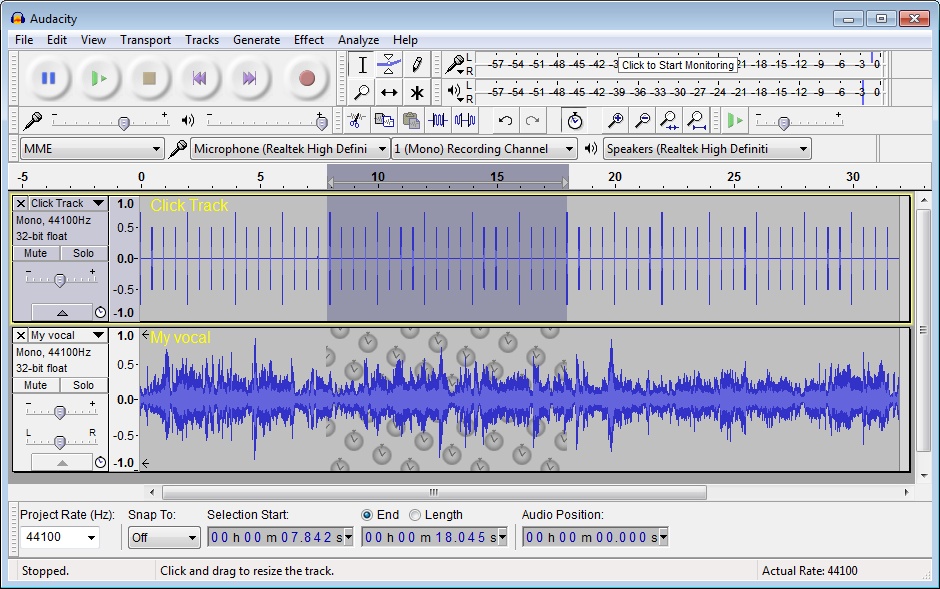
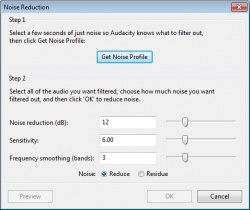
Latest version
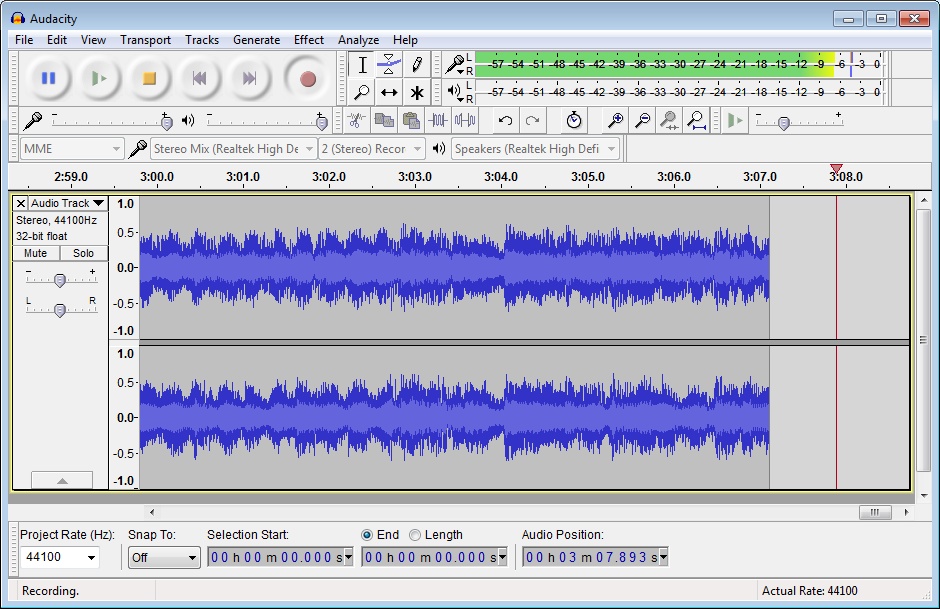
Download
Download Audacity 3.7.8 Windows 64-bit 19MB Win64
Download Audacity 3.7.8 Mac 64-bit 67MB Mac64
Download Audacity 3.7.8 Linux 64-bit 108MB Linux64
Download Beta, Portable and other versions
Portable 
Download Audacity 3.7.8 Windows ARM 64-bit 19MB WinARM64
Download Audacity 3.7.8 Portable Windows ARM 64-bit 19MB WinARM64
Portable Download Audacity 4.0.0 Beta 2 Windows 64-bit 17.7MB Win64
Download Audacity 4.0.0 Beta 2 Mac 17.7MB Mac
Download Audacity 4.0.0 Beta 2 Linux 17.7MB Linux
Download old versions

Software License
Supported operating systems
Mac OS Linux Version history / Release notes / Changelog / What's New
Audacity 3.7.8
This is a patch release. It contains the following changes:
#10688 Fixed an exception thrown when pasting into a newly-created track (Thanks, David Bailes (@DavidBailes)!)
#10870, #10884, #10775, #10629 Fixed tone generation, waveform-scale setting, SetClip Name parameter,
and clip-boundary command names for scripting and macros (Thank you, David Bailes (@DavidBailes)!)
#11106 Fixed the loading of presets for the Distortion effect (A million thanks, David Bailes (@DavidBailes)!)
#10947 Fixed paste into an empty audio track not preserving the source sample rate (Thanks, Juan Gabriel Colonna (@juancolonna)!)
#10776 Allowed AltGr modifier in label and clip name editing (Thanks, Davide Peressoni (@DPDmancul)!)
#9938 Added options to choose where silence is truncated (start/middle/end) (Thanks, Noah Rosenfield (@nosenfield)!)
#9935 Added Podcast 2.0 chapters JSON export for label tracks (Thanks, Noah Rosenfield (@nosenfield)!)
#10103 Improve UI on HiDPI displays on Linux/wxGTK (Thanks, Ivan A. Melnikov (@iv-m)!)
#10099 Fixed MixerBoard Mute and Solo button display (Thanks, Ivan A. Melnikov (@iv-m)!)
#10681 Fixed multichannel FLAC import
#10999 Fixed envelope being broken after joining clips
This is a patch release. It contains the following changes:
#10688 Fixed an exception thrown when pasting into a newly-created track (Thanks, David Bailes (@DavidBailes)!)
#10870, #10884, #10775, #10629 Fixed tone generation, waveform-scale setting, SetClip Name parameter,
and clip-boundary command names for scripting and macros (Thank you, David Bailes (@DavidBailes)!)
#11106 Fixed the loading of presets for the Distortion effect (A million thanks, David Bailes (@DavidBailes)!)
#10947 Fixed paste into an empty audio track not preserving the source sample rate (Thanks, Juan Gabriel Colonna (@juancolonna)!)
#10776 Allowed AltGr modifier in label and clip name editing (Thanks, Davide Peressoni (@DPDmancul)!)
#9938 Added options to choose where silence is truncated (start/middle/end) (Thanks, Noah Rosenfield (@nosenfield)!)
#9935 Added Podcast 2.0 chapters JSON export for label tracks (Thanks, Noah Rosenfield (@nosenfield)!)
#10103 Improve UI on HiDPI displays on Linux/wxGTK (Thanks, Ivan A. Melnikov (@iv-m)!)
#10099 Fixed MixerBoard Mute and Solo button display (Thanks, Ivan A. Melnikov (@iv-m)!)
#10681 Fixed multichannel FLAC import
#10999 Fixed envelope being broken after joining clips
View full changelog
All features
This is a list of features in Audacity, the free, open source, cross-platform audio editor. For full information on how to use these features, go to the help pages.
Recording
Audacity can record live audio through a microphone or mixer, or digitize recordings from cassette tapes, records, or minidiscs. With some sound cards, Audacity can also capture streaming audio.
Record from microphone, line input, USB/Firewire devices and others.
Device Toolbar manages multiple input and output devices.
Timer Record and Sound Activated Recording features.
Dub over existing tracks to create multi-track recordings.
Record at high sample rates in excess of 192,000 Hz (subject to appropriate hardware).
Record multiple channels at once (subject to appropriate hardware).
Level meters can monitor volume levels before, during and after recording. Clipping can be displayed in the waveform or in a label track.
Import and Export
Import sound files, edit them, and combine them with other files or new recordings. Export your recordings in many different file formats, including multiple files at once.
Import and export WAV, AIFF, AU, FLAC and Ogg Vorbis files.
Fast "On-Demand" import of WAV or AIFF files (letting you start work with the files almost immediately) if read directly from source. "On-Demand" import of other file formats is available with the optional FFmpeg library.
Import and export all formats supported by libsndfile such as GSM 6.10, 32-bit and 64-bit float WAV and U/A-Law.
Import MPEG audio (including MP2 and MP3 files) using libmad.
Import raw (headerless) audio files using the "Import Raw" command.
Create WAV or AIFF files suitable for burning to audio CD.
Export MP3 files with the optional LAME encoder library.
Import and export AC3, M4A/M4R (AAC) and WMA with the optional FFmpeg library (this also supports import of audio from video files).
Sound Quality
Supports 16-bit, 24-bit and 32-bit (floating point) samples (the latter preserves samples in excess of full scale).
Sample rates and formats are converted using high-quality resampling and dithering.
Tracks with different sample rates or formats are converted automatically in real time.
Editing
Easy editing with Cut, Copy, Paste and Delete.
Unlimited sequential Undo (and Redo) to go back any number of steps.
Edit and mix large numbers of tracks.
Multiple clips are allowed per track.
Label tracks with selectable Sync-Lock Tracks feature for keeping tracks and labels synchronized.
Draw Tool to alter individual sample points.
Envelope Tool to fade the volume up or down smoothly.
Automatic Crash Recovery in the event of abnormal program termination.
Accessibility
Tracks and selections can be fully manipulated using the keyboard.
Large range of keyboard shortcuts.
Excellent support for JAWS, NVDA and other screen readers on Windows, and for VoiceOver on Mac.
Effects
Change the pitch without altering the tempo (or vice-versa).
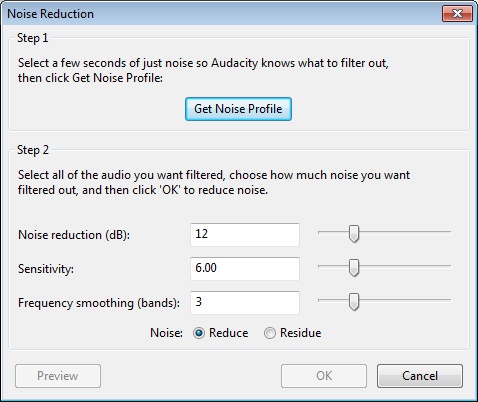
Remove static, hiss, hum or other constant background noises.
Alter frequencies with Equalization, Bass Boost, High/Low Pass and Notch Filter effects.
Adjust volume with Compressor, Amplify, Normalize and Fade In/Out effects.
Remove Vocals from suitable stereo tracks.
Create voice-overs for podcasts or DJ sets using Auto Duck effect.
Other built-in effects include:
Echo
Phaser
Wahwah
Paulstretch (extreme stretch)
Reverse
Truncate Silence
Run "Chains" of effects on a project or multiple files in Batch Processing mode.
Plug-ins
Add new effects with LADSPA, Nyquist, VST and Audio Unit effect plug-ins.
Effects written in the Nyquist programming language can be easily modified in a text editor - or you can even write your own plug-in.
Analysis
Spectrogram view modes for visualizing frequencies.
"Plot Spectrum" command for detailed frequency analysis.
"Sample Data Export" for exporting a file containing amplitude values for each sample in the selection.
Contrast Analysis for analyzing average rms volume differences between foreground speech and background music.
Support for adding VAMP analysis plug-ins.
Free and Cross-Platform
Licensed under the GNU General Public License (GPL).
Runs on Windows, Mac OS X and GNU/Linux.
Recording
Audacity can record live audio through a microphone or mixer, or digitize recordings from cassette tapes, records, or minidiscs. With some sound cards, Audacity can also capture streaming audio.
Record from microphone, line input, USB/Firewire devices and others.
Device Toolbar manages multiple input and output devices.
Timer Record and Sound Activated Recording features.
Dub over existing tracks to create multi-track recordings.
Record at high sample rates in excess of 192,000 Hz (subject to appropriate hardware).
Record multiple channels at once (subject to appropriate hardware).
Level meters can monitor volume levels before, during and after recording. Clipping can be displayed in the waveform or in a label track.
Import and Export
Import sound files, edit them, and combine them with other files or new recordings. Export your recordings in many different file formats, including multiple files at once.
Import and export WAV, AIFF, AU, FLAC and Ogg Vorbis files.
Fast "On-Demand" import of WAV or AIFF files (letting you start work with the files almost immediately) if read directly from source. "On-Demand" import of other file formats is available with the optional FFmpeg library.
Import and export all formats supported by libsndfile such as GSM 6.10, 32-bit and 64-bit float WAV and U/A-Law.
Import MPEG audio (including MP2 and MP3 files) using libmad.
Import raw (headerless) audio files using the "Import Raw" command.
Create WAV or AIFF files suitable for burning to audio CD.
Export MP3 files with the optional LAME encoder library.
Import and export AC3, M4A/M4R (AAC) and WMA with the optional FFmpeg library (this also supports import of audio from video files).
Sound Quality
Supports 16-bit, 24-bit and 32-bit (floating point) samples (the latter preserves samples in excess of full scale).
Sample rates and formats are converted using high-quality resampling and dithering.
Tracks with different sample rates or formats are converted automatically in real time.
Editing
Easy editing with Cut, Copy, Paste and Delete.
Unlimited sequential Undo (and Redo) to go back any number of steps.
Edit and mix large numbers of tracks.
Multiple clips are allowed per track.
Label tracks with selectable Sync-Lock Tracks feature for keeping tracks and labels synchronized.
Draw Tool to alter individual sample points.
Envelope Tool to fade the volume up or down smoothly.
Automatic Crash Recovery in the event of abnormal program termination.
Accessibility
Tracks and selections can be fully manipulated using the keyboard.
Large range of keyboard shortcuts.
Excellent support for JAWS, NVDA and other screen readers on Windows, and for VoiceOver on Mac.
Effects
Change the pitch without altering the tempo (or vice-versa).
Remove static, hiss, hum or other constant background noises.
Alter frequencies with Equalization, Bass Boost, High/Low Pass and Notch Filter effects.
Adjust volume with Compressor, Amplify, Normalize and Fade In/Out effects.
Remove Vocals from suitable stereo tracks.
Create voice-overs for podcasts or DJ sets using Auto Duck effect.
Other built-in effects include:
Echo
Phaser
Wahwah
Paulstretch (extreme stretch)
Reverse
Truncate Silence
Run "Chains" of effects on a project or multiple files in Batch Processing mode.
Plug-ins
Add new effects with LADSPA, Nyquist, VST and Audio Unit effect plug-ins.
Effects written in the Nyquist programming language can be easily modified in a text editor - or you can even write your own plug-in.
Analysis
Spectrogram view modes for visualizing frequencies.
"Plot Spectrum" command for detailed frequency analysis.
"Sample Data Export" for exporting a file containing amplitude values for each sample in the selection.
Contrast Analysis for analyzing average rms volume differences between foreground speech and background music.
Support for adding VAMP analysis plug-ins.
Free and Cross-Platform
Licensed under the GNU General Public License (GPL).
Runs on Windows, Mac OS X and GNU/Linux.
Sections/Browse similar tools
Alternative to Audacity
(Latest version updated)Adobe Audition (Jun 17, 2026)
GoldWave (Aug 4, 2026)
ocenaudio (Aug 11, 2026)
Sound Forge (Mar 25, 2026)
Tenacity (Jul 6, 2026)
WavePad (Aug 11, 2026)
WaveShop (Nov 8, 2013)
Wavosaur (May 20, 2023)
Guides and How to's
Creating .mp3 ringtones using Audacity
- ReadMini Guide - Using Audacity With VST Plugins
- ReadAudacity video tutorials
View all guides with guide description here
Tool features - Convert
Download Audacity Portable download from the Download links under Download and Download other versions!
Notify me when software updated or report software
| 37 reviews, Showing 1 to 5 reviews |
Audacity, is the first thing you install, if you are a fan of audio general.
I'm using the 2.4.2v and latest 3.2.4v, on Windows.
After 3.0 + they break into your privacy, they colecting data from your files.
Newer versions introduced audio-sharing, that for me is useless.
User-friendly, even an newcomer of computing, can get used to it like in some days (very-basic editing).
But, when it comes to pro-cutting, entering tags or mixing audio, you may must have years
on your side, using that program.
*Must have installed the latest versions of ffmpeg to open Mpeg files.
Most plugins are paid, which I find reasonable, since they are provided for demanding users and not newbies.
Otherwise, this program offers audio cutting, filtering, recording and audio export to
3 basic types, WAV, OGG, MP3 and MIDI recorded sessions.
Supports almost all of audio inputs, sound cards and brigded-instruments always with proper settings.
Audacity is exact it says: City of Audio.
I'm using the 2.4.2v and latest 3.2.4v, on Windows.
After 3.0 + they break into your privacy, they colecting data from your files.
Newer versions introduced audio-sharing, that for me is useless.
User-friendly, even an newcomer of computing, can get used to it like in some days (very-basic editing).
But, when it comes to pro-cutting, entering tags or mixing audio, you may must have years
on your side, using that program.
*Must have installed the latest versions of ffmpeg to open Mpeg files.
Most plugins are paid, which I find reasonable, since they are provided for demanding users and not newbies.
Otherwise, this program offers audio cutting, filtering, recording and audio export to
3 basic types, WAV, OGG, MP3 and MIDI recorded sessions.
Supports almost all of audio inputs, sound cards and brigded-instruments always with proper settings.
Audacity is exact it says: City of Audio.
Review by DVDLover00 on
Mar 12, 2023 Version: 3.2.4
OS: Windows 10 64-bit Ease of use: 7/10
Functionality: 10/10
Value for money: 10/10
Overall: 9/10
Even professionals use it!
Review by Darren on
Dec 29, 2022 Version: 3.2.3
OS: Windows 10 64-bit Ease of use: 8/10
Functionality: 10/10
Value for money: 10/10
Overall: 10/10
The best audio editor available so easy to use unlike Goldwave & also FOSS.
Review by alex 11 on
Apr 20, 2022 Version: 3.1.3
OS: Windows 10 64-bit Ease of use: 10/10
Functionality: 10/10
Value for money: 10/10
Overall: 10/10
Rating by gdans on
Jan 8, 2022 Version: 3.1.3
OS: Windows 10 64-bit Ease of use: 10/10
Functionality: 10/10
Value for money: 10/10
Overall: 10/10
I'd love for the developers of this excellent tool to upgrade for some new version of ffmpeg. When exporting final material I mostly use external encoders by now.
Review by serge on
Jul 28, 2021 Version: 3.0.3
OS: Windows 10 64-bit Ease of use: 10/10
Functionality: 8/10
Value for money: 10/10
Overall: 10/10
| 37 reviews, Showing 1 to 5 reviews |
| 1 tool hits, Showing 1 to 1 tools |
Explanation:
NEW SOFTWARE= New tool since your last visit
NEW VERSION= New version since your last visit
NEW REVIEW= New review since your last visit
NEW VERSION= New version
Latest version
Version number / Beta version number / Update version number and when it whas released.
Type and download
NO MORE UPDATES? = The software hasn't been updated in over 2 years.
NO LONGER DEVELOPED = The software hasn't been updated in over 5 years.
RECENTLY UPDATED = The software has been updated the last 31 days.
Freeware = Download Free software.
Freeware Trialware = Download Free software but some parts are trial/shareware.
Free software = Download Free software and also open source code also known as FOSS (Free and Open Source Software).
Free software Trialware = Download Free software and also open source code but some parts are trial/shareware.
Freeware Ads = Download Free software but supported by advertising, usually with a included browser toolbar. It may be disabled when installing or after installation.
Free software Ads = Free Download software and open source code but supported by advertising, usually with a included browser toolbar. It may be disabled when installing or after installation.
Trialware = Also called shareware or demo. Free Trial version available for download and testing with usually a time limit or limited functions.
Payware = No demo or trial available.
Portable version = A portable/standalone version is available. No installation is required.
v1.0.1 = Latest version available.
Download beta = It could be a Beta, RC(Release Candidate) or an Alpha / Nightly / Unstable version of the software.
Download 15MB = A direct link to the software download.
Win = Windows download version for 32-bit and 64-bit Windows.
Win64 = Windows 64-bit download version for 64-bit Windows.
WinARM64 = Windows 64-bit ARM download version for Windows ARM64/AArch64.
Mac = Mac download version for 64-bit Mac OS Intel/ARM64/AArch64.
MacARM64 = Mac Silicon download version for 64-bit Mac OS ARM64/AArch64.
Mac64 = Mac OS download version for 64-bit Intel Mac OS.
Linux = Linux download version.
Linux64 = Linux download version for 64bit Linux.
Linux ARM = Linux download version for Linux ARM64/AArch64.
Portable = Portable version. No installation is required.
Ad-Supported = The software is bundled with advertising. Be careful when you install the software and disable addons that you don't want!
Visit developers site = A link to the software developer site.
Download (mirror link) = A mirror link to the software download. It may not contain the latest versions.
Download old versions = Free downloads of previous versions of the program.
Download 64-bit version = If you have a 64bit operating system you can download this version.
Download portable version = Portable/Standalone version meaning that no installation is required, just extract the files to a folder and run directly.
Portable version available = Download the portable version and you can just extract the files and run the program without installation.
Old versions available = Download old versions of the program.
Version history available = Complete changelog on our site.
= Windows version available.
= Mac OS version available.
= Linux version available.
Our hosted software are virus and malware scanned with several antivirus programs using www.virustotal.com. (NOTE! Just one virustotal warning is 99.9% a false positive. And some software might receive 2-6 warnings but it's if they are not all same virus/trojan then it's 99% false positives.)
Rating
Rating from 0-10.
NEW SOFTWARE= New tool since your last visit
NEW VERSION= New version since your last visit
NEW REVIEW= New review since your last visit
NEW VERSION= New version
Latest version
Version number / Beta version number / Update version number and when it whas released.
Type and download
NO MORE UPDATES? = The software hasn't been updated in over 2 years.
NO LONGER DEVELOPED = The software hasn't been updated in over 5 years.
RECENTLY UPDATED = The software has been updated the last 31 days.
Freeware = Download Free software.
Freeware Trialware = Download Free software but some parts are trial/shareware.
Free software = Download Free software and also open source code also known as FOSS (Free and Open Source Software).
Free software Trialware = Download Free software and also open source code but some parts are trial/shareware.
Freeware Ads = Download Free software but supported by advertising, usually with a included browser toolbar. It may be disabled when installing or after installation.
Free software Ads = Free Download software and open source code but supported by advertising, usually with a included browser toolbar. It may be disabled when installing or after installation.
Trialware = Also called shareware or demo. Free Trial version available for download and testing with usually a time limit or limited functions.
Payware = No demo or trial available.
Portable version = A portable/standalone version is available. No installation is required.
v1.0.1 = Latest version available.
Download beta = It could be a Beta, RC(Release Candidate) or an Alpha / Nightly / Unstable version of the software.
Download 15MB = A direct link to the software download.
Win = Windows download version for 32-bit and 64-bit Windows.
Win64 = Windows 64-bit download version for 64-bit Windows.
WinARM64 = Windows 64-bit ARM download version for Windows ARM64/AArch64.
Mac = Mac download version for 64-bit Mac OS Intel/ARM64/AArch64.
MacARM64 = Mac Silicon download version for 64-bit Mac OS ARM64/AArch64.
Mac64 = Mac OS download version for 64-bit Intel Mac OS.
Linux = Linux download version.
Linux64 = Linux download version for 64bit Linux.
Linux ARM = Linux download version for Linux ARM64/AArch64.
Portable = Portable version. No installation is required.
Ad-Supported = The software is bundled with advertising. Be careful when you install the software and disable addons that you don't want!
Visit developers site = A link to the software developer site.
Download (mirror link) = A mirror link to the software download. It may not contain the latest versions.
Download old versions = Free downloads of previous versions of the program.
Download 64-bit version = If you have a 64bit operating system you can download this version.
Download portable version = Portable/Standalone version meaning that no installation is required, just extract the files to a folder and run directly.
Portable version available = Download the portable version and you can just extract the files and run the program without installation.
Old versions available = Download old versions of the program.
Version history available = Complete changelog on our site.
= Windows version available. = Mac OS version available. = Linux version available.Our hosted software are virus and malware scanned with several antivirus programs using www.virustotal.com. (NOTE! Just one virustotal warning is 99.9% a false positive. And some software might receive 2-6 warnings but it's if they are not all same virus/trojan then it's 99% false positives.)
Rating
Rating from 0-10.
Browse software by sections
All In One Blu-ray Converters (9)
All In One DVD Converters (12)
All In One MKV to MP4, Blu-ray, UHD (11)
All In One Video Converters (19)
Animation (3D, 2D Animation) (12)
Audio Editors (22)
Audio Encoders (80)
Audio Players (19)
Authoring (Blu-ray, UHD, AVCHD) (13)
Authoring (DivX) (4)
Authoring (DVD) (26)
Authoring (SVCD, VCD) (9)
Bitrate Calculators (7)
Blu-ray to AVI, MKV, MP4 (15)
Blu-ray to Blu-ray, AVCHD (10)
Burn (CD,DVD,Blu-ray) (24)
Camcorders, DV, HDV, AVCHD (31)
Capture TV, DVD, VCR (30)
CD, DVD, Blu-ray recovery (3)
Codec Packs (6)
All In One DVD Converters (12)
All In One MKV to MP4, Blu-ray, UHD (11)
All In One Video Converters (19)
Animation (3D, 2D Animation) (12)
Audio Editors (22)
Audio Encoders (80)
Audio Players (19)
Authoring (Blu-ray, UHD, AVCHD) (13)
Authoring (DivX) (4)
Authoring (DVD) (26)
Authoring (SVCD, VCD) (9)
Bitrate Calculators (7)
Blu-ray to AVI, MKV, MP4 (15)
Blu-ray to Blu-ray, AVCHD (10)
Burn (CD,DVD,Blu-ray) (24)
Camcorders, DV, HDV, AVCHD (31)
Capture TV, DVD, VCR (30)
CD, DVD, Blu-ray recovery (3)
Codec Packs (6)
Codec, Video Identifiers (31)
Codecs (67)
Decrypters (DVD Rippers) (16)
Decrypters (UHD, Blu-ray Rippers) (8)
DigitalTV, DVB, IPTV (39)
DVD to DVD (20)
DVD to MP4, MKV, H264, H265 (16)
DVD to VCD, SVCD (5)
DVD to XviD, AVI, DivX (16)
ISO, Image (15)
Linux Video Tools (212)
MacOS Video Tools (243)
Media (Blu-ray, DVD, CD) (9)
Media Center, HTPC (24)
Other Useful Tools (140)
Photo Blu-ray, DVD, SlideShow (8)
Portable (Mobile, PSP) (35)
Region Free Tools (5)
Screen capture , Screen recording (26)
Screenshots , Thumbnails (13)
Codecs (67)
Decrypters (DVD Rippers) (16)
Decrypters (UHD, Blu-ray Rippers) (8)
DigitalTV, DVB, IPTV (39)
DVD to DVD (20)
DVD to MP4, MKV, H264, H265 (16)
DVD to VCD, SVCD (5)
DVD to XviD, AVI, DivX (16)
ISO, Image (15)
Linux Video Tools (212)
MacOS Video Tools (243)
Media (Blu-ray, DVD, CD) (9)
Media Center, HTPC (24)
Other Useful Tools (140)
Photo Blu-ray, DVD, SlideShow (8)
Portable (Mobile, PSP) (35)
Region Free Tools (5)
Screen capture , Screen recording (26)
Screenshots , Thumbnails (13)
Subtitle Editors, Converters (72)
Tag Editors (4)
Video De, Multiplexers (66)
Video Editors (Advanced, NLE) (35)
Video Editors (Basic) (56)
Video Editors (H264, MP4, MKV, MTS) (19)
Video Editors (Lossless) (4)
Video Editors (MPG, DVD) (16)
Video Editors (WMV, AVI) (15)
Video Encoders (AV1, VP8, VP9) (2)
Video Encoders (AVI, WMV) (38)
Video Encoders (H264, H265, MP4, MKV) (45)
Video Encoders (MPG, DVD) (23)
Video Encoders , Converters (155)
Video Frameservers (9)
Video Players (48)
Video Repair, Fix (24)
Video Scripting (10)
Video Streaming (20)
Video Streaming Downloaders (100)
Tag Editors (4)
Video De, Multiplexers (66)
Video Editors (Advanced, NLE) (35)
Video Editors (Basic) (56)
Video Editors (H264, MP4, MKV, MTS) (19)
Video Editors (Lossless) (4)
Video Editors (MPG, DVD) (16)
Video Editors (WMV, AVI) (15)
Video Encoders (AV1, VP8, VP9) (2)
Video Encoders (AVI, WMV) (38)
Video Encoders (H264, H265, MP4, MKV) (45)
Video Encoders (MPG, DVD) (23)
Video Encoders , Converters (155)
Video Frameservers (9)
Video Players (48)
Video Repair, Fix (24)
Video Scripting (10)
Video Streaming (20)
Video Streaming Downloaders (100)