
Help us keep the list up to date and submit new video software here.
Tool
Description
Type
Rating
Reviews
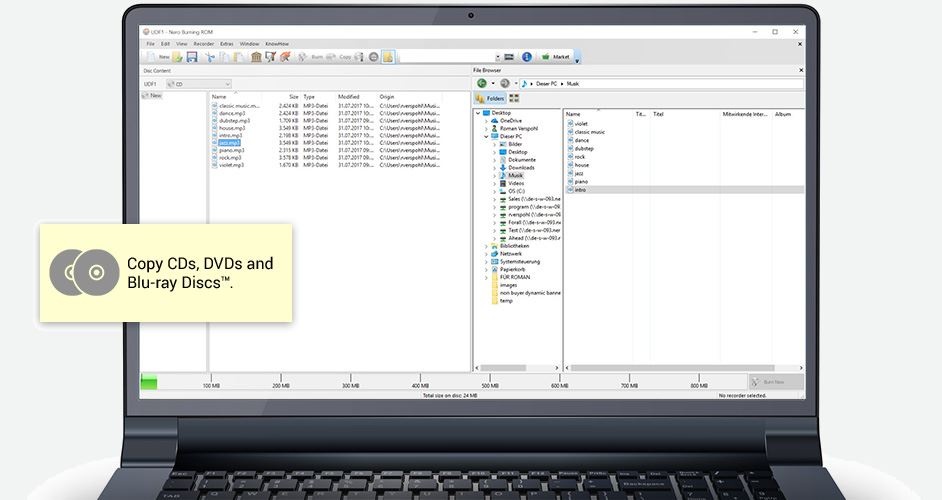
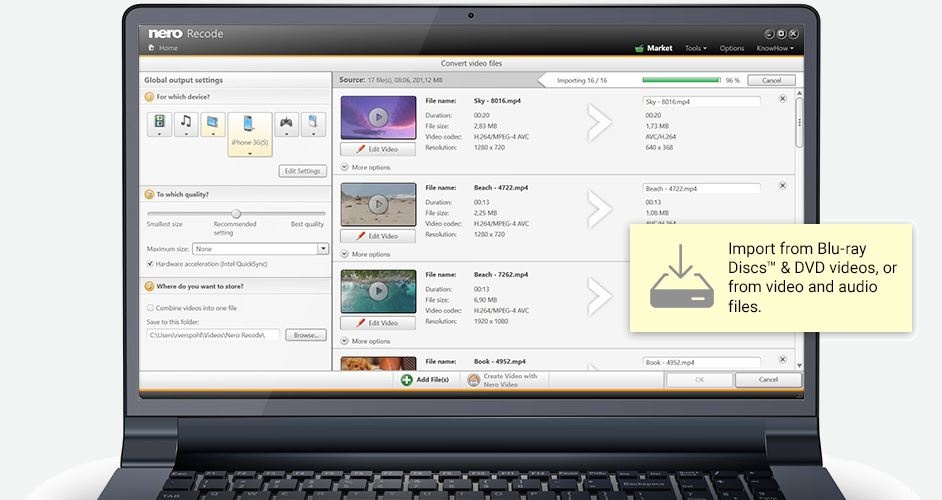
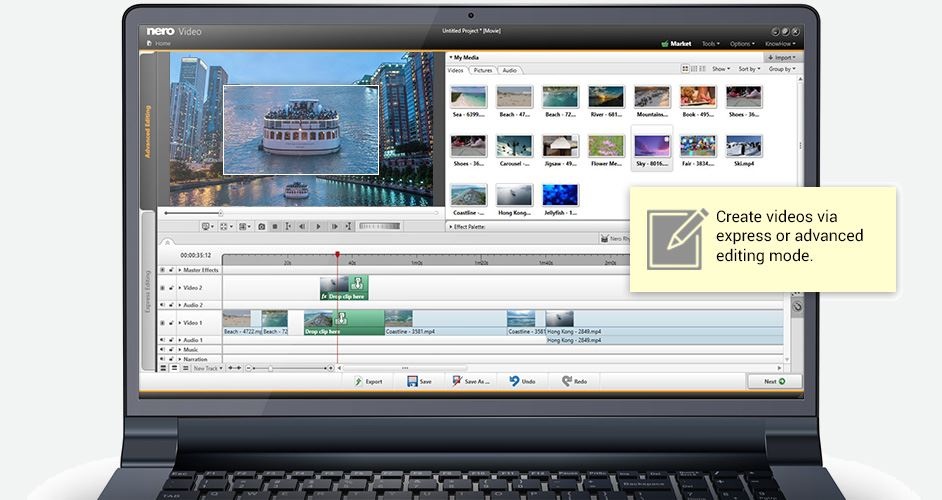
Nero is THE software when it comes to burning CDs, DVDs, Blu-ray Discs. Fast and easy rip, burn, Autobackup, and copy functions, Backup files to CDs, DVDs, and Blu-ray Discs, Create professional-looking DVD movies with integrated 3D menus, Copy, burn, share, upload, and create music mixes like a DJ, Convert music, photos, and DVDs to play on your iPod® and other mobile devices, Quick photo and video upload to My Nero, You-Tube™, and MySpace, Watch, record, pause, and customize your live TV experience, Play Blu-ray, AVCHD and other HD formats
Screenshots
Latest version
Download
Download Nero Platinum 28.5.30110 194MB Win

Download Beta and other versions
Download old versions

Software License
Supported operating systems
More information and other downloads
Nero old free versions:
Nero MediaHome Free 16.0.03300 (direct link)
Nero MediaHome Free 15.0.02900 (direct link)
Nero MediaHome Free 15.0.02400 (direct link)
Nero MediaHome Free 15.0.00700 (direct link)
Nero Kwik Media 12.5.00300 (direct link)
Nero Kwik Media 12.0.02100 (direct link)
Nero Kwik Media 11.0.17100(direct link)
Nero Kwik Media 11.0.14900 (direct link)
Nero Burn Lite 10.0.600 (direct link)
Nero Burn Free 9.4.12.708b (direct link)
Nero Burn Free 9.4.12.3 (direct link)
Download a standalone Nero Recode 2.2.6.17 here, it can only output mp4 nero digital video. Nero is not required.
Nero MediaHome Free 16.0.03300 (direct link)
Nero MediaHome Free 15.0.02900 (direct link)
Nero MediaHome Free 15.0.02400 (direct link)
Nero MediaHome Free 15.0.00700 (direct link)
Nero Kwik Media 12.5.00300 (direct link)
Nero Kwik Media 12.0.02100 (direct link)
Nero Kwik Media 11.0.17100(direct link)
Nero Kwik Media 11.0.14900 (direct link)
Nero Burn Lite 10.0.600 (direct link)
Nero Burn Free 9.4.12.708b (direct link)
Nero Burn Free 9.4.12.3 (direct link)
Download a standalone Nero Recode 2.2.6.17 here, it can only output mp4 nero digital video. Nero is not required.
Version history / Release notes / Changelog / What's New
N/A
View full changelog
Sections/Browse similar tools
All In One Blu-ray Converters
All In One DVD Converters
Authoring (Blu-ray/UHD/AVCHD)
Authoring (DVD)
Authoring (SVCD/VCD)
Burn (CD,DVD,Blu-ray)
DVD to DVD
DVD to MP4/MKV/H264/H265
DVD to XviD/AVI/DivX
Portable (Mobile/PSP)
Alternative to Nero
(Latest version updated)BurnAware (Sep 17, 2026)
Burrrn (Oct 19, 2005)
CDBurnerXP (Nov 19, 2019)
CloneDVD mobile (May 18, 2016)
CopyTo (Mar 8, 2013)
HandBrake (Jun 7, 2026)
ImgBurn (Jun 13, 2013)
MediaCoder (Jul 6, 2026)
MPEG Video Wizard DVD (Oct 27, 2015)
TMPGEnc Authoring Works (Jun 11, 2026)
Total Video Converter (Oct 11, 2024)
WinFF (Jun 12, 2017)
XviD4PSP (Oct 1, 2026)
Guides and How to's
How to burn compliant DVD-Video with Nero
- ReadHow to convert DVD to Nero Digital format
- ReadNero DVD-Video burning guide using the "UDF/ISO" mode
- ReadNero Vision 4 DVD Authoring Guide
- ReadNero Vision 5 AVCHD Authoring Guide
- ReadNero Vision 5 DVD Authoring Guide
- ReadSefy's DVD Backup Guide v2.6
- ReadNero video tutorials
View all guides with guide description here
Acronyms / Also Known As
Notify me when software updated or report software
| 183 reviews, Showing 1 to 5 reviews |
It IS NOT a 'complete solution' nor 'Unlimited' when they charge a yearly access subscription for separate parts of their 'complete solution'.
This is horribly misleading, and an insult to the quality and integrity expected from Germany. I will not purchase ANY NERO product, and will continue to share this unfortunate experience until they either tell the truth or deliver what they have promised.
Having used NERO for many years, I unfortunately believed in them, and purchased in 2025, only to find that I couldn't use the 'complete' software without having 3 separate yearly subscriptions!
Very poor advertising, judgement, and support on Nero's part.
This is horribly misleading, and an insult to the quality and integrity expected from Germany. I will not purchase ANY NERO product, and will continue to share this unfortunate experience until they either tell the truth or deliver what they have promised.
Having used NERO for many years, I unfortunately believed in them, and purchased in 2025, only to find that I couldn't use the 'complete' software without having 3 separate yearly subscriptions!
Very poor advertising, judgement, and support on Nero's part.
Review by MYMAINE1 on
Dec 30, 2025 Version: Platinum 2025
OS: Windows 11 64-bit Ease of use: 10/10
Functionality: 5/10
Value for money: 5/10
Overall: 4/10
Truly expensive Bloatware which wrecks your system after an uninstall!
Review by Joel on
Jan 30, 2022 Version: 2022
OS: Windows 10 64-bit Ease of use: 1/10
Functionality: 1/10
Value for money: 1/10
Overall: 1/10
They broke it.
I used to use Nero Video to author BluRays. The menus it creates are kind of ugly and can't be made better without paying
extra money, and the software seemed to bloat my videos up to where they filled a disc rather quickly (but it had "Fit to
disc"), and the software made me do some things that didn't seem necessary, but oh well, it worked.
Until I downloaded an update. Now, the "Fit to disc" no longer works. They appear to have hard-coded a number of bytes
that should fit on a BluRay, and use that instead of the actual size of my legitimate BluRay media. You can ask for the
"Fit to disc" and watch the software happily transcode for hours, and then die when it finally notices the size of the
disc in the burner, as it's about to do a burn. I reported this to Nero - crickets.
Given how a 5Gb mp4 video seems to expand to 15Gb on a BluRay, "Fit to disc" was the only way to get a reasonable amount
of content onto a disc, but that's now utterly broken because some wag made a bad software decision. It's useless now.
I'll still use other parts to burn regular files to disc, but I have no good way to author.
I used to use Nero Video to author BluRays. The menus it creates are kind of ugly and can't be made better without paying
extra money, and the software seemed to bloat my videos up to where they filled a disc rather quickly (but it had "Fit to
disc"), and the software made me do some things that didn't seem necessary, but oh well, it worked.
Until I downloaded an update. Now, the "Fit to disc" no longer works. They appear to have hard-coded a number of bytes
that should fit on a BluRay, and use that instead of the actual size of my legitimate BluRay media. You can ask for the
"Fit to disc" and watch the software happily transcode for hours, and then die when it finally notices the size of the
disc in the burner, as it's about to do a burn. I reported this to Nero - crickets.
Given how a 5Gb mp4 video seems to expand to 15Gb on a BluRay, "Fit to disc" was the only way to get a reasonable amount
of content onto a disc, but that's now utterly broken because some wag made a bad software decision. It's useless now.
I'll still use other parts to burn regular files to disc, but I have no good way to author.
Review by Rob T on
Jan 29, 2022 Version: 22.0.1020
OS: Windows 10 64-bit Ease of use: 6/10
Functionality: 3/10
Value for money: 3/10
Overall: 3/10
Rating by James Pous on
Apr 29, 2018 Version: 2018
OS: Windows 10 64-bit Ease of use: 8/10
Functionality: 5/10
Value for money: 2/10
Overall: 5/10
Nero video is not made for ripping blu ray...
Review by Theodor on
Mar 8, 2017 Version: Nero Platinum 2017 1.10.0.6
OS: Windows 10 Ease of use: 7/10
Functionality: 7/10
Value for money: 7/10
Overall: 7/10
| 183 reviews, Showing 1 to 5 reviews |
| 1 tool hits, Showing 1 to 1 tools |
Explanation:
NEW SOFTWARE= New tool since your last visit
NEW VERSION= New version since your last visit
NEW REVIEW= New review since your last visit
NEW VERSION= New version
Latest version
Version number / Beta version number / Update version number and when it whas released.
Type and download
NO MORE UPDATES? = The software hasn't been updated in over 2 years.
NO LONGER DEVELOPED = The software hasn't been updated in over 5 years.
RECENTLY UPDATED = The software has been updated the last 31 days.
Freeware = Download Free software.
Freeware Trialware = Download Free software but some parts are trial/shareware.
Free software = Download Free software and also open source code also known as FOSS (Free and Open Source Software).
Free software Trialware = Download Free software and also open source code but some parts are trial/shareware.
Freeware Ads = Download Free software but supported by advertising, usually with a included browser toolbar. It may be disabled when installing or after installation.
Free software Ads = Free Download software and open source code but supported by advertising, usually with a included browser toolbar. It may be disabled when installing or after installation.
Trialware = Also called shareware or demo. Free Trial version available for download and testing with usually a time limit or limited functions.
Payware = No demo or trial available.
Portable version = A portable/standalone version is available. No installation is required.
v1.0.1 = Latest version available.
Download beta = It could be a Beta, RC(Release Candidate) or an Alpha / Nightly / Unstable version of the software.
Download 15MB = A direct link to the software download.
Win = Windows download version for 32-bit and 64-bit Windows.
Win64 = Windows 64-bit download version for 64-bit Windows.
WinARM64 = Windows 64-bit ARM download version for Windows ARM64/AArch64.
Mac = Mac download version for 64-bit Mac OS Intel/ARM64/AArch64.
MacARM64 = Mac Silicon download version for 64-bit Mac OS ARM64/AArch64.
Mac64 = Mac OS download version for 64-bit Intel Mac OS.
Linux = Linux download version.
Linux64 = Linux download version for 64bit Linux.
Linux ARM = Linux download version for Linux ARM64/AArch64.
Portable = Portable version. No installation is required.
Ad-Supported = The software is bundled with advertising. Be careful when you install the software and disable addons that you don't want!
Visit developers site = A link to the software developer site.
Download (mirror link) = A mirror link to the software download. It may not contain the latest versions.
Download old versions = Free downloads of previous versions of the program.
Download 64-bit version = If you have a 64bit operating system you can download this version.
Download portable version = Portable/Standalone version meaning that no installation is required, just extract the files to a folder and run directly.
Portable version available = Download the portable version and you can just extract the files and run the program without installation.
Old versions available = Download old versions of the program.
Version history available = Complete changelog on our site.
= Windows version available.
 = Mac OS version available.
 = Linux version available.
Our hosted software are virus and malware scanned with several antivirus programs using www.virustotal.com. (NOTE! Just one virustotal warning is 99.9% a false positive. And some software might receive 2-6 warnings but it's if they are not all same virus/trojan then it's 99% false positives.)
Rating
Rating from 0-10.
NEW SOFTWARE= New tool since your last visit
NEW VERSION= New version since your last visit
NEW REVIEW= New review since your last visit
NEW VERSION= New version
Latest version
Version number / Beta version number / Update version number and when it whas released.
Type and download
NO MORE UPDATES? = The software hasn't been updated in over 2 years.
NO LONGER DEVELOPED = The software hasn't been updated in over 5 years.
RECENTLY UPDATED = The software has been updated the last 31 days.
Freeware = Download Free software.
Freeware Trialware = Download Free software but some parts are trial/shareware.
Free software = Download Free software and also open source code also known as FOSS (Free and Open Source Software).
Free software Trialware = Download Free software and also open source code but some parts are trial/shareware.
Freeware Ads = Download Free software but supported by advertising, usually with a included browser toolbar. It may be disabled when installing or after installation.
Free software Ads = Free Download software and open source code but supported by advertising, usually with a included browser toolbar. It may be disabled when installing or after installation.
Trialware = Also called shareware or demo. Free Trial version available for download and testing with usually a time limit or limited functions.
Payware = No demo or trial available.
Portable version = A portable/standalone version is available. No installation is required.
v1.0.1 = Latest version available.
Download beta = It could be a Beta, RC(Release Candidate) or an Alpha / Nightly / Unstable version of the software.
Download 15MB = A direct link to the software download.
Win = Windows download version for 32-bit and 64-bit Windows.
Win64 = Windows 64-bit download version for 64-bit Windows.
WinARM64 = Windows 64-bit ARM download version for Windows ARM64/AArch64.
Mac = Mac download version for 64-bit Mac OS Intel/ARM64/AArch64.
MacARM64 = Mac Silicon download version for 64-bit Mac OS ARM64/AArch64.
Mac64 = Mac OS download version for 64-bit Intel Mac OS.
Linux = Linux download version.
Linux64 = Linux download version for 64bit Linux.
Linux ARM = Linux download version for Linux ARM64/AArch64.
Portable = Portable version. No installation is required.
Ad-Supported = The software is bundled with advertising. Be careful when you install the software and disable addons that you don't want!
Visit developers site = A link to the software developer site.
Download (mirror link) = A mirror link to the software download. It may not contain the latest versions.
Download old versions = Free downloads of previous versions of the program.
Download 64-bit version = If you have a 64bit operating system you can download this version.
Download portable version = Portable/Standalone version meaning that no installation is required, just extract the files to a folder and run directly.
Portable version available = Download the portable version and you can just extract the files and run the program without installation.
Old versions available = Download old versions of the program.
Version history available = Complete changelog on our site.
= Windows version available. = Mac OS version available. = Linux version available.Our hosted software are virus and malware scanned with several antivirus programs using www.virustotal.com. (NOTE! Just one virustotal warning is 99.9% a false positive. And some software might receive 2-6 warnings but it's if they are not all same virus/trojan then it's 99% false positives.)
Rating
Rating from 0-10.
Browse software by sections
All In One Blu-ray Converters (9)
All In One DVD Converters (12)
All In One MKV to MP4, Blu-ray, UHD (11)
All In One Video Converters (19)
Animation (3D, 2D Animation) (13)
Audio Editors (23)
Audio Encoders (80)
Audio Players (19)
Authoring (Blu-ray, UHD, AVCHD) (13)
Authoring (DivX) (4)
Authoring (DVD) (26)
Authoring (SVCD, VCD) (9)
Bitrate Calculators (7)
Blu-ray to AVI, MKV, MP4 (15)
Blu-ray to Blu-ray, AVCHD (10)
Burn (CD,DVD,Blu-ray) (24)
Camcorders, DV, HDV, AVCHD (31)
Capture TV, DVD, VCR (30)
CD, DVD, Blu-ray recovery (3)
Codec Packs (6)
All In One DVD Converters (12)
All In One MKV to MP4, Blu-ray, UHD (11)
All In One Video Converters (19)
Animation (3D, 2D Animation) (13)
Audio Editors (23)
Audio Encoders (80)
Audio Players (19)
Authoring (Blu-ray, UHD, AVCHD) (13)
Authoring (DivX) (4)
Authoring (DVD) (26)
Authoring (SVCD, VCD) (9)
Bitrate Calculators (7)
Blu-ray to AVI, MKV, MP4 (15)
Blu-ray to Blu-ray, AVCHD (10)
Burn (CD,DVD,Blu-ray) (24)
Camcorders, DV, HDV, AVCHD (31)
Capture TV, DVD, VCR (30)
CD, DVD, Blu-ray recovery (3)
Codec Packs (6)
Codec, Video Identifiers (31)
Codecs (67)
Decrypters (DVD Rippers) (16)
Decrypters (UHD, Blu-ray Rippers) (8)
DigitalTV, DVB, IPTV (40)
DVD to DVD (20)
DVD to MP4, MKV, H264, H265 (16)
DVD to VCD, SVCD (5)
DVD to XviD, AVI, DivX (16)
ISO, Image (14)
Linux Video Tools (219)
MacOS Video Tools (252)
Media (Blu-ray, DVD, CD) (9)
Media Center, HTPC (25)
Other Useful Tools (136)
Photo Blu-ray, DVD, SlideShow (8)
Portable (Mobile, PSP) (35)
Region Free Tools (5)
Screen capture , Screen recording (25)
Screenshots , Thumbnails (13)
Codecs (67)
Decrypters (DVD Rippers) (16)
Decrypters (UHD, Blu-ray Rippers) (8)
DigitalTV, DVB, IPTV (40)
DVD to DVD (20)
DVD to MP4, MKV, H264, H265 (16)
DVD to VCD, SVCD (5)
DVD to XviD, AVI, DivX (16)
ISO, Image (14)
Linux Video Tools (219)
MacOS Video Tools (252)
Media (Blu-ray, DVD, CD) (9)
Media Center, HTPC (25)
Other Useful Tools (136)
Photo Blu-ray, DVD, SlideShow (8)
Portable (Mobile, PSP) (35)
Region Free Tools (5)
Screen capture , Screen recording (25)
Screenshots , Thumbnails (13)
Subtitle Editors, Converters (72)
Tag Editors (4)
Video Compare Software (6)
Video Demultiplexers, Multiplexers (66)
Video Editors (Advanced, NLE) (37)
Video Editors (Basic) (57)
Video Editors (H264, MP4, MKV, MTS) (19)
Video Editors (Lossless) (5)
Video Editors (MPG, DVD) (16)
Video Editors (WMV, AVI) (15)
Video Encoders (AV1, VP8, VP9) (2)
Video Encoders (AVI, WMV) (38)
Video Encoders (H264, H265, MP4, MKV) (45)
Video Encoders (MPG, DVD) (23)
Video Encoders , Converters (156)
Video Frameservers (9)
Video Players (48)
Video Repair, Fix (24)
Video Scripting (10)
Video Streaming (20)
Tag Editors (4)
Video Compare Software (6)
Video Demultiplexers, Multiplexers (66)
Video Editors (Advanced, NLE) (37)
Video Editors (Basic) (57)
Video Editors (H264, MP4, MKV, MTS) (19)
Video Editors (Lossless) (5)
Video Editors (MPG, DVD) (16)
Video Editors (WMV, AVI) (15)
Video Encoders (AV1, VP8, VP9) (2)
Video Encoders (AVI, WMV) (38)
Video Encoders (H264, H265, MP4, MKV) (45)
Video Encoders (MPG, DVD) (23)
Video Encoders , Converters (156)
Video Frameservers (9)
Video Players (48)
Video Repair, Fix (24)
Video Scripting (10)
Video Streaming (20)