
Help us keep the list up to date and submit new video software here.
Tool
Description
Type
Rating
Reviews
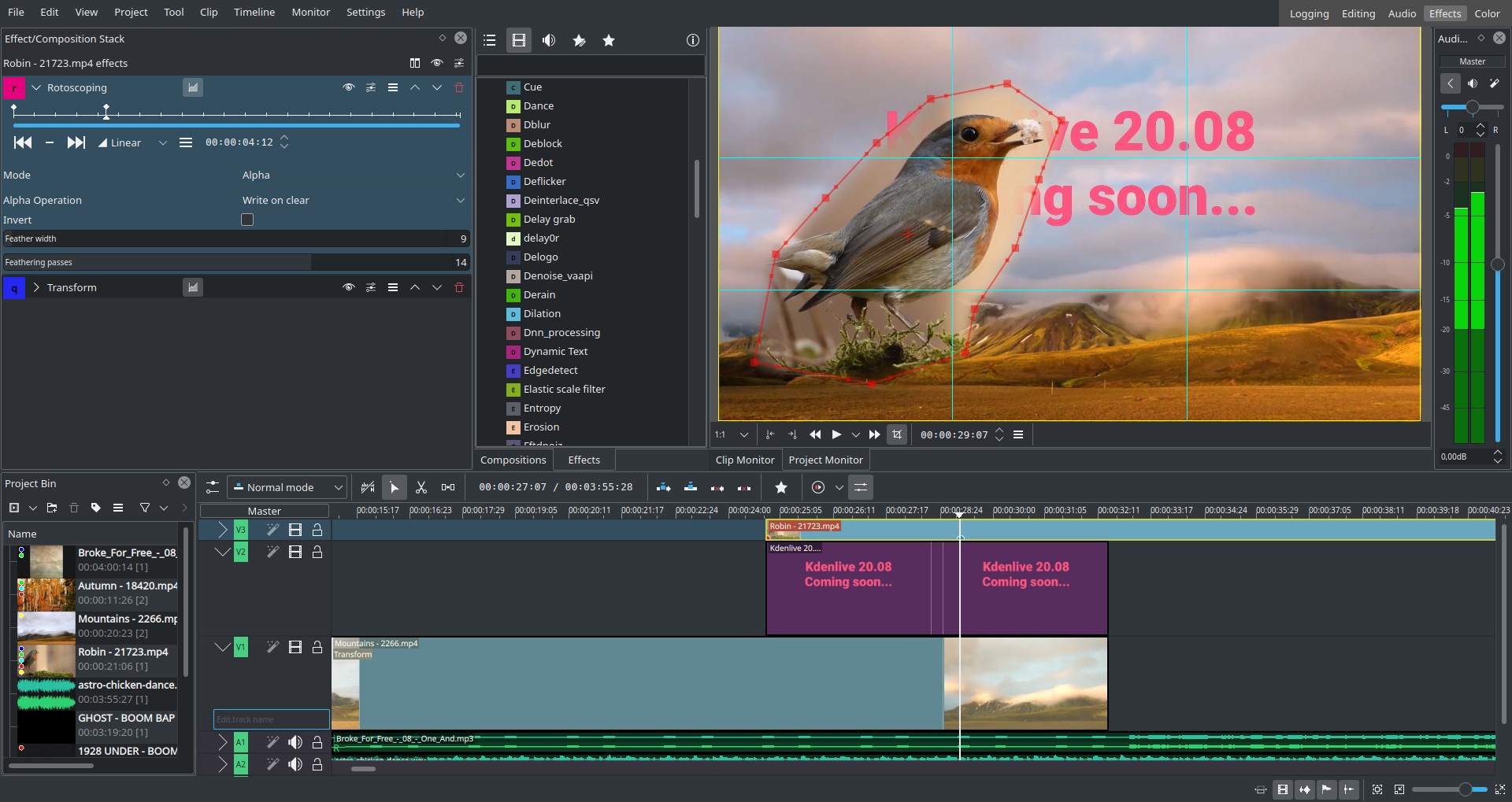
Kdenlive is a non-linear video editor for GNU/Linux and Windows, which supports DV, HDV and AVCHD(not complete yet) editing. Kdenlive relies on several other open source projects like FFmpeg and the MLT video framework. It was designed to answer all needs, from basic video editing to semi-professionnal work.
Free software
OS:


File size: 129MB
Portable version
Other versions
Old versions
Version history
Alternative software
OS:
File size: 129MB
Portable version
Other versions
Old versions
Version history
Alternative software
Screenshots
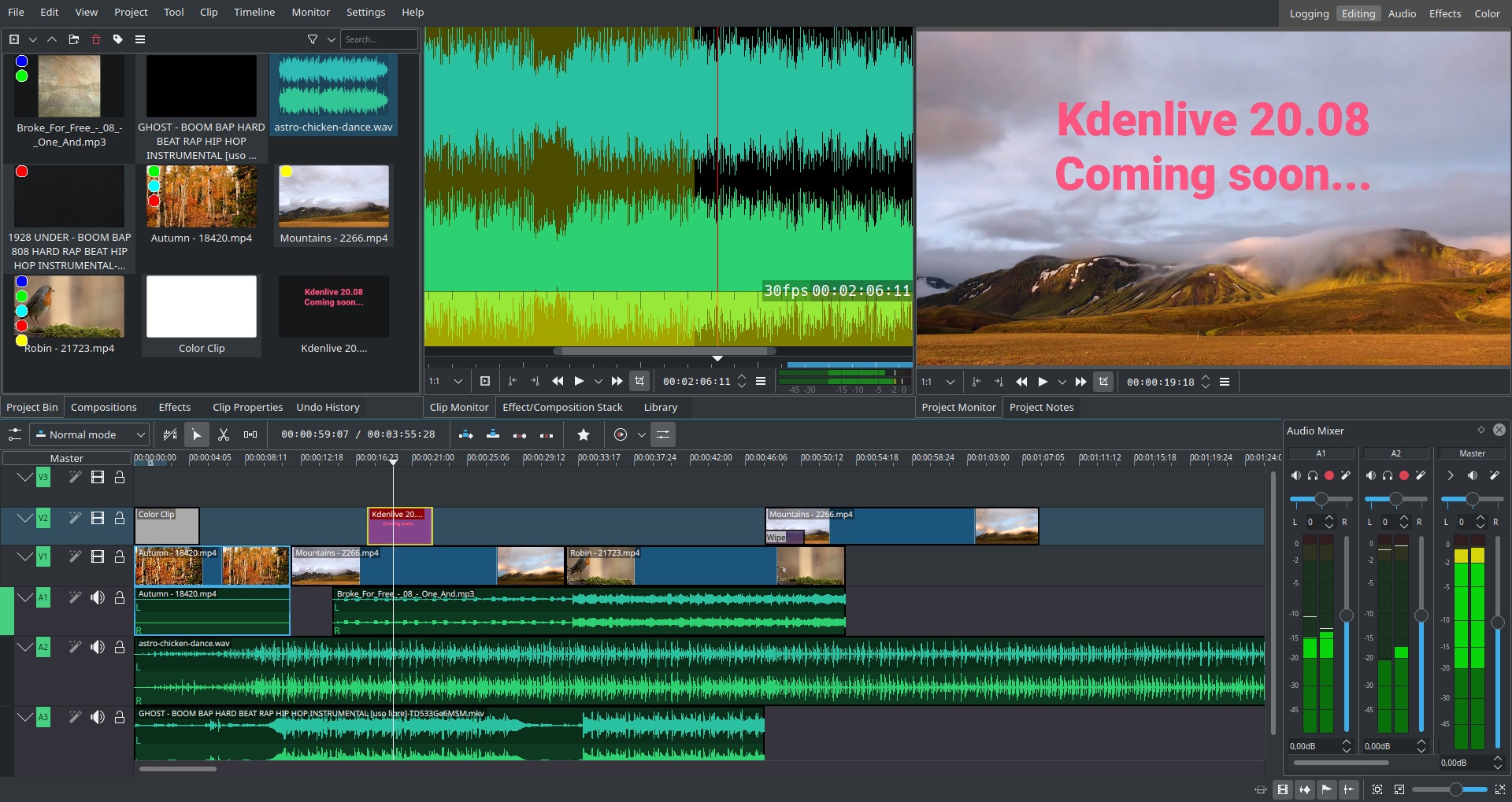
Latest version
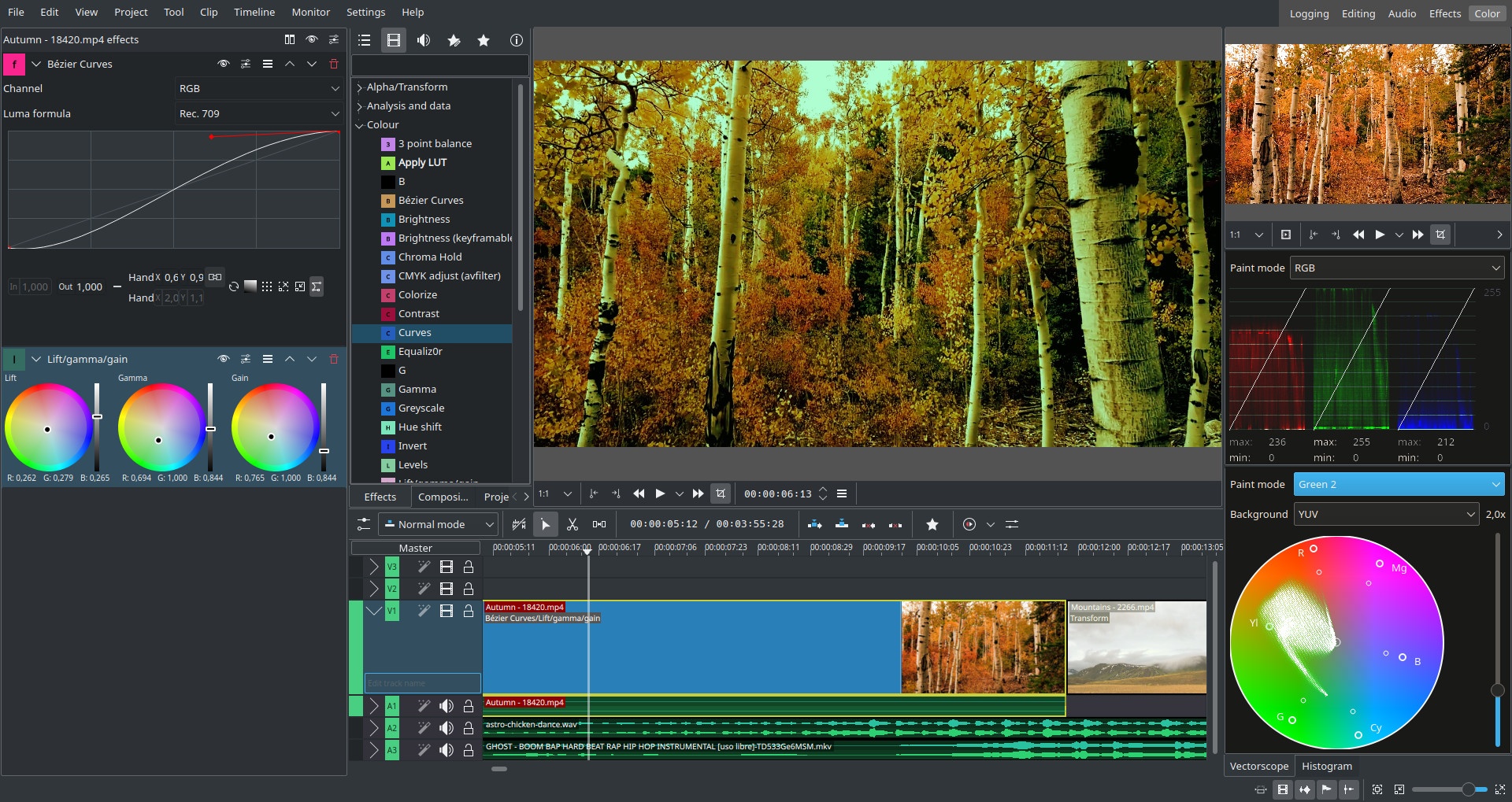
Download
Download Kdenlive 26.08.2 Windows 64-bit 129MB Win64
Download Kdenlive 26.08.2 Mac Silicon ARM 64-bit 129MB MacARM64
Download Kdenlive 26.08.2 Mac Intel 64-bit 129MB Mac64
Download Kdenlive 26.08.2 Linux 64-bit 129MB Linux64
AppImage Download Portable and other versions
Portable 
Download old versions

Software License
Supported operating systems
Mac OS Linux More information and other downloads
Kdenlive for Windows requires ffmpeg 64-bit.
Version history / Release notes / Changelog / What's New
Kdenlive 26.08.2 released
Tuesday, 13 October 2026 | Farid Abdelnour
#Release
The second maintenance release of the 26.08 series is out with the usual batch of stability fixes and workflow improvements. Highlights include improved project handling and ability to set the frame count to start at 1 in the Dynamic Text filter which is useful for animation workflows. This release also fixes several issues in proxy clips, titles, and audio levels.
Kdenlive needs your support
Our small team has been working for years to build an intuitive open source video editor that does not track you, does not use your data, and respects your privacy. However, to ensure a proper development requires resources, so please consider a donation if you enjoy using Kdenlive - even small amounts can make a big difference.
Full Changelog
Add option to control whether qmllint runs during build. Commit.
Do not set mlt cache to 0 to improve file handle situation. Commit. See bug #526044
Fix possibly incorrect detection of proxied clip, causing proxy to be considered the original clip. Commit.
Fix path detection on missing root. Commit.
Fix title images not found on project opening. Commit.
Fix project storage incorrectly switching from project folder to default location when editing settings of unsaved project. Commit.
Fix monitor not refreshing on subtitle cut, add or delete. Commit. See bug #526379
Avoid hardcoding absolute root path in generated MLT clip. Commit. Fixes bug #495091
Fix clip monitor image sometimes not cleared after deleting a bin clip. Commit.
Fix editor font size zoom. Commit.
Fix incorrect proxy param breaking nvidia encoding. Commit. Fixes bug #526155
Fix resize handles appearing on deselected titler items. Commit.
Fix stale selected pointer overriding new selection in Titler. Commit.
Fix titler animation viewports moving after being deselected. Commit.
Fix changing project's storage folder if not yet saved. Commit.
Fix ClipMonitor job info width binding loop. Commit.
Fix possible freeze on audio failed recording. Commit.
Fix audio recording sometimes correctly monitoring but recording nothing. Commit.
Fix proxy crash and proxying .kdenlive playlist clips. Commit.
Don't try to generate sub playlists if .kdenlive file only containe 1 sequence. Commit.
Do not seek playhead if clip did not insert. Commit.
Feat(effects): add keyword to dynamictext. Commit.
Disconnect monitor signal on deactivation in RotatedRectHelper. Commit. Fixes bug #523263
Fix leaking monitor helper caused rotation on wrong clip. Real fix for !998. Commit. Fixes bug #523263
Fix arrow keys moving playhead instead of grabbed clip after monitor interaction. Commit. Fixes bug #472365
Fix incorrect handling of missing proxies on document open. Commit.
Move default safe proxy params to C++ so that any change is not shadowed by a custom list. Commit.
Fix crash caused by uninitialized track in new project. Commit. See bug #525583
Fix master audio levels incorrect with latest MLT. Commit. Fixes bug #525578
Fix merge problem breaking qml. Commit.
Fix audio thumbs not correctly showing on clip monitor and audio/video drag icon inconsistently working. Commit.
Fix clip monitor clip name history not shown on hover monitor. Commit.
Remove incorrect cxx version set in kdenlivelib. Commit.
Tuesday, 13 October 2026 | Farid Abdelnour
#Release
The second maintenance release of the 26.08 series is out with the usual batch of stability fixes and workflow improvements. Highlights include improved project handling and ability to set the frame count to start at 1 in the Dynamic Text filter which is useful for animation workflows. This release also fixes several issues in proxy clips, titles, and audio levels.
Kdenlive needs your support
Our small team has been working for years to build an intuitive open source video editor that does not track you, does not use your data, and respects your privacy. However, to ensure a proper development requires resources, so please consider a donation if you enjoy using Kdenlive - even small amounts can make a big difference.
Full Changelog
Add option to control whether qmllint runs during build. Commit.
Do not set mlt cache to 0 to improve file handle situation. Commit. See bug #526044
Fix possibly incorrect detection of proxied clip, causing proxy to be considered the original clip. Commit.
Fix path detection on missing root. Commit.
Fix title images not found on project opening. Commit.
Fix project storage incorrectly switching from project folder to default location when editing settings of unsaved project. Commit.
Fix monitor not refreshing on subtitle cut, add or delete. Commit. See bug #526379
Avoid hardcoding absolute root path in generated MLT clip. Commit. Fixes bug #495091
Fix clip monitor image sometimes not cleared after deleting a bin clip. Commit.
Fix editor font size zoom. Commit.
Fix incorrect proxy param breaking nvidia encoding. Commit. Fixes bug #526155
Fix resize handles appearing on deselected titler items. Commit.
Fix stale selected pointer overriding new selection in Titler. Commit.
Fix titler animation viewports moving after being deselected. Commit.
Fix changing project's storage folder if not yet saved. Commit.
Fix ClipMonitor job info width binding loop. Commit.
Fix possible freeze on audio failed recording. Commit.
Fix audio recording sometimes correctly monitoring but recording nothing. Commit.
Fix proxy crash and proxying .kdenlive playlist clips. Commit.
Don't try to generate sub playlists if .kdenlive file only containe 1 sequence. Commit.
Do not seek playhead if clip did not insert. Commit.
Feat(effects): add keyword to dynamictext. Commit.
Disconnect monitor signal on deactivation in RotatedRectHelper. Commit. Fixes bug #523263
Fix leaking monitor helper caused rotation on wrong clip. Real fix for !998. Commit. Fixes bug #523263
Fix arrow keys moving playhead instead of grabbed clip after monitor interaction. Commit. Fixes bug #472365
Fix incorrect handling of missing proxies on document open. Commit.
Move default safe proxy params to C++ so that any change is not shadowed by a custom list. Commit.
Fix crash caused by uninitialized track in new project. Commit. See bug #525583
Fix master audio levels incorrect with latest MLT. Commit. Fixes bug #525578
Fix merge problem breaking qml. Commit.
Fix audio thumbs not correctly showing on clip monitor and audio/video drag icon inconsistently working. Commit.
Fix clip monitor clip name history not shown on hover monitor. Commit.
Remove incorrect cxx version set in kdenlivelib. Commit.
View full changelog
Sections/Browse similar tools
Alternative to Kdenlive
(Latest version updated)Adobe Premiere Pro (Sep 28, 2026)
DaVinci Resolve (Oct 2, 2026)
OpenShot Video Editor (Sep 27, 2026)
Shotcut (Sep 28, 2026)
Guides and How to's
Notify me when software updated or report software
| 31 reviews, Showing 1 to 5 reviews |
Import jpg files not chash anywhere.
Thanks
Thanks
Review by lamola2010 on
Jul 10, 2024 Version: 24.05.2
OS: Windows 11 64-bit Ease of use: 10/10
Functionality: 10/10
Value for money: 10/10
Overall: 10/10
kdenlive has been my go-to video editor for years.
However, it often introduces bugs in new versions, such as 24.05.0 and 24.05.1.
When you import a JPG image into the timeline the program crashes. ¿?
However, it often introduces bugs in new versions, such as 24.05.0 and 24.05.1.
When you import a JPG image into the timeline the program crashes. ¿?
Review by lamola2010 on
Jun 28, 2024 Version: 24.5.0
OS: Windows 11 64-bit Ease of use: 10/10
Functionality: 10/10
Value for money: 10/10
Overall: 10/10
I've no doubt this program has advanced special effects, but compared to AviUtl, basic editing is a hassle. Transitions should be objects you can set parameters on, then copy/paste to where you need them on the timeline.
Review by Bob on
Oct 18, 2022 Version: 22.08.2
OS: Windows 10 64-bit Ease of use: 1/10
Functionality: 10/10
Value for money: 10/10
Overall: 4/10
I love kdenlive. It is the best video editor for me.
Review by lamola on
Aug 25, 2022 Version: 22.08
OS: Windows 10 64-bit Ease of use: 10/10
Functionality: 10/10
Value for money: 10/10
Overall: 10/10
I love kdenlive. It is the best video editor for me.
Review by lamola on
Aug 25, 2022 Version: 22.08
OS: Windows 10 64-bit Ease of use: 10/10
Functionality: 10/10
Value for money: 10/10
Overall: 10/10
| 31 reviews, Showing 1 to 5 reviews |
| 1 tool hits, Showing 1 to 1 tools |
Explanation:
NEW SOFTWARE= New tool since your last visit
NEW VERSION= New version since your last visit
NEW REVIEW= New review since your last visit
NEW VERSION= New version
Latest version
Version number / Beta version number / Update version number and when it whas released.
Type and download
NO MORE UPDATES? = The software hasn't been updated in over 2 years.
NO LONGER DEVELOPED = The software hasn't been updated in over 5 years.
RECENTLY UPDATED = The software has been updated the last 31 days.
Freeware = Download Free software.
Freeware Trialware = Download Free software but some parts are trial/shareware.
Free software = Download Free software and also open source code also known as FOSS (Free and Open Source Software).
Free software Trialware = Download Free software and also open source code but some parts are trial/shareware.
Freeware Ads = Download Free software but supported by advertising, usually with a included browser toolbar. It may be disabled when installing or after installation.
Free software Ads = Free Download software and open source code but supported by advertising, usually with a included browser toolbar. It may be disabled when installing or after installation.
Trialware = Also called shareware or demo. Free Trial version available for download and testing with usually a time limit or limited functions.
Payware = No demo or trial available.
Portable version = A portable/standalone version is available. No installation is required.
v1.0.1 = Latest version available.
Download beta = It could be a Beta, RC(Release Candidate) or an Alpha / Nightly / Unstable version of the software.
Download 15MB = A direct link to the software download.
Win = Windows download version for 32-bit and 64-bit Windows.
Win64 = Windows 64-bit download version for 64-bit Windows.
WinARM64 = Windows 64-bit ARM download version for Windows ARM64/AArch64.
Mac = Mac download version for 64-bit Mac OS Intel/ARM64/AArch64.
MacARM64 = Mac Silicon download version for 64-bit Mac OS ARM64/AArch64.
Mac64 = Mac OS download version for 64-bit Intel Mac OS.
Linux = Linux download version.
Linux64 = Linux download version for 64bit Linux.
Linux ARM = Linux download version for Linux ARM64/AArch64.
Portable = Portable version. No installation is required.
Ad-Supported = The software is bundled with advertising. Be careful when you install the software and disable addons that you don't want!
Visit developers site = A link to the software developer site.
Download (mirror link) = A mirror link to the software download. It may not contain the latest versions.
Download old versions = Free downloads of previous versions of the program.
Download 64-bit version = If you have a 64bit operating system you can download this version.
Download portable version = Portable/Standalone version meaning that no installation is required, just extract the files to a folder and run directly.
Portable version available = Download the portable version and you can just extract the files and run the program without installation.
Old versions available = Download old versions of the program.
Version history available = Complete changelog on our site.
= Windows version available.
= Mac OS version available.
= Linux version available.
Our hosted software are virus and malware scanned with several antivirus programs using www.virustotal.com. (NOTE! Just one virustotal warning is 99.9% a false positive. And some software might receive 2-6 warnings but it's if they are not all same virus/trojan then it's 99% false positives.)
Rating
Rating from 0-10.
NEW SOFTWARE= New tool since your last visit
NEW VERSION= New version since your last visit
NEW REVIEW= New review since your last visit
NEW VERSION= New version
Latest version
Version number / Beta version number / Update version number and when it whas released.
Type and download
NO MORE UPDATES? = The software hasn't been updated in over 2 years.
NO LONGER DEVELOPED = The software hasn't been updated in over 5 years.
RECENTLY UPDATED = The software has been updated the last 31 days.
Freeware = Download Free software.
Freeware Trialware = Download Free software but some parts are trial/shareware.
Free software = Download Free software and also open source code also known as FOSS (Free and Open Source Software).
Free software Trialware = Download Free software and also open source code but some parts are trial/shareware.
Freeware Ads = Download Free software but supported by advertising, usually with a included browser toolbar. It may be disabled when installing or after installation.
Free software Ads = Free Download software and open source code but supported by advertising, usually with a included browser toolbar. It may be disabled when installing or after installation.
Trialware = Also called shareware or demo. Free Trial version available for download and testing with usually a time limit or limited functions.
Payware = No demo or trial available.
Portable version = A portable/standalone version is available. No installation is required.
v1.0.1 = Latest version available.
Download beta = It could be a Beta, RC(Release Candidate) or an Alpha / Nightly / Unstable version of the software.
Download 15MB = A direct link to the software download.
Win = Windows download version for 32-bit and 64-bit Windows.
Win64 = Windows 64-bit download version for 64-bit Windows.
WinARM64 = Windows 64-bit ARM download version for Windows ARM64/AArch64.
Mac = Mac download version for 64-bit Mac OS Intel/ARM64/AArch64.
MacARM64 = Mac Silicon download version for 64-bit Mac OS ARM64/AArch64.
Mac64 = Mac OS download version for 64-bit Intel Mac OS.
Linux = Linux download version.
Linux64 = Linux download version for 64bit Linux.
Linux ARM = Linux download version for Linux ARM64/AArch64.
Portable = Portable version. No installation is required.
Ad-Supported = The software is bundled with advertising. Be careful when you install the software and disable addons that you don't want!
Visit developers site = A link to the software developer site.
Download (mirror link) = A mirror link to the software download. It may not contain the latest versions.
Download old versions = Free downloads of previous versions of the program.
Download 64-bit version = If you have a 64bit operating system you can download this version.
Download portable version = Portable/Standalone version meaning that no installation is required, just extract the files to a folder and run directly.
Portable version available = Download the portable version and you can just extract the files and run the program without installation.
Old versions available = Download old versions of the program.
Version history available = Complete changelog on our site.
= Windows version available. = Mac OS version available. = Linux version available.Our hosted software are virus and malware scanned with several antivirus programs using www.virustotal.com. (NOTE! Just one virustotal warning is 99.9% a false positive. And some software might receive 2-6 warnings but it's if they are not all same virus/trojan then it's 99% false positives.)
Rating
Rating from 0-10.
Browse software by sections
All In One Blu-ray Converters (9)
All In One DVD Converters (12)
All In One MKV to MP4, Blu-ray, UHD (11)
All In One Video Converters (19)
Animation (3D, 2D Animation) (13)
Audio Editors (23)
Audio Encoders (80)
Audio Players (19)
Authoring (Blu-ray, UHD, AVCHD) (13)
Authoring (DivX) (4)
Authoring (DVD) (26)
Authoring (SVCD, VCD) (9)
Bitrate Calculators (7)
Blu-ray to AVI, MKV, MP4 (15)
Blu-ray to Blu-ray, AVCHD (10)
Burn (CD,DVD,Blu-ray) (24)
Camcorders, DV, HDV, AVCHD (31)
Capture TV, DVD, VCR (30)
CD, DVD, Blu-ray recovery (3)
Codec Packs (6)
All In One DVD Converters (12)
All In One MKV to MP4, Blu-ray, UHD (11)
All In One Video Converters (19)
Animation (3D, 2D Animation) (13)
Audio Editors (23)
Audio Encoders (80)
Audio Players (19)
Authoring (Blu-ray, UHD, AVCHD) (13)
Authoring (DivX) (4)
Authoring (DVD) (26)
Authoring (SVCD, VCD) (9)
Bitrate Calculators (7)
Blu-ray to AVI, MKV, MP4 (15)
Blu-ray to Blu-ray, AVCHD (10)
Burn (CD,DVD,Blu-ray) (24)
Camcorders, DV, HDV, AVCHD (31)
Capture TV, DVD, VCR (30)
CD, DVD, Blu-ray recovery (3)
Codec Packs (6)
Codec, Video Identifiers (31)
Codecs (67)
Decrypters (DVD Rippers) (16)
Decrypters (UHD, Blu-ray Rippers) (8)
DigitalTV, DVB, IPTV (40)
DVD to DVD (20)
DVD to MP4, MKV, H264, H265 (16)
DVD to VCD, SVCD (5)
DVD to XviD, AVI, DivX (16)
ISO, Image (14)
Linux Video Tools (220)
MacOS Video Tools (252)
Media (Blu-ray, DVD, CD) (9)
Media Center, HTPC (25)
Other Useful Tools (136)
Photo Blu-ray, DVD, SlideShow (8)
Portable (Mobile, PSP) (35)
Region Free Tools (5)
Screen capture , Screen recording (25)
Screenshots , Thumbnails (13)
Codecs (67)
Decrypters (DVD Rippers) (16)
Decrypters (UHD, Blu-ray Rippers) (8)
DigitalTV, DVB, IPTV (40)
DVD to DVD (20)
DVD to MP4, MKV, H264, H265 (16)
DVD to VCD, SVCD (5)
DVD to XviD, AVI, DivX (16)
ISO, Image (14)
Linux Video Tools (220)
MacOS Video Tools (252)
Media (Blu-ray, DVD, CD) (9)
Media Center, HTPC (25)
Other Useful Tools (136)
Photo Blu-ray, DVD, SlideShow (8)
Portable (Mobile, PSP) (35)
Region Free Tools (5)
Screen capture , Screen recording (25)
Screenshots , Thumbnails (13)
Subtitle Editors, Converters (72)
Tag Editors (4)
Video Compare Software (6)
Video Demultiplexers, Multiplexers (66)
Video Editors (Advanced, NLE) (37)
Video Editors (Basic) (57)
Video Editors (H264, MP4, MKV, MTS) (19)
Video Editors (Lossless) (5)
Video Editors (MPG, DVD) (16)
Video Editors (WMV, AVI) (15)
Video Encoders (AV1, VP8, VP9) (2)
Video Encoders (AVI, WMV) (38)
Video Encoders (H264, H265, MP4, MKV) (45)
Video Encoders (MPG, DVD) (23)
Video Encoders , Converters (156)
Video Frameservers (9)
Video Players (48)
Video Repair, Fix (24)
Video Scripting (10)
Video Streaming (20)
Tag Editors (4)
Video Compare Software (6)
Video Demultiplexers, Multiplexers (66)
Video Editors (Advanced, NLE) (37)
Video Editors (Basic) (57)
Video Editors (H264, MP4, MKV, MTS) (19)
Video Editors (Lossless) (5)
Video Editors (MPG, DVD) (16)
Video Editors (WMV, AVI) (15)
Video Encoders (AV1, VP8, VP9) (2)
Video Encoders (AVI, WMV) (38)
Video Encoders (H264, H265, MP4, MKV) (45)
Video Encoders (MPG, DVD) (23)
Video Encoders , Converters (156)
Video Frameservers (9)
Video Players (48)
Video Repair, Fix (24)
Video Scripting (10)
Video Streaming (20)