
Help us keep the list up to date and submit new video software here.
Tool
Description
Type
Rating
Reviews
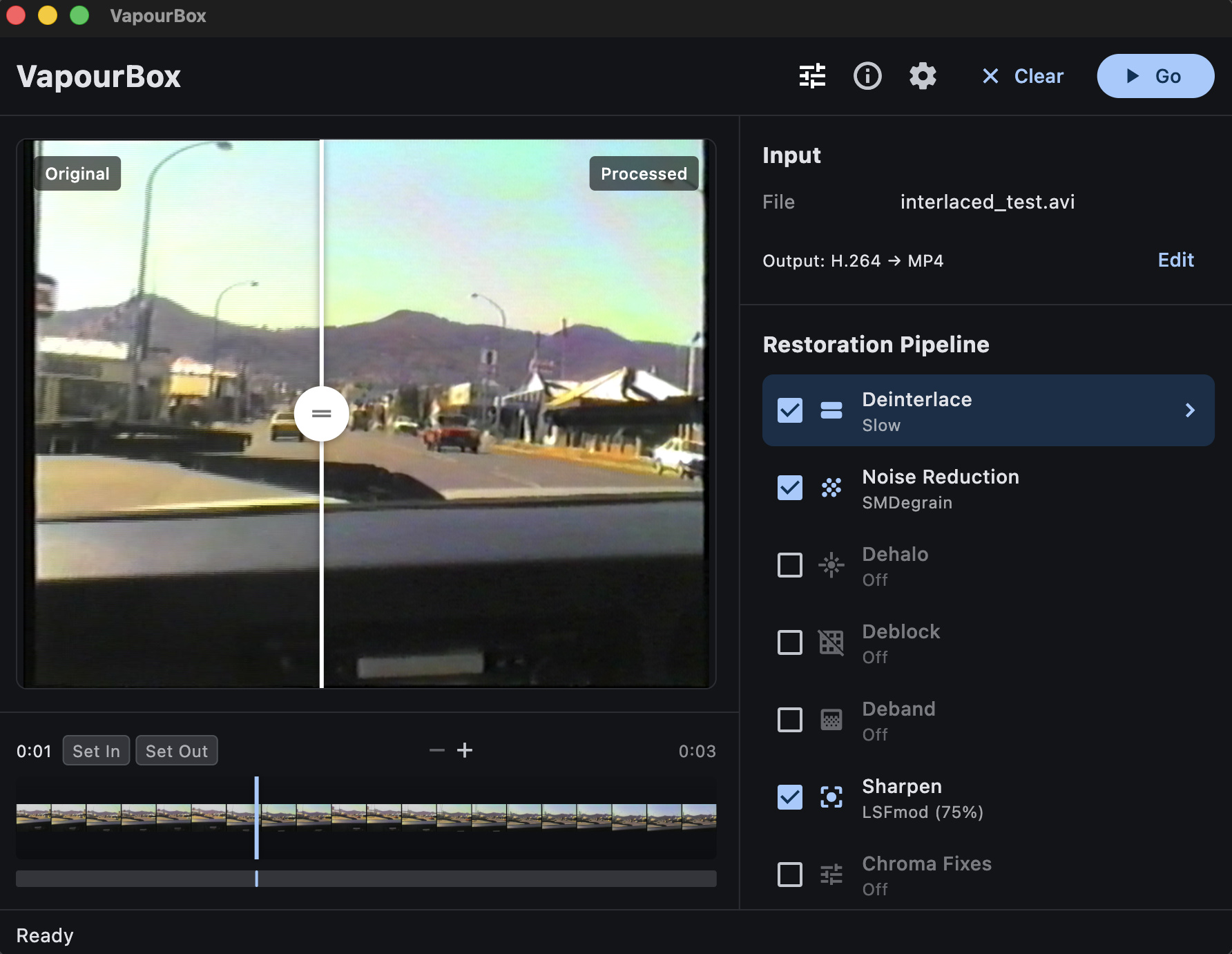
VapourBox is a user-friendly wrapper for VapourSynth for Windows, MacOS and Linux that makes video processing accessible to everyone. Convert between video formats, apply QTGMC deinterlacing, reduce noise, and fix common video problems—all through a simple drag-and-drop interface. No scripting required. No command line needed. Just drop your video and go.
Free software
OS:


File size: 14MB
Portable version
Old versions
Version history
OS:
File size: 14MB
Portable version
Old versions
Version history
Screenshots
Latest version
Download
Download VapourBox 0.9.13 Windows 64-bit 15MB Win64
Portable 
Download VapourBox 0.9.13 Mac Silicon ARM 64-bit 13MB MacARM64
Download VapourBox 0.9.13 Mac Intel 64-bit 14MB Mac64
Download VapourBox 0.9.13 Linux 64-bit 13MB Linux64
Download other versions
Download old versions

Software License
Supported operating systems
Mac OS Linux Version history / Release notes / Changelog / What's New
VapourBox 0.9.13
Fixed
DVD import on macOS. Titles listed correctly but extracting one always failed. It now works. (Affected every signed macOS release since DVD import was added.)
Ripped DVD folders. A folder holding the DVD files directly — VIDEO_TS.IFO, VTS_01_1.VOB and friends, with no VIDEO_TS subfolder — is now recognised as a disc and opens the title picker, instead of queueing every VOB fragment as a separate video.
Cancelling a job could leave processing running. Cancel stopped the job but could leave vspipe/ffmpeg working at full CPU. Most likely with a source on a network drive.
Windows: previews leaked processes. Every movement of the preview scrubber left a vspipe and ffmpeg behind, and they piled up.
Dropping a folder onto the queue did nothing once the queue already had something in it. It now behaves like dropping one on the empty window.
About screen now credits every bundled component, and no longer lists one that was removed.
Notes
Dependencies are unchanged from 0.9.12 — nothing new to download on upgrade.
Fixed
DVD import on macOS. Titles listed correctly but extracting one always failed. It now works. (Affected every signed macOS release since DVD import was added.)
Ripped DVD folders. A folder holding the DVD files directly — VIDEO_TS.IFO, VTS_01_1.VOB and friends, with no VIDEO_TS subfolder — is now recognised as a disc and opens the title picker, instead of queueing every VOB fragment as a separate video.
Cancelling a job could leave processing running. Cancel stopped the job but could leave vspipe/ffmpeg working at full CPU. Most likely with a source on a network drive.
Windows: previews leaked processes. Every movement of the preview scrubber left a vspipe and ffmpeg behind, and they piled up.
Dropping a folder onto the queue did nothing once the queue already had something in it. It now behaves like dropping one on the empty window.
About screen now credits every bundled component, and no longer lists one that was removed.
Notes
Dependencies are unchanged from 0.9.12 — nothing new to download on upgrade.
View full changelog
All features
Features
QTGMC deinterlacing - Industry-standard deinterlacing with full parameter control
Multi-pass restoration pipeline - Denoise, sharpen, dehalo, deblock, deband
Real-time preview - Side-by-side before/after comparison
Timeline with zoom - Navigate and set in/out points for partial exports
Multiple output codecs - ProRes, FFV1, H.264, H.265
Preset system - Save and reuse your filter configurations
Use Cases
Convert interlaced video to progressive
Clean up noisy or soft footage
Archive DVDs with proper deinterlacing
Restore VHS captures
Platforms
macOS ARM64 (Apple Silicon)
Windows x64
Installation
Download the zip for your platform
Extract and run
Dependencies (~94 MB macOS, ~183 MB Windows) download automatically on first launch
Requirements
macOS 11+ (Apple Silicon) or Windows 10/11 (x64)
Internet connection for first launch
QTGMC deinterlacing - Industry-standard deinterlacing with full parameter control
Multi-pass restoration pipeline - Denoise, sharpen, dehalo, deblock, deband
Real-time preview - Side-by-side before/after comparison
Timeline with zoom - Navigate and set in/out points for partial exports
Multiple output codecs - ProRes, FFV1, H.264, H.265
Preset system - Save and reuse your filter configurations
Use Cases
Convert interlaced video to progressive
Clean up noisy or soft footage
Archive DVDs with proper deinterlacing
Restore VHS captures
Platforms
macOS ARM64 (Apple Silicon)
Windows x64
Installation
Download the zip for your platform
Extract and run
Dependencies (~94 MB macOS, ~183 MB Windows) download automatically on first launch
Requirements
macOS 11+ (Apple Silicon) or Windows 10/11 (x64)
Internet connection for first launch
Sections/Browse similar tools
Guides and How to's
Notify me when software updated or report software
| 3 reviews, Showing 1 to 3 reviews |
Excellent, thank you so much.I hope it continues to develop, especially in the area of ​​scratch removal, to make the program even more effective. My sincere thanks again to the developers.
Review by AbuDhifaf on
Aug 14, 2026 Version: 0.9.12
OS: Windows 10 64-bit Ease of use: 10/10
Functionality: 10/10
Value for money: 10/10
Overall: 10/10
After working with Hybrid, which is a good interface, I'd say VapourBox is a nice change when it comes to quick projects. Some more filters for dealing with old tapes and films, would make it even better.
Review by Brandonaz on
Mar 20, 2026 Version: 0.8.0
OS: Windows 10 64-bit Ease of use: 8/10
Functionality: 7/10
Value for money: 10/10
Overall: 8/10
I cut a sample section of a screen recorded movie using AviDemux to test the outcome of this software, using drag & drop I deselected deinterlace & selected sharpen. The output was listed as deinterlaced with no audio despite it being checked to copy original audio.
Review by on
Jan 19, 2026 Version: VapourBox 0.2.0
OS: Windows 11 64-bit Ease of use: -/10
Functionality: -/10
Value for money: -/10
Overall: 5/10
| 3 reviews, Showing 1 to 3 reviews |
| 1 tool hits, Showing 1 to 1 tools |
Explanation:
NEW SOFTWARE= New tool since your last visit
NEW VERSION= New version since your last visit
NEW REVIEW= New review since your last visit
NEW VERSION= New version
Latest version
Version number / Beta version number / Update version number and when it whas released.
Type and download
NO MORE UPDATES? = The software hasn't been updated in over 2 years.
NO LONGER DEVELOPED = The software hasn't been updated in over 5 years.
RECENTLY UPDATED = The software has been updated the last 31 days.
Freeware = Download Free software.
Freeware Trialware = Download Free software but some parts are trial/shareware.
Free software = Download Free software and also open source code also known as FOSS (Free and Open Source Software).
Free software Trialware = Download Free software and also open source code but some parts are trial/shareware.
Freeware Ads = Download Free software but supported by advertising, usually with a included browser toolbar. It may be disabled when installing or after installation.
Free software Ads = Free Download software and open source code but supported by advertising, usually with a included browser toolbar. It may be disabled when installing or after installation.
Trialware = Also called shareware or demo. Free Trial version available for download and testing with usually a time limit or limited functions.
Payware = No demo or trial available.
Portable version = A portable/standalone version is available. No installation is required.
v1.0.1 = Latest version available.
Download beta = It could be a Beta, RC(Release Candidate) or an Alpha / Nightly / Unstable version of the software.
Download 15MB = A direct link to the software download.
Win = Windows download version for 32-bit and 64-bit Windows.
Win64 = Windows 64-bit download version for 64-bit Windows.
WinARM64 = Windows 64-bit ARM download version for Windows ARM64/AArch64.
Mac = Mac download version for 64-bit Mac OS Intel/ARM64/AArch64.
MacARM64 = Mac Silicon download version for 64-bit Mac OS ARM64/AArch64.
Mac64 = Mac OS download version for 64-bit Intel Mac OS.
Linux = Linux download version.
Linux64 = Linux download version for 64bit Linux.
Linux ARM = Linux download version for Linux ARM64/AArch64.
Portable = Portable version. No installation is required.
Ad-Supported = The software is bundled with advertising. Be careful when you install the software and disable addons that you don't want!
Visit developers site = A link to the software developer site.
Download (mirror link) = A mirror link to the software download. It may not contain the latest versions.
Download old versions = Free downloads of previous versions of the program.
Download 64-bit version = If you have a 64bit operating system you can download this version.
Download portable version = Portable/Standalone version meaning that no installation is required, just extract the files to a folder and run directly.
Portable version available = Download the portable version and you can just extract the files and run the program without installation.
Old versions available = Download old versions of the program.
Version history available = Complete changelog on our site.
= Windows version available.
= Mac OS version available.
= Linux version available.
Our hosted software are virus and malware scanned with several antivirus programs using www.virustotal.com. (NOTE! Just one virustotal warning is 99.9% a false positive. And some software might receive 2-6 warnings but it's if they are not all same virus/trojan then it's 99% false positives.)
Rating
Rating from 0-10.
NEW SOFTWARE= New tool since your last visit
NEW VERSION= New version since your last visit
NEW REVIEW= New review since your last visit
NEW VERSION= New version
Latest version
Version number / Beta version number / Update version number and when it whas released.
Type and download
NO MORE UPDATES? = The software hasn't been updated in over 2 years.
NO LONGER DEVELOPED = The software hasn't been updated in over 5 years.
RECENTLY UPDATED = The software has been updated the last 31 days.
Freeware = Download Free software.
Freeware Trialware = Download Free software but some parts are trial/shareware.
Free software = Download Free software and also open source code also known as FOSS (Free and Open Source Software).
Free software Trialware = Download Free software and also open source code but some parts are trial/shareware.
Freeware Ads = Download Free software but supported by advertising, usually with a included browser toolbar. It may be disabled when installing or after installation.
Free software Ads = Free Download software and open source code but supported by advertising, usually with a included browser toolbar. It may be disabled when installing or after installation.
Trialware = Also called shareware or demo. Free Trial version available for download and testing with usually a time limit or limited functions.
Payware = No demo or trial available.
Portable version = A portable/standalone version is available. No installation is required.
v1.0.1 = Latest version available.
Download beta = It could be a Beta, RC(Release Candidate) or an Alpha / Nightly / Unstable version of the software.
Download 15MB = A direct link to the software download.
Win = Windows download version for 32-bit and 64-bit Windows.
Win64 = Windows 64-bit download version for 64-bit Windows.
WinARM64 = Windows 64-bit ARM download version for Windows ARM64/AArch64.
Mac = Mac download version for 64-bit Mac OS Intel/ARM64/AArch64.
MacARM64 = Mac Silicon download version for 64-bit Mac OS ARM64/AArch64.
Mac64 = Mac OS download version for 64-bit Intel Mac OS.
Linux = Linux download version.
Linux64 = Linux download version for 64bit Linux.
Linux ARM = Linux download version for Linux ARM64/AArch64.
Portable = Portable version. No installation is required.
Ad-Supported = The software is bundled with advertising. Be careful when you install the software and disable addons that you don't want!
Visit developers site = A link to the software developer site.
Download (mirror link) = A mirror link to the software download. It may not contain the latest versions.
Download old versions = Free downloads of previous versions of the program.
Download 64-bit version = If you have a 64bit operating system you can download this version.
Download portable version = Portable/Standalone version meaning that no installation is required, just extract the files to a folder and run directly.
Portable version available = Download the portable version and you can just extract the files and run the program without installation.
Old versions available = Download old versions of the program.
Version history available = Complete changelog on our site.
= Windows version available. = Mac OS version available. = Linux version available.Our hosted software are virus and malware scanned with several antivirus programs using www.virustotal.com. (NOTE! Just one virustotal warning is 99.9% a false positive. And some software might receive 2-6 warnings but it's if they are not all same virus/trojan then it's 99% false positives.)
Rating
Rating from 0-10.
Browse software by sections
All In One Blu-ray Converters (9)
All In One DVD Converters (12)
All In One MKV to MP4, Blu-ray, UHD (11)
All In One Video Converters (19)
Animation (3D, 2D Animation) (12)
Audio Editors (22)
Audio Encoders (80)
Audio Players (19)
Authoring (Blu-ray, UHD, AVCHD) (13)
Authoring (DivX) (4)
Authoring (DVD) (26)
Authoring (SVCD, VCD) (9)
Bitrate Calculators (7)
Blu-ray to AVI, MKV, MP4 (15)
Blu-ray to Blu-ray, AVCHD (10)
Burn (CD,DVD,Blu-ray) (24)
Camcorders, DV, HDV, AVCHD (31)
Capture TV, DVD, VCR (30)
CD, DVD, Blu-ray recovery (3)
Codec Packs (6)
All In One DVD Converters (12)
All In One MKV to MP4, Blu-ray, UHD (11)
All In One Video Converters (19)
Animation (3D, 2D Animation) (12)
Audio Editors (22)
Audio Encoders (80)
Audio Players (19)
Authoring (Blu-ray, UHD, AVCHD) (13)
Authoring (DivX) (4)
Authoring (DVD) (26)
Authoring (SVCD, VCD) (9)
Bitrate Calculators (7)
Blu-ray to AVI, MKV, MP4 (15)
Blu-ray to Blu-ray, AVCHD (10)
Burn (CD,DVD,Blu-ray) (24)
Camcorders, DV, HDV, AVCHD (31)
Capture TV, DVD, VCR (30)
CD, DVD, Blu-ray recovery (3)
Codec Packs (6)
Codec, Video Identifiers (31)
Codecs (67)
Decrypters (DVD Rippers) (16)
Decrypters (UHD, Blu-ray Rippers) (8)
DigitalTV, DVB, IPTV (39)
DVD to DVD (20)
DVD to MP4, MKV, H264, H265 (16)
DVD to VCD, SVCD (5)
DVD to XviD, AVI, DivX (16)
ISO, Image (15)
Linux Video Tools (212)
MacOS Video Tools (244)
Media (Blu-ray, DVD, CD) (9)
Media Center, HTPC (24)
Other Useful Tools (140)
Photo Blu-ray, DVD, SlideShow (8)
Portable (Mobile, PSP) (35)
Region Free Tools (5)
Screen capture , Screen recording (26)
Screenshots , Thumbnails (13)
Codecs (67)
Decrypters (DVD Rippers) (16)
Decrypters (UHD, Blu-ray Rippers) (8)
DigitalTV, DVB, IPTV (39)
DVD to DVD (20)
DVD to MP4, MKV, H264, H265 (16)
DVD to VCD, SVCD (5)
DVD to XviD, AVI, DivX (16)
ISO, Image (15)
Linux Video Tools (212)
MacOS Video Tools (244)
Media (Blu-ray, DVD, CD) (9)
Media Center, HTPC (24)
Other Useful Tools (140)
Photo Blu-ray, DVD, SlideShow (8)
Portable (Mobile, PSP) (35)
Region Free Tools (5)
Screen capture , Screen recording (26)
Screenshots , Thumbnails (13)
Subtitle Editors, Converters (72)
Tag Editors (4)
Video De, Multiplexers (66)
Video Editors (Advanced, NLE) (35)
Video Editors (Basic) (56)
Video Editors (H264, MP4, MKV, MTS) (19)
Video Editors (Lossless) (4)
Video Editors (MPG, DVD) (16)
Video Editors (WMV, AVI) (15)
Video Encoders (AV1, VP8, VP9) (2)
Video Encoders (AVI, WMV) (38)
Video Encoders (H264, H265, MP4, MKV) (45)
Video Encoders (MPG, DVD) (23)
Video Encoders , Converters (155)
Video Frameservers (9)
Video Players (48)
Video Repair, Fix (24)
Video Scripting (10)
Video Streaming (20)
Video Streaming Downloaders (100)
Tag Editors (4)
Video De, Multiplexers (66)
Video Editors (Advanced, NLE) (35)
Video Editors (Basic) (56)
Video Editors (H264, MP4, MKV, MTS) (19)
Video Editors (Lossless) (4)
Video Editors (MPG, DVD) (16)
Video Editors (WMV, AVI) (15)
Video Encoders (AV1, VP8, VP9) (2)
Video Encoders (AVI, WMV) (38)
Video Encoders (H264, H265, MP4, MKV) (45)
Video Encoders (MPG, DVD) (23)
Video Encoders , Converters (155)
Video Frameservers (9)
Video Players (48)
Video Repair, Fix (24)
Video Scripting (10)
Video Streaming (20)
Video Streaming Downloaders (100)