
Help us keep the list up to date and submit new video software here.
Try StreamFab Downloader and download streaming video from Netflix, Amazon, Youtube! Download free trial.
Tool
Description
Type
Rating
Reviews
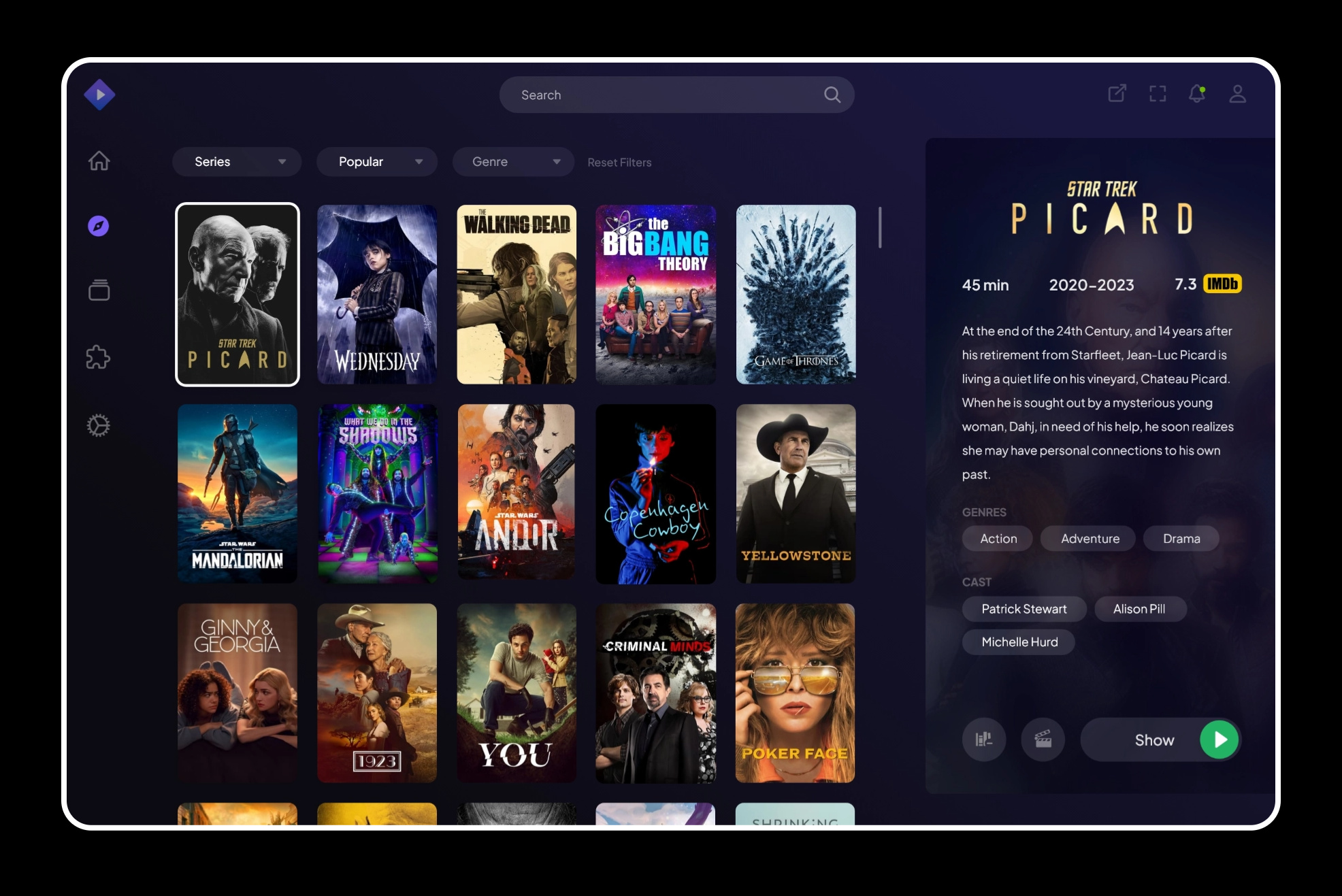
Stremio offers a secure, modern and seamless entertainment experience. With its easy-to-use interface and diverse content library, including 4K HDR support, users can enjoy their favorite movies and TV shows across all their devices. And with its commitment to security, Stremio is the ultimate choice for a worry-free, high-quality streaming experience.
Free software
OS:


File size: 113MB
Version history
Alternative software
OS:
File size: 113MB
Version history
Alternative software
Screenshots


Latest version
Download
Download Stremio 5.0.27 Windows 113MB Win
Download Stremio 5.1.30 Mac Silicon ARM 64-bit 113MB MacARM64
Download Stremio 5.1.30 Mac Intel 64-bit 113MB Mac64
Download Stremio 5 Linux 64-bit Linux64
Download other versions
Software License
Supported operating systems
Mac OS Linux Version history / Release notes / Changelog / What's New
Stremio Tech Update #86 – Stremio Update for MacOS and iOS
Posted on October 22, 2026 by Alex
Stremio 2.1 for iOS, iPadOS, tvOS and MacOS is here, and it’s a big one.
Highlights
New Calendar with a daily agenda of upcoming episodes
Discover previews: see a title’s details, trailer and actions without leaving Discover
Redesigned Settings, title details and player controls
Redesigned Subtitle Live Sync and profile picker for Supporters
Support for foldable iPhones
Lots of subtitle, player and Discover fixes
This update allows installation of Stremio on iPhone 18 and duo
Heads up: 2.1 needs iOS 15 or macOS 12 and newer. iOS 13–14 and macOS 10.15–11 are no longer supported. tvOS still needs 15.
New
Calendar with month navigation and a daily agenda of upcoming episodes.
Discover previews: tap a title to see its details inline, with trailer, library, watched and rating actions, without leaving Discover.
Add-ons that receive your watch activity now show a warning and ask you to confirm before you install them.
Support for foldable iPhones, with adaptive layouts for playback, login, account, profile picker and stream lists that keep content clear of the camera area.
Hover, focus and press feedback on posters.
Redesigned
Settings: grouped by task, with dedicated pages, adaptive sidebar navigation and a refreshed tvOS layout.
Title details: richer metadata, new action buttons, artwork that fades into the background and a consistent info line for episodes.
Player controls on iOS, macOS and tvOS, with adaptive layouts, glass styling and refreshed Next Episode and Skip Intro popups.
Subtitle menu: picking a language now selects its first subtitle automatically.
Subtitle Live Sync (Supporters): cue search, applied delay and cue timing details.
Profile picker (Supporters) on iOS and tvOS.
Native menus replace the custom dropdown sheets on iOS and macOS.
Poster sizes and loading placeholders now match across all catalogs.
Updated add-ons icon in the navigation bar and profile menu.
Improvements
Discover shows every filter a catalog supports, sizes its filter bar to fit and shows an error when a page fails to load.
Discover on tvOS shows a loading indicator while more titles load and keeps your focus in place.
Stream lists tell apart several configured copies of the same add-on.
Library keeps its state when you switch tabs and shows a loading state until it’s ready.
Downloads: better retries and HTTP error handling. Resuming works correctly after a cancel, and storage cleanup only touches downloads.
Settings stays in sync with the app: external player choices, Low Data Mode status and stream filter presets.
Settings shows subtitle opacity as a percentage, tvOS rows show their current value, and only player options your device supports are listed.
Your seek duration setting is now used everywhere, including hold-to-seek on tvOS.
Cinemeta configuration opens inside the app.
Faster title details, stream lists, player and subtitle rendering.
On iPad and Mac, selecting the current sidebar item again behaves like tapping the current tab.
On iPad, action menus open from the button you tapped.
Larger close buttons, toolbars that follow the app’s tint, and chip rows that fade out at the edges.
Fixes
Subtitles: fixed overlapping cues, automatic track selection (including embedded tracks), style changes not applying, format detection, handling of broken files and duplicate subtitle entries.
More reliable video file matching for subtitles.
Audio fallback now respects your secondary language preference.
Catalog titles no longer repeat across pages.
Fixed Discover filters, catalog links, navigation state and scroll position when you open a new catalog.
Player: fixed it reporting ready too early, wrong loading transitions, timeline marker positions, native player presentation, the navigation bar showing during playback and back button spacing on iPhone. Also fixed the Next Episode popup on narrow screens and leftover screens after closing the player.
External players no longer leave stale callbacks behind after playback.
No more misleading error messages while offline, and better handling of library sync errors.
Login: fixed placeholders, the password visibility toggle, keyboard focus, cancelling link login and the sign-in button position on Mac.
Opening an episode directly keeps series navigation, and episode progress bars are correct.
Spoiler episode thumbnails stay blurred.
Fixed where catalog loading rows appear, the watched indicator overlapping badges and poster selection sticking after a tap on iPhone.
Settings: fixed layout after rotation on iPad, dropdown sizing and rows collapsing with an avatar.
Fixed toolbar visibility when switching screens, and disabled buttons and menu items can no longer be triggered.
Add-on cards refresh when their information changes.
Accessibility
tvOS playback seeking works with VoiceOver.
VoiceOver announces the selected profile.
Settings supports Dynamic Type.
Animations respect Reduce Motion.
System requirements
The move to the current Apple SDK and the redesigned interface require newer system versions. iOS 13 and 14 and macOS 10.15 and 11 are no longer supported; iOS 15 and macOS 12 are now the minimum. tvOS stays at 15.
View full changelog
All features
Watch & Enjoy.
Stremio makes it a piece of cake
Easy to Use
Stremio is designed to be user-friendly and easy to use. With its clean and intuitive interface you can easily navigate and find the content you want to watch.
Seamless Across Devices
Available for a wide range of platforms (incl. Windows, Mac, Linux, Android and more), Stremio will keep track of your progress across all your devices. Just login and continue watching without having to configure the app again on each new device.
All Downloads
High-Definition Video Support
An integrated video player supporting most video formats, including 4K HDR content, lets you enjoy the highest quality available.
Diverse Content Library
Stremio integrates with a large number of popular video sources, such as Netflix, Amazon Prime Video, Hulu, YouTube, and many more.
Create a Free Account
Free & Secure
Streaming
Stremio offers unmatched security and privacy for users. With its unique feature of running addons remotely, Stremio provides a safer way to stream your favorite content compared to other platforms. Your security and privacy are top priorities, and the platform ensures that all your data is protected.
Say goodbye to worries about security and privacy and say hello to a world of endless entertainment with Stremio.
Get Stremio for Free
New Theater Experience
Stremio's new dedicated TV app let's you enjoy a movie night on your Android TV devices.
Discover more.
Never run out of things to watch
Sections/Browse similar tools
Alternative to Stremio
(Latest version updated)Emby Server (Oct 31, 2026)
Jellyfin (Oct 26, 2026)
JRiver Media Center (Oct 27, 2026)
MediaPortal (Oct 13, 2026)
Plex Media Server (Oct 26, 2026)
Universal Media Server (Nov 1, 2026)
Guides and How to's
Notify me when software updated or report software
| 1 reviews, Showing 1 to 1 reviews |
Rating by on
Jul 28, 2025 Version: 5.0.0 beta 26
OS: Windows 11 64-bit Ease of use: 10/10
Functionality: 10/10
Value for money: 10/10
Overall: 10/10
| 1 reviews, Showing 1 to 1 reviews |
| 1 tool hits, Showing 1 to 1 tools |
Explanation:
NEW SOFTWARE= New tool since your last visit
NEW VERSION= New version since your last visit
NEW REVIEW= New review since your last visit
NEW VERSION= New version
Latest version
Version number / Beta version number / Update version number and when it whas released.
Type and download
NO MORE UPDATES? = The software hasn't been updated in over 2 years.
NO LONGER DEVELOPED = The software hasn't been updated in over 5 years.
RECENTLY UPDATED = The software has been updated the last 31 days.
Freeware = Download Free software.
Freeware Trialware = Download Free software but some parts are trial/shareware.
Free software = Download Free software and also open source code also known as FOSS (Free and Open Source Software).
Free software Trialware = Download Free software and also open source code but some parts are trial/shareware.
Freeware Ads = Download Free software but supported by advertising, usually with a included browser toolbar. It may be disabled when installing or after installation.
Free software Ads = Free Download software and open source code but supported by advertising, usually with a included browser toolbar. It may be disabled when installing or after installation.
Trialware = Also called shareware or demo. Free Trial version available for download and testing with usually a time limit or limited functions.
Payware = No demo or trial available.
Portable version = A portable/standalone version is available. No installation is required.
v1.0.1 = Latest version available.
Download beta = It could be a Beta, RC(Release Candidate) or an Alpha / Nightly / Unstable version of the software.
Download 15MB = A direct link to the software download.
Win = Windows download version for 32-bit and 64-bit Windows.
Win64 = Windows 64-bit download version for 64-bit Windows.
WinARM64 = Windows 64-bit ARM download version for Windows ARM64/AArch64.
Mac = Mac download version for 64-bit Mac OS Intel/ARM64/AArch64.
MacARM64 = Mac Silicon download version for 64-bit Mac OS ARM64/AArch64.
Mac64 = Mac OS download version for 64-bit Intel Mac OS.
Linux = Linux download version.
Linux64 = Linux download version for 64bit Linux.
Linux ARM = Linux download version for Linux ARM64/AArch64.
Portable = Portable version. No installation is required.
Ad-Supported = The software is bundled with advertising. Be careful when you install the software and disable addons that you don't want!
Visit developers site = A link to the software developer site.
Download (mirror link) = A mirror link to the software download. It may not contain the latest versions.
Download old versions = Free downloads of previous versions of the program.
Download 64-bit version = If you have a 64bit operating system you can download this version.
Download portable version = Portable/Standalone version meaning that no installation is required, just extract the files to a folder and run directly.
Portable version available = Download the portable version and you can just extract the files and run the program without installation.
Old versions available = Download old versions of the program.
Version history available = Complete changelog on our site.
= Windows version available.
= Mac OS version available.
= Linux version available.
Our hosted software are virus and malware scanned with several antivirus programs using www.virustotal.com. (NOTE! Just one virustotal warning is 99.9% a false positive. And some software might receive 2-6 warnings but it's if they are not all same virus/trojan then it's 99% false positives.)
Rating
Rating from 0-10.
NEW SOFTWARE= New tool since your last visit
NEW VERSION= New version since your last visit
NEW REVIEW= New review since your last visit
NEW VERSION= New version
Latest version
Version number / Beta version number / Update version number and when it whas released.
Type and download
NO MORE UPDATES? = The software hasn't been updated in over 2 years.
NO LONGER DEVELOPED = The software hasn't been updated in over 5 years.
RECENTLY UPDATED = The software has been updated the last 31 days.
Freeware = Download Free software.
Freeware Trialware = Download Free software but some parts are trial/shareware.
Free software = Download Free software and also open source code also known as FOSS (Free and Open Source Software).
Free software Trialware = Download Free software and also open source code but some parts are trial/shareware.
Freeware Ads = Download Free software but supported by advertising, usually with a included browser toolbar. It may be disabled when installing or after installation.
Free software Ads = Free Download software and open source code but supported by advertising, usually with a included browser toolbar. It may be disabled when installing or after installation.
Trialware = Also called shareware or demo. Free Trial version available for download and testing with usually a time limit or limited functions.
Payware = No demo or trial available.
Portable version = A portable/standalone version is available. No installation is required.
v1.0.1 = Latest version available.
Download beta = It could be a Beta, RC(Release Candidate) or an Alpha / Nightly / Unstable version of the software.
Download 15MB = A direct link to the software download.
Win = Windows download version for 32-bit and 64-bit Windows.
Win64 = Windows 64-bit download version for 64-bit Windows.
WinARM64 = Windows 64-bit ARM download version for Windows ARM64/AArch64.
Mac = Mac download version for 64-bit Mac OS Intel/ARM64/AArch64.
MacARM64 = Mac Silicon download version for 64-bit Mac OS ARM64/AArch64.
Mac64 = Mac OS download version for 64-bit Intel Mac OS.
Linux = Linux download version.
Linux64 = Linux download version for 64bit Linux.
Linux ARM = Linux download version for Linux ARM64/AArch64.
Portable = Portable version. No installation is required.
Ad-Supported = The software is bundled with advertising. Be careful when you install the software and disable addons that you don't want!
Visit developers site = A link to the software developer site.
Download (mirror link) = A mirror link to the software download. It may not contain the latest versions.
Download old versions = Free downloads of previous versions of the program.
Download 64-bit version = If you have a 64bit operating system you can download this version.
Download portable version = Portable/Standalone version meaning that no installation is required, just extract the files to a folder and run directly.
Portable version available = Download the portable version and you can just extract the files and run the program without installation.
Old versions available = Download old versions of the program.
Version history available = Complete changelog on our site.
= Windows version available. = Mac OS version available. = Linux version available.Our hosted software are virus and malware scanned with several antivirus programs using www.virustotal.com. (NOTE! Just one virustotal warning is 99.9% a false positive. And some software might receive 2-6 warnings but it's if they are not all same virus/trojan then it's 99% false positives.)
Rating
Rating from 0-10.
Browse software by sections
All In One Blu-ray Converters (9)
All In One DVD Converters (12)
All In One MKV to MP4, Blu-ray, UHD (11)
All In One Video Converters (19)
Animation (3D, 2D Animation) (13)
Audio Editors (23)
Audio Encoders (80)
Audio Players (19)
Authoring (Blu-ray, UHD, AVCHD) (13)
Authoring (DivX) (4)
Authoring (DVD) (26)
Authoring (SVCD, VCD) (9)
Bitrate Calculators (7)
Blu-ray to AVI, MKV, MP4 (15)
Blu-ray to Blu-ray, AVCHD (10)
Burn (CD,DVD,Blu-ray) (24)
Camcorders, DV, HDV, AVCHD (31)
Capture TV, DVD, VCR (30)
CD, DVD, Blu-ray recovery (3)
Codec Packs (6)
Codec, Video Identifiers (31)
Codecs , Renderers (68)
Decrypters (DVD Rippers) (16)
Decrypters (UHD, Blu-ray Rippers) (8)
DigitalTV, DVB, IPTV (40)
DVD to DVD (20)
DVD to MP4, MKV, H264, H265 (16)
DVD to VCD, SVCD (5)
DVD to XviD, AVI, DivX (16)
ISO, Image (14)
Linux Video Tools (218)
MacOS Video Tools (252)
Media (Blu-ray, DVD, CD) (9)
Media Center, HTPC (25)
Other Useful Tools (136)
Photo Blu-ray, DVD, SlideShow (8)
Portable (Mobile, PSP) (35)
Region Free Tools (5)
Screen capture , Screen recording (25)
Screenshots , Thumbnails (13)
Subtitle Editors, Converters (71)
Tag Editors (4)
Video Compare Software (6)
Video Demultiplexers, Multiplexers (66)
Video Editors (Advanced, NLE) (37)
Video Editors (Basic) (58)
Video Editors (H264, MP4, MKV, MTS) (21)
Video Editors (Lossless) (7)
Video Editors (MPG, DVD) (16)
Video Editors (WMV, AVI) (15)
Video Encoders (AV1, VP8, VP9) (2)
Video Encoders (AVI, WMV) (38)
Video Encoders (H264, H265, MP4, MKV) (45)
Video Encoders (MPG, DVD) (23)
Video Encoders , Converters (155)
Video Frameservers (9)
Video Players (49)
Video Repair, Fix (24)
Video Scripting (10)
Video Streaming (20)