
Help us keep the list up to date and submit new video software here.
Tool
Description
Type
Rating
Reviews
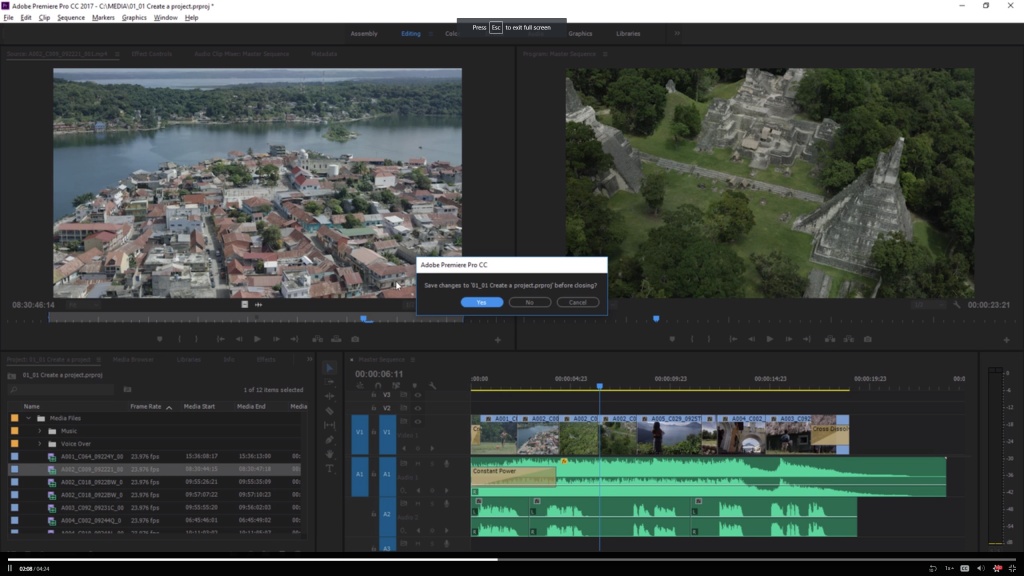
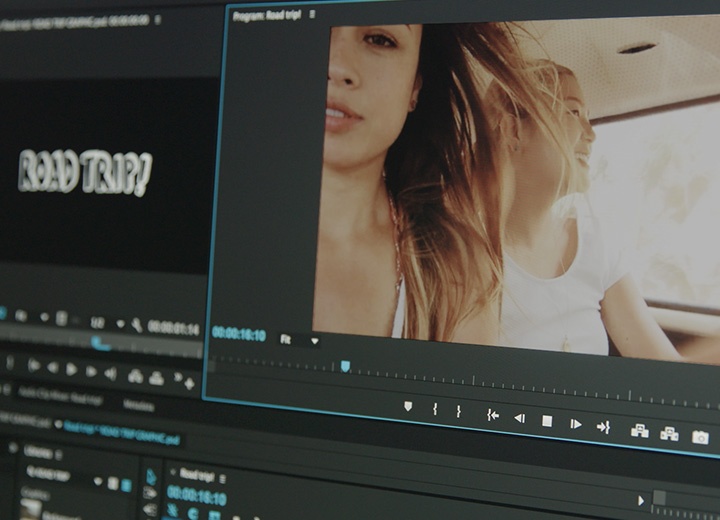
Adobe Premiere Pro software is a nonlinear video editing application. Powerful real-time video and audio editing tools give you precise control over virtually every aspect of your production. Price $20/month or $50/month for all Adobe products.
Screenshots

Latest version
Download
Download Adobe Premiere Pro 26.5.1 Windows 3.1MB Win

Download Adobe Premiere Pro 26.5.1 Mac Mac

Software License
Supported operating systems
Mac OS More information and other downloads
Download WebMiere, WebMiere is a free and open-source Premiere Pro importer for VP9/AV1 video and Opus audio in WebM and MKV files. Drop OBS recordings and YouTube-style WebM/MKV media straight into Adobe Premiere Pro.
Version history / Release notes / Changelog / What's New
September 2026 (version 26.5.1)
Fixed issue
Increased transparency for generation and credit usage associated with the Generative Media Tool.
What’s new in Adobe Premiere on desktop
Last updated on Sep 9, 2026
Explore the new and enhanced features in the latest releases of Adobe Premiere on desktop.
September 2026 (version 26.5)
Generate media with the Generative Media Tool
Generate video and sound effects from text prompts directly in your Premiere timeline. Add the generated media as editable clips to your sequence, so you can continue refining your edit.
Learn more about the Generative Media Tool ›
Build sequences faster with Paper Edit
Create sequences directly from your transcript with Paper Edit. Select multiple lines of text in the Text panel to quickly assemble a sequence from your transcript.
Learn more about Paper Edit ›
Support Sony FX5 cameras
Bring footage from Sony FX5 cameras directly into your editing workflow with expanded camera support. Edit Sony XAVC and XOCN media with support for 32-bit float Hi-Res audio, alongside your other media in Premiere for a more seamless production workflow.
Full raw control and enhanced ProRes RAW performance
View and modify native raw parameters right from your timeline, with smooth playback and better overall performance.
Match audio settings automatically with Match Source
Match Source now includes your source's audio channels and sample rate, with automatic downmixing and warnings when a format can't support the source's channel layout.
Get smoother Object Masking results
Adjust the smoothness of object masks with new controls for more precise mask edges.
Learn more about Object Masking ›
Create cinematic looks with new and updated effects
Create customizable cinematic flares with Lens Flare, achieve more precise creative results with the updated Twirl, and get more natural-looking results with improved Mosaic Softness control, while keeping existing projects unchanged.
Learn more about the effects ›
Extend more media with Generative Extend
Generative Extend now supports more source media, including resolutions from 360p to 4K UHD, any aspect ratio, and interlaced or non-square-pixel footage.
Learn more about Generative Extend ›
Native support for ARRI ALEXA 35 Xtreme & ARRICORE
Import ARRICORE media directly into your timeline with zero transcoding and great performance.
Updated hardware-accelerated playback on NVIDIA Blackwell
Premiere now supports hardware 4:2:2 10-bit decoding for AVC and HEVC in MXF on NVIDIA Blackwell GPUs.
Fixed issue
Increased transparency for generation and credit usage associated with the Generative Media Tool.
What’s new in Adobe Premiere on desktop
Last updated on Sep 9, 2026
Explore the new and enhanced features in the latest releases of Adobe Premiere on desktop.
September 2026 (version 26.5)
Generate media with the Generative Media Tool
Generate video and sound effects from text prompts directly in your Premiere timeline. Add the generated media as editable clips to your sequence, so you can continue refining your edit.
Learn more about the Generative Media Tool ›
Build sequences faster with Paper Edit
Create sequences directly from your transcript with Paper Edit. Select multiple lines of text in the Text panel to quickly assemble a sequence from your transcript.
Learn more about Paper Edit ›
Support Sony FX5 cameras
Bring footage from Sony FX5 cameras directly into your editing workflow with expanded camera support. Edit Sony XAVC and XOCN media with support for 32-bit float Hi-Res audio, alongside your other media in Premiere for a more seamless production workflow.
Full raw control and enhanced ProRes RAW performance
View and modify native raw parameters right from your timeline, with smooth playback and better overall performance.
Match audio settings automatically with Match Source
Match Source now includes your source's audio channels and sample rate, with automatic downmixing and warnings when a format can't support the source's channel layout.
Get smoother Object Masking results
Adjust the smoothness of object masks with new controls for more precise mask edges.
Learn more about Object Masking ›
Create cinematic looks with new and updated effects
Create customizable cinematic flares with Lens Flare, achieve more precise creative results with the updated Twirl, and get more natural-looking results with improved Mosaic Softness control, while keeping existing projects unchanged.
Learn more about the effects ›
Extend more media with Generative Extend
Generative Extend now supports more source media, including resolutions from 360p to 4K UHD, any aspect ratio, and interlaced or non-square-pixel footage.
Learn more about Generative Extend ›
Native support for ARRI ALEXA 35 Xtreme & ARRICORE
Import ARRICORE media directly into your timeline with zero transcoding and great performance.
Updated hardware-accelerated playback on NVIDIA Blackwell
Premiere now supports hardware 4:2:2 10-bit decoding for AVC and HEVC in MXF on NVIDIA Blackwell GPUs.
View full changelog
Sections/Browse similar tools
Alternative to Adobe Premiere Pro
(Latest version updated)Adobe After Effects (Sep 9, 2026)
Avid Media Composer (Aug 31, 2026)
DaVinci Resolve (Sep 8, 2026)
Kdenlive (Sep 11, 2026)
OpenShot Video Editor (Aug 30, 2026)
Shotcut (Sep 6, 2026)
Vegas Pro (Sep 9, 2025)
Guides and How to's
Acronyms / Also Known As
Notify me when software updated or report software
| 16 reviews, Showing 1 to 5 reviews |
I made the terrible mistake of updating to 12.1.0 and I'm completely dead in the water. First, as I'm review the video clips in the cutting process the video freezes and never resumes. If I try to exit the program the program turns grey and doesn't close. I have to use Task Manager to close it. When I reload program and project I was working on all the edits are gone and I'm back to square one. So, even though I save frequently during the edit/cutting process when the program freezes and I close it with Task Manager then re-launch and open the project I was working on every single edit I've done and saved is gone wasting hours of time. I have 5 hours of video to edit and a non function PP to do it. I was fine until the update and have a powerful PC so my hardware isn't the problem.
Adobe is a worthless company!
Brian
Adobe is a worthless company!
Brian
Review by Brian on
Apr 8, 2018 Version: 12.1.0
OS: Windows 10 64-bit Ease of use: 5/10
Functionality: 2/10
Value for money: 3/10
Overall: 3/10
Rating by Brian on
Apr 8, 2018 Version: 12.1.0
OS: Windows 10 64-bit Ease of use: 6/10
Functionality: 1/10
Value for money: 3/10
Overall: 3/10
I have used many different video editors even the ones on the mac aka crapple. Out of all the editors I have used Adobe Premiere Pro is by far the best. Sony VEGAS is not even close. I have been with premiere since version 5. This tool is very easy to use I work for the Assemblies of God and during their summer camps we have to put together 10-15 minute videos EACH DAY. Our whole team uses Adobe Premiere Pro 7 except for one who uses a mac (yuck). Oh yea in reply to "Fernando Assis" The Red screen with all the words on it is what adobe inserts when it cant find your file because YOU moved it and YOU didnt FIND it when it asked you to (when you opened the program) This is YOUR fault not adobes.
Review by Spywell on
May 24, 2007 Version: 7.0
OS: WinXP Ease of use: 10/10
Functionality: 10/10
Value for money: 10/10
Overall: 10/10
I've read a lot about Premiere Pro crashing on various people, and while I don't doubt their experiences, I've been a happy Premiere user for a couple of years now and my computer has crashed not one time due to Premiere. I've never even had the program lock up on me, and my system is definitely not a perfectly smooth build.
I don't know how "easy" it is to learn for others, but being I'm already pretty fluent in Photoshop, it took me about half an hour to figure out most of the basics in Premiere, and was happily editing complex shots after a few hours work. Frankly I love the program and am very, very satisfied with both ease of use and great results.
I don't know how "easy" it is to learn for others, but being I'm already pretty fluent in Photoshop, it took me about half an hour to figure out most of the basics in Premiere, and was happily editing complex shots after a few hours work. Frankly I love the program and am very, very satisfied with both ease of use and great results.
Review by Ozymango on
Feb 28, 2007 Version: 1.5
OS: WinXP Ease of use: 9/10
Functionality: 10/10
Value for money: 10/10
Overall: 9/10
I can safely say this is a great application. I have worked with Pinnacle Liquid, Avid Xpress, Avid Media Composer. While some features look more professional on these applications, nothing beats adobe when it comes to ease of use. It operates just like any other windows based application.
With the HD support, and Major Matrox RTX100 integration, Premiere Pro is one powerful tool. There's nothing u cant do on it. Add a little of After Effects Skills, anf u got urself a kick ass workstation and unlimited creativity.
VERVE
With the HD support, and Major Matrox RTX100 integration, Premiere Pro is one powerful tool. There's nothing u cant do on it. Add a little of After Effects Skills, anf u got urself a kick ass workstation and unlimited creativity.
VERVE
Review by VERVE on
Aug 23, 2005 Version: 1.5.1
OS: WinXP Ease of use: 9/10
Functionality: 8/10
Value for money: 10/10
Overall: 9/10
| 16 reviews, Showing 1 to 5 reviews |
| 1 tool hits, Showing 1 to 1 tools |
Explanation:
NEW SOFTWARE= New tool since your last visit
NEW VERSION= New version since your last visit
NEW REVIEW= New review since your last visit
NEW VERSION= New version
Latest version
Version number / Beta version number / Update version number and when it whas released.
Type and download
NO MORE UPDATES? = The software hasn't been updated in over 2 years.
NO LONGER DEVELOPED = The software hasn't been updated in over 5 years.
RECENTLY UPDATED = The software has been updated the last 31 days.
Freeware = Download Free software.
Freeware Trialware = Download Free software but some parts are trial/shareware.
Free software = Download Free software and also open source code also known as FOSS (Free and Open Source Software).
Free software Trialware = Download Free software and also open source code but some parts are trial/shareware.
Freeware Ads = Download Free software but supported by advertising, usually with a included browser toolbar. It may be disabled when installing or after installation.
Free software Ads = Free Download software and open source code but supported by advertising, usually with a included browser toolbar. It may be disabled when installing or after installation.
Trialware = Also called shareware or demo. Free Trial version available for download and testing with usually a time limit or limited functions.
Payware = No demo or trial available.
Portable version = A portable/standalone version is available. No installation is required.
v1.0.1 = Latest version available.
Download beta = It could be a Beta, RC(Release Candidate) or an Alpha / Nightly / Unstable version of the software.
Download 15MB = A direct link to the software download.
Win = Windows download version for 32-bit and 64-bit Windows.
Win64 = Windows 64-bit download version for 64-bit Windows.
WinARM64 = Windows 64-bit ARM download version for Windows ARM64/AArch64.
Mac = Mac download version for 64-bit Mac OS Intel/ARM64/AArch64.
MacARM64 = Mac Silicon download version for 64-bit Mac OS ARM64/AArch64.
Mac64 = Mac OS download version for 64-bit Intel Mac OS.
Linux = Linux download version.
Linux64 = Linux download version for 64bit Linux.
Linux ARM = Linux download version for Linux ARM64/AArch64.
Portable = Portable version. No installation is required.
Ad-Supported = The software is bundled with advertising. Be careful when you install the software and disable addons that you don't want!
Visit developers site = A link to the software developer site.
Download (mirror link) = A mirror link to the software download. It may not contain the latest versions.
Download old versions = Free downloads of previous versions of the program.
Download 64-bit version = If you have a 64bit operating system you can download this version.
Download portable version = Portable/Standalone version meaning that no installation is required, just extract the files to a folder and run directly.
Portable version available = Download the portable version and you can just extract the files and run the program without installation.
Old versions available = Download old versions of the program.
Version history available = Complete changelog on our site.
= Windows version available.
= Mac OS version available.
 = Linux version available.
Our hosted software are virus and malware scanned with several antivirus programs using www.virustotal.com. (NOTE! Just one virustotal warning is 99.9% a false positive. And some software might receive 2-6 warnings but it's if they are not all same virus/trojan then it's 99% false positives.)
Rating
Rating from 0-10.
NEW SOFTWARE= New tool since your last visit
NEW VERSION= New version since your last visit
NEW REVIEW= New review since your last visit
NEW VERSION= New version
Latest version
Version number / Beta version number / Update version number and when it whas released.
Type and download
NO MORE UPDATES? = The software hasn't been updated in over 2 years.
NO LONGER DEVELOPED = The software hasn't been updated in over 5 years.
RECENTLY UPDATED = The software has been updated the last 31 days.
Freeware = Download Free software.
Freeware Trialware = Download Free software but some parts are trial/shareware.
Free software = Download Free software and also open source code also known as FOSS (Free and Open Source Software).
Free software Trialware = Download Free software and also open source code but some parts are trial/shareware.
Freeware Ads = Download Free software but supported by advertising, usually with a included browser toolbar. It may be disabled when installing or after installation.
Free software Ads = Free Download software and open source code but supported by advertising, usually with a included browser toolbar. It may be disabled when installing or after installation.
Trialware = Also called shareware or demo. Free Trial version available for download and testing with usually a time limit or limited functions.
Payware = No demo or trial available.
Portable version = A portable/standalone version is available. No installation is required.
v1.0.1 = Latest version available.
Download beta = It could be a Beta, RC(Release Candidate) or an Alpha / Nightly / Unstable version of the software.
Download 15MB = A direct link to the software download.
Win = Windows download version for 32-bit and 64-bit Windows.
Win64 = Windows 64-bit download version for 64-bit Windows.
WinARM64 = Windows 64-bit ARM download version for Windows ARM64/AArch64.
Mac = Mac download version for 64-bit Mac OS Intel/ARM64/AArch64.
MacARM64 = Mac Silicon download version for 64-bit Mac OS ARM64/AArch64.
Mac64 = Mac OS download version for 64-bit Intel Mac OS.
Linux = Linux download version.
Linux64 = Linux download version for 64bit Linux.
Linux ARM = Linux download version for Linux ARM64/AArch64.
Portable = Portable version. No installation is required.
Ad-Supported = The software is bundled with advertising. Be careful when you install the software and disable addons that you don't want!
Visit developers site = A link to the software developer site.
Download (mirror link) = A mirror link to the software download. It may not contain the latest versions.
Download old versions = Free downloads of previous versions of the program.
Download 64-bit version = If you have a 64bit operating system you can download this version.
Download portable version = Portable/Standalone version meaning that no installation is required, just extract the files to a folder and run directly.
Portable version available = Download the portable version and you can just extract the files and run the program without installation.
Old versions available = Download old versions of the program.
Version history available = Complete changelog on our site.
= Windows version available. = Mac OS version available. = Linux version available.Our hosted software are virus and malware scanned with several antivirus programs using www.virustotal.com. (NOTE! Just one virustotal warning is 99.9% a false positive. And some software might receive 2-6 warnings but it's if they are not all same virus/trojan then it's 99% false positives.)
Rating
Rating from 0-10.
Browse software by sections
All In One Blu-ray Converters (9)
All In One DVD Converters (12)
All In One MKV to MP4, Blu-ray, UHD (11)
All In One Video Converters (19)
Animation (3D, 2D Animation) (12)
Audio Editors (22)
Audio Encoders (80)
Audio Players (19)
Authoring (Blu-ray, UHD, AVCHD) (13)
Authoring (DivX) (4)
Authoring (DVD) (26)
Authoring (SVCD, VCD) (9)
Bitrate Calculators (7)
Blu-ray to AVI, MKV, MP4 (15)
Blu-ray to Blu-ray, AVCHD (10)
Burn (CD,DVD,Blu-ray) (24)
Camcorders, DV, HDV, AVCHD (31)
Capture TV, DVD, VCR (30)
CD, DVD, Blu-ray recovery (3)
Codec Packs (6)
All In One DVD Converters (12)
All In One MKV to MP4, Blu-ray, UHD (11)
All In One Video Converters (19)
Animation (3D, 2D Animation) (12)
Audio Editors (22)
Audio Encoders (80)
Audio Players (19)
Authoring (Blu-ray, UHD, AVCHD) (13)
Authoring (DivX) (4)
Authoring (DVD) (26)
Authoring (SVCD, VCD) (9)
Bitrate Calculators (7)
Blu-ray to AVI, MKV, MP4 (15)
Blu-ray to Blu-ray, AVCHD (10)
Burn (CD,DVD,Blu-ray) (24)
Camcorders, DV, HDV, AVCHD (31)
Capture TV, DVD, VCR (30)
CD, DVD, Blu-ray recovery (3)
Codec Packs (6)
Codec, Video Identifiers (31)
Codecs (67)
Decrypters (DVD Rippers) (16)
Decrypters (UHD, Blu-ray Rippers) (8)
DigitalTV, DVB, IPTV (39)
DVD to DVD (20)
DVD to MP4, MKV, H264, H265 (16)
DVD to VCD, SVCD (5)
DVD to XviD, AVI, DivX (16)
ISO, Image (15)
Linux Video Tools (214)
MacOS Video Tools (246)
Media (Blu-ray, DVD, CD) (9)
Media Center, HTPC (24)
Other Useful Tools (140)
Photo Blu-ray, DVD, SlideShow (8)
Portable (Mobile, PSP) (35)
Region Free Tools (5)
Screen capture , Screen recording (25)
Screenshots , Thumbnails (13)
Codecs (67)
Decrypters (DVD Rippers) (16)
Decrypters (UHD, Blu-ray Rippers) (8)
DigitalTV, DVB, IPTV (39)
DVD to DVD (20)
DVD to MP4, MKV, H264, H265 (16)
DVD to VCD, SVCD (5)
DVD to XviD, AVI, DivX (16)
ISO, Image (15)
Linux Video Tools (214)
MacOS Video Tools (246)
Media (Blu-ray, DVD, CD) (9)
Media Center, HTPC (24)
Other Useful Tools (140)
Photo Blu-ray, DVD, SlideShow (8)
Portable (Mobile, PSP) (35)
Region Free Tools (5)
Screen capture , Screen recording (25)
Screenshots , Thumbnails (13)
Subtitle Editors, Converters (72)
Tag Editors (4)
Video De, Multiplexers (66)
Video Editors (Advanced, NLE) (35)
Video Editors (Basic) (56)
Video Editors (H264, MP4, MKV, MTS) (19)
Video Editors (Lossless) (4)
Video Editors (MPG, DVD) (16)
Video Editors (WMV, AVI) (15)
Video Encoders (AV1, VP8, VP9) (2)
Video Encoders (AVI, WMV) (38)
Video Encoders (H264, H265, MP4, MKV) (45)
Video Encoders (MPG, DVD) (23)
Video Encoders , Converters (156)
Video Frameservers (9)
Video Players (48)
Video Repair, Fix (24)
Video Scripting (10)
Video Streaming (20)
Video Streaming Downloaders (99)
Tag Editors (4)
Video De, Multiplexers (66)
Video Editors (Advanced, NLE) (35)
Video Editors (Basic) (56)
Video Editors (H264, MP4, MKV, MTS) (19)
Video Editors (Lossless) (4)
Video Editors (MPG, DVD) (16)
Video Editors (WMV, AVI) (15)
Video Encoders (AV1, VP8, VP9) (2)
Video Encoders (AVI, WMV) (38)
Video Encoders (H264, H265, MP4, MKV) (45)
Video Encoders (MPG, DVD) (23)
Video Encoders , Converters (156)
Video Frameservers (9)
Video Players (48)
Video Repair, Fix (24)
Video Scripting (10)
Video Streaming (20)
Video Streaming Downloaders (99)