
Help us keep the list up to date and submit new video software here.
Try DVDFab and copy all Ultra HD Blu-rays and DVDs / remove Cinavia protection! Download free trial.
Tool
Description
Type
Rating
Reviews
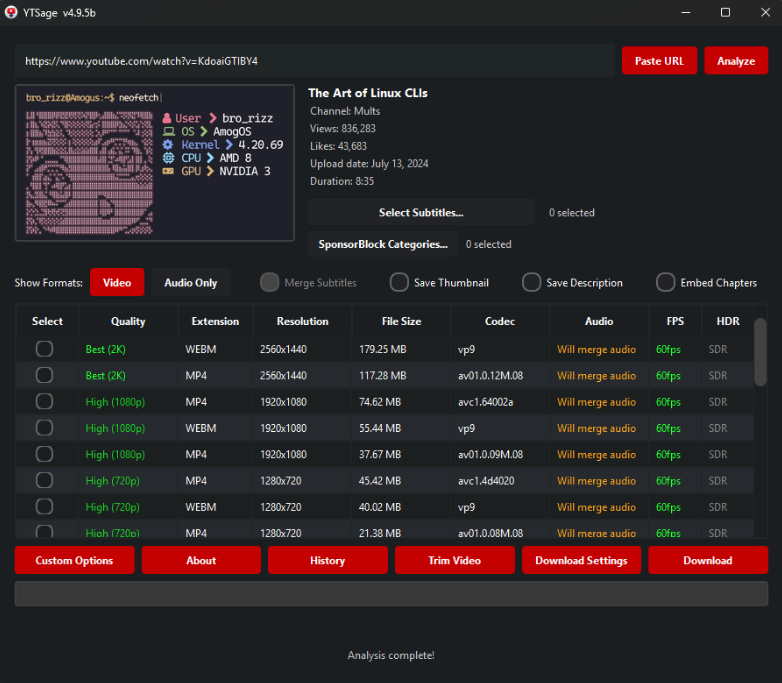
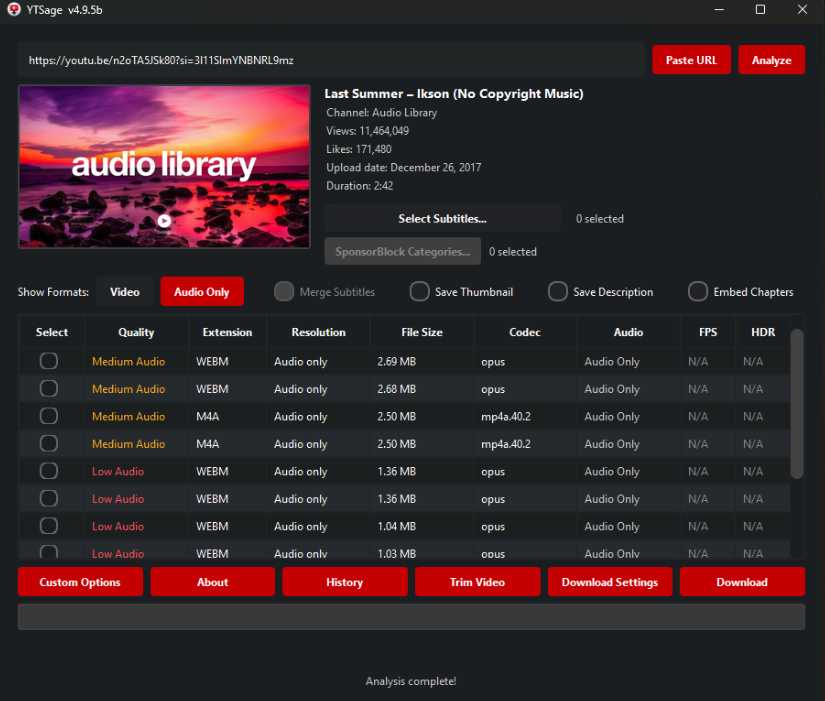
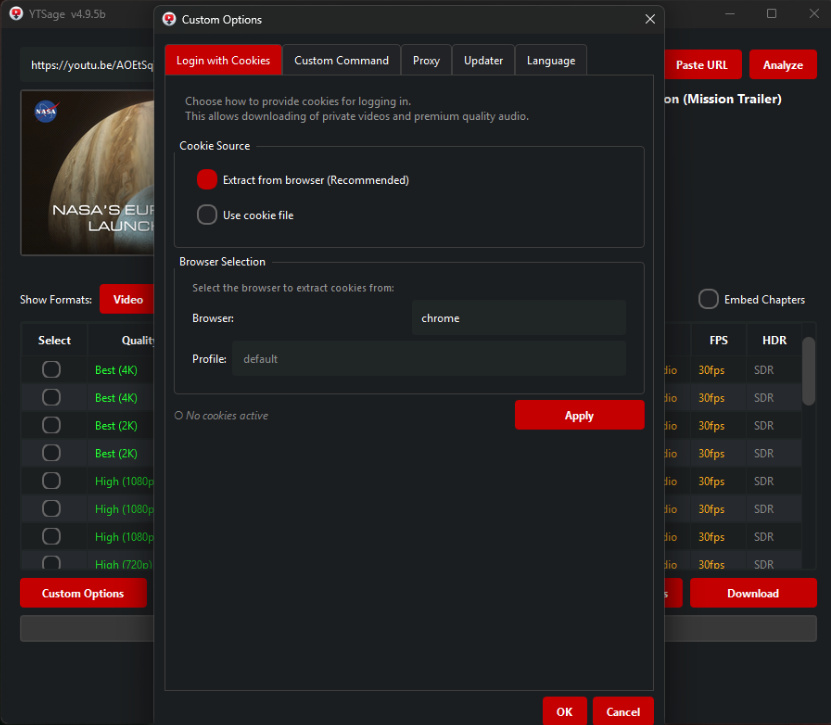
YTSage is designed for users who want a simple yet powerful YouTube downloader. Unlike other tools, it offers: A clean, modern PySide6 interface, One-click downloads for video, audio, and subtitles, Advanced features like SponsorBlock, subtitle merging, and playlist selection, Cross-platform support and easy installation.
Free software
OS:


File size: 107MB
Beta version
Portable version
Old versions
Version history
Alternative software
OS:
File size: 107MB
Beta version
Portable version
Old versions
Version history
Alternative software
Screenshots
Latest version
Download
Download YTSage 5.1.0 Windows 64-bit 83MB Win64
Download YTSage 5.1.0 Mac Silicon ARM 64-bit 89MB MacARM64
Download YTSage 5.1.0 Linux 64-bit 59MB Linux64
Download Beta, Portable and other versions
Portable 
Download YTSage 5.3.0 Beta Windows 64-bit 107MB Win64
Download YTSage 5.3.0 Beta Portable Windows 64-bit 107MB Win64
Portable Download YTSage 5.3.0 Beta Mac Silicon ARM 107MB MacARM64
Download YTSage 5.3.0 Beta Linux 107MB Linux
Download old versions

Software License
Supported operating systems
Mac OS Linux Version history / Release notes / Changelog / What's New
YTSage 5.3.0b - Beta Release
Features
Improvements
Playlist Downloads & Quality Presets: Introduced universal preset format expressions for playlist downloads. You can now select a target quality for an entire playlist, and if an exact match isn't available for a specific video, the app will automatically download the next closest quality. This replaces the misleading old behavior where the app only displayed the format table of the first video (#114, thanks to @cwlnet)
Bug Fixes
Fixed "About" dialog issue: The "About" dialog menu is closed before it receives system information (#116, thanks to @Seryi3)
YTSage 5.2.0b - Beta Release
Features
Remember Window Position: The application will now remember your window size and placement. When you close and reopen YTSage, it will return exactly to how you left it
Improvements
Smart Folder Management: Improved reliability when choosing your download directory. The app will now automatically create missing folders for you and accurately warn you if the selected folder is restricted or locked from saving files #108 thanks to (@Seryi3)
Optimized Default Modes: Enabled "Generic Mode" by default to ensure better out-of-the-box compatibility for new users #110 thanks to (@tuming2025)
Features
Improvements
Playlist Downloads & Quality Presets: Introduced universal preset format expressions for playlist downloads. You can now select a target quality for an entire playlist, and if an exact match isn't available for a specific video, the app will automatically download the next closest quality. This replaces the misleading old behavior where the app only displayed the format table of the first video (#114, thanks to @cwlnet)
Bug Fixes
Fixed "About" dialog issue: The "About" dialog menu is closed before it receives system information (#116, thanks to @Seryi3)
YTSage 5.2.0b - Beta Release
Features
Remember Window Position: The application will now remember your window size and placement. When you close and reopen YTSage, it will return exactly to how you left it
Improvements
Smart Folder Management: Improved reliability when choosing your download directory. The app will now automatically create missing folders for you and accurately warn you if the selected folder is restricted or locked from saving files #108 thanks to (@Seryi3)
Optimized Default Modes: Enabled "Generic Mode" by default to ensure better out-of-the-box compatibility for new users #110 thanks to (@tuming2025)
View full changelog
All features
Core Features Advanced Features Extra Features
Format Table SponsorBlock Integration FPS/HDR Display
Audio Extraction Multi-Subtitle Select & Merge Auto-Update yt-dlp
Simple UI Save Description & Thumbnail FFmpeg/yt-dlp/Deno Detection
Playlist Support & Selector Speed Limiter Custom Commands
Embed Chapters Trim Video Sections Login with Cookies
Download History Release Channel Selection Proxy Support
Audio Format Conversion Video Format Settings Built-in Updater Tab
Format Table SponsorBlock Integration FPS/HDR Display
Audio Extraction Multi-Subtitle Select & Merge Auto-Update yt-dlp
Simple UI Save Description & Thumbnail FFmpeg/yt-dlp/Deno Detection
Playlist Support & Selector Speed Limiter Custom Commands
Embed Chapters Trim Video Sections Login with Cookies
Download History Release Channel Selection Proxy Support
Audio Format Conversion Video Format Settings Built-in Updater Tab
Sections/Browse similar tools
Alternative to YTSage
(Latest version updated)3D Youtube Downloader (Jul 5, 2026)
3D Youtube Downloader Batch (Jul 5, 2026)
ChrisPC VideoTube Downloader (Jul 18, 2026)
Gharmonize (Jun 25, 2026)
MassTube (Jul 13, 2026)
NickVision Parabolic (May 24, 2026)
ytdlp-interface (May 18, 2026)
ytDownloader (Jul 17, 2026)
Guides and How to's
Notify me when software updated or report software
| 4 reviews, Showing 1 to 4 reviews |
It would be top marks, if you were able to select the audio format in the container.
Almost every MP4 format video comes out with OPUS sudio.
I think the option to select AAC or another format, which would make it more compatible.
As a side note, but not important, how about an option to split the video at chapter points.
I know we have embed chapters.
If these two were implemented all stars would be at top.
Almost every MP4 format video comes out with OPUS sudio.
I think the option to select AAC or another format, which would make it more compatible.
As a side note, but not important, how about an option to split the video at chapter points.
I know we have embed chapters.
If these two were implemented all stars would be at top.
Review by Amanda on
May 3, 2026 Version: v5.0.10b
OS: Windows 10 Ease of use: 8/10
Functionality: 9/10
Value for money: 10/10
Overall: 8/10
truly excellent
Review by bilek on
Mar 26, 2026 Version: 5.0.0
OS: Windows 11 64-bit Ease of use: 10/10
Functionality: 10/10
Value for money: 10/10
Overall: 10/10
Rating by KEN on
Feb 8, 2026 Version: 4.97/5.0.0 BETA 4
OS: Windows 11 64-bit Ease of use: 8/10
Functionality: 10/10
Value for money: 10/10
Overall: 10/10
Rating by kokos on
Dec 5, 2025 Version: 4.9.5 / 4.9.6 Beta
OS: Windows 11 64-bit Ease of use: 10/10
Functionality: 10/10
Value for money: 10/10
Overall: 10/10
| 4 reviews, Showing 1 to 4 reviews |
| 1 tool hits, Showing 1 to 1 tools |
Explanation:
NEW SOFTWARE= New tool since your last visit
NEW VERSION= New version since your last visit
NEW REVIEW= New review since your last visit
NEW VERSION= New version
Latest version
Version number / Beta version number / Update version number and when it whas released.
Type and download
NO MORE UPDATES? = The software hasn't been updated in over 2 years.
NO LONGER DEVELOPED = The software hasn't been updated in over 5 years.
RECENTLY UPDATED = The software has been updated the last 31 days.
Freeware = Download Free software.
Freeware Trialware = Download Free software but some parts are trial/shareware.
Free software = Download Free software and also open source code also known as FOSS (Free and Open Source Software).
Free software Trialware = Download Free software and also open source code but some parts are trial/shareware.
Freeware Ads = Download Free software but supported by advertising, usually with a included browser toolbar. It may be disabled when installing or after installation.
Free software Ads = Free Download software and open source code but supported by advertising, usually with a included browser toolbar. It may be disabled when installing or after installation.
Trialware = Also called shareware or demo. Free Trial version available for download and testing with usually a time limit or limited functions.
Payware = No demo or trial available.
Portable version = A portable/standalone version is available. No installation is required.
v1.0.1 = Latest version available.
Download beta = It could be a Beta, RC(Release Candidate) or an Alpha / Nightly / Unstable version of the software.
Download 15MB = A direct link to the software download.
Win = Windows download version for 32-bit and 64-bit Windows.
Win64 = Windows 64-bit download version for 64-bit Windows.
WinARM64 = Windows 64-bit ARM download version for Windows ARM64/AArch64.
Mac = Mac download version for 64-bit Mac OS Intel/ARM64/AArch64.
MacARM64 = Mac Silicon download version for 64-bit Mac OS ARM64/AArch64.
Mac64 = Mac OS download version for 64-bit Intel Mac OS.
Linux = Linux download version.
Linux64 = Linux download version for 64bit Linux.
Linux ARM = Linux download version for Linux ARM64/AArch64.
Portable = Portable version. No installation is required.
Ad-Supported = The software is bundled with advertising. Be careful when you install the software and disable addons that you don't want!
Visit developers site = A link to the software developer site.
Download (mirror link) = A mirror link to the software download. It may not contain the latest versions.
Download old versions = Free downloads of previous versions of the program.
Download 64-bit version = If you have a 64bit operating system you can download this version.
Download portable version = Portable/Standalone version meaning that no installation is required, just extract the files to a folder and run directly.
Portable version available = Download the portable version and you can just extract the files and run the program without installation.
Old versions available = Download old versions of the program.
Version history available = Complete changelog on our site.
= Windows version available.
= Mac OS version available.
= Linux version available.
Our hosted software are virus and malware scanned with several antivirus programs using www.virustotal.com. (NOTE! Just one virustotal warning is 99.9% a false positive. And some software might receive 2-6 warnings but it's if they are not all same virus/trojan then it's 99% false positives.)
Rating
Rating from 0-10.
NEW SOFTWARE= New tool since your last visit
NEW VERSION= New version since your last visit
NEW REVIEW= New review since your last visit
NEW VERSION= New version
Latest version
Version number / Beta version number / Update version number and when it whas released.
Type and download
NO MORE UPDATES? = The software hasn't been updated in over 2 years.
NO LONGER DEVELOPED = The software hasn't been updated in over 5 years.
RECENTLY UPDATED = The software has been updated the last 31 days.
Freeware = Download Free software.
Freeware Trialware = Download Free software but some parts are trial/shareware.
Free software = Download Free software and also open source code also known as FOSS (Free and Open Source Software).
Free software Trialware = Download Free software and also open source code but some parts are trial/shareware.
Freeware Ads = Download Free software but supported by advertising, usually with a included browser toolbar. It may be disabled when installing or after installation.
Free software Ads = Free Download software and open source code but supported by advertising, usually with a included browser toolbar. It may be disabled when installing or after installation.
Trialware = Also called shareware or demo. Free Trial version available for download and testing with usually a time limit or limited functions.
Payware = No demo or trial available.
Portable version = A portable/standalone version is available. No installation is required.
v1.0.1 = Latest version available.
Download beta = It could be a Beta, RC(Release Candidate) or an Alpha / Nightly / Unstable version of the software.
Download 15MB = A direct link to the software download.
Win = Windows download version for 32-bit and 64-bit Windows.
Win64 = Windows 64-bit download version for 64-bit Windows.
WinARM64 = Windows 64-bit ARM download version for Windows ARM64/AArch64.
Mac = Mac download version for 64-bit Mac OS Intel/ARM64/AArch64.
MacARM64 = Mac Silicon download version for 64-bit Mac OS ARM64/AArch64.
Mac64 = Mac OS download version for 64-bit Intel Mac OS.
Linux = Linux download version.
Linux64 = Linux download version for 64bit Linux.
Linux ARM = Linux download version for Linux ARM64/AArch64.
Portable = Portable version. No installation is required.
Ad-Supported = The software is bundled with advertising. Be careful when you install the software and disable addons that you don't want!
Visit developers site = A link to the software developer site.
Download (mirror link) = A mirror link to the software download. It may not contain the latest versions.
Download old versions = Free downloads of previous versions of the program.
Download 64-bit version = If you have a 64bit operating system you can download this version.
Download portable version = Portable/Standalone version meaning that no installation is required, just extract the files to a folder and run directly.
Portable version available = Download the portable version and you can just extract the files and run the program without installation.
Old versions available = Download old versions of the program.
Version history available = Complete changelog on our site.
= Windows version available. = Mac OS version available. = Linux version available.Our hosted software are virus and malware scanned with several antivirus programs using www.virustotal.com. (NOTE! Just one virustotal warning is 99.9% a false positive. And some software might receive 2-6 warnings but it's if they are not all same virus/trojan then it's 99% false positives.)
Rating
Rating from 0-10.
Browse software by sections
All In One Blu-ray Converters (9)
All In One DVD Converters (12)
All In One MKV to MP4, Blu-ray, UHD (11)
All In One Video Converters (19)
Animation (3D, 2D Animation) (12)
Audio Editors (22)
Audio Encoders (80)
Audio Players (19)
Authoring (Blu-ray, UHD, AVCHD) (13)
Authoring (DivX) (4)
Authoring (DVD) (26)
Authoring (SVCD, VCD) (9)
Bitrate Calculators (7)
Blu-ray to AVI, MKV, MP4 (15)
Blu-ray to Blu-ray, AVCHD (10)
Burn (CD,DVD,Blu-ray) (24)
Camcorders, DV, HDV, AVCHD (31)
Capture TV, DVD, VCR (30)
CD, DVD, Blu-ray recovery (3)
Codec Packs (6)
All In One DVD Converters (12)
All In One MKV to MP4, Blu-ray, UHD (11)
All In One Video Converters (19)
Animation (3D, 2D Animation) (12)
Audio Editors (22)
Audio Encoders (80)
Audio Players (19)
Authoring (Blu-ray, UHD, AVCHD) (13)
Authoring (DivX) (4)
Authoring (DVD) (26)
Authoring (SVCD, VCD) (9)
Bitrate Calculators (7)
Blu-ray to AVI, MKV, MP4 (15)
Blu-ray to Blu-ray, AVCHD (10)
Burn (CD,DVD,Blu-ray) (24)
Camcorders, DV, HDV, AVCHD (31)
Capture TV, DVD, VCR (30)
CD, DVD, Blu-ray recovery (3)
Codec Packs (6)
Codec, Video Identifiers (31)
Codecs (67)
Decrypters (DVD Rippers) (16)
Decrypters (UHD, Blu-ray Rippers) (8)
DigitalTV, DVB, IPTV (39)
DVD to DVD (20)
DVD to MP4, MKV, H264, H265 (16)
DVD to VCD, SVCD (5)
DVD to XviD, AVI, DivX (16)
ISO, Image (15)
Linux Video Tools (212)
MacOS Video Tools (246)
Media (Blu-ray, DVD, CD) (9)
Media Center, HTPC (24)
Other Useful Tools (140)
Photo Blu-ray, DVD, SlideShow (8)
Portable (Mobile, PSP) (35)
Region Free Tools (5)
Screen capture , Screen recording (26)
Screenshots , Thumbnails (13)
Codecs (67)
Decrypters (DVD Rippers) (16)
Decrypters (UHD, Blu-ray Rippers) (8)
DigitalTV, DVB, IPTV (39)
DVD to DVD (20)
DVD to MP4, MKV, H264, H265 (16)
DVD to VCD, SVCD (5)
DVD to XviD, AVI, DivX (16)
ISO, Image (15)
Linux Video Tools (212)
MacOS Video Tools (246)
Media (Blu-ray, DVD, CD) (9)
Media Center, HTPC (24)
Other Useful Tools (140)
Photo Blu-ray, DVD, SlideShow (8)
Portable (Mobile, PSP) (35)
Region Free Tools (5)
Screen capture , Screen recording (26)
Screenshots , Thumbnails (13)
Subtitle Editors, Converters (71)
Tag Editors (4)
Video De, Multiplexers (66)
Video Editors (Advanced, NLE) (35)
Video Editors (Basic) (56)
Video Editors (H264, MP4, MKV, MTS) (19)
Video Editors (Lossless) (4)
Video Editors (MPG, DVD) (16)
Video Editors (WMV, AVI) (15)
Video Encoders (AV1, VP8, VP9) (2)
Video Encoders (AVI, WMV) (38)
Video Encoders (H264, H265, MP4, MKV) (45)
Video Encoders (MPG, DVD) (23)
Video Encoders , Converters (155)
Video Frameservers (9)
Video Players (49)
Video Repair, Fix (24)
Video Scripting (10)
Video Streaming (20)
Video Streaming Downloaders (101)
Tag Editors (4)
Video De, Multiplexers (66)
Video Editors (Advanced, NLE) (35)
Video Editors (Basic) (56)
Video Editors (H264, MP4, MKV, MTS) (19)
Video Editors (Lossless) (4)
Video Editors (MPG, DVD) (16)
Video Editors (WMV, AVI) (15)
Video Encoders (AV1, VP8, VP9) (2)
Video Encoders (AVI, WMV) (38)
Video Encoders (H264, H265, MP4, MKV) (45)
Video Encoders (MPG, DVD) (23)
Video Encoders , Converters (155)
Video Frameservers (9)
Video Players (49)
Video Repair, Fix (24)
Video Scripting (10)
Video Streaming (20)
Video Streaming Downloaders (101)