
Help us keep the list up to date and submit new video software here.
Tool
Description
Type
Rating
Reviews
Vegas Pro is a professional non-linear editor. Expertly edit complex SD or HD projects using mouse or keyboard trimming and powerful ripple editing modes. Features include improved video monitoring, customizable window layouts, color-coded snapping, improved HDV, SDI and XDCAM support, Cinescore plug-in support, A/V synchronization detect and repair, playhead scrubbing, drag ripple and arrange, source project editing, and auto-frame quantization. Subscription from $18/month.
Screenshots
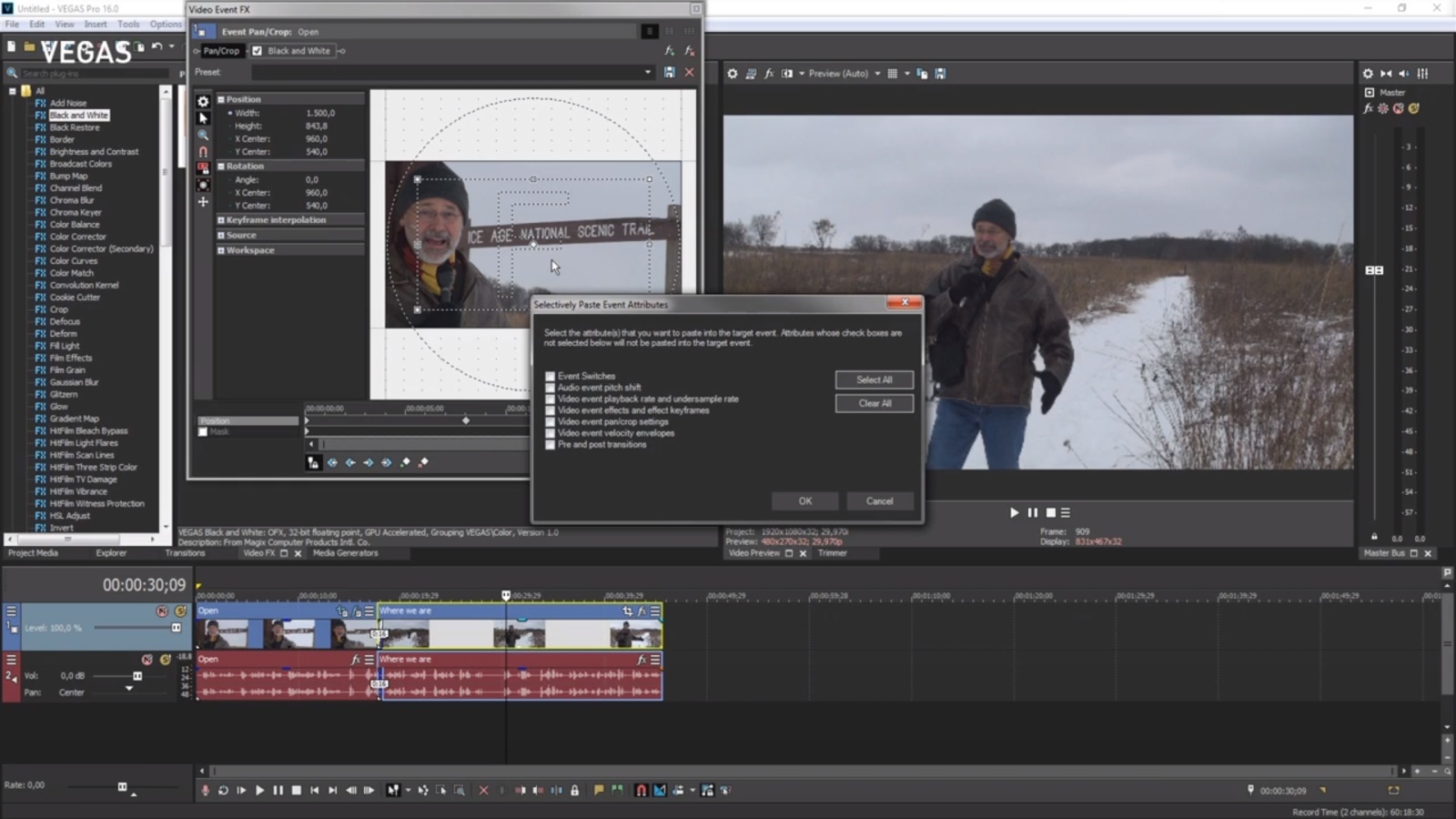


Latest version
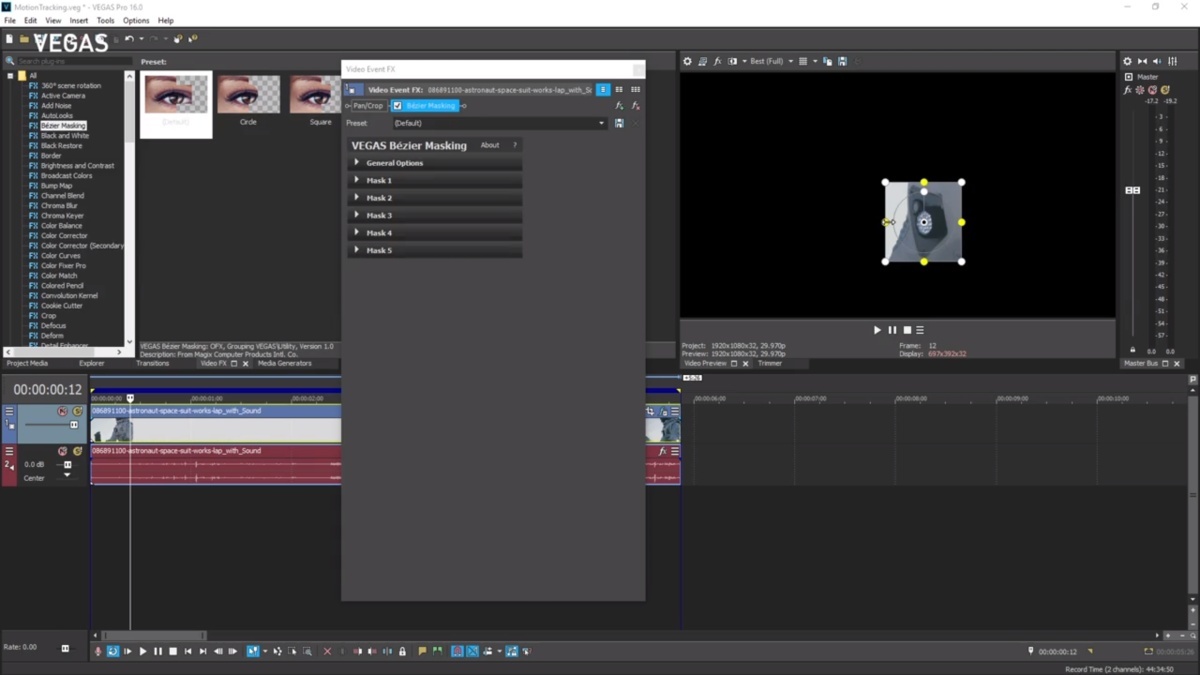
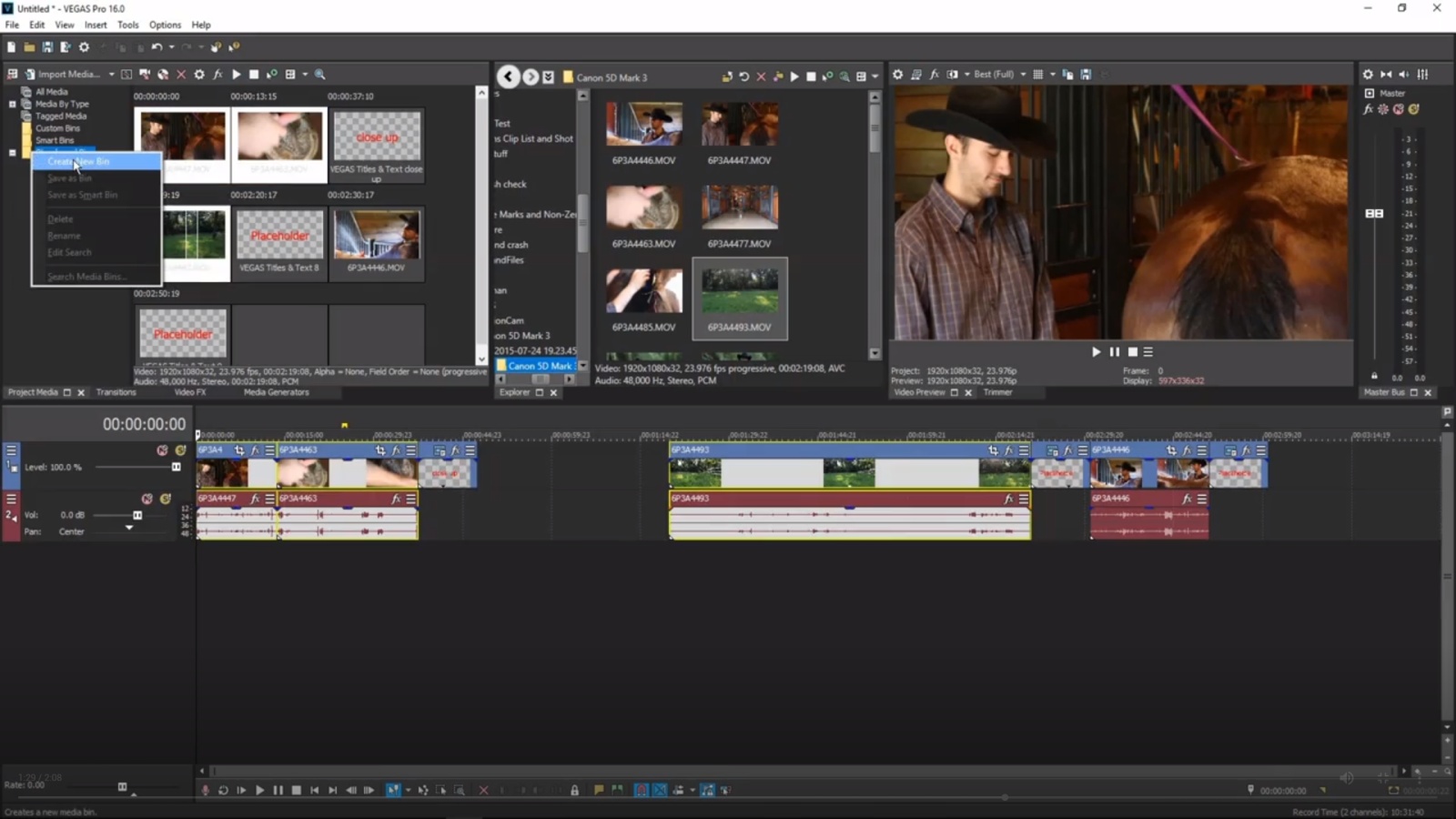
Download
Download Vegas Pro 2027 35MB Win

Software License
Supported operating systems
More information and other downloads
Download Vegasaur here, Vegasaur is an automation and productivity tool for Sony Vegas Pro.
Version history / Release notes / Changelog / What's New
Vegas Pro 2027
Make more. Worry less.
Vegas Pro 2027 takes the tedious parts of your workflow off your plate: mixed-camera color, render waits, captions, masks, file naming. So you can get back to the only parts that really matter. Shoot. Cut. Publish. Repeat.
Vegas Pro 2027 Update title over a fanned Vegas Pro interface on a dark blue planet horizon.
Every camera. One timeline.
Beach portrait beside OCIO color-space settings, color wheels and a vectorscope in Vegas Pro.
Color Management, Rebuilt
A-cam shoots Log. B-cam shoots HDR. Your phone shoots something else entirely. Vegas Pro 2027 reads each source on import and brings them into a single color-managed timeline, converting on the fly while you play back.
Native engine support for a broad range of color spaces, including Log and HDR
Improved automatic detection and interpretation of source color spaces
Manual control over color primaries, transfer characteristics, and color range
Fully GPU-accelerated color space conversion
More predictable mixed-camera and mixed-color-space projects
Vegas Pro Media Properties dialog with the transfer characteristics menu listing camera log formats.
Modernized Media Properties
View and adjust critical information about all the media in your project in a completely redesigned dialog. Expanded color-space information and settings, clearer metadata, and technical details you can copy in one click and paste straight into an email, a shot list, or a project doc.
Improved color-space information and settings
Improved metadata presentation
Easier copying of technical media information
Render. Publish. Repeat.
Vegas chip on a circuit board above import, effects, playback and film icons, with the text Zero Copy Pipeline.
Faster Exports. Less CPU Load.
Get from final edit to finished file faster. An improved GPU pipeline transfers video frames to your hardware encoder more efficiently, avoiding unnecessary copies through system memory. This reduces CPU workload and speeds up exports, especially for simple edits, projects with fewer effects, and format conversions.
More efficient frame delivery to hardware encoders
Reduced CPU workload and improved GPU utilization
Faster exports when memory bandwidth is the bottleneck
Supported on NVIDIA, AMD, and Intel hardware
Diagram of a 4:2:2 chip linked through Intel Panther Lake and NVIDIA Blackwell to H.264 AVC and H.265 HEVC encoders.
GPU-Accelerated Hardware Encoding
Building on last year’s 4:2:2 decoding support, Vegas Pro now adds hardware-accelerated 4:2:2 encoding for AVC and HEVC. Export directly from your timeline while preserving 4:2:2 chroma detail for broadcast, grading, and delivery.
Hardware-accelerated 4:2:2 output in AVC and HEVC
Supported on NVIDIA Blackwell GPUs and
Intel Panther Lake platforms
Preserves more color detail than 4:2:0 output
Less reliance on external encoding tools
A stepped 8-bit 44.1 kHz waveform beside a smooth 24-bit 192 kHz waveform, titled High-resolution PCM and AAC Audio.
High-Resolution Audio Export
You spent an hour on the mix. Don’t hand it to an 8-bit down-converter at the finish line. Vegas Pro 2027 exports 24-bit PCM and AAC alongside AVC and HEVC video, straight into MP4 or MOV.
24-bit PCM and AAC audio in MP4 and MOV containers
Sample rates up to 192 kHz
Up to 32 audio channels
The full quality of the Vegas audio engine, preserved
Let the machines do the boring bits.
AI Quick Mask selecting a smiling woman with blue braids, with the Vegas AI Quick Mask panel open.
AI Quick Mask
Rotoscoping is the tax on every composite. AI Quick Mask brings Boris FX AI masking technology directly into the Vegas timeline. Pick your subject, and the mask follows it through the shot.
AI-assisted object recognition and masking
High-speed mask propagation
More stable masks during motion
On average 20x faster than Smart Mask 2.0
GPU transcription badge reading Up to 7x faster beside the Vegas Pro AI model settings.
GPU-Accelerated Transcription
(Subscription Only)
Subtitles are no longer optional, and the people watching with the sound off don’t care how long your transcript took. Speech to text now runs on the GPU, so long recordings transcribe faster and subtitles land in your timeline sooner.
GPU-accelerated transcriptions powered by Whisper
Faster transcription of long recordings
Shorter subtitle workflows on larger projects
Automatic hardware detection with CPU fallback
ElevenLabs voice library listing voices such as Jessica, Lauren and Siren, with an ElevenLabs API Key button.
ElevenLabs Text to Speech
(Subscription Only)
The offline voices are still here but now there’s a second option. Add your own ElevenLabs API key and generate narration from ElevenLabs’ voice library without leaving your edit.
Optional online text-to-speech provider
Access to a large library of high-quality ElevenLabs voices inside Vegas Pro
Bring your own ElevenLabs API key
*ElevenLabs requires a separate ElevenLabs account. No ElevenLabs usage credits are included with Vegas Pro.
Bump Map compositor effect being dragged onto a video event in the Vegas Pro timeline.
Composite FX on Video Events
Some of the best OFX effects, including BCC+ Primatte Studio, need two images to work with. Until now that meant restructuring your tracks. In Vegas Pro 2027, compatible plugins take a secondary image input directly on a single video event.
Support for OFX effects that require two image inputs
Improved compatibility with BCC+ composite effects, including Primatte Studio
Advanced blending, keying, and transition workflows at event level
No track-hierarchy rework required
Shoot on anything. Cut with anyone.
Nikon ZR N-RAW Support
The Nikon ZR puts RED’s RAW technology in a lot more hands. Vegas Pro 2027 reads it natively, so footage goes from card to timeline without a transcode in between.
Native support for Nikon ZR N-RAW footage
No transcoding or intermediate conversion required
Nikon ZR N-RAW file icon in front of red stage curtains.
Updated Final Cut XML
Productions run on more than one application, and your project shouldn’t be the thing that can’t leave the room. Vegas Pro 2027 updates its Final Cut XML import and export for newer versions, so round-trips to other editing and grading systems are more reliable.
Compatibility with newer Final Cut XML versions
More stable project import and export
Better collaboration with external NLEs
Vegas Pro export menu with an XML file icon and round-trip arrows.
The small stuff that eats your day.
Render dialog with filename tokens for count, frame rate, HDR and resolution.
Dynamic Render Filenames
Six versions, three platforms, one client who wants the date in the filename. Build a template once in the Render dialog and every export names itself.
Tokens for project, frame rate, resolution, codec, preset, date, time, and counter
“Insert placeholder” picker, so there’s no syntax to memorize
Live preview of the resolved filename before you render
Counters compatible with %d and %i formats
Vegas Titles and Text panel under a Vegas Pro 2027 Titles and Text banner on a desert background.
Vegas Titles & Text, Improved
Your audience is international. Now your titles are too. The built-in titler picks up the things you’ve asked for.
Character-based foreground and background color
Right-to-left text support
Expanded Unicode and multilingual support
Auto Subtitles with adjustable foreground and background colors
Glowing blue ARM processor chip.
ARM Platform Support (coming soon)
A native build for Windows on ARM, built for Snapdragon X and X2 and NVIDIA RTX Spark systems. Hybrid compatibility with existing x64 components.
And more
ProRes encoding unlocked up to 8K
Storyblocks: audio and video categories plus a resolution filter (Subscription Only)
Updated DeckLink, RED, and MainConcept SDKs
Numerous stability and performance optimizations
More fun toys included.
Acid Pro running on a studio desktop setup against a green backdrop.
Acid Pro included with Vegas Pro Plus and Vegas Pro Ultimate
Build your soundtrack instead of hunting for one. Acid Pro’s loop-based music production comes standard with Plus and Ultimate, so the beat under your cut is yours, not a licensing headache.
Sound Forge Plus running on a studio desktop setup against a red backdrop.
Sound Forge Plus included with Vegas Pro Ultimate
Get the audio right down to the sample. Sound Forge Plus ships with Ultimate for detailed cleanup, restoration, and mastering when the timeline’s audio tools need a specialist in the room.
Vegas Pro Ultimate on a monitor above a row of included product icons.
Vegas Pro Ultimate available as a perpetual license
Own the whole toolset outright. For the first time, Vegas Pro Ultimate is available as a perpetual license: buy it once, keep it, and stop watching the renewal calendar.
Powerful features from previous updates.
Introduced in earlier versions and still available today. Editing power that helps you work faster, more efficiently, and more creatively.
Layer Deformer
Reshape and animate titles in 3D space.
Bend and arc text layers
Apply perspective-based warping
Create dimensional motion effects
Layer Deformer adds dynamic curvature and depth without complex compositing.
Vegas Pro logo flag between a deformed building cube and a sphere, above 3D Vegas Pro text.
Type On Text
Precision text reveal animation with procedural control.
Animate by character, word, or line
Typewriter-style and cursor animation
Custom easing and timing controls
Gradient fills, outlines, and drop shadows
Perfect for tutorials, callouts, social content, and modern typography.
Magenta and blue 3D Type On Text lettering on a dark navy background.
Extruded Text
Create depth-rich 3D typography directly in Vegas Pro.
True 3D text extrusion
Adjustable bevel and depth controls
Real-time lighting and shadow casting
M...
Make more. Worry less.
Vegas Pro 2027 takes the tedious parts of your workflow off your plate: mixed-camera color, render waits, captions, masks, file naming. So you can get back to the only parts that really matter. Shoot. Cut. Publish. Repeat.
Vegas Pro 2027 Update title over a fanned Vegas Pro interface on a dark blue planet horizon.
Every camera. One timeline.
Beach portrait beside OCIO color-space settings, color wheels and a vectorscope in Vegas Pro.
Color Management, Rebuilt
A-cam shoots Log. B-cam shoots HDR. Your phone shoots something else entirely. Vegas Pro 2027 reads each source on import and brings them into a single color-managed timeline, converting on the fly while you play back.
Native engine support for a broad range of color spaces, including Log and HDR
Improved automatic detection and interpretation of source color spaces
Manual control over color primaries, transfer characteristics, and color range
Fully GPU-accelerated color space conversion
More predictable mixed-camera and mixed-color-space projects
Vegas Pro Media Properties dialog with the transfer characteristics menu listing camera log formats.
Modernized Media Properties
View and adjust critical information about all the media in your project in a completely redesigned dialog. Expanded color-space information and settings, clearer metadata, and technical details you can copy in one click and paste straight into an email, a shot list, or a project doc.
Improved color-space information and settings
Improved metadata presentation
Easier copying of technical media information
Render. Publish. Repeat.
Vegas chip on a circuit board above import, effects, playback and film icons, with the text Zero Copy Pipeline.
Faster Exports. Less CPU Load.
Get from final edit to finished file faster. An improved GPU pipeline transfers video frames to your hardware encoder more efficiently, avoiding unnecessary copies through system memory. This reduces CPU workload and speeds up exports, especially for simple edits, projects with fewer effects, and format conversions.
More efficient frame delivery to hardware encoders
Reduced CPU workload and improved GPU utilization
Faster exports when memory bandwidth is the bottleneck
Supported on NVIDIA, AMD, and Intel hardware
Diagram of a 4:2:2 chip linked through Intel Panther Lake and NVIDIA Blackwell to H.264 AVC and H.265 HEVC encoders.
GPU-Accelerated Hardware Encoding
Building on last year’s 4:2:2 decoding support, Vegas Pro now adds hardware-accelerated 4:2:2 encoding for AVC and HEVC. Export directly from your timeline while preserving 4:2:2 chroma detail for broadcast, grading, and delivery.
Hardware-accelerated 4:2:2 output in AVC and HEVC
Supported on NVIDIA Blackwell GPUs and
Intel Panther Lake platforms
Preserves more color detail than 4:2:0 output
Less reliance on external encoding tools
A stepped 8-bit 44.1 kHz waveform beside a smooth 24-bit 192 kHz waveform, titled High-resolution PCM and AAC Audio.
High-Resolution Audio Export
You spent an hour on the mix. Don’t hand it to an 8-bit down-converter at the finish line. Vegas Pro 2027 exports 24-bit PCM and AAC alongside AVC and HEVC video, straight into MP4 or MOV.
24-bit PCM and AAC audio in MP4 and MOV containers
Sample rates up to 192 kHz
Up to 32 audio channels
The full quality of the Vegas audio engine, preserved
Let the machines do the boring bits.
AI Quick Mask selecting a smiling woman with blue braids, with the Vegas AI Quick Mask panel open.
AI Quick Mask
Rotoscoping is the tax on every composite. AI Quick Mask brings Boris FX AI masking technology directly into the Vegas timeline. Pick your subject, and the mask follows it through the shot.
AI-assisted object recognition and masking
High-speed mask propagation
More stable masks during motion
On average 20x faster than Smart Mask 2.0
GPU transcription badge reading Up to 7x faster beside the Vegas Pro AI model settings.
GPU-Accelerated Transcription
(Subscription Only)
Subtitles are no longer optional, and the people watching with the sound off don’t care how long your transcript took. Speech to text now runs on the GPU, so long recordings transcribe faster and subtitles land in your timeline sooner.
GPU-accelerated transcriptions powered by Whisper
Faster transcription of long recordings
Shorter subtitle workflows on larger projects
Automatic hardware detection with CPU fallback
ElevenLabs voice library listing voices such as Jessica, Lauren and Siren, with an ElevenLabs API Key button.
ElevenLabs Text to Speech
(Subscription Only)
The offline voices are still here but now there’s a second option. Add your own ElevenLabs API key and generate narration from ElevenLabs’ voice library without leaving your edit.
Optional online text-to-speech provider
Access to a large library of high-quality ElevenLabs voices inside Vegas Pro
Bring your own ElevenLabs API key
*ElevenLabs requires a separate ElevenLabs account. No ElevenLabs usage credits are included with Vegas Pro.
Bump Map compositor effect being dragged onto a video event in the Vegas Pro timeline.
Composite FX on Video Events
Some of the best OFX effects, including BCC+ Primatte Studio, need two images to work with. Until now that meant restructuring your tracks. In Vegas Pro 2027, compatible plugins take a secondary image input directly on a single video event.
Support for OFX effects that require two image inputs
Improved compatibility with BCC+ composite effects, including Primatte Studio
Advanced blending, keying, and transition workflows at event level
No track-hierarchy rework required
Shoot on anything. Cut with anyone.
Nikon ZR N-RAW Support
The Nikon ZR puts RED’s RAW technology in a lot more hands. Vegas Pro 2027 reads it natively, so footage goes from card to timeline without a transcode in between.
Native support for Nikon ZR N-RAW footage
No transcoding or intermediate conversion required
Nikon ZR N-RAW file icon in front of red stage curtains.
Updated Final Cut XML
Productions run on more than one application, and your project shouldn’t be the thing that can’t leave the room. Vegas Pro 2027 updates its Final Cut XML import and export for newer versions, so round-trips to other editing and grading systems are more reliable.
Compatibility with newer Final Cut XML versions
More stable project import and export
Better collaboration with external NLEs
Vegas Pro export menu with an XML file icon and round-trip arrows.
The small stuff that eats your day.
Render dialog with filename tokens for count, frame rate, HDR and resolution.
Dynamic Render Filenames
Six versions, three platforms, one client who wants the date in the filename. Build a template once in the Render dialog and every export names itself.
Tokens for project, frame rate, resolution, codec, preset, date, time, and counter
“Insert placeholder” picker, so there’s no syntax to memorize
Live preview of the resolved filename before you render
Counters compatible with %d and %i formats
Vegas Titles and Text panel under a Vegas Pro 2027 Titles and Text banner on a desert background.
Vegas Titles & Text, Improved
Your audience is international. Now your titles are too. The built-in titler picks up the things you’ve asked for.
Character-based foreground and background color
Right-to-left text support
Expanded Unicode and multilingual support
Auto Subtitles with adjustable foreground and background colors
Glowing blue ARM processor chip.
ARM Platform Support (coming soon)
A native build for Windows on ARM, built for Snapdragon X and X2 and NVIDIA RTX Spark systems. Hybrid compatibility with existing x64 components.
And more
ProRes encoding unlocked up to 8K
Storyblocks: audio and video categories plus a resolution filter (Subscription Only)
Updated DeckLink, RED, and MainConcept SDKs
Numerous stability and performance optimizations
More fun toys included.
Acid Pro running on a studio desktop setup against a green backdrop.
Acid Pro included with Vegas Pro Plus and Vegas Pro Ultimate
Build your soundtrack instead of hunting for one. Acid Pro’s loop-based music production comes standard with Plus and Ultimate, so the beat under your cut is yours, not a licensing headache.
Sound Forge Plus running on a studio desktop setup against a red backdrop.
Sound Forge Plus included with Vegas Pro Ultimate
Get the audio right down to the sample. Sound Forge Plus ships with Ultimate for detailed cleanup, restoration, and mastering when the timeline’s audio tools need a specialist in the room.
Vegas Pro Ultimate on a monitor above a row of included product icons.
Vegas Pro Ultimate available as a perpetual license
Own the whole toolset outright. For the first time, Vegas Pro Ultimate is available as a perpetual license: buy it once, keep it, and stop watching the renewal calendar.
Powerful features from previous updates.
Introduced in earlier versions and still available today. Editing power that helps you work faster, more efficiently, and more creatively.
Layer Deformer
Reshape and animate titles in 3D space.
Bend and arc text layers
Apply perspective-based warping
Create dimensional motion effects
Layer Deformer adds dynamic curvature and depth without complex compositing.
Vegas Pro logo flag between a deformed building cube and a sphere, above 3D Vegas Pro text.
Type On Text
Precision text reveal animation with procedural control.
Animate by character, word, or line
Typewriter-style and cursor animation
Custom easing and timing controls
Gradient fills, outlines, and drop shadows
Perfect for tutorials, callouts, social content, and modern typography.
Magenta and blue 3D Type On Text lettering on a dark navy background.
Extruded Text
Create depth-rich 3D typography directly in Vegas Pro.
True 3D text extrusion
Adjustable bevel and depth controls
Real-time lighting and shadow casting
M...
View full changelog
Sections/Browse similar tools
Alternative to Vegas Pro
(Latest version updated)Adobe After Effects (Sep 9, 2026)
Adobe Premiere Pro (Sep 28, 2026)
Avid Media Composer (Aug 31, 2026)
Guides and How to's
Acronyms / Also Known As
Notify me when software updated or report software
| 36 reviews, Showing 1 to 5 reviews |
Rating by on
Feb 28, 2026 Version: Preview 1280
OS: Windows 10 Ease of use: 10/10
Functionality: 10/10
Value for money: 10/10
Overall: 10/10
Rating by Jerry Jester on
Feb 3, 2020 Version: 17
OS: Windows 10 64-bit Ease of use: 10/10
Functionality: 10/10
Value for money: 10/10
Overall: 10/10
Rating by Paulus on
Oct 25, 2018 Version: vegas 16
OS: Windows 10 64-bit Ease of use: 1/10
Functionality: 1/10
Value for money: 1/10
Overall: 1/10
Version 13 adds some features vs. v.12, but it's much slower encoding on this rig [almost 2x in some cases] -- to me that's a deal breaker since regardless what you do editing, you still have to get your work out of Vegas as a video file. Prem Pro might be an alternative but I'm not fond of their subscription pricing model, & I'm set up for Sony with AMD/ATI graphics, while Adobe favors Nvidia. Sony may fix this in a later build -- 12 was buggy for quite a while... seemed like they moved it from beta too soon, or maybe have too small a pool of beta testers. May be the same with 13? At any rate, skipped 13 for now -- I may look at it later in its development or may just wait & see what 14's like. I've skipped Vegas version upgrades in the past for this sort of thing, and they've always come around eventually.
Review by mikiem on
Jun 3, 2014 Version: 13 Build 310
OS: Windows 7 64-bit Ease of use: 10/10
Functionality: 8/10
Value for money: 6/10
Overall: 8/10
Sony Vegas USED to be a strong editor, but the more recent versions, it started to lose ground where it used to stand out - crashing; Sony Vegas crashes like crazy, at least as far as I have been noticing in the space of say, two years. Its interface and ease of use are still nice, attractive but it feels like, the more they change it, adding new features etc etc, the less stable it becomes. I am now gradually switching to Davinci Resolve lite and am toying with the idea of getting Premiere Pro. Today alone I wasted plenty time because Vegas crashed (on minor things, such as, applying non real time effects to WAV files), while I am to meet a deadline in finishing a wedding project. I have been using Vegas since 2004 (since the Sonic Foundry era) but I am saying good bye to it. Many still prefer it due to its ease of use, but if you want to do serious work, Vegas is not the way anymore.
Review by videodan on
Jun 3, 2014 Version: 8.1
OS: Windows 8 64-bit Ease of use: 9/10
Functionality: 7/10
Value for money: 7/10
Overall: 8/10
| 36 reviews, Showing 1 to 5 reviews |
| 1 tool hits, Showing 1 to 1 tools |
Explanation:
NEW SOFTWARE= New tool since your last visit
NEW VERSION= New version since your last visit
NEW REVIEW= New review since your last visit
NEW VERSION= New version
Latest version
Version number / Beta version number / Update version number and when it whas released.
Type and download
NO MORE UPDATES? = The software hasn't been updated in over 2 years.
NO LONGER DEVELOPED = The software hasn't been updated in over 5 years.
RECENTLY UPDATED = The software has been updated the last 31 days.
Freeware = Download Free software.
Freeware Trialware = Download Free software but some parts are trial/shareware.
Free software = Download Free software and also open source code also known as FOSS (Free and Open Source Software).
Free software Trialware = Download Free software and also open source code but some parts are trial/shareware.
Freeware Ads = Download Free software but supported by advertising, usually with a included browser toolbar. It may be disabled when installing or after installation.
Free software Ads = Free Download software and open source code but supported by advertising, usually with a included browser toolbar. It may be disabled when installing or after installation.
Trialware = Also called shareware or demo. Free Trial version available for download and testing with usually a time limit or limited functions.
Payware = No demo or trial available.
Portable version = A portable/standalone version is available. No installation is required.
v1.0.1 = Latest version available.
Download beta = It could be a Beta, RC(Release Candidate) or an Alpha / Nightly / Unstable version of the software.
Download 15MB = A direct link to the software download.
Win = Windows download version for 32-bit and 64-bit Windows.
Win64 = Windows 64-bit download version for 64-bit Windows.
WinARM64 = Windows 64-bit ARM download version for Windows ARM64/AArch64.
Mac = Mac download version for 64-bit Mac OS Intel/ARM64/AArch64.
MacARM64 = Mac Silicon download version for 64-bit Mac OS ARM64/AArch64.
Mac64 = Mac OS download version for 64-bit Intel Mac OS.
Linux = Linux download version.
Linux64 = Linux download version for 64bit Linux.
Linux ARM = Linux download version for Linux ARM64/AArch64.
Portable = Portable version. No installation is required.
Ad-Supported = The software is bundled with advertising. Be careful when you install the software and disable addons that you don't want!
Visit developers site = A link to the software developer site.
Download (mirror link) = A mirror link to the software download. It may not contain the latest versions.
Download old versions = Free downloads of previous versions of the program.
Download 64-bit version = If you have a 64bit operating system you can download this version.
Download portable version = Portable/Standalone version meaning that no installation is required, just extract the files to a folder and run directly.
Portable version available = Download the portable version and you can just extract the files and run the program without installation.
Old versions available = Download old versions of the program.
Version history available = Complete changelog on our site.
= Windows version available.
 = Mac OS version available.
 = Linux version available.
Our hosted software are virus and malware scanned with several antivirus programs using www.virustotal.com. (NOTE! Just one virustotal warning is 99.9% a false positive. And some software might receive 2-6 warnings but it's if they are not all same virus/trojan then it's 99% false positives.)
Rating
Rating from 0-10.
NEW SOFTWARE= New tool since your last visit
NEW VERSION= New version since your last visit
NEW REVIEW= New review since your last visit
NEW VERSION= New version
Latest version
Version number / Beta version number / Update version number and when it whas released.
Type and download
NO MORE UPDATES? = The software hasn't been updated in over 2 years.
NO LONGER DEVELOPED = The software hasn't been updated in over 5 years.
RECENTLY UPDATED = The software has been updated the last 31 days.
Freeware = Download Free software.
Freeware Trialware = Download Free software but some parts are trial/shareware.
Free software = Download Free software and also open source code also known as FOSS (Free and Open Source Software).
Free software Trialware = Download Free software and also open source code but some parts are trial/shareware.
Freeware Ads = Download Free software but supported by advertising, usually with a included browser toolbar. It may be disabled when installing or after installation.
Free software Ads = Free Download software and open source code but supported by advertising, usually with a included browser toolbar. It may be disabled when installing or after installation.
Trialware = Also called shareware or demo. Free Trial version available for download and testing with usually a time limit or limited functions.
Payware = No demo or trial available.
Portable version = A portable/standalone version is available. No installation is required.
v1.0.1 = Latest version available.
Download beta = It could be a Beta, RC(Release Candidate) or an Alpha / Nightly / Unstable version of the software.
Download 15MB = A direct link to the software download.
Win = Windows download version for 32-bit and 64-bit Windows.
Win64 = Windows 64-bit download version for 64-bit Windows.
WinARM64 = Windows 64-bit ARM download version for Windows ARM64/AArch64.
Mac = Mac download version for 64-bit Mac OS Intel/ARM64/AArch64.
MacARM64 = Mac Silicon download version for 64-bit Mac OS ARM64/AArch64.
Mac64 = Mac OS download version for 64-bit Intel Mac OS.
Linux = Linux download version.
Linux64 = Linux download version for 64bit Linux.
Linux ARM = Linux download version for Linux ARM64/AArch64.
Portable = Portable version. No installation is required.
Ad-Supported = The software is bundled with advertising. Be careful when you install the software and disable addons that you don't want!
Visit developers site = A link to the software developer site.
Download (mirror link) = A mirror link to the software download. It may not contain the latest versions.
Download old versions = Free downloads of previous versions of the program.
Download 64-bit version = If you have a 64bit operating system you can download this version.
Download portable version = Portable/Standalone version meaning that no installation is required, just extract the files to a folder and run directly.
Portable version available = Download the portable version and you can just extract the files and run the program without installation.
Old versions available = Download old versions of the program.
Version history available = Complete changelog on our site.
= Windows version available. = Mac OS version available. = Linux version available.Our hosted software are virus and malware scanned with several antivirus programs using www.virustotal.com. (NOTE! Just one virustotal warning is 99.9% a false positive. And some software might receive 2-6 warnings but it's if they are not all same virus/trojan then it's 99% false positives.)
Rating
Rating from 0-10.
Browse software by sections
All In One Blu-ray Converters (9)
All In One DVD Converters (12)
All In One MKV to MP4, Blu-ray, UHD (11)
All In One Video Converters (19)
Animation (3D, 2D Animation) (13)
Audio Editors (23)
Audio Encoders (80)
Audio Players (19)
Authoring (Blu-ray, UHD, AVCHD) (13)
Authoring (DivX) (4)
Authoring (DVD) (26)
Authoring (SVCD, VCD) (9)
Bitrate Calculators (7)
Blu-ray to AVI, MKV, MP4 (15)
Blu-ray to Blu-ray, AVCHD (10)
Burn (CD,DVD,Blu-ray) (24)
Camcorders, DV, HDV, AVCHD (31)
Capture TV, DVD, VCR (30)
CD, DVD, Blu-ray recovery (3)
Codec Packs (6)
All In One DVD Converters (12)
All In One MKV to MP4, Blu-ray, UHD (11)
All In One Video Converters (19)
Animation (3D, 2D Animation) (13)
Audio Editors (23)
Audio Encoders (80)
Audio Players (19)
Authoring (Blu-ray, UHD, AVCHD) (13)
Authoring (DivX) (4)
Authoring (DVD) (26)
Authoring (SVCD, VCD) (9)
Bitrate Calculators (7)
Blu-ray to AVI, MKV, MP4 (15)
Blu-ray to Blu-ray, AVCHD (10)
Burn (CD,DVD,Blu-ray) (24)
Camcorders, DV, HDV, AVCHD (31)
Capture TV, DVD, VCR (30)
CD, DVD, Blu-ray recovery (3)
Codec Packs (6)
Codec, Video Identifiers (31)
Codecs (67)
Decrypters (DVD Rippers) (16)
Decrypters (UHD, Blu-ray Rippers) (8)
DigitalTV, DVB, IPTV (40)
DVD to DVD (20)
DVD to MP4, MKV, H264, H265 (16)
DVD to VCD, SVCD (5)
DVD to XviD, AVI, DivX (16)
ISO, Image (14)
Linux Video Tools (220)
MacOS Video Tools (252)
Media (Blu-ray, DVD, CD) (9)
Media Center, HTPC (25)
Other Useful Tools (136)
Photo Blu-ray, DVD, SlideShow (8)
Portable (Mobile, PSP) (35)
Region Free Tools (5)
Screen capture , Screen recording (25)
Screenshots , Thumbnails (13)
Codecs (67)
Decrypters (DVD Rippers) (16)
Decrypters (UHD, Blu-ray Rippers) (8)
DigitalTV, DVB, IPTV (40)
DVD to DVD (20)
DVD to MP4, MKV, H264, H265 (16)
DVD to VCD, SVCD (5)
DVD to XviD, AVI, DivX (16)
ISO, Image (14)
Linux Video Tools (220)
MacOS Video Tools (252)
Media (Blu-ray, DVD, CD) (9)
Media Center, HTPC (25)
Other Useful Tools (136)
Photo Blu-ray, DVD, SlideShow (8)
Portable (Mobile, PSP) (35)
Region Free Tools (5)
Screen capture , Screen recording (25)
Screenshots , Thumbnails (13)
Subtitle Editors, Converters (72)
Tag Editors (4)
Video Compare Software (6)
Video Demultiplexers, Multiplexers (66)
Video Editors (Advanced, NLE) (37)
Video Editors (Basic) (58)
Video Editors (H264, MP4, MKV, MTS) (21)
Video Editors (Lossless) (7)
Video Editors (MPG, DVD) (16)
Video Editors (WMV, AVI) (15)
Video Encoders (AV1, VP8, VP9) (2)
Video Encoders (AVI, WMV) (38)
Video Encoders (H264, H265, MP4, MKV) (45)
Video Encoders (MPG, DVD) (23)
Video Encoders , Converters (156)
Video Frameservers (9)
Video Players (48)
Video Repair, Fix (24)
Video Scripting (10)
Video Streaming (20)
Tag Editors (4)
Video Compare Software (6)
Video Demultiplexers, Multiplexers (66)
Video Editors (Advanced, NLE) (37)
Video Editors (Basic) (58)
Video Editors (H264, MP4, MKV, MTS) (21)
Video Editors (Lossless) (7)
Video Editors (MPG, DVD) (16)
Video Editors (WMV, AVI) (15)
Video Encoders (AV1, VP8, VP9) (2)
Video Encoders (AVI, WMV) (38)
Video Encoders (H264, H265, MP4, MKV) (45)
Video Encoders (MPG, DVD) (23)
Video Encoders , Converters (156)
Video Frameservers (9)
Video Players (48)
Video Repair, Fix (24)
Video Scripting (10)
Video Streaming (20)