
Help us keep the list up to date and submit new video software here.
Tool
Description
Type
Rating
Reviews
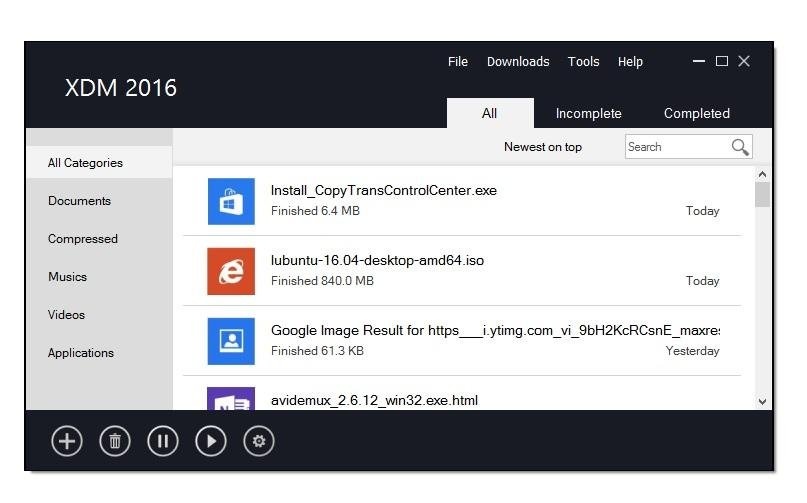
Xtreme Download Manager (XDM) speeds up downloads by splitting them across multiple connections, saves videos from streaming sites, and picks up broken downloads exactly where they left off. A companion browser extension hands downloads and detected videos straight to the app, so you never have to copy a link by hand. Detects and saves videos from streaming sites, including HLS (.m3u8) and MPEG-DASH (.mpd) streams, muxed to MP4 with no external tools. Pick a subtitle track and get it as an .srt file, timed to match the video.
Free software
OS:


File size: 47MB
Old versions
Version history
OS:
File size: 47MB
Old versions
Version history
Screenshots


Latest version

Download
Download Xtreme Download Manager 9.0.8 Windows 47MB Win
Download Xtreme Download Manager 9.0.8 Mac Silicon ARM 64-bit 60MB MacARM64
Download Xtreme Download Manager 9.0.8 Mac Intel 64-bit 62MB Mac64
Download Xtreme Download Manager 9.0.8 Linux 64-bit 62MB Linux64
Download other versions
Download Xtreme Download Manager 9.0.8 Linux ARM 47.8MB Linux ARM64
Download old versions

Software License
Supported operating systems
Mac OS Linux Version history / Release notes / Changelog / What's New
What's new in XDM 9
XDM 9 is a ground-up rewrite. Highlights:
Writes straight to the final file: HTTP downloads go directly into your download folder, with no temp copy and no slow "assembling" step at the end. Large files finish the moment the last byte arrives.
Better HLS and DASH: more reliable stream detection, a choice of quality and audio track, and muxing to MP4 without ffmpeg. You can also grab subtitles as .srt, timed to match the video.
Bulk downloads: right-click Download all with XDM to grab every PDF, image or video on a page. You can also save a social media profile's videos and images in one go, with video and audio merged into ready-to-play MP4s.
On the Chrome Web Store: install the browser extension with one click.
Modern UI: a refreshed light and dark theme, runs natively on Wayland, a native macOS build (Apple Silicon and Intel) and Windows on ARM64 support.
Command-line mode: xdm-app --headless -o <folder> <url> downloads HTTP, HLS and DASH from a terminal, with a quality pick (-q best|720p|audio). It can run alongside the app.
Download categories: rules sort each download into a category and folder. You can change the folder or restart a download from the list.
Disk errors never restart from zero: a full disk or a missing folder stops the download and keeps its progress.
Checksum verification: check a finished file's hash from the download-complete window or the download's properties.
Safer downloads: finished files are marked as coming from the internet (Mark-of-the-Web on Windows, quarantine on macOS), so SmartScreen and Gatekeeper still check them. You can turn this off in settings.
NTLM authentication: works with Windows/IIS servers and corporate proxies that require NTLM.
XDM 9 is a ground-up rewrite. Highlights:
Writes straight to the final file: HTTP downloads go directly into your download folder, with no temp copy and no slow "assembling" step at the end. Large files finish the moment the last byte arrives.
Better HLS and DASH: more reliable stream detection, a choice of quality and audio track, and muxing to MP4 without ffmpeg. You can also grab subtitles as .srt, timed to match the video.
Bulk downloads: right-click Download all with XDM to grab every PDF, image or video on a page. You can also save a social media profile's videos and images in one go, with video and audio merged into ready-to-play MP4s.
On the Chrome Web Store: install the browser extension with one click.
Modern UI: a refreshed light and dark theme, runs natively on Wayland, a native macOS build (Apple Silicon and Intel) and Windows on ARM64 support.
Command-line mode: xdm-app --headless -o <folder> <url> downloads HTTP, HLS and DASH from a terminal, with a quality pick (-q best|720p|audio). It can run alongside the app.
Download categories: rules sort each download into a category and folder. You can change the folder or restart a download from the list.
Disk errors never restart from zero: a full disk or a missing folder stops the download and keeps its progress.
Checksum verification: check a finished file's hash from the download-complete window or the download's properties.
Safer downloads: finished files are marked as coming from the internet (Mark-of-the-Web on Windows, quarantine on macOS), so SmartScreen and Gatekeeper still check them. You can turn this off in settings.
NTLM authentication: works with Windows/IIS servers and corporate proxies that require NTLM.
View full changelog
All features
Faster downloads Multi-connection segmented downloading to make the most of your bandwidth.
Browser integration Works with Chrome, Firefox, Edge and other popular browsers: XDM takes over downloads from the browser automatically, so every file gets the speed boost without copying a link.
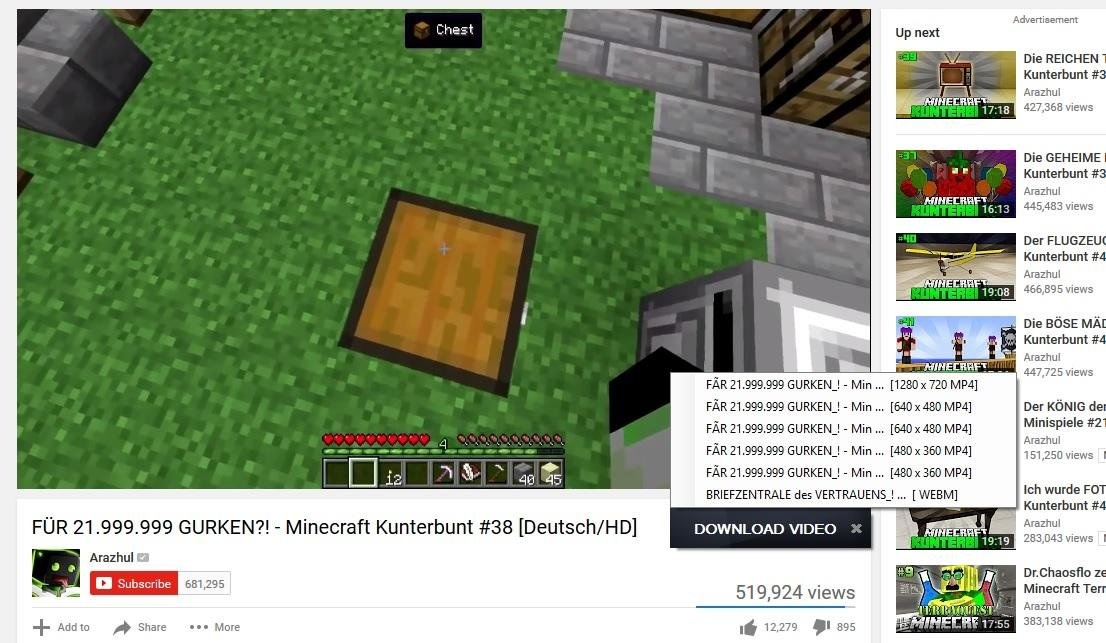
Video grabber Detects and saves videos from streaming sites, including HLS (.m3u8) and MPEG-DASH (.mpd) streams, muxed to MP4 with no external tools. Pick a subtitle track and get it as an .srt file, timed to match the video.
Resume anything Recovers downloads interrupted by network drops, crashes or power loss; refresh expired links without starting over.
Bulk social media downloads Save every video and image from a social media profile in a single click. Video and audio tracks are merged into ready-to-play MP4s, and ads are left out.
Batch downloads Grab every PDF on a page or a whole gallery of HD wallpapers at once: right-click Download all with XDM, filter by type, size or name, and save them all into a single folder.
Scheduler & queues Start and stop downloads on a schedule, limit parallel downloads, shut down when done.
Paste from clipboard Add one link or a whole list of links straight from the clipboard.
Proxies & auth HTTP and SOCKS proxies, and server/proxy authentication.
Antivirus scan Optionally scan finished downloads with your antivirus.
Cross-platform Native-feeling app on Windows, macOS and Linux, with light and dark themes.
Browser integration Works with Chrome, Firefox, Edge and other popular browsers: XDM takes over downloads from the browser automatically, so every file gets the speed boost without copying a link.
Video grabber Detects and saves videos from streaming sites, including HLS (.m3u8) and MPEG-DASH (.mpd) streams, muxed to MP4 with no external tools. Pick a subtitle track and get it as an .srt file, timed to match the video.
Resume anything Recovers downloads interrupted by network drops, crashes or power loss; refresh expired links without starting over.
Bulk social media downloads Save every video and image from a social media profile in a single click. Video and audio tracks are merged into ready-to-play MP4s, and ads are left out.
Batch downloads Grab every PDF on a page or a whole gallery of HD wallpapers at once: right-click Download all with XDM, filter by type, size or name, and save them all into a single folder.
Scheduler & queues Start and stop downloads on a schedule, limit parallel downloads, shut down when done.
Paste from clipboard Add one link or a whole list of links straight from the clipboard.
Proxies & auth HTTP and SOCKS proxies, and server/proxy authentication.
Antivirus scan Optionally scan finished downloads with your antivirus.
Cross-platform Native-feeling app on Windows, macOS and Linux, with light and dark themes.
Sections/Browse similar tools
Guides and How to's
Acronyms / Also Known As
Notify me when software updated or report software
| 11 reviews, Showing 1 to 5 reviews |
Really nice and easy to use. Makes a lot of complicate downloads simple. Thanks a lot for this peace of software.
Review by tim on
Jan 26, 2022 Version: 7.2.11
OS: Linux Ease of use: 10/10
Functionality: 10/10
Value for money: 10/10
Overall: 10/10
Works great. Oddly enough I found it being sold on eBay for $12.95.
Review by mail2tom on
Mar 28, 2020 Version: 7.2.10
OS: Windows 10 64-bit Ease of use: 9/10
Functionality: 9/10
Value for money: 10/10
Overall: 9/10
Superb
Review by AlanP on
Feb 12, 2018 Version: 7.1.2
OS: Windows 7 64-bit Ease of use: 10/10
Functionality: 10/10
Value for money: 10/10
Overall: 10/10
Error apparently fixed on 12/01/2018-software update tool: XDM 7.0.5 (Help / update components) "update run as administrator".
There was a significant improvement in integration with the chrome extension, but still appears (.mkv) as the default extension in the pop up monitor, as a solution I changed the end of the video file to (.mp4), and this time I was successful in downloading, in subsequent videos it was not necessary to change.
There was a significant improvement in integration with the chrome extension, but still appears (.mkv) as the default extension in the pop up monitor, as a solution I changed the end of the video file to (.mp4), and this time I was successful in downloading, in subsequent videos it was not necessary to change.
Review by alex3676 on
Jan 13, 2018 Version: 7.0.5
OS: Windows 7 Ease of use: 9/10
Functionality: 8/10
Value for money: 8/10
Overall: 10/10
Video download from youtube works great in latest Version. I faced no issues while downloading videos from youtube or other sites
Review by Stefan on
Jan 12, 2018 Version: 7.0.5
OS: Windows 10 64-bit Ease of use: 8/10
Functionality: 10/10
Value for money: 10/10
Overall: 10/10
| 11 reviews, Showing 1 to 5 reviews |
| 1 tool hits, Showing 1 to 1 tools |
Explanation:
NEW SOFTWARE= New tool since your last visit
NEW VERSION= New version since your last visit
NEW REVIEW= New review since your last visit
NEW VERSION= New version
Latest version
Version number / Beta version number / Update version number and when it whas released.
Type and download
NO MORE UPDATES? = The software hasn't been updated in over 2 years.
NO LONGER DEVELOPED = The software hasn't been updated in over 5 years.
RECENTLY UPDATED = The software has been updated the last 31 days.
Freeware = Download Free software.
Freeware Trialware = Download Free software but some parts are trial/shareware.
Free software = Download Free software and also open source code also known as FOSS (Free and Open Source Software).
Free software Trialware = Download Free software and also open source code but some parts are trial/shareware.
Freeware Ads = Download Free software but supported by advertising, usually with a included browser toolbar. It may be disabled when installing or after installation.
Free software Ads = Free Download software and open source code but supported by advertising, usually with a included browser toolbar. It may be disabled when installing or after installation.
Trialware = Also called shareware or demo. Free Trial version available for download and testing with usually a time limit or limited functions.
Payware = No demo or trial available.
Portable version = A portable/standalone version is available. No installation is required.
v1.0.1 = Latest version available.
Download beta = It could be a Beta, RC(Release Candidate) or an Alpha / Nightly / Unstable version of the software.
Download 15MB = A direct link to the software download.
Win = Windows download version for 32-bit and 64-bit Windows.
Win64 = Windows 64-bit download version for 64-bit Windows.
WinARM64 = Windows 64-bit ARM download version for Windows ARM64/AArch64.
Mac = Mac download version for 64-bit Mac OS Intel/ARM64/AArch64.
MacARM64 = Mac Silicon download version for 64-bit Mac OS ARM64/AArch64.
Mac64 = Mac OS download version for 64-bit Intel Mac OS.
Linux = Linux download version.
Linux64 = Linux download version for 64bit Linux.
Linux ARM = Linux download version for Linux ARM64/AArch64.
Portable = Portable version. No installation is required.
Ad-Supported = The software is bundled with advertising. Be careful when you install the software and disable addons that you don't want!
Visit developers site = A link to the software developer site.
Download (mirror link) = A mirror link to the software download. It may not contain the latest versions.
Download old versions = Free downloads of previous versions of the program.
Download 64-bit version = If you have a 64bit operating system you can download this version.
Download portable version = Portable/Standalone version meaning that no installation is required, just extract the files to a folder and run directly.
Portable version available = Download the portable version and you can just extract the files and run the program without installation.
Old versions available = Download old versions of the program.
Version history available = Complete changelog on our site.
= Windows version available.
= Mac OS version available.
= Linux version available.
Our hosted software are virus and malware scanned with several antivirus programs using www.virustotal.com. (NOTE! Just one virustotal warning is 99.9% a false positive. And some software might receive 2-6 warnings but it's if they are not all same virus/trojan then it's 99% false positives.)
Rating
Rating from 0-10.
NEW SOFTWARE= New tool since your last visit
NEW VERSION= New version since your last visit
NEW REVIEW= New review since your last visit
NEW VERSION= New version
Latest version
Version number / Beta version number / Update version number and when it whas released.
Type and download
NO MORE UPDATES? = The software hasn't been updated in over 2 years.
NO LONGER DEVELOPED = The software hasn't been updated in over 5 years.
RECENTLY UPDATED = The software has been updated the last 31 days.
Freeware = Download Free software.
Freeware Trialware = Download Free software but some parts are trial/shareware.
Free software = Download Free software and also open source code also known as FOSS (Free and Open Source Software).
Free software Trialware = Download Free software and also open source code but some parts are trial/shareware.
Freeware Ads = Download Free software but supported by advertising, usually with a included browser toolbar. It may be disabled when installing or after installation.
Free software Ads = Free Download software and open source code but supported by advertising, usually with a included browser toolbar. It may be disabled when installing or after installation.
Trialware = Also called shareware or demo. Free Trial version available for download and testing with usually a time limit or limited functions.
Payware = No demo or trial available.
Portable version = A portable/standalone version is available. No installation is required.
v1.0.1 = Latest version available.
Download beta = It could be a Beta, RC(Release Candidate) or an Alpha / Nightly / Unstable version of the software.
Download 15MB = A direct link to the software download.
Win = Windows download version for 32-bit and 64-bit Windows.
Win64 = Windows 64-bit download version for 64-bit Windows.
WinARM64 = Windows 64-bit ARM download version for Windows ARM64/AArch64.
Mac = Mac download version for 64-bit Mac OS Intel/ARM64/AArch64.
MacARM64 = Mac Silicon download version for 64-bit Mac OS ARM64/AArch64.
Mac64 = Mac OS download version for 64-bit Intel Mac OS.
Linux = Linux download version.
Linux64 = Linux download version for 64bit Linux.
Linux ARM = Linux download version for Linux ARM64/AArch64.
Portable = Portable version. No installation is required.
Ad-Supported = The software is bundled with advertising. Be careful when you install the software and disable addons that you don't want!
Visit developers site = A link to the software developer site.
Download (mirror link) = A mirror link to the software download. It may not contain the latest versions.
Download old versions = Free downloads of previous versions of the program.
Download 64-bit version = If you have a 64bit operating system you can download this version.
Download portable version = Portable/Standalone version meaning that no installation is required, just extract the files to a folder and run directly.
Portable version available = Download the portable version and you can just extract the files and run the program without installation.
Old versions available = Download old versions of the program.
Version history available = Complete changelog on our site.
= Windows version available. = Mac OS version available. = Linux version available.Our hosted software are virus and malware scanned with several antivirus programs using www.virustotal.com. (NOTE! Just one virustotal warning is 99.9% a false positive. And some software might receive 2-6 warnings but it's if they are not all same virus/trojan then it's 99% false positives.)
Rating
Rating from 0-10.
Browse software by sections
All In One Blu-ray Converters (9)
All In One DVD Converters (12)
All In One MKV to MP4, Blu-ray, UHD (11)
All In One Video Converters (19)
Animation (3D, 2D Animation) (13)
Audio Editors (23)
Audio Encoders (80)
Audio Players (19)
Authoring (Blu-ray, UHD, AVCHD) (13)
Authoring (DivX) (4)
Authoring (DVD) (26)
Authoring (SVCD, VCD) (9)
Bitrate Calculators (7)
Blu-ray to AVI, MKV, MP4 (15)
Blu-ray to Blu-ray, AVCHD (10)
Burn (CD,DVD,Blu-ray) (24)
Camcorders, DV, HDV, AVCHD (31)
Capture TV, DVD, VCR (30)
CD, DVD, Blu-ray recovery (3)
Codec Packs (6)
All In One DVD Converters (12)
All In One MKV to MP4, Blu-ray, UHD (11)
All In One Video Converters (19)
Animation (3D, 2D Animation) (13)
Audio Editors (23)
Audio Encoders (80)
Audio Players (19)
Authoring (Blu-ray, UHD, AVCHD) (13)
Authoring (DivX) (4)
Authoring (DVD) (26)
Authoring (SVCD, VCD) (9)
Bitrate Calculators (7)
Blu-ray to AVI, MKV, MP4 (15)
Blu-ray to Blu-ray, AVCHD (10)
Burn (CD,DVD,Blu-ray) (24)
Camcorders, DV, HDV, AVCHD (31)
Capture TV, DVD, VCR (30)
CD, DVD, Blu-ray recovery (3)
Codec Packs (6)
Codec, Video Identifiers (31)
Codecs , Renderers (68)
Decrypters (DVD Rippers) (16)
Decrypters (UHD, Blu-ray Rippers) (8)
DigitalTV, DVB, IPTV (40)
DVD to DVD (20)
DVD to MP4, MKV, H264, H265 (16)
DVD to VCD, SVCD (5)
DVD to XviD, AVI, DivX (16)
ISO, Image (14)
Linux Video Tools (220)
MacOS Video Tools (252)
Media (Blu-ray, DVD, CD) (9)
Media Center, HTPC (25)
Other Useful Tools (136)
Photo Blu-ray, DVD, SlideShow (8)
Portable (Mobile, PSP) (35)
Region Free Tools (5)
Screen capture , Screen recording (25)
Screenshots , Thumbnails (13)
Codecs , Renderers (68)
Decrypters (DVD Rippers) (16)
Decrypters (UHD, Blu-ray Rippers) (8)
DigitalTV, DVB, IPTV (40)
DVD to DVD (20)
DVD to MP4, MKV, H264, H265 (16)
DVD to VCD, SVCD (5)
DVD to XviD, AVI, DivX (16)
ISO, Image (14)
Linux Video Tools (220)
MacOS Video Tools (252)
Media (Blu-ray, DVD, CD) (9)
Media Center, HTPC (25)
Other Useful Tools (136)
Photo Blu-ray, DVD, SlideShow (8)
Portable (Mobile, PSP) (35)
Region Free Tools (5)
Screen capture , Screen recording (25)
Screenshots , Thumbnails (13)
Subtitle Editors, Converters (72)
Tag Editors (4)
Video Compare Software (6)
Video Demultiplexers, Multiplexers (66)
Video Editors (Advanced, NLE) (37)
Video Editors (Basic) (58)
Video Editors (H264, MP4, MKV, MTS) (21)
Video Editors (Lossless) (7)
Video Editors (MPG, DVD) (16)
Video Editors (WMV, AVI) (15)
Video Encoders (AV1, VP8, VP9) (2)
Video Encoders (AVI, WMV) (38)
Video Encoders (H264, H265, MP4, MKV) (45)
Video Encoders (MPG, DVD) (23)
Video Encoders , Converters (156)
Video Frameservers (9)
Video Players (48)
Video Repair, Fix (24)
Video Scripting (10)
Video Streaming (20)
Tag Editors (4)
Video Compare Software (6)
Video Demultiplexers, Multiplexers (66)
Video Editors (Advanced, NLE) (37)
Video Editors (Basic) (58)
Video Editors (H264, MP4, MKV, MTS) (21)
Video Editors (Lossless) (7)
Video Editors (MPG, DVD) (16)
Video Editors (WMV, AVI) (15)
Video Encoders (AV1, VP8, VP9) (2)
Video Encoders (AVI, WMV) (38)
Video Encoders (H264, H265, MP4, MKV) (45)
Video Encoders (MPG, DVD) (23)
Video Encoders , Converters (156)
Video Frameservers (9)
Video Players (48)
Video Repair, Fix (24)
Video Scripting (10)
Video Streaming (20)