
Help us keep the list up to date and submit new video software here.
Tool
Description
Type
Rating
Reviews
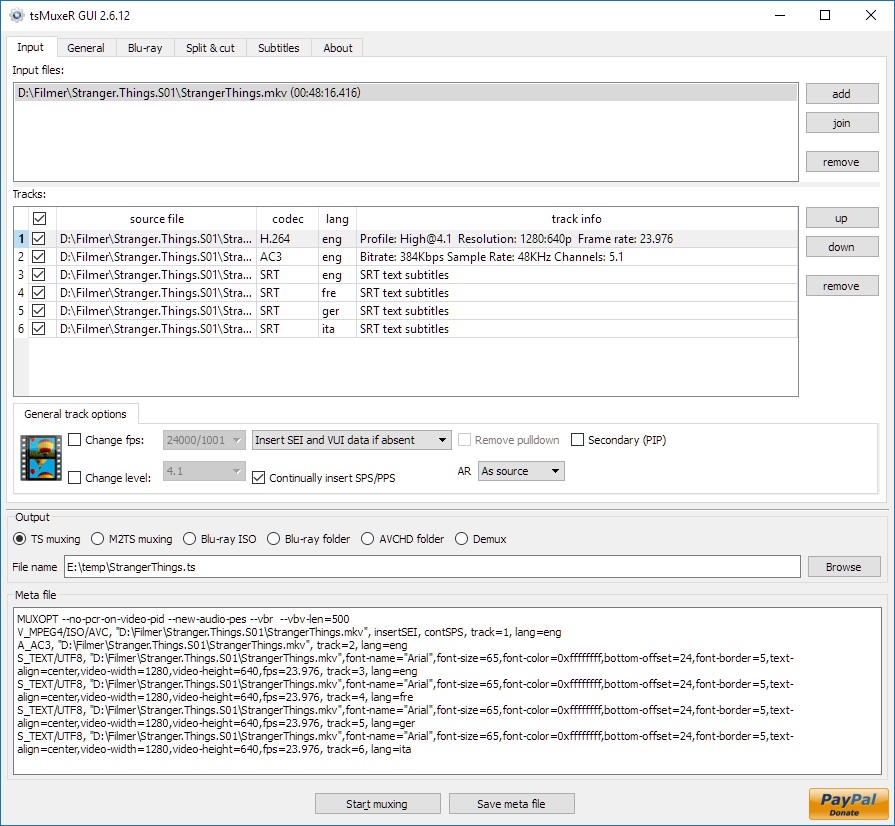
tsMuxer is a Transport Stream muxer. Remux/mux elementary streams, EVO/VOB/MPG, MKV/MKA, MP4/MOV, TS, M2TS to TS to M2TS. Supported video codecs H.264/AVC, H.265/HEVC, VC-1, MPEG2. Supported audio codecs AAC, AC3 / E-AC3(DD+), DTS/ DTS-HD. Ability to set muxing fps manually and automatically, Ability to change level for H.264 streams, Ability to shift a sound tracks, Ability to extract DTS core from DTS-HD, Ability to join files. Output/Author to compliant Blu-ray Disc or AVCHD. Blu-ray 3D support in version 1.11+.
Free software
OS:


File size: 12MB
Portable version
Other versions
Old versions
Version history
Alternative software
OS:
File size: 12MB
Portable version
Other versions
Old versions
Version history
Alternative software
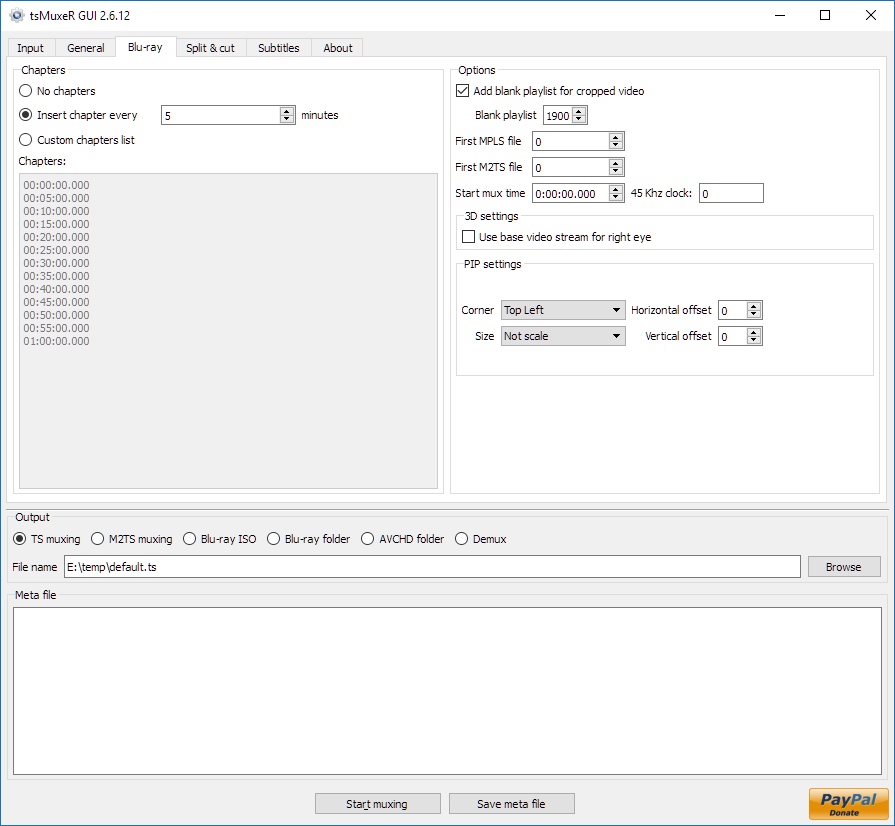
Screenshots
Latest version
Download
Download tsMuxeR 2.18.14 Windows 64-bit 12MB Win64
Portable 
Download tsMuxeR 2.18.14 Windows 12MB Win
Portable Download tsMuxeR 2.18.14 Mac Silicon ARM 64-bit 12MB MacARM64
Download tsMuxeR 2.18.14 Mac Intel 64-bit 12MB Mac64
Download tsMuxeR 2.18.14 Linux 64-bit 12MB Linux64
Download Beta, Update and other versions
Download tsMuxeR 2.7.0 Original Windows 64-bit 12MB Win64
Download tsMuxeR 2.7.0 Original Windows 7MB Win
Download tsMuxeR 2.7.0 Original Mac 57MB Mac
Download tsMuxeR 2.7.0 Original Linux 33MB Linux
Download the tsMuxer 2.7.0 source code
Download the tsMuxer 2.7.2 fork source code
Download old versions

Software License
Supported operating systems
Mac OS Linux More information and other downloads
Download Tsmuxer for Mac OSX Snow Leopard here
If you have problems playing your Blu-ray on Panasonic players then try reauthor it with Free AVCHD Editor. Read this forum thread for information.
If you have problems playing your Blu-ray on Panasonic players then try reauthor it with Free AVCHD Editor. Read this forum thread for information.
Version history / Release notes / Changelog / What's New
tsMuxeR 2.18.14
As I said when this fork started, it gets attention when I have free time, which comes in bursts and sometimes not at all. One of those quiet stretches begins now: I will have no access to a machine, so this is the last release until I am back. Reports are still worth posting. Nothing goes missing while I am away, and I will read all of them when I return.
Six fixes, five of them found by people reporting something in 2.18.13 and staying with it until it made sense. Two of them are faults in things 2.18.13 itself introduced.
Fixed
A short intro clip was naming the languages of the whole film. A playlist that opens with a brief clip and then plays the feature has a stream table for each, and they do not have to agree. 2.18.13 began describing a playlist by the streams that most of its running time uses, which is right, but where two clips carried the same tracks it then took the details from the first of them. On a disc whose intro is tagged English and whose feature is tagged Norwegian, a seventeen second intro was naming the language of a one hour forty-nine minute film. The longest clip provides them now. Checked by listing every playlist on eight discs, 2,068 of them, with the old build and the new one: every listing identical, because this only reaches a playlist whose clips carry the same tracks and disagree about the language.
The window showed no language for a file that was about to get one. A raw stream carries its language and its delay in its file name, and both are read when the mux runs. Neither was reported before that, so the track list sat there empty and the only way to find out whether anything had been recognised was to mux the file and look afterwards. Both now appear as soon as the file is added. The delay rule has been in tsMuxeR for years, so this is old rather than new.
The read rate ceiling could be written twice, and the wrong one won. The tick on the Blu-ray tab and Restricted VBR on the General tab both wrote a maximum bitrate, and the muxer takes the last one it reads. A box on another tab could therefore override a tick whose own label promises to hold the disc to the rate a player can read. One ceiling is written now, and the lower of the two wins: the tick is a limit that must not be exceeded, and a smaller figure typed by hand is inside it and is yours to choose.
The space bar did not tick or untick a track. It only ever worked when the highlighted cell was the checkbox itself, and anyone selecting a track clicks its name or its codec, so the key appeared to do nothing at all. It now toggles the highlighted track whichever column has the focus.
Nineteen strings had been left in English. They appeared in the window untranslated in Spanish, French, Russian, Chinese, Japanese and Hebrew, including the whole read rate row added in the last release. Every one of them is translated now, so no language falls back to English any more.
New
A subtitle file whose name says forced is marked as the forced track. The tools that split the forced subtitles into a file of their own put the word in the name, and setting the same thing by hand before every disc is a step that can be skipped. A Blu-ray has no per track attribute for this: what a disc carries is an instruction at startup saying which subtitle a player selects and whether it shows only the forced parts, and that is what gets set. The word has to be the last one in the name, so subs (forced).sup and movie_forced.sup are recognised while a film whose title merely begins with the word is not. An explicit default= on the meta line always wins.
tsMuxeR 2.18.13
Three reports arrived on this fork's own tracker while the older list was being worked through, and all three are answered here. The rest of the release comes from two long standing defects on the tracker of the original project, justdan96/tsMuxer. Neither could be tested before, for want of a file that reaches them. Both files were built here, and each of them had four more faults standing behind the one it was built for.
Fixed
A playlist was described by its first clip rather than by the film. A playlist joins clips, and nothing obliges those clips to carry the same streams. A disc that opens with a short clip of its own and then plays the feature was described by that opening clip alone: its tracks were the ones offered, and muxing them read the feature's audio through the wrong reader, which fails with "AV frame too large" and no buffer size helps. Every play item's stream table is kept now, the playlist is described by the streams that the greatest part of its running time uses, and a clip that declares a different codec on a shared PID is left out and named. Checked against 228 real playlists: no clip left out of any of them, and all 228 listings byte identical to before.
A track's language was taken from the clip and not from the playlist. A Blu-ray writes the language of a stream in two places, in the playlist and in the clip info file, and a re-authored disc can have the two disagree. tsMuxeR read only the clip. On such a disc a Norwegian track was reported as English, where a player and BDInfo both say Norwegian. The playlist wins now, because that is what the disc's own navigation uses, and a line says where the language came from. A bare .m2ts opened on its own has no playlist, so the clip is still the only source there.
Three of the language code pairs were wrong. The table that converts the older three letter codes to the newer ones had Malay and Persian swapped, and pointed Moldavian at Romany. All twenty official pairs now agree with the list published by the registration authority.
The read rate warning told people to re-encode when the muxer was the cause. It ended by saying the rate comes from the source and not from muxing, so the only cure was to encode the video again. Measured on a conformant HD Blu-ray source, which sits exactly on 48 Mbit/s and never goes past it: remuxed whole, it asks for 118.0 Mbit/s at its fastest, with 22.7 per cent of its 109.5 million packets above the limit. A conformant source comes out over the limit because the muxer computes arrival times from its own model rather than keeping the pace the disc was authored at. Capped, the same mux holds 48.0 Mbit/s with not one packet over, every elementary stream byte identical, for 0.006 per cent of the file size. The warning now names --maxbitrate and the right number for the disc, and keeps the re-encode advice for the case where the video's own peak really is the problem.
A subtitle error named neither the track nor the file. Someone demuxing thirty two subtitle tracks got Invalid SRT format. "" is invalid timing info and could not tell which of the thirty two it was. It now names the track, the file and the line number, and says what a timing line looks like.
A subtitle line shorter than two characters walked off the end of it. The search for the --> counted to length() - 2 on an unsigned length, so a line of one character or none wrapped the bound and read past the end of the string. A blank line where a timing line belongs is exactly that case. On a build where the read reached an unmapped page it came up as "Unknnown exception" and stood in front of the error the reporter was actually getting.
Three bytes off the front of every subtitle file with no byte order mark. The UTF-8 branch of the encoding detection skipped three bytes whether it had matched a mark or only found the file to be legal UTF-8. Usually those three bytes are an index line and one digit of the hour, and the hour still parses, which is why it went unnoticed. Not always: the same file without its mark put its first cue an hour early.
Memory the subtitle renderer never gave back. The 8 MB render buffer was allocated with new[] and released with delete, in two places. Every glyph rendered took a second glyph for its outline and never released it. A failing call left a pointer that had already been released, and the next line wrote through it. All three need a real font on the machine to reach, which is why a sanitizer sweep on a machine without one found nothing. Measured with the sanitizer, a subtitle mux went from 24,028 bytes leaked in 105 allocations to none.
A meta line that is ignored now says so. Naming the same file twice, as two tracks, produced one track and no message, so the output simply had a track missing. The behaviour is unchanged and deliberate, because a playlist line expands to one file per play item; what was wrong was doing it in silence.
A negative timeshift wrapped the timestamp round. Asking a track to move earlier by more than there is start time to absorb sent its timestamp below zero, and a PTS field is 33 bits with no sign. A track meant to lead the picture by 0.827 s came out more than a day after it, and the mux reported success. The start of the mux is raised by exactly what is needed instead, so every track moves together and the offset between them is the one that was asked for.
Rejecting bytes that are not this codec cost quadratic time. When the frame at a false sync word failed to decode, the reader advanced by one byte from where it had started looking, so the same false sync was still in front of it and was found and decoded again, once for every byte of the gap. This is the path a damaged file takes, and the path a wrong codec name on a meta line takes. 39 MB of TrueHD named as AC-3 went from 11 minutes 16 seconds to 0.9 seconds. The reader steps past the sync that failed, and the byte accounting, which decides what is reported as lost, is unchanged on every case measured.
The window's language list had a typo, two gaps and eighteen blank rows. The list is declared 502 long and 484 entries were filled, so the last eighteen rows of the combo box read " ()". umd was a typo for und. Blissymbols and "No linguistic content" were missing, the second of which a real disc carries on a track with no dialogue. An...
As I said when this fork started, it gets attention when I have free time, which comes in bursts and sometimes not at all. One of those quiet stretches begins now: I will have no access to a machine, so this is the last release until I am back. Reports are still worth posting. Nothing goes missing while I am away, and I will read all of them when I return.
Six fixes, five of them found by people reporting something in 2.18.13 and staying with it until it made sense. Two of them are faults in things 2.18.13 itself introduced.
Fixed
A short intro clip was naming the languages of the whole film. A playlist that opens with a brief clip and then plays the feature has a stream table for each, and they do not have to agree. 2.18.13 began describing a playlist by the streams that most of its running time uses, which is right, but where two clips carried the same tracks it then took the details from the first of them. On a disc whose intro is tagged English and whose feature is tagged Norwegian, a seventeen second intro was naming the language of a one hour forty-nine minute film. The longest clip provides them now. Checked by listing every playlist on eight discs, 2,068 of them, with the old build and the new one: every listing identical, because this only reaches a playlist whose clips carry the same tracks and disagree about the language.
The window showed no language for a file that was about to get one. A raw stream carries its language and its delay in its file name, and both are read when the mux runs. Neither was reported before that, so the track list sat there empty and the only way to find out whether anything had been recognised was to mux the file and look afterwards. Both now appear as soon as the file is added. The delay rule has been in tsMuxeR for years, so this is old rather than new.
The read rate ceiling could be written twice, and the wrong one won. The tick on the Blu-ray tab and Restricted VBR on the General tab both wrote a maximum bitrate, and the muxer takes the last one it reads. A box on another tab could therefore override a tick whose own label promises to hold the disc to the rate a player can read. One ceiling is written now, and the lower of the two wins: the tick is a limit that must not be exceeded, and a smaller figure typed by hand is inside it and is yours to choose.
The space bar did not tick or untick a track. It only ever worked when the highlighted cell was the checkbox itself, and anyone selecting a track clicks its name or its codec, so the key appeared to do nothing at all. It now toggles the highlighted track whichever column has the focus.
Nineteen strings had been left in English. They appeared in the window untranslated in Spanish, French, Russian, Chinese, Japanese and Hebrew, including the whole read rate row added in the last release. Every one of them is translated now, so no language falls back to English any more.
New
A subtitle file whose name says forced is marked as the forced track. The tools that split the forced subtitles into a file of their own put the word in the name, and setting the same thing by hand before every disc is a step that can be skipped. A Blu-ray has no per track attribute for this: what a disc carries is an instruction at startup saying which subtitle a player selects and whether it shows only the forced parts, and that is what gets set. The word has to be the last one in the name, so subs (forced).sup and movie_forced.sup are recognised while a film whose title merely begins with the word is not. An explicit default= on the meta line always wins.
tsMuxeR 2.18.13
Three reports arrived on this fork's own tracker while the older list was being worked through, and all three are answered here. The rest of the release comes from two long standing defects on the tracker of the original project, justdan96/tsMuxer. Neither could be tested before, for want of a file that reaches them. Both files were built here, and each of them had four more faults standing behind the one it was built for.
Fixed
A playlist was described by its first clip rather than by the film. A playlist joins clips, and nothing obliges those clips to carry the same streams. A disc that opens with a short clip of its own and then plays the feature was described by that opening clip alone: its tracks were the ones offered, and muxing them read the feature's audio through the wrong reader, which fails with "AV frame too large" and no buffer size helps. Every play item's stream table is kept now, the playlist is described by the streams that the greatest part of its running time uses, and a clip that declares a different codec on a shared PID is left out and named. Checked against 228 real playlists: no clip left out of any of them, and all 228 listings byte identical to before.
A track's language was taken from the clip and not from the playlist. A Blu-ray writes the language of a stream in two places, in the playlist and in the clip info file, and a re-authored disc can have the two disagree. tsMuxeR read only the clip. On such a disc a Norwegian track was reported as English, where a player and BDInfo both say Norwegian. The playlist wins now, because that is what the disc's own navigation uses, and a line says where the language came from. A bare .m2ts opened on its own has no playlist, so the clip is still the only source there.
Three of the language code pairs were wrong. The table that converts the older three letter codes to the newer ones had Malay and Persian swapped, and pointed Moldavian at Romany. All twenty official pairs now agree with the list published by the registration authority.
The read rate warning told people to re-encode when the muxer was the cause. It ended by saying the rate comes from the source and not from muxing, so the only cure was to encode the video again. Measured on a conformant HD Blu-ray source, which sits exactly on 48 Mbit/s and never goes past it: remuxed whole, it asks for 118.0 Mbit/s at its fastest, with 22.7 per cent of its 109.5 million packets above the limit. A conformant source comes out over the limit because the muxer computes arrival times from its own model rather than keeping the pace the disc was authored at. Capped, the same mux holds 48.0 Mbit/s with not one packet over, every elementary stream byte identical, for 0.006 per cent of the file size. The warning now names --maxbitrate and the right number for the disc, and keeps the re-encode advice for the case where the video's own peak really is the problem.
A subtitle error named neither the track nor the file. Someone demuxing thirty two subtitle tracks got Invalid SRT format. "" is invalid timing info and could not tell which of the thirty two it was. It now names the track, the file and the line number, and says what a timing line looks like.
A subtitle line shorter than two characters walked off the end of it. The search for the --> counted to length() - 2 on an unsigned length, so a line of one character or none wrapped the bound and read past the end of the string. A blank line where a timing line belongs is exactly that case. On a build where the read reached an unmapped page it came up as "Unknnown exception" and stood in front of the error the reporter was actually getting.
Three bytes off the front of every subtitle file with no byte order mark. The UTF-8 branch of the encoding detection skipped three bytes whether it had matched a mark or only found the file to be legal UTF-8. Usually those three bytes are an index line and one digit of the hour, and the hour still parses, which is why it went unnoticed. Not always: the same file without its mark put its first cue an hour early.
Memory the subtitle renderer never gave back. The 8 MB render buffer was allocated with new[] and released with delete, in two places. Every glyph rendered took a second glyph for its outline and never released it. A failing call left a pointer that had already been released, and the next line wrote through it. All three need a real font on the machine to reach, which is why a sanitizer sweep on a machine without one found nothing. Measured with the sanitizer, a subtitle mux went from 24,028 bytes leaked in 105 allocations to none.
A meta line that is ignored now says so. Naming the same file twice, as two tracks, produced one track and no message, so the output simply had a track missing. The behaviour is unchanged and deliberate, because a playlist line expands to one file per play item; what was wrong was doing it in silence.
A negative timeshift wrapped the timestamp round. Asking a track to move earlier by more than there is start time to absorb sent its timestamp below zero, and a PTS field is 33 bits with no sign. A track meant to lead the picture by 0.827 s came out more than a day after it, and the mux reported success. The start of the mux is raised by exactly what is needed instead, so every track moves together and the offset between them is the one that was asked for.
Rejecting bytes that are not this codec cost quadratic time. When the frame at a false sync word failed to decode, the reader advanced by one byte from where it had started looking, so the same false sync was still in front of it and was found and decoded again, once for every byte of the gap. This is the path a damaged file takes, and the path a wrong codec name on a meta line takes. 39 MB of TrueHD named as AC-3 went from 11 minutes 16 seconds to 0.9 seconds. The reader steps past the sync that failed, and the byte accounting, which decides what is reported as lost, is unchanged on every case measured.
The window's language list had a typo, two gaps and eighteen blank rows. The list is declared 502 long and 484 entries were filled, so the last eighteen rows of the combo box read " ()". umd was a typo for und. Blissymbols and "No linguistic content" were missing, the second of which a real disc carries on a track with no dialogue. An...
View full changelog
All features
Supported incoming formats:
* TS;
* M2TS;
* Blu-ray;
* Demux option.
Supported videocodecs:
* H.264
* Microsoft VC-1;
* MPEG-2.
Supported audiocodecs:
* AAC;
* AC3 / E-AC3(DD+);
* Dolby True HD (for streams with AC3 core only);
* DTS/ DTS-HD;
* LPCM.
Supported subtitle types:
* M2TS Presentation graphic stream.
* SRT text subtitles
Supported containers and formats:
* Elementary stream;
* Transport stream TS and M2TS;
* Program stream EVO/VOB/MPG;
* Matroska MKV/MKA;
* MP4/MOV
Main features:
* Automatic or manual fps adjustment while mixing;
* Level changing as well as SEI, SPS/PPS elements and NAL unit delimiter cycle insertion while mixing H.264;
* Audio tracks and subtitles time shifting;
* Ability to extract DTS core from DTS-HD;
* Ability to extract AC3 core from True-HD;
* Ability to join files;
* Ability to adjust fps for subtitles;
* Ability to convert LPCM streams into WAVE and vice versa;
* Track language information injection into blu-ray structure and TS header;
* Ability to cut source files;
* Ability to split output file;
* Ability to detect audio delay for TS/M2TS/MPG/VOB/EVO sources;
* Ability to remove pulldown info from stream;
* Ability to open Blu-ray playlist (MPLS) files;
* Ability to convert SRT subtitles to PGS;
* Tags for SRT subtitles support - tags for changing font, color, size, etc.; tag's syntax is similar to HTML;
* United cross-platform GUI - Windows, Linux, MacOS.
* TS;
* M2TS;
* Blu-ray;
* Demux option.
Supported videocodecs:
* H.264
* Microsoft VC-1;
* MPEG-2.
Supported audiocodecs:
* AAC;
* AC3 / E-AC3(DD+);
* Dolby True HD (for streams with AC3 core only);
* DTS/ DTS-HD;
* LPCM.
Supported subtitle types:
* M2TS Presentation graphic stream.
* SRT text subtitles
Supported containers and formats:
* Elementary stream;
* Transport stream TS and M2TS;
* Program stream EVO/VOB/MPG;
* Matroska MKV/MKA;
* MP4/MOV
Main features:
* Automatic or manual fps adjustment while mixing;
* Level changing as well as SEI, SPS/PPS elements and NAL unit delimiter cycle insertion while mixing H.264;
* Audio tracks and subtitles time shifting;
* Ability to extract DTS core from DTS-HD;
* Ability to extract AC3 core from True-HD;
* Ability to join files;
* Ability to adjust fps for subtitles;
* Ability to convert LPCM streams into WAVE and vice versa;
* Track language information injection into blu-ray structure and TS header;
* Ability to cut source files;
* Ability to split output file;
* Ability to detect audio delay for TS/M2TS/MPG/VOB/EVO sources;
* Ability to remove pulldown info from stream;
* Ability to open Blu-ray playlist (MPLS) files;
* Ability to convert SRT subtitles to PGS;
* Tags for SRT subtitles support - tags for changing font, color, size, etc.; tag's syntax is similar to HTML;
* United cross-platform GUI - Windows, Linux, MacOS.
Sections/Browse similar tools
All In One MKV to MP4/Blu-ray/UHD
Authoring (Blu-ray/UHD/AVCHD)
DigitalTV/DVB/IPTV
Linux Video Tools
MacOS Video Tools
Video De/Multiplexers
Alternative to tsMuxeR
(Latest version updated)Clown_BD (May 31, 2013)
Free AVCHD Editor (Jun 9, 2011)
MakeMKV (Sep 20, 2026)
multiAVCHD (Jul 4, 2012)
ToNMT UI (Jun 1, 2009)
TsRemux (Apr 20, 2010)
Guides and How to's
Adding a subtitle on a Blu-ray Disc keeping the original menu
- ReadBasic Guide for HDV to Blu-ray
- ReadBlu-ray to MKV with optional multi-language audio/subtitle support
- ReadConvert MKV to AVCHD for PS3 and Blu-ray
- ReadHow to add menus to avcHD without re-encode the files
- ReadHow to convert a Blu-ray disc into a .MKV 720P file
- ReadHow to Decrypt/store/play Blu-Ray and HD-DVD Discs
- ReadHow to rip a Blu-ray disc and remux it to MKV
- ReadMKV H.264/AVC to VC-1 Conversion Guide
- ReadtsMuxeR video tutorials
View all guides with guide description here
Tool features - Convert
M2TS to AVCHD, M2TS to Blu-ray, MKV to AVCHD, MKV to Blu-ray, MTS to AVCHD, MTS to Blu-ray, TS to AVCHD, TS to Blu-ray
Acronyms / Also Known As
Download tsMuxeR Portable download from the Download links under Download and Download other versions!
Notify me when software updated or report software
| 119 reviews, Showing 1 to 5 reviews |
Looking forward to trying this release. The link to the developers page should probably be changed to this release (https://github.com/teaching-droid/tsMuxer/releases/).
Review by mail2tom on
Jul 25, 2026 Version: tsMuxeR 2.11.0 fork
OS: Windows 11 64-bit Ease of use: 5/10
Functionality: 9/10
Value for money: 10/10
Overall: 7/10
Excellent tool! I use it for all bluray remuxes. I thought the development was no longer, but found this fork.
Still some very simple features that I'm missing that I believe the developer would implement without trouble.
Where can I post to the developer(s)?
Still some very simple features that I'm missing that I believe the developer would implement without trouble.
Where can I post to the developer(s)?
Review by O2 on
Jul 21, 2026 Version: 2.7.2-dev
OS: Windows 11 64-bit Ease of use: 8/10
Functionality: 5/10
Value for money: 8/10
Overall: 8/10
Rating by on
Jul 1, 2025 Version: 2.7
OS: Windows 11 64-bit Ease of use: 1/10
Functionality: 1/10
Value for money: 1/10
Overall: 1/10
No support for Atmos. Hope this will be supported in the next update. Fantastic software.
Review by Roger Jacobsen on
Sep 4, 2024 Version: 2.6.12
OS: Windows 11 64-bit Ease of use: 9/10
Functionality: 9/10
Value for money: 10/10
Overall: 9/10
Would be good if the program could read the subtitle in VOB format which is often in MKV files
Review by Johan on
Jul 6, 2024 Version: 2.6.12
OS: Windows 11 64-bit Ease of use: 10/10
Functionality: 10/10
Value for money: 10/10
Overall: 10/10
| 119 reviews, Showing 1 to 5 reviews |
| 1 tool hits, Showing 1 to 1 tools |
Explanation:
NEW SOFTWARE= New tool since your last visit
NEW VERSION= New version since your last visit
NEW REVIEW= New review since your last visit
NEW VERSION= New version
Latest version
Version number / Beta version number / Update version number and when it whas released.
Type and download
NO MORE UPDATES? = The software hasn't been updated in over 2 years.
NO LONGER DEVELOPED = The software hasn't been updated in over 5 years.
RECENTLY UPDATED = The software has been updated the last 31 days.
Freeware = Download Free software.
Freeware Trialware = Download Free software but some parts are trial/shareware.
Free software = Download Free software and also open source code also known as FOSS (Free and Open Source Software).
Free software Trialware = Download Free software and also open source code but some parts are trial/shareware.
Freeware Ads = Download Free software but supported by advertising, usually with a included browser toolbar. It may be disabled when installing or after installation.
Free software Ads = Free Download software and open source code but supported by advertising, usually with a included browser toolbar. It may be disabled when installing or after installation.
Trialware = Also called shareware or demo. Free Trial version available for download and testing with usually a time limit or limited functions.
Payware = No demo or trial available.
Portable version = A portable/standalone version is available. No installation is required.
v1.0.1 = Latest version available.
Download beta = It could be a Beta, RC(Release Candidate) or an Alpha / Nightly / Unstable version of the software.
Download 15MB = A direct link to the software download.
Win = Windows download version for 32-bit and 64-bit Windows.
Win64 = Windows 64-bit download version for 64-bit Windows.
WinARM64 = Windows 64-bit ARM download version for Windows ARM64/AArch64.
Mac = Mac download version for 64-bit Mac OS Intel/ARM64/AArch64.
MacARM64 = Mac Silicon download version for 64-bit Mac OS ARM64/AArch64.
Mac64 = Mac OS download version for 64-bit Intel Mac OS.
Linux = Linux download version.
Linux64 = Linux download version for 64bit Linux.
Linux ARM = Linux download version for Linux ARM64/AArch64.
Portable = Portable version. No installation is required.
Ad-Supported = The software is bundled with advertising. Be careful when you install the software and disable addons that you don't want!
Visit developers site = A link to the software developer site.
Download (mirror link) = A mirror link to the software download. It may not contain the latest versions.
Download old versions = Free downloads of previous versions of the program.
Download 64-bit version = If you have a 64bit operating system you can download this version.
Download portable version = Portable/Standalone version meaning that no installation is required, just extract the files to a folder and run directly.
Portable version available = Download the portable version and you can just extract the files and run the program without installation.
Old versions available = Download old versions of the program.
Version history available = Complete changelog on our site.
= Windows version available.
= Mac OS version available.
= Linux version available.
Our hosted software are virus and malware scanned with several antivirus programs using www.virustotal.com. (NOTE! Just one virustotal warning is 99.9% a false positive. And some software might receive 2-6 warnings but it's if they are not all same virus/trojan then it's 99% false positives.)
Rating
Rating from 0-10.
NEW SOFTWARE= New tool since your last visit
NEW VERSION= New version since your last visit
NEW REVIEW= New review since your last visit
NEW VERSION= New version
Latest version
Version number / Beta version number / Update version number and when it whas released.
Type and download
NO MORE UPDATES? = The software hasn't been updated in over 2 years.
NO LONGER DEVELOPED = The software hasn't been updated in over 5 years.
RECENTLY UPDATED = The software has been updated the last 31 days.
Freeware = Download Free software.
Freeware Trialware = Download Free software but some parts are trial/shareware.
Free software = Download Free software and also open source code also known as FOSS (Free and Open Source Software).
Free software Trialware = Download Free software and also open source code but some parts are trial/shareware.
Freeware Ads = Download Free software but supported by advertising, usually with a included browser toolbar. It may be disabled when installing or after installation.
Free software Ads = Free Download software and open source code but supported by advertising, usually with a included browser toolbar. It may be disabled when installing or after installation.
Trialware = Also called shareware or demo. Free Trial version available for download and testing with usually a time limit or limited functions.
Payware = No demo or trial available.
Portable version = A portable/standalone version is available. No installation is required.
v1.0.1 = Latest version available.
Download beta = It could be a Beta, RC(Release Candidate) or an Alpha / Nightly / Unstable version of the software.
Download 15MB = A direct link to the software download.
Win = Windows download version for 32-bit and 64-bit Windows.
Win64 = Windows 64-bit download version for 64-bit Windows.
WinARM64 = Windows 64-bit ARM download version for Windows ARM64/AArch64.
Mac = Mac download version for 64-bit Mac OS Intel/ARM64/AArch64.
MacARM64 = Mac Silicon download version for 64-bit Mac OS ARM64/AArch64.
Mac64 = Mac OS download version for 64-bit Intel Mac OS.
Linux = Linux download version.
Linux64 = Linux download version for 64bit Linux.
Linux ARM = Linux download version for Linux ARM64/AArch64.
Portable = Portable version. No installation is required.
Ad-Supported = The software is bundled with advertising. Be careful when you install the software and disable addons that you don't want!
Visit developers site = A link to the software developer site.
Download (mirror link) = A mirror link to the software download. It may not contain the latest versions.
Download old versions = Free downloads of previous versions of the program.
Download 64-bit version = If you have a 64bit operating system you can download this version.
Download portable version = Portable/Standalone version meaning that no installation is required, just extract the files to a folder and run directly.
Portable version available = Download the portable version and you can just extract the files and run the program without installation.
Old versions available = Download old versions of the program.
Version history available = Complete changelog on our site.
= Windows version available. = Mac OS version available. = Linux version available.Our hosted software are virus and malware scanned with several antivirus programs using www.virustotal.com. (NOTE! Just one virustotal warning is 99.9% a false positive. And some software might receive 2-6 warnings but it's if they are not all same virus/trojan then it's 99% false positives.)
Rating
Rating from 0-10.
Browse software by sections
All In One Blu-ray Converters (9)
All In One DVD Converters (12)
All In One MKV to MP4, Blu-ray, UHD (11)
All In One Video Converters (19)
Animation (3D, 2D Animation) (12)
Audio Editors (22)
Audio Encoders (80)
Audio Players (19)
Authoring (Blu-ray, UHD, AVCHD) (13)
Authoring (DivX) (4)
Authoring (DVD) (26)
Authoring (SVCD, VCD) (9)
Bitrate Calculators (7)
Blu-ray to AVI, MKV, MP4 (15)
Blu-ray to Blu-ray, AVCHD (10)
Burn (CD,DVD,Blu-ray) (24)
Camcorders, DV, HDV, AVCHD (31)
Capture TV, DVD, VCR (30)
CD, DVD, Blu-ray recovery (3)
Codec Packs (6)
All In One DVD Converters (12)
All In One MKV to MP4, Blu-ray, UHD (11)
All In One Video Converters (19)
Animation (3D, 2D Animation) (12)
Audio Editors (22)
Audio Encoders (80)
Audio Players (19)
Authoring (Blu-ray, UHD, AVCHD) (13)
Authoring (DivX) (4)
Authoring (DVD) (26)
Authoring (SVCD, VCD) (9)
Bitrate Calculators (7)
Blu-ray to AVI, MKV, MP4 (15)
Blu-ray to Blu-ray, AVCHD (10)
Burn (CD,DVD,Blu-ray) (24)
Camcorders, DV, HDV, AVCHD (31)
Capture TV, DVD, VCR (30)
CD, DVD, Blu-ray recovery (3)
Codec Packs (6)
Codec, Video Identifiers (31)
Codecs (67)
Decrypters (DVD Rippers) (16)
Decrypters (UHD, Blu-ray Rippers) (8)
DigitalTV, DVB, IPTV (39)
DVD to DVD (20)
DVD to MP4, MKV, H264, H265 (16)
DVD to VCD, SVCD (5)
DVD to XviD, AVI, DivX (16)
ISO, Image (15)
Linux Video Tools (214)
MacOS Video Tools (246)
Media (Blu-ray, DVD, CD) (9)
Media Center, HTPC (24)
Other Useful Tools (140)
Photo Blu-ray, DVD, SlideShow (8)
Portable (Mobile, PSP) (35)
Region Free Tools (5)
Screen capture , Screen recording (25)
Screenshots , Thumbnails (13)
Codecs (67)
Decrypters (DVD Rippers) (16)
Decrypters (UHD, Blu-ray Rippers) (8)
DigitalTV, DVB, IPTV (39)
DVD to DVD (20)
DVD to MP4, MKV, H264, H265 (16)
DVD to VCD, SVCD (5)
DVD to XviD, AVI, DivX (16)
ISO, Image (15)
Linux Video Tools (214)
MacOS Video Tools (246)
Media (Blu-ray, DVD, CD) (9)
Media Center, HTPC (24)
Other Useful Tools (140)
Photo Blu-ray, DVD, SlideShow (8)
Portable (Mobile, PSP) (35)
Region Free Tools (5)
Screen capture , Screen recording (25)
Screenshots , Thumbnails (13)
Subtitle Editors, Converters (72)
Tag Editors (4)
Video De, Multiplexers (66)
Video Editors (Advanced, NLE) (35)
Video Editors (Basic) (56)
Video Editors (H264, MP4, MKV, MTS) (19)
Video Editors (Lossless) (4)
Video Editors (MPG, DVD) (16)
Video Editors (WMV, AVI) (15)
Video Encoders (AV1, VP8, VP9) (2)
Video Encoders (AVI, WMV) (38)
Video Encoders (H264, H265, MP4, MKV) (45)
Video Encoders (MPG, DVD) (23)
Video Encoders , Converters (156)
Video Frameservers (9)
Video Players (48)
Video Repair, Fix (24)
Video Scripting (10)
Video Streaming (20)
Video Streaming Downloaders (99)
Tag Editors (4)
Video De, Multiplexers (66)
Video Editors (Advanced, NLE) (35)
Video Editors (Basic) (56)
Video Editors (H264, MP4, MKV, MTS) (19)
Video Editors (Lossless) (4)
Video Editors (MPG, DVD) (16)
Video Editors (WMV, AVI) (15)
Video Encoders (AV1, VP8, VP9) (2)
Video Encoders (AVI, WMV) (38)
Video Encoders (H264, H265, MP4, MKV) (45)
Video Encoders (MPG, DVD) (23)
Video Encoders , Converters (156)
Video Frameservers (9)
Video Players (48)
Video Repair, Fix (24)
Video Scripting (10)
Video Streaming (20)
Video Streaming Downloaders (99)