
Help us keep the list up to date and submit new video software here.
Tool
Description
Type
Rating
Reviews
OpenShot Video Editor is a free, open-source, non-linear video editor for Linux, Mac OS, Windows, built with Python, GTK, and the MLT Framework. Our goal is to create an easy-to-use, powerful, non-linear video editor, with a focus on "User Interface", "Work flow", and "Stability".
Free software
OS:


File size: 209MB
Old versions
Version history
Alternative software
OS:
File size: 209MB
Old versions
Version history
Alternative software
Screenshots
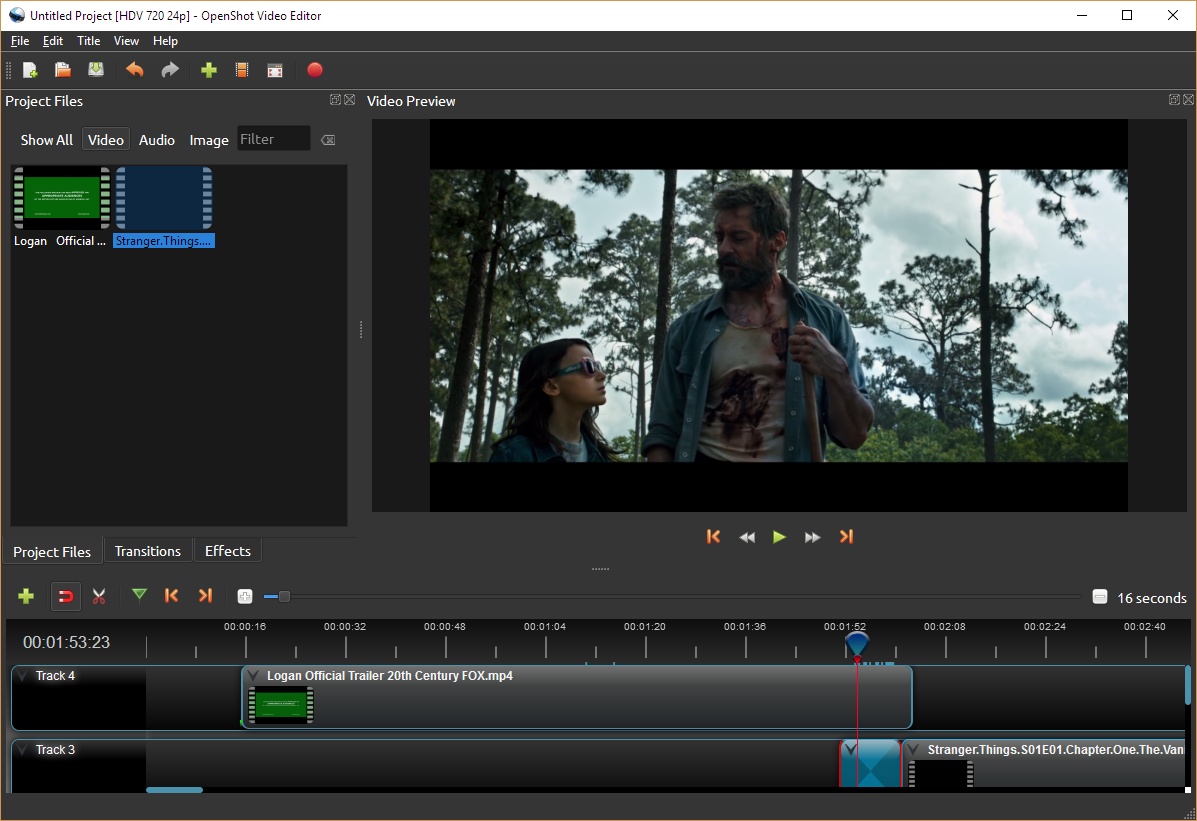

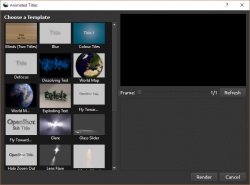
Latest version
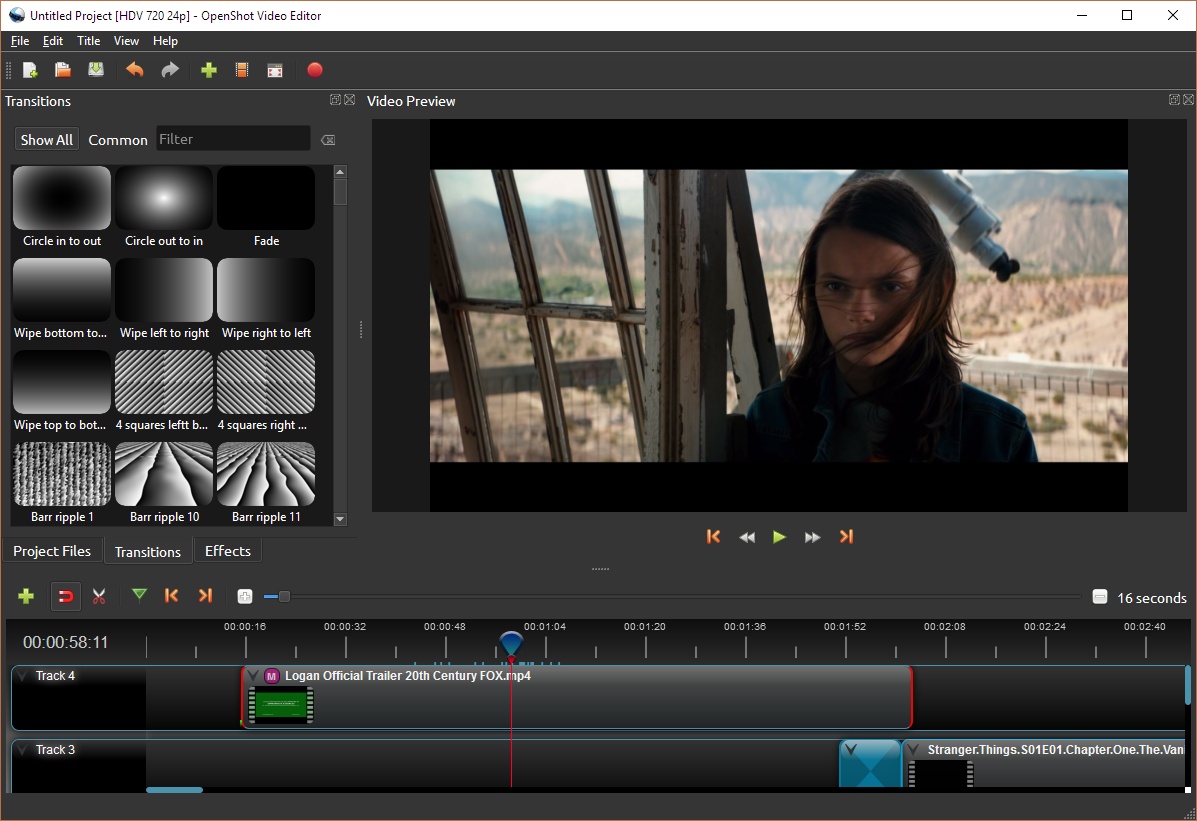
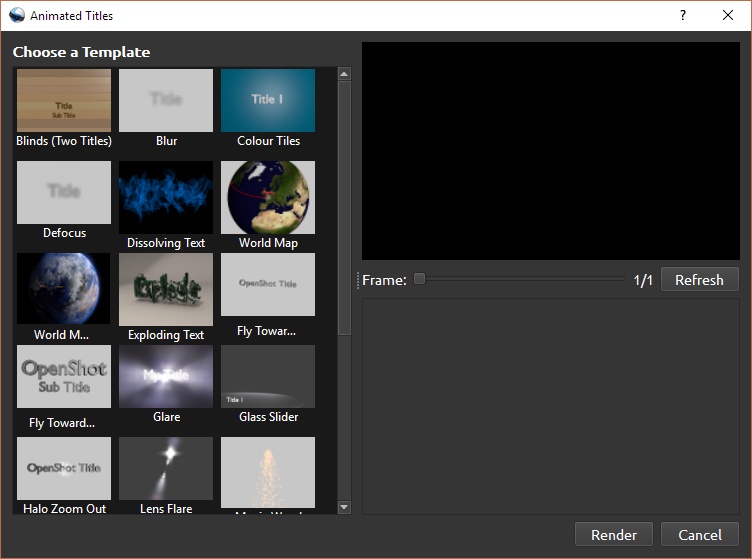
Download
Download OpenShot Video Editor 4.0.0 Windows 64-bit 218MB Win64
Download OpenShot Video Editor 4.0.0 Mac Intel 64-bit 279MB Mac64
Download OpenShot Video Editor 4.0.0 Linux 64-bit 243MB Linux64
AppImage Download old versions

Software License
Supported operating systems
Mac OS Linux Version history / Release notes / Changelog / What's New
OpenShot 4.0: Record, Edit, and Color Like Never Before
Written by Jonathan on Aug. 30, 2026 in Releases
OpenShot 4.0 Color View showing a video preview, timeline, color wheels, properties, and professional video scopes.
OpenShot 4.0 has arrived, bringing some of the biggest creative workflow upgrades in our history. You can now record your screen, webcam, microphone, and system audio directly into a project. You can correct and grade footage with color wheels, curves, LUTs, and professional video scopes. You can also isolate subjects with locally run machine learning models and create everything from animated audio visualizations to cinematic film looks. It is a major step toward a faster, more complete, and more creative OpenShot.
Download OpenShot 4.0
OpenShot 4.0 Highlights
New Color View: Correct and grade footage with approachable presets plus the precision of color wheels, curves, LUTs, and live video scopes.
New Recording View: Record your microphone, screen, webcam, and system audio directly into a project, with each source kept separate and editable.
10 new effects: Create audio-reactive graphics, beat-synced flashes, cinematic film looks, cleaner footage, animated timers, and more.
Local AI-powered masks: Select and follow subjects using free downloadable models that run on your computer, with no cloud service or subscription required.
A cleaner native timeline: Work with smoother zooming, easier keyframes, editable timecode, clearer clips, and more consistent interaction.
Faster effects and editing: Performance work makes Blur dramatically faster while also improving Sharpen, timeline rendering, video scopes, color grading, and audio visualizations.
Smarter creative workflows: Reorganized menus and presets make camera moves, animation, color looks, film styles, and audio edits easier to find and apply.
A more modern foundation: Expanded Qt 6 support improves compatibility with newer Linux distributions and lays groundwork for Android and other future platforms.
Meet the New Color View
Color can fix a problem shot, guide the viewer's attention, or completely change the mood of a scene. OpenShot 4.0 brings these jobs together in a dedicated Color View with a large video preview, clip properties, color wheels, and live video scopes arranged around your footage.
You do not need to be a professional colorist to get started. Right-click a video clip and choose Look > Adjust Colors. OpenShot adds the new Color Grade effect, selects it, and opens the tools you need. You can begin with a quick adjustment and learn the more advanced controls at your own pace.
Color correction and creative grading in one effect
The new Color Grade effect includes practical controls for exposure, contrast, temperature, tint, highlights, shadows, saturation, and vibrance. These are useful for correcting dark footage, removing a color cast, recovering bright areas, or giving several cameras a more consistent appearance.
When you are ready to build a look, the same effect includes separate color wheels for global adjustments, shadows, midtones, and highlights. Push the shadows toward a cooler tone, warm the highlights, or make a small adjustment to skin tones without shifting every part of the image in the same way.
OpenShot Color Grade effect with an editable color curve, color wheels, and a vectorscope
Color wheels and editable curves give you precise control over different tonal ranges.
Four editable curves provide precise control over the full image and the individual red, green, and blue channels. Curve points and handles can be moved directly, including smooth Bézier adjustments. OpenShot also supports industry-standard .cube LUT files, with an intensity control that lets you blend a LUT into the corrected image instead of applying it at full strength.
The complete Color Grade effect is keyframable. Color wheels, curves, correction controls, LUT intensity, and the overall mix can all change over time. That makes it possible to correct lighting that shifts during a shot, animate a stylized color transition, or slowly reveal a finished look.
See what your image is really doing
A monitor can be misleading. Its brightness, color settings, and the light in your room can all affect what you see. Video scopes show the actual color and brightness information inside the frame.
OpenShot 4.0 includes a Luma Waveform, Histogram, RGB Parade, and Vectorscope. The scopes update as you move through the project, so you can check exposure, find clipped highlights, compare color channels, judge saturation, and keep skin tones looking natural.
OpenShot analyzing a selected part of a video frame with an RGB Parade scope
Draw a region over a face, sky, product, or other area to analyze only that part of the frame.
Each video scope includes a Region tool. Draw a box over a face, sky, wall, or product and the scope will focus on that part of the image. The Vectorscope also includes a skin-tone reference line, making it easier to spot color casts and keep faces looking believable.
For a quicker start, the clip menu includes options such as Auto Contrast, Lift Shadows, Warm Up, and Boost Color. These presets use the same editable Color Grade effect, so they are starting points rather than permanent one-click filters.
We also wrote a new color chapter for the OpenShot User Guide. It explains color correction, grading, scopes, skin tones, curves, wheels, and LUTs in plain language.
Record Your Screen, Camera, and Voice Inside OpenShot
The new Recording View turns OpenShot into a practical capture and editing workspace. Record a microphone, desktop, webcam, or several sources together without building a separate import workflow first.
OpenShot 4.0 Recording View with microphone, screen, and webcam controls beside the timeline
Choose any combination of microphone, screen, and webcam sources from the new Recording View.
Each enabled source is recorded as its own media file and timeline clip. Your microphone stays separate from system audio. Your webcam stays separate from the screen capture. After recording, you can trim a mistake, adjust voice volume, crop the camera, move the picture-in-picture window, or apply effects to one source without changing the others.
Detailed view of the OpenShot recording controls for microphone, screen, and webcam capture
Recording controls remain close at hand while you preview and edit your project.
When screen and webcam recording are combined, OpenShot can automatically place the webcam in a rounded picture-in-picture layout. All of those choices use normal clip properties, so you remain in control after the recording ends.
The Recording View provides live feedback before and during a session. You can check the microphone meter, preview the webcam, and watch temporary clips appear on the timeline while recording. OpenShot keeps the sources synchronized and replaces the temporary previews with the completed media when you stop.
You can also preview an existing project while recording a microphone or webcam. This is useful for voice-over work, commentary, reaction videos, lessons, and presentations. For an even faster voice-over workflow, right-click a clip and choose Audio > Record. OpenShot moves to the beginning of the clip, opens the recording controls, and chooses a useful track below it.
If you want to record several takes before editing, choose No Track. The finished media will be added to Project Files without being placed on the timeline. Recordings are stored in the project's assets folder, which helps keep the source files together with your work.
Capture options adapt to the operating system and available hardware. OpenShot supports platform-native recording paths on Windows, macOS, Linux X11, and Linux Wayland with PipeWire. Available screen, window, region, camera, and system-audio options can vary by platform and permissions.
10 New Effects for Sound, Style, and Motion
OpenShot 4.0 adds ten effects to the underlying video engine. Some solve everyday problems, while others make entirely new creative workflows possible.
Turn audio into animated graphics
The new Audio Visualization effect transforms sound into an animated visual. It can draw waveforms, filled waveforms, bars, radial patterns, spectrum displays, particles, and VU-style meters. Controls for color, rainbow spread, frequency range, channels, detail, glow, background, and visual style make it useful for music videos, podcasts, lyric videos, audio previews, and social media posts.
Rainbow audio spectrum bars created with the OpenShot Audio Visualization effect
Rainbow spectrum bars
Circular rainbow audio visualization created in OpenShot
Radial audio visualization
OpenShot 4.0 audio visualization benchmark showing average processing rates from 172.2 to 2217.6 frames per second across ten visualization modes
Audio visualization processing performance in OpenShot 4.0. These figures measure the effect itself, not complete project playback or export speed.
These visuals are designed to animate smoothly, not simply look good in a still frame. In our performance testing, every visualization mode ran well above common 24, 30, and 60 FPS project rates. Even the most demanding modes exceeded 170 frames per second, while Bars, PhaseScope, and VU Meter processed at more than 1,000 FPS.
Beat Sync turns the energy in an audio clip into a color layer that reacts to beats and loud sounds. Adjust the frequency range, threshold, response curve, attack, and release, then composite the result over another video. It is a flexible building block for flashes, rhythmic color changes, and music-driven edits.
Add texture, light, and polish
Film Grain adds repeatable, animated grain with controls for size, softness, clumping, tonal response, color variation, evolution, and coherence. Ready-made looks include 35mm Fine, 35mm Classic, 35mm Gritty, 16mm Classic, Super 8, a...
Written by Jonathan on Aug. 30, 2026 in Releases
OpenShot 4.0 Color View showing a video preview, timeline, color wheels, properties, and professional video scopes.
OpenShot 4.0 has arrived, bringing some of the biggest creative workflow upgrades in our history. You can now record your screen, webcam, microphone, and system audio directly into a project. You can correct and grade footage with color wheels, curves, LUTs, and professional video scopes. You can also isolate subjects with locally run machine learning models and create everything from animated audio visualizations to cinematic film looks. It is a major step toward a faster, more complete, and more creative OpenShot.
Download OpenShot 4.0
OpenShot 4.0 Highlights
New Color View: Correct and grade footage with approachable presets plus the precision of color wheels, curves, LUTs, and live video scopes.
New Recording View: Record your microphone, screen, webcam, and system audio directly into a project, with each source kept separate and editable.
10 new effects: Create audio-reactive graphics, beat-synced flashes, cinematic film looks, cleaner footage, animated timers, and more.
Local AI-powered masks: Select and follow subjects using free downloadable models that run on your computer, with no cloud service or subscription required.
A cleaner native timeline: Work with smoother zooming, easier keyframes, editable timecode, clearer clips, and more consistent interaction.
Faster effects and editing: Performance work makes Blur dramatically faster while also improving Sharpen, timeline rendering, video scopes, color grading, and audio visualizations.
Smarter creative workflows: Reorganized menus and presets make camera moves, animation, color looks, film styles, and audio edits easier to find and apply.
A more modern foundation: Expanded Qt 6 support improves compatibility with newer Linux distributions and lays groundwork for Android and other future platforms.
Meet the New Color View
Color can fix a problem shot, guide the viewer's attention, or completely change the mood of a scene. OpenShot 4.0 brings these jobs together in a dedicated Color View with a large video preview, clip properties, color wheels, and live video scopes arranged around your footage.
You do not need to be a professional colorist to get started. Right-click a video clip and choose Look > Adjust Colors. OpenShot adds the new Color Grade effect, selects it, and opens the tools you need. You can begin with a quick adjustment and learn the more advanced controls at your own pace.
Color correction and creative grading in one effect
The new Color Grade effect includes practical controls for exposure, contrast, temperature, tint, highlights, shadows, saturation, and vibrance. These are useful for correcting dark footage, removing a color cast, recovering bright areas, or giving several cameras a more consistent appearance.
When you are ready to build a look, the same effect includes separate color wheels for global adjustments, shadows, midtones, and highlights. Push the shadows toward a cooler tone, warm the highlights, or make a small adjustment to skin tones without shifting every part of the image in the same way.
OpenShot Color Grade effect with an editable color curve, color wheels, and a vectorscope
Color wheels and editable curves give you precise control over different tonal ranges.
Four editable curves provide precise control over the full image and the individual red, green, and blue channels. Curve points and handles can be moved directly, including smooth Bézier adjustments. OpenShot also supports industry-standard .cube LUT files, with an intensity control that lets you blend a LUT into the corrected image instead of applying it at full strength.
The complete Color Grade effect is keyframable. Color wheels, curves, correction controls, LUT intensity, and the overall mix can all change over time. That makes it possible to correct lighting that shifts during a shot, animate a stylized color transition, or slowly reveal a finished look.
See what your image is really doing
A monitor can be misleading. Its brightness, color settings, and the light in your room can all affect what you see. Video scopes show the actual color and brightness information inside the frame.
OpenShot 4.0 includes a Luma Waveform, Histogram, RGB Parade, and Vectorscope. The scopes update as you move through the project, so you can check exposure, find clipped highlights, compare color channels, judge saturation, and keep skin tones looking natural.
OpenShot analyzing a selected part of a video frame with an RGB Parade scope
Draw a region over a face, sky, product, or other area to analyze only that part of the frame.
Each video scope includes a Region tool. Draw a box over a face, sky, wall, or product and the scope will focus on that part of the image. The Vectorscope also includes a skin-tone reference line, making it easier to spot color casts and keep faces looking believable.
For a quicker start, the clip menu includes options such as Auto Contrast, Lift Shadows, Warm Up, and Boost Color. These presets use the same editable Color Grade effect, so they are starting points rather than permanent one-click filters.
We also wrote a new color chapter for the OpenShot User Guide. It explains color correction, grading, scopes, skin tones, curves, wheels, and LUTs in plain language.
Record Your Screen, Camera, and Voice Inside OpenShot
The new Recording View turns OpenShot into a practical capture and editing workspace. Record a microphone, desktop, webcam, or several sources together without building a separate import workflow first.
OpenShot 4.0 Recording View with microphone, screen, and webcam controls beside the timeline
Choose any combination of microphone, screen, and webcam sources from the new Recording View.
Each enabled source is recorded as its own media file and timeline clip. Your microphone stays separate from system audio. Your webcam stays separate from the screen capture. After recording, you can trim a mistake, adjust voice volume, crop the camera, move the picture-in-picture window, or apply effects to one source without changing the others.
Detailed view of the OpenShot recording controls for microphone, screen, and webcam capture
Recording controls remain close at hand while you preview and edit your project.
When screen and webcam recording are combined, OpenShot can automatically place the webcam in a rounded picture-in-picture layout. All of those choices use normal clip properties, so you remain in control after the recording ends.
The Recording View provides live feedback before and during a session. You can check the microphone meter, preview the webcam, and watch temporary clips appear on the timeline while recording. OpenShot keeps the sources synchronized and replaces the temporary previews with the completed media when you stop.
You can also preview an existing project while recording a microphone or webcam. This is useful for voice-over work, commentary, reaction videos, lessons, and presentations. For an even faster voice-over workflow, right-click a clip and choose Audio > Record. OpenShot moves to the beginning of the clip, opens the recording controls, and chooses a useful track below it.
If you want to record several takes before editing, choose No Track. The finished media will be added to Project Files without being placed on the timeline. Recordings are stored in the project's assets folder, which helps keep the source files together with your work.
Capture options adapt to the operating system and available hardware. OpenShot supports platform-native recording paths on Windows, macOS, Linux X11, and Linux Wayland with PipeWire. Available screen, window, region, camera, and system-audio options can vary by platform and permissions.
10 New Effects for Sound, Style, and Motion
OpenShot 4.0 adds ten effects to the underlying video engine. Some solve everyday problems, while others make entirely new creative workflows possible.
Turn audio into animated graphics
The new Audio Visualization effect transforms sound into an animated visual. It can draw waveforms, filled waveforms, bars, radial patterns, spectrum displays, particles, and VU-style meters. Controls for color, rainbow spread, frequency range, channels, detail, glow, background, and visual style make it useful for music videos, podcasts, lyric videos, audio previews, and social media posts.
Rainbow audio spectrum bars created with the OpenShot Audio Visualization effect
Rainbow spectrum bars
Circular rainbow audio visualization created in OpenShot
Radial audio visualization
OpenShot 4.0 audio visualization benchmark showing average processing rates from 172.2 to 2217.6 frames per second across ten visualization modes
Audio visualization processing performance in OpenShot 4.0. These figures measure the effect itself, not complete project playback or export speed.
These visuals are designed to animate smoothly, not simply look good in a still frame. In our performance testing, every visualization mode ran well above common 24, 30, and 60 FPS project rates. Even the most demanding modes exceeded 170 frames per second, while Bars, PhaseScope, and VU Meter processed at more than 1,000 FPS.
Beat Sync turns the energy in an audio clip into a color layer that reacts to beats and loud sounds. Adjust the frequency range, threshold, response curve, attack, and release, then composite the result over another video. It is a flexible building block for flashes, rhythmic color changes, and music-driven edits.
Add texture, light, and polish
Film Grain adds repeatable, animated grain with controls for size, softness, clumping, tonal response, color variation, evolution, and coherence. Ready-made looks include 35mm Fine, 35mm Classic, 35mm Gritty, 16mm Classic, Super 8, a...
View full changelog
All features
OpenShot's Features include:
* Support for many video, audio, and image formats (based on FFmpeg)
* Gnome integration (drag and drop support)
* Multiple tracks
* Clip resizing, trimming, snapping, and cutting
* Video transitions with real-time previews
* Compositing, image overlays, watermarks
* Title templates, title creation
* SVG friendly, to create and include titles and credits
* Scrolling motion picture credits
* Solid color clips (including alpha compositing)
* Support for Rotoscoping / Image sequences
* Drag and drop timeline
* Frame stepping, key-mappings: J,K, and L keys
* Video encoding (based on FFmpeg)
* Key Frame animation
* Digital zooming of video clips
* Speed changes on clips (slow motion etc)
* Custom transition lumas and masks
* Re-sizing of clips (frame size)
* Audio mixing and editing
* Presets for key frame animations and layout
* Ken Burns effect (making video by panning over an image)
* Support for many video, audio, and image formats (based on FFmpeg)
* Gnome integration (drag and drop support)
* Multiple tracks
* Clip resizing, trimming, snapping, and cutting
* Video transitions with real-time previews
* Compositing, image overlays, watermarks
* Title templates, title creation
* SVG friendly, to create and include titles and credits
* Scrolling motion picture credits
* Solid color clips (including alpha compositing)
* Support for Rotoscoping / Image sequences
* Drag and drop timeline
* Frame stepping, key-mappings: J,K, and L keys
* Video encoding (based on FFmpeg)
* Key Frame animation
* Digital zooming of video clips
* Speed changes on clips (slow motion etc)
* Custom transition lumas and masks
* Re-sizing of clips (frame size)
* Audio mixing and editing
* Presets for key frame animations and layout
* Ken Burns effect (making video by panning over an image)
Sections/Browse similar tools
Alternative to OpenShot Video Editor
(Latest version updated)Adobe Premiere Pro (Sep 9, 2026)
DaVinci Resolve (Sep 8, 2026)
Kdenlive (Sep 11, 2026)
Shotcut (Sep 6, 2026)
Guides and How to's
OpenShot Video Editor Masks & Transitions Video Tutorial
- ReadOpenShot Video Editor video tutorials
View all guides with guide description here
Acronyms / Also Known As
Notify me when software updated or report software
| 12 reviews, Showing 1 to 5 reviews |
I tried to like this but the interface is really obscure, e.g, saturation involves picking an arbitrary number vs. a slider. I couldn't get hardware acceleration to work. I can see how this could be a good basic editor, maybe it tries to do too much. It's pleasant to look at, imports work fine, assembling clips is slow, modifying clips is difficult. I can install a number of NLE's and get going immediately, they're mostly the same. Not here, it's poorly structured. Well, it's free.
Review by bluey on
Dec 6, 2025 Version: 3.3.0
OS: Windows 11 64-bit Ease of use: 3/10
Functionality: 4/10
Value for money: 10/10
Overall: 5/10
Rating by Martin on
Jul 31, 2024 Version: 3.2.1
OS: Windows 11 64-bit Ease of use: 9/10
Functionality: 7/10
Value for money: 10/10
Overall: 8/10
I had been using OpenShot for simple video creation for few years and loved working with it. The old versions such as 2.5.0 were OK for my purposes. But the later versions have a lagging issue. Most of the time, the playhead does not move, or moves very slowly which makes it is impossible to use. This has been a good video editor for simple videos until the new versions were released. It is regrettable to see a good and useful software comes to this fate. It is high time to debug the codes and rectify the problem.
Review by Sajla on
Nov 9, 2022 Version: 2.6.1
OS: Windows 8 64-bit Ease of use: 5/10
Functionality: 5/10
Value for money: 8/10
Overall: 5/10
Working with new release (2.6.1) Suspect this might be easier, eventually, but lacks any user documentation for new release. "Intermediate" level users such as myself need guidance on new tools (?Origin X/Y replacing Crop??)
Review by EvD on
Oct 29, 2021 Version: 2.6.1
OS: Windows 10 64-bit Ease of use: 6/10
Functionality: 8/10
Value for money: 10/10
Overall: 8/10
Having used much older versions of the program which crashed every few minutes, I was impressed when I edited and exported a video with no problems in about ten minutes
I then tried to make a slide show using around 30 jpg photos and a music track but after trying to fiddle with transitions, the program froze completely. I couldn't close it and didn't know about killw at that stage so I restarted the computer.
When I restarted I tried to open Openshot but it flashed instantly and then closed each time. I thought if I removed my project source files it would be ok, but now while I can open the program I am in a permanent loop demanding I find the directory for the files, but with no 'cancel' option or ability to access the main menu and start a new project. I downloaded the daily update to see if this might make a difference but that is no different.
I am not sure what to do next as somewhere the AppImage file has made start up files but despite lots of searches in system files I cannot find these.
I then tried to make a slide show using around 30 jpg photos and a music track but after trying to fiddle with transitions, the program froze completely. I couldn't close it and didn't know about killw at that stage so I restarted the computer.
When I restarted I tried to open Openshot but it flashed instantly and then closed each time. I thought if I removed my project source files it would be ok, but now while I can open the program I am in a permanent loop demanding I find the directory for the files, but with no 'cancel' option or ability to access the main menu and start a new project. I downloaded the daily update to see if this might make a difference but that is no different.
I am not sure what to do next as somewhere the AppImage file has made start up files but despite lots of searches in system files I cannot find these.
Review by bertiefox on
Dec 27, 2018 Version: OpenShot-v2.4.3-dev2-1545894458-a8f75a5b-3861a2c5-
OS: Linux Ease of use: 9/10
Functionality: 7/10
Value for money: 10/10
Overall: 3/10
| 12 reviews, Showing 1 to 5 reviews |
| 1 tool hits, Showing 1 to 1 tools |
Explanation:
NEW SOFTWARE= New tool since your last visit
NEW VERSION= New version since your last visit
NEW REVIEW= New review since your last visit
NEW VERSION= New version
Latest version
Version number / Beta version number / Update version number and when it whas released.
Type and download
NO MORE UPDATES? = The software hasn't been updated in over 2 years.
NO LONGER DEVELOPED = The software hasn't been updated in over 5 years.
RECENTLY UPDATED = The software has been updated the last 31 days.
Freeware = Download Free software.
Freeware Trialware = Download Free software but some parts are trial/shareware.
Free software = Download Free software and also open source code also known as FOSS (Free and Open Source Software).
Free software Trialware = Download Free software and also open source code but some parts are trial/shareware.
Freeware Ads = Download Free software but supported by advertising, usually with a included browser toolbar. It may be disabled when installing or after installation.
Free software Ads = Free Download software and open source code but supported by advertising, usually with a included browser toolbar. It may be disabled when installing or after installation.
Trialware = Also called shareware or demo. Free Trial version available for download and testing with usually a time limit or limited functions.
Payware = No demo or trial available.
Portable version = A portable/standalone version is available. No installation is required.
v1.0.1 = Latest version available.
Download beta = It could be a Beta, RC(Release Candidate) or an Alpha / Nightly / Unstable version of the software.
Download 15MB = A direct link to the software download.
Win = Windows download version for 32-bit and 64-bit Windows.
Win64 = Windows 64-bit download version for 64-bit Windows.
WinARM64 = Windows 64-bit ARM download version for Windows ARM64/AArch64.
Mac = Mac download version for 64-bit Mac OS Intel/ARM64/AArch64.
MacARM64 = Mac Silicon download version for 64-bit Mac OS ARM64/AArch64.
Mac64 = Mac OS download version for 64-bit Intel Mac OS.
Linux = Linux download version.
Linux64 = Linux download version for 64bit Linux.
Linux ARM = Linux download version for Linux ARM64/AArch64.
Portable = Portable version. No installation is required.
Ad-Supported = The software is bundled with advertising. Be careful when you install the software and disable addons that you don't want!
Visit developers site = A link to the software developer site.
Download (mirror link) = A mirror link to the software download. It may not contain the latest versions.
Download old versions = Free downloads of previous versions of the program.
Download 64-bit version = If you have a 64bit operating system you can download this version.
Download portable version = Portable/Standalone version meaning that no installation is required, just extract the files to a folder and run directly.
Portable version available = Download the portable version and you can just extract the files and run the program without installation.
Old versions available = Download old versions of the program.
Version history available = Complete changelog on our site.
= Windows version available.
= Mac OS version available.
= Linux version available.
Our hosted software are virus and malware scanned with several antivirus programs using www.virustotal.com. (NOTE! Just one virustotal warning is 99.9% a false positive. And some software might receive 2-6 warnings but it's if they are not all same virus/trojan then it's 99% false positives.)
Rating
Rating from 0-10.
NEW SOFTWARE= New tool since your last visit
NEW VERSION= New version since your last visit
NEW REVIEW= New review since your last visit
NEW VERSION= New version
Latest version
Version number / Beta version number / Update version number and when it whas released.
Type and download
NO MORE UPDATES? = The software hasn't been updated in over 2 years.
NO LONGER DEVELOPED = The software hasn't been updated in over 5 years.
RECENTLY UPDATED = The software has been updated the last 31 days.
Freeware = Download Free software.
Freeware Trialware = Download Free software but some parts are trial/shareware.
Free software = Download Free software and also open source code also known as FOSS (Free and Open Source Software).
Free software Trialware = Download Free software and also open source code but some parts are trial/shareware.
Freeware Ads = Download Free software but supported by advertising, usually with a included browser toolbar. It may be disabled when installing or after installation.
Free software Ads = Free Download software and open source code but supported by advertising, usually with a included browser toolbar. It may be disabled when installing or after installation.
Trialware = Also called shareware or demo. Free Trial version available for download and testing with usually a time limit or limited functions.
Payware = No demo or trial available.
Portable version = A portable/standalone version is available. No installation is required.
v1.0.1 = Latest version available.
Download beta = It could be a Beta, RC(Release Candidate) or an Alpha / Nightly / Unstable version of the software.
Download 15MB = A direct link to the software download.
Win = Windows download version for 32-bit and 64-bit Windows.
Win64 = Windows 64-bit download version for 64-bit Windows.
WinARM64 = Windows 64-bit ARM download version for Windows ARM64/AArch64.
Mac = Mac download version for 64-bit Mac OS Intel/ARM64/AArch64.
MacARM64 = Mac Silicon download version for 64-bit Mac OS ARM64/AArch64.
Mac64 = Mac OS download version for 64-bit Intel Mac OS.
Linux = Linux download version.
Linux64 = Linux download version for 64bit Linux.
Linux ARM = Linux download version for Linux ARM64/AArch64.
Portable = Portable version. No installation is required.
Ad-Supported = The software is bundled with advertising. Be careful when you install the software and disable addons that you don't want!
Visit developers site = A link to the software developer site.
Download (mirror link) = A mirror link to the software download. It may not contain the latest versions.
Download old versions = Free downloads of previous versions of the program.
Download 64-bit version = If you have a 64bit operating system you can download this version.
Download portable version = Portable/Standalone version meaning that no installation is required, just extract the files to a folder and run directly.
Portable version available = Download the portable version and you can just extract the files and run the program without installation.
Old versions available = Download old versions of the program.
Version history available = Complete changelog on our site.
= Windows version available. = Mac OS version available. = Linux version available.Our hosted software are virus and malware scanned with several antivirus programs using www.virustotal.com. (NOTE! Just one virustotal warning is 99.9% a false positive. And some software might receive 2-6 warnings but it's if they are not all same virus/trojan then it's 99% false positives.)
Rating
Rating from 0-10.
Browse software by sections
All In One Blu-ray Converters (9)
All In One DVD Converters (12)
All In One MKV to MP4, Blu-ray, UHD (11)
All In One Video Converters (19)
Animation (3D, 2D Animation) (12)
Audio Editors (22)
Audio Encoders (80)
Audio Players (19)
Authoring (Blu-ray, UHD, AVCHD) (13)
Authoring (DivX) (4)
Authoring (DVD) (26)
Authoring (SVCD, VCD) (9)
Bitrate Calculators (7)
Blu-ray to AVI, MKV, MP4 (15)
Blu-ray to Blu-ray, AVCHD (10)
Burn (CD,DVD,Blu-ray) (24)
Camcorders, DV, HDV, AVCHD (31)
Capture TV, DVD, VCR (30)
CD, DVD, Blu-ray recovery (3)
Codec Packs (6)
All In One DVD Converters (12)
All In One MKV to MP4, Blu-ray, UHD (11)
All In One Video Converters (19)
Animation (3D, 2D Animation) (12)
Audio Editors (22)
Audio Encoders (80)
Audio Players (19)
Authoring (Blu-ray, UHD, AVCHD) (13)
Authoring (DivX) (4)
Authoring (DVD) (26)
Authoring (SVCD, VCD) (9)
Bitrate Calculators (7)
Blu-ray to AVI, MKV, MP4 (15)
Blu-ray to Blu-ray, AVCHD (10)
Burn (CD,DVD,Blu-ray) (24)
Camcorders, DV, HDV, AVCHD (31)
Capture TV, DVD, VCR (30)
CD, DVD, Blu-ray recovery (3)
Codec Packs (6)
Codec, Video Identifiers (31)
Codecs (67)
Decrypters (DVD Rippers) (16)
Decrypters (UHD, Blu-ray Rippers) (8)
DigitalTV, DVB, IPTV (39)
DVD to DVD (20)
DVD to MP4, MKV, H264, H265 (16)
DVD to VCD, SVCD (5)
DVD to XviD, AVI, DivX (16)
ISO, Image (14)
Linux Video Tools (215)
MacOS Video Tools (246)
Media (Blu-ray, DVD, CD) (9)
Media Center, HTPC (24)
Other Useful Tools (140)
Photo Blu-ray, DVD, SlideShow (8)
Portable (Mobile, PSP) (35)
Region Free Tools (5)
Screen capture , Screen recording (25)
Screenshots , Thumbnails (13)
Codecs (67)
Decrypters (DVD Rippers) (16)
Decrypters (UHD, Blu-ray Rippers) (8)
DigitalTV, DVB, IPTV (39)
DVD to DVD (20)
DVD to MP4, MKV, H264, H265 (16)
DVD to VCD, SVCD (5)
DVD to XviD, AVI, DivX (16)
ISO, Image (14)
Linux Video Tools (215)
MacOS Video Tools (246)
Media (Blu-ray, DVD, CD) (9)
Media Center, HTPC (24)
Other Useful Tools (140)
Photo Blu-ray, DVD, SlideShow (8)
Portable (Mobile, PSP) (35)
Region Free Tools (5)
Screen capture , Screen recording (25)
Screenshots , Thumbnails (13)
Subtitle Editors, Converters (72)
Tag Editors (4)
Video De, Multiplexers (66)
Video Editors (Advanced, NLE) (35)
Video Editors (Basic) (56)
Video Editors (H264, MP4, MKV, MTS) (19)
Video Editors (Lossless) (4)
Video Editors (MPG, DVD) (16)
Video Editors (WMV, AVI) (15)
Video Encoders (AV1, VP8, VP9) (2)
Video Encoders (AVI, WMV) (38)
Video Encoders (H264, H265, MP4, MKV) (45)
Video Encoders (MPG, DVD) (23)
Video Encoders , Converters (156)
Video Frameservers (9)
Video Players (48)
Video Repair, Fix (24)
Video Scripting (10)
Video Streaming (20)
Video Streaming Downloaders (99)
Tag Editors (4)
Video De, Multiplexers (66)
Video Editors (Advanced, NLE) (35)
Video Editors (Basic) (56)
Video Editors (H264, MP4, MKV, MTS) (19)
Video Editors (Lossless) (4)
Video Editors (MPG, DVD) (16)
Video Editors (WMV, AVI) (15)
Video Encoders (AV1, VP8, VP9) (2)
Video Encoders (AVI, WMV) (38)
Video Encoders (H264, H265, MP4, MKV) (45)
Video Encoders (MPG, DVD) (23)
Video Encoders , Converters (156)
Video Frameservers (9)
Video Players (48)
Video Repair, Fix (24)
Video Scripting (10)
Video Streaming (20)
Video Streaming Downloaders (99)