
Help us keep the list up to date and submit new video software here.
Tool
Description
Type
Rating
Reviews
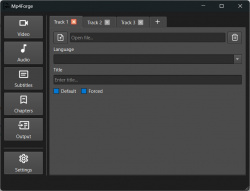
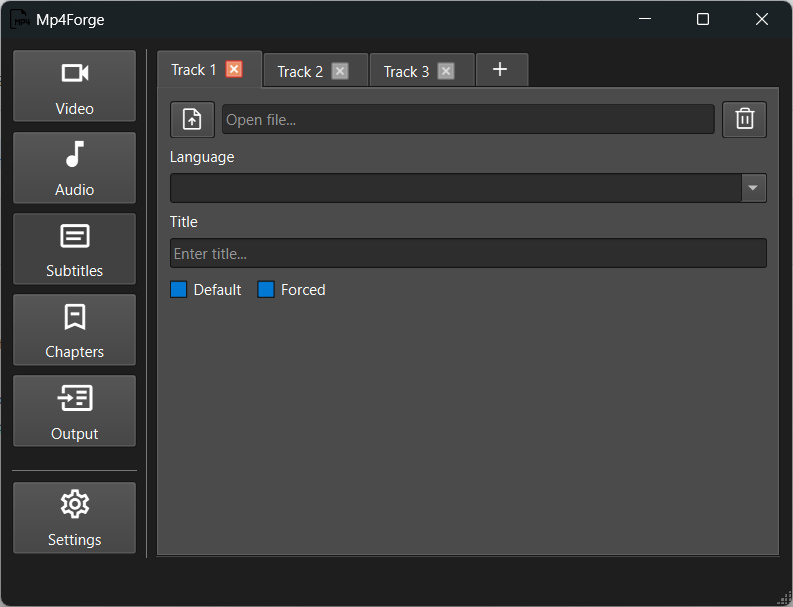
Mp4Forge (former MP4-Mux-Tool) is a GUI for mp4box, you can mux files with dolby vision. You can import video, audio, subtitle and chapter tracks and mux them all together in an mp4 format. Requires mp4box.
Free software
OS:


File size: 59MB
Portable version
Old versions
Version history
OS:
File size: 59MB
Portable version
Old versions
Version history
Screenshots

Latest version
Download
Download Mp4Forge 2.1.4 Windows 64-bit 59MB Win64
Portable 
Download Mp4Forge 2.1.4 Mac Silicon ARM 64-bit 46MB MacARM64
Download Mp4Forge 2.1.4 Mac Intel 64-bit 50MB Mac64
Download Mp4Forge 2.1.4 Linux 64-bit 126MB Linux64
Download old versions

Software License
Supported operating systems
Mac OS Linux Version history / Release notes / Changelog / What's New
2.1.4
Changed
Improve bundle for MacOS:
build_desktop.py:109 now keeps PyInstaller’s native .app, supplies the icon and bundle identifier before signing, and strictly verifies the final signature
core/utils/working_dir.py:18 resolves frozen resources through sys._MEIPASS
.github/workflows/build-desktop-app.yml:72 archives macOS apps with ditto, extracts them, and verifies the archived signature before upload/release
Removed the unsafe custom bundle reconstruction and manual signing logic. PyInstaller already handles ad-hoc signing and its required symlink layout. PyInstaller signing documentation (https://pyinstaller.org/en/stable/feature-notes.html#macos-binary-code-signing)
Changed
Improve bundle for MacOS:
build_desktop.py:109 now keeps PyInstaller’s native .app, supplies the icon and bundle identifier before signing, and strictly verifies the final signature
core/utils/working_dir.py:18 resolves frozen resources through sys._MEIPASS
.github/workflows/build-desktop-app.yml:72 archives macOS apps with ditto, extracts them, and verifies the archived signature before upload/release
Removed the unsafe custom bundle reconstruction and manual signing logic. PyInstaller already handles ad-hoc signing and its required symlink layout. PyInstaller signing documentation (https://pyinstaller.org/en/stable/feature-notes.html#macos-binary-code-signing)
View full changelog
All features
Current Features (v2.0.0-rc)
Multi-track support: Add multiple video, audio, subtitle, and chapter tracks to a single MP4 container
Multi-track MP4 audio selection: Select specific audio tracks from MP4 files containing multiple audio streams
Language & metadata: Set language codes, titles, default/forced flags for all tracks
Audio delay: Support for audio delay values (automatically detected from filenames or MediaInfo)
Chapter support: Import chapters from OGM/XML files or other MP4 containers
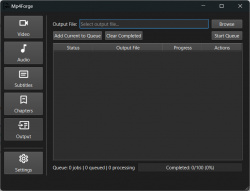
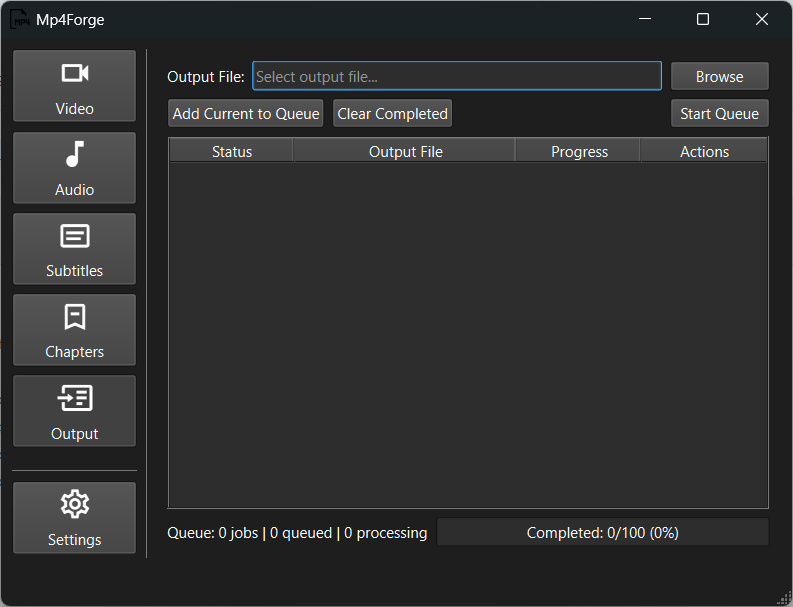
Queue system: Build and manage multiple muxing jobs in a queue
Cross-platform: Available for Windows (8+ x64), macOS, and Linux
Theme support: Light, dark, and auto themes
Persistent configuration: Settings stored in OS-appropriate locations (portable mode available)
Supported Formats
Video: H.264/AVC, H.265/HEVC (as MP4/M4V input)
Audio: AAC, AC3, E-AC3, MP2, MP3, Opus, OGG, MP4/M4A (with multi-track selection)
Subtitles: SRT, SSA, ASS, VTT
Chapters: OGM, XML, MP4 (extracted from existing files)
Output: MP4 container only
Requirements
MP4Box must be installed and available in your system PATH, or configured in the application settings.
Download MP4Box: GPAC Downloads
Or install via package manager:
Windows: winget install GPAC.GPAC or choco install gpac
macOS: brew install gpac
Linux: apt install gpac or yum install gpac
Multi-track support: Add multiple video, audio, subtitle, and chapter tracks to a single MP4 container
Multi-track MP4 audio selection: Select specific audio tracks from MP4 files containing multiple audio streams
Language & metadata: Set language codes, titles, default/forced flags for all tracks
Audio delay: Support for audio delay values (automatically detected from filenames or MediaInfo)
Chapter support: Import chapters from OGM/XML files or other MP4 containers
Queue system: Build and manage multiple muxing jobs in a queue
Cross-platform: Available for Windows (8+ x64), macOS, and Linux
Theme support: Light, dark, and auto themes
Persistent configuration: Settings stored in OS-appropriate locations (portable mode available)
Supported Formats
Video: H.264/AVC, H.265/HEVC (as MP4/M4V input)
Audio: AAC, AC3, E-AC3, MP2, MP3, Opus, OGG, MP4/M4A (with multi-track selection)
Subtitles: SRT, SSA, ASS, VTT
Chapters: OGM, XML, MP4 (extracted from existing files)
Output: MP4 container only
Requirements
MP4Box must be installed and available in your system PATH, or configured in the application settings.
Download MP4Box: GPAC Downloads
Or install via package manager:
Windows: winget install GPAC.GPAC or choco install gpac
macOS: brew install gpac
Linux: apt install gpac or yum install gpac
Sections/Browse similar tools
Guides and How to's
Acronyms / Also Known As
Download Mp4Forge Portable download from the Download links under Download and Download other versions!
Notify me when software updated or report software
| 3 reviews, Showing 1 to 3 reviews |
Rating by DolbyVision on
Apr 9, 2023 Version: Mp4 Mux Tool 1.17
OS: Windows 10 64-bit Ease of use: 10/10
Functionality: 8/10
Value for money: 10/10
Overall: 10/10
Rating by Chris Blair on
Aug 11, 2022 Version: 1.12
OS: Windows 10 64-bit Ease of use: 10/10
Functionality: 10/10
Value for money: 10/10
Overall: 10/10
Rating by jlw4049 on
Feb 2, 2022 Version: 1.1
OS: Windows 10 64-bit Ease of use: 10/10
Functionality: 10/10
Value for money: 10/10
Overall: 10/10
| 3 reviews, Showing 1 to 3 reviews |
| 1 tool hits, Showing 1 to 1 tools |
Explanation:
NEW SOFTWARE= New tool since your last visit
NEW VERSION= New version since your last visit
NEW REVIEW= New review since your last visit
NEW VERSION= New version
Latest version
Version number / Beta version number / Update version number and when it whas released.
Type and download
NO MORE UPDATES? = The software hasn't been updated in over 2 years.
NO LONGER DEVELOPED = The software hasn't been updated in over 5 years.
RECENTLY UPDATED = The software has been updated the last 31 days.
Freeware = Download Free software.
Freeware Trialware = Download Free software but some parts are trial/shareware.
Free software = Download Free software and also open source code also known as FOSS (Free and Open Source Software).
Free software Trialware = Download Free software and also open source code but some parts are trial/shareware.
Freeware Ads = Download Free software but supported by advertising, usually with a included browser toolbar. It may be disabled when installing or after installation.
Free software Ads = Free Download software and open source code but supported by advertising, usually with a included browser toolbar. It may be disabled when installing or after installation.
Trialware = Also called shareware or demo. Free Trial version available for download and testing with usually a time limit or limited functions.
Payware = No demo or trial available.
Portable version = A portable/standalone version is available. No installation is required.
v1.0.1 = Latest version available.
Download beta = It could be a Beta, RC(Release Candidate) or an Alpha / Nightly / Unstable version of the software.
Download 15MB = A direct link to the software download.
Win = Windows download version for 32-bit and 64-bit Windows.
Win64 = Windows 64-bit download version for 64-bit Windows.
WinARM64 = Windows 64-bit ARM download version for Windows ARM64/AArch64.
Mac = Mac download version for 64-bit Mac OS Intel/ARM64/AArch64.
MacARM64 = Mac Silicon download version for 64-bit Mac OS ARM64/AArch64.
Mac64 = Mac OS download version for 64-bit Intel Mac OS.
Linux = Linux download version.
Linux64 = Linux download version for 64bit Linux.
Linux ARM = Linux download version for Linux ARM64/AArch64.
Portable = Portable version. No installation is required.
Ad-Supported = The software is bundled with advertising. Be careful when you install the software and disable addons that you don't want!
Visit developers site = A link to the software developer site.
Download (mirror link) = A mirror link to the software download. It may not contain the latest versions.
Download old versions = Free downloads of previous versions of the program.
Download 64-bit version = If you have a 64bit operating system you can download this version.
Download portable version = Portable/Standalone version meaning that no installation is required, just extract the files to a folder and run directly.
Portable version available = Download the portable version and you can just extract the files and run the program without installation.
Old versions available = Download old versions of the program.
Version history available = Complete changelog on our site.
= Windows version available.
= Mac OS version available.
= Linux version available.
Our hosted software are virus and malware scanned with several antivirus programs using www.virustotal.com. (NOTE! Just one virustotal warning is 99.9% a false positive. And some software might receive 2-6 warnings but it's if they are not all same virus/trojan then it's 99% false positives.)
Rating
Rating from 0-10.
NEW SOFTWARE= New tool since your last visit
NEW VERSION= New version since your last visit
NEW REVIEW= New review since your last visit
NEW VERSION= New version
Latest version
Version number / Beta version number / Update version number and when it whas released.
Type and download
NO MORE UPDATES? = The software hasn't been updated in over 2 years.
NO LONGER DEVELOPED = The software hasn't been updated in over 5 years.
RECENTLY UPDATED = The software has been updated the last 31 days.
Freeware = Download Free software.
Freeware Trialware = Download Free software but some parts are trial/shareware.
Free software = Download Free software and also open source code also known as FOSS (Free and Open Source Software).
Free software Trialware = Download Free software and also open source code but some parts are trial/shareware.
Freeware Ads = Download Free software but supported by advertising, usually with a included browser toolbar. It may be disabled when installing or after installation.
Free software Ads = Free Download software and open source code but supported by advertising, usually with a included browser toolbar. It may be disabled when installing or after installation.
Trialware = Also called shareware or demo. Free Trial version available for download and testing with usually a time limit or limited functions.
Payware = No demo or trial available.
Portable version = A portable/standalone version is available. No installation is required.
v1.0.1 = Latest version available.
Download beta = It could be a Beta, RC(Release Candidate) or an Alpha / Nightly / Unstable version of the software.
Download 15MB = A direct link to the software download.
Win = Windows download version for 32-bit and 64-bit Windows.
Win64 = Windows 64-bit download version for 64-bit Windows.
WinARM64 = Windows 64-bit ARM download version for Windows ARM64/AArch64.
Mac = Mac download version for 64-bit Mac OS Intel/ARM64/AArch64.
MacARM64 = Mac Silicon download version for 64-bit Mac OS ARM64/AArch64.
Mac64 = Mac OS download version for 64-bit Intel Mac OS.
Linux = Linux download version.
Linux64 = Linux download version for 64bit Linux.
Linux ARM = Linux download version for Linux ARM64/AArch64.
Portable = Portable version. No installation is required.
Ad-Supported = The software is bundled with advertising. Be careful when you install the software and disable addons that you don't want!
Visit developers site = A link to the software developer site.
Download (mirror link) = A mirror link to the software download. It may not contain the latest versions.
Download old versions = Free downloads of previous versions of the program.
Download 64-bit version = If you have a 64bit operating system you can download this version.
Download portable version = Portable/Standalone version meaning that no installation is required, just extract the files to a folder and run directly.
Portable version available = Download the portable version and you can just extract the files and run the program without installation.
Old versions available = Download old versions of the program.
Version history available = Complete changelog on our site.
= Windows version available. = Mac OS version available. = Linux version available.Our hosted software are virus and malware scanned with several antivirus programs using www.virustotal.com. (NOTE! Just one virustotal warning is 99.9% a false positive. And some software might receive 2-6 warnings but it's if they are not all same virus/trojan then it's 99% false positives.)
Rating
Rating from 0-10.
Browse software by sections
All In One Blu-ray Converters (9)
All In One DVD Converters (12)
All In One MKV to MP4, Blu-ray, UHD (11)
All In One Video Converters (19)
Animation (3D, 2D Animation) (13)
Audio Editors (23)
Audio Encoders (80)
Audio Players (19)
Authoring (Blu-ray, UHD, AVCHD) (13)
Authoring (DivX) (4)
Authoring (DVD) (26)
Authoring (SVCD, VCD) (9)
Bitrate Calculators (7)
Blu-ray to AVI, MKV, MP4 (15)
Blu-ray to Blu-ray, AVCHD (10)
Burn (CD,DVD,Blu-ray) (24)
Camcorders, DV, HDV, AVCHD (31)
Capture TV, DVD, VCR (30)
CD, DVD, Blu-ray recovery (3)
Codec Packs (6)
All In One DVD Converters (12)
All In One MKV to MP4, Blu-ray, UHD (11)
All In One Video Converters (19)
Animation (3D, 2D Animation) (13)
Audio Editors (23)
Audio Encoders (80)
Audio Players (19)
Authoring (Blu-ray, UHD, AVCHD) (13)
Authoring (DivX) (4)
Authoring (DVD) (26)
Authoring (SVCD, VCD) (9)
Bitrate Calculators (7)
Blu-ray to AVI, MKV, MP4 (15)
Blu-ray to Blu-ray, AVCHD (10)
Burn (CD,DVD,Blu-ray) (24)
Camcorders, DV, HDV, AVCHD (31)
Capture TV, DVD, VCR (30)
CD, DVD, Blu-ray recovery (3)
Codec Packs (6)
Codec, Video Identifiers (31)
Codecs (67)
Decrypters (DVD Rippers) (16)
Decrypters (UHD, Blu-ray Rippers) (8)
DigitalTV, DVB, IPTV (40)
DVD to DVD (20)
DVD to MP4, MKV, H264, H265 (16)
DVD to VCD, SVCD (5)
DVD to XviD, AVI, DivX (16)
ISO, Image (14)
Linux Video Tools (220)
MacOS Video Tools (252)
Media (Blu-ray, DVD, CD) (9)
Media Center, HTPC (25)
Other Useful Tools (136)
Photo Blu-ray, DVD, SlideShow (8)
Portable (Mobile, PSP) (35)
Region Free Tools (5)
Screen capture , Screen recording (25)
Screenshots , Thumbnails (13)
Codecs (67)
Decrypters (DVD Rippers) (16)
Decrypters (UHD, Blu-ray Rippers) (8)
DigitalTV, DVB, IPTV (40)
DVD to DVD (20)
DVD to MP4, MKV, H264, H265 (16)
DVD to VCD, SVCD (5)
DVD to XviD, AVI, DivX (16)
ISO, Image (14)
Linux Video Tools (220)
MacOS Video Tools (252)
Media (Blu-ray, DVD, CD) (9)
Media Center, HTPC (25)
Other Useful Tools (136)
Photo Blu-ray, DVD, SlideShow (8)
Portable (Mobile, PSP) (35)
Region Free Tools (5)
Screen capture , Screen recording (25)
Screenshots , Thumbnails (13)
Subtitle Editors, Converters (72)
Tag Editors (4)
Video Compare Software (6)
Video Demultiplexers, Multiplexers (66)
Video Editors (Advanced, NLE) (37)
Video Editors (Basic) (57)
Video Editors (H264, MP4, MKV, MTS) (19)
Video Editors (Lossless) (5)
Video Editors (MPG, DVD) (16)
Video Editors (WMV, AVI) (15)
Video Encoders (AV1, VP8, VP9) (2)
Video Encoders (AVI, WMV) (38)
Video Encoders (H264, H265, MP4, MKV) (45)
Video Encoders (MPG, DVD) (23)
Video Encoders , Converters (156)
Video Frameservers (9)
Video Players (48)
Video Repair, Fix (24)
Video Scripting (10)
Video Streaming (20)
Tag Editors (4)
Video Compare Software (6)
Video Demultiplexers, Multiplexers (66)
Video Editors (Advanced, NLE) (37)
Video Editors (Basic) (57)
Video Editors (H264, MP4, MKV, MTS) (19)
Video Editors (Lossless) (5)
Video Editors (MPG, DVD) (16)
Video Editors (WMV, AVI) (15)
Video Encoders (AV1, VP8, VP9) (2)
Video Encoders (AVI, WMV) (38)
Video Encoders (H264, H265, MP4, MKV) (45)
Video Encoders (MPG, DVD) (23)
Video Encoders , Converters (156)
Video Frameservers (9)
Video Players (48)
Video Repair, Fix (24)
Video Scripting (10)
Video Streaming (20)