
Help us keep the list up to date and submit new video software here.
Tool
Description
Type
Rating
Reviews
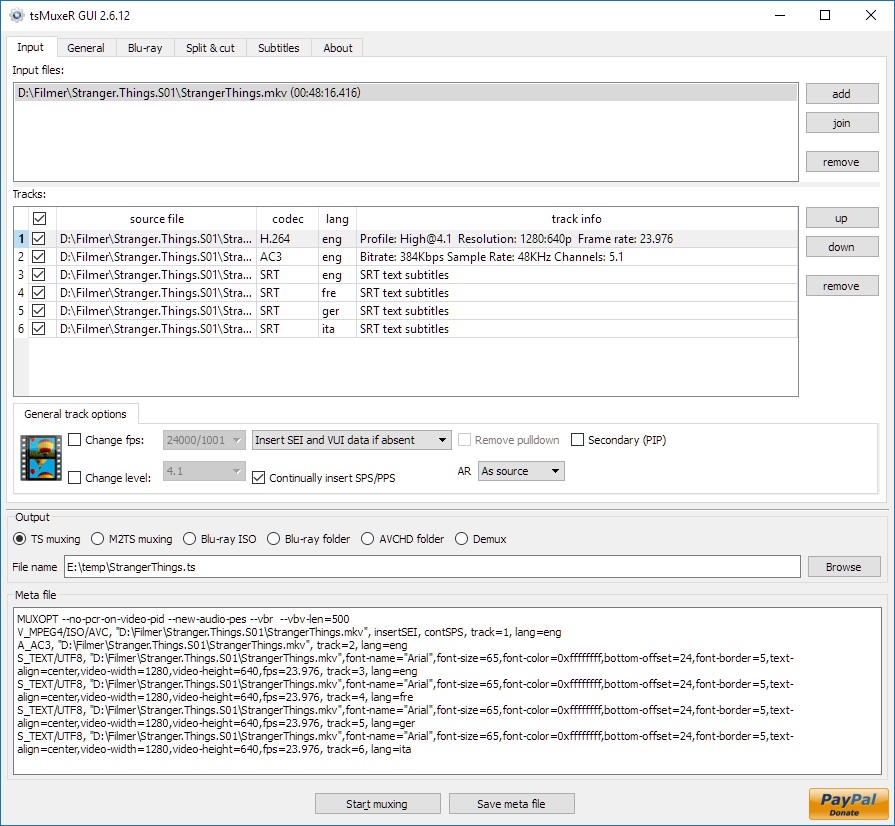
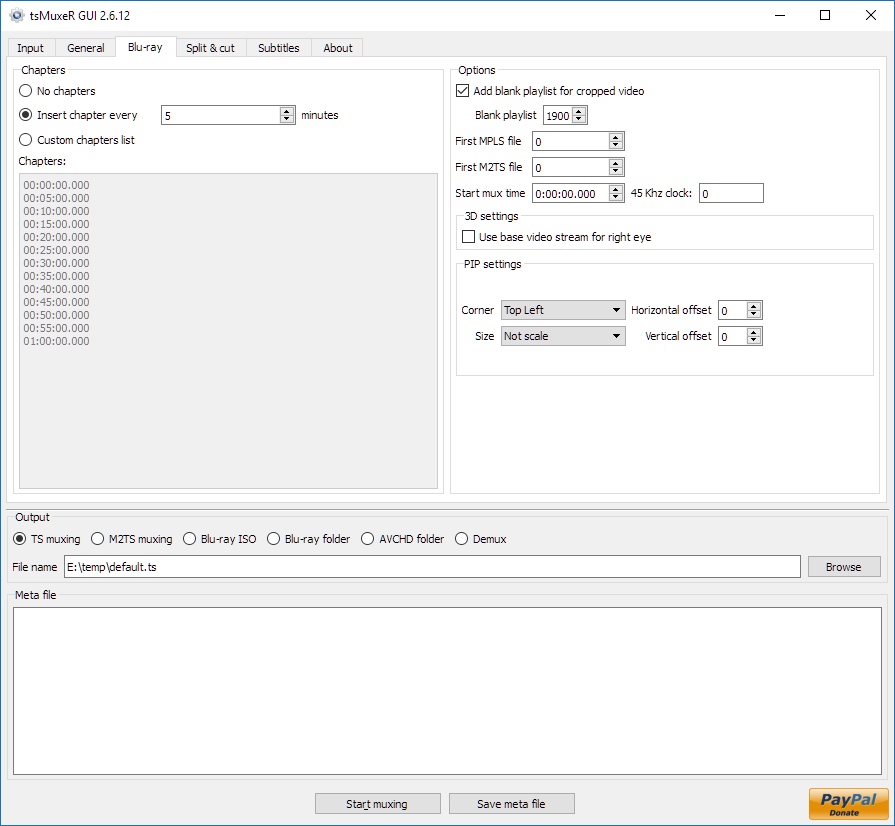
tsMuxer is a Transport Stream muxer. Remux/mux elementary streams, EVO/VOB/MPG, MKV/MKA, MP4/MOV, TS, M2TS to TS to M2TS. Supported video codecs H.264/AVC, H.265/HEVC, VC-1, MPEG2. Supported audio codecs AAC, AC3 / E-AC3(DD+), DTS/ DTS-HD. Ability to set muxing fps manually and automatically, Ability to change level for H.264 streams, Ability to shift a sound tracks, Ability to extract DTS core from DTS-HD, Ability to join files. Output/Author to compliant Blu-ray Disc or AVCHD. Blu-ray 3D support in version 1.11+.
Free software
OS:


File size: 12MB
Portable version
Other versions
Old versions
Version history
Alternative software
OS:
File size: 12MB
Portable version
Other versions
Old versions
Version history
Alternative software
Screenshots
Latest version
Download
Download tsMuxeR 2.16.0 Windows 64-bit 12MB Win64
Portable 
Download tsMuxeR 2.16.0 Windows 12MB Win
Portable Download tsMuxeR 2.16.0 Mac Silicon ARM 64-bit 12MB MacARM64
Download tsMuxeR 2.16.0 Mac Intel 64-bit 12MB Mac64
Download tsMuxeR 2.16.0 Linux 64-bit 12MB Linux64
Download Beta, Update and other versions
Download tsMuxeR 2.7.0 Original Windows 64-bit 12MB Win64
Download tsMuxeR 2.7.0 Original Windows 7MB Win
Download tsMuxeR 2.7.0 Original Mac 57MB Mac
Download tsMuxeR 2.7.0 Original Linux 33MB Linux
Download the tsMuxer 2.70.0 source code
Download the tsMuxer 2.7.2 fork source code
Download old versions

Software License
Supported operating systems
Mac OS Linux More information and other downloads
Download Tsmuxer for Mac OSX Snow Leopard here
If you have problems playing your Blu-ray on Panasonic players then try reauthor it with Free AVCHD Editor. Read this forum thread for information.
If you have problems playing your Blu-ray on Panasonic players then try reauthor it with Free AVCHD Editor. Read this forum thread for information.
Version history / Release notes / Changelog / What's New
tsMuxeR 2.16.0
Matroska output was losing almost everything except the picture and the sound. Language was never written at all, and since a Matroska file that declares no language is English by definition, every track in every file tsMuxeR had ever written claimed to be English. Chapters were read, listed and then discarded, which loses the 200 to 250 marks of a feature playlist. Dolby Digital Plus was labelled as plain AC-3, and TrueHD as plain AC-3 as well, so a player that trusted the label tried to decode the wrong thing. HDR10 colour, the mastering display values and MaxCLL and MaxFALL were read for the disc path and thrown away on the Matroska one, so an HDR10 source came back as an untagged file. All of it is written now.
A language the source container already knows is carried over without needing an explicit lang=, in both directions, so a disc authored from a named Matroska track now names it on the disc as well. An explicit lang= still wins, and demuxed file names are unaffected.
New track-name= on a track, and "default" now takes effect on Matroska output. Without an explicit flag Matroska treats every track as a default track, so a file with two audio tracks declared both of them default. Exactly one track per type is marked now, and the interface can choose which one: its default audio and default subtitle controls previously reached the meta file for disc output only, so on an .mkv the checkbox was present, was settable, and silently did nothing, leaving every player to take the first track.
Fixed a mux with two video tracks describing itself by whichever video the meta file happened to list last, because only one stream advanced the running duration and that duration becomes the playlist end. On a Dolby Vision disc the second track is the enhancement layer, and the natural listing order puts it second, so the disc claimed the enhancement layer's length and every chapter mark past that point was dropped as out of range, while the feature itself was written in full. Reported by @axledentaldj against 2.15.0. The main stream is now chosen by what the track is, a primary video outranking a secondary or an enhancement layer, rather than by where it sits in the file, and a title runs as long as its primary video does. Reproduced and fixed against a pressed dual layer Dolby Vision disc, where the natural order previously gave 24.8 seconds against a 60 second base layer. A mux with a single video track is byte for byte identical.
Fixed the file list of a playlist built from several sections showing the second entry with two file names run together, the third with three, and so on. On a 57 section playlist from a pressed disc the last line ran to 602 characters naming 57 files. The GUI builds its file list from those lines.
A DTS:X track is now named. It used to be shown exactly like a plain DTS-HD Master Audio track, because nothing in the extension substream header says DTS:X: the marker sits at the very end of the XLL band data and is only reachable by walking the asset descriptor, the XLL common header, the channel set sub-headers and the navigation table. A track carrying it now prints " + DTS:X" beside "DTS Master Audio", in the same place a TrueHD track prints "+ ATMOS". Confirmed by walking every frame of all three DTS tracks of a pressed disc: 857,001 of 857,001 frames of the 7.1 track carry the marker and neither 5.1 track carries it. A second marker value, used by some material and matched under a mask because its low nibble is not part of the sync word, rests on two short samples rather than a full disc. This is labelling only; the audio is untouched and produced files are byte-identical.
Dolby Vision in Matroska, for sources with a SINGLE picture track only. Such a file now carries the configuration record a television reads to recognise Dolby Vision; without it the file played as HDR10 even though the data was there. That covers streaming material, profiles 5 and 8, and it was confirmed on hardware. A DISC IS NOT COVERED AND NOW DELIBERATELY CLAIMS NOTHING: a Dolby Vision disc carries the picture on two tracks, a base layer plus a quarter resolution enhancement layer holding the Dolby Vision data, and Matroska needs the two merged into one track. That merge is not built yet, so the record is not written when a second picture track is present, and the mux says so in its log. Writing it there would leave a 1080p enhancement layer announcing itself as complete Dolby Vision when it is neither complete nor playable on its own. A disc source produces a plain HDR10 file.
Fixed a track delay of exactly the length of an open GOP's lead-in being reported as zero and then lost on a demux and remux. "Stream delay" was measured against the smallest timestamp on the stream rather than the first one, and on an open GOP the leading B pictures are presented before the first coded picture. Found on AVCHD clips from a Sony ZV-1, whose audio runs 80 ms ahead of the picture; clips from a Panasonic Lumix DMC-TZ110 never reproduced it because their first coded picture is also their first displayed one. Nothing about it is specific to AVCHD; any open-GOP source is affected.
Fixed the reported and written picture height on sources that pad the coded picture to a round number of rows and mark the extra ones as not for display: a 2160 row picture was described as 2176, and a 1634 row one as 1664. The conformance window is now applied. Discs were always correct and are unchanged. VVC is deliberately untouched, as no test material was available for it.
Fixed the Dolby Vision level written into a disc being one step too high for material at exactly 24.000 frames per second, caused by a rounding error putting the computed pixel rate three units past a boundary that is defined as an exact rate. Players that support the higher level were unaffected, which is why it went unnoticed, and 23.976 material was never affected.
A mistyped per-track option in a meta file used to be accepted in silence, so langauge= instead of lang= did nothing and gave no clue why. Unknown option names now produce a warning and the mux continues, so existing meta files keep working.
--bdmv-to-iso listed nine options in its usage error and only three in --help. The six that were missing (--keep-extra-files, --inner-only, --original-order, --no-layer-fit, --disc-capacity, --label) are now documented, each described from what it does rather than from its name. The GUI already offered them, so only command line users were short of the information.
Matroska output was losing almost everything except the picture and the sound. Language was never written at all, and since a Matroska file that declares no language is English by definition, every track in every file tsMuxeR had ever written claimed to be English. Chapters were read, listed and then discarded, which loses the 200 to 250 marks of a feature playlist. Dolby Digital Plus was labelled as plain AC-3, and TrueHD as plain AC-3 as well, so a player that trusted the label tried to decode the wrong thing. HDR10 colour, the mastering display values and MaxCLL and MaxFALL were read for the disc path and thrown away on the Matroska one, so an HDR10 source came back as an untagged file. All of it is written now.
A language the source container already knows is carried over without needing an explicit lang=, in both directions, so a disc authored from a named Matroska track now names it on the disc as well. An explicit lang= still wins, and demuxed file names are unaffected.
New track-name= on a track, and "default" now takes effect on Matroska output. Without an explicit flag Matroska treats every track as a default track, so a file with two audio tracks declared both of them default. Exactly one track per type is marked now, and the interface can choose which one: its default audio and default subtitle controls previously reached the meta file for disc output only, so on an .mkv the checkbox was present, was settable, and silently did nothing, leaving every player to take the first track.
Fixed a mux with two video tracks describing itself by whichever video the meta file happened to list last, because only one stream advanced the running duration and that duration becomes the playlist end. On a Dolby Vision disc the second track is the enhancement layer, and the natural listing order puts it second, so the disc claimed the enhancement layer's length and every chapter mark past that point was dropped as out of range, while the feature itself was written in full. Reported by @axledentaldj against 2.15.0. The main stream is now chosen by what the track is, a primary video outranking a secondary or an enhancement layer, rather than by where it sits in the file, and a title runs as long as its primary video does. Reproduced and fixed against a pressed dual layer Dolby Vision disc, where the natural order previously gave 24.8 seconds against a 60 second base layer. A mux with a single video track is byte for byte identical.
Fixed the file list of a playlist built from several sections showing the second entry with two file names run together, the third with three, and so on. On a 57 section playlist from a pressed disc the last line ran to 602 characters naming 57 files. The GUI builds its file list from those lines.
A DTS:X track is now named. It used to be shown exactly like a plain DTS-HD Master Audio track, because nothing in the extension substream header says DTS:X: the marker sits at the very end of the XLL band data and is only reachable by walking the asset descriptor, the XLL common header, the channel set sub-headers and the navigation table. A track carrying it now prints " + DTS:X" beside "DTS Master Audio", in the same place a TrueHD track prints "+ ATMOS". Confirmed by walking every frame of all three DTS tracks of a pressed disc: 857,001 of 857,001 frames of the 7.1 track carry the marker and neither 5.1 track carries it. A second marker value, used by some material and matched under a mask because its low nibble is not part of the sync word, rests on two short samples rather than a full disc. This is labelling only; the audio is untouched and produced files are byte-identical.
Dolby Vision in Matroska, for sources with a SINGLE picture track only. Such a file now carries the configuration record a television reads to recognise Dolby Vision; without it the file played as HDR10 even though the data was there. That covers streaming material, profiles 5 and 8, and it was confirmed on hardware. A DISC IS NOT COVERED AND NOW DELIBERATELY CLAIMS NOTHING: a Dolby Vision disc carries the picture on two tracks, a base layer plus a quarter resolution enhancement layer holding the Dolby Vision data, and Matroska needs the two merged into one track. That merge is not built yet, so the record is not written when a second picture track is present, and the mux says so in its log. Writing it there would leave a 1080p enhancement layer announcing itself as complete Dolby Vision when it is neither complete nor playable on its own. A disc source produces a plain HDR10 file.
Fixed a track delay of exactly the length of an open GOP's lead-in being reported as zero and then lost on a demux and remux. "Stream delay" was measured against the smallest timestamp on the stream rather than the first one, and on an open GOP the leading B pictures are presented before the first coded picture. Found on AVCHD clips from a Sony ZV-1, whose audio runs 80 ms ahead of the picture; clips from a Panasonic Lumix DMC-TZ110 never reproduced it because their first coded picture is also their first displayed one. Nothing about it is specific to AVCHD; any open-GOP source is affected.
Fixed the reported and written picture height on sources that pad the coded picture to a round number of rows and mark the extra ones as not for display: a 2160 row picture was described as 2176, and a 1634 row one as 1664. The conformance window is now applied. Discs were always correct and are unchanged. VVC is deliberately untouched, as no test material was available for it.
Fixed the Dolby Vision level written into a disc being one step too high for material at exactly 24.000 frames per second, caused by a rounding error putting the computed pixel rate three units past a boundary that is defined as an exact rate. Players that support the higher level were unaffected, which is why it went unnoticed, and 23.976 material was never affected.
A mistyped per-track option in a meta file used to be accepted in silence, so langauge= instead of lang= did nothing and gave no clue why. Unknown option names now produce a warning and the mux continues, so existing meta files keep working.
--bdmv-to-iso listed nine options in its usage error and only three in --help. The six that were missing (--keep-extra-files, --inner-only, --original-order, --no-layer-fit, --disc-capacity, --label) are now documented, each described from what it does rather than from its name. The GUI already offered them, so only command line users were short of the information.
View full changelog
All features
Supported incoming formats:
* TS;
* M2TS;
* Blu-ray;
* Demux option.
Supported videocodecs:
* H.264
* Microsoft VC-1;
* MPEG-2.
Supported audiocodecs:
* AAC;
* AC3 / E-AC3(DD+);
* Dolby True HD (for streams with AC3 core only);
* DTS/ DTS-HD;
* LPCM.
Supported subtitle types:
* M2TS Presentation graphic stream.
* SRT text subtitles
Supported containers and formats:
* Elementary stream;
* Transport stream TS and M2TS;
* Program stream EVO/VOB/MPG;
* Matroska MKV/MKA;
* MP4/MOV
Main features:
* Automatic or manual fps adjustment while mixing;
* Level changing as well as SEI, SPS/PPS elements and NAL unit delimiter cycle insertion while mixing H.264;
* Audio tracks and subtitles time shifting;
* Ability to extract DTS core from DTS-HD;
* Ability to extract AC3 core from True-HD;
* Ability to join files;
* Ability to adjust fps for subtitles;
* Ability to convert LPCM streams into WAVE and vice versa;
* Track language information injection into blu-ray structure and TS header;
* Ability to cut source files;
* Ability to split output file;
* Ability to detect audio delay for TS/M2TS/MPG/VOB/EVO sources;
* Ability to remove pulldown info from stream;
* Ability to open Blu-ray playlist (MPLS) files;
* Ability to convert SRT subtitles to PGS;
* Tags for SRT subtitles support - tags for changing font, color, size, etc.; tag's syntax is similar to HTML;
* United cross-platform GUI - Windows, Linux, MacOS.
* TS;
* M2TS;
* Blu-ray;
* Demux option.
Supported videocodecs:
* H.264
* Microsoft VC-1;
* MPEG-2.
Supported audiocodecs:
* AAC;
* AC3 / E-AC3(DD+);
* Dolby True HD (for streams with AC3 core only);
* DTS/ DTS-HD;
* LPCM.
Supported subtitle types:
* M2TS Presentation graphic stream.
* SRT text subtitles
Supported containers and formats:
* Elementary stream;
* Transport stream TS and M2TS;
* Program stream EVO/VOB/MPG;
* Matroska MKV/MKA;
* MP4/MOV
Main features:
* Automatic or manual fps adjustment while mixing;
* Level changing as well as SEI, SPS/PPS elements and NAL unit delimiter cycle insertion while mixing H.264;
* Audio tracks and subtitles time shifting;
* Ability to extract DTS core from DTS-HD;
* Ability to extract AC3 core from True-HD;
* Ability to join files;
* Ability to adjust fps for subtitles;
* Ability to convert LPCM streams into WAVE and vice versa;
* Track language information injection into blu-ray structure and TS header;
* Ability to cut source files;
* Ability to split output file;
* Ability to detect audio delay for TS/M2TS/MPG/VOB/EVO sources;
* Ability to remove pulldown info from stream;
* Ability to open Blu-ray playlist (MPLS) files;
* Ability to convert SRT subtitles to PGS;
* Tags for SRT subtitles support - tags for changing font, color, size, etc.; tag's syntax is similar to HTML;
* United cross-platform GUI - Windows, Linux, MacOS.
Sections/Browse similar tools
All In One MKV to MP4/Blu-ray/UHD
Authoring (Blu-ray/UHD/AVCHD)
DigitalTV/DVB/IPTV
Linux Video Tools
MacOS Video Tools
Video De/Multiplexers
Alternative to tsMuxeR
(Latest version updated)Clown_BD (May 31, 2013)
Free AVCHD Editor (Jun 9, 2011)
MakeMKV (Jun 15, 2026)
multiAVCHD (Jul 4, 2012)
ToNMT UI (Jun 1, 2009)
TsRemux (Apr 20, 2010)
Guides and How to's
Adding a subtitle on a Blu-ray Disc keeping the original menu
- ReadBasic Guide for HDV to Blu-ray
- ReadBlu-ray to MKV with optional multi-language audio/subtitle support
- ReadConvert MKV to AVCHD for PS3 and Blu-ray
- ReadHow to add menus to avcHD without re-encode the files
- ReadHow to convert a Blu-ray disc into a .MKV 720P file
- ReadHow to Decrypt/store/play Blu-Ray and HD-DVD Discs
- ReadHow to rip a Blu-ray disc and remux it to MKV
- ReadMKV H.264/AVC to VC-1 Conversion Guide
- ReadtsMuxeR video tutorials
View all guides with guide description here
Tool features - Convert
M2TS to AVCHD, M2TS to Blu-ray, MKV to AVCHD, MKV to Blu-ray, MTS to AVCHD, MTS to Blu-ray, TS to AVCHD, TS to Blu-ray
Acronyms / Also Known As
Download tsMuxeR Portable download from the Download links under Download and Download other versions!
Notify me when software updated or report software
| 119 reviews, Showing 1 to 5 reviews |
Looking forward to trying this release. The link to the developers page should probably be changed to this release (https://github.com/teaching-droid/tsMuxer/releases/).
Review by mail2tom on
Jul 25, 2026 Version: tsMuxeR 2.11.0 fork
OS: Windows 11 64-bit Ease of use: 5/10
Functionality: 9/10
Value for money: 10/10
Overall: 7/10
Excellent tool! I use it for all bluray remuxes. I thought the development was no longer, but found this fork.
Still some very simple features that I'm missing that I believe the developer would implement without trouble.
Where can I post to the developer(s)?
Still some very simple features that I'm missing that I believe the developer would implement without trouble.
Where can I post to the developer(s)?
Review by O2 on
Jul 21, 2026 Version: 2.7.2-dev
OS: Windows 11 64-bit Ease of use: 8/10
Functionality: 5/10
Value for money: 8/10
Overall: 8/10
Rating by on
Jul 1, 2025 Version: 2.7
OS: Windows 11 64-bit Ease of use: 1/10
Functionality: 1/10
Value for money: 1/10
Overall: 1/10
No support for Atmos. Hope this will be supported in the next update. Fantastic software.
Review by Roger Jacobsen on
Sep 4, 2024 Version: 2.6.12
OS: Windows 11 64-bit Ease of use: 9/10
Functionality: 9/10
Value for money: 10/10
Overall: 9/10
Would be good if the program could read the subtitle in VOB format which is often in MKV files
Review by Johan on
Jul 6, 2024 Version: 2.6.12
OS: Windows 11 64-bit Ease of use: 10/10
Functionality: 10/10
Value for money: 10/10
Overall: 10/10
| 119 reviews, Showing 1 to 5 reviews |
| 1 tool hits, Showing 1 to 1 tools |
Explanation:
NEW SOFTWARE= New tool since your last visit
NEW VERSION= New version since your last visit
NEW REVIEW= New review since your last visit
NEW VERSION= New version
Latest version
Version number / Beta version number / Update version number and when it whas released.
Type and download
NO MORE UPDATES? = The software hasn't been updated in over 2 years.
NO LONGER DEVELOPED = The software hasn't been updated in over 5 years.
RECENTLY UPDATED = The software has been updated the last 31 days.
Freeware = Download Free software.
Freeware Trialware = Download Free software but some parts are trial/shareware.
Free software = Download Free software and also open source code also known as FOSS (Free and Open Source Software).
Free software Trialware = Download Free software and also open source code but some parts are trial/shareware.
Freeware Ads = Download Free software but supported by advertising, usually with a included browser toolbar. It may be disabled when installing or after installation.
Free software Ads = Free Download software and open source code but supported by advertising, usually with a included browser toolbar. It may be disabled when installing or after installation.
Trialware = Also called shareware or demo. Free Trial version available for download and testing with usually a time limit or limited functions.
Payware = No demo or trial available.
Portable version = A portable/standalone version is available. No installation is required.
v1.0.1 = Latest version available.
Download beta = It could be a Beta, RC(Release Candidate) or an Alpha / Nightly / Unstable version of the software.
Download 15MB = A direct link to the software download.
Win = Windows download version for 32-bit and 64-bit Windows.
Win64 = Windows 64-bit download version for 64-bit Windows.
WinARM64 = Windows 64-bit ARM download version for Windows ARM64/AArch64.
Mac = Mac download version for 64-bit Mac OS Intel/ARM64/AArch64.
MacARM64 = Mac Silicon download version for 64-bit Mac OS ARM64/AArch64.
Mac64 = Mac OS download version for 64-bit Intel Mac OS.
Linux = Linux download version.
Linux64 = Linux download version for 64bit Linux.
Linux ARM = Linux download version for Linux ARM64/AArch64.
Portable = Portable version. No installation is required.
Ad-Supported = The software is bundled with advertising. Be careful when you install the software and disable addons that you don't want!
Visit developers site = A link to the software developer site.
Download (mirror link) = A mirror link to the software download. It may not contain the latest versions.
Download old versions = Free downloads of previous versions of the program.
Download 64-bit version = If you have a 64bit operating system you can download this version.
Download portable version = Portable/Standalone version meaning that no installation is required, just extract the files to a folder and run directly.
Portable version available = Download the portable version and you can just extract the files and run the program without installation.
Old versions available = Download old versions of the program.
Version history available = Complete changelog on our site.
= Windows version available.
= Mac OS version available.
= Linux version available.
Our hosted software are virus and malware scanned with several antivirus programs using www.virustotal.com. (NOTE! Just one virustotal warning is 99.9% a false positive. And some software might receive 2-6 warnings but it's if they are not all same virus/trojan then it's 99% false positives.)
Rating
Rating from 0-10.
NEW SOFTWARE= New tool since your last visit
NEW VERSION= New version since your last visit
NEW REVIEW= New review since your last visit
NEW VERSION= New version
Latest version
Version number / Beta version number / Update version number and when it whas released.
Type and download
NO MORE UPDATES? = The software hasn't been updated in over 2 years.
NO LONGER DEVELOPED = The software hasn't been updated in over 5 years.
RECENTLY UPDATED = The software has been updated the last 31 days.
Freeware = Download Free software.
Freeware Trialware = Download Free software but some parts are trial/shareware.
Free software = Download Free software and also open source code also known as FOSS (Free and Open Source Software).
Free software Trialware = Download Free software and also open source code but some parts are trial/shareware.
Freeware Ads = Download Free software but supported by advertising, usually with a included browser toolbar. It may be disabled when installing or after installation.
Free software Ads = Free Download software and open source code but supported by advertising, usually with a included browser toolbar. It may be disabled when installing or after installation.
Trialware = Also called shareware or demo. Free Trial version available for download and testing with usually a time limit or limited functions.
Payware = No demo or trial available.
Portable version = A portable/standalone version is available. No installation is required.
v1.0.1 = Latest version available.
Download beta = It could be a Beta, RC(Release Candidate) or an Alpha / Nightly / Unstable version of the software.
Download 15MB = A direct link to the software download.
Win = Windows download version for 32-bit and 64-bit Windows.
Win64 = Windows 64-bit download version for 64-bit Windows.
WinARM64 = Windows 64-bit ARM download version for Windows ARM64/AArch64.
Mac = Mac download version for 64-bit Mac OS Intel/ARM64/AArch64.
MacARM64 = Mac Silicon download version for 64-bit Mac OS ARM64/AArch64.
Mac64 = Mac OS download version for 64-bit Intel Mac OS.
Linux = Linux download version.
Linux64 = Linux download version for 64bit Linux.
Linux ARM = Linux download version for Linux ARM64/AArch64.
Portable = Portable version. No installation is required.
Ad-Supported = The software is bundled with advertising. Be careful when you install the software and disable addons that you don't want!
Visit developers site = A link to the software developer site.
Download (mirror link) = A mirror link to the software download. It may not contain the latest versions.
Download old versions = Free downloads of previous versions of the program.
Download 64-bit version = If you have a 64bit operating system you can download this version.
Download portable version = Portable/Standalone version meaning that no installation is required, just extract the files to a folder and run directly.
Portable version available = Download the portable version and you can just extract the files and run the program without installation.
Old versions available = Download old versions of the program.
Version history available = Complete changelog on our site.
= Windows version available. = Mac OS version available. = Linux version available.Our hosted software are virus and malware scanned with several antivirus programs using www.virustotal.com. (NOTE! Just one virustotal warning is 99.9% a false positive. And some software might receive 2-6 warnings but it's if they are not all same virus/trojan then it's 99% false positives.)
Rating
Rating from 0-10.
Browse software by sections
All In One Blu-ray Converters (9)
All In One DVD Converters (12)
All In One MKV to MP4, Blu-ray, UHD (11)
All In One Video Converters (19)
Animation (3D, 2D Animation) (12)
Audio Editors (22)
Audio Encoders (80)
Audio Players (19)
Authoring (Blu-ray, UHD, AVCHD) (13)
Authoring (DivX) (4)
Authoring (DVD) (26)
Authoring (SVCD, VCD) (9)
Bitrate Calculators (7)
Blu-ray to AVI, MKV, MP4 (15)
Blu-ray to Blu-ray, AVCHD (10)
Burn (CD,DVD,Blu-ray) (24)
Camcorders, DV, HDV, AVCHD (31)
Capture TV, DVD, VCR (30)
CD, DVD, Blu-ray recovery (3)
Codec Packs (6)
All In One DVD Converters (12)
All In One MKV to MP4, Blu-ray, UHD (11)
All In One Video Converters (19)
Animation (3D, 2D Animation) (12)
Audio Editors (22)
Audio Encoders (80)
Audio Players (19)
Authoring (Blu-ray, UHD, AVCHD) (13)
Authoring (DivX) (4)
Authoring (DVD) (26)
Authoring (SVCD, VCD) (9)
Bitrate Calculators (7)
Blu-ray to AVI, MKV, MP4 (15)
Blu-ray to Blu-ray, AVCHD (10)
Burn (CD,DVD,Blu-ray) (24)
Camcorders, DV, HDV, AVCHD (31)
Capture TV, DVD, VCR (30)
CD, DVD, Blu-ray recovery (3)
Codec Packs (6)
Codec, Video Identifiers (31)
Codecs (67)
Decrypters (DVD Rippers) (16)
Decrypters (UHD, Blu-ray Rippers) (8)
DigitalTV, DVB, IPTV (39)
DVD to DVD (20)
DVD to MP4, MKV, H264, H265 (16)
DVD to VCD, SVCD (5)
DVD to XviD, AVI, DivX (16)
ISO, Image (15)
Linux Video Tools (212)
MacOS Video Tools (244)
Media (Blu-ray, DVD, CD) (9)
Media Center, HTPC (24)
Other Useful Tools (140)
Photo Blu-ray, DVD, SlideShow (8)
Portable (Mobile, PSP) (35)
Region Free Tools (5)
Screen capture , Screen recording (26)
Screenshots , Thumbnails (13)
Codecs (67)
Decrypters (DVD Rippers) (16)
Decrypters (UHD, Blu-ray Rippers) (8)
DigitalTV, DVB, IPTV (39)
DVD to DVD (20)
DVD to MP4, MKV, H264, H265 (16)
DVD to VCD, SVCD (5)
DVD to XviD, AVI, DivX (16)
ISO, Image (15)
Linux Video Tools (212)
MacOS Video Tools (244)
Media (Blu-ray, DVD, CD) (9)
Media Center, HTPC (24)
Other Useful Tools (140)
Photo Blu-ray, DVD, SlideShow (8)
Portable (Mobile, PSP) (35)
Region Free Tools (5)
Screen capture , Screen recording (26)
Screenshots , Thumbnails (13)
Subtitle Editors, Converters (72)
Tag Editors (4)
Video De, Multiplexers (66)
Video Editors (Advanced, NLE) (35)
Video Editors (Basic) (56)
Video Editors (H264, MP4, MKV, MTS) (19)
Video Editors (Lossless) (4)
Video Editors (MPG, DVD) (16)
Video Editors (WMV, AVI) (15)
Video Encoders (AV1, VP8, VP9) (2)
Video Encoders (AVI, WMV) (38)
Video Encoders (H264, H265, MP4, MKV) (45)
Video Encoders (MPG, DVD) (23)
Video Encoders , Converters (155)
Video Frameservers (9)
Video Players (48)
Video Repair, Fix (24)
Video Scripting (10)
Video Streaming (20)
Video Streaming Downloaders (100)
Tag Editors (4)
Video De, Multiplexers (66)
Video Editors (Advanced, NLE) (35)
Video Editors (Basic) (56)
Video Editors (H264, MP4, MKV, MTS) (19)
Video Editors (Lossless) (4)
Video Editors (MPG, DVD) (16)
Video Editors (WMV, AVI) (15)
Video Encoders (AV1, VP8, VP9) (2)
Video Encoders (AVI, WMV) (38)
Video Encoders (H264, H265, MP4, MKV) (45)
Video Encoders (MPG, DVD) (23)
Video Encoders , Converters (155)
Video Frameservers (9)
Video Players (48)
Video Repair, Fix (24)
Video Scripting (10)
Video Streaming (20)
Video Streaming Downloaders (100)