
Help us keep the list up to date and submit new video software here.
Tool
Description
Type
Rating
Reviews
FFmpeg is a complete solution to record, convert, edit and stream audio and video. It is a command line video software for Windows, Mac and Linux. It supports converting between most video and audio formats. It supports grabbing and encoding in real time from streaming media, capture cards, etc. Multiplex(join) and demultipex(split) video and audio tracks from all video formats. Edit(cut,join) all video formats. Advanced video and audio filters. Subtitle support. ffplay(basic video player) and ffprobe(video identifier) are also included. Several frontEnds/GUIs are available like FFmpeg Batch Converter or clever FFMPEG-GUI.
Free software
OS:


File size: 158MB
Portable version
Old versions
Version history
Alternative software
OS:
File size: 158MB
Portable version
Old versions
Version history
Alternative software
Screenshots
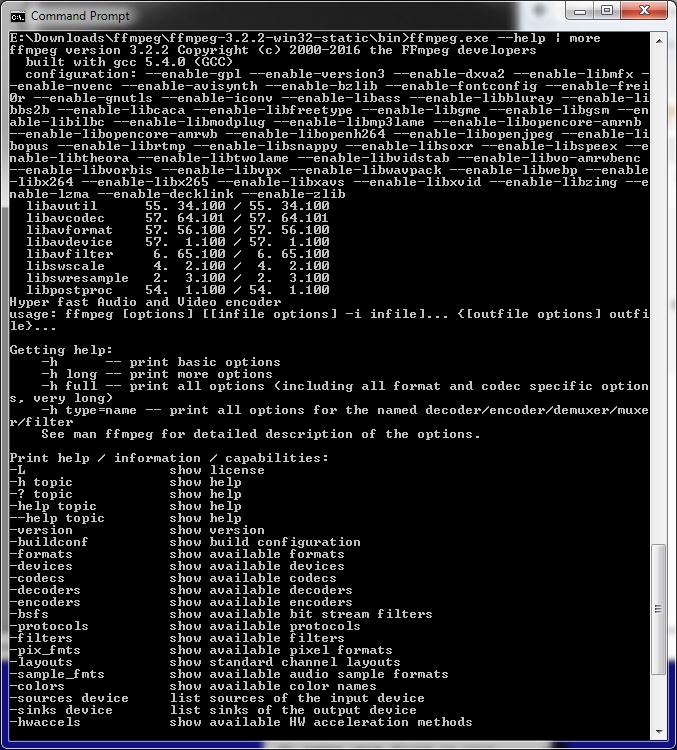

Latest version
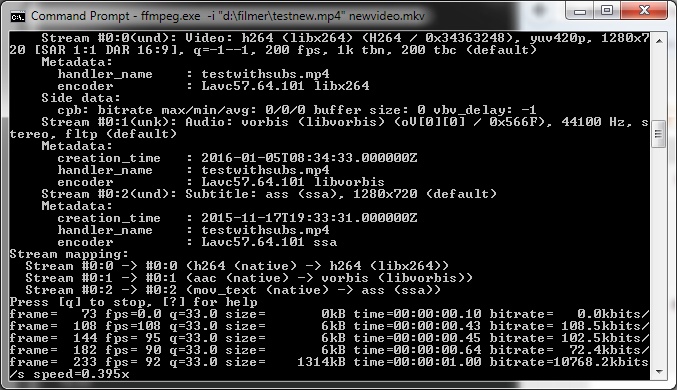
Download
Download ffmpeg 9.0.2 Windows 64-bit 161MB Win64
Portable 
Download ffmpeg 9.0.2 Mac Silicon ARM 64-bit 22MB MacARM64
Download ffmpeg 9.0.2 Mac Intel 64-bit 17MB Mac64
Download ffmpeg 9.0.2 Linux Linux
Download Beta, Portable and other versions
Portable Download ffmpeg latest Beta/Nightly Mac Mac
Download ffmpeg latest Beta/Nightly Linux Linux
Download more daily Windows ffmpeg builds here (gyan.dev) Win
Download more daily Windows ffmpeg builds here (BtbN) Win
Download more daily Mac Intel ffmpeg builds here (evermeet) Mac
Download more daily Mac Silicon ARM ffmpeg builds here (osxexperts) Mac
Download old versions

Software License
Supported operating systems
Mac OS Linux Version history / Release notes / Changelog / What's New
version 9.0.2:
Update for 9.0.2
avcodec/ppc/vp8dsp: store the 16 pixel wide rows at any alignment
avfilter/vf_decimate: reject blocks smaller than one chroma sample
avformat/genh: check for unsupported interlaved size 1 typ1 THP
lavc/vvc: Prevent OOB write in sh_entry_points
avcodec/vulkan_hevc: bound the per category reference counts in vk_hevc_start_frame
avcodec/vulkan_hevc: bound the reference count in vk_hevc_start_frame
avformat/pdvenc: add the AVClass pointer to PDVMuxContext
avcodec/fflcms2: fix memory leak after cmsDeleteContext(NULL)
avcodec/cbs_h266_syntax_template: fix ph_recovery_poc_cnt range
avformat/http: free cookie parameters on parse failure
avutil/opt: fix av_opt_is_set_to_default() on default-NAN options
fftools: reject negative -t durations
avcodec/hevc: don't error out on remaining slices of a skipped picture
avcodec/vvc: Skip over the current picture in find_ref_idx
avcodec/mips/vc1dsp_msa: Fix mspel functions
avcodec/mips/hevcpred_msa: Fix compilation
avcodec/vc1_block: don't drop the last macroblock when 1 bit remains
avcodec/dovi_rpudec: strip zero padding
avformat/dashdec: check fragment_timescale before division in refresh_manifest
avutil/encryption_info: reject init info with zero-sized key IDs
avformat/genh: check thp extradata read and allocation
avformat/oggdec: check for integer overflow in buf_realloc
vulkan_av1: fix out-of-bounds write of tile_sizes
avcodec/cfhd: reject header tags after the frame buffer was allocated
avcodec/cfhd: check the channel number after every tag
avcodec/cfhd: reset the allocated band sizes when freeing the buffers
avcodec/cook: require the channel mask to cover every subpacket channel
avcodec/dvdsubenc: account for the byte alignment of each RLE line
avfilter/vf_colorconstancy: free only allocated buffers on setup failure
avcodec/hap: do not hide the failure of the chunk table allocation
avformat/mov: Allocate the array without clearing before read
avformat/mov: do not zero a key string before reading it
avformat/mov: bound the keys atom entry count by the atom size
avcodec/vvc/dec: compare the CTU area in ibc_tl_init()
avcodec/vvc/dec: free the tabs when pic_arrays_init() fails
avcodec/vvc/thread: clear fc->ft when the frame thread is freed
avfilter/vf_uspp: Fix qpcount
avcodec/codec_internal: clarify docs for FF_CODEC_CAP_SKIP_FRAME_FILL_PARAM
avfilter/f_metadata: avoid overread on long formatted output
avformat/tls_mbedtls: set the expected hostname for numeric hosts
libswscale/ppc/yuv2rgb_altivec: Fix heap buffer overflow in yuv2packedX
swscale/ops_dispatch: account for the vertical filter taps in the tail copy
swscale/ops_dispatch: pass the line strides to copy_lines() as ptrdiff_t
swscale/uops: pad the horizontal filter weights to whole blocks
avcodec/apac: reset bitstream_index unconditionally to avoid integer overflow
avcodec/vorbisenc: dont assert on non finite input
avcodec/rv34: do not copy an unused reference line in the edge emulation
avcodec/rv34: do not await a negative reference-frame row
avcodec/vp9: unref next_refs in vp9_decode_flush
avcodec/vp8: do not await a negative reference-frame row
avformat/vpk: Check the channel count before dividing in the last block
avformat: Restore the container channel layout after a failed decoder open
avcodec/dcadec: ignore reserved speaker positions in coded channel order
avformat/matroskaenc: reserve space for BlockAdditionMapping even if Matroska muxer isn't enabled
(fforge/pr/24457) ffmpeg: fix matching of non-apic stream specifiers
avformat/cbs: move AV1 feature definition to their own header
(fforge/pr/24399) avcodec/bsf/dca_core: clear profile value on init()
avformat/sierravmd: require a 6bit palette in the probe
libswscale: use unaligned read/write macros in planarCopyWrapper
avformat/binka: reject truncated packet reads
avfilter/acrossover: reject non-finite parameters
avfilter/aiir: reject non-finite parameters
avfilter/firequalizer: reject overflowing delays
avcodec/wavpackenc: handle INT32_MIN samples
avfilter/aecho: reject non-finite delays and decays
libswresample/aarch64: Fix sign extension in audio conversion
avcodec/audiotoolbox: use 64-bit channel masks
avfilter/aarch64/vf_bwdif_init: Fix stride bound check
avformat/dashenc: free http options on avio_open_dyn_buf failure
avcodec/bmp: fix misaligned read in 16-bit decoding
avcodec/huffyuv: seed the median predictor endian independently
avformat/wvdec: convert flags to defines
(fforge/pr/24299) avformat/iamf_writer: don't discard skip samples signaled through side data for Opus
(fforge/pr/24295) avformat/movenc: fix crash when flushing a fragment with no data
swscale/loongarch: fix buffer underflow in yuv2plane1_8_lsx/lasx
(fforge/pr/24279) avcodec/h264_direct: do not read the other field's rows of colocated mb_type
avcodec/h264_slice: clear the ER picture when starting a second field
Revert "fftools/ffmpeg_sched: allow throttling decoder outputs"
avcodec/libdav1d: fix leak of frames on failure
avcodec/mips/cabac: Fix building on OpenBSD/mips64
avcodec/pthread_frame: sync decoded side data to all worker threads
(fforge/pr/24146) avcodec/h264_direct: await both fields of a colocated field pair
avcodec/h264_direct: move check before loading things
Update for 9.0.2
avcodec/ppc/vp8dsp: store the 16 pixel wide rows at any alignment
avfilter/vf_decimate: reject blocks smaller than one chroma sample
avformat/genh: check for unsupported interlaved size 1 typ1 THP
lavc/vvc: Prevent OOB write in sh_entry_points
avcodec/vulkan_hevc: bound the per category reference counts in vk_hevc_start_frame
avcodec/vulkan_hevc: bound the reference count in vk_hevc_start_frame
avformat/pdvenc: add the AVClass pointer to PDVMuxContext
avcodec/fflcms2: fix memory leak after cmsDeleteContext(NULL)
avcodec/cbs_h266_syntax_template: fix ph_recovery_poc_cnt range
avformat/http: free cookie parameters on parse failure
avutil/opt: fix av_opt_is_set_to_default() on default-NAN options
fftools: reject negative -t durations
avcodec/hevc: don't error out on remaining slices of a skipped picture
avcodec/vvc: Skip over the current picture in find_ref_idx
avcodec/mips/vc1dsp_msa: Fix mspel functions
avcodec/mips/hevcpred_msa: Fix compilation
avcodec/vc1_block: don't drop the last macroblock when 1 bit remains
avcodec/dovi_rpudec: strip zero padding
avformat/dashdec: check fragment_timescale before division in refresh_manifest
avutil/encryption_info: reject init info with zero-sized key IDs
avformat/genh: check thp extradata read and allocation
avformat/oggdec: check for integer overflow in buf_realloc
vulkan_av1: fix out-of-bounds write of tile_sizes
avcodec/cfhd: reject header tags after the frame buffer was allocated
avcodec/cfhd: check the channel number after every tag
avcodec/cfhd: reset the allocated band sizes when freeing the buffers
avcodec/cook: require the channel mask to cover every subpacket channel
avcodec/dvdsubenc: account for the byte alignment of each RLE line
avfilter/vf_colorconstancy: free only allocated buffers on setup failure
avcodec/hap: do not hide the failure of the chunk table allocation
avformat/mov: Allocate the array without clearing before read
avformat/mov: do not zero a key string before reading it
avformat/mov: bound the keys atom entry count by the atom size
avcodec/vvc/dec: compare the CTU area in ibc_tl_init()
avcodec/vvc/dec: free the tabs when pic_arrays_init() fails
avcodec/vvc/thread: clear fc->ft when the frame thread is freed
avfilter/vf_uspp: Fix qpcount
avcodec/codec_internal: clarify docs for FF_CODEC_CAP_SKIP_FRAME_FILL_PARAM
avfilter/f_metadata: avoid overread on long formatted output
avformat/tls_mbedtls: set the expected hostname for numeric hosts
libswscale/ppc/yuv2rgb_altivec: Fix heap buffer overflow in yuv2packedX
swscale/ops_dispatch: account for the vertical filter taps in the tail copy
swscale/ops_dispatch: pass the line strides to copy_lines() as ptrdiff_t
swscale/uops: pad the horizontal filter weights to whole blocks
avcodec/apac: reset bitstream_index unconditionally to avoid integer overflow
avcodec/vorbisenc: dont assert on non finite input
avcodec/rv34: do not copy an unused reference line in the edge emulation
avcodec/rv34: do not await a negative reference-frame row
avcodec/vp9: unref next_refs in vp9_decode_flush
avcodec/vp8: do not await a negative reference-frame row
avformat/vpk: Check the channel count before dividing in the last block
avformat: Restore the container channel layout after a failed decoder open
avcodec/dcadec: ignore reserved speaker positions in coded channel order
avformat/matroskaenc: reserve space for BlockAdditionMapping even if Matroska muxer isn't enabled
(fforge/pr/24457) ffmpeg: fix matching of non-apic stream specifiers
avformat/cbs: move AV1 feature definition to their own header
(fforge/pr/24399) avcodec/bsf/dca_core: clear profile value on init()
avformat/sierravmd: require a 6bit palette in the probe
libswscale: use unaligned read/write macros in planarCopyWrapper
avformat/binka: reject truncated packet reads
avfilter/acrossover: reject non-finite parameters
avfilter/aiir: reject non-finite parameters
avfilter/firequalizer: reject overflowing delays
avcodec/wavpackenc: handle INT32_MIN samples
avfilter/aecho: reject non-finite delays and decays
libswresample/aarch64: Fix sign extension in audio conversion
avcodec/audiotoolbox: use 64-bit channel masks
avfilter/aarch64/vf_bwdif_init: Fix stride bound check
avformat/dashenc: free http options on avio_open_dyn_buf failure
avcodec/bmp: fix misaligned read in 16-bit decoding
avcodec/huffyuv: seed the median predictor endian independently
avformat/wvdec: convert flags to defines
(fforge/pr/24299) avformat/iamf_writer: don't discard skip samples signaled through side data for Opus
(fforge/pr/24295) avformat/movenc: fix crash when flushing a fragment with no data
swscale/loongarch: fix buffer underflow in yuv2plane1_8_lsx/lasx
(fforge/pr/24279) avcodec/h264_direct: do not read the other field's rows of colocated mb_type
avcodec/h264_slice: clear the ER picture when starting a second field
Revert "fftools/ffmpeg_sched: allow throttling decoder outputs"
avcodec/libdav1d: fix leak of frames on failure
avcodec/mips/cabac: Fix building on OpenBSD/mips64
avcodec/pthread_frame: sync decoded side data to all worker threads
(fforge/pr/24146) avcodec/h264_direct: await both fields of a colocated field pair
avcodec/h264_direct: move check before loading things
View full changelog
Sections/Browse similar tools
Alternative to ffmpeg
(Latest version updated)Libav (Feb 12, 2018)
Guides and How to's
Batch Files for Ffmpeg to correct chroma shift etc.
- ReadFFmpeg profiles and levels
- ReadHow to batch convert/multiplex with ffmpeg
- ReadHow to encode and play HEVC with alfa chanel
- ReadTop ffmpeg lossless commands
- ReadVideo batch files to annoy you
- ReadVirtualdub External Encoder feature (Video tutorial)
- Readffmpeg video tutorials
View all guides with guide description here
Acronyms / Also Known As
Download ffmpeg Portable download from the Download links under Download and Download other versions!
Notify me when software updated or report software
| 48 reviews, Showing 1 to 5 reviews |
-c:v hevc_nvenc -SPATIAL_AQ NOT AVAILABLE
Review by Ole on
Aug 5, 2026 Version: ffmpeg 9.0
OS: Windows 11 64-bit Ease of use: 7/10
Functionality: 7/10
Value for money: 7/10
Overall: 7/10
@gripweed
This download is v6.1.
ffmpeg version 6.1-full_build-www.gyan.dev Copyright (c) 2000-2023 the FFmpeg developers built with gcc 12.2.0 (Rev10, Built by MSYS2 project)
FFmpeg 6.1 "Heaviside"
6.1 was released on 2023-11-11. It is the latest stable FFmpeg release from the 6.1 release branch, which was cut from master on 2023-10-29.
FFmpeg 6.0.1 "Von Neumann"
6.0.1 was released on 2023-11-10. It is the latest stable FFmpeg release from the 6.0 release branch, which was cut from master on 2023-02-19.
This download is v6.1.
ffmpeg version 6.1-full_build-www.gyan.dev Copyright (c) 2000-2023 the FFmpeg developers built with gcc 12.2.0 (Rev10, Built by MSYS2 project)
FFmpeg 6.1 "Heaviside"
6.1 was released on 2023-11-11. It is the latest stable FFmpeg release from the 6.1 release branch, which was cut from master on 2023-10-29.
FFmpeg 6.0.1 "Von Neumann"
6.0.1 was released on 2023-11-10. It is the latest stable FFmpeg release from the 6.0 release branch, which was cut from master on 2023-02-19.
Review by HemLok on
Nov 11, 2023 Version: 6.1
OS: Windows 10 64-bit Ease of use: 10/10
Functionality: 10/10
Value for money: 10/10
Overall: 10/10
All is well but shouldn't this be listed as 6.0.1 and not 6.1?
Review by Gripweed on
Nov 11, 2023 Version: 6.0.1
OS: Windows 10 64-bit Ease of use: 10/10
Functionality: 10/10
Value for money: 10/10
Overall: 10/10
Works great! Just used this to render a Krita animation! Very simple and easy to use.
Review by swiss_szn on
Jul 14, 2022 Version: 5.0.1
OS: Windows 11 Ease of use: 10/10
Functionality: 10/10
Value for money: 10/10
Overall: 10/10
Rating by longwin on
Nov 6, 2021 Version: 4.4.1
OS: Windows 7 64-bit Ease of use: 1/10
Functionality: 10/10
Value for money: 10/10
Overall: 10/10
| 48 reviews, Showing 1 to 5 reviews |
| 1 tool hits, Showing 1 to 1 tools |
Explanation:
NEW SOFTWARE= New tool since your last visit
NEW VERSION= New version since your last visit
NEW REVIEW= New review since your last visit
NEW VERSION= New version
Latest version
Version number / Beta version number / Update version number and when it whas released.
Type and download
NO MORE UPDATES? = The software hasn't been updated in over 2 years.
NO LONGER DEVELOPED = The software hasn't been updated in over 5 years.
RECENTLY UPDATED = The software has been updated the last 31 days.
Freeware = Download Free software.
Freeware Trialware = Download Free software but some parts are trial/shareware.
Free software = Download Free software and also open source code also known as FOSS (Free and Open Source Software).
Free software Trialware = Download Free software and also open source code but some parts are trial/shareware.
Freeware Ads = Download Free software but supported by advertising, usually with a included browser toolbar. It may be disabled when installing or after installation.
Free software Ads = Free Download software and open source code but supported by advertising, usually with a included browser toolbar. It may be disabled when installing or after installation.
Trialware = Also called shareware or demo. Free Trial version available for download and testing with usually a time limit or limited functions.
Payware = No demo or trial available.
Portable version = A portable/standalone version is available. No installation is required.
v1.0.1 = Latest version available.
Download beta = It could be a Beta, RC(Release Candidate) or an Alpha / Nightly / Unstable version of the software.
Download 15MB = A direct link to the software download.
Win = Windows download version for 32-bit and 64-bit Windows.
Win64 = Windows 64-bit download version for 64-bit Windows.
WinARM64 = Windows 64-bit ARM download version for Windows ARM64/AArch64.
Mac = Mac download version for 64-bit Mac OS Intel/ARM64/AArch64.
MacARM64 = Mac Silicon download version for 64-bit Mac OS ARM64/AArch64.
Mac64 = Mac OS download version for 64-bit Intel Mac OS.
Linux = Linux download version.
Linux64 = Linux download version for 64bit Linux.
Linux ARM = Linux download version for Linux ARM64/AArch64.
Portable = Portable version. No installation is required.
Ad-Supported = The software is bundled with advertising. Be careful when you install the software and disable addons that you don't want!
Visit developers site = A link to the software developer site.
Download (mirror link) = A mirror link to the software download. It may not contain the latest versions.
Download old versions = Free downloads of previous versions of the program.
Download 64-bit version = If you have a 64bit operating system you can download this version.
Download portable version = Portable/Standalone version meaning that no installation is required, just extract the files to a folder and run directly.
Portable version available = Download the portable version and you can just extract the files and run the program without installation.
Old versions available = Download old versions of the program.
Version history available = Complete changelog on our site.
= Windows version available.
= Mac OS version available.
= Linux version available.
Our hosted software are virus and malware scanned with several antivirus programs using www.virustotal.com. (NOTE! Just one virustotal warning is 99.9% a false positive. And some software might receive 2-6 warnings but it's if they are not all same virus/trojan then it's 99% false positives.)
Rating
Rating from 0-10.
NEW SOFTWARE= New tool since your last visit
NEW VERSION= New version since your last visit
NEW REVIEW= New review since your last visit
NEW VERSION= New version
Latest version
Version number / Beta version number / Update version number and when it whas released.
Type and download
NO MORE UPDATES? = The software hasn't been updated in over 2 years.
NO LONGER DEVELOPED = The software hasn't been updated in over 5 years.
RECENTLY UPDATED = The software has been updated the last 31 days.
Freeware = Download Free software.
Freeware Trialware = Download Free software but some parts are trial/shareware.
Free software = Download Free software and also open source code also known as FOSS (Free and Open Source Software).
Free software Trialware = Download Free software and also open source code but some parts are trial/shareware.
Freeware Ads = Download Free software but supported by advertising, usually with a included browser toolbar. It may be disabled when installing or after installation.
Free software Ads = Free Download software and open source code but supported by advertising, usually with a included browser toolbar. It may be disabled when installing or after installation.
Trialware = Also called shareware or demo. Free Trial version available for download and testing with usually a time limit or limited functions.
Payware = No demo or trial available.
Portable version = A portable/standalone version is available. No installation is required.
v1.0.1 = Latest version available.
Download beta = It could be a Beta, RC(Release Candidate) or an Alpha / Nightly / Unstable version of the software.
Download 15MB = A direct link to the software download.
Win = Windows download version for 32-bit and 64-bit Windows.
Win64 = Windows 64-bit download version for 64-bit Windows.
WinARM64 = Windows 64-bit ARM download version for Windows ARM64/AArch64.
Mac = Mac download version for 64-bit Mac OS Intel/ARM64/AArch64.
MacARM64 = Mac Silicon download version for 64-bit Mac OS ARM64/AArch64.
Mac64 = Mac OS download version for 64-bit Intel Mac OS.
Linux = Linux download version.
Linux64 = Linux download version for 64bit Linux.
Linux ARM = Linux download version for Linux ARM64/AArch64.
Portable = Portable version. No installation is required.
Ad-Supported = The software is bundled with advertising. Be careful when you install the software and disable addons that you don't want!
Visit developers site = A link to the software developer site.
Download (mirror link) = A mirror link to the software download. It may not contain the latest versions.
Download old versions = Free downloads of previous versions of the program.
Download 64-bit version = If you have a 64bit operating system you can download this version.
Download portable version = Portable/Standalone version meaning that no installation is required, just extract the files to a folder and run directly.
Portable version available = Download the portable version and you can just extract the files and run the program without installation.
Old versions available = Download old versions of the program.
Version history available = Complete changelog on our site.
= Windows version available. = Mac OS version available. = Linux version available.Our hosted software are virus and malware scanned with several antivirus programs using www.virustotal.com. (NOTE! Just one virustotal warning is 99.9% a false positive. And some software might receive 2-6 warnings but it's if they are not all same virus/trojan then it's 99% false positives.)
Rating
Rating from 0-10.
Browse software by sections
All In One Blu-ray Converters (9)
All In One DVD Converters (12)
All In One MKV to MP4, Blu-ray, UHD (11)
All In One Video Converters (19)
Animation (3D, 2D Animation) (13)
Audio Editors (23)
Audio Encoders (80)
Audio Players (19)
Authoring (Blu-ray, UHD, AVCHD) (13)
Authoring (DivX) (4)
Authoring (DVD) (26)
Authoring (SVCD, VCD) (9)
Bitrate Calculators (7)
Blu-ray to AVI, MKV, MP4 (15)
Blu-ray to Blu-ray, AVCHD (10)
Burn (CD,DVD,Blu-ray) (24)
Camcorders, DV, HDV, AVCHD (31)
Capture TV, DVD, VCR (30)
CD, DVD, Blu-ray recovery (3)
Codec Packs (6)
All In One DVD Converters (12)
All In One MKV to MP4, Blu-ray, UHD (11)
All In One Video Converters (19)
Animation (3D, 2D Animation) (13)
Audio Editors (23)
Audio Encoders (80)
Audio Players (19)
Authoring (Blu-ray, UHD, AVCHD) (13)
Authoring (DivX) (4)
Authoring (DVD) (26)
Authoring (SVCD, VCD) (9)
Bitrate Calculators (7)
Blu-ray to AVI, MKV, MP4 (15)
Blu-ray to Blu-ray, AVCHD (10)
Burn (CD,DVD,Blu-ray) (24)
Camcorders, DV, HDV, AVCHD (31)
Capture TV, DVD, VCR (30)
CD, DVD, Blu-ray recovery (3)
Codec Packs (6)
Codec, Video Identifiers (31)
Codecs (67)
Decrypters (DVD Rippers) (16)
Decrypters (UHD, Blu-ray Rippers) (8)
DigitalTV, DVB, IPTV (40)
DVD to DVD (20)
DVD to MP4, MKV, H264, H265 (16)
DVD to VCD, SVCD (5)
DVD to XviD, AVI, DivX (16)
ISO, Image (14)
Linux Video Tools (219)
MacOS Video Tools (252)
Media (Blu-ray, DVD, CD) (9)
Media Center, HTPC (25)
Other Useful Tools (136)
Photo Blu-ray, DVD, SlideShow (8)
Portable (Mobile, PSP) (35)
Region Free Tools (5)
Screen capture , Screen recording (25)
Screenshots , Thumbnails (13)
Codecs (67)
Decrypters (DVD Rippers) (16)
Decrypters (UHD, Blu-ray Rippers) (8)
DigitalTV, DVB, IPTV (40)
DVD to DVD (20)
DVD to MP4, MKV, H264, H265 (16)
DVD to VCD, SVCD (5)
DVD to XviD, AVI, DivX (16)
ISO, Image (14)
Linux Video Tools (219)
MacOS Video Tools (252)
Media (Blu-ray, DVD, CD) (9)
Media Center, HTPC (25)
Other Useful Tools (136)
Photo Blu-ray, DVD, SlideShow (8)
Portable (Mobile, PSP) (35)
Region Free Tools (5)
Screen capture , Screen recording (25)
Screenshots , Thumbnails (13)
Subtitle Editors, Converters (72)
Tag Editors (4)
Video Compare Software (6)
Video Demultiplexers, Multiplexers (66)
Video Editors (Advanced, NLE) (37)
Video Editors (Basic) (57)
Video Editors (H264, MP4, MKV, MTS) (19)
Video Editors (Lossless) (5)
Video Editors (MPG, DVD) (16)
Video Editors (WMV, AVI) (15)
Video Encoders (AV1, VP8, VP9) (2)
Video Encoders (AVI, WMV) (38)
Video Encoders (H264, H265, MP4, MKV) (45)
Video Encoders (MPG, DVD) (23)
Video Encoders , Converters (156)
Video Frameservers (9)
Video Players (48)
Video Repair, Fix (24)
Video Scripting (10)
Video Streaming (20)
Tag Editors (4)
Video Compare Software (6)
Video Demultiplexers, Multiplexers (66)
Video Editors (Advanced, NLE) (37)
Video Editors (Basic) (57)
Video Editors (H264, MP4, MKV, MTS) (19)
Video Editors (Lossless) (5)
Video Editors (MPG, DVD) (16)
Video Editors (WMV, AVI) (15)
Video Encoders (AV1, VP8, VP9) (2)
Video Encoders (AVI, WMV) (38)
Video Encoders (H264, H265, MP4, MKV) (45)
Video Encoders (MPG, DVD) (23)
Video Encoders , Converters (156)
Video Frameservers (9)
Video Players (48)
Video Repair, Fix (24)
Video Scripting (10)
Video Streaming (20)