
Help us keep the list up to date and submit new video software here.
Tool
Description
Type
Rating
Reviews
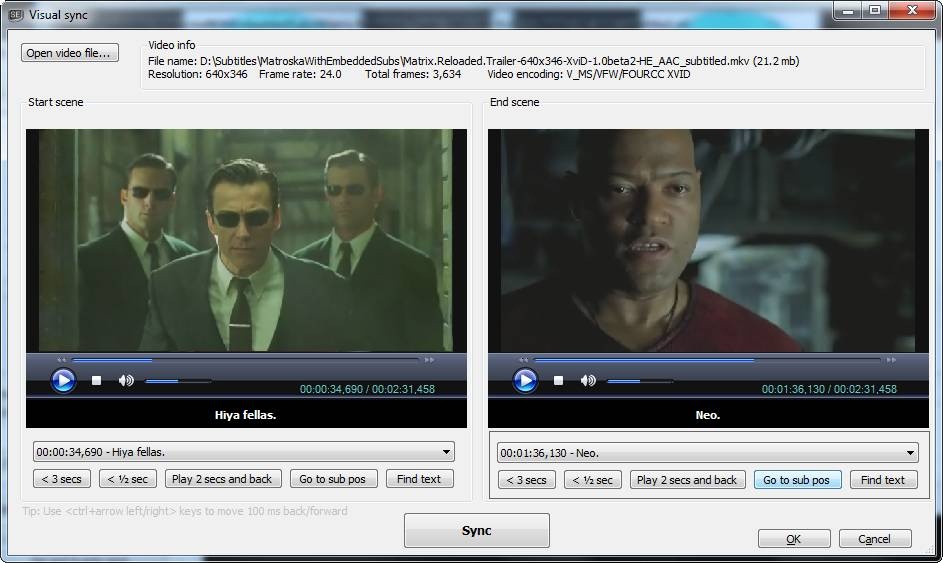
Subtitle Edit is a free editor for video subtitles - a subtitle editor. With SE you can easily adjust a subtitle if it is out of sync with the video and much more. Visually sync/adjust a subtitle (start/end position and speed). Import Blu-ray SUP titles or VobSub sub/idx binary subtitles and OCR to text srt subtitles. SUP to SRT, SUB to SRT. DVD to SRT. Requires Microsoft .NET Framework Version 10 or later.
Free software
OS:


File size: 55MB
Beta version
Portable version
Old versions
Version history
Alternative software
OS:
File size: 55MB
Beta version
Portable version
Old versions
Version history
Alternative software
Screenshots
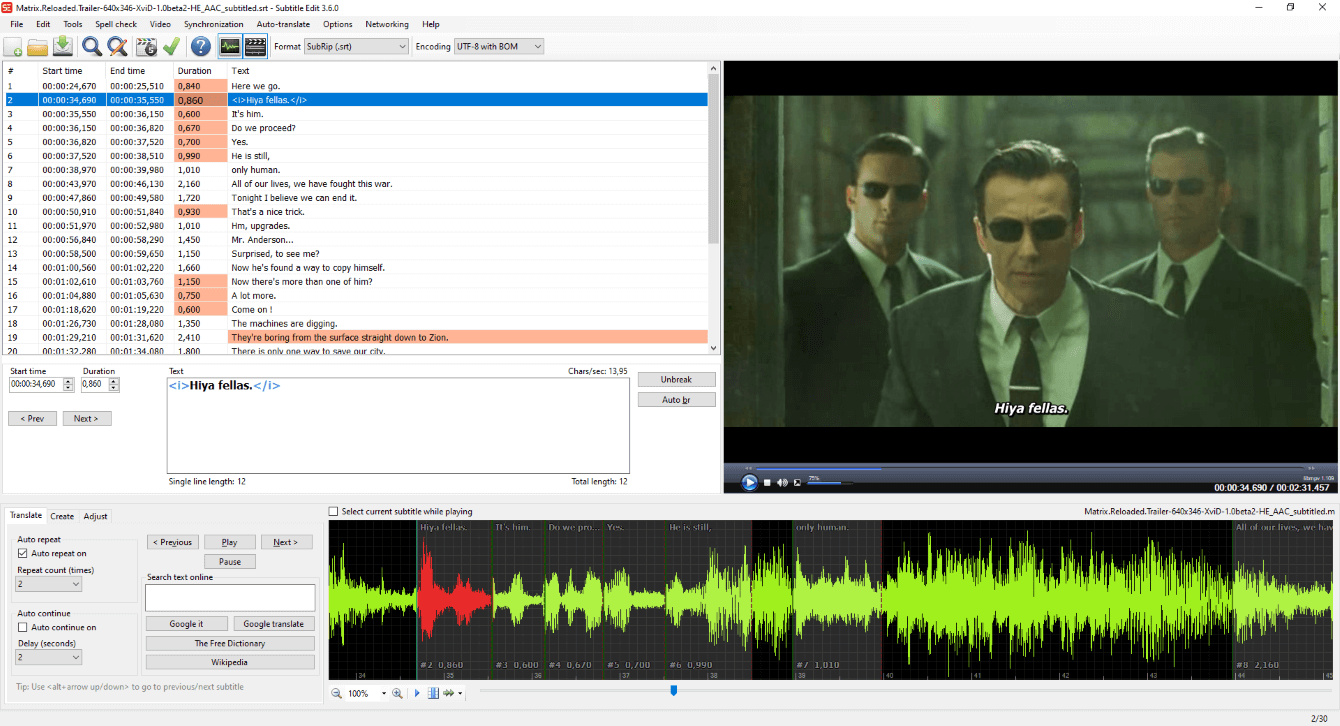
Latest version
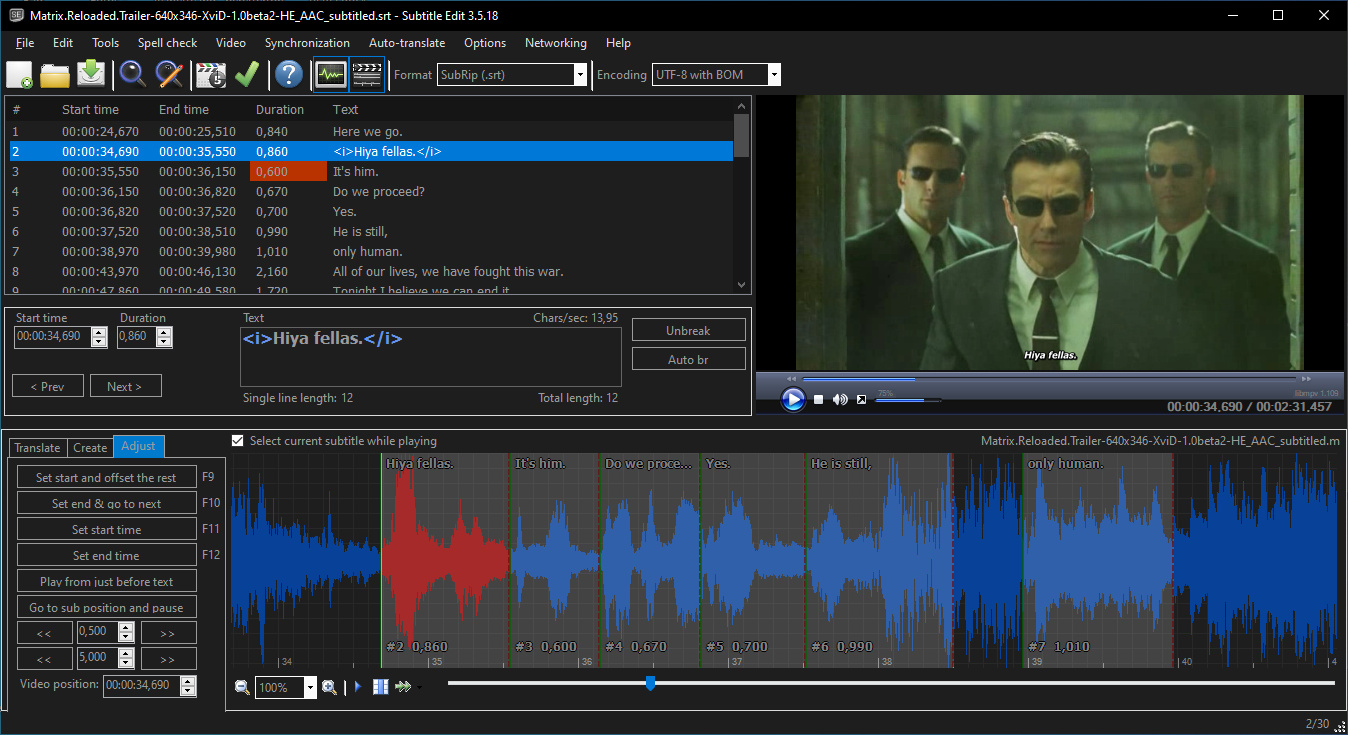
Download
Download Subtitle Edit 5.2.0 Windows 64-bit 55MB Win64
Download Subtitle Edit 5.2.0 Mac Silicon ARM 64-bit 125MB MacARM64
Download Subtitle Edit 5.2.0 Mac Intel 64-bit 144MB Mac64
Download Subtitle Edit 5.2.0 Linux 64-bit 123MB Linux64
Download Beta, Portable and other versions
Portable 
Download Subtitle Edit 5.2.0 Portable Windows ARM 64-bit 55MB WinARM64
Portable Download Subtitle Edit 5.2.0 Linux ARM 55MB Linux ARM64
Download Subtitle Edit 5.3.0 Beta 11 Windows 64-bit 55MB Win64
Download Subtitle Edit 5.3.0 Beta 11 Portable Windows 64-bit 55MB Win64
Portable Download Subtitle Edit 5.3.0 Beta 11 Windows ARM 64-bit 55MB WinARM64
Download Subtitle Edit 5.3.0 Beta 11 Mac Silicon ARM 55MB MacARM64
Download Subtitle Edit 5.3.0 Beta 11 Mac 55MB Mac
Download Subtitle Edit 5.3.0 Beta 11 Linux 55MB Linux
Download Subtitle Edit 4.0.16 Windows
Download Subtitle Edit 4.0.16 Windows portable
Download old versions

Software License
Supported operating systems
Mac OS Linux Version history / Release notes / Changelog / What's New
v5.3.0-beta11 (24th of September 2026)
* Add syntax highlighting in Source view for WebVTT, LRC and SCC, and basic coloring for every other text format
* Remux: mix audio files into one track with per-file volume - thx ghostminhtoan
* TTS review: show the waveform position, click it to go to a position - thx subof
* Batch convert: prevent sleep while converting - thx verbal666
* Remember "Merge continuation lines" max gap and max characters
* SenseVoice: offer to re-download models from before the CMVN fix
* Speech to text: explain a CUDA run on a CPU-only build - thx Marooo1122
* Improve performance of OCR fix, fix casing and video preview ticks
* Fix saving a subtitle opened from an audio file overwriting the audio - thx MG240
* Fix LRC header replaced by the default header, and Source view losing an edited header/footer - thx MG240
* Fix Source view: crash on OK when the format throws, silently taking lines that parse as another format, and a deleted header coming back
* Fix Source view highlighting: a number-only SubRip text line styled as a cue number, unclosed XML comments
* Fix speech to text with Purfview Faster Whisper XXL and the "anime.ja" model (and hide translate for it) - thx dustwanderer
* Fix speech to text batch statuses not reset on each run - thx Marooo1122
* Fix undocked full screen video player leaving full screen when Alt+F4 minimizes it - thx GrampaWildWilly
* Fix native file pickers opening off screen / on another monitor - thx GrampaWildWilly
* Fix Remux "finalizing" progress animation not stopping when ffmpeg exits - thx GrampaWildWilly
* Update CrispASR to v0.8.36
* Update llama.cpp to b11149
* Update Japanese translation - thx hisui3393
v5.3.0-beta10 (23rd of September 2026)
* Add "Edit second subtitle settings..." to the Video menu (restyle the second subtitle without the file picker) - thx GrampaWildWilly
* Add EBU STL to the "Save as" format list - thx Triathlon-rally
* Add audio track picker for the FFmpeg video player - thx fraternl
* Find/Replace: show the replace count in the window, add button icons and a search history dropdown - thx fraternl
* Remux: show each audio/subtitle file's folder, and a "finalizing" phase while the mp4 index is moved to the front - thx GrampaWildWilly
* Speech separation ("Remove original speech", "Isolate speech", speech-only waveform): show progress and time left - thx to285
* Shot changes: allow sensitivity 0.05-0.95 in 0.01 steps like SE 4 - thx kadrimarzouki
* seconv: --no-language-suffix keeps "forced" and stream labels, drops only the language code - thx Mafuyu0
* Refresh auto-translate API model lists (DeepSeek, Anthropic, Gemini, OpenAI, Perplexity)
* Improve idle performance: main window tick pumps only run while a video is loaded - thx ivandrofly
* Fix waveform shaking/jerky cursor on Windows (16 ms tick pump ran at 31 ms with the default timer resolution) - thx mariajuferreira1958-creator
* Fix keyboard focus staying in the main window when a non-modal window (e.g. Remux) opens - thx GrampaWildWilly
* Fix Enter on a split button (Remux, Burn-in, Batch convert, ...) running the window's default button instead - thx GrampaWildWilly
* Fix Alt+Space system menu opening partially off-screen or on the wrong monitor - thx GrampaWildWilly
* Fix change frame rate "From" not preset with the current frame rate, and frame rate combo boxes using the OS decimal separator - thx fointypinger
* Fix ASSA styles dialog losing every style for headers without an exact "ScriptType: v4.00+" and for "*"-prefixed style names - thx hisui3393
* Fix VobSub position ignoring the image crop (seconv ASSA alignment auto-detect tagged every cue {\an7}/{\an8}) - thx gambar3
* Fix WhisperX model dots always green, redundant download button, distil-large-v3.5/anime.ja model names, and the Lightning checkpoint message - thx GitGianluc
* Update WhisperX standalone to build 103
* Update Avalonia to 12.1.3
* Update Czech translation - thx Matj Fouma
* Update Italian translation - thx bovirus
* Update Chinese Traditional translation - thx love80312
v5.3.0-beta9 (22nd of September 2026)
* Add TranslatePsy-AfriSLM 4B (English <-> 19 African languages) to the llama.cpp auto-translate models
* Add Romanian OCR fix replace list (cedilla / to comma below /) - thx Gabriel
* Batch convert: OCR language per file from the container track or file name (e.g. "Movie [fra].sup") - thx Gabriel
* Remux: show durations, elapsed/remaining time, and load the remuxed video when done - thx ghostminhtoan
* OCR: remember the spell check dictionary per language (no more jumping back to "English (Australia)") - thx Gabriel
* Clone from video: offer speech-to-text for the clips when the TTS engine needs transcripts (OmniVoice) - thx nielka98
* Point sync via other subtitle: browse from the current subtitle's folder - thx fraternl
* seconv: add --ocr-auto-detect-assa-alignment - thx gambar3
* seconv: add --no-language-suffix to write auto-translated files without the language code - thx Mafuyu0
* Improve performance of binary OCR matching, select-all timing commands, merge lines and the "Remove text for HI" dialog
* Fix ASSA/SSA styles dialog changing the style of other lines when an original subtitle is loaded - thx hisui3393
* Fix "Remove text for hearing impaired" changing dashes/spaces with no option selected - thx kadrimarzouki
* Fix WebVTT to SubRip wrapping every line in a font tag with the player's default text color - thx maknol
* Fix "Remove color tags" leaving garbage for rgba() colors
* Fix Matroska subtitle extraction failing on busy network shares (short reads) - thx shotfirer
* Fix seconv DVB-sub image export placing images at twice the offset, and MKV DVB-sub going through OCR
* Fix audio clip extraction on zero/negative duration lines (ffmpeg -t 0 = whole file) in extract audio, clone voice and speech-to-text on selected lines
* Fix FFmpeg video player stuck at the end after playing to it, and frame step keys dead on audio-only files
* Fix layout 14 filmstrip going blank near the end of the video
* Fix "Show speech only" waveform reverting to the full mix after undocking, and drifting with SMPTE timing
* Fix second subtitle "Remember these settings" failing with audio-only media
* Fix settings import bringing back old shortcut defaults (e.g. Cmd+H for Replace on macOS)
* Fix OCR language auto-detect taking title words like "No"/"It"/"Be" for language codes (Dr.No.sup as Norwegian)
* Fix "Generate background music" discarding the clip just listened to and generating a new one
* Fix "Improve time codes" moving end times with "Adjust end times" off
* Fix text to speech casting listing Zonos without an install
* Update llama.cpp to b11070
* Update FFmpeg (Windows) to 9.0.2
* Update Italian translation - thx bovirus
* Update Polish translation - thx potplayer-fanpack
v5.3.0-beta8 (21st of September 2026)
* Add editor-style layout 14 with a track timeline (video row and subtitle rows above the waveform)
* Add sound on Linux to the FFmpeg video player (PulseAudio / PipeWire)
* FFmpeg video player: real frame index, seek-free frame stepping (also variable frame rate) and faster scrubbing
* Add "Move lines: shorten previous/next line instead of overlapping it" option - thx gambar3
* Add width setting for the "initial text of selected line" waveform toolbar box - thx kadrimarzouki
* WhisperX: new standalone build with live output (no more "hang" at "Performing transcription..."), and an update prompt - thx gambar3
* Batch convert: lock Add/Remove/Clear while converting - thx yozongu
* OCR "Add character" windows: show subtitle images on the image preview background - thx Nino-kun
* Fix many ffmpeg video generation bugs (burn-in, cut, re-encode, remux, write chapters, blank video, add/remove embedded subtitles)
* Fix "Add/remove embedded subtitles" dropping extra audio tracks and font attachments
* Fix burn-in of Blu-ray sup showing subtitles too early when the first subtitle starts late
* Fix window position lost when closing SE with a minimized window - thx GrampaWildWilly
* Fix format properties button missing after restart - thx GrampaWildWilly
* Fix waveform subtitle blocks vanishing when scrolling in TTS review / Improve time codes - thx gambar3
* Fix underscores missing from file, audio track and plugin names in menus
* Fix error log flooded with "disposed mpv player" entries after closing Visual sync / Point sync
* Update Chinese (Simplified) translation - thx emsb8888-prog
* Update Japanese translation - thx hisui3393
* Update Korean translation - thx 12si27
* Update Polish translation - thx potplayer-fanpack
v5.3.0-beta7 (20th of September 2026)
* Add "Improve time codes (forced alignment)" in Tools: re-time a roughly synced subtitle with a Crisp ASR forced aligner, with waveform preview
* Add "Isolate speech" option to Crisp ASR speech-to-text (removes music/noise before transcribing)
* Add "Show speech only" waveform option
* Add "Remove original speech" option to text to speech
* Add Supertonic-3 (Crisp ASR) text to speech engine
* Add Voxtral F16 model to Crisp ASR speech-to-text
* Add "Move text after cursor, go to next, play and pause at end" shortcut - thx kadrimarzouki
* Add optional "initial text of selected line" box to the waveform toolbar - thx kadrimarzouki
* Add two "line break" items to the waveform toolbar (choose where the toolbar wraps)
* Remember the second subtitle file after restart - thx kadrimarzouki
* Point sync: open at the line selected in the main window - thx TristisOris
* Settings backup: interval 0 = backup at every start, unchanged settings are skipped - thx GrampaWildWilly
* Spell check: accept capitalized lowercase-only words at sentence start (e.g. Dutch "Oktober") - thx fraternl
* OCR word split and auto-break of 3+ lines now find the best split - thx ivandrofly
* Zonos (Crisp ASR) is no longer...
* Add syntax highlighting in Source view for WebVTT, LRC and SCC, and basic coloring for every other text format
* Remux: mix audio files into one track with per-file volume - thx ghostminhtoan
* TTS review: show the waveform position, click it to go to a position - thx subof
* Batch convert: prevent sleep while converting - thx verbal666
* Remember "Merge continuation lines" max gap and max characters
* SenseVoice: offer to re-download models from before the CMVN fix
* Speech to text: explain a CUDA run on a CPU-only build - thx Marooo1122
* Improve performance of OCR fix, fix casing and video preview ticks
* Fix saving a subtitle opened from an audio file overwriting the audio - thx MG240
* Fix LRC header replaced by the default header, and Source view losing an edited header/footer - thx MG240
* Fix Source view: crash on OK when the format throws, silently taking lines that parse as another format, and a deleted header coming back
* Fix Source view highlighting: a number-only SubRip text line styled as a cue number, unclosed XML comments
* Fix speech to text with Purfview Faster Whisper XXL and the "anime.ja" model (and hide translate for it) - thx dustwanderer
* Fix speech to text batch statuses not reset on each run - thx Marooo1122
* Fix undocked full screen video player leaving full screen when Alt+F4 minimizes it - thx GrampaWildWilly
* Fix native file pickers opening off screen / on another monitor - thx GrampaWildWilly
* Fix Remux "finalizing" progress animation not stopping when ffmpeg exits - thx GrampaWildWilly
* Update CrispASR to v0.8.36
* Update llama.cpp to b11149
* Update Japanese translation - thx hisui3393
v5.3.0-beta10 (23rd of September 2026)
* Add "Edit second subtitle settings..." to the Video menu (restyle the second subtitle without the file picker) - thx GrampaWildWilly
* Add EBU STL to the "Save as" format list - thx Triathlon-rally
* Add audio track picker for the FFmpeg video player - thx fraternl
* Find/Replace: show the replace count in the window, add button icons and a search history dropdown - thx fraternl
* Remux: show each audio/subtitle file's folder, and a "finalizing" phase while the mp4 index is moved to the front - thx GrampaWildWilly
* Speech separation ("Remove original speech", "Isolate speech", speech-only waveform): show progress and time left - thx to285
* Shot changes: allow sensitivity 0.05-0.95 in 0.01 steps like SE 4 - thx kadrimarzouki
* seconv: --no-language-suffix keeps "forced" and stream labels, drops only the language code - thx Mafuyu0
* Refresh auto-translate API model lists (DeepSeek, Anthropic, Gemini, OpenAI, Perplexity)
* Improve idle performance: main window tick pumps only run while a video is loaded - thx ivandrofly
* Fix waveform shaking/jerky cursor on Windows (16 ms tick pump ran at 31 ms with the default timer resolution) - thx mariajuferreira1958-creator
* Fix keyboard focus staying in the main window when a non-modal window (e.g. Remux) opens - thx GrampaWildWilly
* Fix Enter on a split button (Remux, Burn-in, Batch convert, ...) running the window's default button instead - thx GrampaWildWilly
* Fix Alt+Space system menu opening partially off-screen or on the wrong monitor - thx GrampaWildWilly
* Fix change frame rate "From" not preset with the current frame rate, and frame rate combo boxes using the OS decimal separator - thx fointypinger
* Fix ASSA styles dialog losing every style for headers without an exact "ScriptType: v4.00+" and for "*"-prefixed style names - thx hisui3393
* Fix VobSub position ignoring the image crop (seconv ASSA alignment auto-detect tagged every cue {\an7}/{\an8}) - thx gambar3
* Fix WhisperX model dots always green, redundant download button, distil-large-v3.5/anime.ja model names, and the Lightning checkpoint message - thx GitGianluc
* Update WhisperX standalone to build 103
* Update Avalonia to 12.1.3
* Update Czech translation - thx Matj Fouma
* Update Italian translation - thx bovirus
* Update Chinese Traditional translation - thx love80312
v5.3.0-beta9 (22nd of September 2026)
* Add TranslatePsy-AfriSLM 4B (English <-> 19 African languages) to the llama.cpp auto-translate models
* Add Romanian OCR fix replace list (cedilla / to comma below /) - thx Gabriel
* Batch convert: OCR language per file from the container track or file name (e.g. "Movie [fra].sup") - thx Gabriel
* Remux: show durations, elapsed/remaining time, and load the remuxed video when done - thx ghostminhtoan
* OCR: remember the spell check dictionary per language (no more jumping back to "English (Australia)") - thx Gabriel
* Clone from video: offer speech-to-text for the clips when the TTS engine needs transcripts (OmniVoice) - thx nielka98
* Point sync via other subtitle: browse from the current subtitle's folder - thx fraternl
* seconv: add --ocr-auto-detect-assa-alignment - thx gambar3
* seconv: add --no-language-suffix to write auto-translated files without the language code - thx Mafuyu0
* Improve performance of binary OCR matching, select-all timing commands, merge lines and the "Remove text for HI" dialog
* Fix ASSA/SSA styles dialog changing the style of other lines when an original subtitle is loaded - thx hisui3393
* Fix "Remove text for hearing impaired" changing dashes/spaces with no option selected - thx kadrimarzouki
* Fix WebVTT to SubRip wrapping every line in a font tag with the player's default text color - thx maknol
* Fix "Remove color tags" leaving garbage for rgba() colors
* Fix Matroska subtitle extraction failing on busy network shares (short reads) - thx shotfirer
* Fix seconv DVB-sub image export placing images at twice the offset, and MKV DVB-sub going through OCR
* Fix audio clip extraction on zero/negative duration lines (ffmpeg -t 0 = whole file) in extract audio, clone voice and speech-to-text on selected lines
* Fix FFmpeg video player stuck at the end after playing to it, and frame step keys dead on audio-only files
* Fix layout 14 filmstrip going blank near the end of the video
* Fix "Show speech only" waveform reverting to the full mix after undocking, and drifting with SMPTE timing
* Fix second subtitle "Remember these settings" failing with audio-only media
* Fix settings import bringing back old shortcut defaults (e.g. Cmd+H for Replace on macOS)
* Fix OCR language auto-detect taking title words like "No"/"It"/"Be" for language codes (Dr.No.sup as Norwegian)
* Fix "Generate background music" discarding the clip just listened to and generating a new one
* Fix "Improve time codes" moving end times with "Adjust end times" off
* Fix text to speech casting listing Zonos without an install
* Update llama.cpp to b11070
* Update FFmpeg (Windows) to 9.0.2
* Update Italian translation - thx bovirus
* Update Polish translation - thx potplayer-fanpack
v5.3.0-beta8 (21st of September 2026)
* Add editor-style layout 14 with a track timeline (video row and subtitle rows above the waveform)
* Add sound on Linux to the FFmpeg video player (PulseAudio / PipeWire)
* FFmpeg video player: real frame index, seek-free frame stepping (also variable frame rate) and faster scrubbing
* Add "Move lines: shorten previous/next line instead of overlapping it" option - thx gambar3
* Add width setting for the "initial text of selected line" waveform toolbar box - thx kadrimarzouki
* WhisperX: new standalone build with live output (no more "hang" at "Performing transcription..."), and an update prompt - thx gambar3
* Batch convert: lock Add/Remove/Clear while converting - thx yozongu
* OCR "Add character" windows: show subtitle images on the image preview background - thx Nino-kun
* Fix many ffmpeg video generation bugs (burn-in, cut, re-encode, remux, write chapters, blank video, add/remove embedded subtitles)
* Fix "Add/remove embedded subtitles" dropping extra audio tracks and font attachments
* Fix burn-in of Blu-ray sup showing subtitles too early when the first subtitle starts late
* Fix window position lost when closing SE with a minimized window - thx GrampaWildWilly
* Fix format properties button missing after restart - thx GrampaWildWilly
* Fix waveform subtitle blocks vanishing when scrolling in TTS review / Improve time codes - thx gambar3
* Fix underscores missing from file, audio track and plugin names in menus
* Fix error log flooded with "disposed mpv player" entries after closing Visual sync / Point sync
* Update Chinese (Simplified) translation - thx emsb8888-prog
* Update Japanese translation - thx hisui3393
* Update Korean translation - thx 12si27
* Update Polish translation - thx potplayer-fanpack
v5.3.0-beta7 (20th of September 2026)
* Add "Improve time codes (forced alignment)" in Tools: re-time a roughly synced subtitle with a Crisp ASR forced aligner, with waveform preview
* Add "Isolate speech" option to Crisp ASR speech-to-text (removes music/noise before transcribing)
* Add "Show speech only" waveform option
* Add "Remove original speech" option to text to speech
* Add Supertonic-3 (Crisp ASR) text to speech engine
* Add Voxtral F16 model to Crisp ASR speech-to-text
* Add "Move text after cursor, go to next, play and pause at end" shortcut - thx kadrimarzouki
* Add optional "initial text of selected line" box to the waveform toolbar - thx kadrimarzouki
* Add two "line break" items to the waveform toolbar (choose where the toolbar wraps)
* Remember the second subtitle file after restart - thx kadrimarzouki
* Point sync: open at the line selected in the main window - thx TristisOris
* Settings backup: interval 0 = backup at every start, unchanged settings are skipped - thx GrampaWildWilly
* Spell check: accept capitalized lowercase-only words at sentence start (e.g. Dutch "Oktober") - thx fraternl
* OCR word split and auto-break of 3+ lines now find the best split - thx ivandrofly
* Zonos (Crisp ASR) is no longer...
View full changelog
All features
Create/adjust/sync/translate subtitle lines
Convert between SubRib, MicroDVD, Advanced Sub Station Alpha, Sub Station Alpha, D-Cinema, SAMI, you-tube sbv, and many more (300+ different formats!)
Cool audio visualizer control - can display wave form and/or spectrogram
Video player uses mpv, DirectShow, or VLC media player
Visually sync/adjust a subtitle (start/end position and speed)
Audio to text (speech recognition) via Whisper or Vosk/Kaldi
Auto Translation via Google translate
Rip subtitles from a (decrypted) dvd
Import and OCR VobSub sub/idx binary subtitles
Import and OCR Blu-ray .sup files - bd sup reading is based on Java code from BDSup2Sub by 0xdeadbeef)
Can open subtitles embedded inside Matroska files
Can open subtitles (text, closed captions, VobSub) embedded inside mp4/mv4 files
Can open/OCR XSub subtitles embedded inside divx/avi files
Can open/OCR DVB and teletext subtitles embedded inside .ts/.m2ts (Transport Stream) files
Can open/OCR Blu-ray subtitles embedded inside .m2ts (Transport Stream) files
Can read and write both UTF-8 and other unicode files and ANSI (support for all languages/encodings on the pc!)
Sync: Show texts earlier/later + point synchronization + synchronization via other subtitle
Merge/split subtitles
Adjust display time
Fix common errors wizard
Spell checking via Libre Office dictionaries (many dictionaries available)
Remove text for hear impaired (HI)
Renumbering
Effects: Typewriter and karaoke
History/undo manager (Undo=Ctrl+z, Redo=Ctrl+y)
Compare subtitles
Multiple search and replace
Change casing using names dictionary
Merge short lines/split long lines
Export to PNG images (+bdn xml), Adobe Encore FAB image script, VobSub, Blu-ray sup, EBU stl, PAC, and plain text
Convert between SubRib, MicroDVD, Advanced Sub Station Alpha, Sub Station Alpha, D-Cinema, SAMI, you-tube sbv, and many more (300+ different formats!)
Cool audio visualizer control - can display wave form and/or spectrogram
Video player uses mpv, DirectShow, or VLC media player
Visually sync/adjust a subtitle (start/end position and speed)
Audio to text (speech recognition) via Whisper or Vosk/Kaldi
Auto Translation via Google translate
Rip subtitles from a (decrypted) dvd
Import and OCR VobSub sub/idx binary subtitles
Import and OCR Blu-ray .sup files - bd sup reading is based on Java code from BDSup2Sub by 0xdeadbeef)
Can open subtitles embedded inside Matroska files
Can open subtitles (text, closed captions, VobSub) embedded inside mp4/mv4 files
Can open/OCR XSub subtitles embedded inside divx/avi files
Can open/OCR DVB and teletext subtitles embedded inside .ts/.m2ts (Transport Stream) files
Can open/OCR Blu-ray subtitles embedded inside .m2ts (Transport Stream) files
Can read and write both UTF-8 and other unicode files and ANSI (support for all languages/encodings on the pc!)
Sync: Show texts earlier/later + point synchronization + synchronization via other subtitle
Merge/split subtitles
Adjust display time
Fix common errors wizard
Spell checking via Libre Office dictionaries (many dictionaries available)
Remove text for hear impaired (HI)
Renumbering
Effects: Typewriter and karaoke
History/undo manager (Undo=Ctrl+z, Redo=Ctrl+y)
Compare subtitles
Multiple search and replace
Change casing using names dictionary
Merge short lines/split long lines
Export to PNG images (+bdn xml), Adobe Encore FAB image script, VobSub, Blu-ray sup, EBU stl, PAC, and plain text
Sections/Browse similar tools
Alternative to Subtitle Edit
(Latest version updated)Aegisub (Jul 11, 2026)
AHD Subtitles Maker (Apr 30, 2022)
DivXLand Media Subtitler (Apr 16, 2021)
DVDSubEdit (Sep 6, 2011)
Jubler (Jul 1, 2026)
Sub Station Alpha (Jun 27, 2000)
SubExtractor (Jan 26, 2013)
SubRip (Nov 14, 2018)
Subtitld (Mar 9, 2023)
Subtitle Workshop (Sep 21, 2026)
Txt2VobSub (Jun 9, 2016)
VobSub (Dec 11, 2002)
Guides and How to's
How to sync a subtitle using Subtitle Edit
- ReadSubtitle Edit video tutorials
View all guides with guide description here
Acronyms / Also Known As
Download Subtitle Edit Portable download from the Download links under Download and Download other versions!
Notify me when software updated or report software
| 87 reviews, Showing 1 to 5 reviews |
For a tool I've been using for so long, the changes were generally unwarranted and didn't improve my workflow. I have hundreds of custom rules set that won't carry onto 5.1.0. Had to downgrade back to 4.
Review by kagetsu on
Aug 3, 2026 Version: 5.1.0
OS: Windows 10 64-bit Ease of use: 5/10
Functionality: 5/10
Value for money: 10/10
Overall: 5/10
Using for quite some time and love it. Really the best so far.
Moving from v4 to v5, the visual sync is not working with subtitle opened.
Moving from v4 to v5, the visual sync is not working with subtitle opened.
Review by on
Jul 30, 2026 Version: 5.1
OS: Windows 11 64-bit Ease of use: 10/10
Functionality: 10/10
Value for money: 10/10
Overall: 10/10
Rating by kepler42 on
Nov 1, 2025 Version: 4.0.14
OS: Windows 10 64-bit Ease of use: 7/10
Functionality: 9/10
Value for money: 10/10
Overall: 9/10
A very good software
Review by jopavirando on
Oct 16, 2025 Version: 4.0.13
OS: Windows 11 64-bit Ease of use: 10/10
Functionality: 10/10
Value for money: 10/10
Overall: 10/10
Rating by Denis on
Sep 9, 2024 Version: 4.0.8
OS: Windows 11 64-bit Ease of use: 9/10
Functionality: 9/10
Value for money: 10/10
Overall: 9/10
| 87 reviews, Showing 1 to 5 reviews |
| 1 tool hits, Showing 1 to 1 tools |
Explanation:
NEW SOFTWARE= New tool since your last visit
NEW VERSION= New version since your last visit
NEW REVIEW= New review since your last visit
NEW VERSION= New version
Latest version
Version number / Beta version number / Update version number and when it whas released.
Type and download
NO MORE UPDATES? = The software hasn't been updated in over 2 years.
NO LONGER DEVELOPED = The software hasn't been updated in over 5 years.
RECENTLY UPDATED = The software has been updated the last 31 days.
Freeware = Download Free software.
Freeware Trialware = Download Free software but some parts are trial/shareware.
Free software = Download Free software and also open source code also known as FOSS (Free and Open Source Software).
Free software Trialware = Download Free software and also open source code but some parts are trial/shareware.
Freeware Ads = Download Free software but supported by advertising, usually with a included browser toolbar. It may be disabled when installing or after installation.
Free software Ads = Free Download software and open source code but supported by advertising, usually with a included browser toolbar. It may be disabled when installing or after installation.
Trialware = Also called shareware or demo. Free Trial version available for download and testing with usually a time limit or limited functions.
Payware = No demo or trial available.
Portable version = A portable/standalone version is available. No installation is required.
v1.0.1 = Latest version available.
Download beta = It could be a Beta, RC(Release Candidate) or an Alpha / Nightly / Unstable version of the software.
Download 15MB = A direct link to the software download.
Win = Windows download version for 32-bit and 64-bit Windows.
Win64 = Windows 64-bit download version for 64-bit Windows.
WinARM64 = Windows 64-bit ARM download version for Windows ARM64/AArch64.
Mac = Mac download version for 64-bit Mac OS Intel/ARM64/AArch64.
MacARM64 = Mac Silicon download version for 64-bit Mac OS ARM64/AArch64.
Mac64 = Mac OS download version for 64-bit Intel Mac OS.
Linux = Linux download version.
Linux64 = Linux download version for 64bit Linux.
Linux ARM = Linux download version for Linux ARM64/AArch64.
Portable = Portable version. No installation is required.
Ad-Supported = The software is bundled with advertising. Be careful when you install the software and disable addons that you don't want!
Visit developers site = A link to the software developer site.
Download (mirror link) = A mirror link to the software download. It may not contain the latest versions.
Download old versions = Free downloads of previous versions of the program.
Download 64-bit version = If you have a 64bit operating system you can download this version.
Download portable version = Portable/Standalone version meaning that no installation is required, just extract the files to a folder and run directly.
Portable version available = Download the portable version and you can just extract the files and run the program without installation.
Old versions available = Download old versions of the program.
Version history available = Complete changelog on our site.
= Windows version available.
= Mac OS version available.
= Linux version available.
Our hosted software are virus and malware scanned with several antivirus programs using www.virustotal.com. (NOTE! Just one virustotal warning is 99.9% a false positive. And some software might receive 2-6 warnings but it's if they are not all same virus/trojan then it's 99% false positives.)
Rating
Rating from 0-10.
NEW SOFTWARE= New tool since your last visit
NEW VERSION= New version since your last visit
NEW REVIEW= New review since your last visit
NEW VERSION= New version
Latest version
Version number / Beta version number / Update version number and when it whas released.
Type and download
NO MORE UPDATES? = The software hasn't been updated in over 2 years.
NO LONGER DEVELOPED = The software hasn't been updated in over 5 years.
RECENTLY UPDATED = The software has been updated the last 31 days.
Freeware = Download Free software.
Freeware Trialware = Download Free software but some parts are trial/shareware.
Free software = Download Free software and also open source code also known as FOSS (Free and Open Source Software).
Free software Trialware = Download Free software and also open source code but some parts are trial/shareware.
Freeware Ads = Download Free software but supported by advertising, usually with a included browser toolbar. It may be disabled when installing or after installation.
Free software Ads = Free Download software and open source code but supported by advertising, usually with a included browser toolbar. It may be disabled when installing or after installation.
Trialware = Also called shareware or demo. Free Trial version available for download and testing with usually a time limit or limited functions.
Payware = No demo or trial available.
Portable version = A portable/standalone version is available. No installation is required.
v1.0.1 = Latest version available.
Download beta = It could be a Beta, RC(Release Candidate) or an Alpha / Nightly / Unstable version of the software.
Download 15MB = A direct link to the software download.
Win = Windows download version for 32-bit and 64-bit Windows.
Win64 = Windows 64-bit download version for 64-bit Windows.
WinARM64 = Windows 64-bit ARM download version for Windows ARM64/AArch64.
Mac = Mac download version for 64-bit Mac OS Intel/ARM64/AArch64.
MacARM64 = Mac Silicon download version for 64-bit Mac OS ARM64/AArch64.
Mac64 = Mac OS download version for 64-bit Intel Mac OS.
Linux = Linux download version.
Linux64 = Linux download version for 64bit Linux.
Linux ARM = Linux download version for Linux ARM64/AArch64.
Portable = Portable version. No installation is required.
Ad-Supported = The software is bundled with advertising. Be careful when you install the software and disable addons that you don't want!
Visit developers site = A link to the software developer site.
Download (mirror link) = A mirror link to the software download. It may not contain the latest versions.
Download old versions = Free downloads of previous versions of the program.
Download 64-bit version = If you have a 64bit operating system you can download this version.
Download portable version = Portable/Standalone version meaning that no installation is required, just extract the files to a folder and run directly.
Portable version available = Download the portable version and you can just extract the files and run the program without installation.
Old versions available = Download old versions of the program.
Version history available = Complete changelog on our site.
= Windows version available. = Mac OS version available. = Linux version available.Our hosted software are virus and malware scanned with several antivirus programs using www.virustotal.com. (NOTE! Just one virustotal warning is 99.9% a false positive. And some software might receive 2-6 warnings but it's if they are not all same virus/trojan then it's 99% false positives.)
Rating
Rating from 0-10.
Browse software by sections
All In One Blu-ray Converters (9)
All In One DVD Converters (12)
All In One MKV to MP4, Blu-ray, UHD (11)
All In One Video Converters (19)
Animation (3D, 2D Animation) (12)
Audio Editors (22)
Audio Encoders (80)
Audio Players (19)
Authoring (Blu-ray, UHD, AVCHD) (13)
Authoring (DivX) (4)
Authoring (DVD) (26)
Authoring (SVCD, VCD) (9)
Bitrate Calculators (7)
Blu-ray to AVI, MKV, MP4 (15)
Blu-ray to Blu-ray, AVCHD (10)
Burn (CD,DVD,Blu-ray) (24)
Camcorders, DV, HDV, AVCHD (31)
Capture TV, DVD, VCR (30)
CD, DVD, Blu-ray recovery (3)
Codec Packs (6)
All In One DVD Converters (12)
All In One MKV to MP4, Blu-ray, UHD (11)
All In One Video Converters (19)
Animation (3D, 2D Animation) (12)
Audio Editors (22)
Audio Encoders (80)
Audio Players (19)
Authoring (Blu-ray, UHD, AVCHD) (13)
Authoring (DivX) (4)
Authoring (DVD) (26)
Authoring (SVCD, VCD) (9)
Bitrate Calculators (7)
Blu-ray to AVI, MKV, MP4 (15)
Blu-ray to Blu-ray, AVCHD (10)
Burn (CD,DVD,Blu-ray) (24)
Camcorders, DV, HDV, AVCHD (31)
Capture TV, DVD, VCR (30)
CD, DVD, Blu-ray recovery (3)
Codec Packs (6)
Codec, Video Identifiers (31)
Codecs (67)
Decrypters (DVD Rippers) (16)
Decrypters (UHD, Blu-ray Rippers) (8)
DigitalTV, DVB, IPTV (39)
DVD to DVD (20)
DVD to MP4, MKV, H264, H265 (16)
DVD to VCD, SVCD (5)
DVD to XviD, AVI, DivX (16)
ISO, Image (15)
Linux Video Tools (214)
MacOS Video Tools (246)
Media (Blu-ray, DVD, CD) (9)
Media Center, HTPC (24)
Other Useful Tools (140)
Photo Blu-ray, DVD, SlideShow (8)
Portable (Mobile, PSP) (35)
Region Free Tools (5)
Screen capture , Screen recording (25)
Screenshots , Thumbnails (13)
Codecs (67)
Decrypters (DVD Rippers) (16)
Decrypters (UHD, Blu-ray Rippers) (8)
DigitalTV, DVB, IPTV (39)
DVD to DVD (20)
DVD to MP4, MKV, H264, H265 (16)
DVD to VCD, SVCD (5)
DVD to XviD, AVI, DivX (16)
ISO, Image (15)
Linux Video Tools (214)
MacOS Video Tools (246)
Media (Blu-ray, DVD, CD) (9)
Media Center, HTPC (24)
Other Useful Tools (140)
Photo Blu-ray, DVD, SlideShow (8)
Portable (Mobile, PSP) (35)
Region Free Tools (5)
Screen capture , Screen recording (25)
Screenshots , Thumbnails (13)
Subtitle Editors, Converters (72)
Tag Editors (4)
Video De, Multiplexers (66)
Video Editors (Advanced, NLE) (35)
Video Editors (Basic) (56)
Video Editors (H264, MP4, MKV, MTS) (19)
Video Editors (Lossless) (4)
Video Editors (MPG, DVD) (16)
Video Editors (WMV, AVI) (15)
Video Encoders (AV1, VP8, VP9) (2)
Video Encoders (AVI, WMV) (38)
Video Encoders (H264, H265, MP4, MKV) (45)
Video Encoders (MPG, DVD) (23)
Video Encoders , Converters (156)
Video Frameservers (9)
Video Players (48)
Video Repair, Fix (24)
Video Scripting (10)
Video Streaming (20)
Video Streaming Downloaders (99)
Tag Editors (4)
Video De, Multiplexers (66)
Video Editors (Advanced, NLE) (35)
Video Editors (Basic) (56)
Video Editors (H264, MP4, MKV, MTS) (19)
Video Editors (Lossless) (4)
Video Editors (MPG, DVD) (16)
Video Editors (WMV, AVI) (15)
Video Encoders (AV1, VP8, VP9) (2)
Video Encoders (AVI, WMV) (38)
Video Encoders (H264, H265, MP4, MKV) (45)
Video Encoders (MPG, DVD) (23)
Video Encoders , Converters (156)
Video Frameservers (9)
Video Players (48)
Video Repair, Fix (24)
Video Scripting (10)
Video Streaming (20)
Video Streaming Downloaders (99)