
Help us keep the list up to date and submit new video software here.
Tool
Description
Type
Rating
Reviews
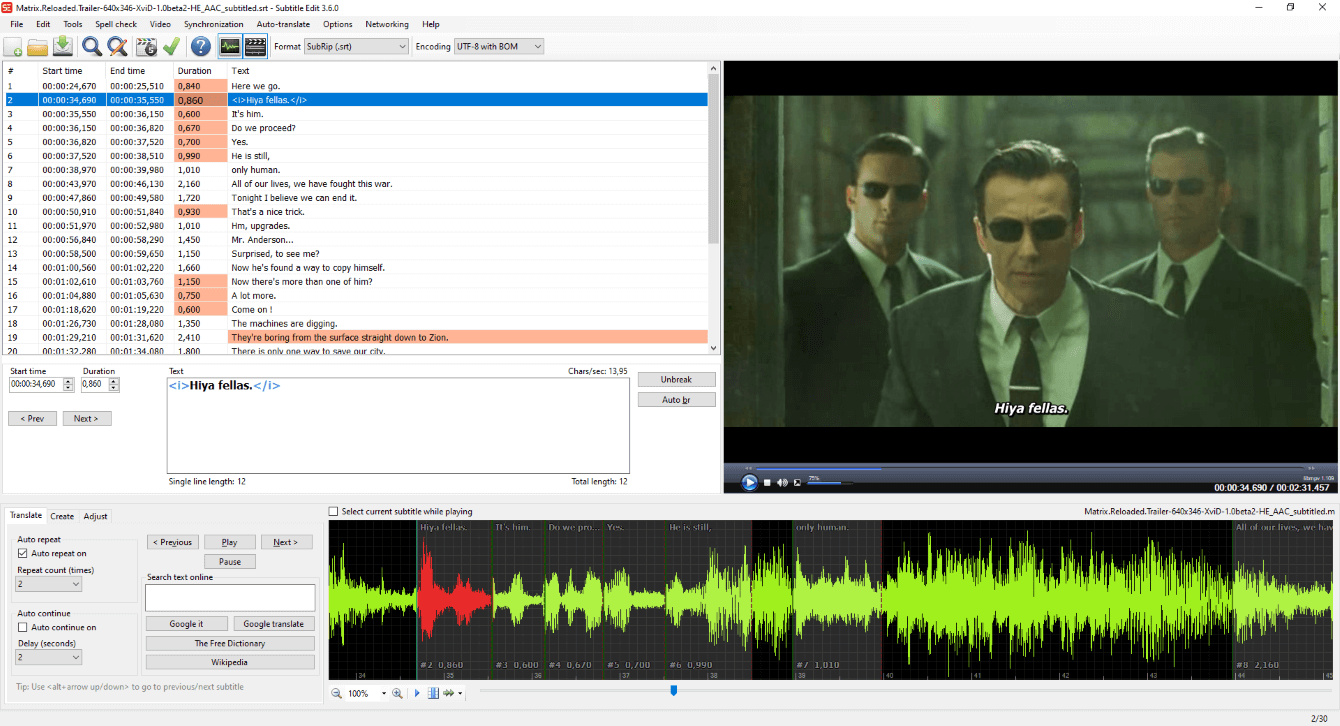
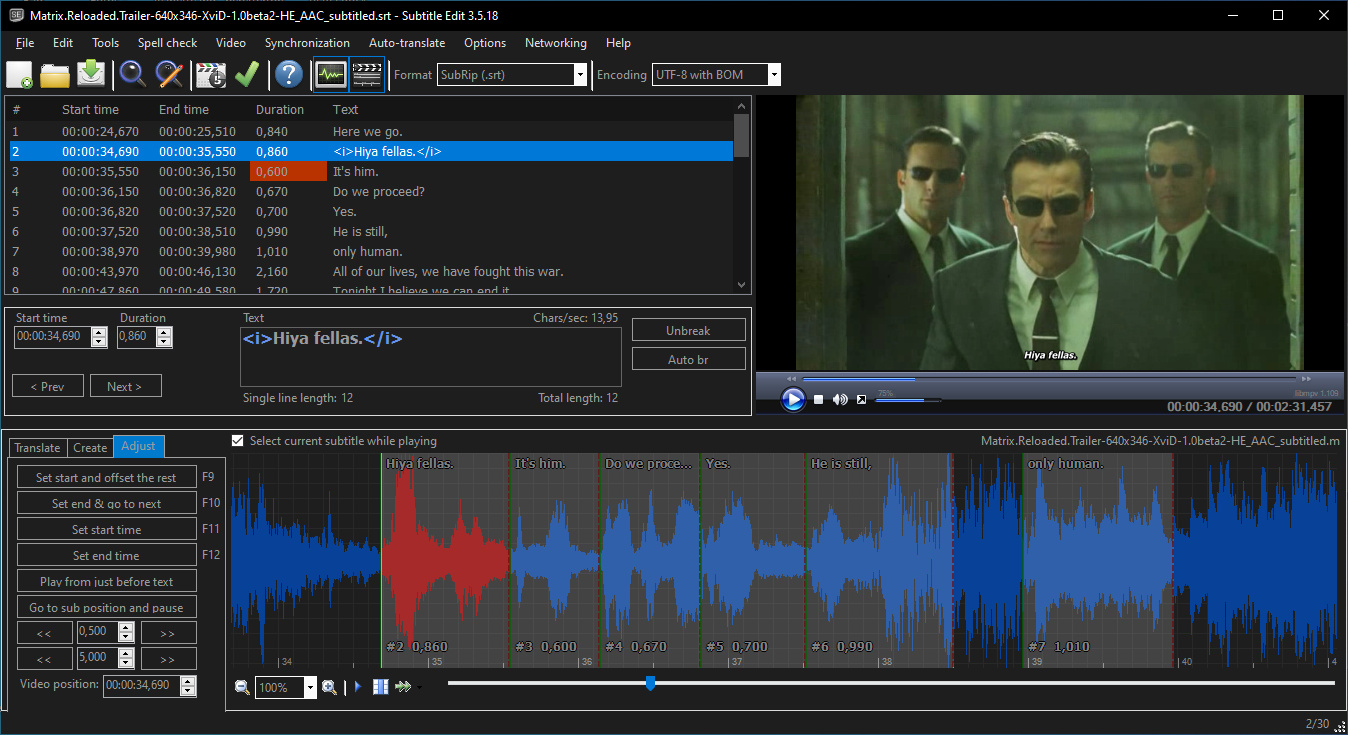
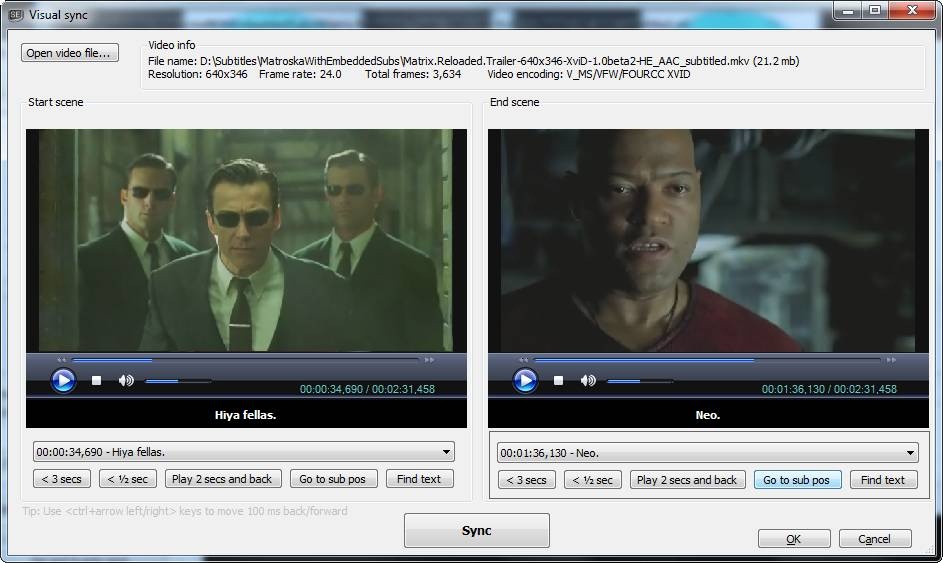
Subtitle Edit is a free editor for video subtitles - a subtitle editor. With SE you can easily adjust a subtitle if it is out of sync with the video and much more. Visually sync/adjust a subtitle (start/end position and speed). Import Blu-ray SUP titles or VobSub sub/idx binary subtitles and OCR to text srt subtitles. SUP to SRT, SUB to SRT. DVD to SRT. Requires Microsoft .NET Framework Version 10 or later.
Free software
OS:


File size: 56MB
Portable version
Old versions
Version history
Alternative software
OS:
File size: 56MB
Portable version
Old versions
Version history
Alternative software
Screenshots
Latest version
Download
Download Subtitle Edit 5.4.0 Windows 64-bit 59MB Win64
Download Subtitle Edit 5.4.0 Mac Silicon ARM 64-bit 132MB MacARM64
Download Subtitle Edit 5.4.0 Mac Intel 64-bit 151MB Mac64
Download Subtitle Edit 5.4.0 Linux 64-bit 132MB Linux64
Flatpak Download Portable and other versions
Portable 
Download Subtitle Edit 5.4.0 Portable Windows ARM 64-bit 59MB WinARM64
Portable Download Subtitle Edit 5.4.0 Linux ARM 56MB Linux ARM64
Download Subtitle Edit 4.0.16 Windows
Download Subtitle Edit 4.0.16 Windows portable
Download old versions

Software License
Supported operating systems
Mac OS Linux Version history / Release notes / Changelog / What's New
v5.4.0 (6th of November 2026)
Subtitle Edit 5.4 collects the work of 12 betas and 4 release candidates.
A summary of the changes since v5.3.0 (full details in the pre-release entries below):
Look and feel:
* A more compact and polished UI - almost all windows redesigned in one modern editor look, with live theme switching
* New SVG icons in all themes and the About window, sharp at any display scale
* New themes: Nord, Midnight Cinema and Sakura - Pastel and Nord also get their own icon sets
* Visual theme picker with preview cards (Settings > Appearance) and a "Cycle theme" shortcut
* Background art for the video player and waveform (new art for the Classic theme too)
* One field look for text boxes, combo boxes and lists; UI font size in px, followed by dialog text
* More consistent dialogs: Escape, button order (Cancel left, OK right), error icons; layout thumbnails in theme colors
* Full screen video controls fade in over the video and are bigger, also on native players
New features:
* Sync subtitle to audio (ffsubsync-style offset and frame rate detection) and Sync audio track with live preview
* YouTube timed text (.ytt/srv3): pens, positions, preview and a styles window
* Export D-Cinema SMPTE 2014 as MXF track file, and Excel dialogue list (.xlsx) with chosen columns
* Check for updates: install and restart (Windows installer, Linux tarball, macOS)
* Custom error rules (regex), auto-wrap while typing, and reload/ask when the file is changed by another program
* Record speech to the text box via microphone (off by default)
* Bookmarks list: import and export
* Many new shortcuts: split line and play, move lines one frame, push-neighbour "Move start/end X ms", copy plain text
Video player and waveform:
* Optional playback speed, previous/next subtitle and toggle subtitles buttons
* FFmpeg player subtitle overlay closer to the mpv preview; faster layout 14 timeline
* Waveform: ASSA lines with the same times move and resize together; pause when stepping one frame
Auto-translate and AI:
* Source and translation side by side, translate selected rows together with context, find and replace in the translation column
* New Opper engine, Bing Region field, llama.cpp CPU/Vulkan builds on Linux, and Generate with AI for the synopsis
OCR:
* Optional video preview in the OCR window, Video OCR of chosen time ranges, keep existing lines in video OCR
* New llama.cpp OCR models: LightOnOCR-3 (4B/0.8B), LFM3-VL 2B and QARI-OCR (Arabic)
* nOCR: many recognition improvements for Latin and Cyrillic; fixed OCR replace list rules in 10 languages
Subtitle formats and export:
* SubRip reader rewritten: tolerant of damaged files, 2.6-12x faster; parser crashes found by fuzzing fixed
* Image-based export draws ASSA lines with their own style and many more ASSA tags (also in Batch convert and seconv)
* Blu-ray sup: HDR (BT.2020 PQ) palette option and smarter palette split
* Remux video: CEA-608/708 as SEI captions in .mp4, caption time offset for .scc/.mcc
* iTunes Timed Text export presets and header template
ASSA:
* ASSA draw: text and shapes, groups, in/out and loop animations, many new (also animated) clip arts
* CapCut-style "Apply advanced effect" gallery with six new caption effects
* Styles, properties, attachments, Set position and Set background redesigned; fonts from [Fonts] previewed
Tools and editing:
* Multiple replace works like SE4: categories, flat rule list with type-in row, "Add rules" window, edit in place
* Spell check: remove words from the dictionary; editable word list regex
* Batch convert: run batch-capable plugins, search box for functions, plain text options
* Get plugins: search box and a bigger window
Translations and engines:
* All language files synced with English; new Romanian and Croatian UI translations
* Updated engines: Crisp ASR v0.8.50, llama.cpp b12110, CrispEmbed v0.17.14, audio.cpp v0.9.4, Qwen3 ASR v0.1.11, yt-dlp 2026.10.26 and Avalonia 12.1.5
A big thank you to everyone who tested the pre-releases, reported issues and
contributed code and translations :)
v5.4.0-rc4 (5th of November 2026)
* Image-based export: draw ASSA lines with their own style (also in Batch convert and seconv)
* Image-based export: support ASSA \r, \rStyle, \fsp, \blur, \be, \fscx, \fscy, \frz, underline and strikeout
* Image-based export: an undrawable ASSA tag no longer drops the line's italic/bold/colour/font
* Copy plain text keeps an empty line between lines (like SE4) - thx OmrSi
* Fix Go to video position ignoring the video offset - thx accessallareas
* Fix OCR to ASSA losing line breaks and tagging tall bottom text as middle - thx robinfire110
* Fix Improve time codes preview playing the default audio track - thx VaLvOnAuTa1981
* Update llama.cpp to b12110
* Update CrispEmbed to v0.17.14
* Update Whisper.cpp advanced-parameter help to 1.9.5 - thx GitGianluc
* Update translations: new strings in all languages (machine translated, needs review)
v5.4.0-rc3 (4th of November 2026)
* llama.cpp advanced translate: add Generate with AI button for the synopsis - thx fraternl
* Hide the Actor column for formats that do not keep actors - thx accessallareas
* Pause video when stepping one frame back/forward - thx accessallareas
* Improve time codes: one prompt for missing models, no dead Download button - thx GitGianluc
* Blu-ray sup: split the palette by need between two objects
* Settings window opens faster
* Fix Auto-translate accepting replies shifted and padded with "..." - thx fraternl
* Fix Qwen3 ASR instant crash on Linux (engine v0.1.11) - thx JavierSanchezQ
* Fix Cut video ignoring SMPTE timing - thx OmrSi
* Fix long names cut off in Waveform toolbar items dialog - thx GitGianluc
* Fix stacked images in About window cross-fade - thx GitGianluc
* Update CrispASR to v0.8.50
* Update Finnish translation - thx KarvaMaha
* Update German translation - thx FunkyKnilch
* Update Hungarian translation
* Update Italian translation - thx GitGianluc
v5.4.0-rc2 (3rd of November 2026)
* Auto-translate: translate selected rows together, with context - thx mmmsh-125
* Auto-translate: find and replace in the translation column - thx mmmsh-125
* Auto-translate: skip more music/lyric line layouts - thx lordvorkosigan1968-cloud
* Blu-ray sup: add HDR (BT.2020 PQ) palette option - thx Victory61
* Bookmarks list: add import and export
* Source view: Ctrl+Enter (Cmd+Enter on macOS) applies changes - thx pdjdev
* Add Croatian UI translation (machine draft, needs review) - thx lordvorkosigan1968-cloud
* Update Avalonia to 12.1.5
* Fix Auto-translate shifting translations when the engine merges two rows - thx mmmsh-125
* Fix List errors time codes ignoring video offset and leading zero hours - thx accessallareas
* Fix toolbar drop-downs hidden under undocked tool windows - thx GrampaWildWilly
* Fix macOS Ctrl+click collapsing a multi-row selection
* Fix SMPTE timing not being applied until refresh - thx OmrSi
* Fix copy text shortcuts adding a trailing new line - thx OmrSi
* Update Chinese Traditional translation - thx love80312
* Update Italian translation - thx bovirus
* Update Japanese translation - thx hisui3393
* Update Korean translation - thx 12si27
* Update Polish translation - thx potplayer-fanpack
v5.4.0-rc1 (1st of November 2026)
* New SVG icons in all themes and the About window, sharp at any display scale
* New layout picker thumbnails drawn in theme colors, restyled spell check and change casing
* Auto-translate: show source and translation side by side, with more room for text
* Auto-translate: let CrispASR MADLAD use GPU builds - thx SMAP-git
* Fix common errors: more compact rules with clearer examples
* Improve Choose alignment, Go to line number and Command palette
* More consistent dialogs: Escape, button order, error icons
* Save as: list favorite subtitle formats first - thx accessallareas
* More dialog text can now be translated
* Fix "Save as" doubling the file extension on macOS (.srt.srt) - thx accessallareas
* Fix OCR line breaks of separated top and bottom text with Auto-break - thx robinfire110
* Fix error log entry from stopping mpv before it started - thx GrampaWildWilly
* Fix Auto-translate changing the subtitle when no text is returned - thx Blackspirits
* Fix Auto-translate losing language variants like pt-PT when switching provider - thx Blackspirits
* Update Japanese translation - thx hisui3393
* Update Polish translation - thx potplayer-fanpack
* Update Portuguese translation - thx Blackspirits
* Update Turkish translation - thx bilimiyorum
v5.4.0-beta12 (31st of October 2026)
* FFmpeg player: subtitle overlay closer to the mpv preview (per-line alignment, inline colors, bold/italic, RTL, second subtitle style, opaque box, justify)
* llama.cpp: pick CPU or Vulkan on Linux, switch builds from the engine settings - thx SMAP-git
* Bing translate: add Region field for regional Azure resources, show the real token error
* Classic theme: new video and waveform background art
* Improve performance of layout 14 timeline and FFmpeg player subtitle preview
* Improve help: recommended local models for translating from English
* Fix waveform click selecting the source line instead of its duplicate - thx Rafatenshii
* Fix "Generate background boxes" emptying the original subtitle - thx bichitoxxx
* Fix error log entries + Themes.zip unpacked on every start with the System theme - thx GrampaWildWilly
* Fix Multiple replace ticking excluded preview lines again
* Fix "push neighbour" shortcuts lengthening a neighbour already under minimum duration
* Fix OCR ASSA auto-alignment tagging top and bottom text as middle in tall images - thx robinfire110
* Fix AutoCompleteBox and Source view borders - thx pdjdev
* seconv: fix LFM vision models losing their OCR prompt
* seconv: fix --ollama-url with a bare host:port
* Update Japanese translation -...
Subtitle Edit 5.4 collects the work of 12 betas and 4 release candidates.
A summary of the changes since v5.3.0 (full details in the pre-release entries below):
Look and feel:
* A more compact and polished UI - almost all windows redesigned in one modern editor look, with live theme switching
* New SVG icons in all themes and the About window, sharp at any display scale
* New themes: Nord, Midnight Cinema and Sakura - Pastel and Nord also get their own icon sets
* Visual theme picker with preview cards (Settings > Appearance) and a "Cycle theme" shortcut
* Background art for the video player and waveform (new art for the Classic theme too)
* One field look for text boxes, combo boxes and lists; UI font size in px, followed by dialog text
* More consistent dialogs: Escape, button order (Cancel left, OK right), error icons; layout thumbnails in theme colors
* Full screen video controls fade in over the video and are bigger, also on native players
New features:
* Sync subtitle to audio (ffsubsync-style offset and frame rate detection) and Sync audio track with live preview
* YouTube timed text (.ytt/srv3): pens, positions, preview and a styles window
* Export D-Cinema SMPTE 2014 as MXF track file, and Excel dialogue list (.xlsx) with chosen columns
* Check for updates: install and restart (Windows installer, Linux tarball, macOS)
* Custom error rules (regex), auto-wrap while typing, and reload/ask when the file is changed by another program
* Record speech to the text box via microphone (off by default)
* Bookmarks list: import and export
* Many new shortcuts: split line and play, move lines one frame, push-neighbour "Move start/end X ms", copy plain text
Video player and waveform:
* Optional playback speed, previous/next subtitle and toggle subtitles buttons
* FFmpeg player subtitle overlay closer to the mpv preview; faster layout 14 timeline
* Waveform: ASSA lines with the same times move and resize together; pause when stepping one frame
Auto-translate and AI:
* Source and translation side by side, translate selected rows together with context, find and replace in the translation column
* New Opper engine, Bing Region field, llama.cpp CPU/Vulkan builds on Linux, and Generate with AI for the synopsis
OCR:
* Optional video preview in the OCR window, Video OCR of chosen time ranges, keep existing lines in video OCR
* New llama.cpp OCR models: LightOnOCR-3 (4B/0.8B), LFM3-VL 2B and QARI-OCR (Arabic)
* nOCR: many recognition improvements for Latin and Cyrillic; fixed OCR replace list rules in 10 languages
Subtitle formats and export:
* SubRip reader rewritten: tolerant of damaged files, 2.6-12x faster; parser crashes found by fuzzing fixed
* Image-based export draws ASSA lines with their own style and many more ASSA tags (also in Batch convert and seconv)
* Blu-ray sup: HDR (BT.2020 PQ) palette option and smarter palette split
* Remux video: CEA-608/708 as SEI captions in .mp4, caption time offset for .scc/.mcc
* iTunes Timed Text export presets and header template
ASSA:
* ASSA draw: text and shapes, groups, in/out and loop animations, many new (also animated) clip arts
* CapCut-style "Apply advanced effect" gallery with six new caption effects
* Styles, properties, attachments, Set position and Set background redesigned; fonts from [Fonts] previewed
Tools and editing:
* Multiple replace works like SE4: categories, flat rule list with type-in row, "Add rules" window, edit in place
* Spell check: remove words from the dictionary; editable word list regex
* Batch convert: run batch-capable plugins, search box for functions, plain text options
* Get plugins: search box and a bigger window
Translations and engines:
* All language files synced with English; new Romanian and Croatian UI translations
* Updated engines: Crisp ASR v0.8.50, llama.cpp b12110, CrispEmbed v0.17.14, audio.cpp v0.9.4, Qwen3 ASR v0.1.11, yt-dlp 2026.10.26 and Avalonia 12.1.5
A big thank you to everyone who tested the pre-releases, reported issues and
contributed code and translations :)
v5.4.0-rc4 (5th of November 2026)
* Image-based export: draw ASSA lines with their own style (also in Batch convert and seconv)
* Image-based export: support ASSA \r, \rStyle, \fsp, \blur, \be, \fscx, \fscy, \frz, underline and strikeout
* Image-based export: an undrawable ASSA tag no longer drops the line's italic/bold/colour/font
* Copy plain text keeps an empty line between lines (like SE4) - thx OmrSi
* Fix Go to video position ignoring the video offset - thx accessallareas
* Fix OCR to ASSA losing line breaks and tagging tall bottom text as middle - thx robinfire110
* Fix Improve time codes preview playing the default audio track - thx VaLvOnAuTa1981
* Update llama.cpp to b12110
* Update CrispEmbed to v0.17.14
* Update Whisper.cpp advanced-parameter help to 1.9.5 - thx GitGianluc
* Update translations: new strings in all languages (machine translated, needs review)
v5.4.0-rc3 (4th of November 2026)
* llama.cpp advanced translate: add Generate with AI button for the synopsis - thx fraternl
* Hide the Actor column for formats that do not keep actors - thx accessallareas
* Pause video when stepping one frame back/forward - thx accessallareas
* Improve time codes: one prompt for missing models, no dead Download button - thx GitGianluc
* Blu-ray sup: split the palette by need between two objects
* Settings window opens faster
* Fix Auto-translate accepting replies shifted and padded with "..." - thx fraternl
* Fix Qwen3 ASR instant crash on Linux (engine v0.1.11) - thx JavierSanchezQ
* Fix Cut video ignoring SMPTE timing - thx OmrSi
* Fix long names cut off in Waveform toolbar items dialog - thx GitGianluc
* Fix stacked images in About window cross-fade - thx GitGianluc
* Update CrispASR to v0.8.50
* Update Finnish translation - thx KarvaMaha
* Update German translation - thx FunkyKnilch
* Update Hungarian translation
* Update Italian translation - thx GitGianluc
v5.4.0-rc2 (3rd of November 2026)
* Auto-translate: translate selected rows together, with context - thx mmmsh-125
* Auto-translate: find and replace in the translation column - thx mmmsh-125
* Auto-translate: skip more music/lyric line layouts - thx lordvorkosigan1968-cloud
* Blu-ray sup: add HDR (BT.2020 PQ) palette option - thx Victory61
* Bookmarks list: add import and export
* Source view: Ctrl+Enter (Cmd+Enter on macOS) applies changes - thx pdjdev
* Add Croatian UI translation (machine draft, needs review) - thx lordvorkosigan1968-cloud
* Update Avalonia to 12.1.5
* Fix Auto-translate shifting translations when the engine merges two rows - thx mmmsh-125
* Fix List errors time codes ignoring video offset and leading zero hours - thx accessallareas
* Fix toolbar drop-downs hidden under undocked tool windows - thx GrampaWildWilly
* Fix macOS Ctrl+click collapsing a multi-row selection
* Fix SMPTE timing not being applied until refresh - thx OmrSi
* Fix copy text shortcuts adding a trailing new line - thx OmrSi
* Update Chinese Traditional translation - thx love80312
* Update Italian translation - thx bovirus
* Update Japanese translation - thx hisui3393
* Update Korean translation - thx 12si27
* Update Polish translation - thx potplayer-fanpack
v5.4.0-rc1 (1st of November 2026)
* New SVG icons in all themes and the About window, sharp at any display scale
* New layout picker thumbnails drawn in theme colors, restyled spell check and change casing
* Auto-translate: show source and translation side by side, with more room for text
* Auto-translate: let CrispASR MADLAD use GPU builds - thx SMAP-git
* Fix common errors: more compact rules with clearer examples
* Improve Choose alignment, Go to line number and Command palette
* More consistent dialogs: Escape, button order, error icons
* Save as: list favorite subtitle formats first - thx accessallareas
* More dialog text can now be translated
* Fix "Save as" doubling the file extension on macOS (.srt.srt) - thx accessallareas
* Fix OCR line breaks of separated top and bottom text with Auto-break - thx robinfire110
* Fix error log entry from stopping mpv before it started - thx GrampaWildWilly
* Fix Auto-translate changing the subtitle when no text is returned - thx Blackspirits
* Fix Auto-translate losing language variants like pt-PT when switching provider - thx Blackspirits
* Update Japanese translation - thx hisui3393
* Update Polish translation - thx potplayer-fanpack
* Update Portuguese translation - thx Blackspirits
* Update Turkish translation - thx bilimiyorum
v5.4.0-beta12 (31st of October 2026)
* FFmpeg player: subtitle overlay closer to the mpv preview (per-line alignment, inline colors, bold/italic, RTL, second subtitle style, opaque box, justify)
* llama.cpp: pick CPU or Vulkan on Linux, switch builds from the engine settings - thx SMAP-git
* Bing translate: add Region field for regional Azure resources, show the real token error
* Classic theme: new video and waveform background art
* Improve performance of layout 14 timeline and FFmpeg player subtitle preview
* Improve help: recommended local models for translating from English
* Fix waveform click selecting the source line instead of its duplicate - thx Rafatenshii
* Fix "Generate background boxes" emptying the original subtitle - thx bichitoxxx
* Fix error log entries + Themes.zip unpacked on every start with the System theme - thx GrampaWildWilly
* Fix Multiple replace ticking excluded preview lines again
* Fix "push neighbour" shortcuts lengthening a neighbour already under minimum duration
* Fix OCR ASSA auto-alignment tagging top and bottom text as middle in tall images - thx robinfire110
* Fix AutoCompleteBox and Source view borders - thx pdjdev
* seconv: fix LFM vision models losing their OCR prompt
* seconv: fix --ollama-url with a bare host:port
* Update Japanese translation -...
View full changelog
All features
Create/adjust/sync/translate subtitle lines
Convert between SubRib, MicroDVD, Advanced Sub Station Alpha, Sub Station Alpha, D-Cinema, SAMI, you-tube sbv, and many more (300+ different formats!)
Cool audio visualizer control - can display wave form and/or spectrogram
Video player uses mpv, DirectShow, or VLC media player
Visually sync/adjust a subtitle (start/end position and speed)
Audio to text (speech recognition) via Whisper or Vosk/Kaldi
Auto Translation via Google translate
Rip subtitles from a (decrypted) dvd
Import and OCR VobSub sub/idx binary subtitles
Import and OCR Blu-ray .sup files - bd sup reading is based on Java code from BDSup2Sub by 0xdeadbeef)
Can open subtitles embedded inside Matroska files
Can open subtitles (text, closed captions, VobSub) embedded inside mp4/mv4 files
Can open/OCR XSub subtitles embedded inside divx/avi files
Can open/OCR DVB and teletext subtitles embedded inside .ts/.m2ts (Transport Stream) files
Can open/OCR Blu-ray subtitles embedded inside .m2ts (Transport Stream) files
Can read and write both UTF-8 and other unicode files and ANSI (support for all languages/encodings on the pc!)
Sync: Show texts earlier/later + point synchronization + synchronization via other subtitle
Merge/split subtitles
Adjust display time
Fix common errors wizard
Spell checking via Libre Office dictionaries (many dictionaries available)
Remove text for hear impaired (HI)
Renumbering
Effects: Typewriter and karaoke
History/undo manager (Undo=Ctrl+z, Redo=Ctrl+y)
Compare subtitles
Multiple search and replace
Change casing using names dictionary
Merge short lines/split long lines
Export to PNG images (+bdn xml), Adobe Encore FAB image script, VobSub, Blu-ray sup, EBU stl, PAC, and plain text
Convert between SubRib, MicroDVD, Advanced Sub Station Alpha, Sub Station Alpha, D-Cinema, SAMI, you-tube sbv, and many more (300+ different formats!)
Cool audio visualizer control - can display wave form and/or spectrogram
Video player uses mpv, DirectShow, or VLC media player
Visually sync/adjust a subtitle (start/end position and speed)
Audio to text (speech recognition) via Whisper or Vosk/Kaldi
Auto Translation via Google translate
Rip subtitles from a (decrypted) dvd
Import and OCR VobSub sub/idx binary subtitles
Import and OCR Blu-ray .sup files - bd sup reading is based on Java code from BDSup2Sub by 0xdeadbeef)
Can open subtitles embedded inside Matroska files
Can open subtitles (text, closed captions, VobSub) embedded inside mp4/mv4 files
Can open/OCR XSub subtitles embedded inside divx/avi files
Can open/OCR DVB and teletext subtitles embedded inside .ts/.m2ts (Transport Stream) files
Can open/OCR Blu-ray subtitles embedded inside .m2ts (Transport Stream) files
Can read and write both UTF-8 and other unicode files and ANSI (support for all languages/encodings on the pc!)
Sync: Show texts earlier/later + point synchronization + synchronization via other subtitle
Merge/split subtitles
Adjust display time
Fix common errors wizard
Spell checking via Libre Office dictionaries (many dictionaries available)
Remove text for hear impaired (HI)
Renumbering
Effects: Typewriter and karaoke
History/undo manager (Undo=Ctrl+z, Redo=Ctrl+y)
Compare subtitles
Multiple search and replace
Change casing using names dictionary
Merge short lines/split long lines
Export to PNG images (+bdn xml), Adobe Encore FAB image script, VobSub, Blu-ray sup, EBU stl, PAC, and plain text
Sections/Browse similar tools
Alternative to Subtitle Edit
(Latest version updated)Aegisub (Oct 17, 2026)
AHD Subtitles Maker (Apr 30, 2022)
DivXLand Media Subtitler (Apr 16, 2021)
DVDSubEdit (Sep 6, 2011)
Jubler (Jul 1, 2026)
Sub Station Alpha (Jun 27, 2000)
SubExtractor (Jan 26, 2013)
SubRip (Nov 14, 2018)
Subtitld (Apr 23, 2026)
Subtitle Workshop (Oct 17, 2026)
Txt2VobSub (Jun 9, 2016)
VobSub (Dec 11, 2002)
Guides and How to's
How to sync a subtitle using Subtitle Edit
- ReadSubtitle Edit video tutorials
View all guides with guide description here
Acronyms / Also Known As
Download Subtitle Edit Portable download from the Download links under Download and Download other versions!
Notify me when software updated or report software
| 87 reviews, Showing 1 to 5 reviews |
For a tool I've been using for so long, the changes were generally unwarranted and didn't improve my workflow. I have hundreds of custom rules set that won't carry onto 5.1.0. Had to downgrade back to 4.
Review by kagetsu on
Aug 3, 2026 Version: 5.1.0
OS: Windows 10 64-bit Ease of use: 5/10
Functionality: 5/10
Value for money: 10/10
Overall: 5/10
Using for quite some time and love it. Really the best so far.
Moving from v4 to v5, the visual sync is not working with subtitle opened.
Moving from v4 to v5, the visual sync is not working with subtitle opened.
Review by on
Jul 30, 2026 Version: 5.1
OS: Windows 11 64-bit Ease of use: 10/10
Functionality: 10/10
Value for money: 10/10
Overall: 10/10
Rating by kepler42 on
Nov 1, 2025 Version: 4.0.14
OS: Windows 10 64-bit Ease of use: 7/10
Functionality: 9/10
Value for money: 10/10
Overall: 9/10
A very good software
Review by jopavirando on
Oct 16, 2025 Version: 4.0.13
OS: Windows 11 64-bit Ease of use: 10/10
Functionality: 10/10
Value for money: 10/10
Overall: 10/10
Rating by Denis on
Sep 9, 2024 Version: 4.0.8
OS: Windows 11 64-bit Ease of use: 9/10
Functionality: 9/10
Value for money: 10/10
Overall: 9/10
| 87 reviews, Showing 1 to 5 reviews |
| 1 tool hits, Showing 1 to 1 tools |
Explanation:
NEW SOFTWARE= New tool since your last visit
NEW VERSION= New version since your last visit
NEW REVIEW= New review since your last visit
NEW VERSION= New version
Latest version
Version number / Beta version number / Update version number and when it whas released.
Type and download
NO MORE UPDATES? = The software hasn't been updated in over 2 years.
NO LONGER DEVELOPED = The software hasn't been updated in over 5 years.
RECENTLY UPDATED = The software has been updated the last 31 days.
Freeware = Download Free software.
Freeware Trialware = Download Free software but some parts are trial/shareware.
Free software = Download Free software and also open source code also known as FOSS (Free and Open Source Software).
Free software Trialware = Download Free software and also open source code but some parts are trial/shareware.
Freeware Ads = Download Free software but supported by advertising, usually with a included browser toolbar. It may be disabled when installing or after installation.
Free software Ads = Free Download software and open source code but supported by advertising, usually with a included browser toolbar. It may be disabled when installing or after installation.
Trialware = Also called shareware or demo. Free Trial version available for download and testing with usually a time limit or limited functions.
Payware = No demo or trial available.
Portable version = A portable/standalone version is available. No installation is required.
v1.0.1 = Latest version available.
Download beta = It could be a Beta, RC(Release Candidate) or an Alpha / Nightly / Unstable version of the software.
Download 15MB = A direct link to the software download.
Win = Windows download version for 32-bit and 64-bit Windows.
Win64 = Windows 64-bit download version for 64-bit Windows.
WinARM64 = Windows 64-bit ARM download version for Windows ARM64/AArch64.
Mac = Mac download version for 64-bit Mac OS Intel/ARM64/AArch64.
MacARM64 = Mac Silicon download version for 64-bit Mac OS ARM64/AArch64.
Mac64 = Mac OS download version for 64-bit Intel Mac OS.
Linux = Linux download version.
Linux64 = Linux download version for 64bit Linux.
Linux ARM = Linux download version for Linux ARM64/AArch64.
Portable = Portable version. No installation is required.
Ad-Supported = The software is bundled with advertising. Be careful when you install the software and disable addons that you don't want!
Visit developers site = A link to the software developer site.
Download (mirror link) = A mirror link to the software download. It may not contain the latest versions.
Download old versions = Free downloads of previous versions of the program.
Download 64-bit version = If you have a 64bit operating system you can download this version.
Download portable version = Portable/Standalone version meaning that no installation is required, just extract the files to a folder and run directly.
Portable version available = Download the portable version and you can just extract the files and run the program without installation.
Old versions available = Download old versions of the program.
Version history available = Complete changelog on our site.
= Windows version available.
= Mac OS version available.
= Linux version available.
Our hosted software are virus and malware scanned with several antivirus programs using www.virustotal.com. (NOTE! Just one virustotal warning is 99.9% a false positive. And some software might receive 2-6 warnings but it's if they are not all same virus/trojan then it's 99% false positives.)
Rating
Rating from 0-10.
NEW SOFTWARE= New tool since your last visit
NEW VERSION= New version since your last visit
NEW REVIEW= New review since your last visit
NEW VERSION= New version
Latest version
Version number / Beta version number / Update version number and when it whas released.
Type and download
NO MORE UPDATES? = The software hasn't been updated in over 2 years.
NO LONGER DEVELOPED = The software hasn't been updated in over 5 years.
RECENTLY UPDATED = The software has been updated the last 31 days.
Freeware = Download Free software.
Freeware Trialware = Download Free software but some parts are trial/shareware.
Free software = Download Free software and also open source code also known as FOSS (Free and Open Source Software).
Free software Trialware = Download Free software and also open source code but some parts are trial/shareware.
Freeware Ads = Download Free software but supported by advertising, usually with a included browser toolbar. It may be disabled when installing or after installation.
Free software Ads = Free Download software and open source code but supported by advertising, usually with a included browser toolbar. It may be disabled when installing or after installation.
Trialware = Also called shareware or demo. Free Trial version available for download and testing with usually a time limit or limited functions.
Payware = No demo or trial available.
Portable version = A portable/standalone version is available. No installation is required.
v1.0.1 = Latest version available.
Download beta = It could be a Beta, RC(Release Candidate) or an Alpha / Nightly / Unstable version of the software.
Download 15MB = A direct link to the software download.
Win = Windows download version for 32-bit and 64-bit Windows.
Win64 = Windows 64-bit download version for 64-bit Windows.
WinARM64 = Windows 64-bit ARM download version for Windows ARM64/AArch64.
Mac = Mac download version for 64-bit Mac OS Intel/ARM64/AArch64.
MacARM64 = Mac Silicon download version for 64-bit Mac OS ARM64/AArch64.
Mac64 = Mac OS download version for 64-bit Intel Mac OS.
Linux = Linux download version.
Linux64 = Linux download version for 64bit Linux.
Linux ARM = Linux download version for Linux ARM64/AArch64.
Portable = Portable version. No installation is required.
Ad-Supported = The software is bundled with advertising. Be careful when you install the software and disable addons that you don't want!
Visit developers site = A link to the software developer site.
Download (mirror link) = A mirror link to the software download. It may not contain the latest versions.
Download old versions = Free downloads of previous versions of the program.
Download 64-bit version = If you have a 64bit operating system you can download this version.
Download portable version = Portable/Standalone version meaning that no installation is required, just extract the files to a folder and run directly.
Portable version available = Download the portable version and you can just extract the files and run the program without installation.
Old versions available = Download old versions of the program.
Version history available = Complete changelog on our site.
= Windows version available. = Mac OS version available. = Linux version available.Our hosted software are virus and malware scanned with several antivirus programs using www.virustotal.com. (NOTE! Just one virustotal warning is 99.9% a false positive. And some software might receive 2-6 warnings but it's if they are not all same virus/trojan then it's 99% false positives.)
Rating
Rating from 0-10.
Browse software by sections
All In One Blu-ray Converters (9)
All In One DVD Converters (12)
All In One MKV to MP4, Blu-ray, UHD (11)
All In One Video Converters (19)
Animation (3D, 2D Animation) (13)
Audio Editors (23)
Audio Encoders (80)
Audio Players (19)
Authoring (Blu-ray, UHD, AVCHD) (13)
Authoring (DivX) (4)
Authoring (DVD) (26)
Authoring (SVCD, VCD) (9)
Bitrate Calculators (7)
Blu-ray to AVI, MKV, MP4 (15)
Blu-ray to Blu-ray, AVCHD (10)
Burn (CD,DVD,Blu-ray) (24)
Camcorders, DV, HDV, AVCHD (31)
Capture TV, DVD, VCR (30)
CD, DVD, Blu-ray recovery (3)
Codec Packs (6)
All In One DVD Converters (12)
All In One MKV to MP4, Blu-ray, UHD (11)
All In One Video Converters (19)
Animation (3D, 2D Animation) (13)
Audio Editors (23)
Audio Encoders (80)
Audio Players (19)
Authoring (Blu-ray, UHD, AVCHD) (13)
Authoring (DivX) (4)
Authoring (DVD) (26)
Authoring (SVCD, VCD) (9)
Bitrate Calculators (7)
Blu-ray to AVI, MKV, MP4 (15)
Blu-ray to Blu-ray, AVCHD (10)
Burn (CD,DVD,Blu-ray) (24)
Camcorders, DV, HDV, AVCHD (31)
Capture TV, DVD, VCR (30)
CD, DVD, Blu-ray recovery (3)
Codec Packs (6)
Codec, Video Identifiers (31)
Codecs , Renderers (68)
Decrypters (DVD Rippers) (16)
Decrypters (UHD, Blu-ray Rippers) (8)
DigitalTV, DVB, IPTV (40)
DVD to DVD (20)
DVD to MP4, MKV, H264, H265 (16)
DVD to VCD, SVCD (5)
DVD to XviD, AVI, DivX (16)
ISO, Image (14)
Linux Video Tools (219)
MacOS Video Tools (253)
Media (Blu-ray, DVD, CD) (9)
Media Center, HTPC (25)
Other Useful Tools (136)
Photo Blu-ray, DVD, SlideShow (8)
Portable (Mobile, PSP) (35)
Region Free Tools (5)
Screen capture , Screen recording (25)
Screenshots , Thumbnails (13)
Codecs , Renderers (68)
Decrypters (DVD Rippers) (16)
Decrypters (UHD, Blu-ray Rippers) (8)
DigitalTV, DVB, IPTV (40)
DVD to DVD (20)
DVD to MP4, MKV, H264, H265 (16)
DVD to VCD, SVCD (5)
DVD to XviD, AVI, DivX (16)
ISO, Image (14)
Linux Video Tools (219)
MacOS Video Tools (253)
Media (Blu-ray, DVD, CD) (9)
Media Center, HTPC (25)
Other Useful Tools (136)
Photo Blu-ray, DVD, SlideShow (8)
Portable (Mobile, PSP) (35)
Region Free Tools (5)
Screen capture , Screen recording (25)
Screenshots , Thumbnails (13)
Subtitle Editors, Converters (72)
Tag Editors (4)
Video Compare Software (6)
Video Demultiplexers, Multiplexers (66)
Video Editors (Advanced, NLE) (37)
Video Editors (Basic) (58)
Video Editors (H264, MP4, MKV, MTS) (21)
Video Editors (Lossless) (7)
Video Editors (MPG, DVD) (16)
Video Editors (WMV, AVI) (15)
Video Encoders (AV1, VP8, VP9) (2)
Video Encoders (AVI, WMV) (38)
Video Encoders (H264, H265, MP4, MKV) (45)
Video Encoders (MPG, DVD) (23)
Video Encoders , Converters (155)
Video Frameservers (9)
Video Players (48)
Video Repair, Fix (24)
Video Scripting (10)
Video Streaming (20)
Tag Editors (4)
Video Compare Software (6)
Video Demultiplexers, Multiplexers (66)
Video Editors (Advanced, NLE) (37)
Video Editors (Basic) (58)
Video Editors (H264, MP4, MKV, MTS) (21)
Video Editors (Lossless) (7)
Video Editors (MPG, DVD) (16)
Video Editors (WMV, AVI) (15)
Video Encoders (AV1, VP8, VP9) (2)
Video Encoders (AVI, WMV) (38)
Video Encoders (H264, H265, MP4, MKV) (45)
Video Encoders (MPG, DVD) (23)
Video Encoders , Converters (155)
Video Frameservers (9)
Video Players (48)
Video Repair, Fix (24)
Video Scripting (10)
Video Streaming (20)