
Help us keep the list up to date and submit new video software here.
Tool
Description
Type
Rating
Reviews
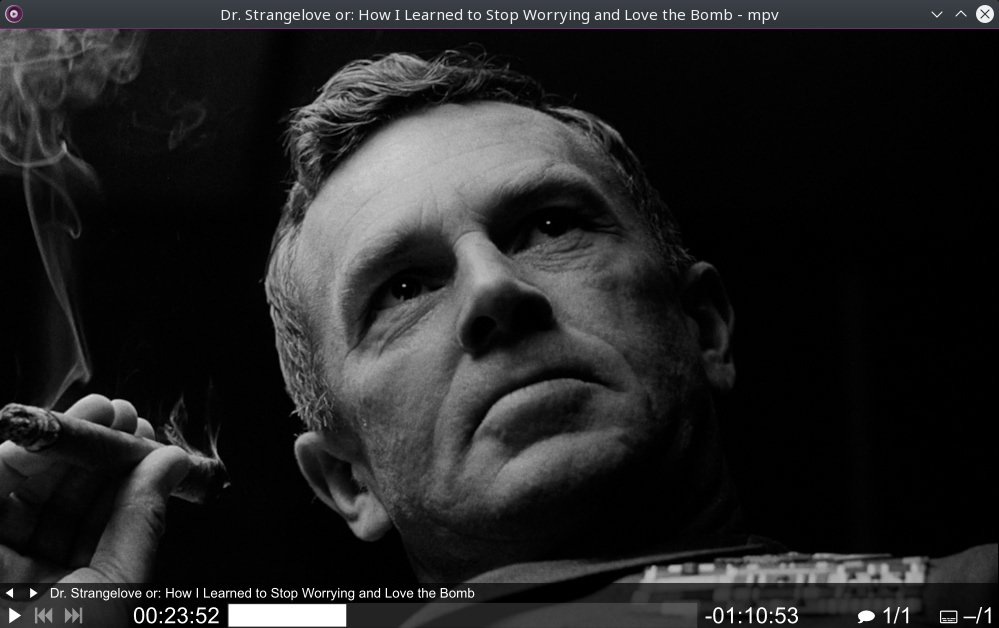
mpv is a video player and a fork of mplayer2 and MPlayer. It shares some features with the former projects while introducing many more. While mpv has no official GUI, it has a small controller that is triggered by mouse movement. mpv has an OpenGL based video output that is capable of many features loved by videophiles, such as video scaling with popular high quality algorithms, color management, frame timing, interpolation, and more.
Free software
OS:


File size: 31MB
Portable version
Other versions
Old versions
Version history
Alternative software
OS:
File size: 31MB
Portable version
Other versions
Old versions
Version history
Alternative software
Screenshots
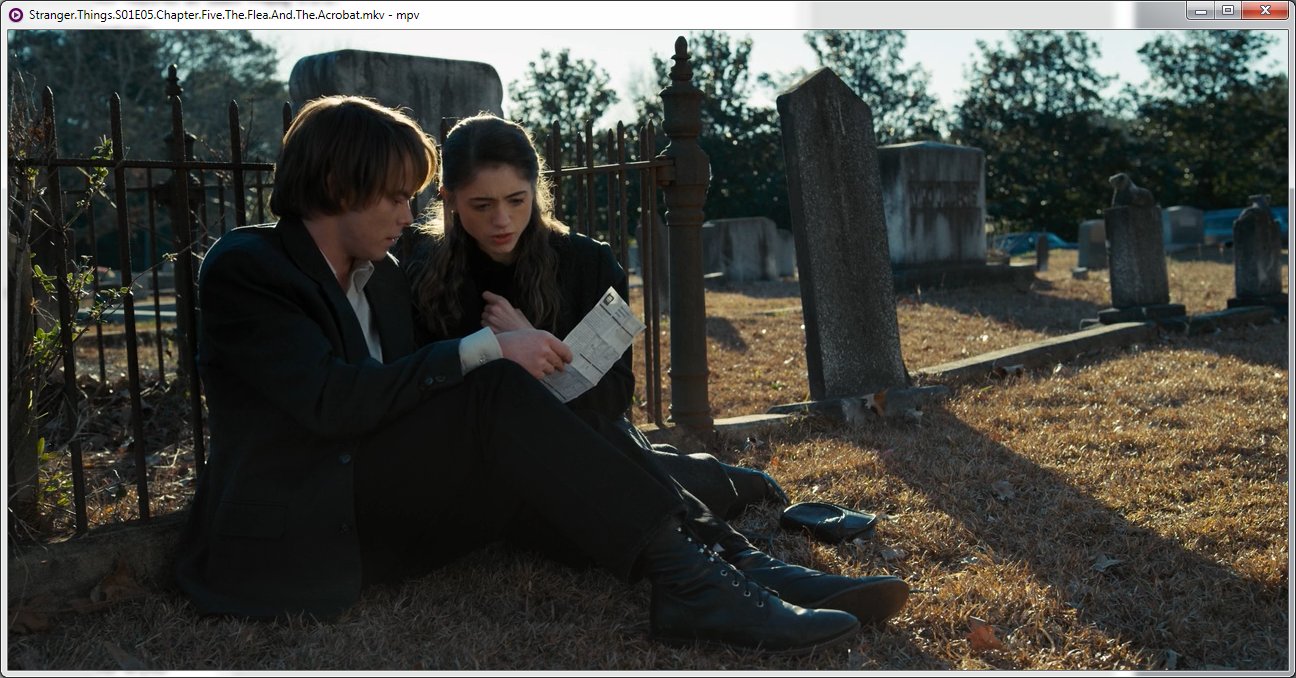

Latest version
Download
Download mpv 0.41.0 Windows 64-bit 23MB Win64
Portable 
Download mpv 0.41.0 Mac Silicon ARM 64-bit 31MB MacARM64
Download mpv 0.41.0 Mac Intel 64-bit 31MB Mac64
Download mpv 0.41.0 Linux Linux
Download Beta, Portable and other versions
Download mpv Nigthly Portable Windows 64-bit Win64
Portable Download mpv Nigthly Mac Mac
Download mpv 0.41.0 v3 Windows 64-bit, it has these instructions enabled by default: avx avx2 bmi bmi2 fma lzcnt movbe sse3 sse4 sse4.1 sse4.2 ssse3 xsave sahf mwait crc32 cx16 popcnt f16c
Download old versions

Software License
Supported operating systems
Mac OS Linux More information and other downloads
Download mpv-config for Mac - This is a collection of MPV configuration files, intended for high quality rendering of traditional live TV and video disc formats. On Macs, you can download and install them in your ~[user profile]/.config/mpv folder.
Download mpv-scripts - A collection of scripts written for mpv over the years.
Download mpv-scripts - A collection of scripts written for mpv over the years.
Version history / Release notes / Changelog / What's New
v0.41.0
We are excited to announce the release of mpv 0.41.0.
Key highlights:
The libplacebo based gpu-next is now the default, instead of gpu
Vulkan hardware decoding is preferred over other APIs
New context_menu.lua script for right-click context menus
AAudio backend for modern, JNI-free audio output on Android
Improved default color management for gpu-next, and handling on Wayland
Color representation protocol support for Wayland
Tablet input support for Wayland
Clipboard writing support for Wayland and a clipboard backend for X11
Ambient light support on Linux (using sysfs ALS)
Built-in helpers to register mpv as a media app on Windows
This release requires FFmpeg 6.1 or newer and libplacebo 6.338.2 or newer.
Features
New
clipboard-wayland: support clipboard writing
wayland: add support for wp-color-representation-v1
wayland: tablet input support
vo_gpu_next: add support for blend-subtitles=video
meson: add mpv-register and mpv-unregister helpers on Windows
context_menu.lua: add this script
select.lua: add edit-config-file and edit-input-conf
osc.lua: add indicator for buffering/loading
osdep/linux-als: support 'ambient-light' property on Linux
clipboard-x11: add x11 clipboard backend
ao/aaudio: implement native AAudio backend for Android
Changed
vd_lavc: prefer Vulkan hwdec when available
vd_lavc: prefer non-copy hwdec before falling back to -copy variant
vo: move vo_mediacodec_embed to not be the default on Android
sub/osd_libass: don't rerender OSD if not changed
vo: prefer vo_gpu_next over vo_gpu by default
vo_gpu_next: respect ICC profile color space over any metadata
vo_gpu_next: linearize sRGB as a pure 2.2 power function
meson: warn if building with SDL2 due to known problems
osxbundle: make bundle category configurable and default to video
ao_pipewire: avoid setting any media.role by default
Options and Commands
Added
sub: add control for libass caching options (glyph-limit, bitmap-max-size)
vo: add options to control background tile appearance (transparency)
command: add default and forced flags to the track add commands
vo_gpu_next: add options to control subtitle peak for HDR output
video/out/d3d11: add d3d11 composition mode support
vd_lavc: add --hwdec-threads
stream_bluray: add --bluray-angle
vo_gpu_next: add options to control output colorspace metadata more precisely
sub: make --sub-fix-timing configurable
vo_gpu_next: add --hdr-reference-white
audio/out: add --audio-set-media-role
Changed
options: revert --prefetch-playlist default back to 'no'
vo_gpu_next: change --target-colorspace-hint to 'auto' by default
options: handle runtime --wid change
options: reduce swapchain-depth to 2 by default
screenshot: add osd and scaled flags to screenshot commands
Fixes and Minor Enhancements
vo_kitty: add auto-multiplexer-passthrough option
vd_lavc: enable FFv1 hwaccel by default
clipboard-wayland: prevent reading from hung up fd
demux_mkv: fix compilation after deprecated definitions removal
filters: handle flipping video if displaymatrix indicates so
player/scripting: fix race condition when destroying clients
{osd,msg}: use PU codepoints for escape codes instead of invalid UTF-8
vo_dmabuf_wayland: only load needed hardware decoding drivers
video/image_writer: tag accurate bit depth
demux_lavf: fix unconstrained cache size with wrapped AVFrame packets
libarchive: fix reading name of certain UTF-8 files
sub/sd_lavc: fix decoding with libaribb24
ao_avfoundation: fix memory leak
osc.lua: fix volume icon not updating while paused
context_wayland: implement target_csp for wayland
vo_gpu: fix target colorspace for redrawn frames
vo_dmabuf_wayland: don't set HDR metadata on SDR transfers
vo_gpu_next: don't do partial updates on hint luminance
sub/ass_mp: add missing padding for ass packer
stream_dvb: allow to enforce DVB-S/T for old zap format channels.conf
demux_libarchive: fix reading archives with '%' in stream URL path
vo_gpu_next: allow UINT upload if no other format is supported
ytdl_hook.lua: fix incorrect default format used with yt-dlp
vo_gpu_next: allow unsetting LUTs
stream_bluray: use bd_get_main_title() to get main title
vo_gpu_next: when tone-mapping, set better maxCLL value
stream_libarchive: seek source stream to 0 before probing
path-unix: support ~~desktop path expansion
ytdl_hook.lua: don't crash if playlist entries don't have an usable URL
mac/vulkan: fix frame not displayed when paused
mac/common: render first frame on init if possible
video/out/w32_common: support --wid=0
demux_mkv: map and expose hearing/visual impaired flags
player/misc: show percentage progress for --stream-dump
command: fix null dereference for invalid command in input-commands
cplugin: fix missing init of pfn_mpv_get_time_ns
vo_dmabuf_wayland: actually reuse OSD buffers
mp_image: add support for AVAlphaMode
vo_gpu_next: add --border-background=blur and --background-blur-radius
demux/cue: fix crash when there are no tracks
vf_format: add some basic HDR10 metadata
vo/context_android: fix surface tearing on resize
meson: remove redundant 'sdl2' option
mac/common: fix window position on multi monitor setups
vo_gpu_next: limit min_luma to 1000:1 contrast ratio in SDR mode
ao_pipewire: fix some incorrect channel mappings
wayland: correct geometry handling for rotated outputs
demux: clear packet pool when upper memory limit is lowered
mp_image: add ycgco-{re,ro} support
wayland: convert luminance values to libplacebo space
vo: trigger manual redraws at most at slightly over display fps
osxbundle: add new macOS 26 compatible App icon
wayland: support color-management-v1 version 2
We are excited to announce the release of mpv 0.41.0.
Key highlights:
The libplacebo based gpu-next is now the default, instead of gpu
Vulkan hardware decoding is preferred over other APIs
New context_menu.lua script for right-click context menus
AAudio backend for modern, JNI-free audio output on Android
Improved default color management for gpu-next, and handling on Wayland
Color representation protocol support for Wayland
Tablet input support for Wayland
Clipboard writing support for Wayland and a clipboard backend for X11
Ambient light support on Linux (using sysfs ALS)
Built-in helpers to register mpv as a media app on Windows
This release requires FFmpeg 6.1 or newer and libplacebo 6.338.2 or newer.
Features
New
clipboard-wayland: support clipboard writing
wayland: add support for wp-color-representation-v1
wayland: tablet input support
vo_gpu_next: add support for blend-subtitles=video
meson: add mpv-register and mpv-unregister helpers on Windows
context_menu.lua: add this script
select.lua: add edit-config-file and edit-input-conf
osc.lua: add indicator for buffering/loading
osdep/linux-als: support 'ambient-light' property on Linux
clipboard-x11: add x11 clipboard backend
ao/aaudio: implement native AAudio backend for Android
Changed
vd_lavc: prefer Vulkan hwdec when available
vd_lavc: prefer non-copy hwdec before falling back to -copy variant
vo: move vo_mediacodec_embed to not be the default on Android
sub/osd_libass: don't rerender OSD if not changed
vo: prefer vo_gpu_next over vo_gpu by default
vo_gpu_next: respect ICC profile color space over any metadata
vo_gpu_next: linearize sRGB as a pure 2.2 power function
meson: warn if building with SDL2 due to known problems
osxbundle: make bundle category configurable and default to video
ao_pipewire: avoid setting any media.role by default
Options and Commands
Added
sub: add control for libass caching options (glyph-limit, bitmap-max-size)
vo: add options to control background tile appearance (transparency)
command: add default and forced flags to the track add commands
vo_gpu_next: add options to control subtitle peak for HDR output
video/out/d3d11: add d3d11 composition mode support
vd_lavc: add --hwdec-threads
stream_bluray: add --bluray-angle
vo_gpu_next: add options to control output colorspace metadata more precisely
sub: make --sub-fix-timing configurable
vo_gpu_next: add --hdr-reference-white
audio/out: add --audio-set-media-role
Changed
options: revert --prefetch-playlist default back to 'no'
vo_gpu_next: change --target-colorspace-hint to 'auto' by default
options: handle runtime --wid change
options: reduce swapchain-depth to 2 by default
screenshot: add osd and scaled flags to screenshot commands
Fixes and Minor Enhancements
vo_kitty: add auto-multiplexer-passthrough option
vd_lavc: enable FFv1 hwaccel by default
clipboard-wayland: prevent reading from hung up fd
demux_mkv: fix compilation after deprecated definitions removal
filters: handle flipping video if displaymatrix indicates so
player/scripting: fix race condition when destroying clients
{osd,msg}: use PU codepoints for escape codes instead of invalid UTF-8
vo_dmabuf_wayland: only load needed hardware decoding drivers
video/image_writer: tag accurate bit depth
demux_lavf: fix unconstrained cache size with wrapped AVFrame packets
libarchive: fix reading name of certain UTF-8 files
sub/sd_lavc: fix decoding with libaribb24
ao_avfoundation: fix memory leak
osc.lua: fix volume icon not updating while paused
context_wayland: implement target_csp for wayland
vo_gpu: fix target colorspace for redrawn frames
vo_dmabuf_wayland: don't set HDR metadata on SDR transfers
vo_gpu_next: don't do partial updates on hint luminance
sub/ass_mp: add missing padding for ass packer
stream_dvb: allow to enforce DVB-S/T for old zap format channels.conf
demux_libarchive: fix reading archives with '%' in stream URL path
vo_gpu_next: allow UINT upload if no other format is supported
ytdl_hook.lua: fix incorrect default format used with yt-dlp
vo_gpu_next: allow unsetting LUTs
stream_bluray: use bd_get_main_title() to get main title
vo_gpu_next: when tone-mapping, set better maxCLL value
stream_libarchive: seek source stream to 0 before probing
path-unix: support ~~desktop path expansion
ytdl_hook.lua: don't crash if playlist entries don't have an usable URL
mac/vulkan: fix frame not displayed when paused
mac/common: render first frame on init if possible
video/out/w32_common: support --wid=0
demux_mkv: map and expose hearing/visual impaired flags
player/misc: show percentage progress for --stream-dump
command: fix null dereference for invalid command in input-commands
cplugin: fix missing init of pfn_mpv_get_time_ns
vo_dmabuf_wayland: actually reuse OSD buffers
mp_image: add support for AVAlphaMode
vo_gpu_next: add --border-background=blur and --background-blur-radius
demux/cue: fix crash when there are no tracks
vf_format: add some basic HDR10 metadata
vo/context_android: fix surface tearing on resize
meson: remove redundant 'sdl2' option
mac/common: fix window position on multi monitor setups
vo_gpu_next: limit min_luma to 1000:1 contrast ratio in SDR mode
ao_pipewire: fix some incorrect channel mappings
wayland: correct geometry handling for rotated outputs
demux: clear packet pool when upper memory limit is lowered
mp_image: add ycgco-{re,ro} support
wayland: convert luminance values to libplacebo space
vo: trigger manual redraws at most at slightly over display fps
osxbundle: add new macOS 26 compatible App icon
wayland: support color-management-v1 version 2
View full changelog
All features
Streamlined CLI options
MPlayer's options parser was improved to behave more like other CLI programs, and many option names and semantics were reworked to make them more intuitive and memorable.
On Screen Controller
While mpv has no official GUI, it has a small controller that is triggered by mouse movement.
High quality video output
mpv has a OpenGL based video output that is capable of many features loved by videophiles, such as video scaling with popular high quality algorithms, color management, frame timing, interpolation, and more.
GPU video decoding
mpv leverages the FFmpeg hwaccel APIs to support VDPAU, VAAPI, DXVA2, VDA and VideoToolbox video decode acceleration.
Embeddable
A straightforward C API was designed from the ground up to make mpv usable as a library and facilitate easy integration into other applications.
Active development
mpv is under active development, focusing on code refactoring and cleanups as well as adding features.
MPlayer's options parser was improved to behave more like other CLI programs, and many option names and semantics were reworked to make them more intuitive and memorable.
On Screen Controller
While mpv has no official GUI, it has a small controller that is triggered by mouse movement.
High quality video output
mpv has a OpenGL based video output that is capable of many features loved by videophiles, such as video scaling with popular high quality algorithms, color management, frame timing, interpolation, and more.
GPU video decoding
mpv leverages the FFmpeg hwaccel APIs to support VDPAU, VAAPI, DXVA2, VDA and VideoToolbox video decode acceleration.
Embeddable
A straightforward C API was designed from the ground up to make mpv usable as a library and facilitate easy integration into other applications.
Active development
mpv is under active development, focusing on code refactoring and cleanups as well as adding features.
Sections/Browse similar tools
Alternative to mpv
(Latest version updated)IINA (Oct 3, 2026)
MPV-EASY Player (Sep 6, 2026)
mpv.net (Jan 9, 2026)
SMPlayer (Aug 30, 2026)
Guides and How to's
Acronyms / Also Known As
Download mpv Portable download from the Download links under Download and Download other versions!
Notify me when software updated or report software
| 23 reviews, Showing 1 to 5 reviews |
Best Player for Anime, TV Shows and Movies!
MPV 0.38.0 "v3" should be the default download option because it is optimized for newer CPU's. If you have a CPU newer than year 2014, just download v3 and don't think about it.
Also if you want to add features like Seekbar Thumbnail like YouTube has, or want better On Screen Controls than default, download "UOSC" and "Thumbfast" from Github. To install, all you have to do is create "scripts" folder next to mpv.exe and copy all the extracted files in it, and create "script-opts" folder to copy .conf files in it.
MPV 0.38.0 "v3" should be the default download option because it is optimized for newer CPU's. If you have a CPU newer than year 2014, just download v3 and don't think about it.
Also if you want to add features like Seekbar Thumbnail like YouTube has, or want better On Screen Controls than default, download "UOSC" and "Thumbfast" from Github. To install, all you have to do is create "scripts" folder next to mpv.exe and copy all the extracted files in it, and create "script-opts" folder to copy .conf files in it.
Review by sparks on
Jul 17, 2024 Version: 0.38.0 v3
OS: Windows 11 64-bit Ease of use: 10/10
Functionality: 10/10
Value for money: 10/10
Overall: 10/10
The playback is extraordinarily smooth and pleasing. It's also very robust in playing corrupted/incomplete video files.
Review by MusiqueRabbit on
Aug 7, 2023 Version: 0.36.0 nightly
OS: Windows 11 64-bit Ease of use: 9/10
Functionality: 10/10
Value for money: 10/10
Overall: 10/10
Rating by Esprit on
Jan 21, 2023 Version: 0.34.0
OS: Windows 10 64-bit Ease of use: 10/10
Functionality: 10/10
Value for money: 10/10
Overall: 10/10
Rating by sottil on
May 27, 2022 Version: 5.7.0.0
OS: Windows 11 64-bit Ease of use: 10/10
Functionality: 10/10
Value for money: 10/10
Overall: 10/10
Rating by Romsryu on
May 31, 2021 Version: 0.33
OS: Windows 10 64-bit Ease of use: 10/10
Functionality: 10/10
Value for money: 10/10
Overall: 10/10
| 23 reviews, Showing 1 to 5 reviews |
| 1 tool hits, Showing 1 to 1 tools |
Explanation:
NEW SOFTWARE= New tool since your last visit
NEW VERSION= New version since your last visit
NEW REVIEW= New review since your last visit
NEW VERSION= New version
Latest version
Version number / Beta version number / Update version number and when it whas released.
Type and download
NO MORE UPDATES? = The software hasn't been updated in over 2 years.
NO LONGER DEVELOPED = The software hasn't been updated in over 5 years.
RECENTLY UPDATED = The software has been updated the last 31 days.
Freeware = Download Free software.
Freeware Trialware = Download Free software but some parts are trial/shareware.
Free software = Download Free software and also open source code also known as FOSS (Free and Open Source Software).
Free software Trialware = Download Free software and also open source code but some parts are trial/shareware.
Freeware Ads = Download Free software but supported by advertising, usually with a included browser toolbar. It may be disabled when installing or after installation.
Free software Ads = Free Download software and open source code but supported by advertising, usually with a included browser toolbar. It may be disabled when installing or after installation.
Trialware = Also called shareware or demo. Free Trial version available for download and testing with usually a time limit or limited functions.
Payware = No demo or trial available.
Portable version = A portable/standalone version is available. No installation is required.
v1.0.1 = Latest version available.
Download beta = It could be a Beta, RC(Release Candidate) or an Alpha / Nightly / Unstable version of the software.
Download 15MB = A direct link to the software download.
Win = Windows download version for 32-bit and 64-bit Windows.
Win64 = Windows 64-bit download version for 64-bit Windows.
WinARM64 = Windows 64-bit ARM download version for Windows ARM64/AArch64.
Mac = Mac download version for 64-bit Mac OS Intel/ARM64/AArch64.
MacARM64 = Mac Silicon download version for 64-bit Mac OS ARM64/AArch64.
Mac64 = Mac OS download version for 64-bit Intel Mac OS.
Linux = Linux download version.
Linux64 = Linux download version for 64bit Linux.
Linux ARM = Linux download version for Linux ARM64/AArch64.
Portable = Portable version. No installation is required.
Ad-Supported = The software is bundled with advertising. Be careful when you install the software and disable addons that you don't want!
Visit developers site = A link to the software developer site.
Download (mirror link) = A mirror link to the software download. It may not contain the latest versions.
Download old versions = Free downloads of previous versions of the program.
Download 64-bit version = If you have a 64bit operating system you can download this version.
Download portable version = Portable/Standalone version meaning that no installation is required, just extract the files to a folder and run directly.
Portable version available = Download the portable version and you can just extract the files and run the program without installation.
Old versions available = Download old versions of the program.
Version history available = Complete changelog on our site.
= Windows version available.
= Mac OS version available.
= Linux version available.
Our hosted software are virus and malware scanned with several antivirus programs using www.virustotal.com. (NOTE! Just one virustotal warning is 99.9% a false positive. And some software might receive 2-6 warnings but it's if they are not all same virus/trojan then it's 99% false positives.)
Rating
Rating from 0-10.
NEW SOFTWARE= New tool since your last visit
NEW VERSION= New version since your last visit
NEW REVIEW= New review since your last visit
NEW VERSION= New version
Latest version
Version number / Beta version number / Update version number and when it whas released.
Type and download
NO MORE UPDATES? = The software hasn't been updated in over 2 years.
NO LONGER DEVELOPED = The software hasn't been updated in over 5 years.
RECENTLY UPDATED = The software has been updated the last 31 days.
Freeware = Download Free software.
Freeware Trialware = Download Free software but some parts are trial/shareware.
Free software = Download Free software and also open source code also known as FOSS (Free and Open Source Software).
Free software Trialware = Download Free software and also open source code but some parts are trial/shareware.
Freeware Ads = Download Free software but supported by advertising, usually with a included browser toolbar. It may be disabled when installing or after installation.
Free software Ads = Free Download software and open source code but supported by advertising, usually with a included browser toolbar. It may be disabled when installing or after installation.
Trialware = Also called shareware or demo. Free Trial version available for download and testing with usually a time limit or limited functions.
Payware = No demo or trial available.
Portable version = A portable/standalone version is available. No installation is required.
v1.0.1 = Latest version available.
Download beta = It could be a Beta, RC(Release Candidate) or an Alpha / Nightly / Unstable version of the software.
Download 15MB = A direct link to the software download.
Win = Windows download version for 32-bit and 64-bit Windows.
Win64 = Windows 64-bit download version for 64-bit Windows.
WinARM64 = Windows 64-bit ARM download version for Windows ARM64/AArch64.
Mac = Mac download version for 64-bit Mac OS Intel/ARM64/AArch64.
MacARM64 = Mac Silicon download version for 64-bit Mac OS ARM64/AArch64.
Mac64 = Mac OS download version for 64-bit Intel Mac OS.
Linux = Linux download version.
Linux64 = Linux download version for 64bit Linux.
Linux ARM = Linux download version for Linux ARM64/AArch64.
Portable = Portable version. No installation is required.
Ad-Supported = The software is bundled with advertising. Be careful when you install the software and disable addons that you don't want!
Visit developers site = A link to the software developer site.
Download (mirror link) = A mirror link to the software download. It may not contain the latest versions.
Download old versions = Free downloads of previous versions of the program.
Download 64-bit version = If you have a 64bit operating system you can download this version.
Download portable version = Portable/Standalone version meaning that no installation is required, just extract the files to a folder and run directly.
Portable version available = Download the portable version and you can just extract the files and run the program without installation.
Old versions available = Download old versions of the program.
Version history available = Complete changelog on our site.
= Windows version available. = Mac OS version available. = Linux version available.Our hosted software are virus and malware scanned with several antivirus programs using www.virustotal.com. (NOTE! Just one virustotal warning is 99.9% a false positive. And some software might receive 2-6 warnings but it's if they are not all same virus/trojan then it's 99% false positives.)
Rating
Rating from 0-10.
Browse software by sections
All In One Blu-ray Converters (9)
All In One DVD Converters (12)
All In One MKV to MP4, Blu-ray, UHD (11)
All In One Video Converters (19)
Animation (3D, 2D Animation) (12)
Audio Editors (22)
Audio Encoders (80)
Audio Players (19)
Authoring (Blu-ray, UHD, AVCHD) (13)
Authoring (DivX) (4)
Authoring (DVD) (26)
Authoring (SVCD, VCD) (9)
Bitrate Calculators (7)
Blu-ray to AVI, MKV, MP4 (15)
Blu-ray to Blu-ray, AVCHD (10)
Burn (CD,DVD,Blu-ray) (24)
Camcorders, DV, HDV, AVCHD (31)
Capture TV, DVD, VCR (30)
CD, DVD, Blu-ray recovery (3)
Codec Packs (6)
All In One DVD Converters (12)
All In One MKV to MP4, Blu-ray, UHD (11)
All In One Video Converters (19)
Animation (3D, 2D Animation) (12)
Audio Editors (22)
Audio Encoders (80)
Audio Players (19)
Authoring (Blu-ray, UHD, AVCHD) (13)
Authoring (DivX) (4)
Authoring (DVD) (26)
Authoring (SVCD, VCD) (9)
Bitrate Calculators (7)
Blu-ray to AVI, MKV, MP4 (15)
Blu-ray to Blu-ray, AVCHD (10)
Burn (CD,DVD,Blu-ray) (24)
Camcorders, DV, HDV, AVCHD (31)
Capture TV, DVD, VCR (30)
CD, DVD, Blu-ray recovery (3)
Codec Packs (6)
Codec, Video Identifiers (31)
Codecs (67)
Decrypters (DVD Rippers) (16)
Decrypters (UHD, Blu-ray Rippers) (8)
DigitalTV, DVB, IPTV (40)
DVD to DVD (20)
DVD to MP4, MKV, H264, H265 (16)
DVD to VCD, SVCD (5)
DVD to XviD, AVI, DivX (16)
ISO, Image (14)
Linux Video Tools (216)
MacOS Video Tools (247)
Media (Blu-ray, DVD, CD) (9)
Media Center, HTPC (24)
Other Useful Tools (136)
Photo Blu-ray, DVD, SlideShow (8)
Portable (Mobile, PSP) (35)
Region Free Tools (5)
Screen capture , Screen recording (25)
Screenshots , Thumbnails (13)
Codecs (67)
Decrypters (DVD Rippers) (16)
Decrypters (UHD, Blu-ray Rippers) (8)
DigitalTV, DVB, IPTV (40)
DVD to DVD (20)
DVD to MP4, MKV, H264, H265 (16)
DVD to VCD, SVCD (5)
DVD to XviD, AVI, DivX (16)
ISO, Image (14)
Linux Video Tools (216)
MacOS Video Tools (247)
Media (Blu-ray, DVD, CD) (9)
Media Center, HTPC (24)
Other Useful Tools (136)
Photo Blu-ray, DVD, SlideShow (8)
Portable (Mobile, PSP) (35)
Region Free Tools (5)
Screen capture , Screen recording (25)
Screenshots , Thumbnails (13)
Subtitle Editors, Converters (72)
Tag Editors (4)
Video Compare Software (5)
Video Demultiplexers, Multiplexers (66)
Video Editors (Advanced, NLE) (35)
Video Editors (Basic) (57)
Video Editors (H264, MP4, MKV, MTS) (19)
Video Editors (Lossless) (5)
Video Editors (MPG, DVD) (16)
Video Editors (WMV, AVI) (15)
Video Encoders (AV1, VP8, VP9) (2)
Video Encoders (AVI, WMV) (38)
Video Encoders (H264, H265, MP4, MKV) (45)
Video Encoders (MPG, DVD) (23)
Video Encoders , Converters (156)
Video Frameservers (9)
Video Players (48)
Video Repair, Fix (24)
Video Scripting (10)
Video Streaming (20)
Tag Editors (4)
Video Compare Software (5)
Video Demultiplexers, Multiplexers (66)
Video Editors (Advanced, NLE) (35)
Video Editors (Basic) (57)
Video Editors (H264, MP4, MKV, MTS) (19)
Video Editors (Lossless) (5)
Video Editors (MPG, DVD) (16)
Video Editors (WMV, AVI) (15)
Video Encoders (AV1, VP8, VP9) (2)
Video Encoders (AVI, WMV) (38)
Video Encoders (H264, H265, MP4, MKV) (45)
Video Encoders (MPG, DVD) (23)
Video Encoders , Converters (156)
Video Frameservers (9)
Video Players (48)
Video Repair, Fix (24)
Video Scripting (10)
Video Streaming (20)