
Help us keep the list up to date and submit new video software here.
Tool
Description
Type
Rating
Reviews
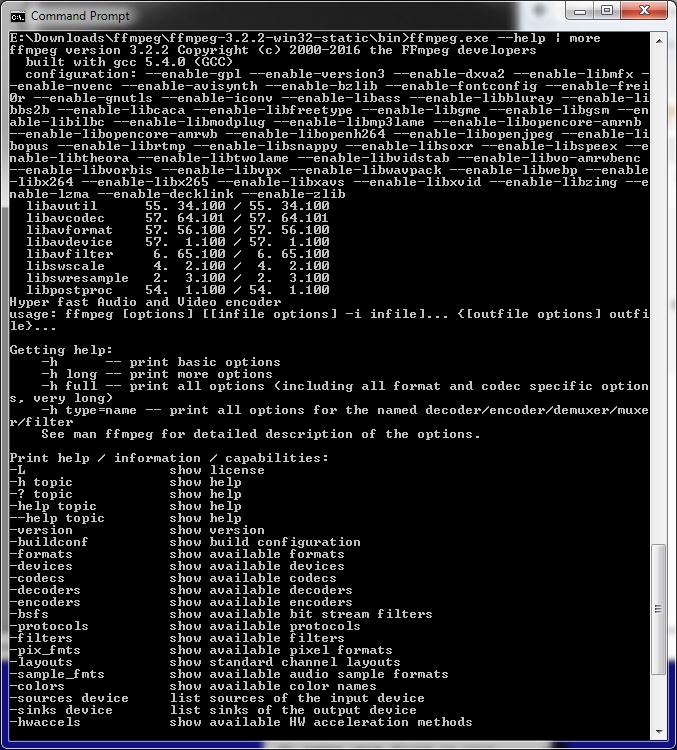
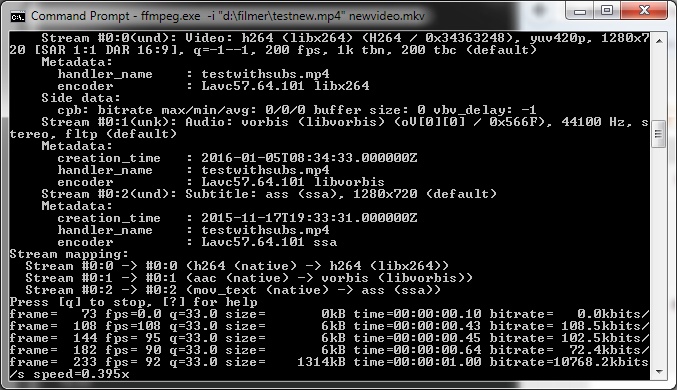
FFmpeg is a complete solution to record, convert, edit and stream audio and video. It is a command line video software for Windows, Mac and Linux. It supports converting between most video and audio formats. It supports grabbing and encoding in real time from streaming media, capture cards, etc. Multiplex(join) and demultipex(split) video and audio tracks from all video formats. Edit(cut,join) all video formats. Advanced video and audio filters. Subtitle support. ffplay(basic video player) and ffprobe(video identifier) are also included. Several frontEnds/GUIs are available like FFmpeg Batch Converter or clever FFMPEG-GUI.
Free software
OS:


File size: 153MB
Portable version
Old versions
Version history
Alternative software
OS:
File size: 153MB
Portable version
Old versions
Version history
Alternative software
Screenshots

Latest version
Download
Download ffmpeg 8.1.1 Windows 64-bit 155MB Win64
Portable 
Download ffmpeg 8.1.1 Mac Silicon ARM 64-bit 22MB MacARM64
Download ffmpeg 8.1.1 Mac Intel 64-bit 25MB Mac64
Download ffmpeg 8.1.1 Linux Linux
Download Beta, Portable and other versions
Portable Download ffmpeg latest Beta/Nightly Mac Mac
Download ffmpeg latest Beta/Nightly Linux Linux
Download more daily Windows ffmpeg builds here (gyan.dev) Win
Download more daily Windows ffmpeg builds here (BtbN) Win
Download more daily Mac Intel ffmpeg builds here (evermeet) Mac
Download more daily Mac Silicon/ARM ffmpeg builds here (osxexperts) Mac
Download old versions

Software License
Supported operating systems
Mac OS Linux Version history / Release notes / Changelog / What's New
version 8.1.1:
avcodec/aac/aacdec_usac_mps212: fix attach_lsb() OOB after huff_decode
avcodec/dfpwmdec: Check nb_samples
avcodec/alsdec: do not set nbits invalidly
swscale/swscale_unscaled: adjust last line copy
swscale/swscale: Check srcSliceY and srcSliceH
avformat/avidec: check LIST size in avi_load_index()
avformat/avidec: validate INFO list size before parsing
avformat/matroskadec: Check audio.sub_packet_h * audio.frame_size
libavformat/xwma: fix overflow in seek position
avformat/pcm: Use 64bit for byte_rate
avcodec/adpcm: signed integer overflow in ADPCM_N64
avcodec/hevc/ps: validate rep_format dimensions in multi-layer SPS
avfilter/vf_kerndeint: Check for minimum height
avcodec/ralf: Add the missing return statement after the error log
avfilter/vf_codecview: Clamp block to the visible frame region
avcodec/zmbv: reject XOR data that overruns the decompression buffer
avcodec/rasc: fix heap use-after-free in decode_move()
avformat/rtpdec_mpeg4: reject zero-length AU header sections
avcodec/hevc/refs: Check multiplication in alloc_frame()
fftools/ffmpeg_opt: validate stream index in negative map handling
avformat/rtmpproto: prevent integer overflow accumulating FLV buffer size
avformat/rtmpproto: validate compressed SWF header length
avformat/rtsp: Fix out-of-bounds read in SDP parser when control_url is empty
avformat/rtpdec_latm: avoid integer overflow in LATM length parsing
avcodec/h264: recompute per-slice direct mode state for every slice
avcodec/h264_refs: Clear stale pointers from ref_list
avcodec/pdvdec: Check input space before buffer allocation
avformat/concat: guard total_size overflow
avformat/iamf_parse.c: Fix potential integer overflow in opus_decoder_config()
avcodec/wmaenc: Fix missing padding in extradata
avformat: Fix various extradata padding issues
avcodec/tdsc: remove double stride adjustment
avformat/cafdec: fix negative index use in read_seek
avcodec/notchlc: Check 255 loops
avformat/rtpdec_jpeg: check qtable_len
avformat/vividas: use-of-uninitialized-value in keybuffer
avcodec/tdsc: Check jpeg size
avcodec/tdsc: Better input size check
avcodec/tdsc: Check tile_size
avcodec/decode: Better documentation for ff_set_dimensions()
avformat/mov: Limit maximum box size for mov_read_lhvc()
avformat/mov: reject dimg references with zero entries
avformat/mov: check extradata in mov_read_dops()
avformat/mov: Check read size for opus extradata
avformat/rtspdec: reject non-positive ANNOUNCE Content-Length
avformat/wavdec: Fix use-of-uninitialized-value in find_guid()
lavfi: vf_drawtext: check memory allocation
avcodec/svq1dec: Check input space for minimum
avcodec/vp9: Rollback dimensions when format is rejected
avformat/rtpdec_qdm2: Check block_size
avfilter/vf_ssim360: fix integer overflow in tape_length allocation
avcodec/escape130: Initialize old_y_avg
avutil/samplefmt: Dont claim that av_get_sample_fmt_string checks sample_fmt
swscale: fix signed integer overflow in color conversion arithmetic
avformat: check avio_read() return values in dss/dtshd/mlv
avformat/whip: check RTP history packet size before RTX retransmission
avcodec/aac/aacdec_usac: Implement missing bits of otts_bands_phase and residual_bands computation
avcodec/alsdec: preserve full float value in zero-truncated samples
avcodec/alsdec: propagate read_diff_float_data() errors in read_frame_data()
avcodec/alsdec: fix mantissa unpacking in compressed Part A path
avfilter/vf_drawtext: fix newline rendered as .notdef glyph
avcodec/pngdec: fix dead overflow check in decode_text_to_exif()
avcodec/vp9: fix cbs fragment leak on error
libavfilter/vf_v360: fix operator precedence in stereo loop condition
avcodec/alsdec: fix abs(INT_MIN) UB in read_diff_float_data()
avformat/rsd: reject short ADPCM_THP extradata reads
avformat/mov: Handle integer overflow in MOV parser
avcodec/dvdsub_parser: Fix buf_size check
avfilter/af_pan: fix sscanf() return value checks in parse_channel_name
avutil/bswap: fix implicit conversion warning in av_bswap64
avcodec/h2645_sei: don't use provider_code uninitialized
(fforge/pr/22943) avformat/hls_sample_encryption: add missing padding for audio setup buffer
(fforge/pr/22826) lavc/videotoolbox_vp9: fix vpcC flags offset
lavc/videotoolboxenc: return SEI parse errors
vulkan: fix encode feedback query handling
avcodec/cbs_lcevc: fix writing process blocks with size 6
avformat/mov: don't try to create an LCEVC group if there's a single track
(fforge/pr/22563) aarch64: Add Armv9.3-A GCS (Guarded Control Stack) support
aarch64: hevcdsp: Make returns match the call site
(fforge/pr/22545) avcodec/lcevcdec: don't try to derive final dimensions from SAR
avcodec/lcevc_parser: move the resolution type table to a header
avcodec/cbs_lcevc: don't look for process blocks if the unit was not decomposed
avcodec/aac/aacdec_usac_mps212: fix attach_lsb() OOB after huff_decode
avcodec/dfpwmdec: Check nb_samples
avcodec/alsdec: do not set nbits invalidly
swscale/swscale_unscaled: adjust last line copy
swscale/swscale: Check srcSliceY and srcSliceH
avformat/avidec: check LIST size in avi_load_index()
avformat/avidec: validate INFO list size before parsing
avformat/matroskadec: Check audio.sub_packet_h * audio.frame_size
libavformat/xwma: fix overflow in seek position
avformat/pcm: Use 64bit for byte_rate
avcodec/adpcm: signed integer overflow in ADPCM_N64
avcodec/hevc/ps: validate rep_format dimensions in multi-layer SPS
avfilter/vf_kerndeint: Check for minimum height
avcodec/ralf: Add the missing return statement after the error log
avfilter/vf_codecview: Clamp block to the visible frame region
avcodec/zmbv: reject XOR data that overruns the decompression buffer
avcodec/rasc: fix heap use-after-free in decode_move()
avformat/rtpdec_mpeg4: reject zero-length AU header sections
avcodec/hevc/refs: Check multiplication in alloc_frame()
fftools/ffmpeg_opt: validate stream index in negative map handling
avformat/rtmpproto: prevent integer overflow accumulating FLV buffer size
avformat/rtmpproto: validate compressed SWF header length
avformat/rtsp: Fix out-of-bounds read in SDP parser when control_url is empty
avformat/rtpdec_latm: avoid integer overflow in LATM length parsing
avcodec/h264: recompute per-slice direct mode state for every slice
avcodec/h264_refs: Clear stale pointers from ref_list
avcodec/pdvdec: Check input space before buffer allocation
avformat/concat: guard total_size overflow
avformat/iamf_parse.c: Fix potential integer overflow in opus_decoder_config()
avcodec/wmaenc: Fix missing padding in extradata
avformat: Fix various extradata padding issues
avcodec/tdsc: remove double stride adjustment
avformat/cafdec: fix negative index use in read_seek
avcodec/notchlc: Check 255 loops
avformat/rtpdec_jpeg: check qtable_len
avformat/vividas: use-of-uninitialized-value in keybuffer
avcodec/tdsc: Check jpeg size
avcodec/tdsc: Better input size check
avcodec/tdsc: Check tile_size
avcodec/decode: Better documentation for ff_set_dimensions()
avformat/mov: Limit maximum box size for mov_read_lhvc()
avformat/mov: reject dimg references with zero entries
avformat/mov: check extradata in mov_read_dops()
avformat/mov: Check read size for opus extradata
avformat/rtspdec: reject non-positive ANNOUNCE Content-Length
avformat/wavdec: Fix use-of-uninitialized-value in find_guid()
lavfi: vf_drawtext: check memory allocation
avcodec/svq1dec: Check input space for minimum
avcodec/vp9: Rollback dimensions when format is rejected
avformat/rtpdec_qdm2: Check block_size
avfilter/vf_ssim360: fix integer overflow in tape_length allocation
avcodec/escape130: Initialize old_y_avg
avutil/samplefmt: Dont claim that av_get_sample_fmt_string checks sample_fmt
swscale: fix signed integer overflow in color conversion arithmetic
avformat: check avio_read() return values in dss/dtshd/mlv
avformat/whip: check RTP history packet size before RTX retransmission
avcodec/aac/aacdec_usac: Implement missing bits of otts_bands_phase and residual_bands computation
avcodec/alsdec: preserve full float value in zero-truncated samples
avcodec/alsdec: propagate read_diff_float_data() errors in read_frame_data()
avcodec/alsdec: fix mantissa unpacking in compressed Part A path
avfilter/vf_drawtext: fix newline rendered as .notdef glyph
avcodec/pngdec: fix dead overflow check in decode_text_to_exif()
avcodec/vp9: fix cbs fragment leak on error
libavfilter/vf_v360: fix operator precedence in stereo loop condition
avcodec/alsdec: fix abs(INT_MIN) UB in read_diff_float_data()
avformat/rsd: reject short ADPCM_THP extradata reads
avformat/mov: Handle integer overflow in MOV parser
avcodec/dvdsub_parser: Fix buf_size check
avfilter/af_pan: fix sscanf() return value checks in parse_channel_name
avutil/bswap: fix implicit conversion warning in av_bswap64
avcodec/h2645_sei: don't use provider_code uninitialized
(fforge/pr/22943) avformat/hls_sample_encryption: add missing padding for audio setup buffer
(fforge/pr/22826) lavc/videotoolbox_vp9: fix vpcC flags offset
lavc/videotoolboxenc: return SEI parse errors
vulkan: fix encode feedback query handling
avcodec/cbs_lcevc: fix writing process blocks with size 6
avformat/mov: don't try to create an LCEVC group if there's a single track
(fforge/pr/22563) aarch64: Add Armv9.3-A GCS (Guarded Control Stack) support
aarch64: hevcdsp: Make returns match the call site
(fforge/pr/22545) avcodec/lcevcdec: don't try to derive final dimensions from SAR
avcodec/lcevc_parser: move the resolution type table to a header
avcodec/cbs_lcevc: don't look for process blocks if the unit was not decomposed
View full changelog
Sections/Browse similar tools
Alternative to ffmpeg
(Latest version updated)Libav (Feb 12, 2018)
Guides and How to's
Batch Files for Ffmpeg to correct chroma shift etc.
- ReadFFmpeg profiles and levels
- ReadHow to batch convert/multiplex with ffmpeg
- ReadHow to encode and play HEVC with alfa chanel
- ReadTop ffmpeg lossless commands
- ReadVideo batch files to annoy you
- ReadVirtualdub External Encoder feature (Video tutorial)
- Readffmpeg video tutorials
View all guides with guide description here
Acronyms / Also Known As
Download ffmpeg Portable download from the Download links under Download and Download other versions!
Notify me when software updated or report software
| 47 reviews, Showing 1 to 5 reviews |
@gripweed
This download is v6.1.
ffmpeg version 6.1-full_build-www.gyan.dev Copyright (c) 2000-2023 the FFmpeg developers built with gcc 12.2.0 (Rev10, Built by MSYS2 project)
FFmpeg 6.1 "Heaviside"
6.1 was released on 2023-11-11. It is the latest stable FFmpeg release from the 6.1 release branch, which was cut from master on 2023-10-29.
FFmpeg 6.0.1 "Von Neumann"
6.0.1 was released on 2023-11-10. It is the latest stable FFmpeg release from the 6.0 release branch, which was cut from master on 2023-02-19.
This download is v6.1.
ffmpeg version 6.1-full_build-www.gyan.dev Copyright (c) 2000-2023 the FFmpeg developers built with gcc 12.2.0 (Rev10, Built by MSYS2 project)
FFmpeg 6.1 "Heaviside"
6.1 was released on 2023-11-11. It is the latest stable FFmpeg release from the 6.1 release branch, which was cut from master on 2023-10-29.
FFmpeg 6.0.1 "Von Neumann"
6.0.1 was released on 2023-11-10. It is the latest stable FFmpeg release from the 6.0 release branch, which was cut from master on 2023-02-19.
Review by HemLok on
Nov 11, 2023 Version: 6.1
OS: Windows 10 64-bit Ease of use: 10/10
Functionality: 10/10
Value for money: 10/10
Overall: 10/10
All is well but shouldn't this be listed as 6.0.1 and not 6.1?
Review by Gripweed on
Nov 11, 2023 Version: 6.0.1
OS: Windows 10 64-bit Ease of use: 10/10
Functionality: 10/10
Value for money: 10/10
Overall: 10/10
Works great! Just used this to render a Krita animation! Very simple and easy to use.
Review by swiss_szn on
Jul 14, 2022 Version: 5.0.1
OS: Windows 11 Ease of use: 10/10
Functionality: 10/10
Value for money: 10/10
Overall: 10/10
Rating by longwin on
Nov 6, 2021 Version: 4.4.1
OS: Windows 7 64-bit Ease of use: 1/10
Functionality: 10/10
Value for money: 10/10
Overall: 10/10
Superb project but 99% of users won't have a clue how to use it or know what a command line is! Pazera MP4 Converter is my recommended GUI for that group of folks. My quibble is Ffmeg can deinterlace, but there must be an easier way to ivtc an NTSC based single Bob file source. Anyway I will master it someday using decimate in my script.
For those wanting one which will work in XP, link below.
https://opensourcepack.blogspot.com/2017/12/ffmpeg-for-windows-xp.html
For those wanting one which will work in XP, link below.
https://opensourcepack.blogspot.com/2017/12/ffmpeg-for-windows-xp.html
Review by Rod on
Sep 2, 2020 Version: 4.3.1
OS: Windows 8 64-bit Ease of use: 1/10
Functionality: 9/10
Value for money: 10/10
Overall: 9/10
| 47 reviews, Showing 1 to 5 reviews |
| 1 tool hits, Showing 1 to 1 tools |
Explanation:
NEW SOFTWARE= New tool since your last visit
NEW VERSION= New version since your last visit
NEW REVIEW= New review since your last visit
NEW VERSION= New version
Latest version
Version number / Beta version number / Update version number and when it whas released.
Type and download
NO MORE UPDATES? = The software hasn't been updated in over 2 years.
NO LONGER DEVELOPED = The software hasn't been updated in over 5 years.
RECENTLY UPDATED = The software has been updated the last 31 days.
Freeware = Download Free software.
Freeware Trialware = Download Free software but some parts are trial/shareware.
Free software = Download Free software and also open source code also known as FOSS (Free and Open Source Software).
Free software Trialware = Download Free software and also open source code but some parts are trial/shareware.
Freeware Ads = Download Free software but supported by advertising, usually with a included browser toolbar. It may be disabled when installing or after installation.
Free software Ads = Free Download software and open source code but supported by advertising, usually with a included browser toolbar. It may be disabled when installing or after installation.
Trialware = Also called shareware or demo. Free Trial version available for download and testing with usually a time limit or limited functions.
Payware = No demo or trial available.
Portable version = A portable/standalone version is available. No installation is required.
v1.0.1 = Latest version available.
Download beta = It could be a Beta, RC(Release Candidate) or an Alpha / Nightly / Unstable version of the software.
Download 15MB = A direct link to the software download.
Win = Windows download version for 32-bit and 64-bit Windows.
Win64 = Windows 64-bit download version for 64-bit Windows.
WinARM64 = Windows 64-bit ARM download version for Windows ARM64/AArch64.
Mac = Mac download version for 64-bit Mac OS Intel/ARM64/AArch64.
MacARM64 = Mac Silicon download version for 64-bit Mac OS ARM64/AArch64.
Mac64 = Mac OS download version for 64-bit Intel Mac OS.
Linux = Linux download version.
Linux64 = Linux download version for 64bit Linux.
Linux ARM = Linux download version for Linux ARM64/AArch64.
Portable = Portable version. No installation is required.
Ad-Supported = The software is bundled with advertising. Be careful when you install the software and disable addons that you don't want!
Visit developers site = A link to the software developer site.
Download (mirror link) = A mirror link to the software download. It may not contain the latest versions.
Download old versions = Free downloads of previous versions of the program.
Download 64-bit version = If you have a 64bit operating system you can download this version.
Download portable version = Portable/Standalone version meaning that no installation is required, just extract the files to a folder and run directly.
Portable version available = Download the portable version and you can just extract the files and run the program without installation.
Old versions available = Download old versions of the program.
Version history available = Complete changelog on our site.
= Windows version available.
= Mac OS version available.
= Linux version available.
Our hosted software are virus and malware scanned with several antivirus programs using www.virustotal.com. (NOTE! Just one virustotal warning is 99.9% a false positive. And some software might receive 2-6 warnings but it's if they are not all same virus/trojan then it's 99% false positives.)
Rating
Rating from 0-10.
NEW SOFTWARE= New tool since your last visit
NEW VERSION= New version since your last visit
NEW REVIEW= New review since your last visit
NEW VERSION= New version
Latest version
Version number / Beta version number / Update version number and when it whas released.
Type and download
NO MORE UPDATES? = The software hasn't been updated in over 2 years.
NO LONGER DEVELOPED = The software hasn't been updated in over 5 years.
RECENTLY UPDATED = The software has been updated the last 31 days.
Freeware = Download Free software.
Freeware Trialware = Download Free software but some parts are trial/shareware.
Free software = Download Free software and also open source code also known as FOSS (Free and Open Source Software).
Free software Trialware = Download Free software and also open source code but some parts are trial/shareware.
Freeware Ads = Download Free software but supported by advertising, usually with a included browser toolbar. It may be disabled when installing or after installation.
Free software Ads = Free Download software and open source code but supported by advertising, usually with a included browser toolbar. It may be disabled when installing or after installation.
Trialware = Also called shareware or demo. Free Trial version available for download and testing with usually a time limit or limited functions.
Payware = No demo or trial available.
Portable version = A portable/standalone version is available. No installation is required.
v1.0.1 = Latest version available.
Download beta = It could be a Beta, RC(Release Candidate) or an Alpha / Nightly / Unstable version of the software.
Download 15MB = A direct link to the software download.
Win = Windows download version for 32-bit and 64-bit Windows.
Win64 = Windows 64-bit download version for 64-bit Windows.
WinARM64 = Windows 64-bit ARM download version for Windows ARM64/AArch64.
Mac = Mac download version for 64-bit Mac OS Intel/ARM64/AArch64.
MacARM64 = Mac Silicon download version for 64-bit Mac OS ARM64/AArch64.
Mac64 = Mac OS download version for 64-bit Intel Mac OS.
Linux = Linux download version.
Linux64 = Linux download version for 64bit Linux.
Linux ARM = Linux download version for Linux ARM64/AArch64.
Portable = Portable version. No installation is required.
Ad-Supported = The software is bundled with advertising. Be careful when you install the software and disable addons that you don't want!
Visit developers site = A link to the software developer site.
Download (mirror link) = A mirror link to the software download. It may not contain the latest versions.
Download old versions = Free downloads of previous versions of the program.
Download 64-bit version = If you have a 64bit operating system you can download this version.
Download portable version = Portable/Standalone version meaning that no installation is required, just extract the files to a folder and run directly.
Portable version available = Download the portable version and you can just extract the files and run the program without installation.
Old versions available = Download old versions of the program.
Version history available = Complete changelog on our site.
= Windows version available. = Mac OS version available. = Linux version available.Our hosted software are virus and malware scanned with several antivirus programs using www.virustotal.com. (NOTE! Just one virustotal warning is 99.9% a false positive. And some software might receive 2-6 warnings but it's if they are not all same virus/trojan then it's 99% false positives.)
Rating
Rating from 0-10.
Browse software by sections
All In One Blu-ray Converters (9)
All In One DVD Converters (12)
All In One MKV to MP4, Blu-ray, UHD (11)
All In One Video Converters (19)
Animation (3D, 2D Animation) (12)
Audio Editors (22)
Audio Encoders (80)
Audio Players (19)
Authoring (Blu-ray, UHD, AVCHD) (13)
Authoring (DivX) (4)
Authoring (DVD) (26)
Authoring (SVCD, VCD) (9)
Bitrate Calculators (7)
Blu-ray to AVI, MKV, MP4 (15)
Blu-ray to Blu-ray, AVCHD (10)
Burn (CD,DVD,Blu-ray) (24)
Camcorders, DV, HDV, AVCHD (31)
Capture TV, DVD, VCR (30)
CD, DVD, Blu-ray recovery (3)
Codec Packs (6)
All In One DVD Converters (12)
All In One MKV to MP4, Blu-ray, UHD (11)
All In One Video Converters (19)
Animation (3D, 2D Animation) (12)
Audio Editors (22)
Audio Encoders (80)
Audio Players (19)
Authoring (Blu-ray, UHD, AVCHD) (13)
Authoring (DivX) (4)
Authoring (DVD) (26)
Authoring (SVCD, VCD) (9)
Bitrate Calculators (7)
Blu-ray to AVI, MKV, MP4 (15)
Blu-ray to Blu-ray, AVCHD (10)
Burn (CD,DVD,Blu-ray) (24)
Camcorders, DV, HDV, AVCHD (31)
Capture TV, DVD, VCR (30)
CD, DVD, Blu-ray recovery (3)
Codec Packs (6)
Codec, Video Identifiers (30)
Codecs (67)
Decrypters (DVD Rippers) (16)
Decrypters (UHD, Blu-ray Rippers) (8)
DigitalTV, DVB, IPTV (39)
DVD to DVD (20)
DVD to MP4, MKV, H264, H265 (16)
DVD to VCD, SVCD (5)
DVD to XviD, AVI, DivX (16)
ISO, Image (15)
Linux Video Tools (208)
MacOS Video Tools (244)
Media (Blu-ray, DVD, CD) (9)
Media Center, HTPC (24)
Other Useful Tools (140)
Photo Blu-ray, DVD, SlideShow (8)
Portable (Mobile, PSP) (35)
Region Free Tools (5)
Screen capture , Screen recording (27)
Screenshots , Thumbnails (13)
Codecs (67)
Decrypters (DVD Rippers) (16)
Decrypters (UHD, Blu-ray Rippers) (8)
DigitalTV, DVB, IPTV (39)
DVD to DVD (20)
DVD to MP4, MKV, H264, H265 (16)
DVD to VCD, SVCD (5)
DVD to XviD, AVI, DivX (16)
ISO, Image (15)
Linux Video Tools (208)
MacOS Video Tools (244)
Media (Blu-ray, DVD, CD) (9)
Media Center, HTPC (24)
Other Useful Tools (140)
Photo Blu-ray, DVD, SlideShow (8)
Portable (Mobile, PSP) (35)
Region Free Tools (5)
Screen capture , Screen recording (27)
Screenshots , Thumbnails (13)
Subtitle Editors, Converters (72)
Tag Editors (4)
Video De, Multiplexers (66)
Video Editors (Advanced, NLE) (35)
Video Editors (Basic) (56)
Video Editors (H264, MP4, MKV, MTS) (19)
Video Editors (Lossless) (4)
Video Editors (MPG, DVD) (16)
Video Editors (WMV, AVI) (15)
Video Encoders (AV1, VP8, VP9) (2)
Video Encoders (AVI, WMV) (38)
Video Encoders (H264, H265, MP4, MKV) (45)
Video Encoders (MPG, DVD) (23)
Video Encoders , Converters (155)
Video Frameservers (9)
Video Players (49)
Video Repair, Fix (24)
Video Scripting (10)
Video Streaming (21)
Video Streaming Downloaders (101)
Tag Editors (4)
Video De, Multiplexers (66)
Video Editors (Advanced, NLE) (35)
Video Editors (Basic) (56)
Video Editors (H264, MP4, MKV, MTS) (19)
Video Editors (Lossless) (4)
Video Editors (MPG, DVD) (16)
Video Editors (WMV, AVI) (15)
Video Encoders (AV1, VP8, VP9) (2)
Video Encoders (AVI, WMV) (38)
Video Encoders (H264, H265, MP4, MKV) (45)
Video Encoders (MPG, DVD) (23)
Video Encoders , Converters (155)
Video Frameservers (9)
Video Players (49)
Video Repair, Fix (24)
Video Scripting (10)
Video Streaming (21)
Video Streaming Downloaders (101)