
Help us keep the list up to date and submit new video software here.
Tool
Description
Type
Rating
Reviews
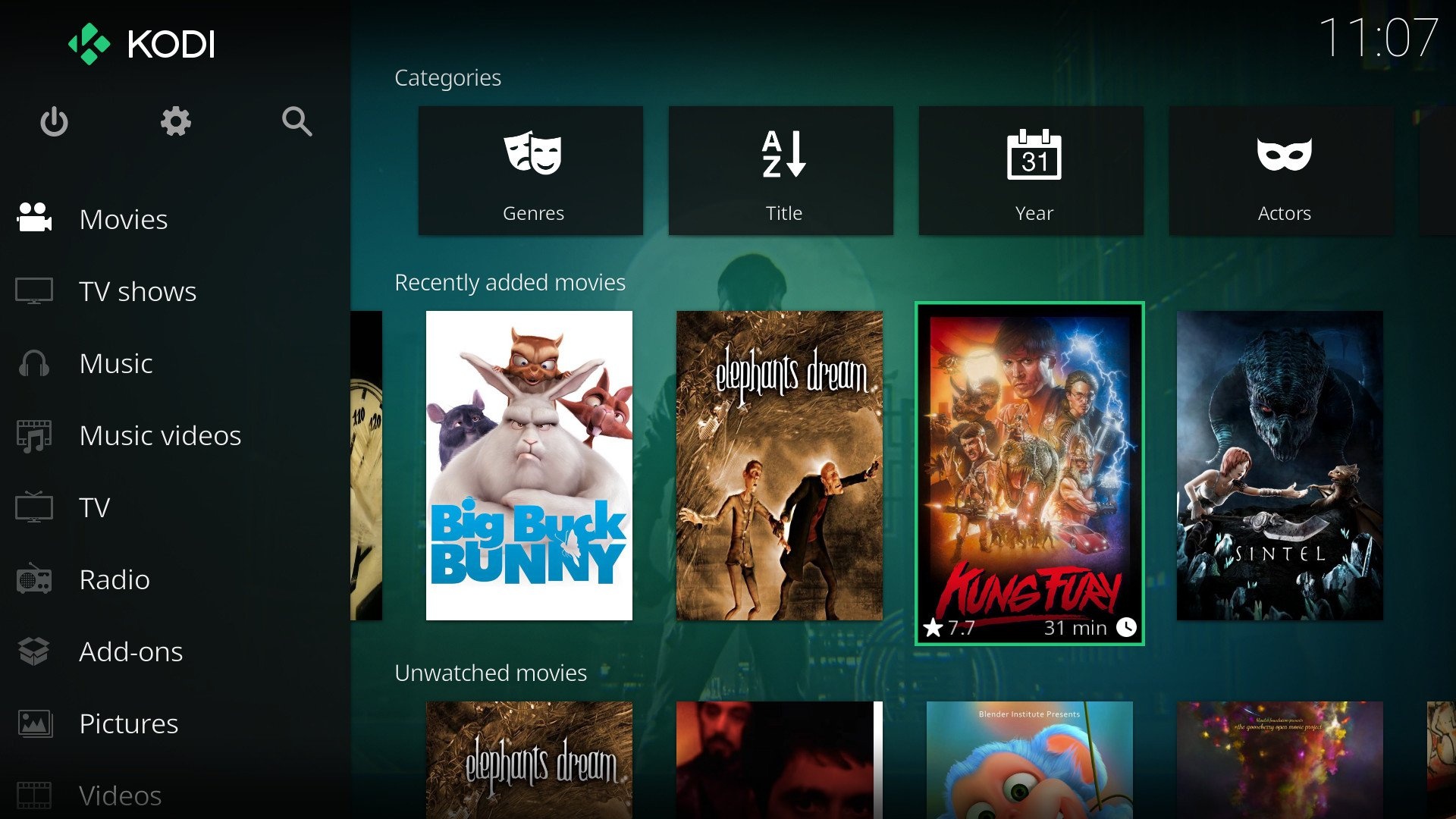
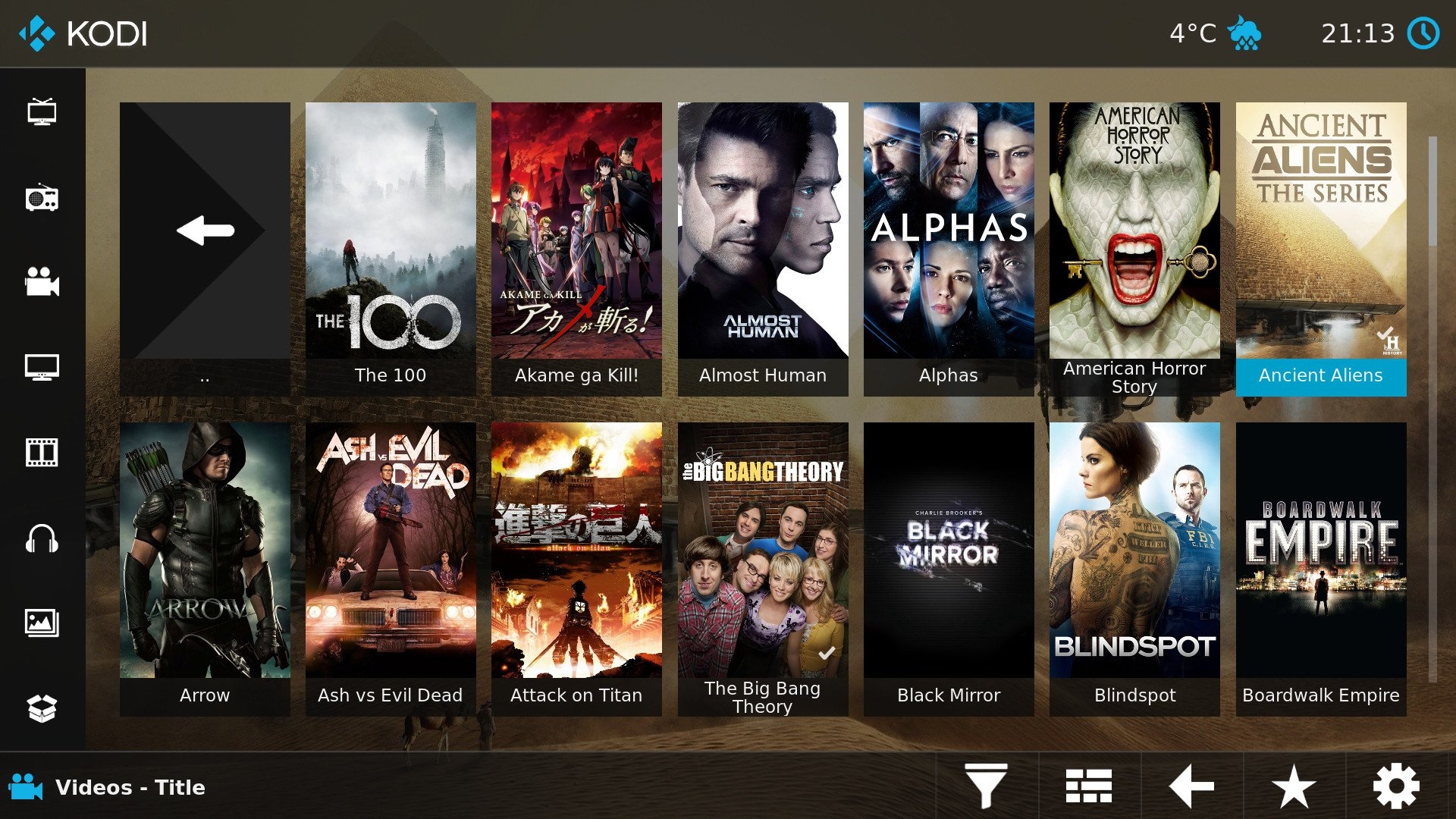
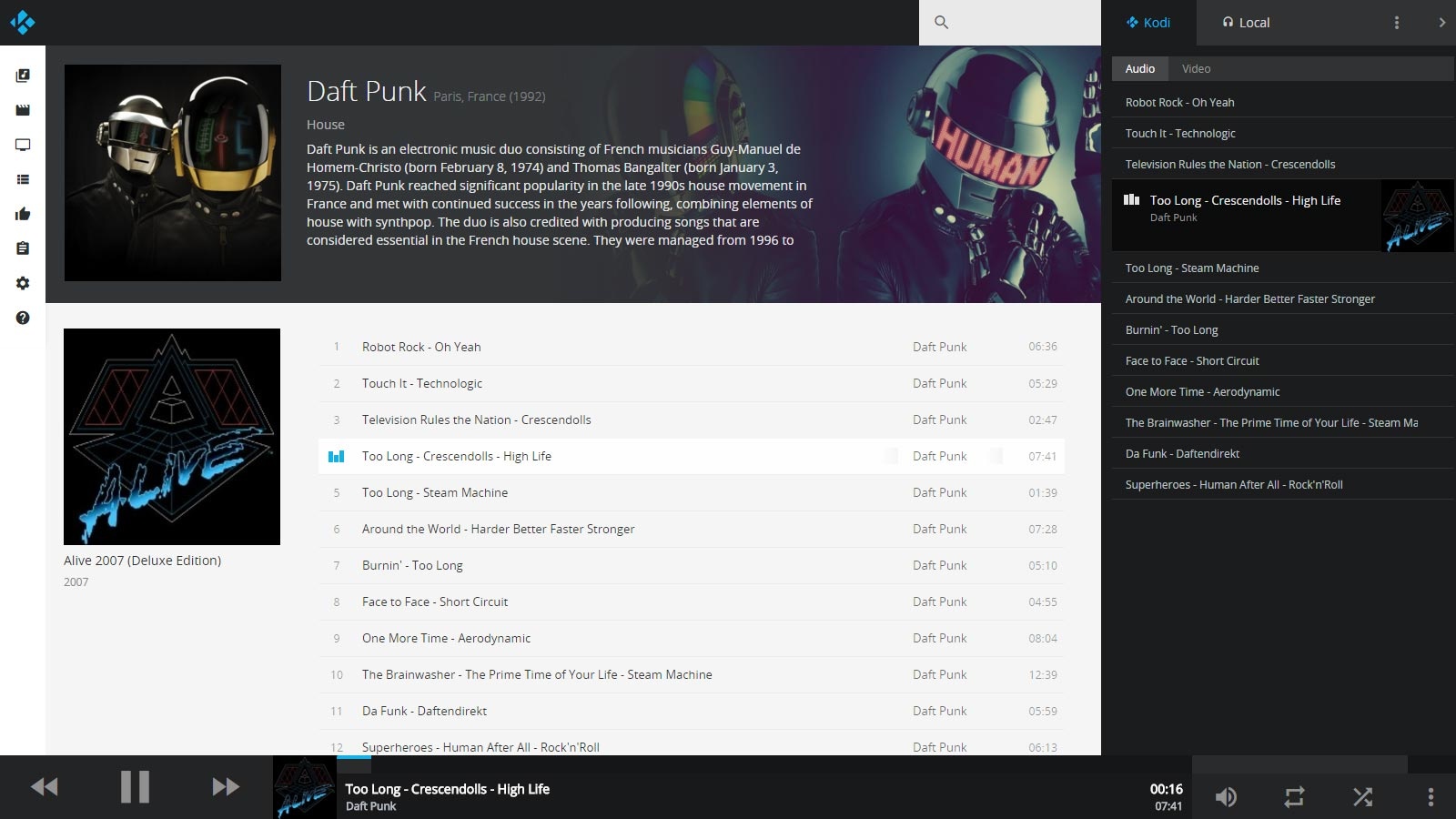
Kodi (former XBMC) is an award-winning free and open source software media player and entertainment hub that can be installed on Linux, OSX, Windows, iOS, and Android, featuring a 10-foot user interface for use with televisions and remote controls. It allows users to play and view most videos, music, podcasts, and other digital media files from local and network storage media and the internet.
Free software
OS:


File size: 74MB
Beta version
Old versions
Version history
Alternative software
OS:
File size: 74MB
Beta version
Old versions
Version history
Alternative software
Screenshots
Latest version
Download
Download Kodi 21.3 Windows 64-bit 74MB Win64
Download Kodi 21.3 Mac Silicon ARM 64-bit 72MB MacARM64
Download Kodi 21.3 Mac Intel 64-bit 84MB Mac64
Download Kodi 21.3 Linux 64-bit Linux64
Download Beta and other versions
Download Kodi 22.0 Beta 2 Mac Silicon ARM 74MB MacARM64
Download Kodi 22.0 Beta 2 Mac 74MB Mac
Download old versions

Software License
Supported operating systems
Mac OS Linux Version history / Release notes / Changelog / What's New
Kodi 22 "Piers" Beta 2
No changelog yet
Kodi 22 "Piers" Beta 1
Prerelease
Team Kodi
June 28, 2026
·
4 min read
Announcing the first Beta release of Kodi 22 "Piers"!
As we move from the Alpha to the Beta stage of the release cycle, the team is happy with the significant number of features and improvements that have come together for v22. Now, the focus becomes stability and performance, leading us to the final v22 release.
If you want the latest and greatest, this release is for you. Being a beta release, there's some possibility of rough edges, and things that previously worked and now stubbornly don't. But fear not, you're part of a relentless community that now has our Beta 1 release to play with. Please raise Github issues with full debug logs to help us resolve any faults.
Okay, what's new in this version?
Changelog
Video
Upgraded to FFmpeg 8.1.2
Added live bitrate infolabels
Improved accuracy for chapter changes
Improved handling of chapters read by FFmpeg
Improved tempo settings
Integrated bookmarks into forward/backward skip
Fixed seeking during 1.6x tempo
Fixed AV1 playback with keyframe-filtering=2
Fixed broken OSD for DVDs after Alpha 3
Audio
Fixed possible crash during DTS-HD audio playback
Fixed audio delay for live TV with AC3/EAC3 passthrough
Subtitles
Subtitle visibility improvements
Subtitle timing improvements
Fixed handling of ASS/SSA script headers
Shows the playing video's current subtitle CODEC
Library
Added "Media Details" dialog
Added audio language to media item badges
Added additional HDR formats to the UI
Fixed duplicate taglines in the library view
Fixed various stream detail issues
Improved Blu-ray handling for .nfo files
Improved Blu-ray playcount handling
Improved stacking for movie/folder path names with Roman numerals
Fixed handling of more complex episode ranges
Improved Movie Version scanning behaviour
Improved media badges
Music
Fixed several issues for CUE sheets
Fixed several audiobook issues
Fixed rescanning music items
PVR
Improved daily wake-up timer
Games
Added new Disc Manager
Fixed possible crash when changing resolution
Fixed M3U handling for multi-disc games
Fixed transparency when choosing video filters
Added ability for Amiga controllers to autoconnect
Added "Select" button for Amiga controllers
Network
Fixed NFSv4 file creation with atomic O_EXCL flag
Fixed possible crash when a JSON-RPC TCP client disconnects
Fixed parsing NFS URL options
Fixed reading DVD folders on NFS
Fixed SMB session exhaustion (Windows desktop is limited to 20 connections)
Extended the JSON-RPC method Textures.GetTextures to report texture status
Fixed potential XSS and open redirects in the web UI
Databases
Fixed incompatibility with MySQL 9.6 and above
Fixed incompatibility with MariaDB 10.x remote databases
Fixed possible crash when MySQL server is temporarily unavailable
Added new advancedsettings.xml MySQL/MariaDB timeout element - <connecttimeout>, default 5s
element for MySQL/MariaDB video and music databases (defaults to 5 seconds)
Inputstream add-ons
Added HDR, colour metadata, 10-bit and 12-bit to Inputstream add-ons
Fixed non-encrypted streams in Inputstream add-ons
Peripherals
Improved CEC handling (product of DevCon 2026 outside Barcelona)
Fixed crash when rapidly hotplugging Linux joysticks
Profiles
Fixed possible crash switching to a profile that has never been used before
Fixed migrations across different profiles
Skinning
Blocked clicks on disabled buttons
Small tweaks to default Estuary skin
Fixed nested label formatting
Fixed scrolling text speed scaling with display resolution
Fixes for skin reloading for skin developers
Improved HDR profile support
Added skin setting for showing original/localised movie titles
Python
Upgraded to Python 3.14.6
Fixed addVideoStream(), addAudioStream() and addSubtileStream()
Platforms
Android
Fixed crash when using voice recognition
Fixed general app failures due to JNI exception
Fixed crash when starting Zeroconf browser
Fixed error when running "Library > Clean library" in settings
Linux (general)
Increased support for remote keys
Embedded Linux (DRM, GBM, and GLES)
Substantial rewrite of Linux rendering
Brings GLES to feature parity with GL
Added full HDR end-to-end support (decode, colorimetry, tonemapped GUI, and 10-bit output)
Added 12-bit decoding support
Added dithering and HQ scalers for GLES
Added "auto" dithering mode (GLES-only)
Added YUV 4:2:2 and 4:4:4 support
Added VAAPI hardware decoding of HEVC 4:2:2 and 4:4:4 (GLES-only)
Improved video performance
Improved GUI appearance in HDR mode
Expanded hardware support, especially for ARM devices
Fixed BT.2020 colorimetry signalling for DP-HDMI dongles
Fixed numerous "limited-range" video black-level issues
webOS
Fixed screensaver enabling during playback on webOS 4
Fixed playback on webOS 26
Fixed forced aspect ratio playback
tvOS
Improved Siri Remote playback controls
Developers
Fixed build failure with Visual Studio 2026 18.6.0 (May 2026 Update)
Change minimum required FFmpeg version from 8.1.0 to 8.1.1
Warning for case-sensitive filesystem users: a filename was corrected, and may cause git errors
Known issues
On some GBM/GLES platforms, fullscreen video may show stale or flickering overlay graphics
Kodi 22 "Piers" Alpha 3
Developer, Prerelease
Team Kodi
April 01, 2026
·
3 min read
Announcing the release of Kodi 22 "Piers" Alpha 3!
Usual words - the step from 21 to 22 is a major release, but it's also an Alpha at this stage, so you're going to get some bugs as well as funky new features. That is, of course, a major part of the point of early release software: please raise Github issues with full debug logs to help us resolve any regressions you wonderful testers come across.
Okay, what's new in this version?
Changelog
Release highlights
Added support for taglines in TV shows
Added support for H264 AVCC subtitles
Added support for full IANA language tags
Added JSON RPC methods "Player.GetChapters" and "Player.OnPropertyChanged"
Upgraded FFmpeg to v8.0.1
Upgraded Python to v3.14.3
Changed MySQL/MariaDB charset to utf8mb4 and collation to general_ci (case insensitive)
Video
Improved Blu-ray support for both menus and playback
Improved TV show episode handling for blu-ray
Improved changing chapters in movies
Improved seeking during tempo change
Audio
Changed default samplerate from 44.1kHz to 48kHz
Fixed missing 200ms of audio at the start of video playback
Fixed occasional missing audio when changing playback speed
Fixed AC3 audio duration being incorrect for non-48KHz content
Improved handling of low-latency audio
Subtitles
Fixed handling of WebVTT (ISOBMFF) subtitles
Fixed PGS/VobSub subtitle selection for foreign audio tracks
Fixed crash when handling some BCP47 language tags added in Alpha 2
Library
Improved tagline handling for movies and TV shows
Games
Added N64 support using software rendering
Improved shader support
Fixed Black screen for games with unaligned textures
Fixed crash when changing resolution
Streaming and network
Fixed playback of tcp:// streams
Fixed media info display for strm:// streams
Fixed occasional errors resuming UPnP playback
Stacks and compressed archives
Added support for folder stacks, useful for DVD/Bluray folders
Improved playback of folder stacks
Improved handling media inside compressed archives
Fixed handling of zip files greater than 4GB
Profiles
Improved creating profiles in custom folders
Fixed deadlock when viewing Weather with multiple profiles
Highlighted current profile in profile selection dialog
Platforms
Android
Fixed Auto Frame Rate (AFR) when resuming from standby
Improved handling of Dolby Vision L5 metadata
Improved handling of foreign subtitles
webOS Video
General improvements for Dolby Vision support
Improved handling of Dolby Vision L5 metadata
Fixed tempo control
webOS Audio
Improved audio passthrough support
Improved volume handling in non-passthrough mode
Improved Dolby Digital audio when using eARC
Fixed AAC playback on some older versions of webOS
Windows
Added front-to-back rendering
Changed default audio output to XAUDIO and WASAPI
Fixed Kodi unable to run on Windows 8.1
Linux
Improved power management for systems without logind
Extended range of keyboard keys and remote buttons
Fixed long-pressing keyboard keys on Wayland
FreeBSD
Extract to disk instead of RAM for large compressed archives
A little love for developers and security researchers
(For researchers) Dropped some unused code that kept tripping CVEs
(For developers) New KodiAI app on GitHub
(For developers) Added support for Visual Studio 2026
(For developers) Improved compatibility with C++23
(For developers) Added meson support for building dependencies
Known Issues
Kodi is incompatible with MySQL 9.6 ('sets' is now a reserved keyword). A fix will be devised for the next v22 prerelease.
Blu-ray stream details aren't saved in the library
Kodi 22 "Piers" Alpha 2
Prerelease, Developer
Team Kodi
December 19, 2025
It is the season for giving, so, for those who want the latest and greatest, this is for you: hot on the heels of Kodi 22 "Piers" Alpha 1 (and Kodi 21.3 "Omega"), we present the perhaps predictably-titled Alpha 2.
Usual words - the step from 21 to 22 is a major release, but it's also an Alpha at this stage, so you're going to get some bugs as well as funky new features. That is, of course, a major part of the point of early release software: please raise GitHub issues with full debug logs to help us resolve any regressions you wonderful testers come across.
Okay, what's new in this version?
Video/audio
Upgraded to FFmpeg 8
Added HEIF/HEIC support
Fixed playing streams with more than 256 audio+video+subtitles tracks
Improved audio channel handling
Improved subtitle selection for "forced_only" su...
No changelog yet
Kodi 22 "Piers" Beta 1
Prerelease
Team Kodi
June 28, 2026
·
4 min read
Announcing the first Beta release of Kodi 22 "Piers"!
As we move from the Alpha to the Beta stage of the release cycle, the team is happy with the significant number of features and improvements that have come together for v22. Now, the focus becomes stability and performance, leading us to the final v22 release.
If you want the latest and greatest, this release is for you. Being a beta release, there's some possibility of rough edges, and things that previously worked and now stubbornly don't. But fear not, you're part of a relentless community that now has our Beta 1 release to play with. Please raise Github issues with full debug logs to help us resolve any faults.
Okay, what's new in this version?
Changelog
Video
Upgraded to FFmpeg 8.1.2
Added live bitrate infolabels
Improved accuracy for chapter changes
Improved handling of chapters read by FFmpeg
Improved tempo settings
Integrated bookmarks into forward/backward skip
Fixed seeking during 1.6x tempo
Fixed AV1 playback with keyframe-filtering=2
Fixed broken OSD for DVDs after Alpha 3
Audio
Fixed possible crash during DTS-HD audio playback
Fixed audio delay for live TV with AC3/EAC3 passthrough
Subtitles
Subtitle visibility improvements
Subtitle timing improvements
Fixed handling of ASS/SSA script headers
Shows the playing video's current subtitle CODEC
Library
Added "Media Details" dialog
Added audio language to media item badges
Added additional HDR formats to the UI
Fixed duplicate taglines in the library view
Fixed various stream detail issues
Improved Blu-ray handling for .nfo files
Improved Blu-ray playcount handling
Improved stacking for movie/folder path names with Roman numerals
Fixed handling of more complex episode ranges
Improved Movie Version scanning behaviour
Improved media badges
Music
Fixed several issues for CUE sheets
Fixed several audiobook issues
Fixed rescanning music items
PVR
Improved daily wake-up timer
Games
Added new Disc Manager
Fixed possible crash when changing resolution
Fixed M3U handling for multi-disc games
Fixed transparency when choosing video filters
Added ability for Amiga controllers to autoconnect
Added "Select" button for Amiga controllers
Network
Fixed NFSv4 file creation with atomic O_EXCL flag
Fixed possible crash when a JSON-RPC TCP client disconnects
Fixed parsing NFS URL options
Fixed reading DVD folders on NFS
Fixed SMB session exhaustion (Windows desktop is limited to 20 connections)
Extended the JSON-RPC method Textures.GetTextures to report texture status
Fixed potential XSS and open redirects in the web UI
Databases
Fixed incompatibility with MySQL 9.6 and above
Fixed incompatibility with MariaDB 10.x remote databases
Fixed possible crash when MySQL server is temporarily unavailable
Added new advancedsettings.xml MySQL/MariaDB timeout element - <connecttimeout>, default 5s
element for MySQL/MariaDB video and music databases (defaults to 5 seconds)
Inputstream add-ons
Added HDR, colour metadata, 10-bit and 12-bit to Inputstream add-ons
Fixed non-encrypted streams in Inputstream add-ons
Peripherals
Improved CEC handling (product of DevCon 2026 outside Barcelona)
Fixed crash when rapidly hotplugging Linux joysticks
Profiles
Fixed possible crash switching to a profile that has never been used before
Fixed migrations across different profiles
Skinning
Blocked clicks on disabled buttons
Small tweaks to default Estuary skin
Fixed nested label formatting
Fixed scrolling text speed scaling with display resolution
Fixes for skin reloading for skin developers
Improved HDR profile support
Added skin setting for showing original/localised movie titles
Python
Upgraded to Python 3.14.6
Fixed addVideoStream(), addAudioStream() and addSubtileStream()
Platforms
Android
Fixed crash when using voice recognition
Fixed general app failures due to JNI exception
Fixed crash when starting Zeroconf browser
Fixed error when running "Library > Clean library" in settings
Linux (general)
Increased support for remote keys
Embedded Linux (DRM, GBM, and GLES)
Substantial rewrite of Linux rendering
Brings GLES to feature parity with GL
Added full HDR end-to-end support (decode, colorimetry, tonemapped GUI, and 10-bit output)
Added 12-bit decoding support
Added dithering and HQ scalers for GLES
Added "auto" dithering mode (GLES-only)
Added YUV 4:2:2 and 4:4:4 support
Added VAAPI hardware decoding of HEVC 4:2:2 and 4:4:4 (GLES-only)
Improved video performance
Improved GUI appearance in HDR mode
Expanded hardware support, especially for ARM devices
Fixed BT.2020 colorimetry signalling for DP-HDMI dongles
Fixed numerous "limited-range" video black-level issues
webOS
Fixed screensaver enabling during playback on webOS 4
Fixed playback on webOS 26
Fixed forced aspect ratio playback
tvOS
Improved Siri Remote playback controls
Developers
Fixed build failure with Visual Studio 2026 18.6.0 (May 2026 Update)
Change minimum required FFmpeg version from 8.1.0 to 8.1.1
Warning for case-sensitive filesystem users: a filename was corrected, and may cause git errors
Known issues
On some GBM/GLES platforms, fullscreen video may show stale or flickering overlay graphics
Kodi 22 "Piers" Alpha 3
Developer, Prerelease
Team Kodi
April 01, 2026
·
3 min read
Announcing the release of Kodi 22 "Piers" Alpha 3!
Usual words - the step from 21 to 22 is a major release, but it's also an Alpha at this stage, so you're going to get some bugs as well as funky new features. That is, of course, a major part of the point of early release software: please raise Github issues with full debug logs to help us resolve any regressions you wonderful testers come across.
Okay, what's new in this version?
Changelog
Release highlights
Added support for taglines in TV shows
Added support for H264 AVCC subtitles
Added support for full IANA language tags
Added JSON RPC methods "Player.GetChapters" and "Player.OnPropertyChanged"
Upgraded FFmpeg to v8.0.1
Upgraded Python to v3.14.3
Changed MySQL/MariaDB charset to utf8mb4 and collation to general_ci (case insensitive)
Video
Improved Blu-ray support for both menus and playback
Improved TV show episode handling for blu-ray
Improved changing chapters in movies
Improved seeking during tempo change
Audio
Changed default samplerate from 44.1kHz to 48kHz
Fixed missing 200ms of audio at the start of video playback
Fixed occasional missing audio when changing playback speed
Fixed AC3 audio duration being incorrect for non-48KHz content
Improved handling of low-latency audio
Subtitles
Fixed handling of WebVTT (ISOBMFF) subtitles
Fixed PGS/VobSub subtitle selection for foreign audio tracks
Fixed crash when handling some BCP47 language tags added in Alpha 2
Library
Improved tagline handling for movies and TV shows
Games
Added N64 support using software rendering
Improved shader support
Fixed Black screen for games with unaligned textures
Fixed crash when changing resolution
Streaming and network
Fixed playback of tcp:// streams
Fixed media info display for strm:// streams
Fixed occasional errors resuming UPnP playback
Stacks and compressed archives
Added support for folder stacks, useful for DVD/Bluray folders
Improved playback of folder stacks
Improved handling media inside compressed archives
Fixed handling of zip files greater than 4GB
Profiles
Improved creating profiles in custom folders
Fixed deadlock when viewing Weather with multiple profiles
Highlighted current profile in profile selection dialog
Platforms
Android
Fixed Auto Frame Rate (AFR) when resuming from standby
Improved handling of Dolby Vision L5 metadata
Improved handling of foreign subtitles
webOS Video
General improvements for Dolby Vision support
Improved handling of Dolby Vision L5 metadata
Fixed tempo control
webOS Audio
Improved audio passthrough support
Improved volume handling in non-passthrough mode
Improved Dolby Digital audio when using eARC
Fixed AAC playback on some older versions of webOS
Windows
Added front-to-back rendering
Changed default audio output to XAUDIO and WASAPI
Fixed Kodi unable to run on Windows 8.1
Linux
Improved power management for systems without logind
Extended range of keyboard keys and remote buttons
Fixed long-pressing keyboard keys on Wayland
FreeBSD
Extract to disk instead of RAM for large compressed archives
A little love for developers and security researchers
(For researchers) Dropped some unused code that kept tripping CVEs
(For developers) New KodiAI app on GitHub
(For developers) Added support for Visual Studio 2026
(For developers) Improved compatibility with C++23
(For developers) Added meson support for building dependencies
Known Issues
Kodi is incompatible with MySQL 9.6 ('sets' is now a reserved keyword). A fix will be devised for the next v22 prerelease.
Blu-ray stream details aren't saved in the library
Kodi 22 "Piers" Alpha 2
Prerelease, Developer
Team Kodi
December 19, 2025
It is the season for giving, so, for those who want the latest and greatest, this is for you: hot on the heels of Kodi 22 "Piers" Alpha 1 (and Kodi 21.3 "Omega"), we present the perhaps predictably-titled Alpha 2.
Usual words - the step from 21 to 22 is a major release, but it's also an Alpha at this stage, so you're going to get some bugs as well as funky new features. That is, of course, a major part of the point of early release software: please raise GitHub issues with full debug logs to help us resolve any regressions you wonderful testers come across.
Okay, what's new in this version?
Video/audio
Upgraded to FFmpeg 8
Added HEIF/HEIC support
Fixed playing streams with more than 256 audio+video+subtitles tracks
Improved audio channel handling
Improved subtitle selection for "forced_only" su...
View full changelog
Sections/Browse similar tools
Alternative to Kodi
(Latest version updated)Emby Server (Sep 16, 2026)
Jellyfin (Sep 14, 2026)
MediaPortal (Sep 12, 2025)
Plex Media Server (Sep 10, 2026)
PS3 Media Server (Aug 18, 2013)
Serviio (May 21, 2026)
Universal Media Server (Sep 8, 2026)
Guides and How to's
Acronyms / Also Known As
Notify me when software updated or report software
| 9 reviews, Showing 1 to 5 reviews |
Best Media Center I ever used. Lots of functions.
Access to lots of cool and useful tools such as the
Photo Add-on "500pix" or "Big Picture". View world
photos of big events, beautiful nature, etc.
Play your music with all kinds of visualizations, album art, and more.
Video Add-ons are easy to install if you go by the directions, like from this place...
http://www.wirelesshack.org/top-best-working-kodi-video-add-ons.html
Step by step instructions on how to install from Repositories.
Or this place... http://www.htpcbeginner.com/best-kodi-addons-2016/
Just be careful of which add-ons you install.
Play your videos with or without subtitles and music with cool visualizations.
The main settings are in SYSTEM/SETTINGS, then Appearance, Audio, Video, etc.
Access to lots of cool and useful tools such as the
Photo Add-on "500pix" or "Big Picture". View world
photos of big events, beautiful nature, etc.
Play your music with all kinds of visualizations, album art, and more.
Video Add-ons are easy to install if you go by the directions, like from this place...
http://www.wirelesshack.org/top-best-working-kodi-video-add-ons.html
Step by step instructions on how to install from Repositories.
Or this place... http://www.htpcbeginner.com/best-kodi-addons-2016/
Just be careful of which add-ons you install.
Play your videos with or without subtitles and music with cool visualizations.
The main settings are in SYSTEM/SETTINGS, then Appearance, Audio, Video, etc.
Review by Kool-Believer on
Jun 21, 2016 Version: 16.1 Jarvis
OS: Windows 10 64-bit Ease of use: 8/10
Functionality: 9/10
Value for money: 10/10
Overall: 9/10
Straight from your forum I have this problem with the new OTT TV BOX with the 4X CPU Cortex-A9r4 & 8X GPU Mali-450:
"This time after the 15.0 release it became clear that for several devices using an Amlogic chipset there was a change in firmware that caused Kodi to not function properly and only show a zoomed in or only used part of the screen."
"This time after the 15.0 release it became clear that for several devices using an Amlogic chipset there was a change in firmware that caused Kodi to not function properly and only show a zoomed in or only used part of the screen."
Review by JDLewan on
Oct 10, 2015 Version: KODI 15.2
OS: Other Ease of use: 5/10
Functionality: 5/10
Value for money: 10/10
Overall: 5/10
After reading the last review I tried out XBMC and must admit it has come a very long way since it began. As an HTPC app it is incredible. There are many built in functions and lots of addons you can download within XBMC. You can even download and install skins with the click of a button. Adding different video feeds is a just click of a button away. It really is incredible how far this program has come. It also supports DLNA file sharing although video support is very basic and only offers a few video formats. If you haven't tried XBMC in a while, check it out.
Review by Specter on
Jul 15, 2012 Version: 12.0 alpha 3
OS: Windows 7 64-bit Ease of use: 10/10
Functionality: 10/10
Value for money: 10/10
Overall: 10/10
XBMC has come a long way since the last round of comments in late 2009, and I just couldn't let it sit there with a out of date 'out of 10' rating. It's a mature product with a strong following of users and programmers and has a very active forum, so it deserves a better score.
In my opinion it's the best media centre application of it's type.
In my opinion it's the best media centre application of it's type.
Review by The Mariner on
May 3, 2012 Version: 11
OS: WinXP Ease of use: 10/10
Functionality: 10/10
Value for money: 10/10
Overall: 10/10
Beautiful to look at and very ambitious in scope. Looks very promising. Unfortunately I was hoping that since it had Xbox origins, it would play HD DVD format, but it won't. I still have about 30 HD DVDs that I was hoping to view with this. I have an Xbox external disc drive, but no media player that will play it.
Review by ricoman on
Dec 24, 2009 Version: 9.11
OS: Windows 7 Ease of use: 8/10
Functionality: 8/10
Value for money: 10/10
Overall: 8/10
| 9 reviews, Showing 1 to 5 reviews |
| 1 tool hits, Showing 1 to 1 tools |
Explanation:
NEW SOFTWARE= New tool since your last visit
NEW VERSION= New version since your last visit
NEW REVIEW= New review since your last visit
NEW VERSION= New version
Latest version
Version number / Beta version number / Update version number and when it whas released.
Type and download
NO MORE UPDATES? = The software hasn't been updated in over 2 years.
NO LONGER DEVELOPED = The software hasn't been updated in over 5 years.
RECENTLY UPDATED = The software has been updated the last 31 days.
Freeware = Download Free software.
Freeware Trialware = Download Free software but some parts are trial/shareware.
Free software = Download Free software and also open source code also known as FOSS (Free and Open Source Software).
Free software Trialware = Download Free software and also open source code but some parts are trial/shareware.
Freeware Ads = Download Free software but supported by advertising, usually with a included browser toolbar. It may be disabled when installing or after installation.
Free software Ads = Free Download software and open source code but supported by advertising, usually with a included browser toolbar. It may be disabled when installing or after installation.
Trialware = Also called shareware or demo. Free Trial version available for download and testing with usually a time limit or limited functions.
Payware = No demo or trial available.
Portable version = A portable/standalone version is available. No installation is required.
v1.0.1 = Latest version available.
Download beta = It could be a Beta, RC(Release Candidate) or an Alpha / Nightly / Unstable version of the software.
Download 15MB = A direct link to the software download.
Win = Windows download version for 32-bit and 64-bit Windows.
Win64 = Windows 64-bit download version for 64-bit Windows.
WinARM64 = Windows 64-bit ARM download version for Windows ARM64/AArch64.
Mac = Mac download version for 64-bit Mac OS Intel/ARM64/AArch64.
MacARM64 = Mac Silicon download version for 64-bit Mac OS ARM64/AArch64.
Mac64 = Mac OS download version for 64-bit Intel Mac OS.
Linux = Linux download version.
Linux64 = Linux download version for 64bit Linux.
Linux ARM = Linux download version for Linux ARM64/AArch64.
Portable = Portable version. No installation is required.
Ad-Supported = The software is bundled with advertising. Be careful when you install the software and disable addons that you don't want!
Visit developers site = A link to the software developer site.
Download (mirror link) = A mirror link to the software download. It may not contain the latest versions.
Download old versions = Free downloads of previous versions of the program.
Download 64-bit version = If you have a 64bit operating system you can download this version.
Download portable version = Portable/Standalone version meaning that no installation is required, just extract the files to a folder and run directly.
Portable version available = Download the portable version and you can just extract the files and run the program without installation.
Old versions available = Download old versions of the program.
Version history available = Complete changelog on our site.
= Windows version available.
= Mac OS version available.
= Linux version available.
Our hosted software are virus and malware scanned with several antivirus programs using www.virustotal.com. (NOTE! Just one virustotal warning is 99.9% a false positive. And some software might receive 2-6 warnings but it's if they are not all same virus/trojan then it's 99% false positives.)
Rating
Rating from 0-10.
NEW SOFTWARE= New tool since your last visit
NEW VERSION= New version since your last visit
NEW REVIEW= New review since your last visit
NEW VERSION= New version
Latest version
Version number / Beta version number / Update version number and when it whas released.
Type and download
NO MORE UPDATES? = The software hasn't been updated in over 2 years.
NO LONGER DEVELOPED = The software hasn't been updated in over 5 years.
RECENTLY UPDATED = The software has been updated the last 31 days.
Freeware = Download Free software.
Freeware Trialware = Download Free software but some parts are trial/shareware.
Free software = Download Free software and also open source code also known as FOSS (Free and Open Source Software).
Free software Trialware = Download Free software and also open source code but some parts are trial/shareware.
Freeware Ads = Download Free software but supported by advertising, usually with a included browser toolbar. It may be disabled when installing or after installation.
Free software Ads = Free Download software and open source code but supported by advertising, usually with a included browser toolbar. It may be disabled when installing or after installation.
Trialware = Also called shareware or demo. Free Trial version available for download and testing with usually a time limit or limited functions.
Payware = No demo or trial available.
Portable version = A portable/standalone version is available. No installation is required.
v1.0.1 = Latest version available.
Download beta = It could be a Beta, RC(Release Candidate) or an Alpha / Nightly / Unstable version of the software.
Download 15MB = A direct link to the software download.
Win = Windows download version for 32-bit and 64-bit Windows.
Win64 = Windows 64-bit download version for 64-bit Windows.
WinARM64 = Windows 64-bit ARM download version for Windows ARM64/AArch64.
Mac = Mac download version for 64-bit Mac OS Intel/ARM64/AArch64.
MacARM64 = Mac Silicon download version for 64-bit Mac OS ARM64/AArch64.
Mac64 = Mac OS download version for 64-bit Intel Mac OS.
Linux = Linux download version.
Linux64 = Linux download version for 64bit Linux.
Linux ARM = Linux download version for Linux ARM64/AArch64.
Portable = Portable version. No installation is required.
Ad-Supported = The software is bundled with advertising. Be careful when you install the software and disable addons that you don't want!
Visit developers site = A link to the software developer site.
Download (mirror link) = A mirror link to the software download. It may not contain the latest versions.
Download old versions = Free downloads of previous versions of the program.
Download 64-bit version = If you have a 64bit operating system you can download this version.
Download portable version = Portable/Standalone version meaning that no installation is required, just extract the files to a folder and run directly.
Portable version available = Download the portable version and you can just extract the files and run the program without installation.
Old versions available = Download old versions of the program.
Version history available = Complete changelog on our site.
= Windows version available. = Mac OS version available. = Linux version available.Our hosted software are virus and malware scanned with several antivirus programs using www.virustotal.com. (NOTE! Just one virustotal warning is 99.9% a false positive. And some software might receive 2-6 warnings but it's if they are not all same virus/trojan then it's 99% false positives.)
Rating
Rating from 0-10.
Browse software by sections
All In One Blu-ray Converters (9)
All In One DVD Converters (12)
All In One MKV to MP4, Blu-ray, UHD (11)
All In One Video Converters (19)
Animation (3D, 2D Animation) (12)
Audio Editors (22)
Audio Encoders (80)
Audio Players (19)
Authoring (Blu-ray, UHD, AVCHD) (13)
Authoring (DivX) (4)
Authoring (DVD) (26)
Authoring (SVCD, VCD) (9)
Bitrate Calculators (7)
Blu-ray to AVI, MKV, MP4 (15)
Blu-ray to Blu-ray, AVCHD (10)
Burn (CD,DVD,Blu-ray) (24)
Camcorders, DV, HDV, AVCHD (31)
Capture TV, DVD, VCR (30)
CD, DVD, Blu-ray recovery (3)
Codec Packs (6)
All In One DVD Converters (12)
All In One MKV to MP4, Blu-ray, UHD (11)
All In One Video Converters (19)
Animation (3D, 2D Animation) (12)
Audio Editors (22)
Audio Encoders (80)
Audio Players (19)
Authoring (Blu-ray, UHD, AVCHD) (13)
Authoring (DivX) (4)
Authoring (DVD) (26)
Authoring (SVCD, VCD) (9)
Bitrate Calculators (7)
Blu-ray to AVI, MKV, MP4 (15)
Blu-ray to Blu-ray, AVCHD (10)
Burn (CD,DVD,Blu-ray) (24)
Camcorders, DV, HDV, AVCHD (31)
Capture TV, DVD, VCR (30)
CD, DVD, Blu-ray recovery (3)
Codec Packs (6)
Codec, Video Identifiers (31)
Codecs (67)
Decrypters (DVD Rippers) (16)
Decrypters (UHD, Blu-ray Rippers) (8)
DigitalTV, DVB, IPTV (39)
DVD to DVD (20)
DVD to MP4, MKV, H264, H265 (16)
DVD to VCD, SVCD (5)
DVD to XviD, AVI, DivX (16)
ISO, Image (15)
Linux Video Tools (214)
MacOS Video Tools (246)
Media (Blu-ray, DVD, CD) (9)
Media Center, HTPC (24)
Other Useful Tools (140)
Photo Blu-ray, DVD, SlideShow (8)
Portable (Mobile, PSP) (35)
Region Free Tools (5)
Screen capture , Screen recording (25)
Screenshots , Thumbnails (13)
Codecs (67)
Decrypters (DVD Rippers) (16)
Decrypters (UHD, Blu-ray Rippers) (8)
DigitalTV, DVB, IPTV (39)
DVD to DVD (20)
DVD to MP4, MKV, H264, H265 (16)
DVD to VCD, SVCD (5)
DVD to XviD, AVI, DivX (16)
ISO, Image (15)
Linux Video Tools (214)
MacOS Video Tools (246)
Media (Blu-ray, DVD, CD) (9)
Media Center, HTPC (24)
Other Useful Tools (140)
Photo Blu-ray, DVD, SlideShow (8)
Portable (Mobile, PSP) (35)
Region Free Tools (5)
Screen capture , Screen recording (25)
Screenshots , Thumbnails (13)
Subtitle Editors, Converters (72)
Tag Editors (4)
Video De, Multiplexers (66)
Video Editors (Advanced, NLE) (35)
Video Editors (Basic) (56)
Video Editors (H264, MP4, MKV, MTS) (19)
Video Editors (Lossless) (4)
Video Editors (MPG, DVD) (16)
Video Editors (WMV, AVI) (15)
Video Encoders (AV1, VP8, VP9) (2)
Video Encoders (AVI, WMV) (38)
Video Encoders (H264, H265, MP4, MKV) (45)
Video Encoders (MPG, DVD) (23)
Video Encoders , Converters (156)
Video Frameservers (9)
Video Players (48)
Video Repair, Fix (24)
Video Scripting (10)
Video Streaming (20)
Video Streaming Downloaders (99)
Tag Editors (4)
Video De, Multiplexers (66)
Video Editors (Advanced, NLE) (35)
Video Editors (Basic) (56)
Video Editors (H264, MP4, MKV, MTS) (19)
Video Editors (Lossless) (4)
Video Editors (MPG, DVD) (16)
Video Editors (WMV, AVI) (15)
Video Encoders (AV1, VP8, VP9) (2)
Video Encoders (AVI, WMV) (38)
Video Encoders (H264, H265, MP4, MKV) (45)
Video Encoders (MPG, DVD) (23)
Video Encoders , Converters (156)
Video Frameservers (9)
Video Players (48)
Video Repair, Fix (24)
Video Scripting (10)
Video Streaming (20)
Video Streaming Downloaders (99)