
Help us keep the list up to date and submit new video software here.
Tool
Description
Type
Rating
Reviews
Cypheros TS-Doctor is designed for recorded DVB transport stream to check for errors and, if possible, make it as compatible as it can to play it back without stuttering or picture and sound delay. Editing files in transport stream format such as TS, M2TS, M2T, MTS, REC, TS4, DVR, STR, TRP, etc. can be difficult. Many standard video editing programs cannot edit these types of files correctly. Asynchronous sound occurs, playback stutters, stops or playback is not possible at all after editing.
TS-Doctor can do this better, faster and without loss of quality.
TS-Doctor can do this better, faster and without loss of quality.
Screenshots


Latest version
Download
Download TS-Doctor 5.0.13 83MB Win

Software License
Supported operating systems
More information and other downloads
Version history / Release notes / Changelog / What's New
5.0.13 - Release
- New, faster video engine based on FFmpeg 7.1
- Significantly lower CPU and GPU load
- Hardware decoding for NVIDIA, Intel, and AMD
- Improved playback and editing of UHD content
- Super Resolution while playing back SD recordings
- Improved HDR rendering and deinterlacing
- Faster and more user-friendly editing window
- Waveform and level meters
- Improved ad detection via video and audio analysis
- Enhanced radio mode with RDS support
- Export of radio recordings as M4A, MKA, and MP3
- Support for AC-4 audio
- New FFmpeg-based import for MP4, MKV, AVI, VOB, and other formats
- Direct export as MP4 and MKV with audio/video synchronization
- IPTV recording directly in the TS player
- Numerous performance, stability, and detail improvements
- New, faster video engine based on FFmpeg 7.1
- Significantly lower CPU and GPU load
- Hardware decoding for NVIDIA, Intel, and AMD
- Improved playback and editing of UHD content
- Super Resolution while playing back SD recordings
- Improved HDR rendering and deinterlacing
- Faster and more user-friendly editing window
- Waveform and level meters
- Improved ad detection via video and audio analysis
- Enhanced radio mode with RDS support
- Export of radio recordings as M4A, MKA, and MP3
- Support for AC-4 audio
- New FFmpeg-based import for MP4, MKV, AVI, VOB, and other formats
- Direct export as MP4 and MKV with audio/video synchronization
- IPTV recording directly in the TS player
- Numerous performance, stability, and detail improvements
View full changelog
All features
Smart Data Analysis
On opening a TV recording, the TS-Doctor starts a quick deep transport stream analysis to get as much information as possible about the structure, the included streams and the meta data.
This way nearly any transport stream format current recording devices uses, can be read, be it TS, MTS, M2TS, DVR, TS4, TRP, REC, STR or another related format.
It tries to identify the source and the exact format of the recording, a program guide and the best methods to fix problems and detect commercial breaks. Most set top boxes record much more than only one video and one audio stream. Timeline
Commercial detection
TS-Doctor makes use of this additional information and helps you to remove annoying commercial breaks and garbage data, fix stream problems and brings the recording into shape for your video library and better compatibility with today's media players. Program guide
Meta Data
It extracts program guide information, if possible and saves it along with the new cut file, so you know exactly what movie or episode you recorded. TS-Doctor attempts to obtain this data from the EPG, teletext or the receiver-specific files, if present.
Complete details for your video library. Cut
Video Editing
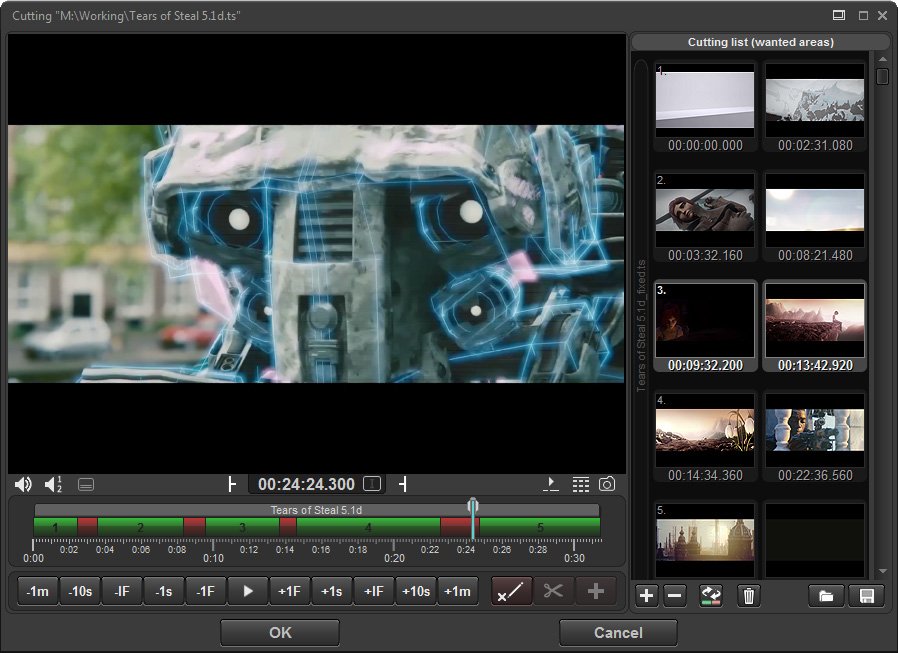
TS-Doctor includes an easy-to-use video editor window to check or improve the result of the automatic cutting or allow for manually cutting. The simple, fast and lossless cutting of the TS-Doctor can be used even for recordings of camcorders, if the recorder format is TS, MTS or M2TS. This is the case for example for many models from Sony, Canon and Panasonic. DVB Subtitel Converting
DVB Subtitel Converting
Conversion of DVB subtitles into the more widely-used SRT text format. This makes TS Doctor one of the few programs that can convert DVB subtitles, including the colour information, into a text format. Error check result
Error Checking
The result page gives you a detailed overview about the amount of removed data and errors found during the processing. Even the streams are inspected in deep, TS-Doctor is lightning fast.
Extended error checking guarantees perfect results. Useful Tools
Useful Expert Tools
TS-Doctor includes many useful tools to work with transport streams. With these tools you can merge, filter, demux, remux streams or even use the TS Packet Viewer to inspect transport streams on packet level. TS-Doctor is the swiss army knife for transport streams.
TS Video Editor and Converter Specifications
System Requirements:
Microsoft® Windows® 7, 8, 10 or 11 (32 Bit or 64 Bit)
At least Dualcore-CPU 2 x 2,8 GHz and 4 GByte RAM
For UHD recordings at least Quadcore CPU 4 x 3,2 GHz, 8 GByte RAM and Graphics card with HEVC (H.265) support
DirectX 9.0c and compatible Graphics card with DXVA
Supported Languages:
German, English, Estonian, French, Finnish, Italian, Lithuanian, Polish, Spanish, Russian, as well as a translation feature for other languages. Functions:
Automatic removal of commercials
Video editing and preview even for multi file recordings
Audio editing of Radio Recordings
Verify (show errors in streams)
Clean (remove unnecessary data)
Repair
Merge
Make incompatible streams playable
Edit (remove advertisement, etc.)
Delete audio streams
Delete teletext streams
Analysis of transport streams and TS packets
Processing of multi program recordings (transponder recordings)
Conversion from DVR, M2TS, MKV, MP4, MPEG, MPG, MOV, MTS, REC, STR, TP, TRP, TS4, VOB to TS
Conversion from TS to M2TS, MP4, MKV, MPG
Batch processing
Demuxing
TS-Player
IPTV
Download recordings via UPnP
Conversion of teletext subtitles to SRT
Conversion of DVB subtitles to SRT
Receiver:
Atemio AM500/510/7500/7600, AV700/7000 • Comag SL100HD, SL90, SL60, SL40 etc. • DBOX2 • Dreambox DM8000/7025/7020/800/600/500 etc. • Fortec Star FS4400 • Freebox HD • Gigablue UHD Quad 4K Pro, Trio 4K Pro etc. • Homecast HT8000, HS8100 • Humax ICord HD, Nano etc. • Kathrein UFS922/910/821 etc. • NanoXX 9800 HD • Panasonic DMR-XS400, BST-745 etc. • Smart MX04 uvm. • Technisat DigiCorder HD S2/S3, ISIO, DIGIT, TechniStar etc. • Technomate 6800HD • Telestar Hbb S1+ • TT-Micro S835 HD+ PVR uvm. • Topfield CRP-2401, TF-6000 etc. • Vantage VT-1/100/610/8000 S/C etc. • VU+ Solo/Solo²/Duo/Duo²/Solo 4K, Zero etc. • Xoro HRS9100, 8750, 8600/8520, HRT5000, HRK8910 Hbb+, etc. • and many more
On opening a TV recording, the TS-Doctor starts a quick deep transport stream analysis to get as much information as possible about the structure, the included streams and the meta data.
This way nearly any transport stream format current recording devices uses, can be read, be it TS, MTS, M2TS, DVR, TS4, TRP, REC, STR or another related format.
It tries to identify the source and the exact format of the recording, a program guide and the best methods to fix problems and detect commercial breaks. Most set top boxes record much more than only one video and one audio stream. Timeline
Commercial detection
TS-Doctor makes use of this additional information and helps you to remove annoying commercial breaks and garbage data, fix stream problems and brings the recording into shape for your video library and better compatibility with today's media players. Program guide
Meta Data
It extracts program guide information, if possible and saves it along with the new cut file, so you know exactly what movie or episode you recorded. TS-Doctor attempts to obtain this data from the EPG, teletext or the receiver-specific files, if present.
Complete details for your video library. Cut
Video Editing
TS-Doctor includes an easy-to-use video editor window to check or improve the result of the automatic cutting or allow for manually cutting. The simple, fast and lossless cutting of the TS-Doctor can be used even for recordings of camcorders, if the recorder format is TS, MTS or M2TS. This is the case for example for many models from Sony, Canon and Panasonic. DVB Subtitel Converting
DVB Subtitel Converting
Conversion of DVB subtitles into the more widely-used SRT text format. This makes TS Doctor one of the few programs that can convert DVB subtitles, including the colour information, into a text format. Error check result
Error Checking
The result page gives you a detailed overview about the amount of removed data and errors found during the processing. Even the streams are inspected in deep, TS-Doctor is lightning fast.
Extended error checking guarantees perfect results. Useful Tools
Useful Expert Tools
TS-Doctor includes many useful tools to work with transport streams. With these tools you can merge, filter, demux, remux streams or even use the TS Packet Viewer to inspect transport streams on packet level. TS-Doctor is the swiss army knife for transport streams.
TS Video Editor and Converter Specifications
System Requirements:
Microsoft® Windows® 7, 8, 10 or 11 (32 Bit or 64 Bit)
At least Dualcore-CPU 2 x 2,8 GHz and 4 GByte RAM
For UHD recordings at least Quadcore CPU 4 x 3,2 GHz, 8 GByte RAM and Graphics card with HEVC (H.265) support
DirectX 9.0c and compatible Graphics card with DXVA
Supported Languages:
German, English, Estonian, French, Finnish, Italian, Lithuanian, Polish, Spanish, Russian, as well as a translation feature for other languages. Functions:
Automatic removal of commercials
Video editing and preview even for multi file recordings
Audio editing of Radio Recordings
Verify (show errors in streams)
Clean (remove unnecessary data)
Repair
Merge
Make incompatible streams playable
Edit (remove advertisement, etc.)
Delete audio streams
Delete teletext streams
Analysis of transport streams and TS packets
Processing of multi program recordings (transponder recordings)
Conversion from DVR, M2TS, MKV, MP4, MPEG, MPG, MOV, MTS, REC, STR, TP, TRP, TS4, VOB to TS
Conversion from TS to M2TS, MP4, MKV, MPG
Batch processing
Demuxing
TS-Player
IPTV
Download recordings via UPnP
Conversion of teletext subtitles to SRT
Conversion of DVB subtitles to SRT
Receiver:
Atemio AM500/510/7500/7600, AV700/7000 • Comag SL100HD, SL90, SL60, SL40 etc. • DBOX2 • Dreambox DM8000/7025/7020/800/600/500 etc. • Fortec Star FS4400 • Freebox HD • Gigablue UHD Quad 4K Pro, Trio 4K Pro etc. • Homecast HT8000, HS8100 • Humax ICord HD, Nano etc. • Kathrein UFS922/910/821 etc. • NanoXX 9800 HD • Panasonic DMR-XS400, BST-745 etc. • Smart MX04 uvm. • Technisat DigiCorder HD S2/S3, ISIO, DIGIT, TechniStar etc. • Technomate 6800HD • Telestar Hbb S1+ • TT-Micro S835 HD+ PVR uvm. • Topfield CRP-2401, TF-6000 etc. • Vantage VT-1/100/610/8000 S/C etc. • VU+ Solo/Solo²/Duo/Duo²/Solo 4K, Zero etc. • Xoro HRS9100, 8750, 8600/8520, HRT5000, HRK8910 Hbb+, etc. • and many more
Sections/Browse similar tools
Alternative to TS-Doctor
(Latest version updated)ProjectX (Mar 27, 2011)
Guides and How to's
Acronyms / Also Known As
Notify me when software updated or report software
| 28 reviews, Showing 1 to 5 reviews |
Rating by Macman on
Sep 10, 2024 Version: 4.1.8
OS: MacOSX Ease of use: 10/10
Functionality: 8/10
Value for money: 9/10
Overall: 9/10
I'm trying to convert some TS files (to get subtitles to work on another device) to MKV
but I am finding many especially HD ones truncate - sometimes after a few megabytes
Nothing seems to stop this - I've tried everything from raw ffmpeg to MKVToolnix etc
I saw TS doctor and hoped it would identify the issue but nothing it seems
to do in the Free version stops it.
I'd be happy to buy this given the other features if only it could stop this truncation
(preferably keeping subtitles intact)
Perhaps the authour could think of a reason for the truncating - I can't find it.
but I am finding many especially HD ones truncate - sometimes after a few megabytes
Nothing seems to stop this - I've tried everything from raw ffmpeg to MKVToolnix etc
I saw TS doctor and hoped it would identify the issue but nothing it seems
to do in the Free version stops it.
I'd be happy to buy this given the other features if only it could stop this truncation
(preferably keeping subtitles intact)
Perhaps the authour could think of a reason for the truncating - I can't find it.
Review by jack616 on
Jan 13, 2023 Version: 3.9.21.0
OS: Windows 7 64-bit Ease of use: 8/10
Functionality: 8/10
Value for money: 3/10
Overall: 6/10
I like the software and have been using it for almost 10 years. There is hardly any software that is updated so often and gets new features. Works from Windows XP to Windows 11 and even on Linux and MacOS using Wine/Crossover/PlayOnMac. The license file you get when you buy it can be used on multiple PCs and doesn't need to be authorized over the Internet, as is often necessary with other software. Use the software to clean recordings from Austrian, Swiss and German channels and remove annoying commercials.
Review by AustrianUser on
Jul 5, 2021 Version: 3.1.13
OS: Windows 10 64-bit Ease of use: 9/10
Functionality: 8/10
Value for money: 10/10
Overall: 10/10
Disappointing. I downloaded the trial version to see if it could help with some .ts file recordings made via IPTV. It was far from intuitive. On one file it was able to 'clean' the file and save a 'fixed' version of it, but on two others it found errors and just gave up. The Commercial Detection was useless, and cut the file in incorrect places. I will not be buying the full version!
Review by raydio on
Jun 15, 2021 Version: 3.0
OS: Windows 10 64-bit Ease of use: 1/10
Functionality: 3/10
Value for money: 3/10
Overall: 3/10
Is easy to use and gives good results. Fast and reliable. Works with many receiver formats.
I can recommend this tool.
I can recommend this tool.
Review by MrSolo4K on
Mar 5, 2020 Version: 3.0.12
OS: Windows 10 64-bit Ease of use: 10/10
Functionality: 9/10
Value for money: 10/10
Overall: 10/10
| 28 reviews, Showing 1 to 5 reviews |
| 1 tool hits, Showing 1 to 1 tools |
Explanation:
NEW SOFTWARE= New tool since your last visit
NEW VERSION= New version since your last visit
NEW REVIEW= New review since your last visit
NEW VERSION= New version
Latest version
Version number / Beta version number / Update version number and when it whas released.
Type and download
NO MORE UPDATES? = The software hasn't been updated in over 2 years.
NO LONGER DEVELOPED = The software hasn't been updated in over 5 years.
RECENTLY UPDATED = The software has been updated the last 31 days.
Freeware = Download Free software.
Freeware Trialware = Download Free software but some parts are trial/shareware.
Free software = Download Free software and also open source code also known as FOSS (Free and Open Source Software).
Free software Trialware = Download Free software and also open source code but some parts are trial/shareware.
Freeware Ads = Download Free software but supported by advertising, usually with a included browser toolbar. It may be disabled when installing or after installation.
Free software Ads = Free Download software and open source code but supported by advertising, usually with a included browser toolbar. It may be disabled when installing or after installation.
Trialware = Also called shareware or demo. Free Trial version available for download and testing with usually a time limit or limited functions.
Payware = No demo or trial available.
Portable version = A portable/standalone version is available. No installation is required.
v1.0.1 = Latest version available.
Download beta = It could be a Beta, RC(Release Candidate) or an Alpha / Nightly / Unstable version of the software.
Download 15MB = A direct link to the software download.
Win = Windows download version for 32-bit and 64-bit Windows.
Win64 = Windows 64-bit download version for 64-bit Windows.
WinARM64 = Windows 64-bit ARM download version for Windows ARM64/AArch64.
Mac = Mac download version for 64-bit Mac OS Intel/ARM64/AArch64.
MacARM64 = Mac Silicon download version for 64-bit Mac OS ARM64/AArch64.
Mac64 = Mac OS download version for 64-bit Intel Mac OS.
Linux = Linux download version.
Linux64 = Linux download version for 64bit Linux.
Linux ARM = Linux download version for Linux ARM64/AArch64.
Portable = Portable version. No installation is required.
Ad-Supported = The software is bundled with advertising. Be careful when you install the software and disable addons that you don't want!
Visit developers site = A link to the software developer site.
Download (mirror link) = A mirror link to the software download. It may not contain the latest versions.
Download old versions = Free downloads of previous versions of the program.
Download 64-bit version = If you have a 64bit operating system you can download this version.
Download portable version = Portable/Standalone version meaning that no installation is required, just extract the files to a folder and run directly.
Portable version available = Download the portable version and you can just extract the files and run the program without installation.
Old versions available = Download old versions of the program.
Version history available = Complete changelog on our site.
= Windows version available.
 = Mac OS version available.
 = Linux version available.
Our hosted software are virus and malware scanned with several antivirus programs using www.virustotal.com. (NOTE! Just one virustotal warning is 99.9% a false positive. And some software might receive 2-6 warnings but it's if they are not all same virus/trojan then it's 99% false positives.)
Rating
Rating from 0-10.
NEW SOFTWARE= New tool since your last visit
NEW VERSION= New version since your last visit
NEW REVIEW= New review since your last visit
NEW VERSION= New version
Latest version
Version number / Beta version number / Update version number and when it whas released.
Type and download
NO MORE UPDATES? = The software hasn't been updated in over 2 years.
NO LONGER DEVELOPED = The software hasn't been updated in over 5 years.
RECENTLY UPDATED = The software has been updated the last 31 days.
Freeware = Download Free software.
Freeware Trialware = Download Free software but some parts are trial/shareware.
Free software = Download Free software and also open source code also known as FOSS (Free and Open Source Software).
Free software Trialware = Download Free software and also open source code but some parts are trial/shareware.
Freeware Ads = Download Free software but supported by advertising, usually with a included browser toolbar. It may be disabled when installing or after installation.
Free software Ads = Free Download software and open source code but supported by advertising, usually with a included browser toolbar. It may be disabled when installing or after installation.
Trialware = Also called shareware or demo. Free Trial version available for download and testing with usually a time limit or limited functions.
Payware = No demo or trial available.
Portable version = A portable/standalone version is available. No installation is required.
v1.0.1 = Latest version available.
Download beta = It could be a Beta, RC(Release Candidate) or an Alpha / Nightly / Unstable version of the software.
Download 15MB = A direct link to the software download.
Win = Windows download version for 32-bit and 64-bit Windows.
Win64 = Windows 64-bit download version for 64-bit Windows.
WinARM64 = Windows 64-bit ARM download version for Windows ARM64/AArch64.
Mac = Mac download version for 64-bit Mac OS Intel/ARM64/AArch64.
MacARM64 = Mac Silicon download version for 64-bit Mac OS ARM64/AArch64.
Mac64 = Mac OS download version for 64-bit Intel Mac OS.
Linux = Linux download version.
Linux64 = Linux download version for 64bit Linux.
Linux ARM = Linux download version for Linux ARM64/AArch64.
Portable = Portable version. No installation is required.
Ad-Supported = The software is bundled with advertising. Be careful when you install the software and disable addons that you don't want!
Visit developers site = A link to the software developer site.
Download (mirror link) = A mirror link to the software download. It may not contain the latest versions.
Download old versions = Free downloads of previous versions of the program.
Download 64-bit version = If you have a 64bit operating system you can download this version.
Download portable version = Portable/Standalone version meaning that no installation is required, just extract the files to a folder and run directly.
Portable version available = Download the portable version and you can just extract the files and run the program without installation.
Old versions available = Download old versions of the program.
Version history available = Complete changelog on our site.
= Windows version available. = Mac OS version available. = Linux version available.Our hosted software are virus and malware scanned with several antivirus programs using www.virustotal.com. (NOTE! Just one virustotal warning is 99.9% a false positive. And some software might receive 2-6 warnings but it's if they are not all same virus/trojan then it's 99% false positives.)
Rating
Rating from 0-10.
Browse software by sections
All In One Blu-ray Converters (9)
All In One DVD Converters (12)
All In One MKV to MP4, Blu-ray, UHD (11)
All In One Video Converters (19)
Animation (3D, 2D Animation) (13)
Audio Editors (23)
Audio Encoders (80)
Audio Players (19)
Authoring (Blu-ray, UHD, AVCHD) (13)
Authoring (DivX) (4)
Authoring (DVD) (26)
Authoring (SVCD, VCD) (9)
Bitrate Calculators (7)
Blu-ray to AVI, MKV, MP4 (15)
Blu-ray to Blu-ray, AVCHD (10)
Burn (CD,DVD,Blu-ray) (24)
Camcorders, DV, HDV, AVCHD (31)
Capture TV, DVD, VCR (30)
CD, DVD, Blu-ray recovery (3)
Codec Packs (6)
All In One DVD Converters (12)
All In One MKV to MP4, Blu-ray, UHD (11)
All In One Video Converters (19)
Animation (3D, 2D Animation) (13)
Audio Editors (23)
Audio Encoders (80)
Audio Players (19)
Authoring (Blu-ray, UHD, AVCHD) (13)
Authoring (DivX) (4)
Authoring (DVD) (26)
Authoring (SVCD, VCD) (9)
Bitrate Calculators (7)
Blu-ray to AVI, MKV, MP4 (15)
Blu-ray to Blu-ray, AVCHD (10)
Burn (CD,DVD,Blu-ray) (24)
Camcorders, DV, HDV, AVCHD (31)
Capture TV, DVD, VCR (30)
CD, DVD, Blu-ray recovery (3)
Codec Packs (6)
Codec, Video Identifiers (31)
Codecs , Renderers (68)
Decrypters (DVD Rippers) (16)
Decrypters (UHD, Blu-ray Rippers) (8)
DigitalTV, DVB, IPTV (40)
DVD to DVD (20)
DVD to MP4, MKV, H264, H265 (16)
DVD to VCD, SVCD (5)
DVD to XviD, AVI, DivX (16)
ISO, Image (14)
Linux Video Tools (220)
MacOS Video Tools (253)
Media (Blu-ray, DVD, CD) (9)
Media Center, HTPC (25)
Other Useful Tools (136)
Photo Blu-ray, DVD, SlideShow (8)
Portable (Mobile, PSP) (35)
Region Free Tools (5)
Screen capture , Screen recording (25)
Screenshots , Thumbnails (13)
Codecs , Renderers (68)
Decrypters (DVD Rippers) (16)
Decrypters (UHD, Blu-ray Rippers) (8)
DigitalTV, DVB, IPTV (40)
DVD to DVD (20)
DVD to MP4, MKV, H264, H265 (16)
DVD to VCD, SVCD (5)
DVD to XviD, AVI, DivX (16)
ISO, Image (14)
Linux Video Tools (220)
MacOS Video Tools (253)
Media (Blu-ray, DVD, CD) (9)
Media Center, HTPC (25)
Other Useful Tools (136)
Photo Blu-ray, DVD, SlideShow (8)
Portable (Mobile, PSP) (35)
Region Free Tools (5)
Screen capture , Screen recording (25)
Screenshots , Thumbnails (13)
Subtitle Editors, Converters (72)
Tag Editors (4)
Video Compare Software (6)
Video Demultiplexers, Multiplexers (66)
Video Editors (Advanced, NLE) (37)
Video Editors (Basic) (58)
Video Editors (H264, MP4, MKV, MTS) (21)
Video Editors (Lossless) (7)
Video Editors (MPG, DVD) (16)
Video Editors (WMV, AVI) (15)
Video Encoders (AV1, VP8, VP9) (2)
Video Encoders (AVI, WMV) (38)
Video Encoders (H264, H265, MP4, MKV) (45)
Video Encoders (MPG, DVD) (23)
Video Encoders , Converters (155)
Video Frameservers (9)
Video Players (48)
Video Repair, Fix (24)
Video Scripting (10)
Video Streaming (20)
Tag Editors (4)
Video Compare Software (6)
Video Demultiplexers, Multiplexers (66)
Video Editors (Advanced, NLE) (37)
Video Editors (Basic) (58)
Video Editors (H264, MP4, MKV, MTS) (21)
Video Editors (Lossless) (7)
Video Editors (MPG, DVD) (16)
Video Editors (WMV, AVI) (15)
Video Encoders (AV1, VP8, VP9) (2)
Video Encoders (AVI, WMV) (38)
Video Encoders (H264, H265, MP4, MKV) (45)
Video Encoders (MPG, DVD) (23)
Video Encoders , Converters (155)
Video Frameservers (9)
Video Players (48)
Video Repair, Fix (24)
Video Scripting (10)
Video Streaming (20)