
Help us keep the list up to date and submit new video software here.
Tool
Description
Type
Rating
Reviews
MKV Cutter is a tool to cut h.264 mkv files frame accurate. Cut out mkv video clips exactly without reconverting the entire video. Since it's an ALPHA version it has some major shortcomings.
Freeware
OS:
File size: 57MB
Portable version
Old versions
Version history
OS:
File size: 57MB
Portable version
Old versions
Version history
Screenshots
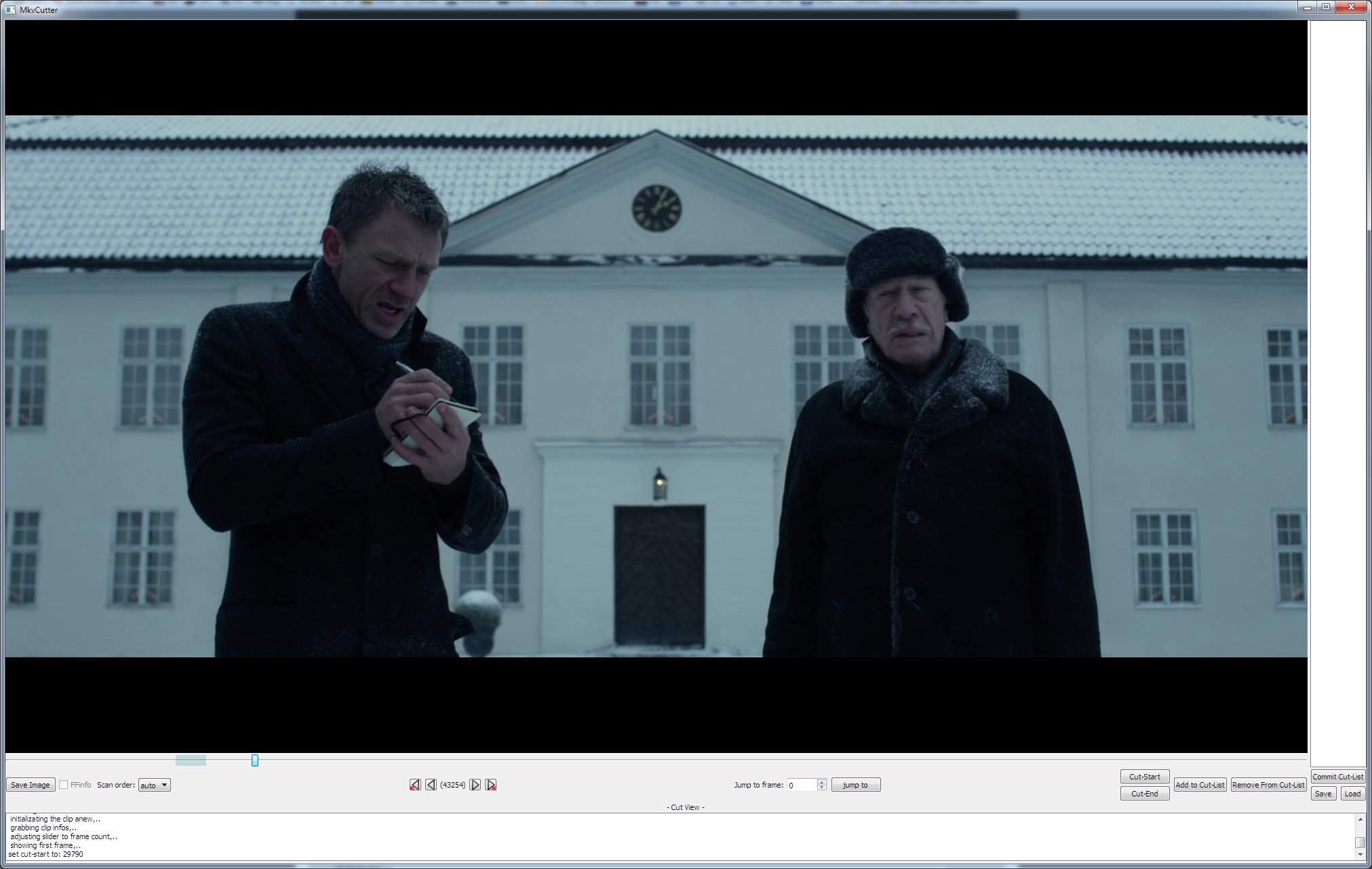
Latest version
Download
Download MKV Cutter 20260910 64-bit 57MB Win64
Portable 
Download old versions

Software License
Supported operating systems
Version history / Release notes / Changelog / What's New
Uploaded MkvCutter_r20260909 which fixes a few bugs and updated the text in the first post. (also using 64bit tool versions now)
View full changelog
All features
Here's a general overview how MKVCutter works:
analyze content with MKVInfo (to get the key frame positions, frame count, frame rate and track layout)
analyze content with MediaInfo (scan type and field order, bit depth, chroma subsampling, audio delays, and the original x264 settings if the source carries them)
index the content with ffmsindex so the preview can seek
create AvisynthSkript to preview the content (simple script that calls FFVideoSource on the input)
let user set which parts of the content he wants
create audio and video cut lists for mkvmerge, create trim calls (and cut the timestamp file, if the source is vfr)
let user set the output name and the temp folder
call mkvmerge with the video cut lists to create a bunch of temporary files (here the cuts are always on key frames)
extract those parts to H.264 elementary streams with ffmpeg
analyze one of the not reencoded parts with h264_parse to improve compatibility
create avisynth scripts using the trim calls and FFVideoSource to decode the GOPs that need reencoding (smart rendering)
create x264 call to reencode the content provided by the avisynth scripts (profile, level, ref frames, bframes, cabac, keyint and field order are taken from the source)
call x264 to reencode
when all GOPs that need to be reencoded are reencoded, call mkvmerge to cut the audio - one file per part - and extract&cut the subtitles
merge the new audio, video and all the reencoded and kept GOPs, giving each audio part the offset that puts it back at the start of its video part
Quote:
This is how one uses 'MKV Cutter': (or how the author envisioned one would use it)
Start MKV Cutter
Press 'Open Source' and select the .mkv file you want to cut.
MKV Cutter will now use MkvInfo, Mediainfo and ffmsindex to analyse and index the source, once it's finished a new screen will show.
Here one selects the parts of the movie one wants to keep.
Go to a 'start-point' of a section you want to keep.
Press 'Cut-Start'
Go to the 'end-point' of the current section you want to keep.
Press 'Cut-End'
The selected section should now be highlighted on the slider.
Press 'Add to Cut-List', so the selection section will be remebered.
Repeat step 5.-10. for all sections you want to keep.
(optional) Press 'Save' to write the cut list to a .cut file, 'Load' reads one back in.
Press 'Commit Cut-List' to finish the selection definition.
In the next view you set the 'Output' (File) and 'Temp folder'
Press 'Output' and set the name and location of the output file.
Press 'Temp folder' to set the folder that is used for temporal files.
Press 'Next' to start the actual processing.
Wait till 'MKVCutter' is done and the 'Finished!' popup appears.
What it handles these days:
H.264 in Matroska, 8 and 10 bit, 4:2:0, 4:2:2 and 4:4:4
progressive, MBAFF and PAFF sources - for field coded content the container counts fields while Avisynth counts frames, so the ratio is measured and everything is converted
constant and variable frame rate (the timestamp file is cut along)
subtitles: SRT, ASS/SSA and VobSub are cut and kept
several audio tracks per file, copied through
if every cut already sits on a key frame, nothing is reencoded at all
it can be driven from the command line with --clinput, so a cut can run unattended
A word on the audio:
Compressed audio can only be cut losslessly on frame boundaries - 32ms for AC-3 - so every part comes out a bit shorter or longer than asked for. The parts are therefore cut into separate files and joined while muxing, each with the offset that puts it back at the start of its video part. Without that the rounding errors add up and the sound slowly runs ahead of the picture.
Limitations:
Since it's a alpha version and I really only look at it from time to time when there are some major shortcomings.
it only properly supports H.264 content (users reported: H.265 content can be cut, cut not frame accurate)
it has an ugly user-interface
it does not come with any bells&whistles
x264 encoding is still rudimentary: the settings follow the source, but the quality is always a crf 19 encode and there is no user choice
PGS subtitles are not cut and get dropped
chapters, attachments and global tags are dropped
audio is not reencoded, so a cut can only land on an audio frame boundary
Windows OS only atm. (mainly because Avisynth is used for decoding and preview; in theory ffmpeg could be used as alternative so porting to Linux&Co should be possible)
analyze content with MKVInfo (to get the key frame positions, frame count, frame rate and track layout)
analyze content with MediaInfo (scan type and field order, bit depth, chroma subsampling, audio delays, and the original x264 settings if the source carries them)
index the content with ffmsindex so the preview can seek
create AvisynthSkript to preview the content (simple script that calls FFVideoSource on the input)
let user set which parts of the content he wants
create audio and video cut lists for mkvmerge, create trim calls (and cut the timestamp file, if the source is vfr)
let user set the output name and the temp folder
call mkvmerge with the video cut lists to create a bunch of temporary files (here the cuts are always on key frames)
extract those parts to H.264 elementary streams with ffmpeg
analyze one of the not reencoded parts with h264_parse to improve compatibility
create avisynth scripts using the trim calls and FFVideoSource to decode the GOPs that need reencoding (smart rendering)
create x264 call to reencode the content provided by the avisynth scripts (profile, level, ref frames, bframes, cabac, keyint and field order are taken from the source)
call x264 to reencode
when all GOPs that need to be reencoded are reencoded, call mkvmerge to cut the audio - one file per part - and extract&cut the subtitles
merge the new audio, video and all the reencoded and kept GOPs, giving each audio part the offset that puts it back at the start of its video part
Quote:
This is how one uses 'MKV Cutter': (or how the author envisioned one would use it)
Start MKV Cutter
Press 'Open Source' and select the .mkv file you want to cut.
MKV Cutter will now use MkvInfo, Mediainfo and ffmsindex to analyse and index the source, once it's finished a new screen will show.
Here one selects the parts of the movie one wants to keep.
Go to a 'start-point' of a section you want to keep.
Press 'Cut-Start'
Go to the 'end-point' of the current section you want to keep.
Press 'Cut-End'
The selected section should now be highlighted on the slider.
Press 'Add to Cut-List', so the selection section will be remebered.
Repeat step 5.-10. for all sections you want to keep.
(optional) Press 'Save' to write the cut list to a .cut file, 'Load' reads one back in.
Press 'Commit Cut-List' to finish the selection definition.
In the next view you set the 'Output' (File) and 'Temp folder'
Press 'Output' and set the name and location of the output file.
Press 'Temp folder' to set the folder that is used for temporal files.
Press 'Next' to start the actual processing.
Wait till 'MKVCutter' is done and the 'Finished!' popup appears.
What it handles these days:
H.264 in Matroska, 8 and 10 bit, 4:2:0, 4:2:2 and 4:4:4
progressive, MBAFF and PAFF sources - for field coded content the container counts fields while Avisynth counts frames, so the ratio is measured and everything is converted
constant and variable frame rate (the timestamp file is cut along)
subtitles: SRT, ASS/SSA and VobSub are cut and kept
several audio tracks per file, copied through
if every cut already sits on a key frame, nothing is reencoded at all
it can be driven from the command line with --clinput, so a cut can run unattended
A word on the audio:
Compressed audio can only be cut losslessly on frame boundaries - 32ms for AC-3 - so every part comes out a bit shorter or longer than asked for. The parts are therefore cut into separate files and joined while muxing, each with the offset that puts it back at the start of its video part. Without that the rounding errors add up and the sound slowly runs ahead of the picture.
Limitations:
Since it's a alpha version and I really only look at it from time to time when there are some major shortcomings.
it only properly supports H.264 content (users reported: H.265 content can be cut, cut not frame accurate)
it has an ugly user-interface
it does not come with any bells&whistles
x264 encoding is still rudimentary: the settings follow the source, but the quality is always a crf 19 encode and there is no user choice
PGS subtitles are not cut and get dropped
chapters, attachments and global tags are dropped
audio is not reencoded, so a cut can only land on an audio frame boundary
Windows OS only atm. (mainly because Avisynth is used for decoding and preview; in theory ffmpeg could be used as alternative so porting to Linux&Co should be possible)
Sections/Browse similar tools
Guides and How to's
Acronyms / Also Known As
Download MKV Cutter Portable download from the Download links under Download and Download other versions!
Notify me when software updated or report software
| 31 reviews, Showing 1 to 5 reviews |
Rating by peanutsoup on
Oct 12, 2024 Version: 20190123
OS: Windows 11 64-bit Ease of use: 9/10
Functionality: 10/10
Value for money: 10/10
Overall: 10/10
Wish I had known about this sooner -
it is THE PERFECT TOOL for synchronising subtitles to video images, e.g. to match frames with text, such as credits or silent film intertitles.
(NOTE: I rated Functionality as 5/10 because I haven't actually used it to cut a video)
it is THE PERFECT TOOL for synchronising subtitles to video images, e.g. to match frames with text, such as credits or silent film intertitles.
(NOTE: I rated Functionality as 5/10 because I haven't actually used it to cut a video)
Review by Jørgen on
Jul 10, 2024 Version: 23-01-2019
OS: Windows 8 64-bit Ease of use: 8/10
Functionality: 5/10
Value for money: 10/10
Overall: 8/10
The app seems to have an issue after Add to Cut-List the first segment, when adding the second you'll have the mention
"Ignored 9976-19960 need more distrance from. (end+1)"
Although my first segment ends at 9975. I also tried going to the key frame before but it didn't work either.
I think this app is broken, unfortunately. Hope to see a fixed release for it!
"Ignored 9976-19960 need more distrance from. (end+1)"
Although my first segment ends at 9975. I also tried going to the key frame before but it didn't work either.
I think this app is broken, unfortunately. Hope to see a fixed release for it!
Review by gravelfreeman on
Aug 12, 2023 Version: 20190123
OS: Windows 10 64-bit Ease of use: 5/10
Functionality: 5/10
Value for money: 10/10
Overall: 5/10
Rating by Desperate Silk Doctor on
Jun 17, 2023 Version: 20190123
OS: Windows 10 64-bit Ease of use: 7/10
Functionality: 10/10
Value for money: 10/10
Overall: 9/10
Rating by carreti on
Jul 16, 2022 Version: 20190123
OS: Windows 11 64-bit Ease of use: 10/10
Functionality: 10/10
Value for money: 10/10
Overall: 10/10
| 31 reviews, Showing 1 to 5 reviews |
| 1 tool hits, Showing 1 to 1 tools |
Explanation:
NEW SOFTWARE= New tool since your last visit
NEW VERSION= New version since your last visit
NEW REVIEW= New review since your last visit
NEW VERSION= New version
Latest version
Version number / Beta version number / Update version number and when it whas released.
Type and download
NO MORE UPDATES? = The software hasn't been updated in over 2 years.
NO LONGER DEVELOPED = The software hasn't been updated in over 5 years.
RECENTLY UPDATED = The software has been updated the last 31 days.
Freeware = Download Free software.
Freeware Trialware = Download Free software but some parts are trial/shareware.
Free software = Download Free software and also open source code also known as FOSS (Free and Open Source Software).
Free software Trialware = Download Free software and also open source code but some parts are trial/shareware.
Freeware Ads = Download Free software but supported by advertising, usually with a included browser toolbar. It may be disabled when installing or after installation.
Free software Ads = Free Download software and open source code but supported by advertising, usually with a included browser toolbar. It may be disabled when installing or after installation.
Trialware = Also called shareware or demo. Free Trial version available for download and testing with usually a time limit or limited functions.
Payware = No demo or trial available.
Portable version = A portable/standalone version is available. No installation is required.
v1.0.1 = Latest version available.
Download beta = It could be a Beta, RC(Release Candidate) or an Alpha / Nightly / Unstable version of the software.
Download 15MB = A direct link to the software download.
Win = Windows download version for 32-bit and 64-bit Windows.
Win64 = Windows 64-bit download version for 64-bit Windows.
WinARM64 = Windows 64-bit ARM download version for Windows ARM64/AArch64.
Mac = Mac download version for 64-bit Mac OS Intel/ARM64/AArch64.
MacARM64 = Mac Silicon download version for 64-bit Mac OS ARM64/AArch64.
Mac64 = Mac OS download version for 64-bit Intel Mac OS.
Linux = Linux download version.
Linux64 = Linux download version for 64bit Linux.
Linux ARM = Linux download version for Linux ARM64/AArch64.
Portable = Portable version. No installation is required.
Ad-Supported = The software is bundled with advertising. Be careful when you install the software and disable addons that you don't want!
Visit developers site = A link to the software developer site.
Download (mirror link) = A mirror link to the software download. It may not contain the latest versions.
Download old versions = Free downloads of previous versions of the program.
Download 64-bit version = If you have a 64bit operating system you can download this version.
Download portable version = Portable/Standalone version meaning that no installation is required, just extract the files to a folder and run directly.
Portable version available = Download the portable version and you can just extract the files and run the program without installation.
Old versions available = Download old versions of the program.
Version history available = Complete changelog on our site.
= Windows version available.
 = Mac OS version available.
 = Linux version available.
Our hosted software are virus and malware scanned with several antivirus programs using www.virustotal.com. (NOTE! Just one virustotal warning is 99.9% a false positive. And some software might receive 2-6 warnings but it's if they are not all same virus/trojan then it's 99% false positives.)
Rating
Rating from 0-10.
NEW SOFTWARE= New tool since your last visit
NEW VERSION= New version since your last visit
NEW REVIEW= New review since your last visit
NEW VERSION= New version
Latest version
Version number / Beta version number / Update version number and when it whas released.
Type and download
NO MORE UPDATES? = The software hasn't been updated in over 2 years.
NO LONGER DEVELOPED = The software hasn't been updated in over 5 years.
RECENTLY UPDATED = The software has been updated the last 31 days.
Freeware = Download Free software.
Freeware Trialware = Download Free software but some parts are trial/shareware.
Free software = Download Free software and also open source code also known as FOSS (Free and Open Source Software).
Free software Trialware = Download Free software and also open source code but some parts are trial/shareware.
Freeware Ads = Download Free software but supported by advertising, usually with a included browser toolbar. It may be disabled when installing or after installation.
Free software Ads = Free Download software and open source code but supported by advertising, usually with a included browser toolbar. It may be disabled when installing or after installation.
Trialware = Also called shareware or demo. Free Trial version available for download and testing with usually a time limit or limited functions.
Payware = No demo or trial available.
Portable version = A portable/standalone version is available. No installation is required.
v1.0.1 = Latest version available.
Download beta = It could be a Beta, RC(Release Candidate) or an Alpha / Nightly / Unstable version of the software.
Download 15MB = A direct link to the software download.
Win = Windows download version for 32-bit and 64-bit Windows.
Win64 = Windows 64-bit download version for 64-bit Windows.
WinARM64 = Windows 64-bit ARM download version for Windows ARM64/AArch64.
Mac = Mac download version for 64-bit Mac OS Intel/ARM64/AArch64.
MacARM64 = Mac Silicon download version for 64-bit Mac OS ARM64/AArch64.
Mac64 = Mac OS download version for 64-bit Intel Mac OS.
Linux = Linux download version.
Linux64 = Linux download version for 64bit Linux.
Linux ARM = Linux download version for Linux ARM64/AArch64.
Portable = Portable version. No installation is required.
Ad-Supported = The software is bundled with advertising. Be careful when you install the software and disable addons that you don't want!
Visit developers site = A link to the software developer site.
Download (mirror link) = A mirror link to the software download. It may not contain the latest versions.
Download old versions = Free downloads of previous versions of the program.
Download 64-bit version = If you have a 64bit operating system you can download this version.
Download portable version = Portable/Standalone version meaning that no installation is required, just extract the files to a folder and run directly.
Portable version available = Download the portable version and you can just extract the files and run the program without installation.
Old versions available = Download old versions of the program.
Version history available = Complete changelog on our site.
= Windows version available. = Mac OS version available. = Linux version available.Our hosted software are virus and malware scanned with several antivirus programs using www.virustotal.com. (NOTE! Just one virustotal warning is 99.9% a false positive. And some software might receive 2-6 warnings but it's if they are not all same virus/trojan then it's 99% false positives.)
Rating
Rating from 0-10.
Browse software by sections
All In One Blu-ray Converters (9)
All In One DVD Converters (12)
All In One MKV to MP4, Blu-ray, UHD (11)
All In One Video Converters (19)
Animation (3D, 2D Animation) (12)
Audio Editors (22)
Audio Encoders (80)
Audio Players (19)
Authoring (Blu-ray, UHD, AVCHD) (13)
Authoring (DivX) (4)
Authoring (DVD) (26)
Authoring (SVCD, VCD) (9)
Bitrate Calculators (7)
Blu-ray to AVI, MKV, MP4 (15)
Blu-ray to Blu-ray, AVCHD (10)
Burn (CD,DVD,Blu-ray) (24)
Camcorders, DV, HDV, AVCHD (31)
Capture TV, DVD, VCR (30)
CD, DVD, Blu-ray recovery (3)
Codec Packs (6)
All In One DVD Converters (12)
All In One MKV to MP4, Blu-ray, UHD (11)
All In One Video Converters (19)
Animation (3D, 2D Animation) (12)
Audio Editors (22)
Audio Encoders (80)
Audio Players (19)
Authoring (Blu-ray, UHD, AVCHD) (13)
Authoring (DivX) (4)
Authoring (DVD) (26)
Authoring (SVCD, VCD) (9)
Bitrate Calculators (7)
Blu-ray to AVI, MKV, MP4 (15)
Blu-ray to Blu-ray, AVCHD (10)
Burn (CD,DVD,Blu-ray) (24)
Camcorders, DV, HDV, AVCHD (31)
Capture TV, DVD, VCR (30)
CD, DVD, Blu-ray recovery (3)
Codec Packs (6)
Codec, Video Identifiers (31)
Codecs (67)
Decrypters (DVD Rippers) (16)
Decrypters (UHD, Blu-ray Rippers) (8)
DigitalTV, DVB, IPTV (39)
DVD to DVD (20)
DVD to MP4, MKV, H264, H265 (16)
DVD to VCD, SVCD (5)
DVD to XviD, AVI, DivX (16)
ISO, Image (14)
Linux Video Tools (215)
MacOS Video Tools (246)
Media (Blu-ray, DVD, CD) (9)
Media Center, HTPC (24)
Other Useful Tools (140)
Photo Blu-ray, DVD, SlideShow (8)
Portable (Mobile, PSP) (35)
Region Free Tools (5)
Screen capture , Screen recording (25)
Screenshots , Thumbnails (13)
Codecs (67)
Decrypters (DVD Rippers) (16)
Decrypters (UHD, Blu-ray Rippers) (8)
DigitalTV, DVB, IPTV (39)
DVD to DVD (20)
DVD to MP4, MKV, H264, H265 (16)
DVD to VCD, SVCD (5)
DVD to XviD, AVI, DivX (16)
ISO, Image (14)
Linux Video Tools (215)
MacOS Video Tools (246)
Media (Blu-ray, DVD, CD) (9)
Media Center, HTPC (24)
Other Useful Tools (140)
Photo Blu-ray, DVD, SlideShow (8)
Portable (Mobile, PSP) (35)
Region Free Tools (5)
Screen capture , Screen recording (25)
Screenshots , Thumbnails (13)
Subtitle Editors, Converters (72)
Tag Editors (4)
Video De, Multiplexers (66)
Video Editors (Advanced, NLE) (35)
Video Editors (Basic) (56)
Video Editors (H264, MP4, MKV, MTS) (19)
Video Editors (Lossless) (4)
Video Editors (MPG, DVD) (16)
Video Editors (WMV, AVI) (15)
Video Encoders (AV1, VP8, VP9) (2)
Video Encoders (AVI, WMV) (38)
Video Encoders (H264, H265, MP4, MKV) (45)
Video Encoders (MPG, DVD) (23)
Video Encoders , Converters (156)
Video Frameservers (9)
Video Players (48)
Video Repair, Fix (24)
Video Scripting (10)
Video Streaming (20)
Video Streaming Downloaders (99)
Tag Editors (4)
Video De, Multiplexers (66)
Video Editors (Advanced, NLE) (35)
Video Editors (Basic) (56)
Video Editors (H264, MP4, MKV, MTS) (19)
Video Editors (Lossless) (4)
Video Editors (MPG, DVD) (16)
Video Editors (WMV, AVI) (15)
Video Encoders (AV1, VP8, VP9) (2)
Video Encoders (AVI, WMV) (38)
Video Encoders (H264, H265, MP4, MKV) (45)
Video Encoders (MPG, DVD) (23)
Video Encoders , Converters (156)
Video Frameservers (9)
Video Players (48)
Video Repair, Fix (24)
Video Scripting (10)
Video Streaming (20)
Video Streaming Downloaders (99)