
Help us keep the list up to date and submit new video software here.
Tool
Description
Type
Rating
Reviews
ConvertXtoHD - Convert all your videos to Blu-ray/AVCHD. Create Blu-ray and AVCHD Disks, Folders and ISO images. Convert and burn any video type to Blu-ray or AVCHD structure to play on any Blu-ray player. Advanced options include image and video editing + Blu-ray menu creation. Super fast with advanced hardware optimization and exceptional quality!
Screenshots
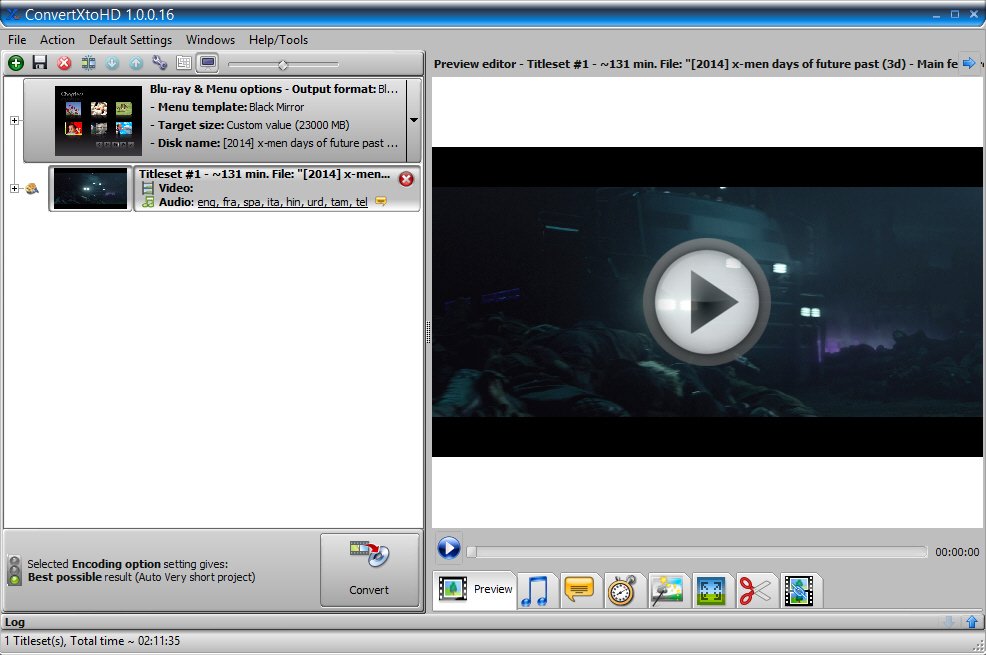
Latest version
Download
Download ConvertXtoHD 3.5.0.158 64-bit 63MB Win64

Software License
Supported operating systems
Version history / Release notes / Changelog / What's New
ConvertXtoHD 3.5.0.156 - released Tue May 19, 2026
Fix various update engine and log presentation issues
0013587
[Bug] H265 source not correctly supported
0014030
[Crash] Conversion fails with specific file/ works fine with ConvertXtoHD2
0014640
[Bug] Log File Timestamp order issue
0014641
[Bug] Top Menu / Help-Tools / Check for update
0014642
[Information] Log bug or confusing information
0014645
[Feature Request] The language German is not available
0014648
[Bug] From Hardware Optimization it's not possible to download the Full Test Package
0014659
[Bug] Old menu templates won't download.
Fix various update engine and log presentation issues
0013587
[Bug] H265 source not correctly supported
0014030
[Crash] Conversion fails with specific file/ works fine with ConvertXtoHD2
0014640
[Bug] Log File Timestamp order issue
0014641
[Bug] Top Menu / Help-Tools / Check for update
0014642
[Information] Log bug or confusing information
0014645
[Feature Request] The language German is not available
0014648
[Bug] From Hardware Optimization it's not possible to download the Full Test Package
0014659
[Bug] Old menu templates won't download.
View full changelog
All features
Convert to Blu-ray
Convert your videos in HD in just a click - whatever their original format - to watch on any Blu-ray or AVCHD player!
Create AVCHD and Blu-ray folders, disks and ISO images.
Supports all input files: .avi, .mkv, Blu-rays, DVDs, .mts, .mpg, FLV, see more
Choose your output size: DVD-5, DVD-9, BD-25, BD-50, or custom value
Give your videos Blu-ray treatment with exceptional image quality! Conversions are made with professional looking menus making your disks extra easy to watch! *Looking to convert to other HD formats, see our Video Converter
toolsEdit & Personalize
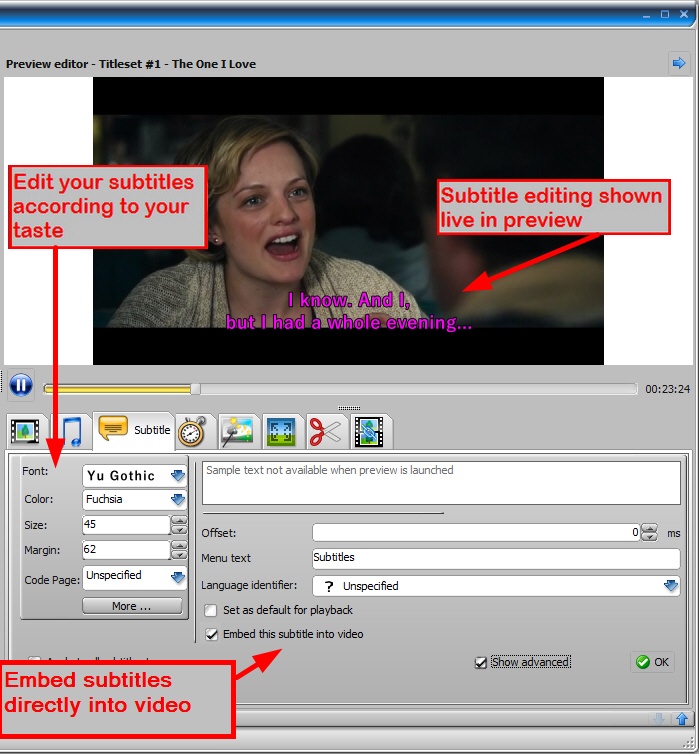
See your changes in real time with the live preview!
Add subtitles & audio
Advanced subtitle editing
Adjust synchronization
Brightness/Contrast
Rotate videos
Chapter managment
Cut out sections of the video
480, 576, 720, 1080 resolution
16:9 widescreen or 4:3 full screen
Increase audio volume
Join files into one
Personalize HD menus
Padding/Cropping
Live preview!
hardware encodingQuality & Speed
Conversion speeds are optimized:
Videos are converted simultaneously and optimized for multi-core processing
Nvidia Cuda/NVENC and INTEL QuickSync hardware optimizations will be used for encoding and decoding when possible
Advanced settings available like upscaling and downscaling filters and 2 pass conversions are available.
easy to use hd converterEasy to use
Create Blu-ray from any video with guaranteed compatibility with all home Blu-ray players.
Burn to disk
Burn multiple copies
Make copies of Blu-ray disks
Create BDMV and AVCHD ISO
Compatible with all disk formats and burners
Store conversions on USB key or PC.
Shutdown PC option when finished
Various skins to change look and feel of the interface
Available in multiple languages
Includes several HD menu templates
Includes "how to" tutorials and video guides
Convert your videos in HD in just a click - whatever their original format - to watch on any Blu-ray or AVCHD player!
Create AVCHD and Blu-ray folders, disks and ISO images.
Supports all input files: .avi, .mkv, Blu-rays, DVDs, .mts, .mpg, FLV, see more
Choose your output size: DVD-5, DVD-9, BD-25, BD-50, or custom value
Give your videos Blu-ray treatment with exceptional image quality! Conversions are made with professional looking menus making your disks extra easy to watch! *Looking to convert to other HD formats, see our Video Converter
toolsEdit & Personalize
See your changes in real time with the live preview!
Add subtitles & audio
Advanced subtitle editing
Adjust synchronization
Brightness/Contrast
Rotate videos
Chapter managment
Cut out sections of the video
480, 576, 720, 1080 resolution
16:9 widescreen or 4:3 full screen
Increase audio volume
Join files into one
Personalize HD menus
Padding/Cropping
Live preview!
hardware encodingQuality & Speed
Conversion speeds are optimized:
Videos are converted simultaneously and optimized for multi-core processing
Nvidia Cuda/NVENC and INTEL QuickSync hardware optimizations will be used for encoding and decoding when possible
Advanced settings available like upscaling and downscaling filters and 2 pass conversions are available.
easy to use hd converterEasy to use
Create Blu-ray from any video with guaranteed compatibility with all home Blu-ray players.
Burn to disk
Burn multiple copies
Make copies of Blu-ray disks
Create BDMV and AVCHD ISO
Compatible with all disk formats and burners
Store conversions on USB key or PC.
Shutdown PC option when finished
Various skins to change look and feel of the interface
Available in multiple languages
Includes several HD menu templates
Includes "how to" tutorials and video guides
Sections/Browse similar tools
Guides and How to's
Acronyms / Also Known As
Notify me when software updated or report software
| 3 reviews, Showing 1 to 3 reviews |
why does this software that works very well, but stops at 49% when verifying? does anyone know if it is possible to permanently turn off verify after successful burn to disk?
Review by allkno on
Aug 29, 2025 Version: 3.0.0.77
OS: Windows 10 64-bit Ease of use: 8/10
Functionality: 8/10
Value for money: 9/10
Overall: 9/10
Very easy to use and does well for playing in different products
Review by Austinfilmstock on
Jul 17, 2019 Version: 3.0.0.64
OS: Windows 10 64-bit Ease of use: 10/10
Functionality: 10/10
Value for money: 10/10
Overall: 10/10
Rating by Lukas80153 on
Oct 28, 2018 Version: 3.0.0.64
OS: Windows 10 64-bit Ease of use: 10/10
Functionality: 10/10
Value for money: 10/10
Overall: 10/10
| 3 reviews, Showing 1 to 3 reviews |
| 1 tool hits, Showing 1 to 1 tools |
Explanation:
NEW SOFTWARE= New tool since your last visit
NEW VERSION= New version since your last visit
NEW REVIEW= New review since your last visit
NEW VERSION= New version
Latest version
Version number / Beta version number / Update version number and when it whas released.
Type and download
NO MORE UPDATES? = The software hasn't been updated in over 2 years.
NO LONGER DEVELOPED = The software hasn't been updated in over 5 years.
RECENTLY UPDATED = The software has been updated the last 31 days.
Freeware = Download Free software.
Freeware Trialware = Download Free software but some parts are trial/shareware.
Free software = Download Free software and also open source code also known as FOSS (Free and Open Source Software).
Free software Trialware = Download Free software and also open source code but some parts are trial/shareware.
Freeware Ads = Download Free software but supported by advertising, usually with a included browser toolbar. It may be disabled when installing or after installation.
Free software Ads = Free Download software and open source code but supported by advertising, usually with a included browser toolbar. It may be disabled when installing or after installation.
Trialware = Also called shareware or demo. Free Trial version available for download and testing with usually a time limit or limited functions.
Payware = No demo or trial available.
Portable version = A portable/standalone version is available. No installation is required.
v1.0.1 = Latest version available.
Download beta = It could be a Beta, RC(Release Candidate) or an Alpha / Nightly / Unstable version of the software.
Download 15MB = A direct link to the software download.
Win = Windows download version for 32-bit and 64-bit Windows.
Win64 = Windows 64-bit download version for 64-bit Windows.
WinARM64 = Windows 64-bit ARM download version for Windows ARM64/AArch64.
Mac = Mac download version for 64-bit Mac OS Intel/ARM64/AArch64.
MacARM64 = Mac Silicon download version for 64-bit Mac OS ARM64/AArch64.
Mac64 = Mac OS download version for 64-bit Intel Mac OS.
Linux = Linux download version.
Linux64 = Linux download version for 64bit Linux.
Linux ARM = Linux download version for Linux ARM64/AArch64.
Portable = Portable version. No installation is required.
Ad-Supported = The software is bundled with advertising. Be careful when you install the software and disable addons that you don't want!
Visit developers site = A link to the software developer site.
Download (mirror link) = A mirror link to the software download. It may not contain the latest versions.
Download old versions = Free downloads of previous versions of the program.
Download 64-bit version = If you have a 64bit operating system you can download this version.
Download portable version = Portable/Standalone version meaning that no installation is required, just extract the files to a folder and run directly.
Portable version available = Download the portable version and you can just extract the files and run the program without installation.
Old versions available = Download old versions of the program.
Version history available = Complete changelog on our site.
= Windows version available.
 = Mac OS version available.
 = Linux version available.
Our hosted software are virus and malware scanned with several antivirus programs using www.virustotal.com. (NOTE! Just one virustotal warning is 99.9% a false positive. And some software might receive 2-6 warnings but it's if they are not all same virus/trojan then it's 99% false positives.)
Rating
Rating from 0-10.
NEW SOFTWARE= New tool since your last visit
NEW VERSION= New version since your last visit
NEW REVIEW= New review since your last visit
NEW VERSION= New version
Latest version
Version number / Beta version number / Update version number and when it whas released.
Type and download
NO MORE UPDATES? = The software hasn't been updated in over 2 years.
NO LONGER DEVELOPED = The software hasn't been updated in over 5 years.
RECENTLY UPDATED = The software has been updated the last 31 days.
Freeware = Download Free software.
Freeware Trialware = Download Free software but some parts are trial/shareware.
Free software = Download Free software and also open source code also known as FOSS (Free and Open Source Software).
Free software Trialware = Download Free software and also open source code but some parts are trial/shareware.
Freeware Ads = Download Free software but supported by advertising, usually with a included browser toolbar. It may be disabled when installing or after installation.
Free software Ads = Free Download software and open source code but supported by advertising, usually with a included browser toolbar. It may be disabled when installing or after installation.
Trialware = Also called shareware or demo. Free Trial version available for download and testing with usually a time limit or limited functions.
Payware = No demo or trial available.
Portable version = A portable/standalone version is available. No installation is required.
v1.0.1 = Latest version available.
Download beta = It could be a Beta, RC(Release Candidate) or an Alpha / Nightly / Unstable version of the software.
Download 15MB = A direct link to the software download.
Win = Windows download version for 32-bit and 64-bit Windows.
Win64 = Windows 64-bit download version for 64-bit Windows.
WinARM64 = Windows 64-bit ARM download version for Windows ARM64/AArch64.
Mac = Mac download version for 64-bit Mac OS Intel/ARM64/AArch64.
MacARM64 = Mac Silicon download version for 64-bit Mac OS ARM64/AArch64.
Mac64 = Mac OS download version for 64-bit Intel Mac OS.
Linux = Linux download version.
Linux64 = Linux download version for 64bit Linux.
Linux ARM = Linux download version for Linux ARM64/AArch64.
Portable = Portable version. No installation is required.
Ad-Supported = The software is bundled with advertising. Be careful when you install the software and disable addons that you don't want!
Visit developers site = A link to the software developer site.
Download (mirror link) = A mirror link to the software download. It may not contain the latest versions.
Download old versions = Free downloads of previous versions of the program.
Download 64-bit version = If you have a 64bit operating system you can download this version.
Download portable version = Portable/Standalone version meaning that no installation is required, just extract the files to a folder and run directly.
Portable version available = Download the portable version and you can just extract the files and run the program without installation.
Old versions available = Download old versions of the program.
Version history available = Complete changelog on our site.
= Windows version available. = Mac OS version available. = Linux version available.Our hosted software are virus and malware scanned with several antivirus programs using www.virustotal.com. (NOTE! Just one virustotal warning is 99.9% a false positive. And some software might receive 2-6 warnings but it's if they are not all same virus/trojan then it's 99% false positives.)
Rating
Rating from 0-10.
Browse software by sections
All In One Blu-ray Converters (9)
All In One DVD Converters (12)
All In One MKV to MP4, Blu-ray, UHD (11)
All In One Video Converters (19)
Animation (3D, 2D Animation) (12)
Audio Editors (22)
Audio Encoders (80)
Audio Players (19)
Authoring (Blu-ray, UHD, AVCHD) (13)
Authoring (DivX) (4)
Authoring (DVD) (26)
Authoring (SVCD, VCD) (9)
Bitrate Calculators (7)
Blu-ray to AVI, MKV, MP4 (15)
Blu-ray to Blu-ray, AVCHD (10)
Burn (CD,DVD,Blu-ray) (24)
Camcorders, DV, HDV, AVCHD (31)
Capture TV, DVD, VCR (30)
CD, DVD, Blu-ray recovery (3)
Codec Packs (6)
All In One DVD Converters (12)
All In One MKV to MP4, Blu-ray, UHD (11)
All In One Video Converters (19)
Animation (3D, 2D Animation) (12)
Audio Editors (22)
Audio Encoders (80)
Audio Players (19)
Authoring (Blu-ray, UHD, AVCHD) (13)
Authoring (DivX) (4)
Authoring (DVD) (26)
Authoring (SVCD, VCD) (9)
Bitrate Calculators (7)
Blu-ray to AVI, MKV, MP4 (15)
Blu-ray to Blu-ray, AVCHD (10)
Burn (CD,DVD,Blu-ray) (24)
Camcorders, DV, HDV, AVCHD (31)
Capture TV, DVD, VCR (30)
CD, DVD, Blu-ray recovery (3)
Codec Packs (6)
Codec, Video Identifiers (31)
Codecs (67)
Decrypters (DVD Rippers) (16)
Decrypters (UHD, Blu-ray Rippers) (8)
DigitalTV, DVB, IPTV (39)
DVD to DVD (20)
DVD to MP4, MKV, H264, H265 (16)
DVD to VCD, SVCD (5)
DVD to XviD, AVI, DivX (16)
ISO, Image (15)
Linux Video Tools (212)
MacOS Video Tools (244)
Media (Blu-ray, DVD, CD) (9)
Media Center, HTPC (24)
Other Useful Tools (140)
Photo Blu-ray, DVD, SlideShow (8)
Portable (Mobile, PSP) (35)
Region Free Tools (5)
Screen capture , Screen recording (26)
Screenshots , Thumbnails (13)
Codecs (67)
Decrypters (DVD Rippers) (16)
Decrypters (UHD, Blu-ray Rippers) (8)
DigitalTV, DVB, IPTV (39)
DVD to DVD (20)
DVD to MP4, MKV, H264, H265 (16)
DVD to VCD, SVCD (5)
DVD to XviD, AVI, DivX (16)
ISO, Image (15)
Linux Video Tools (212)
MacOS Video Tools (244)
Media (Blu-ray, DVD, CD) (9)
Media Center, HTPC (24)
Other Useful Tools (140)
Photo Blu-ray, DVD, SlideShow (8)
Portable (Mobile, PSP) (35)
Region Free Tools (5)
Screen capture , Screen recording (26)
Screenshots , Thumbnails (13)
Subtitle Editors, Converters (72)
Tag Editors (4)
Video De, Multiplexers (66)
Video Editors (Advanced, NLE) (35)
Video Editors (Basic) (56)
Video Editors (H264, MP4, MKV, MTS) (19)
Video Editors (Lossless) (4)
Video Editors (MPG, DVD) (16)
Video Editors (WMV, AVI) (15)
Video Encoders (AV1, VP8, VP9) (2)
Video Encoders (AVI, WMV) (38)
Video Encoders (H264, H265, MP4, MKV) (45)
Video Encoders (MPG, DVD) (23)
Video Encoders , Converters (155)
Video Frameservers (9)
Video Players (48)
Video Repair, Fix (24)
Video Scripting (10)
Video Streaming (20)
Video Streaming Downloaders (101)
Tag Editors (4)
Video De, Multiplexers (66)
Video Editors (Advanced, NLE) (35)
Video Editors (Basic) (56)
Video Editors (H264, MP4, MKV, MTS) (19)
Video Editors (Lossless) (4)
Video Editors (MPG, DVD) (16)
Video Editors (WMV, AVI) (15)
Video Encoders (AV1, VP8, VP9) (2)
Video Encoders (AVI, WMV) (38)
Video Encoders (H264, H265, MP4, MKV) (45)
Video Encoders (MPG, DVD) (23)
Video Encoders , Converters (155)
Video Frameservers (9)
Video Players (48)
Video Repair, Fix (24)
Video Scripting (10)
Video Streaming (20)
Video Streaming Downloaders (101)