
Help us keep the list up to date and submit new video software here.
Tool
Description
Type
Rating
Reviews
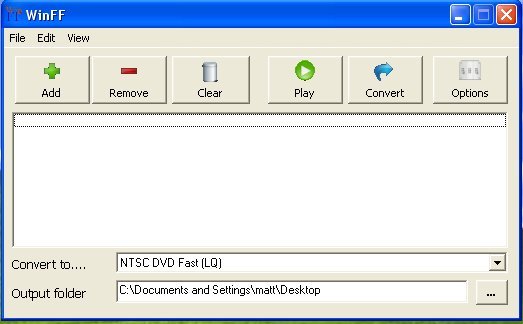
Winff is a frontend for FFMPEG that runs on Windows XP to Windows 10 and Linux. It will convert most any video file that FFmpeg will convert. WinFF does multiple files in multiple formats at one time. You can for example convert mpeg's, flv's, f4v, and mov's, all into avi's all at once. F4V to AVI.
Free software
OS:

File size: 20MB
Portable version
Old versions
Version history
Alternative software
OS:
File size: 20MB
Portable version
Old versions
Version history
Alternative software
Screenshots
Latest version
Download
Download WinFF 1.5.5 Windows 64-bit 20MB Win64
Download WinFF 1.5.5 Linux Linux
Download Portable and other versions
Portable 
Download WinFF 1.5.4 for Windows 32-bit
Download old versions

Software License
Supported operating systems
Linux Version history / Release notes / Changelog / What's New
v1.5.5
WinFF 1.5.5 is mostly just a cleaned up and repacked winff 1.5.4 for possibly the final version.
v1.5.4
-----
Issue 209:
2 Bugs:
1 on drag drop, numfiles was not initialised. Could countain random
number, not actual files dragged and dropped
max number of jobs was not being incremented on dragdrop.
now, if you dragdrop and the file list goes > max number of jobs, we add
50 more rows to filelist.
note: file list is initially limited to 100 jobs because of the memory
overhead of maintaining arrays of the filenames, command lines, options
settings, etc
enhancement: added hint for file list showing number of files in queue
when cursor not over a filename
Issue 211
Use of double quotes replaced by single quote. Cosmetic, done
WinFF 1.5.5 is mostly just a cleaned up and repacked winff 1.5.4 for possibly the final version.
v1.5.4
-----
Issue 209:
2 Bugs:
1 on drag drop, numfiles was not initialised. Could countain random
number, not actual files dragged and dropped
max number of jobs was not being incremented on dragdrop.
now, if you dragdrop and the file list goes > max number of jobs, we add
50 more rows to filelist.
note: file list is initially limited to 100 jobs because of the memory
overhead of maintaining arrays of the filenames, command lines, options
settings, etc
enhancement: added hint for file list showing number of files in queue
when cursor not over a filename
Issue 211
Use of double quotes replaced by single quote. Cosmetic, done
View full changelog
Sections/Browse similar tools
Alternative to WinFF
(Latest version updated)alltoavi (Jul 24, 2007)
Avanti (May 8, 2015)
AVS Video Converter (Feb 25, 2025)
clever FFmpeg-GUI (Mar 29, 2025)
FastFlix (Mar 19, 2025)
FFCoder (Feb 16, 2013)
FFmpeg Batch Converter (Mar 16, 2025)
H.264 Encoder (May 11, 2017)
HandBrake (Feb 23, 2025)
Libre AV Converter (Oct 2, 2023)
MediaCoder (Oct 12, 2022)
MiniCoder (Nov 7, 2009)
Nero Platinum (Nov 4, 2024)
ShanaEncoder (Mar 10, 2025)
Shutter Encoder (Apr 3, 2025)
TEncoder (Nov 30, 2015)
Total Video Converter (Nov 11, 2024)
TX264 (Oct 8, 2014)
VidCoder (Apr 27, 2025)
Video to Video Converter (Jun 9, 2013)
XMedia Recode (Apr 21, 2025)
XviD4PSP (Apr 7, 2025)
Guides and How to's
GUIDE: You can do great iPod video in Linux!!!
- ReadHow to cut out clips from DVDs and convert to AVI, MP4 using free software
- ReadWinFF video tutorials
View all guides with guide description here
Tool features - Convert
AVI to DVD, AVI to FLV, AVI to MPG, AVI to WMV, AVI to XviD, DivX to DVD, DivX to FLV, DivX to MPG, DivX to WMV, FLV to AVI, FLV to DVD, FLV to FLV, FLV to MPG, FLV to WMV, MPG to AVI, MPG to FLV, MPG to WMV, VOB to AVI, VOB to FLV, VOB to MPG, VOB to WMV, WMV to AVI, WMV to DVD, WMV to MPG, WMV to XviD
Download WinFF Portable download from the Download links under Download and Download other versions!
Notify me when software updated or report software
| 46 reviews, Showing 1 to 5 reviews |
Rating by Swedaniel on
Nov 12, 2023 Version: 1.5.5
OS: Windows 10 64-bit Ease of use: 10/10
Functionality: 10/10
Value for money: 10/10
Overall: 10/10
Great converter for video quality.
Review by Thanh on
Jul 25, 2020 Version: 1.5.5
OS: Windows 10 64-bit Ease of use: 10/10
Functionality: 10/10
Value for money: 10/10
Overall: 10/10
Rating by Joe Rod on
Jul 6, 2020 Version: 1.5.5
OS: Windows 10 64-bit Ease of use: 10/10
Functionality: 10/10
Value for money: 10/10
Overall: 10/10
Love this software for years, recommand it to my friends.
BUT
There's no MacOS version, lots of my friends have a mac... please Mac Version !!
BUT
There's no MacOS version, lots of my friends have a mac... please Mac Version !!
Review by adam0509 on
Feb 13, 2019 Version: 1.5.5
OS: Windows 7 Ease of use: 10/10
Functionality: 10/10
Value for money: 10/10
Overall: 9/10
Rating by Beejay on
Jan 2, 2019 Version: 1.5.5
OS: Windows 10 64-bit Ease of use: 10/10
Functionality: 9/10
Value for money: 10/10
Overall: 9/10
| 46 reviews, Showing 1 to 5 reviews |
| 1 tool hits, Showing 1 to 1 tools |
Explanation:
NEW SOFTWARE= New tool since your last visit
NEW VERSION= New version since your last visit
NEW REVIEW= New review since your last visit
NEW VERSION= New version
Latest version
Version number / Beta version number / Update version number and when it whas released.
Type and download
NO MORE UPDATES? = The software hasn't been updated in over 2 years.
NO LONGER DEVELOPED = The software hasn't been updated in over 5 years.
RECENTLY UPDATED = The software has been updated the last 31 days.
Freeware = Download Free software.
Freeware Trialware = Download Free software but some parts are trial/shareware.
Free software = Download Free software and also open source code also known as FOSS (Free and Open Source Software).
Free software Trialware = Download Free software and also open source code but some parts are trial/shareware.
Freeware Ads = Download Free software but supported by advertising, usually with a included browser toolbar. It may be disabled when installing or after installation.
Free software Ads = Free Download software and open source code but supported by advertising, usually with a included browser toolbar. It may be disabled when installing or after installation.
Trialware = Also called shareware or demo. Free Trial version available for download and testing with usually a time limit or limited functions.
Payware = No demo or trial available.
Portable version = A portable/standalone version is available. No installation is required.
v1.0.1 = Latest version available.
Download beta = It could be a Beta, RC(Release Candidate) or an Alpha / Nightly / Unstable version of the software.
Download 15MB = A direct link to the software download.
Win = Windows download version. It works on 32-bit and 64-bit Windows.
Win64 = Windows 64-bit download version. It works only on 64-bit Windows.
Mac = Mac download version. It works on 32-bit and 64-bit Mac OS.
Mac64 = Mac OS download version. It works only on 64-bit Mac OS.
Linux = Linux download version.
Portable = Portable version. No installation is required.
Ad-Supported = The software is bundled with advertising. Be careful when you install the software and disable addons that you don't want!
Visit developers site = A link to the software developer site.
Download (mirror link) = A mirror link to the software download. It may not contain the latest versions.
Download old versions = Free downloads of previous versions of the program.
Download 64-bit version = If you have a 64bit operating system you can download this version.
Download portable version = Portable/Standalone version meaning that no installation is required, just extract the files to a folder and run directly.
Portable version available = Download the portable version and you can just extract the files and run the program without installation.
Old versions available = Download old versions of the program.
Version history available = Complete changelog on our site.
= Windows version available.
 = Mac OS version available.
= Linux version available.
Our hosted software are virus and malware scanned with several antivirus programs using www.virustotal.com. (NOTE! Just one virustotal warning is 99.9% a false positive. And some software might receive 2-6 warnings but it's if they are not all same virus/trojan then it's 99% false positives.)
Rating
Rating from 0-10.
NEW SOFTWARE= New tool since your last visit
NEW VERSION= New version since your last visit
NEW REVIEW= New review since your last visit
NEW VERSION= New version
Latest version
Version number / Beta version number / Update version number and when it whas released.
Type and download
NO MORE UPDATES? = The software hasn't been updated in over 2 years.
NO LONGER DEVELOPED = The software hasn't been updated in over 5 years.
RECENTLY UPDATED = The software has been updated the last 31 days.
Freeware = Download Free software.
Freeware Trialware = Download Free software but some parts are trial/shareware.
Free software = Download Free software and also open source code also known as FOSS (Free and Open Source Software).
Free software Trialware = Download Free software and also open source code but some parts are trial/shareware.
Freeware Ads = Download Free software but supported by advertising, usually with a included browser toolbar. It may be disabled when installing or after installation.
Free software Ads = Free Download software and open source code but supported by advertising, usually with a included browser toolbar. It may be disabled when installing or after installation.
Trialware = Also called shareware or demo. Free Trial version available for download and testing with usually a time limit or limited functions.
Payware = No demo or trial available.
Portable version = A portable/standalone version is available. No installation is required.
v1.0.1 = Latest version available.
Download beta = It could be a Beta, RC(Release Candidate) or an Alpha / Nightly / Unstable version of the software.
Download 15MB = A direct link to the software download.
Win = Windows download version. It works on 32-bit and 64-bit Windows.
Win64 = Windows 64-bit download version. It works only on 64-bit Windows.
Mac = Mac download version. It works on 32-bit and 64-bit Mac OS.
Mac64 = Mac OS download version. It works only on 64-bit Mac OS.
Linux = Linux download version.
Portable = Portable version. No installation is required.
Ad-Supported = The software is bundled with advertising. Be careful when you install the software and disable addons that you don't want!
Visit developers site = A link to the software developer site.
Download (mirror link) = A mirror link to the software download. It may not contain the latest versions.
Download old versions = Free downloads of previous versions of the program.
Download 64-bit version = If you have a 64bit operating system you can download this version.
Download portable version = Portable/Standalone version meaning that no installation is required, just extract the files to a folder and run directly.
Portable version available = Download the portable version and you can just extract the files and run the program without installation.
Old versions available = Download old versions of the program.
Version history available = Complete changelog on our site.
= Windows version available. = Mac OS version available. = Linux version available.Our hosted software are virus and malware scanned with several antivirus programs using www.virustotal.com. (NOTE! Just one virustotal warning is 99.9% a false positive. And some software might receive 2-6 warnings but it's if they are not all same virus/trojan then it's 99% false positives.)
Rating
Rating from 0-10.
Browse software by sections
All In One Blu-ray Converters (9)
All In One DVD Converters (12)
All In One MKV to MP4, Blu-ray, UHD (11)
All In One Video Converters (19)
Animation (3D, 2D Animation) (11)
Audio Editors (21)
Audio Encoders (80)
Audio Players (19)
Authoring (Blu-ray, UHD, AVCHD) (12)
Authoring (DivX) (4)
Authoring (DVD) (26)
Authoring (SVCD, VCD) (9)
Bitrate Calculators (7)
Blu-ray to AVI, MKV, MP4 (15)
Blu-ray to Blu-ray, AVCHD (10)
Burn (CD,DVD,Blu-ray) (24)
Camcorders, DV, HDV, AVCHD (31)
Capture TV, DVD, VCR (30)
CD, DVD, Blu-ray recovery (3)
Codec Packs (6)
All In One DVD Converters (12)
All In One MKV to MP4, Blu-ray, UHD (11)
All In One Video Converters (19)
Animation (3D, 2D Animation) (11)
Audio Editors (21)
Audio Encoders (80)
Audio Players (19)
Authoring (Blu-ray, UHD, AVCHD) (12)
Authoring (DivX) (4)
Authoring (DVD) (26)
Authoring (SVCD, VCD) (9)
Bitrate Calculators (7)
Blu-ray to AVI, MKV, MP4 (15)
Blu-ray to Blu-ray, AVCHD (10)
Burn (CD,DVD,Blu-ray) (24)
Camcorders, DV, HDV, AVCHD (31)
Capture TV, DVD, VCR (30)
CD, DVD, Blu-ray recovery (3)
Codec Packs (6)
Codec, Video Identifiers (30)
Codecs (67)
Decrypters (DVD Rippers) (15)
Decrypters (UHD, Blu-ray Rippers) (8)
DigitalTV, DVB, IPTV (38)
DVD to DVD (20)
DVD to MP4, MKV, H264, H265 (16)
DVD to VCD, SVCD (5)
DVD to XviD, AVI, DivX (16)
ISO, Image (16)
Linux Video Tools (191)
MacOS Video Tools (228)
Media (Blu-ray, DVD, CD) (9)
Media Center, HTPC (23)
Other Useful Tools (141)
Photo Blu-ray, DVD, SlideShow (8)
Portable (Mobile, PSP) (35)
Region Free Tools (5)
Screen capture , Screen recording (27)
Screenshots , Thumbnails (13)
Codecs (67)
Decrypters (DVD Rippers) (15)
Decrypters (UHD, Blu-ray Rippers) (8)
DigitalTV, DVB, IPTV (38)
DVD to DVD (20)
DVD to MP4, MKV, H264, H265 (16)
DVD to VCD, SVCD (5)
DVD to XviD, AVI, DivX (16)
ISO, Image (16)
Linux Video Tools (191)
MacOS Video Tools (228)
Media (Blu-ray, DVD, CD) (9)
Media Center, HTPC (23)
Other Useful Tools (141)
Photo Blu-ray, DVD, SlideShow (8)
Portable (Mobile, PSP) (35)
Region Free Tools (5)
Screen capture , Screen recording (27)
Screenshots , Thumbnails (13)
Subtitle Editors, Converters (70)
Tag Editors (3)
Video De, Multiplexers (66)
Video Editors (Advanced, NLE) (34)
Video Editors (Basic) (53)
Video Editors (H264, MP4, MKV, MTS) (19)
Video Editors (Lossless) (4)
Video Editors (MPG, DVD) (16)
Video Editors (WMV, AVI) (15)
Video Encoders (AV1, VP8, VP9) (2)
Video Encoders (AVI, WMV) (38)
Video Encoders (H264, H265, MP4, MKV) (45)
Video Encoders (MPG, DVD) (23)
Video Encoders , Converters (154)
Video Frameservers (9)
Video Players (48)
Video Repair, Fix (25)
Video Scripting (11)
Video Streaming (21)
Video Streaming Downloaders (101)
Tag Editors (3)
Video De, Multiplexers (66)
Video Editors (Advanced, NLE) (34)
Video Editors (Basic) (53)
Video Editors (H264, MP4, MKV, MTS) (19)
Video Editors (Lossless) (4)
Video Editors (MPG, DVD) (16)
Video Editors (WMV, AVI) (15)
Video Encoders (AV1, VP8, VP9) (2)
Video Encoders (AVI, WMV) (38)
Video Encoders (H264, H265, MP4, MKV) (45)
Video Encoders (MPG, DVD) (23)
Video Encoders , Converters (154)
Video Frameservers (9)
Video Players (48)
Video Repair, Fix (25)
Video Scripting (11)
Video Streaming (21)
Video Streaming Downloaders (101)