
Help us keep the list up to date and submit new video software here.
Tool
Description
Type
Rating
Reviews
Hitfilm is a video editor, with 2D and 3D composing abilities. It has a range of special effects included, which include shockwaves, clouds, rain, gunshots, color grading, chroma keying, 3D particle generator, 3D gunfire generator. HitFilm Express FREE is a free limited version. Pro version costs around $10/month.
Screenshots
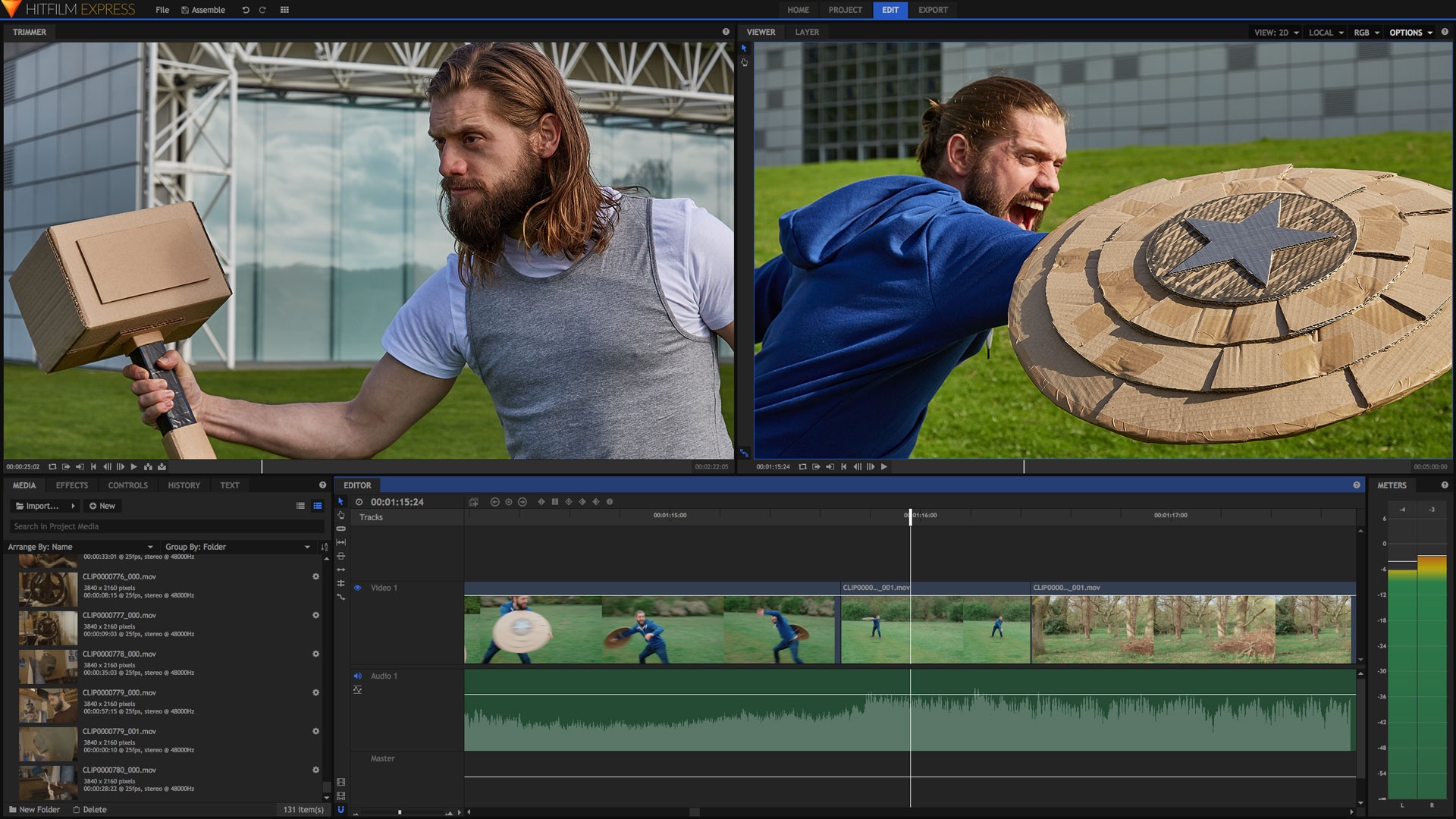


Latest version

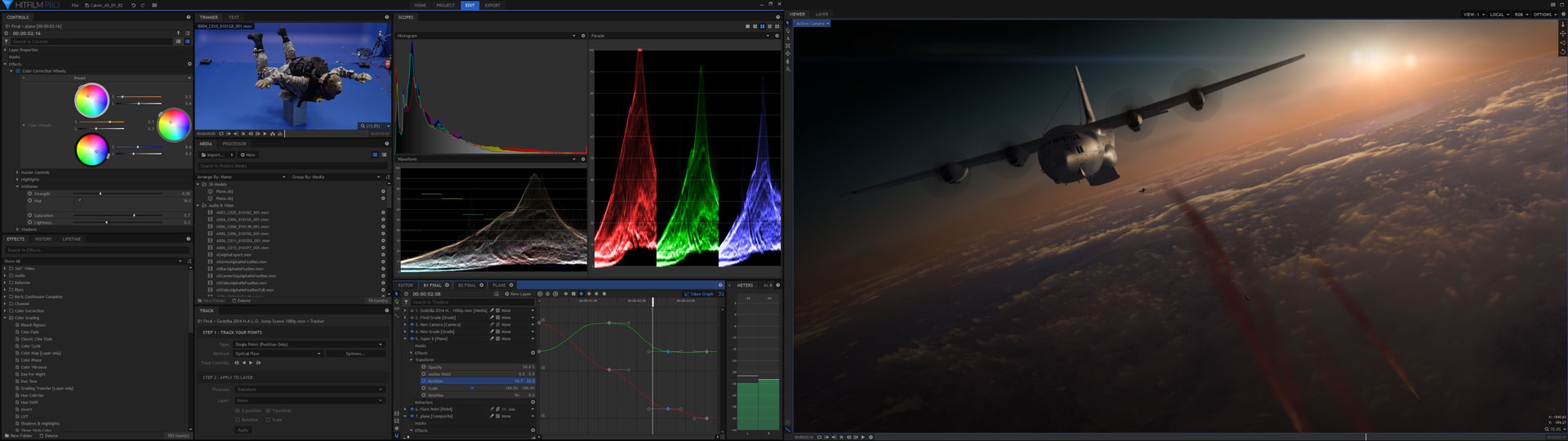
Download
Download HitFilm 2023.2 Windows 64-bit 421MB Win64

Download HitFilm 2023.2 Mac 421MB Mac

Download old versions

Software License
Supported operating systems
Mac OS Version history / Release notes / Changelog / What's New
N/A
View full changelog
All features
Amaze your friends with blockbuster visual effects
HitFilm Standard gives you Hollywood quality visual effects and 3D compositing at an incredible price. You can drag easy presets onto your videos or combine effects to create your own unique visuals.
Gunfire
Turn any prop into a convincing weapon with HitFilm's photorealistic, fully 3D muzzle flashes. Create any kind of gunfire from pistols to miniguns and futuristic plasma rifles.
Lens flares
HitFilm's wide range of highly customizable lens flares enhance your lighting and add authenticity to your visual effects.
Lightswords
Easily create sci-fi's most iconic weapon using HitFilm and show the fanfilm community what you can do. An elegant effect for a more civilized filmmaker.
Invisibility and cloning
Create Predator camouflage and wizard invisibility cloaks with the versatile displacement effect, or use split screen and masking to clone your actors.
3D pre-built effects
A range of drag-and-drop smoke, fire, explosion and shockwave effects are included with HitFilm. They're ready to go, so all you need to do is drop them into place.
Debris
Falling Debris
Fire & Explosions
Bonfire
Fire Explosions
Sci-Fi Shockwave
Smoke
Missile Smoke
Smoke
Sparks
Sparks
Weather
Fluffy Cloud
Rain
Storm Cloud
Do you want even more stunning special effects and a powerful particle system? Check out HitFilm Ultimate »
Edit your movie in HitFilm
Import your videos, trim clips and add transitions with up to 10 video layers and 10 audio layers. At any point you can switch to creating visual effects without having to change applications.
Super fast workflow
Nobody likes having to transfer videos between different apps. If you edit with HitFilm you can switch effortlessly to 2D or 3D compositing and back again without having to wait for clips to render.
Transitions
A selection of high quality video and audio transitions are included to enhance your editing, from fades and dissolves to animated wipes.
Create new worlds using 3D compositing
HitFilm Standard includes 2D and full 3D compositing, which is revolutionary at this kind of price. Sophisticated techniques including green screen removal, virtual sets and cloning are easy to master within HitFilm.
Green screen
Easily remove your green screen backgrounds and replace them with something new, like a virtual set or exotic location. HitFilm's effects and layering features will give you quality results every time.
Green screen compositing
Genuine 3D environment
Switch to three dimensions to open up even more creative possibilities. You can even move your video layers in and around HitFilm's 3D effects to create unique visuals.
3D compositing
Fine tuning
A range of keying tools, including spill removal, light wrap and color correction, help you make high quality composites.
Temporal effects
Exclusive time displacement and channel shift effects join the speed ramping, motion trails and other time-based effects.
Masks
HitFilm's masking tools are great for creating sophisticated interaction between layers, tidying up the edges of your green screen studio or removing unwanted parts of an image or video.
Depth of field & motion blur
HitFilm's 3D cameras work realistically, with optional depth of field automatically blurring layers based on their relative distance from the lens. Turn on automatic motion blur for more realistic movement of your 2D and 3D layers.
Light & shadow
HitFilm's 3D lighting lets you create entirely virtual scenes or match the lighting from a live action shot by mixing different lights together, just as you would on a real set.
Need professional level compositing? The ability to import 3D camera tracking data? More temporal effects?
Check out HitFilm Ultimate »
Make your videos look like professional movies
Film looks
The 'film look' presets are a quick way to give your movies a professional appearance, whether you're going for an action blockbuster or a tense thriller.
Stunning filters
HitFilm Standard comes with over 65 effects for blurring, sharpening, distorting, warping, color correcting and stylizing to make your movies look better than ever before.
Audio
Channel Levels
Tone
Distort
Bulge
Displacement
Insect Vision
Magnify
Pond Ripple
Quad Warp
Reflection
Twirl
Waves
Witness Protection
Temporal
Echo
Jitter
Motion Trails
Speed
Stutter
Time Reverse
Blur & Sharpen
Angle Blur
Blur
Radial Blur
Sharpen
Zoom Blur
Generate
4-Point Color Gradient
Clouds
Color Gradient
Drop Shadow
Fill Color
Flicker
Gleam
Letterbox
Light Flares
Channel
Channel Blur
Channel Mixer
Channel Swapper
Keying
Chroma UV Blur
Color Difference Key
Crush Blacks & White Alpha
Difference Key
Erode White
Hue & RGB Key
Invert Alpha
Light Wrap
Luminance Key
Spill Removal
Stylize
Cartoon
Emboss
Glow
Mosaic
Neon Glow
Oil Painting
Solarize
Threshold
Tint
Color
Auto Color
Auto Contrast
Auto Levels
Brightness & Contrast
Color Balance
Color Temperature
Crush Blacks & Whites
Gamma
Hue Colorize
Hue Shift
Hue, Saturation & Lightness
Invert
Noise & Grain
Grain
Noise
Do you want more 110 filters and more high-end options? Check out HitFilm Ultimate »
Supporting your filmmaking
HitFilm is easy to use, especially if you're already familiar with video software. If you ever need to ask questions you'll find online assistance, video tutorials and a friendly community only a couple of clicks away.
Free video tutorials
A series of detailed video tutorials are available for free from HitFilm.com and from within the application itself, so that you'll never be without nearby assistance.
Visit the tutorials section
Home screen hub
The Home screen keeps you in touch with the HitFilm community, delivering the latest news, software updates and video tutorials direct to your computer.
Stay up-to-date
HitFilm is always being improved with optimizations and new features. As soon as an update is available the software will let you know. All point updates (1.1, 1.2, 1.3 etc) are entirely free.
Join the community
When you purchase HitFilm Standard you join an international community of filmmakers where everybody works together to watch your movies, give useful feedback, collaborate and assist.
Comprehensive documentation
You can find out about every feature of HitFilm Standard using its in-built help system. Quickly search for the feature you want to use and discover everything you need to know.
Friendly support
If you need extra help there's a growing global community to talk to and rapid assistance available through the HitFilm support center.
Share with the world
Be a HitFilm creator
Submit your movie and you might be promoted through the HitFilm website and You-Tube channel. All you need to do is tick a box and make a great movie and we'll help you get some more hits.
Integrated You-Tube upload
Everybody is on You-Tube and HitFilm makes it easier than ever, automatically converting your videos for optimum HD playback before uploading them to your channel.
Utilizes the latest hardware
GPU acceleration
HitFilm uses the power of your computer's graphics card for fast performance, even when working in full 3D with complex particle simulation. Use your graphics card for more than just games!
64-bit & 32-bit
If you have a 64-bit computer you can take advantage of your extra memory to create more complicated projects.
Multi-core aware
Whether you're using a regular dual core desktop or an ultra powerful six-core workstation, HitFilm Standard will make good use of all your system's resources.
Works with your files
Media organizer
The Project Media list takes care of all your videos, images and audio clips. You can organize them yourself or let HitFilm Standard do it for you, keeping everything neat, tidy and easy to find.
Format compatibility
You can use most common video, image and audio formats in HitFilm, including WMV, MP4, AVI, MOV and MXF. This means that whether you shoot on a camcorder, a DSLR or semi-pro cameras we've got you covered.
Multiple export formats
Export your videos using a standard template or by customizing your settings. With HitFilm you have full control over your exported videos.
What video formats does HitFilm support?
MP4 H.264 Import & Export
AVCHD Import (requires HitFilm Pro or Premium formats)
QuickTime Import (QuickTime install required on Windows)
AVI, M2T, M2TS, MTS, MXF (DVCPro HD), DV, HDV, WMV Video Import
HitFilm Pro also supports OpenEXR, Apple ProRes (Mac), GoPro CineForm (Win)
HitFilm Standard gives you Hollywood quality visual effects and 3D compositing at an incredible price. You can drag easy presets onto your videos or combine effects to create your own unique visuals.
Gunfire
Turn any prop into a convincing weapon with HitFilm's photorealistic, fully 3D muzzle flashes. Create any kind of gunfire from pistols to miniguns and futuristic plasma rifles.
Lens flares
HitFilm's wide range of highly customizable lens flares enhance your lighting and add authenticity to your visual effects.
Lightswords
Easily create sci-fi's most iconic weapon using HitFilm and show the fanfilm community what you can do. An elegant effect for a more civilized filmmaker.
Invisibility and cloning
Create Predator camouflage and wizard invisibility cloaks with the versatile displacement effect, or use split screen and masking to clone your actors.
3D pre-built effects
A range of drag-and-drop smoke, fire, explosion and shockwave effects are included with HitFilm. They're ready to go, so all you need to do is drop them into place.
Debris
Falling Debris
Fire & Explosions
Bonfire
Fire Explosions
Sci-Fi Shockwave
Smoke
Missile Smoke
Smoke
Sparks
Sparks
Weather
Fluffy Cloud
Rain
Storm Cloud
Do you want even more stunning special effects and a powerful particle system? Check out HitFilm Ultimate »
Edit your movie in HitFilm
Import your videos, trim clips and add transitions with up to 10 video layers and 10 audio layers. At any point you can switch to creating visual effects without having to change applications.
Super fast workflow
Nobody likes having to transfer videos between different apps. If you edit with HitFilm you can switch effortlessly to 2D or 3D compositing and back again without having to wait for clips to render.
Transitions
A selection of high quality video and audio transitions are included to enhance your editing, from fades and dissolves to animated wipes.
Create new worlds using 3D compositing
HitFilm Standard includes 2D and full 3D compositing, which is revolutionary at this kind of price. Sophisticated techniques including green screen removal, virtual sets and cloning are easy to master within HitFilm.
Green screen
Easily remove your green screen backgrounds and replace them with something new, like a virtual set or exotic location. HitFilm's effects and layering features will give you quality results every time.
Green screen compositing
Genuine 3D environment
Switch to three dimensions to open up even more creative possibilities. You can even move your video layers in and around HitFilm's 3D effects to create unique visuals.
3D compositing
Fine tuning
A range of keying tools, including spill removal, light wrap and color correction, help you make high quality composites.
Temporal effects
Exclusive time displacement and channel shift effects join the speed ramping, motion trails and other time-based effects.
Masks
HitFilm's masking tools are great for creating sophisticated interaction between layers, tidying up the edges of your green screen studio or removing unwanted parts of an image or video.
Depth of field & motion blur
HitFilm's 3D cameras work realistically, with optional depth of field automatically blurring layers based on their relative distance from the lens. Turn on automatic motion blur for more realistic movement of your 2D and 3D layers.
Light & shadow
HitFilm's 3D lighting lets you create entirely virtual scenes or match the lighting from a live action shot by mixing different lights together, just as you would on a real set.
Need professional level compositing? The ability to import 3D camera tracking data? More temporal effects?
Check out HitFilm Ultimate »
Make your videos look like professional movies
Film looks
The 'film look' presets are a quick way to give your movies a professional appearance, whether you're going for an action blockbuster or a tense thriller.
Stunning filters
HitFilm Standard comes with over 65 effects for blurring, sharpening, distorting, warping, color correcting and stylizing to make your movies look better than ever before.
Audio
Channel Levels
Tone
Distort
Bulge
Displacement
Insect Vision
Magnify
Pond Ripple
Quad Warp
Reflection
Twirl
Waves
Witness Protection
Temporal
Echo
Jitter
Motion Trails
Speed
Stutter
Time Reverse
Blur & Sharpen
Angle Blur
Blur
Radial Blur
Sharpen
Zoom Blur
Generate
4-Point Color Gradient
Clouds
Color Gradient
Drop Shadow
Fill Color
Flicker
Gleam
Letterbox
Light Flares
Channel
Channel Blur
Channel Mixer
Channel Swapper
Keying
Chroma UV Blur
Color Difference Key
Crush Blacks & White Alpha
Difference Key
Erode White
Hue & RGB Key
Invert Alpha
Light Wrap
Luminance Key
Spill Removal
Stylize
Cartoon
Emboss
Glow
Mosaic
Neon Glow
Oil Painting
Solarize
Threshold
Tint
Color
Auto Color
Auto Contrast
Auto Levels
Brightness & Contrast
Color Balance
Color Temperature
Crush Blacks & Whites
Gamma
Hue Colorize
Hue Shift
Hue, Saturation & Lightness
Invert
Noise & Grain
Grain
Noise
Do you want more 110 filters and more high-end options? Check out HitFilm Ultimate »
Supporting your filmmaking
HitFilm is easy to use, especially if you're already familiar with video software. If you ever need to ask questions you'll find online assistance, video tutorials and a friendly community only a couple of clicks away.
Free video tutorials
A series of detailed video tutorials are available for free from HitFilm.com and from within the application itself, so that you'll never be without nearby assistance.
Visit the tutorials section
Home screen hub
The Home screen keeps you in touch with the HitFilm community, delivering the latest news, software updates and video tutorials direct to your computer.
Stay up-to-date
HitFilm is always being improved with optimizations and new features. As soon as an update is available the software will let you know. All point updates (1.1, 1.2, 1.3 etc) are entirely free.
Join the community
When you purchase HitFilm Standard you join an international community of filmmakers where everybody works together to watch your movies, give useful feedback, collaborate and assist.
Comprehensive documentation
You can find out about every feature of HitFilm Standard using its in-built help system. Quickly search for the feature you want to use and discover everything you need to know.
Friendly support
If you need extra help there's a growing global community to talk to and rapid assistance available through the HitFilm support center.
Share with the world
Be a HitFilm creator
Submit your movie and you might be promoted through the HitFilm website and You-Tube channel. All you need to do is tick a box and make a great movie and we'll help you get some more hits.
Integrated You-Tube upload
Everybody is on You-Tube and HitFilm makes it easier than ever, automatically converting your videos for optimum HD playback before uploading them to your channel.
Utilizes the latest hardware
GPU acceleration
HitFilm uses the power of your computer's graphics card for fast performance, even when working in full 3D with complex particle simulation. Use your graphics card for more than just games!
64-bit & 32-bit
If you have a 64-bit computer you can take advantage of your extra memory to create more complicated projects.
Multi-core aware
Whether you're using a regular dual core desktop or an ultra powerful six-core workstation, HitFilm Standard will make good use of all your system's resources.
Works with your files
Media organizer
The Project Media list takes care of all your videos, images and audio clips. You can organize them yourself or let HitFilm Standard do it for you, keeping everything neat, tidy and easy to find.
Format compatibility
You can use most common video, image and audio formats in HitFilm, including WMV, MP4, AVI, MOV and MXF. This means that whether you shoot on a camcorder, a DSLR or semi-pro cameras we've got you covered.
Multiple export formats
Export your videos using a standard template or by customizing your settings. With HitFilm you have full control over your exported videos.
What video formats does HitFilm support?
MP4 H.264 Import & Export
AVCHD Import (requires HitFilm Pro or Premium formats)
QuickTime Import (QuickTime install required on Windows)
AVI, M2T, M2TS, MTS, MXF (DVCPro HD), DV, HDV, WMV Video Import
HitFilm Pro also supports OpenEXR, Apple ProRes (Mac), GoPro CineForm (Win)
Sections/Browse similar tools
Guides and How to's
Create a 3D space nebula with Hitfilm
- ReadHitFilm video tutorials
View all guides with guide description here
Acronyms / Also Known As
Notify me when software updated or report software
| 3 reviews, Showing 1 to 3 reviews |
Rating by Zourne on
Jan 19, 2022 Version: 2021
OS: Windows 10 64-bit Ease of use: 4/10
Functionality: 7/10
Value for money: 1/10
Overall: 5/10
Free Hitfilm Express is in version 9.0 too!
Review by Paulus on
Jul 20, 2018 Version: 9.0
OS: Windows 10 64-bit Ease of use: 9/10
Functionality: 9/10
Value for money: 9/10
Overall: 9/10
Rating by geerguy on
Feb 5, 2018 Version: 6.1
OS: Windows 10 64-bit Ease of use: 10/10
Functionality: 10/10
Value for money: 8/10
Overall: 10/10
| 3 reviews, Showing 1 to 3 reviews |
| 1 tool hits, Showing 1 to 1 tools |
Explanation:
NEW SOFTWARE= New tool since your last visit
NEW VERSION= New version since your last visit
NEW REVIEW= New review since your last visit
NEW VERSION= New version
Latest version
Version number / Beta version number / Update version number and when it whas released.
Type and download
NO MORE UPDATES? = The software hasn't been updated in over 2 years.
NO LONGER DEVELOPED = The software hasn't been updated in over 5 years.
RECENTLY UPDATED = The software has been updated the last 31 days.
Freeware = Download Free software.
Freeware Trialware = Download Free software but some parts are trial/shareware.
Free software = Download Free software and also open source code also known as FOSS (Free and Open Source Software).
Free software Trialware = Download Free software and also open source code but some parts are trial/shareware.
Freeware Ads = Download Free software but supported by advertising, usually with a included browser toolbar. It may be disabled when installing or after installation.
Free software Ads = Free Download software and open source code but supported by advertising, usually with a included browser toolbar. It may be disabled when installing or after installation.
Trialware = Also called shareware or demo. Free Trial version available for download and testing with usually a time limit or limited functions.
Payware = No demo or trial available.
Portable version = A portable/standalone version is available. No installation is required.
v1.0.1 = Latest version available.
Download beta = It could be a Beta, RC(Release Candidate) or an Alpha / Nightly / Unstable version of the software.
Download 15MB = A direct link to the software download.
Win = Windows download version. It works on 32-bit and 64-bit Windows.
Win64 = Windows 64-bit download version. It works only on 64-bit Windows.
Mac = Mac download version. It works on 32-bit and 64-bit Mac OS.
Mac64 = Mac OS download version. It works only on 64-bit Mac OS.
Linux = Linux download version.
Portable = Portable version. No installation is required.
Ad-Supported = The software is bundled with advertising. Be careful when you install the software and disable addons that you don't want!
Visit developers site = A link to the software developer site.
Download (mirror link) = A mirror link to the software download. It may not contain the latest versions.
Download old versions = Free downloads of previous versions of the program.
Download 64-bit version = If you have a 64bit operating system you can download this version.
Download portable version = Portable/Standalone version meaning that no installation is required, just extract the files to a folder and run directly.
Portable version available = Download the portable version and you can just extract the files and run the program without installation.
Old versions available = Download old versions of the program.
Version history available = Complete changelog on our site.
= Windows version available.
= Mac OS version available.
 = Linux version available.
Our hosted software are virus and malware scanned with several antivirus programs using www.virustotal.com. (NOTE! Just one virustotal warning is 99.9% a false positive. And some software might receive 2-6 warnings but it's if they are not all same virus/trojan then it's 99% false positives.)
Rating
Rating from 0-10.
NEW SOFTWARE= New tool since your last visit
NEW VERSION= New version since your last visit
NEW REVIEW= New review since your last visit
NEW VERSION= New version
Latest version
Version number / Beta version number / Update version number and when it whas released.
Type and download
NO MORE UPDATES? = The software hasn't been updated in over 2 years.
NO LONGER DEVELOPED = The software hasn't been updated in over 5 years.
RECENTLY UPDATED = The software has been updated the last 31 days.
Freeware = Download Free software.
Freeware Trialware = Download Free software but some parts are trial/shareware.
Free software = Download Free software and also open source code also known as FOSS (Free and Open Source Software).
Free software Trialware = Download Free software and also open source code but some parts are trial/shareware.
Freeware Ads = Download Free software but supported by advertising, usually with a included browser toolbar. It may be disabled when installing or after installation.
Free software Ads = Free Download software and open source code but supported by advertising, usually with a included browser toolbar. It may be disabled when installing or after installation.
Trialware = Also called shareware or demo. Free Trial version available for download and testing with usually a time limit or limited functions.
Payware = No demo or trial available.
Portable version = A portable/standalone version is available. No installation is required.
v1.0.1 = Latest version available.
Download beta = It could be a Beta, RC(Release Candidate) or an Alpha / Nightly / Unstable version of the software.
Download 15MB = A direct link to the software download.
Win = Windows download version. It works on 32-bit and 64-bit Windows.
Win64 = Windows 64-bit download version. It works only on 64-bit Windows.
Mac = Mac download version. It works on 32-bit and 64-bit Mac OS.
Mac64 = Mac OS download version. It works only on 64-bit Mac OS.
Linux = Linux download version.
Portable = Portable version. No installation is required.
Ad-Supported = The software is bundled with advertising. Be careful when you install the software and disable addons that you don't want!
Visit developers site = A link to the software developer site.
Download (mirror link) = A mirror link to the software download. It may not contain the latest versions.
Download old versions = Free downloads of previous versions of the program.
Download 64-bit version = If you have a 64bit operating system you can download this version.
Download portable version = Portable/Standalone version meaning that no installation is required, just extract the files to a folder and run directly.
Portable version available = Download the portable version and you can just extract the files and run the program without installation.
Old versions available = Download old versions of the program.
Version history available = Complete changelog on our site.
= Windows version available. = Mac OS version available. = Linux version available.Our hosted software are virus and malware scanned with several antivirus programs using www.virustotal.com. (NOTE! Just one virustotal warning is 99.9% a false positive. And some software might receive 2-6 warnings but it's if they are not all same virus/trojan then it's 99% false positives.)
Rating
Rating from 0-10.
Browse software by sections
All In One Blu-ray Converters (9)
All In One DVD Converters (12)
All In One MKV to MP4, Blu-ray, UHD (11)
All In One Video Converters (19)
Animation (3D, 2D Animation) (12)
Audio Editors (21)
Audio Encoders (80)
Audio Players (19)
Authoring (Blu-ray, UHD, AVCHD) (13)
Authoring (DivX) (4)
Authoring (DVD) (26)
Authoring (SVCD, VCD) (9)
Bitrate Calculators (7)
Blu-ray to AVI, MKV, MP4 (15)
Blu-ray to Blu-ray, AVCHD (10)
Burn (CD,DVD,Blu-ray) (24)
Camcorders, DV, HDV, AVCHD (31)
Capture TV, DVD, VCR (30)
CD, DVD, Blu-ray recovery (3)
Codec Packs (6)
All In One DVD Converters (12)
All In One MKV to MP4, Blu-ray, UHD (11)
All In One Video Converters (19)
Animation (3D, 2D Animation) (12)
Audio Editors (21)
Audio Encoders (80)
Audio Players (19)
Authoring (Blu-ray, UHD, AVCHD) (13)
Authoring (DivX) (4)
Authoring (DVD) (26)
Authoring (SVCD, VCD) (9)
Bitrate Calculators (7)
Blu-ray to AVI, MKV, MP4 (15)
Blu-ray to Blu-ray, AVCHD (10)
Burn (CD,DVD,Blu-ray) (24)
Camcorders, DV, HDV, AVCHD (31)
Capture TV, DVD, VCR (30)
CD, DVD, Blu-ray recovery (3)
Codec Packs (6)
Codec, Video Identifiers (30)
Codecs (67)
Decrypters (DVD Rippers) (15)
Decrypters (UHD, Blu-ray Rippers) (8)
DigitalTV, DVB, IPTV (39)
DVD to DVD (20)
DVD to MP4, MKV, H264, H265 (16)
DVD to VCD, SVCD (5)
DVD to XviD, AVI, DivX (16)
ISO, Image (16)
Linux Video Tools (197)
MacOS Video Tools (233)
Media (Blu-ray, DVD, CD) (9)
Media Center, HTPC (23)
Other Useful Tools (142)
Photo Blu-ray, DVD, SlideShow (8)
Portable (Mobile, PSP) (35)
Region Free Tools (5)
Screen capture , Screen recording (27)
Screenshots , Thumbnails (13)
Codecs (67)
Decrypters (DVD Rippers) (15)
Decrypters (UHD, Blu-ray Rippers) (8)
DigitalTV, DVB, IPTV (39)
DVD to DVD (20)
DVD to MP4, MKV, H264, H265 (16)
DVD to VCD, SVCD (5)
DVD to XviD, AVI, DivX (16)
ISO, Image (16)
Linux Video Tools (197)
MacOS Video Tools (233)
Media (Blu-ray, DVD, CD) (9)
Media Center, HTPC (23)
Other Useful Tools (142)
Photo Blu-ray, DVD, SlideShow (8)
Portable (Mobile, PSP) (35)
Region Free Tools (5)
Screen capture , Screen recording (27)
Screenshots , Thumbnails (13)
Subtitle Editors, Converters (70)
Tag Editors (3)
Video De, Multiplexers (66)
Video Editors (Advanced, NLE) (34)
Video Editors (Basic) (55)
Video Editors (H264, MP4, MKV, MTS) (19)
Video Editors (Lossless) (4)
Video Editors (MPG, DVD) (16)
Video Editors (WMV, AVI) (15)
Video Encoders (AV1, VP8, VP9) (2)
Video Encoders (AVI, WMV) (38)
Video Encoders (H264, H265, MP4, MKV) (45)
Video Encoders (MPG, DVD) (23)
Video Encoders , Converters (154)
Video Frameservers (9)
Video Players (49)
Video Repair, Fix (25)
Video Scripting (11)
Video Streaming (21)
Video Streaming Downloaders (102)
Tag Editors (3)
Video De, Multiplexers (66)
Video Editors (Advanced, NLE) (34)
Video Editors (Basic) (55)
Video Editors (H264, MP4, MKV, MTS) (19)
Video Editors (Lossless) (4)
Video Editors (MPG, DVD) (16)
Video Editors (WMV, AVI) (15)
Video Encoders (AV1, VP8, VP9) (2)
Video Encoders (AVI, WMV) (38)
Video Encoders (H264, H265, MP4, MKV) (45)
Video Encoders (MPG, DVD) (23)
Video Encoders , Converters (154)
Video Frameservers (9)
Video Players (49)
Video Repair, Fix (25)
Video Scripting (11)
Video Streaming (21)
Video Streaming Downloaders (102)