
Help us keep the list up to date and submit new video software here.
Tool
Description
Type
Rating
Reviews
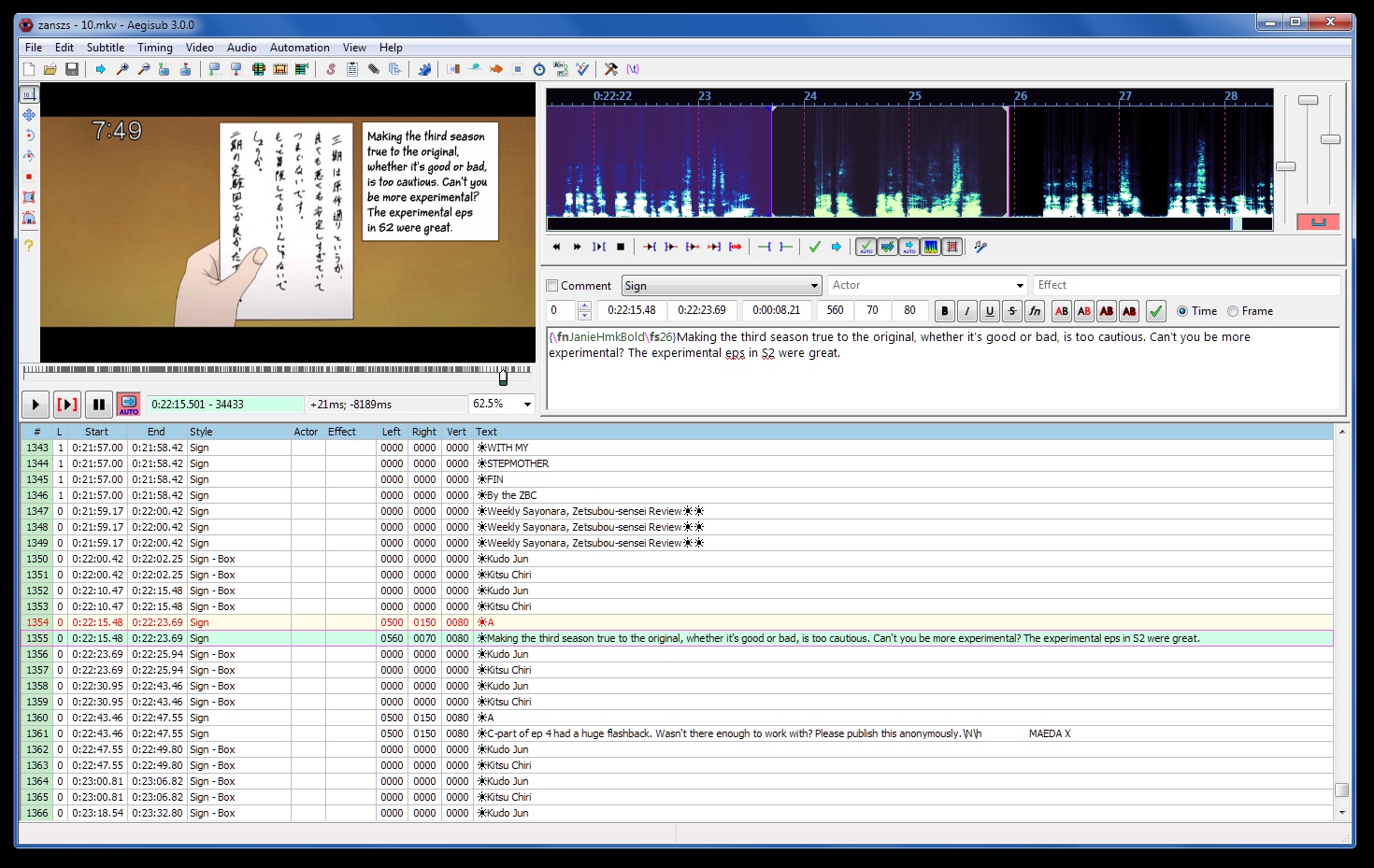
Aegisub is an advanced subtitle editor for Windows, and UNIX-like systems, such as Linux, Mac OS X and BSD. It is open source software and free for any use. Aegisub natively works with the Advanced SubStation Alpha format (aptly abbreviated ASS) which allows for many advanced effects in the subtitles, apart from just basic timed text. Aegisub's goal is to support using these advanced functions with ease.
Free software
OS:


File size: 55MB
Portable version
Old versions
Version history
Alternative software
OS:
File size: 55MB
Portable version
Old versions
Version history
Alternative software
Screenshots


Latest version

Download
Download Aegisub Feature Release 10 Windows 64-bit 54MB Win64
Download Aegisub Feature Release 10 Mac 64-bit 46MB Mac64
Download Aegisub Feature Release 10 Linux 64-bit 71MB Linux64
Download Portable and other versions
Portable 
Download old versions

Software License
Supported operating systems
Mac OS Linux Version history / Release notes / Changelog / What's New
Feature Release 10 another fork of the original Aegisub
Hi! Long time no see, right? Well, most of the changes since the last release were smaller additions and fixes, and there weren't really many bigger additions that'd warrant making a new release. There was also one annoying thing (reworking audio/video provider selection) that I wanted to get done first. But now that's done and we can have a new big release right on the anniversary of this fork's first release, and exactly six months after the previous release. It's even release number 10, so it's like a triple anniversary!
Keep in mind that cutting-edge builds can always be found on the actions page.
New features
Make big improvements to the VapourSynth video provider:
Expose Aegisub's path variables (like ?data, ?user, etc) to the Python environment when running default scripts.
Add the directories ?data/automation/vapoursynth and ?user/automation/vapoursynth to the Python include path for default scripts. This way, default scripts can be kept compact by moving utility functions elsewhere.
Add a cache directory that default scripts can use and that is cleaned when necessary.
Allow video scripts to pass video timecodes or keyframes, as well as a flag to communicate whether audio should be loaded for this file, to Aegisub via global variables. This allows VapourSynth default scripts to handle VFR or provide keyframes, as well as handle automatically opening audio for a video file. The API is documented in the aegisub_vs module
Show messages logged to VapourSynth (up to a configurable severity level) to the user in the script loading progress dialog. This way, scripts can report progress or other useful information.
Add a python module aegisub_vs that contains functions for loading sources, obtaining timecodes from .lwi files, and generating keyframes, and update the default script presets to use that module.
Ship the relevant VapourSynth plugins with the installer or portable build on Windows, and expose their location to Python default scripts. The aegisub_vs module will load plugins from there if they're not found elsewhere.
After all of these changes, the VapourSynth video provider (when using the preset default script) now fully supports VFR and can load keyframes from the video file and automatically load audio when present. On top of that (by uncommenting one line in the default script, marked by a comment there), it can load keyframes from a keyframes file next to the video file (as would be generated by commonly used keyframe generation Batch scripts). When no such file is found, it can use WWXD or Scxvid to generate its own keyframes at scene changes, while reporting progress. It can also show a dialog to the user to ask whether keyframes should be generated each time.
Since the necessary plugins are shipped with the installer on Windows, the VapourSynth video provider can be fully set up just by installing Python and VapourSynth. On other operating systems the necessary plugins will also need to be installed, but after that it will also be fully functional.
With all of this, the VapourSynth video provider can now be used as a full replacement to FFMS2, which is usually also faster and more accurate in terms of seeking. Since it supports keyframe generation directly from Aegisub, it's even more powerful than FFMS2. The main drawback is just that it needs slightly more effort to be set up.
Finally, here's some further small changes:
Also add support for VapourSynth on Mac.
Default to 25 fps when the clip has no framerate set.
Add a "Set to Default" button to the VapourSynth settings page in the Preferences dialog which allows users to easily return to the default default scripts. If you're coming from an older version of this fork and want to update your default scripts to the updated ones, you can use these buttons.
Rework the video/audio provider system, hopefully for the last time. This became necessary since this fork added more providers, which would sometimes cause unexpected behavior. In summary, the changes were:
Prioritize certain providers for certain file types, even if the default provider is a different one. For example, .vpy files will always be opened with the VapourSynth provider. That way, you don't need to switch default providers every time you want to open a VapourSynth script.
Instead of automatically trying other video providers when the default one fails, show an error message to the user and let them pick a different video player (or choose to cancel). This way, users will know when their default provider isn't the one being used.
Tweak some of the error handling when providers fail. FileNotFound errors will abort selection immediately, but providers won't manually check whether the file is readable first (since these checks can give false negatives in some situations, like on samba mounts). The VapourSynth providers, however, will no longer immediately abort selection if they fail, since the provider selection will now alert the user when necessary.
Make the perspective tool support drawings.
Add a setting to increase the size of shape handles in visual tools.
Automatically add scroll bars to dialogs opened by automation scripts when they get to large. This is especially useful for dynamically generated dialogs like DependencyControl's Macro Configuration.
Make dummy video support exact fractional frame rates. This can be useful when using a dummy video as a replacement for an actual video when handling frame timings.
Add support for an AppImage build and provide them as CI artifacts (PR by @ctrlcctrlv, #12)
Make scrolling the subtitle grid smoother when scrolling with a touchpad or some other form of continuous scroll.
Apply the improvements to the German translation PR'd to wangqr's fork and make lots of improvements to translation file generation (PR by @TheOneric, #52)
Ship the English dictionaries for the spell checker with Windows builds again. (#21)
Add the "Reset Video Zoom" to the video context menu so it's easier to find (and fix the capitalization in its name).
Don't make unused extradata entries be immediately deleted when saving the file. This will prevent saving from destroying folds in the middle of a cut/paste operation.
Pull some additions from wangqr's fork:
Save the state of the "Show original" checkbox in the subtitle edit box across Aegisub runs.
Add an "Apply" button to the "Select Lines" dialog that applies the selected modifications but keeps the dialog open.
Various bugfixes:
Ever wondered why you can't drag .webm files into Aegisub? This is why. Well, it's fixed now.
Fix crashes due when opening file open/save dialogs or accessing the clipboard from automation scripts. These were mostly happening on Linux, but clipboard access also had some issues on Windows. See TypesettingTools#51 and #22 .
Fix a memory leak when automation scripts crash or get cancelled.
Fix another issue where errors in automation scripts could crash Aegisub entirely.
Make the font collector collect fonts that are used in drawings.
Don't crash when encountering a frame rate with zero denominator.
Fix a bug that'd make the perspective tool's controls disappear sometimes.
Update some commands in the default hotkey settings that were renamed back in 2013. Usually these would be migrated automatically, but they'd still cause error messages after restoring all settings to default in the preferences menu.
Do a better job at keeping fold records in extradata consistent. This will especially help automations scripts, since they will receive inconsistent fold data less frequently. Note, though, that there's still no guarantee for the data to be consistent.
Disallow negative font spacing in the style editor again. This was added in the last release, but it turns out that this isn't actually supported by renderers...
Some fixes to BestSource:
Clean the cache directory when necessary.
Fix the timecode computation (#27).
Make BestSource index the video (or load the index from a cache) every time - this fixes it breaking on some videos (#27).
Forward some error messages.
Improve some message strings.
Pull bugfixes from wangqr's fork:
Fix a bug where the "add lead-in"/"add lead-out" keys would break when not first clicking into the audio display.
Fix incorrect descriptions being displayed for right-click menu items (part of #50)
Backend stuff:
Pin the bestsource wrap since it master no longer compiles against ffmpeg 4.4 (which the meson wrap still uses).
Mark Aegisub's executable as longPathAware on Windows (and ensure that this doesn't break anything) and update one piece of code that still struggled with longer paths.
Link libdav1d on Windows and patch the ffmpeg wrap to detect it. This will make the FFMS2 and BestSource video providers able to load AV1 video. (The VapourSynth provider could already do that, at least with the right source filter.)
Furthermore, point the ffms2 wrap to a fork that applies some patches to improve support for VP8/VP9/AV1. This also fixes cases where FFMS2 would output scrambled video for VP8/9 video files.
Manually compile and statically link ffms2 on Mac builds, since the latest official ffms2 release still has broken seeking.
Make the Windows installer provide an XAudio2 redistributable below Windows 10 (and ship one in a Redist folder for the portable build) to make builds against higher XAudio versions work on older Windows versions.
Get YUtils from the Typeset...
Hi! Long time no see, right? Well, most of the changes since the last release were smaller additions and fixes, and there weren't really many bigger additions that'd warrant making a new release. There was also one annoying thing (reworking audio/video provider selection) that I wanted to get done first. But now that's done and we can have a new big release right on the anniversary of this fork's first release, and exactly six months after the previous release. It's even release number 10, so it's like a triple anniversary!
Keep in mind that cutting-edge builds can always be found on the actions page.
New features
Make big improvements to the VapourSynth video provider:
Expose Aegisub's path variables (like ?data, ?user, etc) to the Python environment when running default scripts.
Add the directories ?data/automation/vapoursynth and ?user/automation/vapoursynth to the Python include path for default scripts. This way, default scripts can be kept compact by moving utility functions elsewhere.
Add a cache directory that default scripts can use and that is cleaned when necessary.
Allow video scripts to pass video timecodes or keyframes, as well as a flag to communicate whether audio should be loaded for this file, to Aegisub via global variables. This allows VapourSynth default scripts to handle VFR or provide keyframes, as well as handle automatically opening audio for a video file. The API is documented in the aegisub_vs module
Show messages logged to VapourSynth (up to a configurable severity level) to the user in the script loading progress dialog. This way, scripts can report progress or other useful information.
Add a python module aegisub_vs that contains functions for loading sources, obtaining timecodes from .lwi files, and generating keyframes, and update the default script presets to use that module.
Ship the relevant VapourSynth plugins with the installer or portable build on Windows, and expose their location to Python default scripts. The aegisub_vs module will load plugins from there if they're not found elsewhere.
After all of these changes, the VapourSynth video provider (when using the preset default script) now fully supports VFR and can load keyframes from the video file and automatically load audio when present. On top of that (by uncommenting one line in the default script, marked by a comment there), it can load keyframes from a keyframes file next to the video file (as would be generated by commonly used keyframe generation Batch scripts). When no such file is found, it can use WWXD or Scxvid to generate its own keyframes at scene changes, while reporting progress. It can also show a dialog to the user to ask whether keyframes should be generated each time.
Since the necessary plugins are shipped with the installer on Windows, the VapourSynth video provider can be fully set up just by installing Python and VapourSynth. On other operating systems the necessary plugins will also need to be installed, but after that it will also be fully functional.
With all of this, the VapourSynth video provider can now be used as a full replacement to FFMS2, which is usually also faster and more accurate in terms of seeking. Since it supports keyframe generation directly from Aegisub, it's even more powerful than FFMS2. The main drawback is just that it needs slightly more effort to be set up.
Finally, here's some further small changes:
Also add support for VapourSynth on Mac.
Default to 25 fps when the clip has no framerate set.
Add a "Set to Default" button to the VapourSynth settings page in the Preferences dialog which allows users to easily return to the default default scripts. If you're coming from an older version of this fork and want to update your default scripts to the updated ones, you can use these buttons.
Rework the video/audio provider system, hopefully for the last time. This became necessary since this fork added more providers, which would sometimes cause unexpected behavior. In summary, the changes were:
Prioritize certain providers for certain file types, even if the default provider is a different one. For example, .vpy files will always be opened with the VapourSynth provider. That way, you don't need to switch default providers every time you want to open a VapourSynth script.
Instead of automatically trying other video providers when the default one fails, show an error message to the user and let them pick a different video player (or choose to cancel). This way, users will know when their default provider isn't the one being used.
Tweak some of the error handling when providers fail. FileNotFound errors will abort selection immediately, but providers won't manually check whether the file is readable first (since these checks can give false negatives in some situations, like on samba mounts). The VapourSynth providers, however, will no longer immediately abort selection if they fail, since the provider selection will now alert the user when necessary.
Make the perspective tool support drawings.
Add a setting to increase the size of shape handles in visual tools.
Automatically add scroll bars to dialogs opened by automation scripts when they get to large. This is especially useful for dynamically generated dialogs like DependencyControl's Macro Configuration.
Make dummy video support exact fractional frame rates. This can be useful when using a dummy video as a replacement for an actual video when handling frame timings.
Add support for an AppImage build and provide them as CI artifacts (PR by @ctrlcctrlv, #12)
Make scrolling the subtitle grid smoother when scrolling with a touchpad or some other form of continuous scroll.
Apply the improvements to the German translation PR'd to wangqr's fork and make lots of improvements to translation file generation (PR by @TheOneric, #52)
Ship the English dictionaries for the spell checker with Windows builds again. (#21)
Add the "Reset Video Zoom" to the video context menu so it's easier to find (and fix the capitalization in its name).
Don't make unused extradata entries be immediately deleted when saving the file. This will prevent saving from destroying folds in the middle of a cut/paste operation.
Pull some additions from wangqr's fork:
Save the state of the "Show original" checkbox in the subtitle edit box across Aegisub runs.
Add an "Apply" button to the "Select Lines" dialog that applies the selected modifications but keeps the dialog open.
Various bugfixes:
Ever wondered why you can't drag .webm files into Aegisub? This is why. Well, it's fixed now.
Fix crashes due when opening file open/save dialogs or accessing the clipboard from automation scripts. These were mostly happening on Linux, but clipboard access also had some issues on Windows. See TypesettingTools#51 and #22 .
Fix a memory leak when automation scripts crash or get cancelled.
Fix another issue where errors in automation scripts could crash Aegisub entirely.
Make the font collector collect fonts that are used in drawings.
Don't crash when encountering a frame rate with zero denominator.
Fix a bug that'd make the perspective tool's controls disappear sometimes.
Update some commands in the default hotkey settings that were renamed back in 2013. Usually these would be migrated automatically, but they'd still cause error messages after restoring all settings to default in the preferences menu.
Do a better job at keeping fold records in extradata consistent. This will especially help automations scripts, since they will receive inconsistent fold data less frequently. Note, though, that there's still no guarantee for the data to be consistent.
Disallow negative font spacing in the style editor again. This was added in the last release, but it turns out that this isn't actually supported by renderers...
Some fixes to BestSource:
Clean the cache directory when necessary.
Fix the timecode computation (#27).
Make BestSource index the video (or load the index from a cache) every time - this fixes it breaking on some videos (#27).
Forward some error messages.
Improve some message strings.
Pull bugfixes from wangqr's fork:
Fix a bug where the "add lead-in"/"add lead-out" keys would break when not first clicking into the audio display.
Fix incorrect descriptions being displayed for right-click menu items (part of #50)
Backend stuff:
Pin the bestsource wrap since it master no longer compiles against ffmpeg 4.4 (which the meson wrap still uses).
Mark Aegisub's executable as longPathAware on Windows (and ensure that this doesn't break anything) and update one piece of code that still struggled with longer paths.
Link libdav1d on Windows and patch the ffmpeg wrap to detect it. This will make the FFMS2 and BestSource video providers able to load AV1 video. (The VapourSynth provider could already do that, at least with the right source filter.)
Furthermore, point the ffms2 wrap to a fork that applies some patches to improve support for VP8/VP9/AV1. This also fixes cases where FFMS2 would output scrambled video for VP8/9 video files.
Manually compile and statically link ffms2 on Mac builds, since the latest official ffms2 release still has broken seeking.
Make the Windows installer provide an XAudio2 redistributable below Windows 10 (and ship one in a Redist folder for the portable build) to make builds against higher XAudio versions work on older Windows versions.
Get YUtils from the Typeset...
View full changelog
Sections/Browse similar tools
Alternative to Aegisub
(Latest version updated)DivXLand Media Subtitler (Apr 16, 2021)
Jubler (Oct 21, 2025)
Kainote (Aug 3, 2021)
Sub Station Alpha (Jun 27, 2000)
Subtitle Edit (Oct 28, 2025)
Subtitle Workshop (Feb 23, 2025)
Guides and How to's
Notify me when software updated or report software
| 12 reviews, Showing 1 to 5 reviews |
Colour Picker is broken, colors in the cursor are not showing at all, instead it just shows gibberish colors...
Review by M00n on
Aug 5, 2021 Version: Aegisub r8942
OS: Windows 10 64-bit Ease of use: 8/10
Functionality: 8/10
Value for money: 10/10
Overall: 8/10
10+
Review by Xplainer on
Jun 12, 2018 Version: r8942
OS: Windows 10 64-bit Ease of use: 10/10
Functionality: 10/10
Value for money: 10/10
Overall: 10/10
Rating by evile1690 on
May 9, 2018 Version: 2.513
OS: Windows 7 Ease of use: 8/10
Functionality: 10/10
Value for money: 10/10
Overall: 10/10
Rating by typhoon on
May 4, 2018 Version: 3.2.3 / r8898
OS: Win95 Ease of use: 10/10
Functionality: 10/10
Value for money: 10/10
Overall: 10/10
Rating by Wakaku on
Mar 11, 2018 Version: 3.2.2
OS: Windows 7 64-bit Ease of use: 10/10
Functionality: 10/10
Value for money: 10/10
Overall: 10/10
| 12 reviews, Showing 1 to 5 reviews |
| 1 tool hits, Showing 1 to 1 tools |
Explanation:
NEW SOFTWARE= New tool since your last visit
NEW VERSION= New version since your last visit
NEW REVIEW= New review since your last visit
NEW VERSION= New version
Latest version
Version number / Beta version number / Update version number and when it whas released.
Type and download
NO MORE UPDATES? = The software hasn't been updated in over 2 years.
NO LONGER DEVELOPED = The software hasn't been updated in over 5 years.
RECENTLY UPDATED = The software has been updated the last 31 days.
Freeware = Download Free software.
Freeware Trialware = Download Free software but some parts are trial/shareware.
Free software = Download Free software and also open source code also known as FOSS (Free and Open Source Software).
Free software Trialware = Download Free software and also open source code but some parts are trial/shareware.
Freeware Ads = Download Free software but supported by advertising, usually with a included browser toolbar. It may be disabled when installing or after installation.
Free software Ads = Free Download software and open source code but supported by advertising, usually with a included browser toolbar. It may be disabled when installing or after installation.
Trialware = Also called shareware or demo. Free Trial version available for download and testing with usually a time limit or limited functions.
Payware = No demo or trial available.
Portable version = A portable/standalone version is available. No installation is required.
v1.0.1 = Latest version available.
Download beta = It could be a Beta, RC(Release Candidate) or an Alpha / Nightly / Unstable version of the software.
Download 15MB = A direct link to the software download.
Win = Windows download version. It works on 32-bit and 64-bit Windows.
Win64 = Windows 64-bit download version. It works only on 64-bit Windows.
Mac = Mac download version. It works on 32-bit and 64-bit Mac OS.
Mac64 = Mac OS download version. It works only on 64-bit Mac OS.
Linux = Linux download version.
Portable = Portable version. No installation is required.
Ad-Supported = The software is bundled with advertising. Be careful when you install the software and disable addons that you don't want!
Visit developers site = A link to the software developer site.
Download (mirror link) = A mirror link to the software download. It may not contain the latest versions.
Download old versions = Free downloads of previous versions of the program.
Download 64-bit version = If you have a 64bit operating system you can download this version.
Download portable version = Portable/Standalone version meaning that no installation is required, just extract the files to a folder and run directly.
Portable version available = Download the portable version and you can just extract the files and run the program without installation.
Old versions available = Download old versions of the program.
Version history available = Complete changelog on our site.
= Windows version available.
= Mac OS version available.
= Linux version available.
Our hosted software are virus and malware scanned with several antivirus programs using www.virustotal.com. (NOTE! Just one virustotal warning is 99.9% a false positive. And some software might receive 2-6 warnings but it's if they are not all same virus/trojan then it's 99% false positives.)
Rating
Rating from 0-10.
NEW SOFTWARE= New tool since your last visit
NEW VERSION= New version since your last visit
NEW REVIEW= New review since your last visit
NEW VERSION= New version
Latest version
Version number / Beta version number / Update version number and when it whas released.
Type and download
NO MORE UPDATES? = The software hasn't been updated in over 2 years.
NO LONGER DEVELOPED = The software hasn't been updated in over 5 years.
RECENTLY UPDATED = The software has been updated the last 31 days.
Freeware = Download Free software.
Freeware Trialware = Download Free software but some parts are trial/shareware.
Free software = Download Free software and also open source code also known as FOSS (Free and Open Source Software).
Free software Trialware = Download Free software and also open source code but some parts are trial/shareware.
Freeware Ads = Download Free software but supported by advertising, usually with a included browser toolbar. It may be disabled when installing or after installation.
Free software Ads = Free Download software and open source code but supported by advertising, usually with a included browser toolbar. It may be disabled when installing or after installation.
Trialware = Also called shareware or demo. Free Trial version available for download and testing with usually a time limit or limited functions.
Payware = No demo or trial available.
Portable version = A portable/standalone version is available. No installation is required.
v1.0.1 = Latest version available.
Download beta = It could be a Beta, RC(Release Candidate) or an Alpha / Nightly / Unstable version of the software.
Download 15MB = A direct link to the software download.
Win = Windows download version. It works on 32-bit and 64-bit Windows.
Win64 = Windows 64-bit download version. It works only on 64-bit Windows.
Mac = Mac download version. It works on 32-bit and 64-bit Mac OS.
Mac64 = Mac OS download version. It works only on 64-bit Mac OS.
Linux = Linux download version.
Portable = Portable version. No installation is required.
Ad-Supported = The software is bundled with advertising. Be careful when you install the software and disable addons that you don't want!
Visit developers site = A link to the software developer site.
Download (mirror link) = A mirror link to the software download. It may not contain the latest versions.
Download old versions = Free downloads of previous versions of the program.
Download 64-bit version = If you have a 64bit operating system you can download this version.
Download portable version = Portable/Standalone version meaning that no installation is required, just extract the files to a folder and run directly.
Portable version available = Download the portable version and you can just extract the files and run the program without installation.
Old versions available = Download old versions of the program.
Version history available = Complete changelog on our site.
= Windows version available. = Mac OS version available. = Linux version available.Our hosted software are virus and malware scanned with several antivirus programs using www.virustotal.com. (NOTE! Just one virustotal warning is 99.9% a false positive. And some software might receive 2-6 warnings but it's if they are not all same virus/trojan then it's 99% false positives.)
Rating
Rating from 0-10.
Browse software by sections
All In One Blu-ray Converters (9)
All In One DVD Converters (12)
All In One MKV to MP4, Blu-ray, UHD (11)
All In One Video Converters (19)
Animation (3D, 2D Animation) (12)
Audio Editors (22)
Audio Encoders (80)
Audio Players (19)
Authoring (Blu-ray, UHD, AVCHD) (13)
Authoring (DivX) (4)
Authoring (DVD) (26)
Authoring (SVCD, VCD) (9)
Bitrate Calculators (7)
Blu-ray to AVI, MKV, MP4 (15)
Blu-ray to Blu-ray, AVCHD (10)
Burn (CD,DVD,Blu-ray) (24)
Camcorders, DV, HDV, AVCHD (31)
Capture TV, DVD, VCR (30)
CD, DVD, Blu-ray recovery (3)
Codec Packs (6)
All In One DVD Converters (12)
All In One MKV to MP4, Blu-ray, UHD (11)
All In One Video Converters (19)
Animation (3D, 2D Animation) (12)
Audio Editors (22)
Audio Encoders (80)
Audio Players (19)
Authoring (Blu-ray, UHD, AVCHD) (13)
Authoring (DivX) (4)
Authoring (DVD) (26)
Authoring (SVCD, VCD) (9)
Bitrate Calculators (7)
Blu-ray to AVI, MKV, MP4 (15)
Blu-ray to Blu-ray, AVCHD (10)
Burn (CD,DVD,Blu-ray) (24)
Camcorders, DV, HDV, AVCHD (31)
Capture TV, DVD, VCR (30)
CD, DVD, Blu-ray recovery (3)
Codec Packs (6)
Codec, Video Identifiers (30)
Codecs (67)
Decrypters (DVD Rippers) (16)
Decrypters (UHD, Blu-ray Rippers) (8)
DigitalTV, DVB, IPTV (39)
DVD to DVD (20)
DVD to MP4, MKV, H264, H265 (16)
DVD to VCD, SVCD (5)
DVD to XviD, AVI, DivX (16)
ISO, Image (16)
Linux Video Tools (207)
MacOS Video Tools (239)
Media (Blu-ray, DVD, CD) (9)
Media Center, HTPC (24)
Other Useful Tools (142)
Photo Blu-ray, DVD, SlideShow (8)
Portable (Mobile, PSP) (35)
Region Free Tools (5)
Screen capture , Screen recording (28)
Screenshots , Thumbnails (13)
Codecs (67)
Decrypters (DVD Rippers) (16)
Decrypters (UHD, Blu-ray Rippers) (8)
DigitalTV, DVB, IPTV (39)
DVD to DVD (20)
DVD to MP4, MKV, H264, H265 (16)
DVD to VCD, SVCD (5)
DVD to XviD, AVI, DivX (16)
ISO, Image (16)
Linux Video Tools (207)
MacOS Video Tools (239)
Media (Blu-ray, DVD, CD) (9)
Media Center, HTPC (24)
Other Useful Tools (142)
Photo Blu-ray, DVD, SlideShow (8)
Portable (Mobile, PSP) (35)
Region Free Tools (5)
Screen capture , Screen recording (28)
Screenshots , Thumbnails (13)
Subtitle Editors, Converters (71)
Tag Editors (4)
Video De, Multiplexers (66)
Video Editors (Advanced, NLE) (36)
Video Editors (Basic) (55)
Video Editors (H264, MP4, MKV, MTS) (19)
Video Editors (Lossless) (4)
Video Editors (MPG, DVD) (16)
Video Editors (WMV, AVI) (15)
Video Encoders (AV1, VP8, VP9) (2)
Video Encoders (AVI, WMV) (38)
Video Encoders (H264, H265, MP4, MKV) (45)
Video Encoders (MPG, DVD) (23)
Video Encoders , Converters (153)
Video Frameservers (9)
Video Players (49)
Video Repair, Fix (24)
Video Scripting (10)
Video Streaming (21)
Video Streaming Downloaders (101)
Tag Editors (4)
Video De, Multiplexers (66)
Video Editors (Advanced, NLE) (36)
Video Editors (Basic) (55)
Video Editors (H264, MP4, MKV, MTS) (19)
Video Editors (Lossless) (4)
Video Editors (MPG, DVD) (16)
Video Editors (WMV, AVI) (15)
Video Encoders (AV1, VP8, VP9) (2)
Video Encoders (AVI, WMV) (38)
Video Encoders (H264, H265, MP4, MKV) (45)
Video Encoders (MPG, DVD) (23)
Video Encoders , Converters (153)
Video Frameservers (9)
Video Players (49)
Video Repair, Fix (24)
Video Scripting (10)
Video Streaming (21)
Video Streaming Downloaders (101)