
Help us keep the list up to date and submit new video software here.
Tool
Description
Type
Rating
Reviews
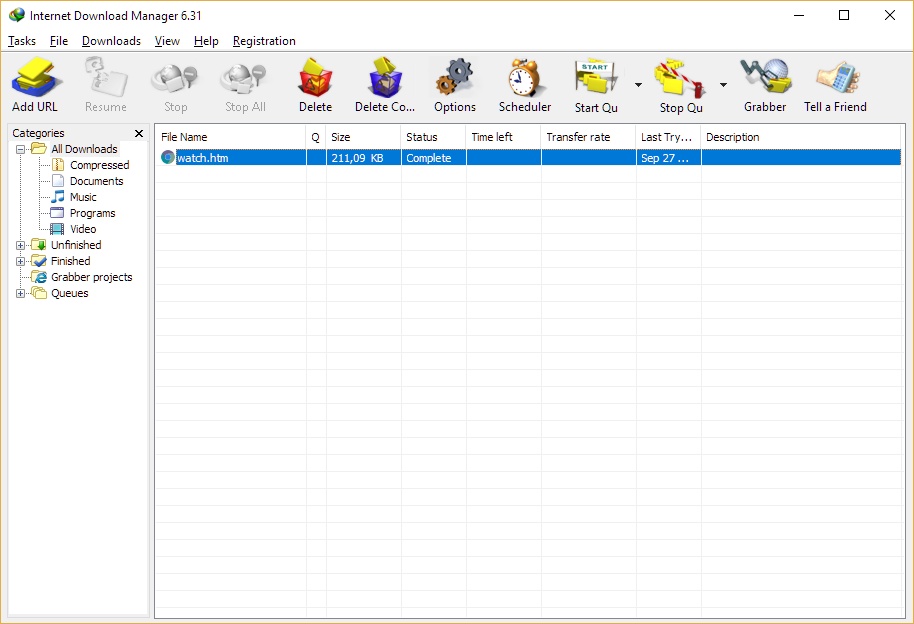
Internet Download Manager (IDM) is a tool to increase download speeds by up to 5 times, resume and schedule downloads. Comprehensive error recovery and resume capability will restart broken or interrupted downloads due to lost connections, network problems, computer shutdowns, or unexpected power outages. Version 6 adds IDM download panel for web-players that can be used to download videos.
Screenshots
Latest version
Download
Download Internet Download Manager 6.43 Build 10 11.7MB Win

Download old versions

Software License
Supported operating systems
Version history / Release notes / Changelog / What's New
What's new in version 6.43 Build 10
(Released: Aug 20, 2026)
Resolved the problem that caused a "403 Forbidden" error when downloading some files
HTTP/2 downloading has been improved
Fixed a bug when converting TS video to MP4
Fixed a bug where the video file extension was incorrectly changed
Other bugs fixed
(Released: Aug 20, 2026)
Resolved the problem that caused a "403 Forbidden" error when downloading some files
HTTP/2 downloading has been improved
Fixed a bug when converting TS video to MP4
Fixed a bug where the video file extension was incorrectly changed
Other bugs fixed
View full changelog
All features
Download faster and more reliably
Install Internet Download Manager (IDM) to stop waiting for your downloads. You will be truly amazed how fast IDM downloads your files. IDM will also repair broken and resume interrupted downloads due to lost connections, network problems, computer shutdowns, or unexpected power outages.
Internet Download Manager Main dialog screenshot
Internet Download Manager Dynamic segmentation
Powerful download engine
Our powerful download engine uses unique algorithms to receive Internet data in a fastest possible way. IDM will accelerate downloads all times because of its innovative dynamic file segmentation technology. Unlike other download managers and accelerators, IDM segments downloaded files dynamically during download process, and it reuses available connections without additional connect and login stages to achieve the best possible acceleration performance. Our engineers have a lot of experience in download acceleration, and we constantly improve this download engine since 1999.
All popular browsers are supported
IDM integrates seamlessly into Google Chrome, FireFox, Microsoft Edge, Opera, Safari, Internet Explorer, AOL, MSN, Maxthon and all other popular browsers. We develop browser extensions since 1999, and we have the best engineering solutions available today. IDM offers the installation of its extensions for Chrome, Firefox, old and new Edge, Opera and other browsers.
Install IDM extension for Google Chrome
Install IDM add-on for Mozilla Firefox
Install IDM extension for Microsoft Edge
You need always to keep IDM extensions installed and enabled in browsers to take over downloads from the browsers and to have IDM's right click menu items! If you have any problem, first check that "IDM integration module" extension is installed and enabled in your browser.
Internet Download Manager Browser support
Download selected files with Internet Download Manager
Download selected files with one click
When several links are selected with a mouse in a browser, IDM will show "Download with IDM" button. You can also minimize this button in "Options General tab Customize download panel in browsers" IDM dialog.
Download files from your favorite web sites
After installing "IDM integration module" browser extension, just continue surfing the Internet, and you will be amazed how easy is to download everything you want from your favorite web sites with IDM video download panel.
Download video with Internet Download Manager animation
Using queue in Internet Download Manager
Built-in Scheduler
Internet Download Manager can connect to the Internet at a set time, download the files you want, disconnect, or shut down your computer when it's done. You can also synchronize changes using periodic synchronization of files. It's possible to create and schedule several download queues for downloading or synchronization.
Download categories
Internet Download Manager can be used to organize downloads automatically using defined download categories. You can add your custom categories for some file types or specific sites.
Internet Download Manager download categories
Internet Download Manager interface customization
Customizable Interface
You may choose the order, buttons and columns to appear on the main IDM window. There are several different skins for the toolbar with different button styles. All skins can be downloaded from IDM home site. Also users can design their own skins. Also you can choose the light or dark IDM theme.
Choose and set up new IDM toolbar
Install Internet Download Manager (IDM) to stop waiting for your downloads. You will be truly amazed how fast IDM downloads your files. IDM will also repair broken and resume interrupted downloads due to lost connections, network problems, computer shutdowns, or unexpected power outages.
Internet Download Manager Main dialog screenshot
Internet Download Manager Dynamic segmentation
Powerful download engine
Our powerful download engine uses unique algorithms to receive Internet data in a fastest possible way. IDM will accelerate downloads all times because of its innovative dynamic file segmentation technology. Unlike other download managers and accelerators, IDM segments downloaded files dynamically during download process, and it reuses available connections without additional connect and login stages to achieve the best possible acceleration performance. Our engineers have a lot of experience in download acceleration, and we constantly improve this download engine since 1999.
All popular browsers are supported
IDM integrates seamlessly into Google Chrome, FireFox, Microsoft Edge, Opera, Safari, Internet Explorer, AOL, MSN, Maxthon and all other popular browsers. We develop browser extensions since 1999, and we have the best engineering solutions available today. IDM offers the installation of its extensions for Chrome, Firefox, old and new Edge, Opera and other browsers.
Install IDM extension for Google Chrome
Install IDM add-on for Mozilla Firefox
Install IDM extension for Microsoft Edge
You need always to keep IDM extensions installed and enabled in browsers to take over downloads from the browsers and to have IDM's right click menu items! If you have any problem, first check that "IDM integration module" extension is installed and enabled in your browser.
Internet Download Manager Browser support
Download selected files with Internet Download Manager
Download selected files with one click
When several links are selected with a mouse in a browser, IDM will show "Download with IDM" button. You can also minimize this button in "Options General tab Customize download panel in browsers" IDM dialog.
Download files from your favorite web sites
After installing "IDM integration module" browser extension, just continue surfing the Internet, and you will be amazed how easy is to download everything you want from your favorite web sites with IDM video download panel.
Download video with Internet Download Manager animation
Using queue in Internet Download Manager
Built-in Scheduler
Internet Download Manager can connect to the Internet at a set time, download the files you want, disconnect, or shut down your computer when it's done. You can also synchronize changes using periodic synchronization of files. It's possible to create and schedule several download queues for downloading or synchronization.
Download categories
Internet Download Manager can be used to organize downloads automatically using defined download categories. You can add your custom categories for some file types or specific sites.
Internet Download Manager download categories
Internet Download Manager interface customization
Customizable Interface
You may choose the order, buttons and columns to appear on the main IDM window. There are several different skins for the toolbar with different button styles. All skins can be downloaded from IDM home site. Also users can design their own skins. Also you can choose the light or dark IDM theme.
Choose and set up new IDM toolbar
Sections/Browse similar tools
Guides and How to's
Acronyms / Also Known As
Notify me when software updated or report software
| 27 reviews, Showing 1 to 5 reviews |
hi will this software download from drm sites like uktvplay site and the wayback machine
Review by barry25 on
Apr 14, 2025 Version: 12
OS: Windows 10 Ease of use: 6/10
Functionality: 4/10
Value for money: 4/10
Overall: 5/10
After a recent upgrade IDM does not seem to work on Youtube any more. But overall I would recommend for anyone who needs a manager to download files. I have been using IDM for about 4 yrs now. Easy to use and you can configure it just the way you want it. Hope they fix the YT issue soon.
Review by on
Apr 8, 2025 Version: 6.42 b32
OS: Windows 11 64-bit Ease of use: 10/10
Functionality: 7/10
Value for money: 10/10
Overall: 9/10
since internet videos were starting toe be popular, IDM did great job for movies lovers. Well done! One of best download tool as well and time tested already.
Review by michael on
Apr 6, 2025 Version: Internet Download Manager 6.42 Build 32
OS: Windows 10 Ease of use: 10/10
Functionality: 10/10
Value for money: 10/10
Overall: 10/10
Great software.I have been using it for 10 years, never had a problem. Updates are instant too.
Review by jopavirando on
Oct 18, 2024 Version: 6.42
OS: Windows 11 64-bit Ease of use: 10/10
Functionality: 10/10
Value for money: 10/10
Overall: 10/10
Rating by nqhXncMU on
Jul 19, 2024 Version: 1
OS: aBksjK31 Ease of use: 10/10
Functionality: 10/10
Value for money: 10/10
Overall: 9/10
| 27 reviews, Showing 1 to 5 reviews |
| 1 tool hits, Showing 1 to 1 tools |
Explanation:
NEW SOFTWARE= New tool since your last visit
NEW VERSION= New version since your last visit
NEW REVIEW= New review since your last visit
NEW VERSION= New version
Latest version
Version number / Beta version number / Update version number and when it whas released.
Type and download
NO MORE UPDATES? = The software hasn't been updated in over 2 years.
NO LONGER DEVELOPED = The software hasn't been updated in over 5 years.
RECENTLY UPDATED = The software has been updated the last 31 days.
Freeware = Download Free software.
Freeware Trialware = Download Free software but some parts are trial/shareware.
Free software = Download Free software and also open source code also known as FOSS (Free and Open Source Software).
Free software Trialware = Download Free software and also open source code but some parts are trial/shareware.
Freeware Ads = Download Free software but supported by advertising, usually with a included browser toolbar. It may be disabled when installing or after installation.
Free software Ads = Free Download software and open source code but supported by advertising, usually with a included browser toolbar. It may be disabled when installing or after installation.
Trialware = Also called shareware or demo. Free Trial version available for download and testing with usually a time limit or limited functions.
Payware = No demo or trial available.
Portable version = A portable/standalone version is available. No installation is required.
v1.0.1 = Latest version available.
Download beta = It could be a Beta, RC(Release Candidate) or an Alpha / Nightly / Unstable version of the software.
Download 15MB = A direct link to the software download.
Win = Windows download version for 32-bit and 64-bit Windows.
Win64 = Windows 64-bit download version for 64-bit Windows.
WinARM64 = Windows 64-bit ARM download version for Windows ARM64/AArch64.
Mac = Mac download version for 64-bit Mac OS Intel/ARM64/AArch64.
MacARM64 = Mac Silicon download version for 64-bit Mac OS ARM64/AArch64.
Mac64 = Mac OS download version for 64-bit Intel Mac OS.
Linux = Linux download version.
Linux64 = Linux download version for 64bit Linux.
Linux ARM = Linux download version for Linux ARM64/AArch64.
Portable = Portable version. No installation is required.
Ad-Supported = The software is bundled with advertising. Be careful when you install the software and disable addons that you don't want!
Visit developers site = A link to the software developer site.
Download (mirror link) = A mirror link to the software download. It may not contain the latest versions.
Download old versions = Free downloads of previous versions of the program.
Download 64-bit version = If you have a 64bit operating system you can download this version.
Download portable version = Portable/Standalone version meaning that no installation is required, just extract the files to a folder and run directly.
Portable version available = Download the portable version and you can just extract the files and run the program without installation.
Old versions available = Download old versions of the program.
Version history available = Complete changelog on our site.
= Windows version available.
 = Mac OS version available.
 = Linux version available.
Our hosted software are virus and malware scanned with several antivirus programs using www.virustotal.com. (NOTE! Just one virustotal warning is 99.9% a false positive. And some software might receive 2-6 warnings but it's if they are not all same virus/trojan then it's 99% false positives.)
Rating
Rating from 0-10.
NEW SOFTWARE= New tool since your last visit
NEW VERSION= New version since your last visit
NEW REVIEW= New review since your last visit
NEW VERSION= New version
Latest version
Version number / Beta version number / Update version number and when it whas released.
Type and download
NO MORE UPDATES? = The software hasn't been updated in over 2 years.
NO LONGER DEVELOPED = The software hasn't been updated in over 5 years.
RECENTLY UPDATED = The software has been updated the last 31 days.
Freeware = Download Free software.
Freeware Trialware = Download Free software but some parts are trial/shareware.
Free software = Download Free software and also open source code also known as FOSS (Free and Open Source Software).
Free software Trialware = Download Free software and also open source code but some parts are trial/shareware.
Freeware Ads = Download Free software but supported by advertising, usually with a included browser toolbar. It may be disabled when installing or after installation.
Free software Ads = Free Download software and open source code but supported by advertising, usually with a included browser toolbar. It may be disabled when installing or after installation.
Trialware = Also called shareware or demo. Free Trial version available for download and testing with usually a time limit or limited functions.
Payware = No demo or trial available.
Portable version = A portable/standalone version is available. No installation is required.
v1.0.1 = Latest version available.
Download beta = It could be a Beta, RC(Release Candidate) or an Alpha / Nightly / Unstable version of the software.
Download 15MB = A direct link to the software download.
Win = Windows download version for 32-bit and 64-bit Windows.
Win64 = Windows 64-bit download version for 64-bit Windows.
WinARM64 = Windows 64-bit ARM download version for Windows ARM64/AArch64.
Mac = Mac download version for 64-bit Mac OS Intel/ARM64/AArch64.
MacARM64 = Mac Silicon download version for 64-bit Mac OS ARM64/AArch64.
Mac64 = Mac OS download version for 64-bit Intel Mac OS.
Linux = Linux download version.
Linux64 = Linux download version for 64bit Linux.
Linux ARM = Linux download version for Linux ARM64/AArch64.
Portable = Portable version. No installation is required.
Ad-Supported = The software is bundled with advertising. Be careful when you install the software and disable addons that you don't want!
Visit developers site = A link to the software developer site.
Download (mirror link) = A mirror link to the software download. It may not contain the latest versions.
Download old versions = Free downloads of previous versions of the program.
Download 64-bit version = If you have a 64bit operating system you can download this version.
Download portable version = Portable/Standalone version meaning that no installation is required, just extract the files to a folder and run directly.
Portable version available = Download the portable version and you can just extract the files and run the program without installation.
Old versions available = Download old versions of the program.
Version history available = Complete changelog on our site.
= Windows version available. = Mac OS version available. = Linux version available.Our hosted software are virus and malware scanned with several antivirus programs using www.virustotal.com. (NOTE! Just one virustotal warning is 99.9% a false positive. And some software might receive 2-6 warnings but it's if they are not all same virus/trojan then it's 99% false positives.)
Rating
Rating from 0-10.
Browse software by sections
All In One Blu-ray Converters (9)
All In One DVD Converters (12)
All In One MKV to MP4, Blu-ray, UHD (11)
All In One Video Converters (19)
Animation (3D, 2D Animation) (12)
Audio Editors (22)
Audio Encoders (80)
Audio Players (19)
Authoring (Blu-ray, UHD, AVCHD) (13)
Authoring (DivX) (4)
Authoring (DVD) (26)
Authoring (SVCD, VCD) (9)
Bitrate Calculators (7)
Blu-ray to AVI, MKV, MP4 (15)
Blu-ray to Blu-ray, AVCHD (10)
Burn (CD,DVD,Blu-ray) (24)
Camcorders, DV, HDV, AVCHD (31)
Capture TV, DVD, VCR (30)
CD, DVD, Blu-ray recovery (3)
Codec Packs (6)
All In One DVD Converters (12)
All In One MKV to MP4, Blu-ray, UHD (11)
All In One Video Converters (19)
Animation (3D, 2D Animation) (12)
Audio Editors (22)
Audio Encoders (80)
Audio Players (19)
Authoring (Blu-ray, UHD, AVCHD) (13)
Authoring (DivX) (4)
Authoring (DVD) (26)
Authoring (SVCD, VCD) (9)
Bitrate Calculators (7)
Blu-ray to AVI, MKV, MP4 (15)
Blu-ray to Blu-ray, AVCHD (10)
Burn (CD,DVD,Blu-ray) (24)
Camcorders, DV, HDV, AVCHD (31)
Capture TV, DVD, VCR (30)
CD, DVD, Blu-ray recovery (3)
Codec Packs (6)
Codec, Video Identifiers (31)
Codecs (67)
Decrypters (DVD Rippers) (16)
Decrypters (UHD, Blu-ray Rippers) (8)
DigitalTV, DVB, IPTV (39)
DVD to DVD (20)
DVD to MP4, MKV, H264, H265 (16)
DVD to VCD, SVCD (5)
DVD to XviD, AVI, DivX (16)
ISO, Image (15)
Linux Video Tools (212)
MacOS Video Tools (243)
Media (Blu-ray, DVD, CD) (9)
Media Center, HTPC (24)
Other Useful Tools (140)
Photo Blu-ray, DVD, SlideShow (8)
Portable (Mobile, PSP) (35)
Region Free Tools (5)
Screen capture , Screen recording (26)
Screenshots , Thumbnails (13)
Codecs (67)
Decrypters (DVD Rippers) (16)
Decrypters (UHD, Blu-ray Rippers) (8)
DigitalTV, DVB, IPTV (39)
DVD to DVD (20)
DVD to MP4, MKV, H264, H265 (16)
DVD to VCD, SVCD (5)
DVD to XviD, AVI, DivX (16)
ISO, Image (15)
Linux Video Tools (212)
MacOS Video Tools (243)
Media (Blu-ray, DVD, CD) (9)
Media Center, HTPC (24)
Other Useful Tools (140)
Photo Blu-ray, DVD, SlideShow (8)
Portable (Mobile, PSP) (35)
Region Free Tools (5)
Screen capture , Screen recording (26)
Screenshots , Thumbnails (13)
Subtitle Editors, Converters (72)
Tag Editors (4)
Video De, Multiplexers (66)
Video Editors (Advanced, NLE) (35)
Video Editors (Basic) (56)
Video Editors (H264, MP4, MKV, MTS) (19)
Video Editors (Lossless) (4)
Video Editors (MPG, DVD) (16)
Video Editors (WMV, AVI) (15)
Video Encoders (AV1, VP8, VP9) (2)
Video Encoders (AVI, WMV) (38)
Video Encoders (H264, H265, MP4, MKV) (45)
Video Encoders (MPG, DVD) (23)
Video Encoders , Converters (155)
Video Frameservers (9)
Video Players (48)
Video Repair, Fix (24)
Video Scripting (10)
Video Streaming (20)
Video Streaming Downloaders (100)
Tag Editors (4)
Video De, Multiplexers (66)
Video Editors (Advanced, NLE) (35)
Video Editors (Basic) (56)
Video Editors (H264, MP4, MKV, MTS) (19)
Video Editors (Lossless) (4)
Video Editors (MPG, DVD) (16)
Video Editors (WMV, AVI) (15)
Video Encoders (AV1, VP8, VP9) (2)
Video Encoders (AVI, WMV) (38)
Video Encoders (H264, H265, MP4, MKV) (45)
Video Encoders (MPG, DVD) (23)
Video Encoders , Converters (155)
Video Frameservers (9)
Video Players (48)
Video Repair, Fix (24)
Video Scripting (10)
Video Streaming (20)
Video Streaming Downloaders (100)