
Help us keep the list up to date and submit new video software here.
Tool
Description
Type
Rating
Reviews
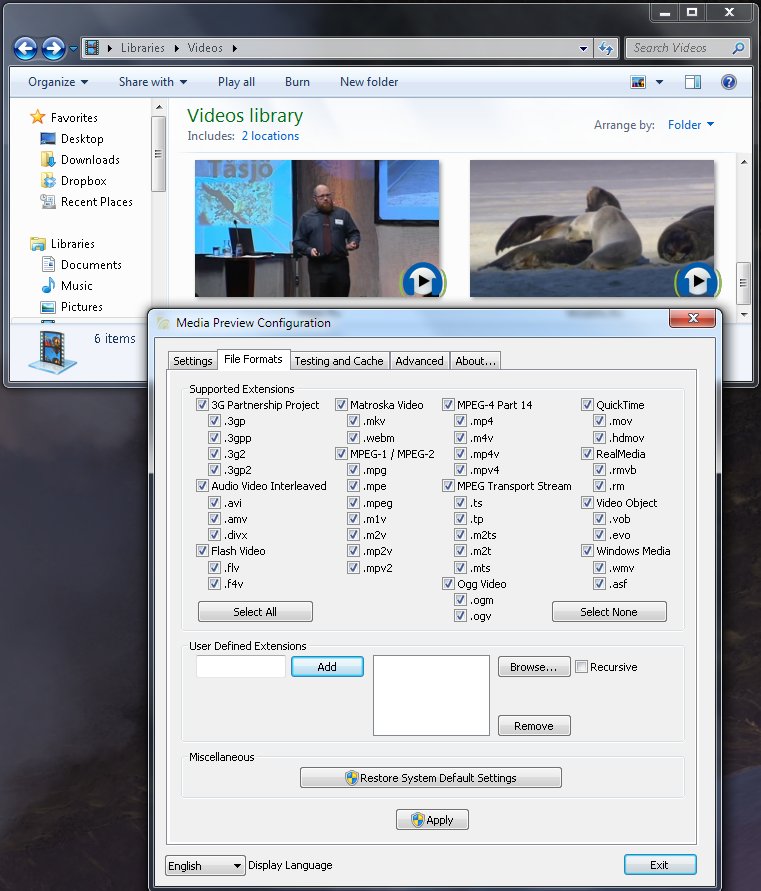
Media Preview shows thumbnails for all your video files in Windows Explorer. Media Preview is powered by ffmpeg.
Freeware
OS:
File size: 15MB
Old versions
Version history
Alternative software
OS:
File size: 15MB
Old versions
Version history
Alternative software
Screenshots
Latest version
Download
Download Media Preview 1.4.3 15MB Win
Download old versions

Software License
Supported operating systems
Version history / Release notes / Changelog / What's New
Media Preview v1.4.3.429 (04/13/2014)
Mini-me release:
Core
Better handling of camcorder recorded video files by getting actual thumbnails instead of grey images
Installer
Do not reset settings upon upgrading anymore (it won't work if you upgrade from 1.4.2 to 1.4.3 as uninstall is still handle by 1.4.2, but it will work when upgrading from 1.4.3)
Overall size reduced by nearly 10% (16.1MB to 14.7MB)
Mini-me release:
Core
Better handling of camcorder recorded video files by getting actual thumbnails instead of grey images
Installer
Do not reset settings upon upgrading anymore (it won't work if you upgrade from 1.4.2 to 1.4.3 as uninstall is still handle by 1.4.2, but it will work when upgrading from 1.4.3)
Overall size reduced by nearly 10% (16.1MB to 14.7MB)
View full changelog
All features
Features
Since the advent of Windows XP in 2001, Windows Explorer has improved its usability by running a preview control system that let you get a glimpse at the content of your files while browsing and without having to open them. For media files, this is done by generating thumbnails replacing default icons.
But the default video thumbnail extractor of Microsoft generally does a lousy job at getting useful previews of your media files, mostly due to performance considerations. Nevertheless, computers have become powerful enough not to let the matter rest, and Media Preview can help them to provide you the best.
Supports The Key Media Formats
By default, Windows only supports the media file formats developped by Microsoft or for Quicktime, and ignores other popular media formats. Third-party media players fill the gap in terms of playback but usually let the preview functionality on the side-road.
Media Preview is here to bring to your computer the full preview capabilities for all of your media files.
Redefines The Uniqueness Of Your Media Files
While browsing TV series folders, you probably already got sets of identical thumbnails, where the default thumbnail extractor get stuck with the same title sequence.
Media Preview get over this by seeking another sequence of your media files to let you get more information out of them.
Works Everywhere
Windows comes in 2 different flavors, 32-bit and 64-bit versions, the later not being entirely backward compatible. And one of the main problems with third-party thumbnail extractors is that most only work on the 32-bit version.
Media Preview caters to every versions of Windows so that you won't feel cheated even if you opted for the more performing 64-bit version. Obviously, it also works seamlessly with your local and remote media files.
Avoids The Monochrome Symptom
The default video thumbnail extractor usually grabs the first frame of your media files, possibly leading to only display a collection of black thumbnails.
Media Preview is smart enough to detect image relevance using related metrics. If the extracted image is part of a shot transition, Media Preview will go seek the following scene to get a meaningful thumbnail.
Gets You Free Of System Constraints
While browsing, you probably encountered some issues like not being able to rename or move a file anymore, because the thumbnail extractor was still running in the background.
Media Preview won't ever remind you of its presence as you'll be able to do what you want with your files.
Designed For System Stability And Performance
Third-party thumbnail extractors use directly the video rendering pipelines of your system and so impose upon you the media solution it's tied to, sometimes invoking a full-blown framework to do the job.
Media Preview remains out of the regular rendering pipeline, lets your delicate playback setup stable and out of harm, doesn't clutter your system with more than needed, but still performs efficiently.
Since the advent of Windows XP in 2001, Windows Explorer has improved its usability by running a preview control system that let you get a glimpse at the content of your files while browsing and without having to open them. For media files, this is done by generating thumbnails replacing default icons.
But the default video thumbnail extractor of Microsoft generally does a lousy job at getting useful previews of your media files, mostly due to performance considerations. Nevertheless, computers have become powerful enough not to let the matter rest, and Media Preview can help them to provide you the best.
Supports The Key Media Formats
By default, Windows only supports the media file formats developped by Microsoft or for Quicktime, and ignores other popular media formats. Third-party media players fill the gap in terms of playback but usually let the preview functionality on the side-road.
Media Preview is here to bring to your computer the full preview capabilities for all of your media files.
Redefines The Uniqueness Of Your Media Files
While browsing TV series folders, you probably already got sets of identical thumbnails, where the default thumbnail extractor get stuck with the same title sequence.
Media Preview get over this by seeking another sequence of your media files to let you get more information out of them.
Works Everywhere
Windows comes in 2 different flavors, 32-bit and 64-bit versions, the later not being entirely backward compatible. And one of the main problems with third-party thumbnail extractors is that most only work on the 32-bit version.
Media Preview caters to every versions of Windows so that you won't feel cheated even if you opted for the more performing 64-bit version. Obviously, it also works seamlessly with your local and remote media files.
Avoids The Monochrome Symptom
The default video thumbnail extractor usually grabs the first frame of your media files, possibly leading to only display a collection of black thumbnails.
Media Preview is smart enough to detect image relevance using related metrics. If the extracted image is part of a shot transition, Media Preview will go seek the following scene to get a meaningful thumbnail.
Gets You Free Of System Constraints
While browsing, you probably encountered some issues like not being able to rename or move a file anymore, because the thumbnail extractor was still running in the background.
Media Preview won't ever remind you of its presence as you'll be able to do what you want with your files.
Designed For System Stability And Performance
Third-party thumbnail extractors use directly the video rendering pipelines of your system and so impose upon you the media solution it's tied to, sometimes invoking a full-blown framework to do the job.
Media Preview remains out of the regular rendering pipeline, lets your delicate playback setup stable and out of harm, doesn't clutter your system with more than needed, but still performs efficiently.
Sections/Browse similar tools
Alternative to Media Preview
(Latest version updated)Icaros (Mar 2, 2025)
Guides and How to's
Acronyms / Also Known As
Notify me when software updated or report software
| 11 reviews, Showing 1 to 5 reviews |
Absolutely Great.
Review by Eugene on
Sep 23, 2024 Version: 1.4.3
OS: Windows 11 Ease of use: 10/10
Functionality: 10/10
Value for money: 10/10
Overall: 10/10
Causes explorer to freeze on the drive hosting some videos (mostly mkv's from youtube), whether in thumbnail view or not (even freezes the command prompt). Not just the folder containing the problematic video, but all folders on that drive. Uninstall Media Preview and the freeze issue instantly vanishes. Occurs with multiple versions of windows, including Win10. Explorer usually (but not always) eventually unfreezes, but it can take 1/2 hour or more & immediately freezes again when you do an operation on any file in that folder or hit refresh. Happens when opening a folder with a problematic video, renaming, deleting or trying to play said video. Basically any explorer operation. Even rebooting in safe mode gives the same result. With Media Preview uninstalled (no need to reboot), all works fine.
Most likely because dev ceased years ago Media preview freezes &/or crashes with some of the newer codecs. Icaros does the same job & is still in development, so may not have the same issue.
Conclusion - in its time a wonderfully useful piece of software, but is now alas dangerously obsolete.
Most likely because dev ceased years ago Media preview freezes &/or crashes with some of the newer codecs. Icaros does the same job & is still in development, so may not have the same issue.
Conclusion - in its time a wonderfully useful piece of software, but is now alas dangerously obsolete.
Review by Brave new World on
Jun 21, 2020 Version: 1.4.3
OS: Windows 7 64-bit Ease of use: 10/10
Functionality: 1/10
Value for money: 10/10
Overall: 2/10
Rating by grmi on
Nov 11, 2019 Version: 1.4.3
OS: Windows 10 Ease of use: 4/10
Functionality: 2/10
Value for money: 4/10
Overall: 2/10
After the latest Windows update you can no longer use this programme to stop thumbnailing of video files whilst leaving thumbnails of photos. It's all or nothing now.
Review by naszdom on
Jul 30, 2019 Version: 1.4.3.429
OS: Windows 10 64-bit Ease of use: 6/10
Functionality: 1/10
Value for money: 6/10
Overall: 1/10
Rating by Anon on
Aug 20, 2018 Version: 1.4.3
OS: Windows 10 64-bit Ease of use: 10/10
Functionality: 10/10
Value for money: 10/10
Overall: 10/10
| 11 reviews, Showing 1 to 5 reviews |
| 1 tool hits, Showing 1 to 1 tools |
Explanation:
NEW SOFTWARE= New tool since your last visit
NEW VERSION= New version since your last visit
NEW REVIEW= New review since your last visit
NEW VERSION= New version
Latest version
Version number / Beta version number / Update version number and when it whas released.
Type and download
NO MORE UPDATES? = The software hasn't been updated in over 2 years.
NO LONGER DEVELOPED = The software hasn't been updated in over 5 years.
RECENTLY UPDATED = The software has been updated the last 31 days.
Freeware = Download Free software.
Freeware Trialware = Download Free software but some parts are trial/shareware.
Free software = Download Free software and also open source code also known as FOSS (Free and Open Source Software).
Free software Trialware = Download Free software and also open source code but some parts are trial/shareware.
Freeware Ads = Download Free software but supported by advertising, usually with a included browser toolbar. It may be disabled when installing or after installation.
Free software Ads = Free Download software and open source code but supported by advertising, usually with a included browser toolbar. It may be disabled when installing or after installation.
Trialware = Also called shareware or demo. Free Trial version available for download and testing with usually a time limit or limited functions.
Payware = No demo or trial available.
Portable version = A portable/standalone version is available. No installation is required.
v1.0.1 = Latest version available.
Download beta = It could be a Beta, RC(Release Candidate) or an Alpha / Nightly / Unstable version of the software.
Download 15MB = A direct link to the software download.
Win = Windows download version. It works on 32-bit and 64-bit Windows.
Win64 = Windows 64-bit download version. It works only on 64-bit Windows.
Mac = Mac download version. It works on 32-bit and 64-bit Mac OS.
Mac64 = Mac OS download version. It works only on 64-bit Mac OS.
Linux = Linux download version.
Portable = Portable version. No installation is required.
Ad-Supported = The software is bundled with advertising. Be careful when you install the software and disable addons that you don't want!
Visit developers site = A link to the software developer site.
Download (mirror link) = A mirror link to the software download. It may not contain the latest versions.
Download old versions = Free downloads of previous versions of the program.
Download 64-bit version = If you have a 64bit operating system you can download this version.
Download portable version = Portable/Standalone version meaning that no installation is required, just extract the files to a folder and run directly.
Portable version available = Download the portable version and you can just extract the files and run the program without installation.
Old versions available = Download old versions of the program.
Version history available = Complete changelog on our site.
= Windows version available.
 = Mac OS version available.
 = Linux version available.
Our hosted software are virus and malware scanned with several antivirus programs using www.virustotal.com. (NOTE! Just one virustotal warning is 99.9% a false positive. And some software might receive 2-6 warnings but it's if they are not all same virus/trojan then it's 99% false positives.)
Rating
Rating from 0-10.
NEW SOFTWARE= New tool since your last visit
NEW VERSION= New version since your last visit
NEW REVIEW= New review since your last visit
NEW VERSION= New version
Latest version
Version number / Beta version number / Update version number and when it whas released.
Type and download
NO MORE UPDATES? = The software hasn't been updated in over 2 years.
NO LONGER DEVELOPED = The software hasn't been updated in over 5 years.
RECENTLY UPDATED = The software has been updated the last 31 days.
Freeware = Download Free software.
Freeware Trialware = Download Free software but some parts are trial/shareware.
Free software = Download Free software and also open source code also known as FOSS (Free and Open Source Software).
Free software Trialware = Download Free software and also open source code but some parts are trial/shareware.
Freeware Ads = Download Free software but supported by advertising, usually with a included browser toolbar. It may be disabled when installing or after installation.
Free software Ads = Free Download software and open source code but supported by advertising, usually with a included browser toolbar. It may be disabled when installing or after installation.
Trialware = Also called shareware or demo. Free Trial version available for download and testing with usually a time limit or limited functions.
Payware = No demo or trial available.
Portable version = A portable/standalone version is available. No installation is required.
v1.0.1 = Latest version available.
Download beta = It could be a Beta, RC(Release Candidate) or an Alpha / Nightly / Unstable version of the software.
Download 15MB = A direct link to the software download.
Win = Windows download version. It works on 32-bit and 64-bit Windows.
Win64 = Windows 64-bit download version. It works only on 64-bit Windows.
Mac = Mac download version. It works on 32-bit and 64-bit Mac OS.
Mac64 = Mac OS download version. It works only on 64-bit Mac OS.
Linux = Linux download version.
Portable = Portable version. No installation is required.
Ad-Supported = The software is bundled with advertising. Be careful when you install the software and disable addons that you don't want!
Visit developers site = A link to the software developer site.
Download (mirror link) = A mirror link to the software download. It may not contain the latest versions.
Download old versions = Free downloads of previous versions of the program.
Download 64-bit version = If you have a 64bit operating system you can download this version.
Download portable version = Portable/Standalone version meaning that no installation is required, just extract the files to a folder and run directly.
Portable version available = Download the portable version and you can just extract the files and run the program without installation.
Old versions available = Download old versions of the program.
Version history available = Complete changelog on our site.
= Windows version available. = Mac OS version available. = Linux version available.Our hosted software are virus and malware scanned with several antivirus programs using www.virustotal.com. (NOTE! Just one virustotal warning is 99.9% a false positive. And some software might receive 2-6 warnings but it's if they are not all same virus/trojan then it's 99% false positives.)
Rating
Rating from 0-10.
Browse software by sections
All In One Blu-ray Converters (9)
All In One DVD Converters (12)
All In One MKV to MP4, Blu-ray, UHD (11)
All In One Video Converters (19)
Animation (3D, 2D Animation) (12)
Audio Editors (21)
Audio Encoders (80)
Audio Players (19)
Authoring (Blu-ray, UHD, AVCHD) (13)
Authoring (DivX) (4)
Authoring (DVD) (26)
Authoring (SVCD, VCD) (9)
Bitrate Calculators (7)
Blu-ray to AVI, MKV, MP4 (15)
Blu-ray to Blu-ray, AVCHD (10)
Burn (CD,DVD,Blu-ray) (24)
Camcorders, DV, HDV, AVCHD (31)
Capture TV, DVD, VCR (30)
CD, DVD, Blu-ray recovery (3)
Codec Packs (6)
All In One DVD Converters (12)
All In One MKV to MP4, Blu-ray, UHD (11)
All In One Video Converters (19)
Animation (3D, 2D Animation) (12)
Audio Editors (21)
Audio Encoders (80)
Audio Players (19)
Authoring (Blu-ray, UHD, AVCHD) (13)
Authoring (DivX) (4)
Authoring (DVD) (26)
Authoring (SVCD, VCD) (9)
Bitrate Calculators (7)
Blu-ray to AVI, MKV, MP4 (15)
Blu-ray to Blu-ray, AVCHD (10)
Burn (CD,DVD,Blu-ray) (24)
Camcorders, DV, HDV, AVCHD (31)
Capture TV, DVD, VCR (30)
CD, DVD, Blu-ray recovery (3)
Codec Packs (6)
Codec, Video Identifiers (30)
Codecs (67)
Decrypters (DVD Rippers) (15)
Decrypters (UHD, Blu-ray Rippers) (8)
DigitalTV, DVB, IPTV (39)
DVD to DVD (20)
DVD to MP4, MKV, H264, H265 (16)
DVD to VCD, SVCD (5)
DVD to XviD, AVI, DivX (16)
ISO, Image (16)
Linux Video Tools (197)
MacOS Video Tools (233)
Media (Blu-ray, DVD, CD) (9)
Media Center, HTPC (23)
Other Useful Tools (142)
Photo Blu-ray, DVD, SlideShow (8)
Portable (Mobile, PSP) (35)
Region Free Tools (5)
Screen capture , Screen recording (27)
Screenshots , Thumbnails (13)
Codecs (67)
Decrypters (DVD Rippers) (15)
Decrypters (UHD, Blu-ray Rippers) (8)
DigitalTV, DVB, IPTV (39)
DVD to DVD (20)
DVD to MP4, MKV, H264, H265 (16)
DVD to VCD, SVCD (5)
DVD to XviD, AVI, DivX (16)
ISO, Image (16)
Linux Video Tools (197)
MacOS Video Tools (233)
Media (Blu-ray, DVD, CD) (9)
Media Center, HTPC (23)
Other Useful Tools (142)
Photo Blu-ray, DVD, SlideShow (8)
Portable (Mobile, PSP) (35)
Region Free Tools (5)
Screen capture , Screen recording (27)
Screenshots , Thumbnails (13)
Subtitle Editors, Converters (70)
Tag Editors (3)
Video De, Multiplexers (66)
Video Editors (Advanced, NLE) (34)
Video Editors (Basic) (55)
Video Editors (H264, MP4, MKV, MTS) (19)
Video Editors (Lossless) (4)
Video Editors (MPG, DVD) (16)
Video Editors (WMV, AVI) (15)
Video Encoders (AV1, VP8, VP9) (2)
Video Encoders (AVI, WMV) (38)
Video Encoders (H264, H265, MP4, MKV) (45)
Video Encoders (MPG, DVD) (23)
Video Encoders , Converters (154)
Video Frameservers (9)
Video Players (49)
Video Repair, Fix (25)
Video Scripting (11)
Video Streaming (21)
Video Streaming Downloaders (102)
Tag Editors (3)
Video De, Multiplexers (66)
Video Editors (Advanced, NLE) (34)
Video Editors (Basic) (55)
Video Editors (H264, MP4, MKV, MTS) (19)
Video Editors (Lossless) (4)
Video Editors (MPG, DVD) (16)
Video Editors (WMV, AVI) (15)
Video Encoders (AV1, VP8, VP9) (2)
Video Encoders (AVI, WMV) (38)
Video Encoders (H264, H265, MP4, MKV) (45)
Video Encoders (MPG, DVD) (23)
Video Encoders , Converters (154)
Video Frameservers (9)
Video Players (49)
Video Repair, Fix (25)
Video Scripting (11)
Video Streaming (21)
Video Streaming Downloaders (102)