
Help us keep the list up to date and submit new video software here.
Tool
Description
Type
Rating
Reviews
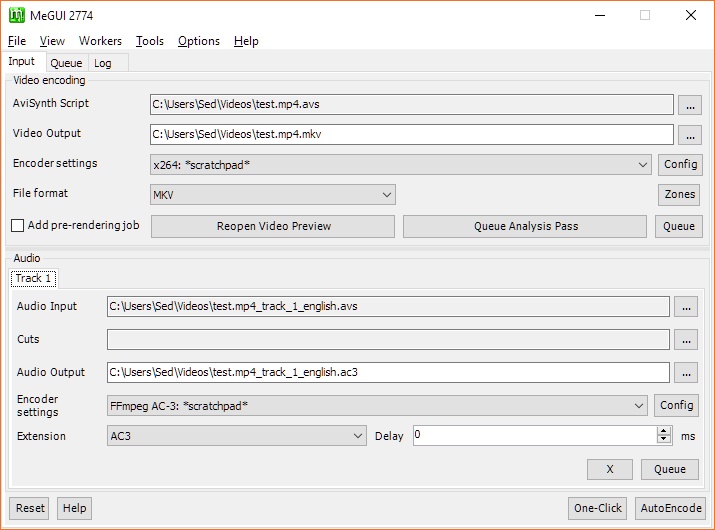
MeGUI is the most comprehensive GUI based x264 converter. It supports also HEVC/H265 (x265), MPEG-4 ASP (XviD & libavcodec MPEG-4) using mencoder, MelEG-4 AVC (x264) using x264 CLI or mencoder, (HE)AAC audio using BeSweet & Nero AAC encoder and MP4 muxing using mp4box. One click encoder option. Requires .NET framework 4.8.1. Windows 7 and older are not supported.
Free software
OS:
File size: 3MB
Portable version
Old versions
Version history
Alternative software
OS:
File size: 3MB
Portable version
Old versions
Version history
Alternative software
Screenshots


Latest version


Download
Download MeGUI 6666 - 20260403 64-bit 3MB Win64
Portable 
Download MeGUI 6666 - 20260403 3MB Win
Portable Download old versions

Software License
Supported operating systems
More information and other downloads
MeGUI x64 has the same functionality as the x86 build with these exceptions, as those tools are not available in x64:
- XviD (can be selected, but does not work)
- AudioLimiter (not available, downmix from 7+ channels to 5.1 will be available in reduced quality only)
- BassAudio (not available)
- convolution3d (not available)
- tomsmocomp (not available)
- XviD (can be selected, but does not work)
- AudioLimiter (not available, downmix from 7+ channels to 5.1 will be available in reduced quality only)
- BassAudio (not available)
- convolution3d (not available)
- tomsmocomp (not available)
Version history / Release notes / Changelog / What's New
MeGUI 6.6.6.6 - 20260403
Fixed several issues on svt-av1 encoder side
Fixed issue on Progress Window Form
Added Demuxers, available through the Tools Menu
Fixed several issues on svt-av1 encoder side
Fixed issue on Progress Window Form
Added Demuxers, available through the Tools Menu
View full changelog
Sections/Browse similar tools
Alternative to MeGUI
(Latest version updated)FFCoder (Feb 16, 2013)
HandBrake (Jun 7, 2026)
RipBot264 (Aug 2, 2025)
StaxRip (Aug 8, 2026)
Guides and How to's
Blu-Ray / HD-DVD / TS / DVD / AVI -> TO H.246 using MEGUI
- ReadConvert DVD to XviD with MeGUI
- ReadHow to convert/encode any video to HD PS Vita
- ReadHow to prepare a DVD for editing in a NLE
- ReadHow to reencode/shrink HD anime with MeGUI
- ReadMeGUI H.264 Conversion Guide
- ReadPS3 H.264 Conversion Guide
- ReadXbox 360 H.264 Conversion Guide
- ReadMeGUI video tutorials
View all guides with guide description here
Notify me when software updated or report software
| 68 reviews, Showing 1 to 5 reviews |
When i trying to load mkv file in newest MeGUI 6666 - 20250210 i got this erroe: there is no functionnamed 'BSVideoSource'.
Review by kartofel24 on
Jun 15, 2025 Version: MeGUI 6666 - 20250210
OS: Windows 10 64-bit Ease of use: 2/10
Functionality: 2/10
Value for money: 2/10
Overall: 2/10
1) crashing (log included)
2) info ver (in log it even newer than in title)))
log:
[Error] Log
-[Information] Versions
--[Information] MeGUI: 6.6.6.6 20241208 x64
...
---[Information] General
----[Information] Format: Matroska
----[Information] FileSize: 510071361
----[Information] PlayTime: 00:13:00.544
---[Information] Video
----[Information] ID: 1
----[Information] StreamOrder: 0
----[Information] CodecID: V_MPEG4/ISO/AVC
----[Information] Format: AVC
----[Information] FormatInfo: Advanced Video Codec
----[Information] Width: 1920
----[Information] Height: 1080
----[Information] FrameCount: 19514
----[Information] FrameRate: 25.000
----[Information] FrameRate_N: 25
----[Information] FrameRate_D: 1
----[Information] FrameRateMode: CFR
----[Information] FrameRateModeString: Constant
----[Information] Duration: 00:13:00.560
----[Information] ScanType: Progressive
----[Information] Bits Depth: 8
----[Information] AspectRatio: 1.778
----[Information] AspectRatioString: 16:9
----[Information] PixelAspectRatio: 1.000
----[Information] Delay: 0
----[Information] Default: Yes
----[Information] Forced: No
---[Information] Audio
----[Information] ID: 2
----[Information] StreamOrder: 1
----[Information] CodecID: A_AAC-2
----[Information] Format: AAC
----[Information] FormatString: AAC LC
----[Information] FormatInfo: Advanced Audio Codec Low Complexity
----[Information] FormatSettingsSBR: No (Explicit)
----[Information] SamplingRate: 48000
----[Information] SamplingRateString: 48.0 kHz
----[Information] Channels: 2
----[Information] ChannelsString: 2 channels
----[Information] ChannelLayout: L R
----[Information] Delay: 0
----[Information] Title: "Русский"
----[Information] Language: ru
----[Information] LanguageString: Russian
----[Information] Default: Yes
----[Information] Forced: No
...
---[Error] [08.12.2024 23:28:20] Encoding [vost#0:0/wrapped_avframe @ 00000148ac869900] [error] Error submitting a packet to the muxer: Broken pipe
---[Error] [08.12.2024 23:28:20] [vost#0:0/wrapped_avframe @ 00000148ac869900] [error] Error submitting a packet to the muxer: Broken pipe
---[Error] [08.12.2024 23:28:20] [out#0/yuv4mpegpipe @ 00000148b3e90d80] [error] Error muxing a packet
---[Error] [08.12.2024 23:28:20] [out#0/yuv4mpegpipe @ 00000148b3e90d80] [error] Task finished with error code: -32 (Broken pipe)
---[Error] [08.12.2024 23:28:20] [out#0/yuv4mpegpipe @ 00000148b3e90d80] [error] Terminating thread with return code -32 (Broken pipe)
---[Error] [08.12.2024 23:28:20] [out#0/yuv4mpegpipe @ 00000148b3e90d80] [error] Error writing trailer: Broken pipe
---[Error] [08.12.2024 23:28:20] [out#0/yuv4mpegpipe @ 00000148b3e90d80] [error] Error closing file: Broken pipe
--[Error] [08.12.2024 23:28:20] Process exits with error: 0xC000001D STATUS_ILLEGAL_INSTRUCTION (-1073741795)
2) info ver (in log it even newer than in title)))
log:
[Error] Log
-[Information] Versions
--[Information] MeGUI: 6.6.6.6 20241208 x64
...
---[Information] General
----[Information] Format: Matroska
----[Information] FileSize: 510071361
----[Information] PlayTime: 00:13:00.544
---[Information] Video
----[Information] ID: 1
----[Information] StreamOrder: 0
----[Information] CodecID: V_MPEG4/ISO/AVC
----[Information] Format: AVC
----[Information] FormatInfo: Advanced Video Codec
----[Information] Width: 1920
----[Information] Height: 1080
----[Information] FrameCount: 19514
----[Information] FrameRate: 25.000
----[Information] FrameRate_N: 25
----[Information] FrameRate_D: 1
----[Information] FrameRateMode: CFR
----[Information] FrameRateModeString: Constant
----[Information] Duration: 00:13:00.560
----[Information] ScanType: Progressive
----[Information] Bits Depth: 8
----[Information] AspectRatio: 1.778
----[Information] AspectRatioString: 16:9
----[Information] PixelAspectRatio: 1.000
----[Information] Delay: 0
----[Information] Default: Yes
----[Information] Forced: No
---[Information] Audio
----[Information] ID: 2
----[Information] StreamOrder: 1
----[Information] CodecID: A_AAC-2
----[Information] Format: AAC
----[Information] FormatString: AAC LC
----[Information] FormatInfo: Advanced Audio Codec Low Complexity
----[Information] FormatSettingsSBR: No (Explicit)
----[Information] SamplingRate: 48000
----[Information] SamplingRateString: 48.0 kHz
----[Information] Channels: 2
----[Information] ChannelsString: 2 channels
----[Information] ChannelLayout: L R
----[Information] Delay: 0
----[Information] Title: "Русский"
----[Information] Language: ru
----[Information] LanguageString: Russian
----[Information] Default: Yes
----[Information] Forced: No
...
---[Error] [08.12.2024 23:28:20] Encoding [vost#0:0/wrapped_avframe @ 00000148ac869900] [error] Error submitting a packet to the muxer: Broken pipe
---[Error] [08.12.2024 23:28:20] [vost#0:0/wrapped_avframe @ 00000148ac869900] [error] Error submitting a packet to the muxer: Broken pipe
---[Error] [08.12.2024 23:28:20] [out#0/yuv4mpegpipe @ 00000148b3e90d80] [error] Error muxing a packet
---[Error] [08.12.2024 23:28:20] [out#0/yuv4mpegpipe @ 00000148b3e90d80] [error] Task finished with error code: -32 (Broken pipe)
---[Error] [08.12.2024 23:28:20] [out#0/yuv4mpegpipe @ 00000148b3e90d80] [error] Terminating thread with return code -32 (Broken pipe)
---[Error] [08.12.2024 23:28:20] [out#0/yuv4mpegpipe @ 00000148b3e90d80] [error] Error writing trailer: Broken pipe
---[Error] [08.12.2024 23:28:20] [out#0/yuv4mpegpipe @ 00000148b3e90d80] [error] Error closing file: Broken pipe
--[Error] [08.12.2024 23:28:20] Process exits with error: 0xC000001D STATUS_ILLEGAL_INSTRUCTION (-1073741795)
Review by nechto on
Dec 8, 2024 Version: latest I suppose(will explain later)
OS: WinXP 64-bit Ease of use: 10/10
Functionality: 9/10
Value for money: 10/10
Overall: 10/10
The bug was fixed quickly. Thank you.
Review by Nick on
Jul 11, 2024 Version: 6666.1007
OS: Windows 10 64-bit Ease of use: 10/10
Functionality: 10/10
Value for money: 10/10
Overall: 10/10
6666.1007 x64. Constantly requires updating AviSynth plugins. MeGUI complete Local Version bild 13, Server Version 13. After reinstall it MeGUI requires updating again and again.
6666.1405 x64 all right.
6666.1405 x64 all right.
Review by Nick on
Jul 11, 2024 Version: 6666.1007
OS: Windows 10 64-bit Ease of use: 5/10
Functionality: 1/10
Value for money: 5/10
Overall: 5/10
Says Windows all here on this Videohelp page, but in fact if you read the changeling it does not suppor Vista or later-so please correct info. Thank you. Still a useful program that when configured corrected delivers quality.
Review by Alan on
Oct 15, 2023 Version: 2944 build
OS: Windows 10 64-bit Ease of use: 8/10
Functionality: 8/10
Value for money: 10/10
Overall: 8/10
| 68 reviews, Showing 1 to 5 reviews |
| 1 tool hits, Showing 1 to 1 tools |
Explanation:
NEW SOFTWARE= New tool since your last visit
NEW VERSION= New version since your last visit
NEW REVIEW= New review since your last visit
NEW VERSION= New version
Latest version
Version number / Beta version number / Update version number and when it whas released.
Type and download
NO MORE UPDATES? = The software hasn't been updated in over 2 years.
NO LONGER DEVELOPED = The software hasn't been updated in over 5 years.
RECENTLY UPDATED = The software has been updated the last 31 days.
Freeware = Download Free software.
Freeware Trialware = Download Free software but some parts are trial/shareware.
Free software = Download Free software and also open source code also known as FOSS (Free and Open Source Software).
Free software Trialware = Download Free software and also open source code but some parts are trial/shareware.
Freeware Ads = Download Free software but supported by advertising, usually with a included browser toolbar. It may be disabled when installing or after installation.
Free software Ads = Free Download software and open source code but supported by advertising, usually with a included browser toolbar. It may be disabled when installing or after installation.
Trialware = Also called shareware or demo. Free Trial version available for download and testing with usually a time limit or limited functions.
Payware = No demo or trial available.
Portable version = A portable/standalone version is available. No installation is required.
v1.0.1 = Latest version available.
Download beta = It could be a Beta, RC(Release Candidate) or an Alpha / Nightly / Unstable version of the software.
Download 15MB = A direct link to the software download.
Win = Windows download version for 32-bit and 64-bit Windows.
Win64 = Windows 64-bit download version for 64-bit Windows.
WinARM64 = Windows 64-bit ARM download version for Windows ARM64/AArch64.
Mac = Mac download version for 64-bit Mac OS Intel/ARM64/AArch64.
MacARM64 = Mac Silicon download version for 64-bit Mac OS ARM64/AArch64.
Mac64 = Mac OS download version for 64-bit Intel Mac OS.
Linux = Linux download version.
Linux64 = Linux download version for 64bit Linux.
Linux ARM = Linux download version for Linux ARM64/AArch64.
Portable = Portable version. No installation is required.
Ad-Supported = The software is bundled with advertising. Be careful when you install the software and disable addons that you don't want!
Visit developers site = A link to the software developer site.
Download (mirror link) = A mirror link to the software download. It may not contain the latest versions.
Download old versions = Free downloads of previous versions of the program.
Download 64-bit version = If you have a 64bit operating system you can download this version.
Download portable version = Portable/Standalone version meaning that no installation is required, just extract the files to a folder and run directly.
Portable version available = Download the portable version and you can just extract the files and run the program without installation.
Old versions available = Download old versions of the program.
Version history available = Complete changelog on our site.
= Windows version available.
 = Mac OS version available.
 = Linux version available.
Our hosted software are virus and malware scanned with several antivirus programs using www.virustotal.com. (NOTE! Just one virustotal warning is 99.9% a false positive. And some software might receive 2-6 warnings but it's if they are not all same virus/trojan then it's 99% false positives.)
Rating
Rating from 0-10.
NEW SOFTWARE= New tool since your last visit
NEW VERSION= New version since your last visit
NEW REVIEW= New review since your last visit
NEW VERSION= New version
Latest version
Version number / Beta version number / Update version number and when it whas released.
Type and download
NO MORE UPDATES? = The software hasn't been updated in over 2 years.
NO LONGER DEVELOPED = The software hasn't been updated in over 5 years.
RECENTLY UPDATED = The software has been updated the last 31 days.
Freeware = Download Free software.
Freeware Trialware = Download Free software but some parts are trial/shareware.
Free software = Download Free software and also open source code also known as FOSS (Free and Open Source Software).
Free software Trialware = Download Free software and also open source code but some parts are trial/shareware.
Freeware Ads = Download Free software but supported by advertising, usually with a included browser toolbar. It may be disabled when installing or after installation.
Free software Ads = Free Download software and open source code but supported by advertising, usually with a included browser toolbar. It may be disabled when installing or after installation.
Trialware = Also called shareware or demo. Free Trial version available for download and testing with usually a time limit or limited functions.
Payware = No demo or trial available.
Portable version = A portable/standalone version is available. No installation is required.
v1.0.1 = Latest version available.
Download beta = It could be a Beta, RC(Release Candidate) or an Alpha / Nightly / Unstable version of the software.
Download 15MB = A direct link to the software download.
Win = Windows download version for 32-bit and 64-bit Windows.
Win64 = Windows 64-bit download version for 64-bit Windows.
WinARM64 = Windows 64-bit ARM download version for Windows ARM64/AArch64.
Mac = Mac download version for 64-bit Mac OS Intel/ARM64/AArch64.
MacARM64 = Mac Silicon download version for 64-bit Mac OS ARM64/AArch64.
Mac64 = Mac OS download version for 64-bit Intel Mac OS.
Linux = Linux download version.
Linux64 = Linux download version for 64bit Linux.
Linux ARM = Linux download version for Linux ARM64/AArch64.
Portable = Portable version. No installation is required.
Ad-Supported = The software is bundled with advertising. Be careful when you install the software and disable addons that you don't want!
Visit developers site = A link to the software developer site.
Download (mirror link) = A mirror link to the software download. It may not contain the latest versions.
Download old versions = Free downloads of previous versions of the program.
Download 64-bit version = If you have a 64bit operating system you can download this version.
Download portable version = Portable/Standalone version meaning that no installation is required, just extract the files to a folder and run directly.
Portable version available = Download the portable version and you can just extract the files and run the program without installation.
Old versions available = Download old versions of the program.
Version history available = Complete changelog on our site.
= Windows version available. = Mac OS version available. = Linux version available.Our hosted software are virus and malware scanned with several antivirus programs using www.virustotal.com. (NOTE! Just one virustotal warning is 99.9% a false positive. And some software might receive 2-6 warnings but it's if they are not all same virus/trojan then it's 99% false positives.)
Rating
Rating from 0-10.
Browse software by sections
All In One Blu-ray Converters (9)
All In One DVD Converters (12)
All In One MKV to MP4, Blu-ray, UHD (11)
All In One Video Converters (19)
Animation (3D, 2D Animation) (12)
Audio Editors (22)
Audio Encoders (80)
Audio Players (19)
Authoring (Blu-ray, UHD, AVCHD) (13)
Authoring (DivX) (4)
Authoring (DVD) (26)
Authoring (SVCD, VCD) (9)
Bitrate Calculators (7)
Blu-ray to AVI, MKV, MP4 (15)
Blu-ray to Blu-ray, AVCHD (10)
Burn (CD,DVD,Blu-ray) (24)
Camcorders, DV, HDV, AVCHD (31)
Capture TV, DVD, VCR (30)
CD, DVD, Blu-ray recovery (3)
Codec Packs (6)
All In One DVD Converters (12)
All In One MKV to MP4, Blu-ray, UHD (11)
All In One Video Converters (19)
Animation (3D, 2D Animation) (12)
Audio Editors (22)
Audio Encoders (80)
Audio Players (19)
Authoring (Blu-ray, UHD, AVCHD) (13)
Authoring (DivX) (4)
Authoring (DVD) (26)
Authoring (SVCD, VCD) (9)
Bitrate Calculators (7)
Blu-ray to AVI, MKV, MP4 (15)
Blu-ray to Blu-ray, AVCHD (10)
Burn (CD,DVD,Blu-ray) (24)
Camcorders, DV, HDV, AVCHD (31)
Capture TV, DVD, VCR (30)
CD, DVD, Blu-ray recovery (3)
Codec Packs (6)
Codec, Video Identifiers (31)
Codecs (67)
Decrypters (DVD Rippers) (16)
Decrypters (UHD, Blu-ray Rippers) (8)
DigitalTV, DVB, IPTV (39)
DVD to DVD (20)
DVD to MP4, MKV, H264, H265 (16)
DVD to VCD, SVCD (5)
DVD to XviD, AVI, DivX (16)
ISO, Image (15)
Linux Video Tools (212)
MacOS Video Tools (245)
Media (Blu-ray, DVD, CD) (9)
Media Center, HTPC (24)
Other Useful Tools (140)
Photo Blu-ray, DVD, SlideShow (8)
Portable (Mobile, PSP) (35)
Region Free Tools (5)
Screen capture , Screen recording (26)
Screenshots , Thumbnails (13)
Codecs (67)
Decrypters (DVD Rippers) (16)
Decrypters (UHD, Blu-ray Rippers) (8)
DigitalTV, DVB, IPTV (39)
DVD to DVD (20)
DVD to MP4, MKV, H264, H265 (16)
DVD to VCD, SVCD (5)
DVD to XviD, AVI, DivX (16)
ISO, Image (15)
Linux Video Tools (212)
MacOS Video Tools (245)
Media (Blu-ray, DVD, CD) (9)
Media Center, HTPC (24)
Other Useful Tools (140)
Photo Blu-ray, DVD, SlideShow (8)
Portable (Mobile, PSP) (35)
Region Free Tools (5)
Screen capture , Screen recording (26)
Screenshots , Thumbnails (13)
Subtitle Editors, Converters (72)
Tag Editors (4)
Video De, Multiplexers (66)
Video Editors (Advanced, NLE) (35)
Video Editors (Basic) (56)
Video Editors (H264, MP4, MKV, MTS) (19)
Video Editors (Lossless) (4)
Video Editors (MPG, DVD) (16)
Video Editors (WMV, AVI) (15)
Video Encoders (AV1, VP8, VP9) (2)
Video Encoders (AVI, WMV) (38)
Video Encoders (H264, H265, MP4, MKV) (45)
Video Encoders (MPG, DVD) (23)
Video Encoders , Converters (155)
Video Frameservers (9)
Video Players (49)
Video Repair, Fix (24)
Video Scripting (10)
Video Streaming (20)
Video Streaming Downloaders (101)
Tag Editors (4)
Video De, Multiplexers (66)
Video Editors (Advanced, NLE) (35)
Video Editors (Basic) (56)
Video Editors (H264, MP4, MKV, MTS) (19)
Video Editors (Lossless) (4)
Video Editors (MPG, DVD) (16)
Video Editors (WMV, AVI) (15)
Video Encoders (AV1, VP8, VP9) (2)
Video Encoders (AVI, WMV) (38)
Video Encoders (H264, H265, MP4, MKV) (45)
Video Encoders (MPG, DVD) (23)
Video Encoders , Converters (155)
Video Frameservers (9)
Video Players (49)
Video Repair, Fix (24)
Video Scripting (10)
Video Streaming (20)
Video Streaming Downloaders (101)