
Help us keep the list up to date and submit new video software here.
Tool
Description
Type
Rating
Reviews
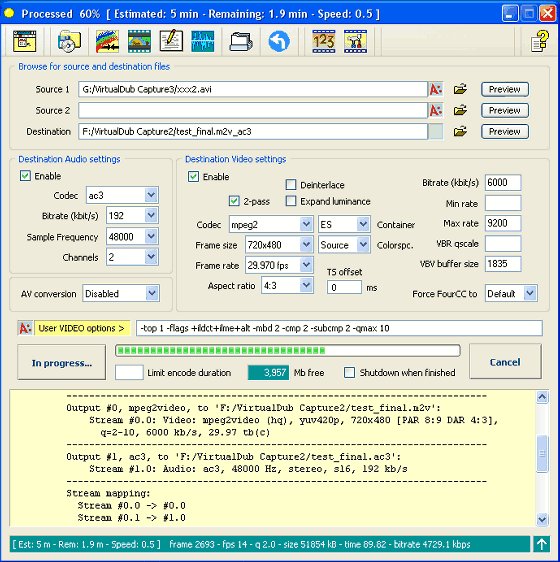
Avanti GUI is a free front-end for FFmpeg with the option to insert Avisynth as pre-processor. It can be used with almost all Windows OS builds of FFmpeg (with Avisynth support). It offers user friendly control over all basic and advanced FFmpeg options. A number of template examples are included. There's no need to be familiar with Avisynth to use the predefined Avanti/Avisynth pre-processor options. Requires ffmpeg.
Freeware
OS:
File size: 1MB
Portable version
Old versions
Version history
Alternative software
OS:
File size: 1MB
Portable version
Old versions
Version history
Alternative software
Screenshots
Latest version
Download
Download Avanti 0.9.2 1MB Win
Portable 
Download old versions

Software License
Supported operating systems
Version history / Release notes / Changelog / What's New
AVANTI 0.9.2 -- FFmpeg/Avisynth GUI -- Changelog 08-04-2015.
==============================================================
1. Added FFmpeg process priority adaption for slow machines.
2. Added -no_check to -new option to bypass error checking.
3. Added FFplay preview alternative for processed clips.
4. Added FFplay preview to web protocol and dshow device.
5. Adapted source properties for vgtmpeg multiple inputs.
6. Fixed metadata issue at web download (web protocol).
7. Fixed occasional error after FFmpeg version switching.
8. Fixed frozen gui window issue at FFmpeg launch delays.
9. Fixed script path error on ifo_path command.
10. Fixed failing metadata dump if FFmpeg not at default path.
11. Fixed reporting of user command line vs. script usage.
12. Updated FFmpeg database with latest codec/format additions.
13. Updated chm context help for changes and additions.
==============================================================
1. Added FFmpeg process priority adaption for slow machines.
2. Added -no_check to -new option to bypass error checking.
3. Added FFplay preview alternative for processed clips.
4. Added FFplay preview to web protocol and dshow device.
5. Adapted source properties for vgtmpeg multiple inputs.
6. Fixed metadata issue at web download (web protocol).
7. Fixed occasional error after FFmpeg version switching.
8. Fixed frozen gui window issue at FFmpeg launch delays.
9. Fixed script path error on ifo_path command.
10. Fixed failing metadata dump if FFmpeg not at default path.
11. Fixed reporting of user command line vs. script usage.
12. Updated FFmpeg database with latest codec/format additions.
13. Updated chm context help for changes and additions.
View full changelog
Sections/Browse similar tools
Alternative to Avanti
(Latest version updated)MediaCoder (Oct 12, 2022)
WinFF (Jun 12, 2017)
Guides and How to's
Acronyms / Also Known As
Download Avanti Portable download from the Download links under Download and Download other versions!
Notify me when software updated or report software
| 15 reviews, Showing 1 to 5 reviews |
Rating by Victor on
Sep 1, 2024 Version: Avanti 0.9.2
OS: Windows 10 64-bit Ease of use: 10/10
Functionality: 10/10
Value for money: 10/10
Overall: 10/10
Rating by Swedaniel on
Nov 17, 2023 Version: 0.9.2
OS: Windows 10 64-bit Ease of use: 10/10
Functionality: 10/10
Value for money: 10/10
Overall: 10/10
Note from the developer,
Please be careful with version 0.9.3 if you want to use the batch conversion option or better wait for a revision. Please read this post...
http://forum.videohelp.com/threads/282223-AVANTI-FFmpeg-Avisynth-GUI-%28support-thread%29?s=966fbf28d21c4bdda88be83098a76887&p=2389538&viewfull=1#post2389538
Chris K (developer of Avanti)
Please be careful with version 0.9.3 if you want to use the batch conversion option or better wait for a revision. Please read this post...
http://forum.videohelp.com/threads/282223-AVANTI-FFmpeg-Avisynth-GUI-%28support-thread%29?s=966fbf28d21c4bdda88be83098a76887&p=2389538&viewfull=1#post2389538
Chris K (developer of Avanti)
Review by Chris K on
May 9, 2015 Version: 0.9.3
OS: Windows 7 Ease of use: 5/10
Functionality: 5/10
Value for money: 5/10
Overall: 5/10
Software hungs on windows 7 64 bits after you click for the convertion to start.
Note:- 0.7.9 work fine.
Note:- 0.7.9 work fine.
Review by ABBrittain on
Jul 16, 2014 Version: 0.8.0
OS: Windows 7 64-bit Ease of use: 1/10
Functionality: 1/10
Value for money: 1/10
Overall: 1/10
Just loaded version 071 on my Windows 7 Ultimate, 64 bit computer and I ran into the following problems which seem to plague a lot of people. I found a fix on my computer by moving the folder to my desktop and almost everything cleared up. I believe the following problems were caused by the path being too long or too complex because the folder and all presets, plugins, etc are located at C:\users\bud\desktop\avanti. This has a shorter name than C:\standalone programs\avanti 71 where it was and you will notice the names all conform to the 8 character or less of old. The old location does not. I have had similar problems in programming languages used on Windows 7 that would only use short names intermittently.
The following problems all disappeared after moving the folder so you may want to try a shorter path location (C:\avanti) if you have problems.
1. Would not launch (Stayed with intitial little AVANTI flash box on screen)
2. Start process did nothing or ran preview no matter what avs script used
3. Source 1 and source 2 folder icons would not launch directory list.
4. User Video Options did nothing during processing.
5. Would not find valid combination of AVISynth /FFmpeg (Reduced FFmpeg's long name from
"C:\Standalone Programs\FFmpegNew with audio volume graph\ffmpeg-20130110-git-7e5c5fa- win32-static")
Only failure left is Autocrop.dll plugin will not be found unless it is used as "loadplugin("\path\autocrop") but I can live with that . This is a great tool again for me.
The following problems all disappeared after moving the folder so you may want to try a shorter path location (C:\avanti) if you have problems.
1. Would not launch (Stayed with intitial little AVANTI flash box on screen)
2. Start process did nothing or ran preview no matter what avs script used
3. Source 1 and source 2 folder icons would not launch directory list.
4. User Video Options did nothing during processing.
5. Would not find valid combination of AVISynth /FFmpeg (Reduced FFmpeg's long name from
"C:\Standalone Programs\FFmpegNew with audio volume graph\ffmpeg-20130110-git-7e5c5fa- win32-static")
Only failure left is Autocrop.dll plugin will not be found unless it is used as "loadplugin("\path\autocrop") but I can live with that . This is a great tool again for me.
Review by budman1 on
Jan 20, 2013 Version: 071
OS: Windows 7 64-bit Ease of use: 8/10
Functionality: 7/10
Value for money: 10/10
Overall: 8/10
| 15 reviews, Showing 1 to 5 reviews |
| 1 tool hits, Showing 1 to 1 tools |
Explanation:
NEW SOFTWARE= New tool since your last visit
NEW VERSION= New version since your last visit
NEW REVIEW= New review since your last visit
NEW VERSION= New version
Latest version
Version number / Beta version number / Update version number and when it whas released.
Type and download
NO MORE UPDATES? = The software hasn't been updated in over 2 years.
NO LONGER DEVELOPED = The software hasn't been updated in over 5 years.
RECENTLY UPDATED = The software has been updated the last 31 days.
Freeware = Download Free software.
Freeware Trialware = Download Free software but some parts are trial/shareware.
Free software = Download Free software and also open source code also known as FOSS (Free and Open Source Software).
Free software Trialware = Download Free software and also open source code but some parts are trial/shareware.
Freeware Ads = Download Free software but supported by advertising, usually with a included browser toolbar. It may be disabled when installing or after installation.
Free software Ads = Free Download software and open source code but supported by advertising, usually with a included browser toolbar. It may be disabled when installing or after installation.
Trialware = Also called shareware or demo. Free Trial version available for download and testing with usually a time limit or limited functions.
Payware = No demo or trial available.
Portable version = A portable/standalone version is available. No installation is required.
v1.0.1 = Latest version available.
Download beta = It could be a Beta, RC(Release Candidate) or an Alpha / Nightly / Unstable version of the software.
Download 15MB = A direct link to the software download.
Win = Windows download version. It works on 32-bit and 64-bit Windows.
Win64 = Windows 64-bit download version. It works only on 64-bit Windows.
Mac = Mac download version. It works on 32-bit and 64-bit Mac OS.
Mac64 = Mac OS download version. It works only on 64-bit Mac OS.
Linux = Linux download version.
Portable = Portable version. No installation is required.
Ad-Supported = The software is bundled with advertising. Be careful when you install the software and disable addons that you don't want!
Visit developers site = A link to the software developer site.
Download (mirror link) = A mirror link to the software download. It may not contain the latest versions.
Download old versions = Free downloads of previous versions of the program.
Download 64-bit version = If you have a 64bit operating system you can download this version.
Download portable version = Portable/Standalone version meaning that no installation is required, just extract the files to a folder and run directly.
Portable version available = Download the portable version and you can just extract the files and run the program without installation.
Old versions available = Download old versions of the program.
Version history available = Complete changelog on our site.
= Windows version available.
 = Mac OS version available.
 = Linux version available.
Our hosted software are virus and malware scanned with several antivirus programs using www.virustotal.com. (NOTE! Just one virustotal warning is 99.9% a false positive. And some software might receive 2-6 warnings but it's if they are not all same virus/trojan then it's 99% false positives.)
Rating
Rating from 0-10.
NEW SOFTWARE= New tool since your last visit
NEW VERSION= New version since your last visit
NEW REVIEW= New review since your last visit
NEW VERSION= New version
Latest version
Version number / Beta version number / Update version number and when it whas released.
Type and download
NO MORE UPDATES? = The software hasn't been updated in over 2 years.
NO LONGER DEVELOPED = The software hasn't been updated in over 5 years.
RECENTLY UPDATED = The software has been updated the last 31 days.
Freeware = Download Free software.
Freeware Trialware = Download Free software but some parts are trial/shareware.
Free software = Download Free software and also open source code also known as FOSS (Free and Open Source Software).
Free software Trialware = Download Free software and also open source code but some parts are trial/shareware.
Freeware Ads = Download Free software but supported by advertising, usually with a included browser toolbar. It may be disabled when installing or after installation.
Free software Ads = Free Download software and open source code but supported by advertising, usually with a included browser toolbar. It may be disabled when installing or after installation.
Trialware = Also called shareware or demo. Free Trial version available for download and testing with usually a time limit or limited functions.
Payware = No demo or trial available.
Portable version = A portable/standalone version is available. No installation is required.
v1.0.1 = Latest version available.
Download beta = It could be a Beta, RC(Release Candidate) or an Alpha / Nightly / Unstable version of the software.
Download 15MB = A direct link to the software download.
Win = Windows download version. It works on 32-bit and 64-bit Windows.
Win64 = Windows 64-bit download version. It works only on 64-bit Windows.
Mac = Mac download version. It works on 32-bit and 64-bit Mac OS.
Mac64 = Mac OS download version. It works only on 64-bit Mac OS.
Linux = Linux download version.
Portable = Portable version. No installation is required.
Ad-Supported = The software is bundled with advertising. Be careful when you install the software and disable addons that you don't want!
Visit developers site = A link to the software developer site.
Download (mirror link) = A mirror link to the software download. It may not contain the latest versions.
Download old versions = Free downloads of previous versions of the program.
Download 64-bit version = If you have a 64bit operating system you can download this version.
Download portable version = Portable/Standalone version meaning that no installation is required, just extract the files to a folder and run directly.
Portable version available = Download the portable version and you can just extract the files and run the program without installation.
Old versions available = Download old versions of the program.
Version history available = Complete changelog on our site.
= Windows version available. = Mac OS version available. = Linux version available.Our hosted software are virus and malware scanned with several antivirus programs using www.virustotal.com. (NOTE! Just one virustotal warning is 99.9% a false positive. And some software might receive 2-6 warnings but it's if they are not all same virus/trojan then it's 99% false positives.)
Rating
Rating from 0-10.
Browse software by sections
All In One Blu-ray Converters (9)
All In One DVD Converters (12)
All In One MKV to MP4, Blu-ray, UHD (11)
All In One Video Converters (19)
Animation (3D, 2D Animation) (11)
Audio Editors (21)
Audio Encoders (80)
Audio Players (19)
Authoring (Blu-ray, UHD, AVCHD) (12)
Authoring (DivX) (4)
Authoring (DVD) (26)
Authoring (SVCD, VCD) (9)
Bitrate Calculators (7)
Blu-ray to AVI, MKV, MP4 (15)
Blu-ray to Blu-ray, AVCHD (10)
Burn (CD,DVD,Blu-ray) (24)
Camcorders, DV, HDV, AVCHD (31)
Capture TV, DVD, VCR (30)
CD, DVD, Blu-ray recovery (3)
Codec Packs (6)
All In One DVD Converters (12)
All In One MKV to MP4, Blu-ray, UHD (11)
All In One Video Converters (19)
Animation (3D, 2D Animation) (11)
Audio Editors (21)
Audio Encoders (80)
Audio Players (19)
Authoring (Blu-ray, UHD, AVCHD) (12)
Authoring (DivX) (4)
Authoring (DVD) (26)
Authoring (SVCD, VCD) (9)
Bitrate Calculators (7)
Blu-ray to AVI, MKV, MP4 (15)
Blu-ray to Blu-ray, AVCHD (10)
Burn (CD,DVD,Blu-ray) (24)
Camcorders, DV, HDV, AVCHD (31)
Capture TV, DVD, VCR (30)
CD, DVD, Blu-ray recovery (3)
Codec Packs (6)
Codec, Video Identifiers (30)
Codecs (67)
Decrypters (DVD Rippers) (15)
Decrypters (UHD, Blu-ray Rippers) (8)
DigitalTV, DVB, IPTV (38)
DVD to DVD (20)
DVD to MP4, MKV, H264, H265 (16)
DVD to VCD, SVCD (5)
DVD to XviD, AVI, DivX (16)
ISO, Image (16)
Linux Video Tools (191)
MacOS Video Tools (228)
Media (Blu-ray, DVD, CD) (9)
Media Center, HTPC (23)
Other Useful Tools (141)
Photo Blu-ray, DVD, SlideShow (8)
Portable (Mobile, PSP) (35)
Region Free Tools (5)
Screen capture , Screen recording (27)
Screenshots , Thumbnails (13)
Codecs (67)
Decrypters (DVD Rippers) (15)
Decrypters (UHD, Blu-ray Rippers) (8)
DigitalTV, DVB, IPTV (38)
DVD to DVD (20)
DVD to MP4, MKV, H264, H265 (16)
DVD to VCD, SVCD (5)
DVD to XviD, AVI, DivX (16)
ISO, Image (16)
Linux Video Tools (191)
MacOS Video Tools (228)
Media (Blu-ray, DVD, CD) (9)
Media Center, HTPC (23)
Other Useful Tools (141)
Photo Blu-ray, DVD, SlideShow (8)
Portable (Mobile, PSP) (35)
Region Free Tools (5)
Screen capture , Screen recording (27)
Screenshots , Thumbnails (13)
Subtitle Editors, Converters (70)
Tag Editors (3)
Video De, Multiplexers (66)
Video Editors (Advanced, NLE) (34)
Video Editors (Basic) (53)
Video Editors (H264, MP4, MKV, MTS) (19)
Video Editors (Lossless) (4)
Video Editors (MPG, DVD) (16)
Video Editors (WMV, AVI) (15)
Video Encoders (AV1, VP8, VP9) (2)
Video Encoders (AVI, WMV) (38)
Video Encoders (H264, H265, MP4, MKV) (45)
Video Encoders (MPG, DVD) (23)
Video Encoders , Converters (154)
Video Frameservers (9)
Video Players (48)
Video Repair, Fix (25)
Video Scripting (11)
Video Streaming (21)
Video Streaming Downloaders (101)
Tag Editors (3)
Video De, Multiplexers (66)
Video Editors (Advanced, NLE) (34)
Video Editors (Basic) (53)
Video Editors (H264, MP4, MKV, MTS) (19)
Video Editors (Lossless) (4)
Video Editors (MPG, DVD) (16)
Video Editors (WMV, AVI) (15)
Video Encoders (AV1, VP8, VP9) (2)
Video Encoders (AVI, WMV) (38)
Video Encoders (H264, H265, MP4, MKV) (45)
Video Encoders (MPG, DVD) (23)
Video Encoders , Converters (154)
Video Frameservers (9)
Video Players (48)
Video Repair, Fix (25)
Video Scripting (11)
Video Streaming (21)
Video Streaming Downloaders (101)