
Help us keep the list up to date and submit new video software here.
Tool
Description
Type
Rating
Reviews
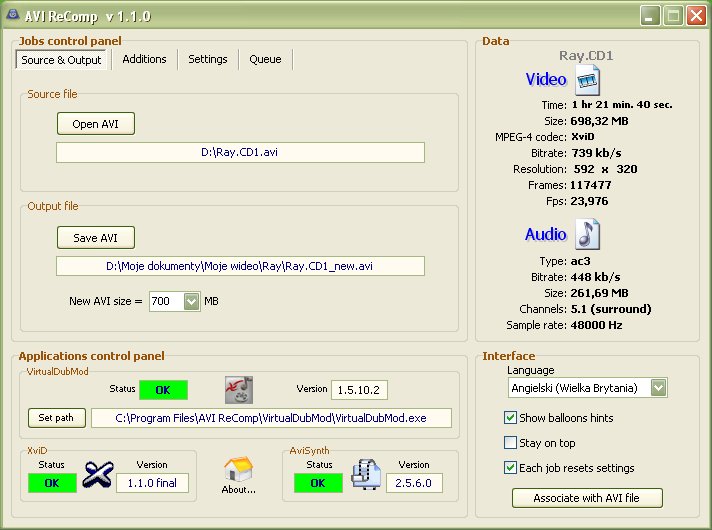
AVI ReComp allows you to recompress your AVI files. Uses only XviD codec to recompression process. AVI ReComp can be very useful for users who want to clear their AVIs out of GMC or Qpel functions to prepare the clips for standalone DVD players. The program contains a feature of embedding/hardcode subtitles into video.
Freeware
OS:
File size: 29MB
Old versions
Version history
OS:
File size: 29MB
Old versions
Version history
Screenshots
Latest version
Download
Download old versions

Software License
Supported operating systems
Version history / Release notes / Changelog / What's New
** 12.03.2014 - 1.5.6 **
[New]
- New option to add custom target file sizes.
[Changed]
- Slight UI changes and improvements.
- Updated some of the external libraries.
- Help file update.
[New]
- New option to add custom target file sizes.
[Changed]
- Slight UI changes and improvements.
- Updated some of the external libraries.
- Help file update.
View full changelog
All features
1. Recompressing (reencoding) AVI clips using Xvid codec.
* new AVI size
* new fourCC code
2. Adjusting all encoding parameters for best standalone DVD players compatibility.
* no QPEL
* no GMC
* max. cons. BVOPs = 1 (or B frames disabled)
* bitrate spikes control
3. Adding your own subtitles (they will be burnt in).
Supported subtitle formats:
* TMPlayer (.txt)
* MicroDVD (.txt / .sub)
* SubViewer2 (.sub)
* SubRip (.srt)
* Advanced SubStation Alpha (.ass)
* SubStation Alpha (.ssa)
4. Adjusting subtitle settings (works only for SSA and ASS subtitles!):
* position
* font
* size
* color
* outline
* shadow
* style (bold, italic, underline)
5. Creating custom subtitle presets (for SSA and ASS formats).
6. Adding own logo bitmaps (watermarks).
You can adjust the following settings for your logo:
* position
* start time
* duration
* fade in and fade out time
* alpha blending
7. Preview.
You can use this feature to preview your movie with all new settings.
8. Resizing.
You can change the resolution of your movie
* resizing preview
* 'keep aspect ratio' option
9. Cropping.
You can crop the source image
* cropping preview
* aspect ratio display
10. Audio conversion.
You can convert audio streams of your movie
* ac3 to mp3 and mp3 to mp3
* VBR, ABR, CBR modes available
* sampling rate conversion available
* volume level adjustment tool
11. Batch encoding.
You can enqueue all your jobs (move them up and down, delete and abort jobs).
12. Command line option for loading a file.
13. AVI file association.
It is possible to associate AVI ReComp with *.avi extension so that your files can be loaded using a right-click menu option.
14. Automatic version checking.
You can enable automatic update notifications or you can manually check for new releases.
15. Multilingual user interface.
Supported languages:
* Arabic
* British
* Bulgarian
* Czech
* Dutch
* French
* German
* Greek
* Hebrew
* Hungarian
* Italian
* Polish
* Portuguese
* Russian
* Serbian
* Slovenian
* Spanish
* Thai
* Turkish
16. Unicode support.
This means that all the languages will be supported independently on Windows language version.
17. Windows Vista compatibility.
From version 1.4.1 AVI ReComp supports Windows Vista.
* new AVI size
* new fourCC code
2. Adjusting all encoding parameters for best standalone DVD players compatibility.
* no QPEL
* no GMC
* max. cons. BVOPs = 1 (or B frames disabled)
* bitrate spikes control
3. Adding your own subtitles (they will be burnt in).
Supported subtitle formats:
* TMPlayer (.txt)
* MicroDVD (.txt / .sub)
* SubViewer2 (.sub)
* SubRip (.srt)
* Advanced SubStation Alpha (.ass)
* SubStation Alpha (.ssa)
4. Adjusting subtitle settings (works only for SSA and ASS subtitles!):
* position
* font
* size
* color
* outline
* shadow
* style (bold, italic, underline)
5. Creating custom subtitle presets (for SSA and ASS formats).
6. Adding own logo bitmaps (watermarks).
You can adjust the following settings for your logo:
* position
* start time
* duration
* fade in and fade out time
* alpha blending
7. Preview.
You can use this feature to preview your movie with all new settings.
8. Resizing.
You can change the resolution of your movie
* resizing preview
* 'keep aspect ratio' option
9. Cropping.
You can crop the source image
* cropping preview
* aspect ratio display
10. Audio conversion.
You can convert audio streams of your movie
* ac3 to mp3 and mp3 to mp3
* VBR, ABR, CBR modes available
* sampling rate conversion available
* volume level adjustment tool
11. Batch encoding.
You can enqueue all your jobs (move them up and down, delete and abort jobs).
12. Command line option for loading a file.
13. AVI file association.
It is possible to associate AVI ReComp with *.avi extension so that your files can be loaded using a right-click menu option.
14. Automatic version checking.
You can enable automatic update notifications or you can manually check for new releases.
15. Multilingual user interface.
Supported languages:
* Arabic
* British
* Bulgarian
* Czech
* Dutch
* French
* German
* Greek
* Hebrew
* Hungarian
* Italian
* Polish
* Portuguese
* Russian
* Serbian
* Slovenian
* Spanish
* Thai
* Turkish
16. Unicode support.
This means that all the languages will be supported independently on Windows language version.
17. Windows Vista compatibility.
From version 1.4.1 AVI ReComp supports Windows Vista.
Sections/Browse similar tools
Guides and How to's
AVI Recomp AVI to AVI XviD Re-Encoding Guide
- ReadAVI ReComp video tutorials
View all guides with guide description here
Tool features - Convert
Acronyms / Also Known As
Notify me when software updated or report software
| 18 reviews, Showing 1 to 5 reviews |
Rating by BOGA on
Oct 13, 2021 Version: windows
OS: Windows 10 64-bit Ease of use: 10/10
Functionality: 10/10
Value for money: 10/10
Overall: 10/10
I have been using Avi Recomp for years and version 1.5.5 from the day it cam out in a win xp desktop/laptop and a win 7 laptop..Your getting false positive readings from your antivirus it is a good clean program for what it does and always has been..I even downloaded it again after I read your comment and checked it again with Malwarebytes and UnThreat and it came out clean..I also checked it against the 1.5.5 executable installer I kept in storage form a year ago and its the exact same file and file size..In fact Its due for an update hopefully soon...:)
Review by RappinRod on
Jul 10, 2013 Version: 1.5.5
OS: WinXP Ease of use: 10/10
Functionality: 10/10
Value for money: 10/10
Overall: 10/10
Yeah, it's sure strange. I've never had any problems with this prog before, it's always been fantastic. I have now tried it twice on two different systems and it does the same thing on both. I do have almost the same applications set up on both machines, so maybe there is a conflict with something or is it to do with having Athlon processors?
Anyway, I am not too concerned as v1.50 does everything I need.
Anyway, I am not too concerned as v1.50 does everything I need.
Review by bolinboy on
Jul 13, 2010 Version: 1.50
OS: WinXP Ease of use: 10/10
Functionality: 10/10
Value for money: 10/10
Overall: 10/10
v1.51 running fine for me(also on XP). No problems with output size or system stability. I have in the past seen problems installing a new version of xvid overtop old version. Uninstalling old version first fixed it.
Review by KiwiKid on
Jul 13, 2010 Version: 1.51
OS: WinXP Ease of use: 9/10
Functionality: 10/10
Value for money: 10/10
Overall: 10/10
I haven't seen anybody else comment, but since upgrading to the latest version I have had nothing but problems. Encodes are massively undersized, bad quality and when the program is running my PC becomes unsatble due to very high processor demands.
I tried it on my older AthlonX2 system and it was even worse. Uninstalled and re-installed v1.5 and everything is sweet again.
I tried it on my older AthlonX2 system and it was even worse. Uninstalled and re-installed v1.5 and everything is sweet again.
Review by bolinboy on
Jul 12, 2010 Version: 1.51
OS: WinXP Ease of use: 9/10
Functionality: 10/10
Value for money: 4/10
Overall: 7/10
| 18 reviews, Showing 1 to 5 reviews |
| 1 tool hits, Showing 1 to 1 tools |
Explanation:
NEW SOFTWARE= New tool since your last visit
NEW VERSION= New version since your last visit
NEW REVIEW= New review since your last visit
NEW VERSION= New version
Latest version
Version number / Beta version number / Update version number and when it whas released.
Type and download
NO MORE UPDATES? = The software hasn't been updated in over 2 years.
NO LONGER DEVELOPED = The software hasn't been updated in over 5 years.
RECENTLY UPDATED = The software has been updated the last 31 days.
Freeware = Download Free software.
Freeware Trialware = Download Free software but some parts are trial/shareware.
Free software = Download Free software and also open source code also known as FOSS (Free and Open Source Software).
Free software Trialware = Download Free software and also open source code but some parts are trial/shareware.
Freeware Ads = Download Free software but supported by advertising, usually with a included browser toolbar. It may be disabled when installing or after installation.
Free software Ads = Free Download software and open source code but supported by advertising, usually with a included browser toolbar. It may be disabled when installing or after installation.
Trialware = Also called shareware or demo. Free Trial version available for download and testing with usually a time limit or limited functions.
Payware = No demo or trial available.
Portable version = A portable/standalone version is available. No installation is required.
v1.0.1 = Latest version available.
Download beta = It could be a Beta, RC(Release Candidate) or an Alpha / Nightly / Unstable version of the software.
Download 15MB = A direct link to the software download.
Win = Windows download version for 32-bit and 64-bit Windows.
Win64 = Windows 64-bit download version for 64-bit Windows.
WinARM64 = Windows 64-bit ARM download version for Windows ARM64/AArch64.
Mac = Mac download version for 64-bit Mac OS Intel/ARM64/AArch64.
MacARM64 = Mac Silicon download version for 64-bit Mac OS ARM64/AArch64.
Mac64 = Mac OS download version for 64-bit Intel Mac OS.
Linux = Linux download version.
Linux64 = Linux download version for 64bit Linux.
Linux ARM = Linux download version for Linux ARM64/AArch64.
Portable = Portable version. No installation is required.
Ad-Supported = The software is bundled with advertising. Be careful when you install the software and disable addons that you don't want!
Visit developers site = A link to the software developer site.
Download (mirror link) = A mirror link to the software download. It may not contain the latest versions.
Download old versions = Free downloads of previous versions of the program.
Download 64-bit version = If you have a 64bit operating system you can download this version.
Download portable version = Portable/Standalone version meaning that no installation is required, just extract the files to a folder and run directly.
Portable version available = Download the portable version and you can just extract the files and run the program without installation.
Old versions available = Download old versions of the program.
Version history available = Complete changelog on our site.
= Windows version available.
 = Mac OS version available.
 = Linux version available.
Our hosted software are virus and malware scanned with several antivirus programs using www.virustotal.com. (NOTE! Just one virustotal warning is 99.9% a false positive. And some software might receive 2-6 warnings but it's if they are not all same virus/trojan then it's 99% false positives.)
Rating
Rating from 0-10.
NEW SOFTWARE= New tool since your last visit
NEW VERSION= New version since your last visit
NEW REVIEW= New review since your last visit
NEW VERSION= New version
Latest version
Version number / Beta version number / Update version number and when it whas released.
Type and download
NO MORE UPDATES? = The software hasn't been updated in over 2 years.
NO LONGER DEVELOPED = The software hasn't been updated in over 5 years.
RECENTLY UPDATED = The software has been updated the last 31 days.
Freeware = Download Free software.
Freeware Trialware = Download Free software but some parts are trial/shareware.
Free software = Download Free software and also open source code also known as FOSS (Free and Open Source Software).
Free software Trialware = Download Free software and also open source code but some parts are trial/shareware.
Freeware Ads = Download Free software but supported by advertising, usually with a included browser toolbar. It may be disabled when installing or after installation.
Free software Ads = Free Download software and open source code but supported by advertising, usually with a included browser toolbar. It may be disabled when installing or after installation.
Trialware = Also called shareware or demo. Free Trial version available for download and testing with usually a time limit or limited functions.
Payware = No demo or trial available.
Portable version = A portable/standalone version is available. No installation is required.
v1.0.1 = Latest version available.
Download beta = It could be a Beta, RC(Release Candidate) or an Alpha / Nightly / Unstable version of the software.
Download 15MB = A direct link to the software download.
Win = Windows download version for 32-bit and 64-bit Windows.
Win64 = Windows 64-bit download version for 64-bit Windows.
WinARM64 = Windows 64-bit ARM download version for Windows ARM64/AArch64.
Mac = Mac download version for 64-bit Mac OS Intel/ARM64/AArch64.
MacARM64 = Mac Silicon download version for 64-bit Mac OS ARM64/AArch64.
Mac64 = Mac OS download version for 64-bit Intel Mac OS.
Linux = Linux download version.
Linux64 = Linux download version for 64bit Linux.
Linux ARM = Linux download version for Linux ARM64/AArch64.
Portable = Portable version. No installation is required.
Ad-Supported = The software is bundled with advertising. Be careful when you install the software and disable addons that you don't want!
Visit developers site = A link to the software developer site.
Download (mirror link) = A mirror link to the software download. It may not contain the latest versions.
Download old versions = Free downloads of previous versions of the program.
Download 64-bit version = If you have a 64bit operating system you can download this version.
Download portable version = Portable/Standalone version meaning that no installation is required, just extract the files to a folder and run directly.
Portable version available = Download the portable version and you can just extract the files and run the program without installation.
Old versions available = Download old versions of the program.
Version history available = Complete changelog on our site.
= Windows version available. = Mac OS version available. = Linux version available.Our hosted software are virus and malware scanned with several antivirus programs using www.virustotal.com. (NOTE! Just one virustotal warning is 99.9% a false positive. And some software might receive 2-6 warnings but it's if they are not all same virus/trojan then it's 99% false positives.)
Rating
Rating from 0-10.
Browse software by sections
All In One Blu-ray Converters (9)
All In One DVD Converters (12)
All In One MKV to MP4, Blu-ray, UHD (11)
All In One Video Converters (19)
Animation (3D, 2D Animation) (12)
Audio Editors (22)
Audio Encoders (80)
Audio Players (19)
Authoring (Blu-ray, UHD, AVCHD) (13)
Authoring (DivX) (4)
Authoring (DVD) (26)
Authoring (SVCD, VCD) (9)
Bitrate Calculators (7)
Blu-ray to AVI, MKV, MP4 (15)
Blu-ray to Blu-ray, AVCHD (10)
Burn (CD,DVD,Blu-ray) (24)
Camcorders, DV, HDV, AVCHD (31)
Capture TV, DVD, VCR (30)
CD, DVD, Blu-ray recovery (3)
Codec Packs (6)
All In One DVD Converters (12)
All In One MKV to MP4, Blu-ray, UHD (11)
All In One Video Converters (19)
Animation (3D, 2D Animation) (12)
Audio Editors (22)
Audio Encoders (80)
Audio Players (19)
Authoring (Blu-ray, UHD, AVCHD) (13)
Authoring (DivX) (4)
Authoring (DVD) (26)
Authoring (SVCD, VCD) (9)
Bitrate Calculators (7)
Blu-ray to AVI, MKV, MP4 (15)
Blu-ray to Blu-ray, AVCHD (10)
Burn (CD,DVD,Blu-ray) (24)
Camcorders, DV, HDV, AVCHD (31)
Capture TV, DVD, VCR (30)
CD, DVD, Blu-ray recovery (3)
Codec Packs (6)
Codec, Video Identifiers (31)
Codecs (67)
Decrypters (DVD Rippers) (16)
Decrypters (UHD, Blu-ray Rippers) (8)
DigitalTV, DVB, IPTV (39)
DVD to DVD (20)
DVD to MP4, MKV, H264, H265 (16)
DVD to VCD, SVCD (5)
DVD to XviD, AVI, DivX (16)
ISO, Image (15)
Linux Video Tools (213)
MacOS Video Tools (244)
Media (Blu-ray, DVD, CD) (9)
Media Center, HTPC (24)
Other Useful Tools (140)
Photo Blu-ray, DVD, SlideShow (8)
Portable (Mobile, PSP) (35)
Region Free Tools (5)
Screen capture , Screen recording (26)
Screenshots , Thumbnails (13)
Codecs (67)
Decrypters (DVD Rippers) (16)
Decrypters (UHD, Blu-ray Rippers) (8)
DigitalTV, DVB, IPTV (39)
DVD to DVD (20)
DVD to MP4, MKV, H264, H265 (16)
DVD to VCD, SVCD (5)
DVD to XviD, AVI, DivX (16)
ISO, Image (15)
Linux Video Tools (213)
MacOS Video Tools (244)
Media (Blu-ray, DVD, CD) (9)
Media Center, HTPC (24)
Other Useful Tools (140)
Photo Blu-ray, DVD, SlideShow (8)
Portable (Mobile, PSP) (35)
Region Free Tools (5)
Screen capture , Screen recording (26)
Screenshots , Thumbnails (13)
Subtitle Editors, Converters (72)
Tag Editors (4)
Video De, Multiplexers (66)
Video Editors (Advanced, NLE) (35)
Video Editors (Basic) (56)
Video Editors (H264, MP4, MKV, MTS) (19)
Video Editors (Lossless) (4)
Video Editors (MPG, DVD) (16)
Video Editors (WMV, AVI) (15)
Video Encoders (AV1, VP8, VP9) (2)
Video Encoders (AVI, WMV) (38)
Video Encoders (H264, H265, MP4, MKV) (45)
Video Encoders (MPG, DVD) (23)
Video Encoders , Converters (155)
Video Frameservers (9)
Video Players (48)
Video Repair, Fix (24)
Video Scripting (10)
Video Streaming (20)
Video Streaming Downloaders (100)
Tag Editors (4)
Video De, Multiplexers (66)
Video Editors (Advanced, NLE) (35)
Video Editors (Basic) (56)
Video Editors (H264, MP4, MKV, MTS) (19)
Video Editors (Lossless) (4)
Video Editors (MPG, DVD) (16)
Video Editors (WMV, AVI) (15)
Video Encoders (AV1, VP8, VP9) (2)
Video Encoders (AVI, WMV) (38)
Video Encoders (H264, H265, MP4, MKV) (45)
Video Encoders (MPG, DVD) (23)
Video Encoders , Converters (155)
Video Frameservers (9)
Video Players (48)
Video Repair, Fix (24)
Video Scripting (10)
Video Streaming (20)
Video Streaming Downloaders (100)