
Help us keep the list up to date and submit new video software here.
Tool
Description
Type
Rating
Reviews
Zrythm is a cross-platform digital audio workstation designed to be featureful and easy to use. Limitless automation. Automate almost anything with automation events using straight lines, ramps and curves, or with LFOs and envelopes.
Screenshots
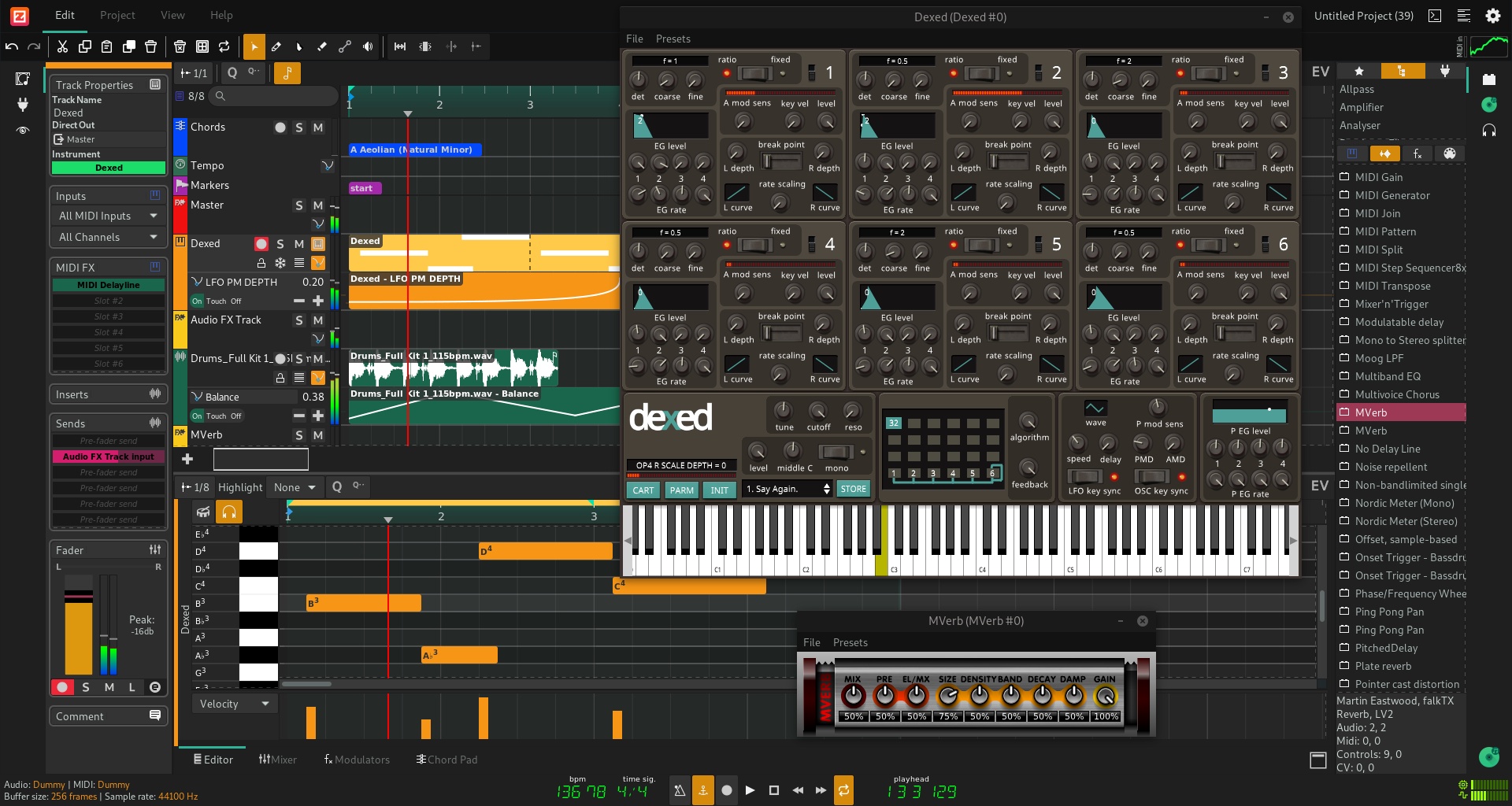
Latest version

Download
Download Zrythm 1.0.0 Windows 64-bit 150MB Win64

Download Zrythm 1.0.0 Mac 64-bit 150MB Mac64

Download Zrythm 1.0.0 Linux 64-bit 150MB Linux64

Download Beta and other versions
AppImageDownload Zrythm 2.0.0 Alpha 7 Windows 64-bit 150MB Win64
Download Zrythm 2.0.0 Alpha 7 Mac 150MB Mac
Download Zrythm 2.0.0 Alpha 7 Linux 150MB Linux
AppImageSoftware License
Supported operating systems
Mac OS Linux Version history / Release notes / Changelog / What's New
v2.0.0-alpha.7 Pre-release
@alex-tee alex-tee released this 2 hours ago
v2.0.0-alpha.7
1d50dc9
Added
Selected notes, audio and automation can be transformed from the
clip editors' Functions menu (#5328): MIDI notes get Crescendo,
Flam, Flip Horizontal/Vertical, Legato, Portato, Staccato and
Strum, audio clips get Invert Polarity, Reverse, Normalize Peak/RMS
and curved Fade In/Out, and automation points get Flip
Horizontal/Vertical and Flatten. Functions with parameters open a
dialog, remember their last-used values and apply as one undo step
Transform Stack panel in the audio editor: audio functions are
kept as ordered, non-destructive entries over a time range, with
controls to bypass, remove, reorder and bake them and with the
affected range highlighted in the clip
Color picker for tracks and clips, reachable from the track
inspector and a new Color… entry in the arranger context menu, with
swatches, a custom color and a reset to the track type's default
GNU/Linux AppImages for aarch64, built next to the x86_64 ones;
AppImage file names now include the CPU architecture
Changed
Project audio is stored in blocks, and identical audio is stored
once; recordings are written to disk as they arrive, and backups
and Save As copy only the audio the project references, including
audio recorded while the save runs
Projects saved by earlier alphas no longer load: the audio pool
uses the new block-based format instead of whole-file WAVs
The startup window opens the project selector immediately while
plugins scan in the background with a progress indicator; the
first-run configuration page and scanning screen are gone
Recent projects show relative save dates in a card with a clear
action and an empty state, the create page is a labeled form with
name, location and template, and a warning appears when no audio
device could be opened
Tracks get a type-derived default color when no color is set,
drawn as a thin strip in the tracklist and mixer, and the folder
expander now sits on the name row
All arranger objects take their colors from the clip's color:
notes, waveforms and automation curves use a deeper, more saturated
shade, scale, chord, tempo and time-signature objects use a tinted
background, markers are drawn as pennants, clips have one unbroken
border and muted clips turn gray
Settings are stored under new names, so the icon theme, recent
projects, plugin search paths and user path fall back to their
defaults once, and the welcome tour shows again once
Open Project… now selects .zpj files directly instead of asking
for a folder
Sliders follow the design system, Filters/Presets/Functions share
a labeled menu button, and dialogs opened inside the window center
on it
Fixed
An idle project no longer keeps a CPU core busy: JUCE events are
dispatched through Qt's event loop instead of a timer that fired
continuously
Systems without an audio input device now get output-only
playback instead of no audio at all, with a warning; opening a
project when no audio device is open shows an error instead of
crashing
Dragging a plugin onto a track while a background plugin scan
runs no longer crashes, and plugin rows stay in place during the
scan
The new-project location field ignored the folder chosen in the
dialog; the selection is now used and remembered as the default,
and a reset button restores the factory location
v2.0.0-alpha.6 Pre-release
@alex-tee alex-tee released this 3 hours ago
v2.0.0-alpha.6
c653abd
Added
File import (#5197, #5325): MIDI files import as tracks with one
clip per MIDI track on its own lane and into clip launcher
slots, undoable as a single step; audio and MIDI files can be
dropped onto the timeline at the snapped position (multi-file
drops stack clips in consecutive lanes, drops below the
tracklist create one track per file) or imported through an
"Import File…" picker in the File menu and the tracklist header
The playhead and its glow turn red while recording, and the
record button and a status bar indicator blink while recording
is active
A --verify-installation command line option that checks the
installation layout and exits
Changed
The mixer strip and track headers regroup their state controls
at a compact size: solo, mute, record and listen sit together,
the mono, phase and monitor controls appear only when one of
them is active, and automation lane controls follow the same
sizing
Recording (record buttons, playhead) and destructive or failure
states (delete rubber band, cut tool, meter over-levels) use
separate record and error colors that meet contrast requirements
in both themes
File dialogs are native on GNU/Linux through the XDG desktop
portal and support multiple selection
Fixed
Undo and redo leaving clips invisible when their lane was
trimmed away after becoming empty: lanes are restored at their
position, and lanes emptied by clip removals collapse back to a
single trailing empty lane (#5325)
LV2 plugins leaking resources they schedule for release through
the worker extension when destroyed
LV2 plugins failing to scan in packaged macOS and Windows builds
because the LV2 spec files were missing from the app bundle and
installer; startup now verifies the installation and reports
fatal errors in a dialog
Removed
The legacy sample processor (unused)
v2.0.0-alpha.5 Pre-release
@alex-tee alex-tee released this 2 hours ago
v2.0.0-alpha.5
e7e95eb
Added
Native LV2 plugin hosting replacing the JUCE wrapper: metadata-only
discovery via lilv that never loads plugin binaries during
scanning, host transport and MIDI delivered as atom sequences,
worker extension hosting, pset presets, default states and
patch:writable parameters exposed as automatable parameters, and
self-contained state blobs that embed files created through
state:makePath
Native LV2 plugin UIs (X11) hosted in real windows on GNU/Linux,
embedded under Wayland via XWayland, following the UI's own size
and resize requests
CLAP preset discovery and loading driven by each plugin's own
preset-discovery providers
Undoable clipboard operations (copy, cut, paste, duplicate) for
arranger objects, tracks and plugins (#5172): shortcuts, menu
items and Delete follow the focused view, pasted tracks keep
their folder nesting and output routing, editor arrangers paste
into the edited clip at the playhead, and payloads sync with the
OS clipboard so selections can be pasted across projects and
instances
Notification center replacing modal alerts (#5324): toasts that
coalesce repeated occurrences and can carry an action supplied by
the producer, a bell badging unacknowledged warnings and errors,
and a history popover with relative timestamps
Status bar showing the audio engine's sample rate, buffer size
and the project's track count
Undoable lane deletion from the lane context menu; laned tracks
keep a trailing empty lane for placing new clips (#5172)
Plugin browser favorites, persisted per plugin, with a favorites
filter and a plugin info dialog; browser rows show vendor
subtitles with show-in-file-manager and import actions
Third-party licenses page in the About dialog listing every
shipped component with its copyright and license texts
Menu items showing their shortcut right-aligned
Changed
The UI follows a new design system specification: dialogs render
as native windows with emphasized default buttons activated by
Return from anywhere, menus and combo popups share spacing and
typography rules with animated color transitions, selected
arranger objects draw a text-colored outline, and recording and
error states use distinct shades of red
The Greeter's recent projects list uses two-line rows with
show-in-file-manager and remove-from-list actions
Update translations (Swedish, Czech, Spanish, French, Russian,
Ukrainian and more)
Fixed
Parameter edits made in plugin UIs (VST3, CLAP) are
attributed as user edits: they mark the selected preset dirty and
coalesce into one undo step instead of flooding the undo history
VST3 parameters reported by the plugin during processing not
reaching the host parameter model, separate edit controllers not
being notified of applied values, and dual-component plugins
appearing twice in scans
Crashes in dlopened pango-based plugin UIs (e.g. avldrums) caused
by internally bundled harfbuzz/freetype copies shadowing the
system libraries
Scans of bundles containing no plugins (e.g. preset-only
bundles) timing out and blacklisting the scanned path
The Greeter re-showing the last alert when a project closes, and
its page stack growing on repeated load failures (#5324)
The audio engine accepting deactivation during an offline render,
leaving the render thread processing without a device callback
Periodic plugin parameter flushes slowing down over a session as
the undo history accumulated removed plugins
Removed
JUCE LV2 hosting and the vendored LV2 headers, replaced by the
native lilv-based hosting
v2.0.0-alpha.4 Pre-release
@alex-tee alex-tee released this 1 hour ago
v2.0.0-alpha.4
a0c094f
Added
Native LV2 plugin hosting replacing the JUCE wrapper: metadata-only
discovery via lilv that never loads plugin binaries during
scanning, host transport and MIDI delivered as atom sequences,
worker extension hosting, pset presets, default states and
patch:writable parameters exposed as automatable parameters, and
self-contained state blobs that embed files created through
state:makePath
Native LV2 plugin UIs (X11) hosted in real windows on GNU/Linux,
embedded under Wayland via XWayland, following the UI's own size
and resize requests
CLAP preset discovery and loading driven by each plugin's own
preset-discovery providers
Undoable clipboard operations (copy, cut, paste, duplicate) for
arranger objects, tracks and plugins (#5172): shortcuts, menu
items and Delete follow the focused view, pasted tracks keep
their folder nesting and outpu...
@alex-tee alex-tee released this 2 hours ago
v2.0.0-alpha.7
1d50dc9
Added
Selected notes, audio and automation can be transformed from the
clip editors' Functions menu (#5328): MIDI notes get Crescendo,
Flam, Flip Horizontal/Vertical, Legato, Portato, Staccato and
Strum, audio clips get Invert Polarity, Reverse, Normalize Peak/RMS
and curved Fade In/Out, and automation points get Flip
Horizontal/Vertical and Flatten. Functions with parameters open a
dialog, remember their last-used values and apply as one undo step
Transform Stack panel in the audio editor: audio functions are
kept as ordered, non-destructive entries over a time range, with
controls to bypass, remove, reorder and bake them and with the
affected range highlighted in the clip
Color picker for tracks and clips, reachable from the track
inspector and a new Color… entry in the arranger context menu, with
swatches, a custom color and a reset to the track type's default
GNU/Linux AppImages for aarch64, built next to the x86_64 ones;
AppImage file names now include the CPU architecture
Changed
Project audio is stored in blocks, and identical audio is stored
once; recordings are written to disk as they arrive, and backups
and Save As copy only the audio the project references, including
audio recorded while the save runs
Projects saved by earlier alphas no longer load: the audio pool
uses the new block-based format instead of whole-file WAVs
The startup window opens the project selector immediately while
plugins scan in the background with a progress indicator; the
first-run configuration page and scanning screen are gone
Recent projects show relative save dates in a card with a clear
action and an empty state, the create page is a labeled form with
name, location and template, and a warning appears when no audio
device could be opened
Tracks get a type-derived default color when no color is set,
drawn as a thin strip in the tracklist and mixer, and the folder
expander now sits on the name row
All arranger objects take their colors from the clip's color:
notes, waveforms and automation curves use a deeper, more saturated
shade, scale, chord, tempo and time-signature objects use a tinted
background, markers are drawn as pennants, clips have one unbroken
border and muted clips turn gray
Settings are stored under new names, so the icon theme, recent
projects, plugin search paths and user path fall back to their
defaults once, and the welcome tour shows again once
Open Project… now selects .zpj files directly instead of asking
for a folder
Sliders follow the design system, Filters/Presets/Functions share
a labeled menu button, and dialogs opened inside the window center
on it
Fixed
An idle project no longer keeps a CPU core busy: JUCE events are
dispatched through Qt's event loop instead of a timer that fired
continuously
Systems without an audio input device now get output-only
playback instead of no audio at all, with a warning; opening a
project when no audio device is open shows an error instead of
crashing
Dragging a plugin onto a track while a background plugin scan
runs no longer crashes, and plugin rows stay in place during the
scan
The new-project location field ignored the folder chosen in the
dialog; the selection is now used and remembered as the default,
and a reset button restores the factory location
v2.0.0-alpha.6 Pre-release
@alex-tee alex-tee released this 3 hours ago
v2.0.0-alpha.6
c653abd
Added
File import (#5197, #5325): MIDI files import as tracks with one
clip per MIDI track on its own lane and into clip launcher
slots, undoable as a single step; audio and MIDI files can be
dropped onto the timeline at the snapped position (multi-file
drops stack clips in consecutive lanes, drops below the
tracklist create one track per file) or imported through an
"Import File…" picker in the File menu and the tracklist header
The playhead and its glow turn red while recording, and the
record button and a status bar indicator blink while recording
is active
A --verify-installation command line option that checks the
installation layout and exits
Changed
The mixer strip and track headers regroup their state controls
at a compact size: solo, mute, record and listen sit together,
the mono, phase and monitor controls appear only when one of
them is active, and automation lane controls follow the same
sizing
Recording (record buttons, playhead) and destructive or failure
states (delete rubber band, cut tool, meter over-levels) use
separate record and error colors that meet contrast requirements
in both themes
File dialogs are native on GNU/Linux through the XDG desktop
portal and support multiple selection
Fixed
Undo and redo leaving clips invisible when their lane was
trimmed away after becoming empty: lanes are restored at their
position, and lanes emptied by clip removals collapse back to a
single trailing empty lane (#5325)
LV2 plugins leaking resources they schedule for release through
the worker extension when destroyed
LV2 plugins failing to scan in packaged macOS and Windows builds
because the LV2 spec files were missing from the app bundle and
installer; startup now verifies the installation and reports
fatal errors in a dialog
Removed
The legacy sample processor (unused)
v2.0.0-alpha.5 Pre-release
@alex-tee alex-tee released this 2 hours ago
v2.0.0-alpha.5
e7e95eb
Added
Native LV2 plugin hosting replacing the JUCE wrapper: metadata-only
discovery via lilv that never loads plugin binaries during
scanning, host transport and MIDI delivered as atom sequences,
worker extension hosting, pset presets, default states and
patch:writable parameters exposed as automatable parameters, and
self-contained state blobs that embed files created through
state:makePath
Native LV2 plugin UIs (X11) hosted in real windows on GNU/Linux,
embedded under Wayland via XWayland, following the UI's own size
and resize requests
CLAP preset discovery and loading driven by each plugin's own
preset-discovery providers
Undoable clipboard operations (copy, cut, paste, duplicate) for
arranger objects, tracks and plugins (#5172): shortcuts, menu
items and Delete follow the focused view, pasted tracks keep
their folder nesting and output routing, editor arrangers paste
into the edited clip at the playhead, and payloads sync with the
OS clipboard so selections can be pasted across projects and
instances
Notification center replacing modal alerts (#5324): toasts that
coalesce repeated occurrences and can carry an action supplied by
the producer, a bell badging unacknowledged warnings and errors,
and a history popover with relative timestamps
Status bar showing the audio engine's sample rate, buffer size
and the project's track count
Undoable lane deletion from the lane context menu; laned tracks
keep a trailing empty lane for placing new clips (#5172)
Plugin browser favorites, persisted per plugin, with a favorites
filter and a plugin info dialog; browser rows show vendor
subtitles with show-in-file-manager and import actions
Third-party licenses page in the About dialog listing every
shipped component with its copyright and license texts
Menu items showing their shortcut right-aligned
Changed
The UI follows a new design system specification: dialogs render
as native windows with emphasized default buttons activated by
Return from anywhere, menus and combo popups share spacing and
typography rules with animated color transitions, selected
arranger objects draw a text-colored outline, and recording and
error states use distinct shades of red
The Greeter's recent projects list uses two-line rows with
show-in-file-manager and remove-from-list actions
Update translations (Swedish, Czech, Spanish, French, Russian,
Ukrainian and more)
Fixed
Parameter edits made in plugin UIs (VST3, CLAP) are
attributed as user edits: they mark the selected preset dirty and
coalesce into one undo step instead of flooding the undo history
VST3 parameters reported by the plugin during processing not
reaching the host parameter model, separate edit controllers not
being notified of applied values, and dual-component plugins
appearing twice in scans
Crashes in dlopened pango-based plugin UIs (e.g. avldrums) caused
by internally bundled harfbuzz/freetype copies shadowing the
system libraries
Scans of bundles containing no plugins (e.g. preset-only
bundles) timing out and blacklisting the scanned path
The Greeter re-showing the last alert when a project closes, and
its page stack growing on repeated load failures (#5324)
The audio engine accepting deactivation during an offline render,
leaving the render thread processing without a device callback
Periodic plugin parameter flushes slowing down over a session as
the undo history accumulated removed plugins
Removed
JUCE LV2 hosting and the vendored LV2 headers, replaced by the
native lilv-based hosting
v2.0.0-alpha.4 Pre-release
@alex-tee alex-tee released this 1 hour ago
v2.0.0-alpha.4
a0c094f
Added
Native LV2 plugin hosting replacing the JUCE wrapper: metadata-only
discovery via lilv that never loads plugin binaries during
scanning, host transport and MIDI delivered as atom sequences,
worker extension hosting, pset presets, default states and
patch:writable parameters exposed as automatable parameters, and
self-contained state blobs that embed files created through
state:makePath
Native LV2 plugin UIs (X11) hosted in real windows on GNU/Linux,
embedded under Wayland via XWayland, following the UI's own size
and resize requests
CLAP preset discovery and loading driven by each plugin's own
preset-discovery providers
Undoable clipboard operations (copy, cut, paste, duplicate) for
arranger objects, tracks and plugins (#5172): shortcuts, menu
items and Delete follow the focused view, pasted tracks keep
their folder nesting and outpu...
View full changelog
All features
Audio plugins
Complete support for LV2 and VST2, with experimental support for VST3, AU, SFZ and SF2.
Multi-backend support
Fully JACK aware, including support for JACK transport, ALSA, WASAPI, Windows MME, CoreMidi and CoreAudio.
Chord assistance
Featuring a chord pad for quickly trying out chords in a scale and a chord track to help with chord progressions.
Liberating
Zrythm is free software. Use, study, share and improve it freely.
Multilingual
Available in multiple languages including English, French, Galician, Portuguese, Japanese and German.
Complete support for LV2 and VST2, with experimental support for VST3, AU, SFZ and SF2.
Multi-backend support
Fully JACK aware, including support for JACK transport, ALSA, WASAPI, Windows MME, CoreMidi and CoreAudio.
Chord assistance
Featuring a chord pad for quickly trying out chords in a scale and a chord track to help with chord progressions.
Liberating
Zrythm is free software. Use, study, share and improve it freely.
Multilingual
Available in multiple languages including English, French, Galician, Portuguese, Japanese and German.
Sections/Browse similar tools
Guides and How to's
Notify me when software updated or report software
| 0 reviews, Showing 0 to 0 reviews |
| 0 reviews, Showing 0 to 0 reviews |
| 1 tool hits, Showing 1 to 1 tools |
Explanation:
NEW SOFTWARE= New tool since your last visit
NEW VERSION= New version since your last visit
NEW REVIEW= New review since your last visit
NEW VERSION= New version
Latest version
Version number / Beta version number / Update version number and when it whas released.
Type and download
NO MORE UPDATES? = The software hasn't been updated in over 2 years.
NO LONGER DEVELOPED = The software hasn't been updated in over 5 years.
RECENTLY UPDATED = The software has been updated the last 31 days.
Freeware = Download Free software.
Freeware Trialware = Download Free software but some parts are trial/shareware.
Free software = Download Free software and also open source code also known as FOSS (Free and Open Source Software).
Free software Trialware = Download Free software and also open source code but some parts are trial/shareware.
Freeware Ads = Download Free software but supported by advertising, usually with a included browser toolbar. It may be disabled when installing or after installation.
Free software Ads = Free Download software and open source code but supported by advertising, usually with a included browser toolbar. It may be disabled when installing or after installation.
Trialware = Also called shareware or demo. Free Trial version available for download and testing with usually a time limit or limited functions.
Payware = No demo or trial available.
Portable version = A portable/standalone version is available. No installation is required.
v1.0.1 = Latest version available.
Download beta = It could be a Beta, RC(Release Candidate) or an Alpha / Nightly / Unstable version of the software.
Download 15MB = A direct link to the software download.
Win = Windows download version for 32-bit and 64-bit Windows.
Win64 = Windows 64-bit download version for 64-bit Windows.
WinARM64 = Windows 64-bit ARM download version for Windows ARM64/AArch64.
Mac = Mac download version for 64-bit Mac OS Intel/ARM64/AArch64.
MacARM64 = Mac Silicon download version for 64-bit Mac OS ARM64/AArch64.
Mac64 = Mac OS download version for 64-bit Intel Mac OS.
Linux = Linux download version.
Linux64 = Linux download version for 64bit Linux.
Linux ARM = Linux download version for Linux ARM64/AArch64.
Portable = Portable version. No installation is required.
Ad-Supported = The software is bundled with advertising. Be careful when you install the software and disable addons that you don't want!
Visit developers site = A link to the software developer site.
Download (mirror link) = A mirror link to the software download. It may not contain the latest versions.
Download old versions = Free downloads of previous versions of the program.
Download 64-bit version = If you have a 64bit operating system you can download this version.
Download portable version = Portable/Standalone version meaning that no installation is required, just extract the files to a folder and run directly.
Portable version available = Download the portable version and you can just extract the files and run the program without installation.
Old versions available = Download old versions of the program.
Version history available = Complete changelog on our site.
= Windows version available.
= Mac OS version available.
= Linux version available.
Our hosted software are virus and malware scanned with several antivirus programs using www.virustotal.com. (NOTE! Just one virustotal warning is 99.9% a false positive. And some software might receive 2-6 warnings but it's if they are not all same virus/trojan then it's 99% false positives.)
Rating
Rating from 0-10.
NEW SOFTWARE= New tool since your last visit
NEW VERSION= New version since your last visit
NEW REVIEW= New review since your last visit
NEW VERSION= New version
Latest version
Version number / Beta version number / Update version number and when it whas released.
Type and download
NO MORE UPDATES? = The software hasn't been updated in over 2 years.
NO LONGER DEVELOPED = The software hasn't been updated in over 5 years.
RECENTLY UPDATED = The software has been updated the last 31 days.
Freeware = Download Free software.
Freeware Trialware = Download Free software but some parts are trial/shareware.
Free software = Download Free software and also open source code also known as FOSS (Free and Open Source Software).
Free software Trialware = Download Free software and also open source code but some parts are trial/shareware.
Freeware Ads = Download Free software but supported by advertising, usually with a included browser toolbar. It may be disabled when installing or after installation.
Free software Ads = Free Download software and open source code but supported by advertising, usually with a included browser toolbar. It may be disabled when installing or after installation.
Trialware = Also called shareware or demo. Free Trial version available for download and testing with usually a time limit or limited functions.
Payware = No demo or trial available.
Portable version = A portable/standalone version is available. No installation is required.
v1.0.1 = Latest version available.
Download beta = It could be a Beta, RC(Release Candidate) or an Alpha / Nightly / Unstable version of the software.
Download 15MB = A direct link to the software download.
Win = Windows download version for 32-bit and 64-bit Windows.
Win64 = Windows 64-bit download version for 64-bit Windows.
WinARM64 = Windows 64-bit ARM download version for Windows ARM64/AArch64.
Mac = Mac download version for 64-bit Mac OS Intel/ARM64/AArch64.
MacARM64 = Mac Silicon download version for 64-bit Mac OS ARM64/AArch64.
Mac64 = Mac OS download version for 64-bit Intel Mac OS.
Linux = Linux download version.
Linux64 = Linux download version for 64bit Linux.
Linux ARM = Linux download version for Linux ARM64/AArch64.
Portable = Portable version. No installation is required.
Ad-Supported = The software is bundled with advertising. Be careful when you install the software and disable addons that you don't want!
Visit developers site = A link to the software developer site.
Download (mirror link) = A mirror link to the software download. It may not contain the latest versions.
Download old versions = Free downloads of previous versions of the program.
Download 64-bit version = If you have a 64bit operating system you can download this version.
Download portable version = Portable/Standalone version meaning that no installation is required, just extract the files to a folder and run directly.
Portable version available = Download the portable version and you can just extract the files and run the program without installation.
Old versions available = Download old versions of the program.
Version history available = Complete changelog on our site.
= Windows version available. = Mac OS version available. = Linux version available.Our hosted software are virus and malware scanned with several antivirus programs using www.virustotal.com. (NOTE! Just one virustotal warning is 99.9% a false positive. And some software might receive 2-6 warnings but it's if they are not all same virus/trojan then it's 99% false positives.)
Rating
Rating from 0-10.
Browse software by sections
All In One Blu-ray Converters (9)
All In One DVD Converters (12)
All In One MKV to MP4, Blu-ray, UHD (11)
All In One Video Converters (19)
Animation (3D, 2D Animation) (13)
Audio Editors (23)
Audio Encoders (80)
Audio Players (19)
Authoring (Blu-ray, UHD, AVCHD) (13)
Authoring (DivX) (4)
Authoring (DVD) (26)
Authoring (SVCD, VCD) (9)
Bitrate Calculators (7)
Blu-ray to AVI, MKV, MP4 (15)
Blu-ray to Blu-ray, AVCHD (10)
Burn (CD,DVD,Blu-ray) (24)
Camcorders, DV, HDV, AVCHD (31)
Capture TV, DVD, VCR (30)
CD, DVD, Blu-ray recovery (3)
Codec Packs (6)
All In One DVD Converters (12)
All In One MKV to MP4, Blu-ray, UHD (11)
All In One Video Converters (19)
Animation (3D, 2D Animation) (13)
Audio Editors (23)
Audio Encoders (80)
Audio Players (19)
Authoring (Blu-ray, UHD, AVCHD) (13)
Authoring (DivX) (4)
Authoring (DVD) (26)
Authoring (SVCD, VCD) (9)
Bitrate Calculators (7)
Blu-ray to AVI, MKV, MP4 (15)
Blu-ray to Blu-ray, AVCHD (10)
Burn (CD,DVD,Blu-ray) (24)
Camcorders, DV, HDV, AVCHD (31)
Capture TV, DVD, VCR (30)
CD, DVD, Blu-ray recovery (3)
Codec Packs (6)
Codec, Video Identifiers (31)
Codecs (67)
Decrypters (DVD Rippers) (16)
Decrypters (UHD, Blu-ray Rippers) (8)
DigitalTV, DVB, IPTV (40)
DVD to DVD (20)
DVD to MP4, MKV, H264, H265 (16)
DVD to VCD, SVCD (5)
DVD to XviD, AVI, DivX (16)
ISO, Image (14)
Linux Video Tools (220)
MacOS Video Tools (252)
Media (Blu-ray, DVD, CD) (9)
Media Center, HTPC (25)
Other Useful Tools (136)
Photo Blu-ray, DVD, SlideShow (8)
Portable (Mobile, PSP) (35)
Region Free Tools (5)
Screen capture , Screen recording (25)
Screenshots , Thumbnails (13)
Codecs (67)
Decrypters (DVD Rippers) (16)
Decrypters (UHD, Blu-ray Rippers) (8)
DigitalTV, DVB, IPTV (40)
DVD to DVD (20)
DVD to MP4, MKV, H264, H265 (16)
DVD to VCD, SVCD (5)
DVD to XviD, AVI, DivX (16)
ISO, Image (14)
Linux Video Tools (220)
MacOS Video Tools (252)
Media (Blu-ray, DVD, CD) (9)
Media Center, HTPC (25)
Other Useful Tools (136)
Photo Blu-ray, DVD, SlideShow (8)
Portable (Mobile, PSP) (35)
Region Free Tools (5)
Screen capture , Screen recording (25)
Screenshots , Thumbnails (13)
Subtitle Editors, Converters (72)
Tag Editors (4)
Video Compare Software (6)
Video Demultiplexers, Multiplexers (66)
Video Editors (Advanced, NLE) (37)
Video Editors (Basic) (58)
Video Editors (H264, MP4, MKV, MTS) (21)
Video Editors (Lossless) (7)
Video Editors (MPG, DVD) (16)
Video Editors (WMV, AVI) (15)
Video Encoders (AV1, VP8, VP9) (2)
Video Encoders (AVI, WMV) (38)
Video Encoders (H264, H265, MP4, MKV) (45)
Video Encoders (MPG, DVD) (23)
Video Encoders , Converters (156)
Video Frameservers (9)
Video Players (48)
Video Repair, Fix (24)
Video Scripting (10)
Video Streaming (20)
Tag Editors (4)
Video Compare Software (6)
Video Demultiplexers, Multiplexers (66)
Video Editors (Advanced, NLE) (37)
Video Editors (Basic) (58)
Video Editors (H264, MP4, MKV, MTS) (21)
Video Editors (Lossless) (7)
Video Editors (MPG, DVD) (16)
Video Editors (WMV, AVI) (15)
Video Encoders (AV1, VP8, VP9) (2)
Video Encoders (AVI, WMV) (38)
Video Encoders (H264, H265, MP4, MKV) (45)
Video Encoders (MPG, DVD) (23)
Video Encoders , Converters (156)
Video Frameservers (9)
Video Players (48)
Video Repair, Fix (24)
Video Scripting (10)
Video Streaming (20)