
Help us keep the list up to date and submit new video software here.
Tool
Description
Type
Rating
Reviews
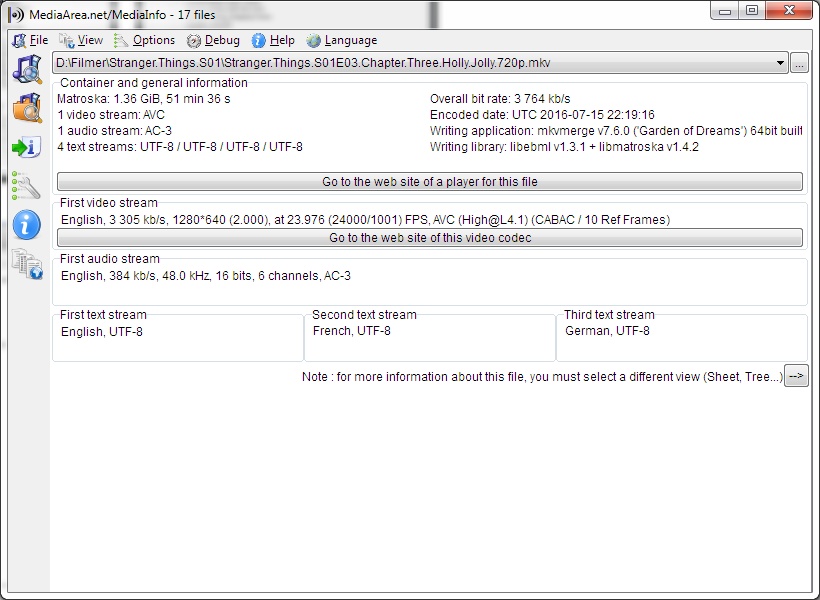
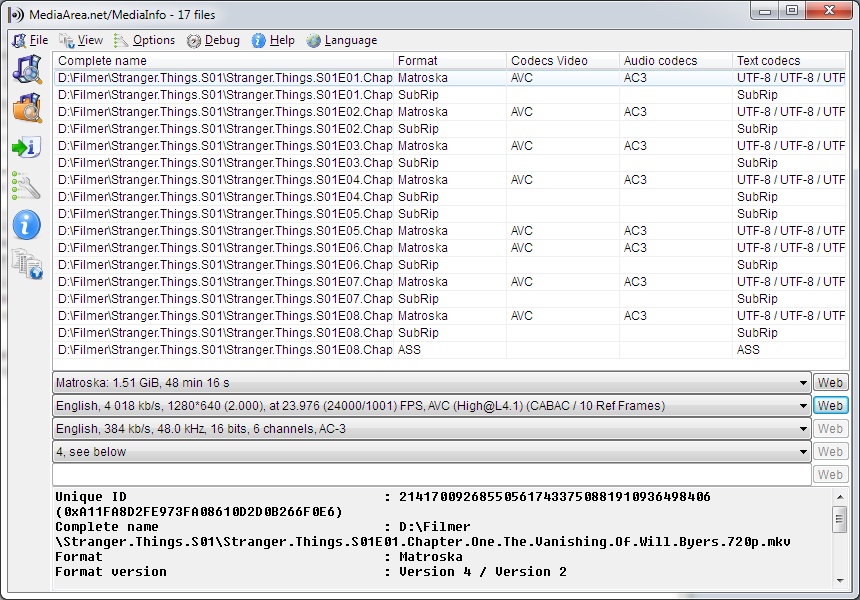
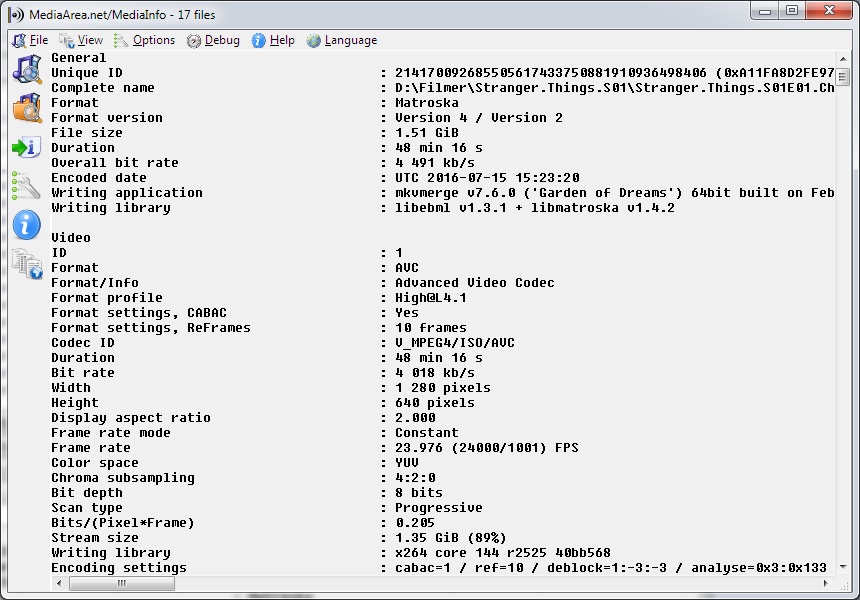
MediaInfo is a convenient unified display of the most relevant technical and tag data for video and audio files. The MediaInfo data display includes: Container: format, profile, commercial name of the format, duration, overall bit rate. Video: format, codec , aspect, frame rate. Audio: format, codec id, sample rate, channels. Text: format, codec id, language of subtitle Chapters: count of chapters, list of chapters.
Free software
OS:


File size: 15MB
Portable version
Old versions
Version history
Alternative software
OS:
File size: 15MB
Portable version
Old versions
Version history
Alternative software
Screenshots


Latest version
Download
Download MediaInfo 26.01 Windows 15MB Win
Download MediaInfo 26.01 Mac 64-bit 11MB Mac64
Download MediaInfo 26.01 Linux Linux
Download Portable and other versions
Portable 
Download MediaInfo Lite 26.01 Win, a very basic version of MediaInfo.
Download old versions

Software License
Supported operating systems
Mac OS Linux Version history / Release notes / Changelog / What's New
Version 26.01, 2026-02-02
-------------
+ Android: dark mode rework, thanks to cjee21
+ Android: modernize the backend, thanks to cjee21
+ More coherency/integrity checks, sponsored by Austrian Mediathek
+ MXF: fix crash with some 0 byte audio packets
+ MPEG-4: C2PA support
+ ID3v2: support of Olympus voice recorder metadata
+ Matroska: show block addition tracks
+ Matroska: add timecode label readout
+ Add default language string for ISO 639-2 special codes, thanks to cjee21
+ AVI/WAV: add support for WAVE_FORMAT_MPEG_HEAAC (0x1610)
+ AV1: Enable parsing raw OBU from network, thanks to cjee21
+ AV1: Indicate usage of Film Grain Synthesis, thanks to cjee21
+ Matroska/TimeCodeXML: add frame rate
x Matroska: fix incoherent readout of unordered tag elements
x TimeCodeXml output: fix lack of frame number with some MXF SDTI timecodes
x AVI/WAV: fix crash with some invalid FourCC
x SDP: fix false-positive detection
x I2469, CDP: fix handling of 708 streams caught in the middle
-------------
+ Android: dark mode rework, thanks to cjee21
+ Android: modernize the backend, thanks to cjee21
+ More coherency/integrity checks, sponsored by Austrian Mediathek
+ MXF: fix crash with some 0 byte audio packets
+ MPEG-4: C2PA support
+ ID3v2: support of Olympus voice recorder metadata
+ Matroska: show block addition tracks
+ Matroska: add timecode label readout
+ Add default language string for ISO 639-2 special codes, thanks to cjee21
+ AVI/WAV: add support for WAVE_FORMAT_MPEG_HEAAC (0x1610)
+ AV1: Enable parsing raw OBU from network, thanks to cjee21
+ AV1: Indicate usage of Film Grain Synthesis, thanks to cjee21
+ Matroska/TimeCodeXML: add frame rate
x Matroska: fix incoherent readout of unordered tag elements
x TimeCodeXml output: fix lack of frame number with some MXF SDTI timecodes
x AVI/WAV: fix crash with some invalid FourCC
x SDP: fix false-positive detection
x I2469, CDP: fix handling of 708 streams caught in the middle
View full changelog
All features
The MediaInfo data display includes:
Container: format, profile, commercial name of the format, duration, overall bit rate, writing application and library, title, author, director, album, track number, date, duration...
Video: format, codec id, aspect, frame rate, bit rate, color space, chroma subsampling, bit depth, scan type, scan order...
Audio: format, codec id, sample rate, channels, bit depth, language, bit rate...
Text: format, codec id, language of subtitle...
Chapters: count of chapters, list of chapters...
MediaInfo analyticals include:
Container: MPEG-4, QuickTime, Matroska, AVI, MPEG-PS (including unprotected DVD), MPEG-TS (including unprotected Blu-ray), MXF, GXF, LXF, WMV, FLV, Real...
Tags: Id3v1, Id3v2, Vorbis comments, APE tags...
Video: MPEG-1/2 Video, H.263, MPEG-4 Visual (including DivX, XviD), H.264/AVC, H.265/HEVC, FFV1...
Audio: MPEG Audio (including MP3), AC3, DTS, AAC, Dolby E, AES3, FLAC...
Subtitles: CEA-608, CEA-708, DTVCC, SCTE-20, SCTE-128, ATSC/53, CDP, DVB Subtitle, Teletext, SRT, SSA, ASS, SAMI...
MediaInfo features include:
Read many video and audio file formats
View information in different formats (text, sheet, tree, HTML...)
Customise these viewing formats
Export information as text, CSV, HTML...
Graphical user interface, command line interface, or library (.dll/.so/.dylib) versions available
Integrate with the shell (drag 'n' drop, and Context menu)
Internationalisation: display any language on any operating system
Localisation capability (for which volunteers are needed - please contact me!)
Container: format, profile, commercial name of the format, duration, overall bit rate, writing application and library, title, author, director, album, track number, date, duration...
Video: format, codec id, aspect, frame rate, bit rate, color space, chroma subsampling, bit depth, scan type, scan order...
Audio: format, codec id, sample rate, channels, bit depth, language, bit rate...
Text: format, codec id, language of subtitle...
Chapters: count of chapters, list of chapters...
MediaInfo analyticals include:
Container: MPEG-4, QuickTime, Matroska, AVI, MPEG-PS (including unprotected DVD), MPEG-TS (including unprotected Blu-ray), MXF, GXF, LXF, WMV, FLV, Real...
Tags: Id3v1, Id3v2, Vorbis comments, APE tags...
Video: MPEG-1/2 Video, H.263, MPEG-4 Visual (including DivX, XviD), H.264/AVC, H.265/HEVC, FFV1...
Audio: MPEG Audio (including MP3), AC3, DTS, AAC, Dolby E, AES3, FLAC...
Subtitles: CEA-608, CEA-708, DTVCC, SCTE-20, SCTE-128, ATSC/53, CDP, DVB Subtitle, Teletext, SRT, SSA, ASS, SAMI...
MediaInfo features include:
Read many video and audio file formats
View information in different formats (text, sheet, tree, HTML...)
Customise these viewing formats
Export information as text, CSV, HTML...
Graphical user interface, command line interface, or library (.dll/.so/.dylib) versions available
Integrate with the shell (drag 'n' drop, and Context menu)
Internationalisation: display any language on any operating system
Localisation capability (for which volunteers are needed - please contact me!)
Sections/Browse similar tools
Alternative to MediaInfo
(Latest version updated)AVI2Clipboard (Jun 11, 2006)
GSpot (Feb 23, 2007)
MediaInfoXP (Aug 17, 2024)
VideoInspector (Mar 4, 2022)
Guides and How to's
Video batch files to annoy you
- ReadMediaInfo video tutorials
View all guides with guide description here
Acronyms / Also Known As
Download MediaInfo Portable download from the Download links under Download and Download other versions!
Notify me when software updated or report software
| 66 reviews, Showing 1 to 5 reviews |
26.01... Unsure but under explorer or xplorer if I try and right click a media file or any file and select OPEN WITH it locks my explorer or xplorer... I've gone back to 25.10 for now and don't see this issue... sent message on developer site...
Otherwise have never had issues and it's been a great package otherwise and I won't stop using it because of this...
Otherwise have never had issues and it's been a great package otherwise and I won't stop using it because of this...
Review by zomorf on
Feb 14, 2026 Version: 26.01
OS: Windows 10 64-bit Ease of use: 10/10
Functionality: 10/10
Value for money: 10/10
Overall: 10/10
I think it is time we stop giving Jérôme Martinez a free pass under the "it’s free software" mantle. We need to talk about the elephant in the room: the fact that basic UI features—like a resizable window that remembers its position—have been requested since 2007 and remain ignored.
In any other project, a 20-year delay for a standard Windows feature would be a joke. Here, it’s a deliberate strategy. Every time a user brings this up, the response is a scripted: "It’s not a priority; if you want it, pay for it or wait in line." Let’s be real: a 20-year-old line isn't a queue; it’s a middle finger.
The "Submit a Patch" Fallacy The common defense is: "It's open source, fix it yourself and submit a PR." This is a disingenuous argument when dealing with a functional monopoly. MediaInfo is the de facto industry standard. Martinez knows that the power lies in the library, and by keeping the GUI intentionally crippled and archaic, he is effectively holding the user experience hostage.
Market Filter or Extortion? There is a thin line between prioritizing paid features and using a monopoly to extort users. When you refuse to implement basic OS standards that have been universal for decades—unless someone writes a check—you aren't "managing a project"; you are degrading the software on purpose to force a payout.
It is a cynical business model:
Become the indispensable standard.
Refuse to fix basic, low-effort usability issues.
Use the resulting frustration as a sales tool for "custom development."
We should stop calling this "the reality of FOSS development" and start calling it what it is: an abuse of position. If the developer cares so little about the thousands of users who made his tool a standard, perhaps it's time the community starts looking seriously at forks or alternatives that don't treat basic usability as a premium ransom.
In any other project, a 20-year delay for a standard Windows feature would be a joke. Here, it’s a deliberate strategy. Every time a user brings this up, the response is a scripted: "It’s not a priority; if you want it, pay for it or wait in line." Let’s be real: a 20-year-old line isn't a queue; it’s a middle finger.
The "Submit a Patch" Fallacy The common defense is: "It's open source, fix it yourself and submit a PR." This is a disingenuous argument when dealing with a functional monopoly. MediaInfo is the de facto industry standard. Martinez knows that the power lies in the library, and by keeping the GUI intentionally crippled and archaic, he is effectively holding the user experience hostage.
Market Filter or Extortion? There is a thin line between prioritizing paid features and using a monopoly to extort users. When you refuse to implement basic OS standards that have been universal for decades—unless someone writes a check—you aren't "managing a project"; you are degrading the software on purpose to force a payout.
It is a cynical business model:
Become the indispensable standard.
Refuse to fix basic, low-effort usability issues.
Use the resulting frustration as a sales tool for "custom development."
We should stop calling this "the reality of FOSS development" and start calling it what it is: an abuse of position. If the developer cares so little about the thousands of users who made his tool a standard, perhaps it's time the community starts looking seriously at forks or alternatives that don't treat basic usability as a premium ransom.
Review by WaRBoK on
Jan 22, 2026 Version: 25.10
OS: Windows 10 64-bit Ease of use: 1/10
Functionality: 8/10
Value for money: 5/10
Overall: 7/10
An essential part of my multimedia toolkit for many years.
Yes, the GUI could be prettier and more friendly, but it delivers all the info I need at glance.
Yes, the GUI could be prettier and more friendly, but it delivers all the info I need at glance.
Review by AlanC on
Feb 23, 2025 Version: 24.12
OS: Windows 11 64-bit Ease of use: 10/10
Functionality: 10/10
Value for money: 10/10
Overall: 10/10
Rating by HemLok on
Oct 6, 2022 Version: 22.09
OS: Windows 10 64-bit Ease of use: 10/10
Functionality: 8/10
Value for money: 10/10
Overall: 8/10
The tool is very helpful to find out parameters of unknown media.
In the same time it's the most uncomfortable and unhandy interface I've ever seen!
I would spend some money for a proper redesign.
In the same time it's the most uncomfortable and unhandy interface I've ever seen!
I would spend some money for a proper redesign.
Review by marvin42 on
Jun 24, 2022 Version: all
OS: Windows 10 Ease of use: 3/10
Functionality: 10/10
Value for money: 10/10
Overall: 6/10
| 66 reviews, Showing 1 to 5 reviews |
| 1 tool hits, Showing 1 to 1 tools |
Explanation:
NEW SOFTWARE= New tool since your last visit
NEW VERSION= New version since your last visit
NEW REVIEW= New review since your last visit
NEW VERSION= New version
Latest version
Version number / Beta version number / Update version number and when it whas released.
Type and download
NO MORE UPDATES? = The software hasn't been updated in over 2 years.
NO LONGER DEVELOPED = The software hasn't been updated in over 5 years.
RECENTLY UPDATED = The software has been updated the last 31 days.
Freeware = Download Free software.
Freeware Trialware = Download Free software but some parts are trial/shareware.
Free software = Download Free software and also open source code also known as FOSS (Free and Open Source Software).
Free software Trialware = Download Free software and also open source code but some parts are trial/shareware.
Freeware Ads = Download Free software but supported by advertising, usually with a included browser toolbar. It may be disabled when installing or after installation.
Free software Ads = Free Download software and open source code but supported by advertising, usually with a included browser toolbar. It may be disabled when installing or after installation.
Trialware = Also called shareware or demo. Free Trial version available for download and testing with usually a time limit or limited functions.
Payware = No demo or trial available.
Portable version = A portable/standalone version is available. No installation is required.
v1.0.1 = Latest version available.
Download beta = It could be a Beta, RC(Release Candidate) or an Alpha / Nightly / Unstable version of the software.
Download 15MB = A direct link to the software download.
Win = Windows download version for 32-bit and 64-bit Windows.
Win64 = Windows 64-bit download version for 64-bit Windows.
WinARM64 = Windows 64-bit ARM download version for Windows ARM64/AArch64.
Mac = Mac download version for 64-bit Mac OS Intel/ARM64/AArch64.
MacARM64 = Mac Silicon download version for 64-bit Mac OS ARM64/AArch64.
Mac64 = Mac OS download version for 64-bit Intel Mac OS.
Linux = Linux download version.
Linux64 = Linux download version for 64bit Linux.
Linux ARM = Linux download version for Linux ARM64/AArch64.
Portable = Portable version. No installation is required.
Ad-Supported = The software is bundled with advertising. Be careful when you install the software and disable addons that you don't want!
Visit developers site = A link to the software developer site.
Download (mirror link) = A mirror link to the software download. It may not contain the latest versions.
Download old versions = Free downloads of previous versions of the program.
Download 64-bit version = If you have a 64bit operating system you can download this version.
Download portable version = Portable/Standalone version meaning that no installation is required, just extract the files to a folder and run directly.
Portable version available = Download the portable version and you can just extract the files and run the program without installation.
Old versions available = Download old versions of the program.
Version history available = Complete changelog on our site.
= Windows version available.
= Mac OS version available.
= Linux version available.
Our hosted software are virus and malware scanned with several antivirus programs using www.virustotal.com. (NOTE! Just one virustotal warning is 99.9% a false positive. And some software might receive 2-6 warnings but it's if they are not all same virus/trojan then it's 99% false positives.)
Rating
Rating from 0-10.
NEW SOFTWARE= New tool since your last visit
NEW VERSION= New version since your last visit
NEW REVIEW= New review since your last visit
NEW VERSION= New version
Latest version
Version number / Beta version number / Update version number and when it whas released.
Type and download
NO MORE UPDATES? = The software hasn't been updated in over 2 years.
NO LONGER DEVELOPED = The software hasn't been updated in over 5 years.
RECENTLY UPDATED = The software has been updated the last 31 days.
Freeware = Download Free software.
Freeware Trialware = Download Free software but some parts are trial/shareware.
Free software = Download Free software and also open source code also known as FOSS (Free and Open Source Software).
Free software Trialware = Download Free software and also open source code but some parts are trial/shareware.
Freeware Ads = Download Free software but supported by advertising, usually with a included browser toolbar. It may be disabled when installing or after installation.
Free software Ads = Free Download software and open source code but supported by advertising, usually with a included browser toolbar. It may be disabled when installing or after installation.
Trialware = Also called shareware or demo. Free Trial version available for download and testing with usually a time limit or limited functions.
Payware = No demo or trial available.
Portable version = A portable/standalone version is available. No installation is required.
v1.0.1 = Latest version available.
Download beta = It could be a Beta, RC(Release Candidate) or an Alpha / Nightly / Unstable version of the software.
Download 15MB = A direct link to the software download.
Win = Windows download version for 32-bit and 64-bit Windows.
Win64 = Windows 64-bit download version for 64-bit Windows.
WinARM64 = Windows 64-bit ARM download version for Windows ARM64/AArch64.
Mac = Mac download version for 64-bit Mac OS Intel/ARM64/AArch64.
MacARM64 = Mac Silicon download version for 64-bit Mac OS ARM64/AArch64.
Mac64 = Mac OS download version for 64-bit Intel Mac OS.
Linux = Linux download version.
Linux64 = Linux download version for 64bit Linux.
Linux ARM = Linux download version for Linux ARM64/AArch64.
Portable = Portable version. No installation is required.
Ad-Supported = The software is bundled with advertising. Be careful when you install the software and disable addons that you don't want!
Visit developers site = A link to the software developer site.
Download (mirror link) = A mirror link to the software download. It may not contain the latest versions.
Download old versions = Free downloads of previous versions of the program.
Download 64-bit version = If you have a 64bit operating system you can download this version.
Download portable version = Portable/Standalone version meaning that no installation is required, just extract the files to a folder and run directly.
Portable version available = Download the portable version and you can just extract the files and run the program without installation.
Old versions available = Download old versions of the program.
Version history available = Complete changelog on our site.
= Windows version available. = Mac OS version available. = Linux version available.Our hosted software are virus and malware scanned with several antivirus programs using www.virustotal.com. (NOTE! Just one virustotal warning is 99.9% a false positive. And some software might receive 2-6 warnings but it's if they are not all same virus/trojan then it's 99% false positives.)
Rating
Rating from 0-10.
Browse software by sections
All In One Blu-ray Converters (9)
All In One DVD Converters (12)
All In One MKV to MP4, Blu-ray, UHD (11)
All In One Video Converters (19)
Animation (3D, 2D Animation) (12)
Audio Editors (22)
Audio Encoders (80)
Audio Players (19)
Authoring (Blu-ray, UHD, AVCHD) (13)
Authoring (DivX) (4)
Authoring (DVD) (26)
Authoring (SVCD, VCD) (9)
Bitrate Calculators (7)
Blu-ray to AVI, MKV, MP4 (15)
Blu-ray to Blu-ray, AVCHD (10)
Burn (CD,DVD,Blu-ray) (24)
Camcorders, DV, HDV, AVCHD (31)
Capture TV, DVD, VCR (30)
CD, DVD, Blu-ray recovery (3)
Codec Packs (6)
All In One DVD Converters (12)
All In One MKV to MP4, Blu-ray, UHD (11)
All In One Video Converters (19)
Animation (3D, 2D Animation) (12)
Audio Editors (22)
Audio Encoders (80)
Audio Players (19)
Authoring (Blu-ray, UHD, AVCHD) (13)
Authoring (DivX) (4)
Authoring (DVD) (26)
Authoring (SVCD, VCD) (9)
Bitrate Calculators (7)
Blu-ray to AVI, MKV, MP4 (15)
Blu-ray to Blu-ray, AVCHD (10)
Burn (CD,DVD,Blu-ray) (24)
Camcorders, DV, HDV, AVCHD (31)
Capture TV, DVD, VCR (30)
CD, DVD, Blu-ray recovery (3)
Codec Packs (6)
Codec, Video Identifiers (30)
Codecs (67)
Decrypters (DVD Rippers) (16)
Decrypters (UHD, Blu-ray Rippers) (8)
DigitalTV, DVB, IPTV (39)
DVD to DVD (20)
DVD to MP4, MKV, H264, H265 (16)
DVD to VCD, SVCD (5)
DVD to XviD, AVI, DivX (16)
ISO, Image (15)
Linux Video Tools (208)
MacOS Video Tools (244)
Media (Blu-ray, DVD, CD) (9)
Media Center, HTPC (24)
Other Useful Tools (140)
Photo Blu-ray, DVD, SlideShow (8)
Portable (Mobile, PSP) (35)
Region Free Tools (5)
Screen capture , Screen recording (27)
Screenshots , Thumbnails (13)
Codecs (67)
Decrypters (DVD Rippers) (16)
Decrypters (UHD, Blu-ray Rippers) (8)
DigitalTV, DVB, IPTV (39)
DVD to DVD (20)
DVD to MP4, MKV, H264, H265 (16)
DVD to VCD, SVCD (5)
DVD to XviD, AVI, DivX (16)
ISO, Image (15)
Linux Video Tools (208)
MacOS Video Tools (244)
Media (Blu-ray, DVD, CD) (9)
Media Center, HTPC (24)
Other Useful Tools (140)
Photo Blu-ray, DVD, SlideShow (8)
Portable (Mobile, PSP) (35)
Region Free Tools (5)
Screen capture , Screen recording (27)
Screenshots , Thumbnails (13)
Subtitle Editors, Converters (72)
Tag Editors (4)
Video De, Multiplexers (66)
Video Editors (Advanced, NLE) (35)
Video Editors (Basic) (56)
Video Editors (H264, MP4, MKV, MTS) (19)
Video Editors (Lossless) (4)
Video Editors (MPG, DVD) (16)
Video Editors (WMV, AVI) (15)
Video Encoders (AV1, VP8, VP9) (2)
Video Encoders (AVI, WMV) (38)
Video Encoders (H264, H265, MP4, MKV) (45)
Video Encoders (MPG, DVD) (23)
Video Encoders , Converters (155)
Video Frameservers (9)
Video Players (49)
Video Repair, Fix (24)
Video Scripting (10)
Video Streaming (21)
Video Streaming Downloaders (101)
Tag Editors (4)
Video De, Multiplexers (66)
Video Editors (Advanced, NLE) (35)
Video Editors (Basic) (56)
Video Editors (H264, MP4, MKV, MTS) (19)
Video Editors (Lossless) (4)
Video Editors (MPG, DVD) (16)
Video Editors (WMV, AVI) (15)
Video Encoders (AV1, VP8, VP9) (2)
Video Encoders (AVI, WMV) (38)
Video Encoders (H264, H265, MP4, MKV) (45)
Video Encoders (MPG, DVD) (23)
Video Encoders , Converters (155)
Video Frameservers (9)
Video Players (49)
Video Repair, Fix (24)
Video Scripting (10)
Video Streaming (21)
Video Streaming Downloaders (101)