
Help us keep the list up to date and submit new video software here.
Tool
Description
Type
Rating
Reviews
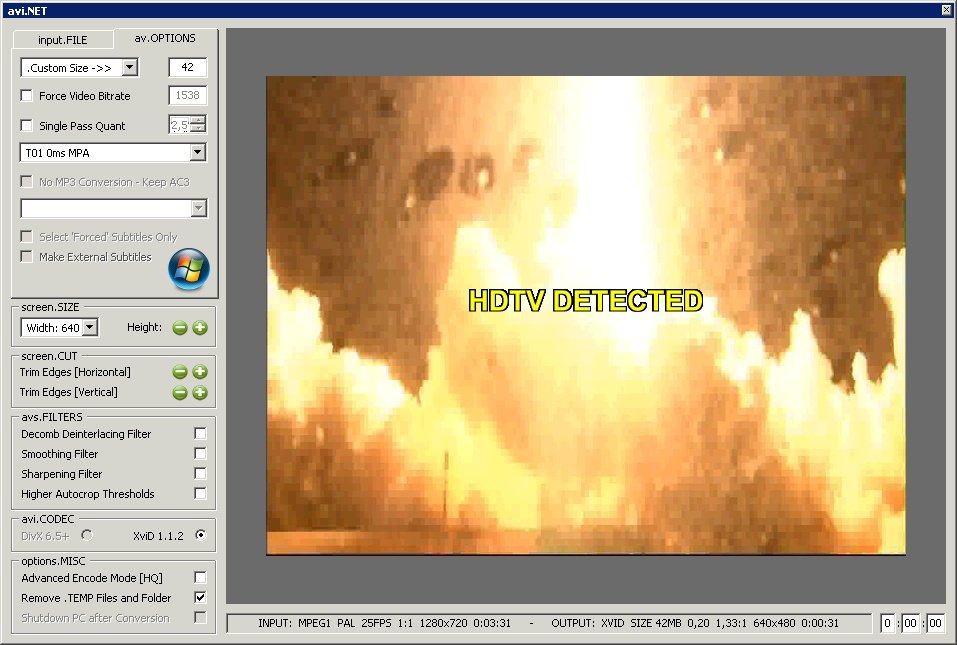
avi.NET allows you to convert a DVD movie, MPEG-1 (VCD) or MPEG-2 (DVD, HDTV, SVCD) media file to an AVI movie file. For their size, AVI files can be excellent quality and you can fit between three and six good quality movies on a single dvdr disk. avi.NET also allows you to select different audio tracks if you require and even choose subtitles to encode into the AVI file. avi.NET allows you to encode an AVI using the latest versions of either the DivX codec or XviD codec. Requires .net framework.
Freeware
OS:
File size: 10MB
Old versions
Version history
Alternative software
OS:
File size: 10MB
Old versions
Version history
Alternative software
Screenshots
Latest version
Download
Download old versions

Software License
Supported operating systems
Version history / Release notes / Changelog / What's New
v3.5.1.0
* Re-wrote codec routines.
* Support for Xvid v1.2.2.
* Prevention of MCI errors
* Re-wrote codec routines.
* Support for Xvid v1.2.2.
* Prevention of MCI errors
View full changelog
Sections/Browse similar tools
Alternative to avi.NET
(Latest version updated)AutoGK (Feb 1, 2009)
Guides and How to's
Tool features - Convert
DVB to AVI, DVB to DivX, DVB to XviD, DVD to AVI, DVD to DivX, HDTV to AVI, HDTV to DivX, HDTV to XviD, MPG to AVI, MPG to DivX, MPG to XviD, VOB to AVI, VOB to DivX, VOB to XviD, SVCD to AVI, SVCD to DivX, SVCD to XviD, TS to AVI, TS to DivX, TS to XviD
Acronyms / Also Known As
Notify me when software updated or report software
| 68 reviews, Showing 1 to 5 reviews |
Absolutely the best quality avi converter I've ever seen and I'd used a lot of these converters or one click type converters over the years. Even better quality than TenCoder or AutoGK which are both still great. The occasional time pops up when one does need an Xvid due to some other modern format not cutting it or just plain old incompatibility with your TV or player. Nearly forgot I had this installed on my old Legacy pc. So gave it a whirl.
Output was virtually identical to the source at Q1.5 setting. Crisp and sharp. Very nice software!
Output was virtually identical to the source at Q1.5 setting. Crisp and sharp. Very nice software!
Review by J.B on
Sep 28, 2024 Version: 3.5.1.0
OS: WinXP Ease of use: 10/10
Functionality: 10/10
Value for money: 10/10
Overall: 10/10
Rating by P.L on
Nov 2, 2023 Version: 3.5.1.0
OS: Windows 7 64-bit Ease of use: 10/10
Functionality: 10/10
Value for money: 10/10
Overall: 10/10
Rating by Ellen on
Oct 24, 2023 Version: 3.5.1.0
OS: WinXP Ease of use: 10/10
Functionality: 10/10
Value for money: 10/10
Overall: 10/10
Never thought I'd have to do an Xvid ever again, but this did a excellent job with a great output. Avi.NET has a field deinterlace option which uses decomb and it worked perfectly for me. I did try AutoGK due to its high reputation, but it surprisingly failed leaving many combed frames and a very poor output.
Review by M. Lee on
Oct 24, 2023 Version: 3.5.1.0
OS: Windows 7 64-bit Ease of use: 10/10
Functionality: 9/10
Value for money: 10/10
Overall: 10/10
My NTSC dvd project needed converting, and an avi or H264 encode was the aim as it was too big for standard dvd disc. I kept seeing awful color banding using the revision of H264 FU Wizard uses, so I used its built in Xvid and it was the same using matrices mpeg2 default and later its H263 too. Ivtc and decombing was done admirably with FU, but decided to give the much praised AutoGK a whirl.
The analysis showed Pure FILM and I encode at 100% quality the result was surprisingly, truly bad with loads of left over uncombed frames. I tried a few other of those Chinese do all e.g Wondershare, Wonderfox, Digiarty and the result was all sucked bigtime quality wise as well.
Finally whipped out the old program called Avi.NET, set it at Q1.5 setting with the deinterlace option on, and the result was excellent which surpassed all even the H264. Granted the file was much bigger. Avi.NET also proved to be the only one which could get the aspect ratio correct as well. Very impressive result! I wonder if this program will work in my Windows 10 desktop?
The analysis showed Pure FILM and I encode at 100% quality the result was surprisingly, truly bad with loads of left over uncombed frames. I tried a few other of those Chinese do all e.g Wondershare, Wonderfox, Digiarty and the result was all sucked bigtime quality wise as well.
Finally whipped out the old program called Avi.NET, set it at Q1.5 setting with the deinterlace option on, and the result was excellent which surpassed all even the H264. Granted the file was much bigger. Avi.NET also proved to be the only one which could get the aspect ratio correct as well. Very impressive result! I wonder if this program will work in my Windows 10 desktop?
Review by J.J on
Sep 10, 2023 Version: 3.5.1.0
OS: Windows 7 64-bit Ease of use: 10/10
Functionality: 10/10
Value for money: 10/10
Overall: 10/10
| 68 reviews, Showing 1 to 5 reviews |
| 1 tool hits, Showing 1 to 1 tools |
Explanation:
NEW SOFTWARE= New tool since your last visit
NEW VERSION= New version since your last visit
NEW REVIEW= New review since your last visit
NEW VERSION= New version
Latest version
Version number / Beta version number / Update version number and when it whas released.
Type and download
NO MORE UPDATES? = The software hasn't been updated in over 2 years.
NO LONGER DEVELOPED = The software hasn't been updated in over 5 years.
RECENTLY UPDATED = The software has been updated the last 31 days.
Freeware = Download Free software.
Freeware Trialware = Download Free software but some parts are trial/shareware.
Free software = Download Free software and also open source code also known as FOSS (Free and Open Source Software).
Free software Trialware = Download Free software and also open source code but some parts are trial/shareware.
Freeware Ads = Download Free software but supported by advertising, usually with a included browser toolbar. It may be disabled when installing or after installation.
Free software Ads = Free Download software and open source code but supported by advertising, usually with a included browser toolbar. It may be disabled when installing or after installation.
Trialware = Also called shareware or demo. Free Trial version available for download and testing with usually a time limit or limited functions.
Payware = No demo or trial available.
Portable version = A portable/standalone version is available. No installation is required.
v1.0.1 = Latest version available.
Download beta = It could be a Beta, RC(Release Candidate) or an Alpha / Nightly / Unstable version of the software.
Download 15MB = A direct link to the software download.
Win = Windows download version. It works on 32-bit and 64-bit Windows.
Win64 = Windows 64-bit download version. It works only on 64-bit Windows.
Mac = Mac download version. It works on 32-bit and 64-bit Mac OS.
Mac64 = Mac OS download version. It works only on 64-bit Mac OS.
Linux = Linux download version.
Portable = Portable version. No installation is required.
Ad-Supported = The software is bundled with advertising. Be careful when you install the software and disable addons that you don't want!
Visit developers site = A link to the software developer site.
Download (mirror link) = A mirror link to the software download. It may not contain the latest versions.
Download old versions = Free downloads of previous versions of the program.
Download 64-bit version = If you have a 64bit operating system you can download this version.
Download portable version = Portable/Standalone version meaning that no installation is required, just extract the files to a folder and run directly.
Portable version available = Download the portable version and you can just extract the files and run the program without installation.
Old versions available = Download old versions of the program.
Version history available = Complete changelog on our site.
= Windows version available.
 = Mac OS version available.
 = Linux version available.
Our hosted software are virus and malware scanned with several antivirus programs using www.virustotal.com. (NOTE! Just one virustotal warning is 99.9% a false positive. And some software might receive 2-6 warnings but it's if they are not all same virus/trojan then it's 99% false positives.)
Rating
Rating from 0-10.
NEW SOFTWARE= New tool since your last visit
NEW VERSION= New version since your last visit
NEW REVIEW= New review since your last visit
NEW VERSION= New version
Latest version
Version number / Beta version number / Update version number and when it whas released.
Type and download
NO MORE UPDATES? = The software hasn't been updated in over 2 years.
NO LONGER DEVELOPED = The software hasn't been updated in over 5 years.
RECENTLY UPDATED = The software has been updated the last 31 days.
Freeware = Download Free software.
Freeware Trialware = Download Free software but some parts are trial/shareware.
Free software = Download Free software and also open source code also known as FOSS (Free and Open Source Software).
Free software Trialware = Download Free software and also open source code but some parts are trial/shareware.
Freeware Ads = Download Free software but supported by advertising, usually with a included browser toolbar. It may be disabled when installing or after installation.
Free software Ads = Free Download software and open source code but supported by advertising, usually with a included browser toolbar. It may be disabled when installing or after installation.
Trialware = Also called shareware or demo. Free Trial version available for download and testing with usually a time limit or limited functions.
Payware = No demo or trial available.
Portable version = A portable/standalone version is available. No installation is required.
v1.0.1 = Latest version available.
Download beta = It could be a Beta, RC(Release Candidate) or an Alpha / Nightly / Unstable version of the software.
Download 15MB = A direct link to the software download.
Win = Windows download version. It works on 32-bit and 64-bit Windows.
Win64 = Windows 64-bit download version. It works only on 64-bit Windows.
Mac = Mac download version. It works on 32-bit and 64-bit Mac OS.
Mac64 = Mac OS download version. It works only on 64-bit Mac OS.
Linux = Linux download version.
Portable = Portable version. No installation is required.
Ad-Supported = The software is bundled with advertising. Be careful when you install the software and disable addons that you don't want!
Visit developers site = A link to the software developer site.
Download (mirror link) = A mirror link to the software download. It may not contain the latest versions.
Download old versions = Free downloads of previous versions of the program.
Download 64-bit version = If you have a 64bit operating system you can download this version.
Download portable version = Portable/Standalone version meaning that no installation is required, just extract the files to a folder and run directly.
Portable version available = Download the portable version and you can just extract the files and run the program without installation.
Old versions available = Download old versions of the program.
Version history available = Complete changelog on our site.
= Windows version available. = Mac OS version available. = Linux version available.Our hosted software are virus and malware scanned with several antivirus programs using www.virustotal.com. (NOTE! Just one virustotal warning is 99.9% a false positive. And some software might receive 2-6 warnings but it's if they are not all same virus/trojan then it's 99% false positives.)
Rating
Rating from 0-10.
Browse software by sections
All In One Blu-ray Converters (9)
All In One DVD Converters (12)
All In One MKV to MP4, Blu-ray, UHD (11)
All In One Video Converters (19)
Animation (3D, 2D Animation) (11)
Audio Editors (21)
Audio Encoders (80)
Audio Players (19)
Authoring (Blu-ray, UHD, AVCHD) (12)
Authoring (DivX) (4)
Authoring (DVD) (26)
Authoring (SVCD, VCD) (9)
Bitrate Calculators (7)
Blu-ray to AVI, MKV, MP4 (15)
Blu-ray to Blu-ray, AVCHD (10)
Burn (CD,DVD,Blu-ray) (24)
Camcorders, DV, HDV, AVCHD (31)
Capture TV, DVD, VCR (30)
CD, DVD, Blu-ray recovery (3)
Codec Packs (6)
All In One DVD Converters (12)
All In One MKV to MP4, Blu-ray, UHD (11)
All In One Video Converters (19)
Animation (3D, 2D Animation) (11)
Audio Editors (21)
Audio Encoders (80)
Audio Players (19)
Authoring (Blu-ray, UHD, AVCHD) (12)
Authoring (DivX) (4)
Authoring (DVD) (26)
Authoring (SVCD, VCD) (9)
Bitrate Calculators (7)
Blu-ray to AVI, MKV, MP4 (15)
Blu-ray to Blu-ray, AVCHD (10)
Burn (CD,DVD,Blu-ray) (24)
Camcorders, DV, HDV, AVCHD (31)
Capture TV, DVD, VCR (30)
CD, DVD, Blu-ray recovery (3)
Codec Packs (6)
Codec, Video Identifiers (30)
Codecs (67)
Decrypters (DVD Rippers) (15)
Decrypters (UHD, Blu-ray Rippers) (8)
DigitalTV, DVB, IPTV (38)
DVD to DVD (20)
DVD to MP4, MKV, H264, H265 (16)
DVD to VCD, SVCD (5)
DVD to XviD, AVI, DivX (16)
ISO, Image (16)
Linux Video Tools (191)
MacOS Video Tools (228)
Media (Blu-ray, DVD, CD) (9)
Media Center, HTPC (23)
Other Useful Tools (141)
Photo Blu-ray, DVD, SlideShow (8)
Portable (Mobile, PSP) (35)
Region Free Tools (5)
Screen capture , Screen recording (27)
Screenshots , Thumbnails (13)
Codecs (67)
Decrypters (DVD Rippers) (15)
Decrypters (UHD, Blu-ray Rippers) (8)
DigitalTV, DVB, IPTV (38)
DVD to DVD (20)
DVD to MP4, MKV, H264, H265 (16)
DVD to VCD, SVCD (5)
DVD to XviD, AVI, DivX (16)
ISO, Image (16)
Linux Video Tools (191)
MacOS Video Tools (228)
Media (Blu-ray, DVD, CD) (9)
Media Center, HTPC (23)
Other Useful Tools (141)
Photo Blu-ray, DVD, SlideShow (8)
Portable (Mobile, PSP) (35)
Region Free Tools (5)
Screen capture , Screen recording (27)
Screenshots , Thumbnails (13)
Subtitle Editors, Converters (70)
Tag Editors (3)
Video De, Multiplexers (66)
Video Editors (Advanced, NLE) (34)
Video Editors (Basic) (53)
Video Editors (H264, MP4, MKV, MTS) (19)
Video Editors (Lossless) (4)
Video Editors (MPG, DVD) (16)
Video Editors (WMV, AVI) (15)
Video Encoders (AV1, VP8, VP9) (2)
Video Encoders (AVI, WMV) (38)
Video Encoders (H264, H265, MP4, MKV) (45)
Video Encoders (MPG, DVD) (23)
Video Encoders , Converters (154)
Video Frameservers (9)
Video Players (48)
Video Repair, Fix (25)
Video Scripting (11)
Video Streaming (21)
Video Streaming Downloaders (101)
Tag Editors (3)
Video De, Multiplexers (66)
Video Editors (Advanced, NLE) (34)
Video Editors (Basic) (53)
Video Editors (H264, MP4, MKV, MTS) (19)
Video Editors (Lossless) (4)
Video Editors (MPG, DVD) (16)
Video Editors (WMV, AVI) (15)
Video Encoders (AV1, VP8, VP9) (2)
Video Encoders (AVI, WMV) (38)
Video Encoders (H264, H265, MP4, MKV) (45)
Video Encoders (MPG, DVD) (23)
Video Encoders , Converters (154)
Video Frameservers (9)
Video Players (48)
Video Repair, Fix (25)
Video Scripting (11)
Video Streaming (21)
Video Streaming Downloaders (101)