
Help us keep the list up to date and submit new video software here.
Tool
Description
Type
Rating
Reviews
XMedia Recode is a free All-In-One video converter, audio converter and video editor. Convert Blu-ray, DVD, AVI, MP4, 3GP, WMV, ASF, MKV, etc. Profiles for most devices like iPod, iPhone, Samsung, SonyEricsson, Zune, PSP, Blackberry, LG, etc. Basic video editing/cutting with video filters like color correction, rotating, cropping, fade-in/out, delogo, detinterlace, hardcode/burn-in subtitles, etc. Requires now Windows 7 or later!
Freeware
OS:
File size: 21MB
Portable version
Other versions
Old versions
Version history
Alternative software
OS:
File size: 21MB
Portable version
Other versions
Old versions
Version history
Alternative software
Screenshots
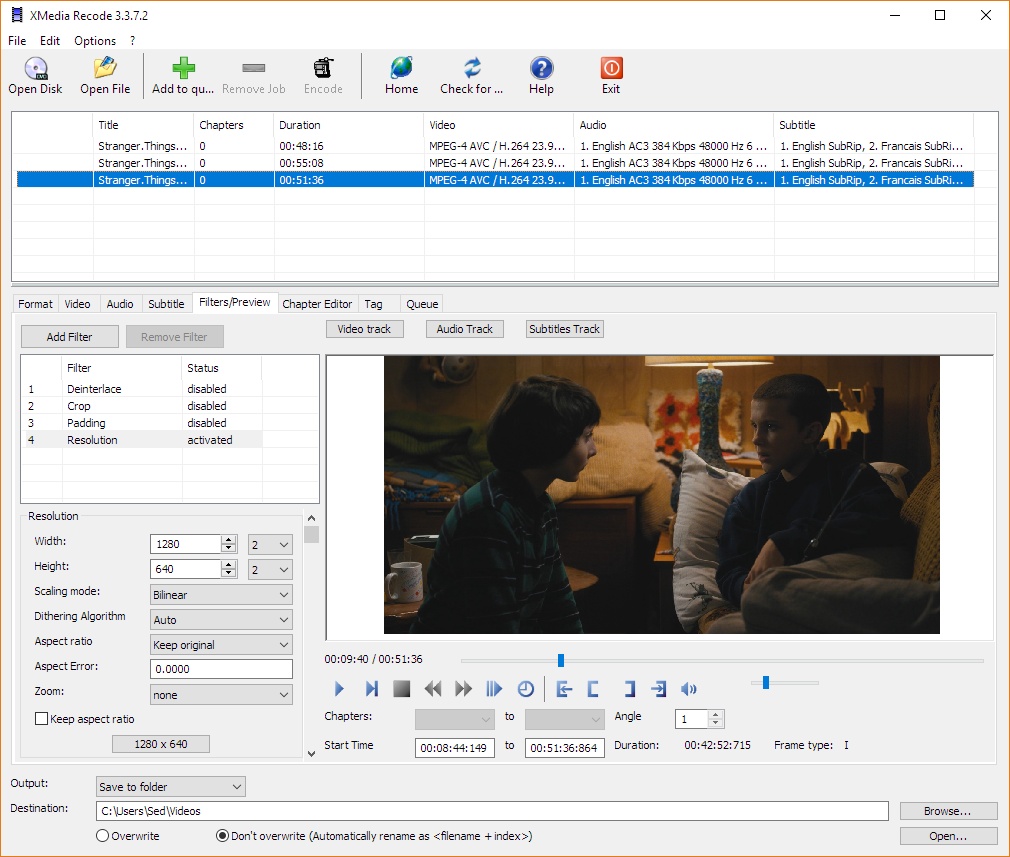

Latest version
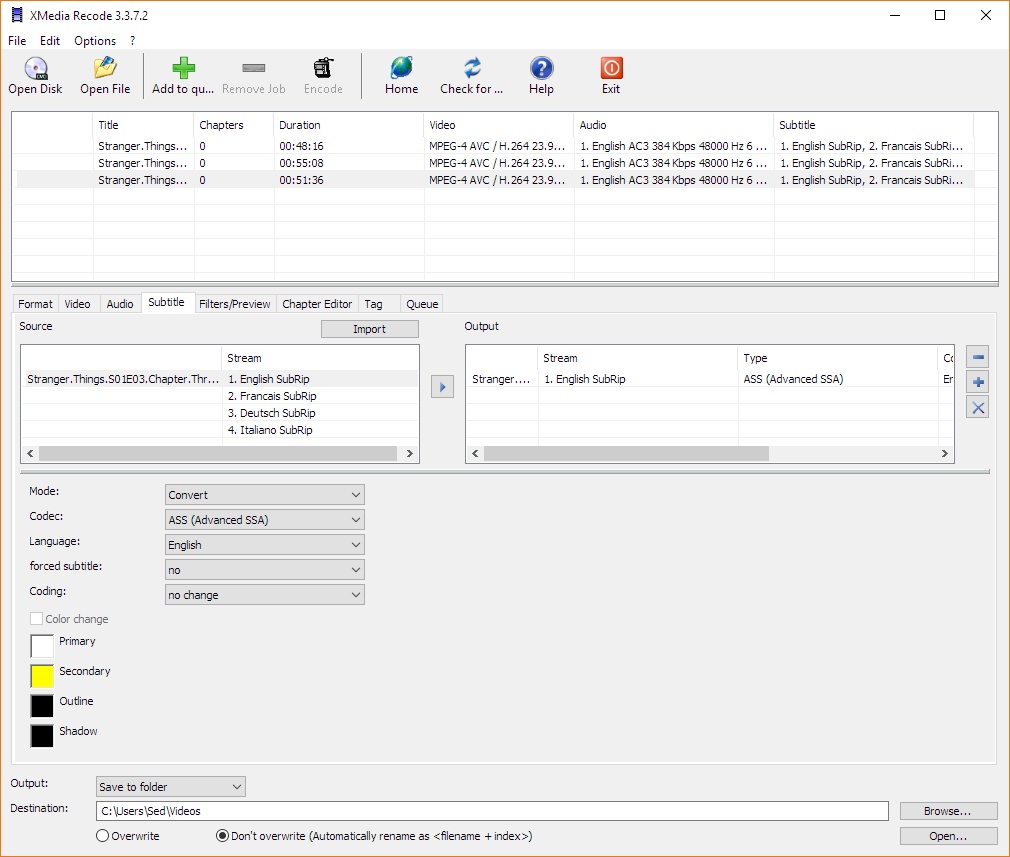
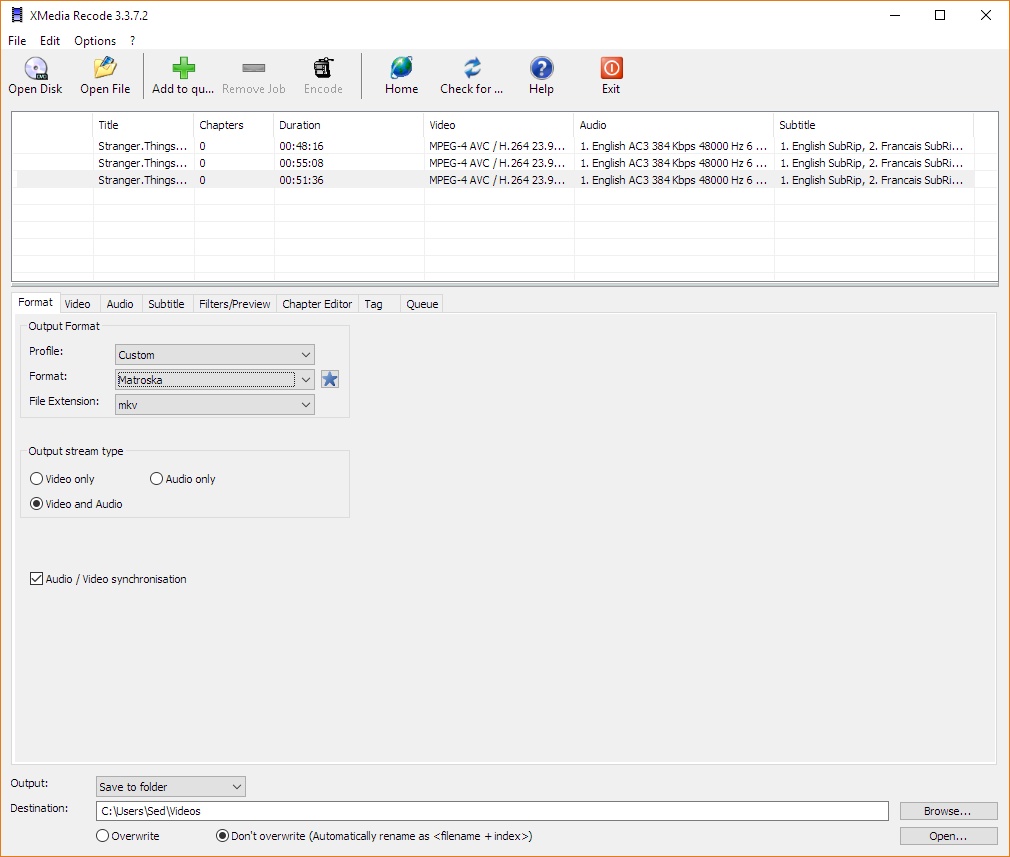
Download
Download XMedia Recode 3.6.2.8 64-bit 22MB Win64
Download Portable and other versions
Portable 
Download old versions

Software License
Supported operating systems
More information and other downloads
Download Xmedia Recode 3.2.7.1 for Windows XP/Vista here
gdiplus.zip is required for Windows 2000 and older. Extract and put it in the xmedia recode folder.
gdiplus.zip is required for Windows 2000 and older. Extract and put it in the xmedia recode folder.
Version history / Release notes / Changelog / What's New
XMedia Recode 3.6.2.8
Release Date: 08.04.2026
Update of ffmpeg
Update of AOM AV1 Codec (3.13.3)
Update of Opus Codec (1.6.1)
Troubleshooting
Fixed minor bugs
Release Date: 08.04.2026
Update of ffmpeg
Update of AOM AV1 Codec (3.13.3)
Update of Opus Codec (1.6.1)
Troubleshooting
Fixed minor bugs
View full changelog
Sections/Browse similar tools
Alternative to XMedia Recode
(Latest version updated)clever FFmpeg-GUI (Apr 25, 2026)
FastFlix (Mar 22, 2026)
FFCoder (Feb 16, 2013)
FFmpeg Batch Converter (Mar 19, 2026)
HandBrake (Mar 22, 2026)
Libre AV Converter (Oct 2, 2023)
MediaCoder (Jan 16, 2026)
ShanaEncoder (Mar 10, 2025)
Shutter Encoder (Apr 7, 2026)
TEncoder (Nov 30, 2015)
TX264 (Oct 8, 2014)
VidCoder (Apr 23, 2026)
Video to Video Converter (Jun 9, 2013)
WinFF (Jun 12, 2017)
XviD4PSP (Apr 22, 2026)
Guides and How to's
How cut any video with Xmedia Recode
- ReadHow to burn in / hardcode srt subtitles with Xmedia Recode
- ReadHow to convert avi or mkv to Android friendly mp4 format
- ReadHow to rotate/flip any video with Xmedia Recode
- ReadXMedia Recode video tutorials
View all guides with guide description here
Acronyms / Also Known As
Download XMedia Recode Portable download from the Download links under Download and Download other versions!
Notify me when software updated or report software
| 447 reviews, Showing 1 to 5 reviews |
Free, efficient, easy to use (except for the filters interface ^_^), with the fastest transcoding speed.
Overall, it is a great app.
I suggest the filters interface learn from Avidemux's filters subsystem, which is a excellent filters interaction I have used.
avidemux is anohter great AV app. thanks for the developers.
Overall, it is a great app.
I suggest the filters interface learn from Avidemux's filters subsystem, which is a excellent filters interaction I have used.
avidemux is anohter great AV app. thanks for the developers.
Review by Homisaku on
Apr 10, 2026 Version: 3.6.2.7
OS: Windows 10 64-bit Ease of use: 9/10
Functionality: 10/10
Value for money: 10/10
Overall: 9/10
This specific version it's 1st time i see malware report from Malwarebytes about "Izma.dll" fiLE.
QUOTE :
Malware.AI
Short bio
Malware.AI.(id-nr) are detection names produced by the Artificial Intelligence module in Malwarebytes 4 and Malwarebytes business products. These generic malware detections are due to our new automated signature system called BytesTotal and DDS engine that are based on Machine Learning technology with 100% autonomous learning which don’t require any human interaction to correctly identify malware.. These techniques are part of Malwarebytes’ Katana engine and were developed for automated mass detection of wide ranges of malware and adware.
The id-nr is usually around 9 digits.
Types of infection
Based on closer determination, items detected as Malware.AI can be categorized more precisely based on their behavior. Malwarebytes uses the underlying threat categories:
Adware
Fraudtool
Hijack
Ransomware
Riskware
Rogue
Rootkit
Spyware
Trojan
Virus
Worm
Protection
Malwarebytes detects unknown threats as Malware.AI by using Artificial Intelligence and Machine Learning techniques without any specific detection rules to protect users from malware that has not yet been researched and classified. This helps protect our customers against 0-day malware.
QUOTE :
Malware.AI
Short bio
Malware.AI.(id-nr) are detection names produced by the Artificial Intelligence module in Malwarebytes 4 and Malwarebytes business products. These generic malware detections are due to our new automated signature system called BytesTotal and DDS engine that are based on Machine Learning technology with 100% autonomous learning which don’t require any human interaction to correctly identify malware.. These techniques are part of Malwarebytes’ Katana engine and were developed for automated mass detection of wide ranges of malware and adware.
The id-nr is usually around 9 digits.
Types of infection
Based on closer determination, items detected as Malware.AI can be categorized more precisely based on their behavior. Malwarebytes uses the underlying threat categories:
Adware
Fraudtool
Hijack
Ransomware
Riskware
Rogue
Rootkit
Spyware
Trojan
Virus
Worm
Protection
Malwarebytes detects unknown threats as Malware.AI by using Artificial Intelligence and Machine Learning techniques without any specific detection rules to protect users from malware that has not yet been researched and classified. This helps protect our customers against 0-day malware.
Review by on
Jan 28, 2026 Version: XMedia Recode 3.6.2.3
OS: Windows 11 64-bit Ease of use: 6/10
Functionality: 8/10
Value for money: 10/10
Overall: 7/10
If you leave the programme unused for a few minutes, it starts consuming resources without authorisation. Apparently, it has a bitcoin mining script.......
Review by zenomag on
Aug 10, 2025 Version: XMedia Recode 3.6.1.6
OS: Windows 11 64-bit Ease of use: 4/10
Functionality: 4/10
Value for money: 4/10
Overall: 4/10
May be a dumb novice but I couldnt get it to work at all. Does not seem very intuitive and after loading a video for editing, could not figure out how to even view it for editing. Maybe some tricks I don't know, but definitely not for a novice.
Review by HarryLime on
Oct 17, 2024 Version: 123456
OS: Windows 10 64-bit Ease of use: 3/10
Functionality: 3/10
Value for money: 6/10
Overall: 4/10
I've used this for many years and like it but on my current two laptops it's become extremely problematic.
It routinely doesn't remember whatever I put into the Rate Control Mode or Quality boxes. For example, using MP4-AVC/H.264 (Intel QuickSync) with LA-ICQ it keeps switching back to a setting of 51 which is a very low bitrate. Add several clips to the file list, select them all, you would expect to be able to set options for all en masse. But no. You have no idea when settings have "stuck" or not.
With AAC it always seems to encode with a bitrate of 128 whatever bitrate has actually been set.
It's just about usable if you're processing one clip at a time. But sometimes I have dozens to do and don't have time to keep playing cat and mouse.
It routinely doesn't remember whatever I put into the Rate Control Mode or Quality boxes. For example, using MP4-AVC/H.264 (Intel QuickSync) with LA-ICQ it keeps switching back to a setting of 51 which is a very low bitrate. Add several clips to the file list, select them all, you would expect to be able to set options for all en masse. But no. You have no idea when settings have "stuck" or not.
With AAC it always seems to encode with a bitrate of 128 whatever bitrate has actually been set.
It's just about usable if you're processing one clip at a time. But sometimes I have dozens to do and don't have time to keep playing cat and mouse.
Review by rgs_uk on
Sep 21, 2024 Version: 3.6.0.1
OS: Windows 10 64-bit Ease of use: 8/10
Functionality: 8/10
Value for money: 10/10
Overall: 8/10
| 447 reviews, Showing 1 to 5 reviews |
| 1 tool hits, Showing 1 to 1 tools |
Explanation:
NEW SOFTWARE= New tool since your last visit
NEW VERSION= New version since your last visit
NEW REVIEW= New review since your last visit
NEW VERSION= New version
Latest version
Version number / Beta version number / Update version number and when it whas released.
Type and download
NO MORE UPDATES? = The software hasn't been updated in over 2 years.
NO LONGER DEVELOPED = The software hasn't been updated in over 5 years.
RECENTLY UPDATED = The software has been updated the last 31 days.
Freeware = Download Free software.
Freeware Trialware = Download Free software but some parts are trial/shareware.
Free software = Download Free software and also open source code also known as FOSS (Free and Open Source Software).
Free software Trialware = Download Free software and also open source code but some parts are trial/shareware.
Freeware Ads = Download Free software but supported by advertising, usually with a included browser toolbar. It may be disabled when installing or after installation.
Free software Ads = Free Download software and open source code but supported by advertising, usually with a included browser toolbar. It may be disabled when installing or after installation.
Trialware = Also called shareware or demo. Free Trial version available for download and testing with usually a time limit or limited functions.
Payware = No demo or trial available.
Portable version = A portable/standalone version is available. No installation is required.
v1.0.1 = Latest version available.
Download beta = It could be a Beta, RC(Release Candidate) or an Alpha / Nightly / Unstable version of the software.
Download 15MB = A direct link to the software download.
Win = Windows download version for 32-bit and 64-bit Windows.
Win64 = Windows 64-bit download version for 64-bit Windows.
WinARM64 = Windows 64-bit ARM download version for Windows ARM64/AArch64.
Mac = Mac download version for 64-bit Mac OS Intel/ARM64/AArch64.
MacARM64 = Mac Silicon download version for 64-bit Mac OS ARM64/AArch64.
Mac64 = Mac OS download version for 64-bit Intel Mac OS.
Linux = Linux download version.
Linux64 = Linux download version for 64bit Linux.
Linux ARM = Linux download version for Linux ARM64/AArch64.
Portable = Portable version. No installation is required.
Ad-Supported = The software is bundled with advertising. Be careful when you install the software and disable addons that you don't want!
Visit developers site = A link to the software developer site.
Download (mirror link) = A mirror link to the software download. It may not contain the latest versions.
Download old versions = Free downloads of previous versions of the program.
Download 64-bit version = If you have a 64bit operating system you can download this version.
Download portable version = Portable/Standalone version meaning that no installation is required, just extract the files to a folder and run directly.
Portable version available = Download the portable version and you can just extract the files and run the program without installation.
Old versions available = Download old versions of the program.
Version history available = Complete changelog on our site.
= Windows version available.
 = Mac OS version available.
 = Linux version available.
Our hosted software are virus and malware scanned with several antivirus programs using www.virustotal.com. (NOTE! Just one virustotal warning is 99.9% a false positive. And some software might receive 2-6 warnings but it's if they are not all same virus/trojan then it's 99% false positives.)
Rating
Rating from 0-10.
NEW SOFTWARE= New tool since your last visit
NEW VERSION= New version since your last visit
NEW REVIEW= New review since your last visit
NEW VERSION= New version
Latest version
Version number / Beta version number / Update version number and when it whas released.
Type and download
NO MORE UPDATES? = The software hasn't been updated in over 2 years.
NO LONGER DEVELOPED = The software hasn't been updated in over 5 years.
RECENTLY UPDATED = The software has been updated the last 31 days.
Freeware = Download Free software.
Freeware Trialware = Download Free software but some parts are trial/shareware.
Free software = Download Free software and also open source code also known as FOSS (Free and Open Source Software).
Free software Trialware = Download Free software and also open source code but some parts are trial/shareware.
Freeware Ads = Download Free software but supported by advertising, usually with a included browser toolbar. It may be disabled when installing or after installation.
Free software Ads = Free Download software and open source code but supported by advertising, usually with a included browser toolbar. It may be disabled when installing or after installation.
Trialware = Also called shareware or demo. Free Trial version available for download and testing with usually a time limit or limited functions.
Payware = No demo or trial available.
Portable version = A portable/standalone version is available. No installation is required.
v1.0.1 = Latest version available.
Download beta = It could be a Beta, RC(Release Candidate) or an Alpha / Nightly / Unstable version of the software.
Download 15MB = A direct link to the software download.
Win = Windows download version for 32-bit and 64-bit Windows.
Win64 = Windows 64-bit download version for 64-bit Windows.
WinARM64 = Windows 64-bit ARM download version for Windows ARM64/AArch64.
Mac = Mac download version for 64-bit Mac OS Intel/ARM64/AArch64.
MacARM64 = Mac Silicon download version for 64-bit Mac OS ARM64/AArch64.
Mac64 = Mac OS download version for 64-bit Intel Mac OS.
Linux = Linux download version.
Linux64 = Linux download version for 64bit Linux.
Linux ARM = Linux download version for Linux ARM64/AArch64.
Portable = Portable version. No installation is required.
Ad-Supported = The software is bundled with advertising. Be careful when you install the software and disable addons that you don't want!
Visit developers site = A link to the software developer site.
Download (mirror link) = A mirror link to the software download. It may not contain the latest versions.
Download old versions = Free downloads of previous versions of the program.
Download 64-bit version = If you have a 64bit operating system you can download this version.
Download portable version = Portable/Standalone version meaning that no installation is required, just extract the files to a folder and run directly.
Portable version available = Download the portable version and you can just extract the files and run the program without installation.
Old versions available = Download old versions of the program.
Version history available = Complete changelog on our site.
= Windows version available. = Mac OS version available. = Linux version available.Our hosted software are virus and malware scanned with several antivirus programs using www.virustotal.com. (NOTE! Just one virustotal warning is 99.9% a false positive. And some software might receive 2-6 warnings but it's if they are not all same virus/trojan then it's 99% false positives.)
Rating
Rating from 0-10.
Browse software by sections
All In One Blu-ray Converters (9)
All In One DVD Converters (12)
All In One MKV to MP4, Blu-ray, UHD (11)
All In One Video Converters (19)
Animation (3D, 2D Animation) (12)
Audio Editors (22)
Audio Encoders (80)
Audio Players (19)
Authoring (Blu-ray, UHD, AVCHD) (13)
Authoring (DivX) (4)
Authoring (DVD) (26)
Authoring (SVCD, VCD) (9)
Bitrate Calculators (7)
Blu-ray to AVI, MKV, MP4 (15)
Blu-ray to Blu-ray, AVCHD (10)
Burn (CD,DVD,Blu-ray) (24)
Camcorders, DV, HDV, AVCHD (31)
Capture TV, DVD, VCR (30)
CD, DVD, Blu-ray recovery (3)
Codec Packs (6)
All In One DVD Converters (12)
All In One MKV to MP4, Blu-ray, UHD (11)
All In One Video Converters (19)
Animation (3D, 2D Animation) (12)
Audio Editors (22)
Audio Encoders (80)
Audio Players (19)
Authoring (Blu-ray, UHD, AVCHD) (13)
Authoring (DivX) (4)
Authoring (DVD) (26)
Authoring (SVCD, VCD) (9)
Bitrate Calculators (7)
Blu-ray to AVI, MKV, MP4 (15)
Blu-ray to Blu-ray, AVCHD (10)
Burn (CD,DVD,Blu-ray) (24)
Camcorders, DV, HDV, AVCHD (31)
Capture TV, DVD, VCR (30)
CD, DVD, Blu-ray recovery (3)
Codec Packs (6)
Codec, Video Identifiers (30)
Codecs (67)
Decrypters (DVD Rippers) (16)
Decrypters (UHD, Blu-ray Rippers) (8)
DigitalTV, DVB, IPTV (39)
DVD to DVD (20)
DVD to MP4, MKV, H264, H265 (16)
DVD to VCD, SVCD (5)
DVD to XviD, AVI, DivX (16)
ISO, Image (15)
Linux Video Tools (208)
MacOS Video Tools (244)
Media (Blu-ray, DVD, CD) (9)
Media Center, HTPC (24)
Other Useful Tools (140)
Photo Blu-ray, DVD, SlideShow (8)
Portable (Mobile, PSP) (35)
Region Free Tools (5)
Screen capture , Screen recording (27)
Screenshots , Thumbnails (13)
Codecs (67)
Decrypters (DVD Rippers) (16)
Decrypters (UHD, Blu-ray Rippers) (8)
DigitalTV, DVB, IPTV (39)
DVD to DVD (20)
DVD to MP4, MKV, H264, H265 (16)
DVD to VCD, SVCD (5)
DVD to XviD, AVI, DivX (16)
ISO, Image (15)
Linux Video Tools (208)
MacOS Video Tools (244)
Media (Blu-ray, DVD, CD) (9)
Media Center, HTPC (24)
Other Useful Tools (140)
Photo Blu-ray, DVD, SlideShow (8)
Portable (Mobile, PSP) (35)
Region Free Tools (5)
Screen capture , Screen recording (27)
Screenshots , Thumbnails (13)
Subtitle Editors, Converters (72)
Tag Editors (4)
Video De, Multiplexers (66)
Video Editors (Advanced, NLE) (35)
Video Editors (Basic) (56)
Video Editors (H264, MP4, MKV, MTS) (19)
Video Editors (Lossless) (4)
Video Editors (MPG, DVD) (16)
Video Editors (WMV, AVI) (15)
Video Encoders (AV1, VP8, VP9) (2)
Video Encoders (AVI, WMV) (38)
Video Encoders (H264, H265, MP4, MKV) (45)
Video Encoders (MPG, DVD) (23)
Video Encoders , Converters (155)
Video Frameservers (9)
Video Players (49)
Video Repair, Fix (24)
Video Scripting (10)
Video Streaming (21)
Video Streaming Downloaders (101)
Tag Editors (4)
Video De, Multiplexers (66)
Video Editors (Advanced, NLE) (35)
Video Editors (Basic) (56)
Video Editors (H264, MP4, MKV, MTS) (19)
Video Editors (Lossless) (4)
Video Editors (MPG, DVD) (16)
Video Editors (WMV, AVI) (15)
Video Encoders (AV1, VP8, VP9) (2)
Video Encoders (AVI, WMV) (38)
Video Encoders (H264, H265, MP4, MKV) (45)
Video Encoders (MPG, DVD) (23)
Video Encoders , Converters (155)
Video Frameservers (9)
Video Players (49)
Video Repair, Fix (24)
Video Scripting (10)
Video Streaming (21)
Video Streaming Downloaders (101)