
Help us keep the list up to date and submit new video software here.
Tool
Description
Type
Rating
Reviews
Corel WinDVD Pro is an advanced 2D and Blu-ray 3D™ player software that supports Blu-ray 3D™, AVCHD™, DVD playback and all the latest video formats. With over 250 million copies sold, WinDVD is one of the world's most recognized products. The Pro version is stacked with features such as an integrated online movie search engine, 3D viewing technology, 2D to 3D conversion, HD upscaling, superior sound and more!
Screenshots

Latest version


Download
Download WinDVD 11 Trial 128MB Win

Download Update and other versions
Software License
Supported operating systems
Version history / Release notes / Changelog / What's New
Service Pack 8 is now available for Corel WinDVD Pro 12. This update includes the following change:
Fixes Blu-ray disc playback on 11th Gen Intel Core Processors (Tiger Lake and Rocket Lake)
Released: 2021-04-28
Fixes Blu-ray disc playback on 11th Gen Intel Core Processors (Tiger Lake and Rocket Lake)
Released: 2021-04-28
View full changelog
All features
Powerful video playback and enhancements
#1 DVD and Blu-ray player software
#1 DVD and Blu-ray player software
Trust your viewing experience to one of the world’s most recognized products, with leading Blu-ray 3D player technology and over 300 million copies sold. WinDVD Pro 12 plays all of the most popular formats, including Blu-ray Disc, BDXL, MP4, WMV-HD, DVD and AVCHD.
Standard to HD video upscaling
Standard to HD video upscaling
Make your video look its best with proven upscaling technology that delivers near-HD quality video from standard DVDs. The GPU-accelerated upscaling works across different platforms.
Color correction and lighting controls
Color correction and lighting controls
Fine-tune to get just the look you want with easy adjustments for richer color and enhanced lighting. Use presets to improve picture, adjust brightness, contrast and more.
Optimized 3D mode
Optimized 3D mode
If you have a NVIDIA graphics card with 3D Vision support on your PC, WinDVD Pro 12 automatically enters an exclusive mode to play high-definition video files in 3D mode, greatly optimizing your 3D playback experience.
3D Blu-ray software
3D Blu-ray software
Enjoy high-definition Blu-ray and Blu-ray 3D movies, HD-quality and theatre-like surround sound. With leading 3D technologies, you can experience 3D playback your way.
2D to 3D video conversion
2D to 3D video conversion
Convert and enjoy your 2D movies in full 3D definition for the most lifelike viewing experience! 2D to 3D conversion is supported for DVD-Video, and standard and high-definition video files.
NEW! Playback interface
Playback interface
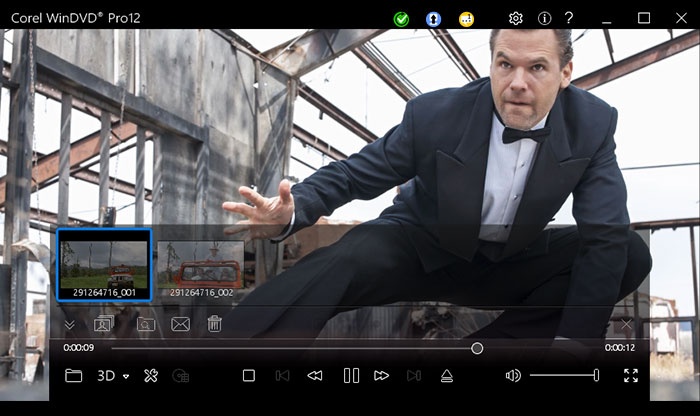
Optimize your viewing experience with the easy-to-access video and audio controls in the new, modern interface. Create playlists, take screenshots or video clips of a favorite scene, enhance quality and more. These tools are just a click away.
Playlists and Bookmark tools
Playlists and Bookmark tools
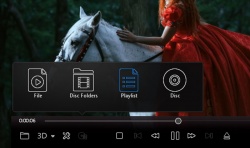
Select your favourite movies and create your own playlists. Plan your next rainy day or big event and enjoy continuous video playback. Even mark your favorite scenes while the video is playing to watch them again.
ENHANCED! Powerful video playback
Powerful video playback
Get closer to the action and catch every detail with smooth, high frame rate video playback that supports up to 240 frames per second. You can also increase frame rate and interpolate frames to remove the jitters from fast motion video.
Capture the action
Capture the action
Easily capture a screenshot of your favorite movie scene as a still picture or video clip. Save it as a file and upload and share it with your friends. Even zoom or crop your video to take a closer look and get closer to the action.
Time Stretch
Time Stretch
Short on time? Watch your movie on your time. Adjust the speed of the video playback to fit the time you have available. You can speed up playback up to 2 times faster, or slow down to half speed.
Enhanced performance and extended battery life
Enhanced performance and extended battery life
Thanks to optimization for new CPUs and GPUs from NVIDIA, Intel and AMD, WinDVD 12 is faster than ever before. Plus, extended power-saving capabilities give you more life from your laptop.
Broadest video and audio format support
NEW!File support
File support
Enjoy crisp, vivid playback of all the most popular file formats, including new 4K video and HEVC (H.265). Also enjoy Blu-ray 3D, BD-Live, BDXL, AVCREC, DivX, FLV, Windows Media (WMV), DVD-Video, MPEG, MTS, M2TS, MKV, MP4, 3GP and much more!
Cinematic surround sound
Cinematic surround sound
Blow yourself away with cinematic surround sound, supported by industry leaders Dolby and DTS. WinDVD Pro 12 offers a broad range of support for the most powerful audio technologies available.
Special audio effects
Special audio effects
Set your audio to match your environment. In a busy, noisy location? Set your controls to ‘Noisy’ and boost the audio levels. At home? Try the ‘Theater’ effect to preserve the original dynamic range of the movie and deliver theater-quality sound.
#1 DVD and Blu-ray player software
#1 DVD and Blu-ray player software
Trust your viewing experience to one of the world’s most recognized products, with leading Blu-ray 3D player technology and over 300 million copies sold. WinDVD Pro 12 plays all of the most popular formats, including Blu-ray Disc, BDXL, MP4, WMV-HD, DVD and AVCHD.
Standard to HD video upscaling
Standard to HD video upscaling
Make your video look its best with proven upscaling technology that delivers near-HD quality video from standard DVDs. The GPU-accelerated upscaling works across different platforms.
Color correction and lighting controls
Color correction and lighting controls
Fine-tune to get just the look you want with easy adjustments for richer color and enhanced lighting. Use presets to improve picture, adjust brightness, contrast and more.
Optimized 3D mode
Optimized 3D mode
If you have a NVIDIA graphics card with 3D Vision support on your PC, WinDVD Pro 12 automatically enters an exclusive mode to play high-definition video files in 3D mode, greatly optimizing your 3D playback experience.
3D Blu-ray software
3D Blu-ray software
Enjoy high-definition Blu-ray and Blu-ray 3D movies, HD-quality and theatre-like surround sound. With leading 3D technologies, you can experience 3D playback your way.
2D to 3D video conversion
2D to 3D video conversion
Convert and enjoy your 2D movies in full 3D definition for the most lifelike viewing experience! 2D to 3D conversion is supported for DVD-Video, and standard and high-definition video files.
NEW! Playback interface
Playback interface
Optimize your viewing experience with the easy-to-access video and audio controls in the new, modern interface. Create playlists, take screenshots or video clips of a favorite scene, enhance quality and more. These tools are just a click away.
Playlists and Bookmark tools
Playlists and Bookmark tools
Select your favourite movies and create your own playlists. Plan your next rainy day or big event and enjoy continuous video playback. Even mark your favorite scenes while the video is playing to watch them again.
ENHANCED! Powerful video playback
Powerful video playback
Get closer to the action and catch every detail with smooth, high frame rate video playback that supports up to 240 frames per second. You can also increase frame rate and interpolate frames to remove the jitters from fast motion video.
Capture the action
Capture the action
Easily capture a screenshot of your favorite movie scene as a still picture or video clip. Save it as a file and upload and share it with your friends. Even zoom or crop your video to take a closer look and get closer to the action.
Time Stretch
Time Stretch
Short on time? Watch your movie on your time. Adjust the speed of the video playback to fit the time you have available. You can speed up playback up to 2 times faster, or slow down to half speed.
Enhanced performance and extended battery life
Enhanced performance and extended battery life
Thanks to optimization for new CPUs and GPUs from NVIDIA, Intel and AMD, WinDVD 12 is faster than ever before. Plus, extended power-saving capabilities give you more life from your laptop.
Broadest video and audio format support
NEW!File support
File support
Enjoy crisp, vivid playback of all the most popular file formats, including new 4K video and HEVC (H.265). Also enjoy Blu-ray 3D, BD-Live, BDXL, AVCREC, DivX, FLV, Windows Media (WMV), DVD-Video, MPEG, MTS, M2TS, MKV, MP4, 3GP and much more!
Cinematic surround sound
Cinematic surround sound
Blow yourself away with cinematic surround sound, supported by industry leaders Dolby and DTS. WinDVD Pro 12 offers a broad range of support for the most powerful audio technologies available.
Special audio effects
Special audio effects
Set your audio to match your environment. In a busy, noisy location? Set your controls to ‘Noisy’ and boost the audio levels. At home? Try the ‘Theater’ effect to preserve the original dynamic range of the movie and deliver theater-quality sound.
Sections/Browse similar tools
Alternative to WinDVD
(Latest version updated)PowerDVD (Jan 25, 2024)
Guides and How to's
Acronyms / Also Known As
Notify me when software updated or report software
| 11 reviews, Showing 1 to 5 reviews |
Great Player! I've got an ATI Card and display on my CRT is just great!
The DVD-decoder is the fastest I have tried (you name it...), when I open DVD-files for testing purposes on the HDD.
Sound with small stereo-system, but nice sound-card (CMEDIA, not even the latest...) is amazing.
The picture is clear, crisp and all settings can be reached easily on the skin's menu. Although I had earlier versions runnning rather slow - start/end was often very sloow, reaction times of menus, etc. to change settings were slightly higher than one would like on as famous a player as this is - now, with v. 9 I get (on the same system!) lightning fast playback/start/reaction times.
Small drawback: formerly it was possible to set the mouse-wheel's function in the config of the player, that seems to be obsolete now - rather a pity!
Still - V. 9: highly recommended!
The DVD-decoder is the fastest I have tried (you name it...), when I open DVD-files for testing purposes on the HDD.
Sound with small stereo-system, but nice sound-card (CMEDIA, not even the latest...) is amazing.
The picture is clear, crisp and all settings can be reached easily on the skin's menu. Although I had earlier versions runnning rather slow - start/end was often very sloow, reaction times of menus, etc. to change settings were slightly higher than one would like on as famous a player as this is - now, with v. 9 I get (on the same system!) lightning fast playback/start/reaction times.
Small drawback: formerly it was possible to set the mouse-wheel's function in the config of the player, that seems to be obsolete now - rather a pity!
Still - V. 9: highly recommended!
Review by nbarzgar on
May 9, 2008 Version: 9 Plus
OS: WinXP Ease of use: 10/10
Functionality: 10/10
Value for money: 10/10
Overall: 10/10
I have been using the full version of WinDVD 8 Platinum for several months now, and for the most part I am quite happy with it, but I have noticed some problems with it:
1. First, whenever I put a new DVD in, it automatically sets up the audio for a 7.1 setup, even though I have a 5.1 setup. I change it back, but the settings are reset whenever I change movies.
2. The DTS decoder is completely borked. I did a test with it and found that it's not doing any kind of discrete processing. I tested it with "The Simpsons Movie" as well as my DTS copy of "Apollo 13" by turning down the center channel. Dialogue that should have been routed only to the center channel was coming out through the front speakers, and occasionally the surrounds.
3. It also annoys me that the box makes no mention that in order to get HD-DVD/Blu-Ray capability, I have to more or less buy the program all over again.
That's why I gave it an 8. If the DTS decoder wasn't screwed up, it'd get a perfect 10.
1. First, whenever I put a new DVD in, it automatically sets up the audio for a 7.1 setup, even though I have a 5.1 setup. I change it back, but the settings are reset whenever I change movies.
2. The DTS decoder is completely borked. I did a test with it and found that it's not doing any kind of discrete processing. I tested it with "The Simpsons Movie" as well as my DTS copy of "Apollo 13" by turning down the center channel. Dialogue that should have been routed only to the center channel was coming out through the front speakers, and occasionally the surrounds.
3. It also annoys me that the box makes no mention that in order to get HD-DVD/Blu-Ray capability, I have to more or less buy the program all over again.
That's why I gave it an 8. If the DTS decoder wasn't screwed up, it'd get a perfect 10.
Review by cubdukat on
Dec 25, 2007 Version: 8.0
OS: Vista Ease of use: 10/10
Functionality: 8/10
Value for money: 8/10
Overall: 8/10
I can't use any function in Video Center and Audio Center when I am watching a video file. The buttons are disabled.
Review by mino_gb on
Jul 12, 2006 Version: 7.0
OS: WinXP Ease of use: 5/10
Functionality: 8/10
Value for money: 8/10
Overall: 8/10
after having tried Power DVD I decided to give this a go; glad I did. The new look is nice and play back is great. I thought I wold try some DVD backups since it was reported that WinDVD would not play them; must be his configuration, all six of the backups I threw at it played just as sweet as the original.
Review by kip on
Aug 18, 2005 Version: 7
OS: WinXP Ease of use: 10/10
Functionality: 10/10
Value for money: 8/10
Overall: 10/10
Interesting program by Intervideo - It does everything but plays backup copies of DVDs. Running the program with a back-up copy will even "LOCKUP" your system.
On the good side; this is probably now one of the best looking and sounding players available for the PC.
On the good side; this is probably now one of the best looking and sounding players available for the PC.
Review by Video-drone on
Aug 18, 2005 Version: WinDVD7
OS: WinXP Ease of use: 10/10
Functionality: 5/10
Value for money: 5/10
Overall: 7/10
| 11 reviews, Showing 1 to 5 reviews |
| 1 tool hits, Showing 1 to 1 tools |
Explanation:
NEW SOFTWARE= New tool since your last visit
NEW VERSION= New version since your last visit
NEW REVIEW= New review since your last visit
NEW VERSION= New version
Latest version
Version number / Beta version number / Update version number and when it whas released.
Type and download
NO MORE UPDATES? = The software hasn't been updated in over 2 years.
NO LONGER DEVELOPED = The software hasn't been updated in over 5 years.
RECENTLY UPDATED = The software has been updated the last 31 days.
Freeware = Download Free software.
Freeware Trialware = Download Free software but some parts are trial/shareware.
Free software = Download Free software and also open source code also known as FOSS (Free and Open Source Software).
Free software Trialware = Download Free software and also open source code but some parts are trial/shareware.
Freeware Ads = Download Free software but supported by advertising, usually with a included browser toolbar. It may be disabled when installing or after installation.
Free software Ads = Free Download software and open source code but supported by advertising, usually with a included browser toolbar. It may be disabled when installing or after installation.
Trialware = Also called shareware or demo. Free Trial version available for download and testing with usually a time limit or limited functions.
Payware = No demo or trial available.
Portable version = A portable/standalone version is available. No installation is required.
v1.0.1 = Latest version available.
Download beta = It could be a Beta, RC(Release Candidate) or an Alpha / Nightly / Unstable version of the software.
Download 15MB = A direct link to the software download.
Win = Windows download version. It works on 32-bit and 64-bit Windows.
Win64 = Windows 64-bit download version. It works only on 64-bit Windows.
Mac = Mac download version. It works on 32-bit and 64-bit Mac OS.
Mac64 = Mac OS download version. It works only on 64-bit Mac OS.
Linux = Linux download version.
Portable = Portable version. No installation is required.
Ad-Supported = The software is bundled with advertising. Be careful when you install the software and disable addons that you don't want!
Visit developers site = A link to the software developer site.
Download (mirror link) = A mirror link to the software download. It may not contain the latest versions.
Download old versions = Free downloads of previous versions of the program.
Download 64-bit version = If you have a 64bit operating system you can download this version.
Download portable version = Portable/Standalone version meaning that no installation is required, just extract the files to a folder and run directly.
Portable version available = Download the portable version and you can just extract the files and run the program without installation.
Old versions available = Download old versions of the program.
Version history available = Complete changelog on our site.
= Windows version available.
 = Mac OS version available.
 = Linux version available.
Our hosted software are virus and malware scanned with several antivirus programs using www.virustotal.com. (NOTE! Just one virustotal warning is 99.9% a false positive. And some software might receive 2-6 warnings but it's if they are not all same virus/trojan then it's 99% false positives.)
Rating
Rating from 0-10.
NEW SOFTWARE= New tool since your last visit
NEW VERSION= New version since your last visit
NEW REVIEW= New review since your last visit
NEW VERSION= New version
Latest version
Version number / Beta version number / Update version number and when it whas released.
Type and download
NO MORE UPDATES? = The software hasn't been updated in over 2 years.
NO LONGER DEVELOPED = The software hasn't been updated in over 5 years.
RECENTLY UPDATED = The software has been updated the last 31 days.
Freeware = Download Free software.
Freeware Trialware = Download Free software but some parts are trial/shareware.
Free software = Download Free software and also open source code also known as FOSS (Free and Open Source Software).
Free software Trialware = Download Free software and also open source code but some parts are trial/shareware.
Freeware Ads = Download Free software but supported by advertising, usually with a included browser toolbar. It may be disabled when installing or after installation.
Free software Ads = Free Download software and open source code but supported by advertising, usually with a included browser toolbar. It may be disabled when installing or after installation.
Trialware = Also called shareware or demo. Free Trial version available for download and testing with usually a time limit or limited functions.
Payware = No demo or trial available.
Portable version = A portable/standalone version is available. No installation is required.
v1.0.1 = Latest version available.
Download beta = It could be a Beta, RC(Release Candidate) or an Alpha / Nightly / Unstable version of the software.
Download 15MB = A direct link to the software download.
Win = Windows download version. It works on 32-bit and 64-bit Windows.
Win64 = Windows 64-bit download version. It works only on 64-bit Windows.
Mac = Mac download version. It works on 32-bit and 64-bit Mac OS.
Mac64 = Mac OS download version. It works only on 64-bit Mac OS.
Linux = Linux download version.
Portable = Portable version. No installation is required.
Ad-Supported = The software is bundled with advertising. Be careful when you install the software and disable addons that you don't want!
Visit developers site = A link to the software developer site.
Download (mirror link) = A mirror link to the software download. It may not contain the latest versions.
Download old versions = Free downloads of previous versions of the program.
Download 64-bit version = If you have a 64bit operating system you can download this version.
Download portable version = Portable/Standalone version meaning that no installation is required, just extract the files to a folder and run directly.
Portable version available = Download the portable version and you can just extract the files and run the program without installation.
Old versions available = Download old versions of the program.
Version history available = Complete changelog on our site.
= Windows version available. = Mac OS version available. = Linux version available.Our hosted software are virus and malware scanned with several antivirus programs using www.virustotal.com. (NOTE! Just one virustotal warning is 99.9% a false positive. And some software might receive 2-6 warnings but it's if they are not all same virus/trojan then it's 99% false positives.)
Rating
Rating from 0-10.
Browse software by sections
All In One Blu-ray Converters (9)
All In One DVD Converters (12)
All In One MKV to MP4, Blu-ray, UHD (11)
All In One Video Converters (19)
Animation (3D, 2D Animation) (11)
Audio Editors (21)
Audio Encoders (80)
Audio Players (19)
Authoring (Blu-ray, UHD, AVCHD) (12)
Authoring (DivX) (4)
Authoring (DVD) (26)
Authoring (SVCD, VCD) (9)
Bitrate Calculators (7)
Blu-ray to AVI, MKV, MP4 (15)
Blu-ray to Blu-ray, AVCHD (10)
Burn (CD,DVD,Blu-ray) (24)
Camcorders, DV, HDV, AVCHD (31)
Capture TV, DVD, VCR (30)
CD, DVD, Blu-ray recovery (3)
Codec Packs (6)
All In One DVD Converters (12)
All In One MKV to MP4, Blu-ray, UHD (11)
All In One Video Converters (19)
Animation (3D, 2D Animation) (11)
Audio Editors (21)
Audio Encoders (80)
Audio Players (19)
Authoring (Blu-ray, UHD, AVCHD) (12)
Authoring (DivX) (4)
Authoring (DVD) (26)
Authoring (SVCD, VCD) (9)
Bitrate Calculators (7)
Blu-ray to AVI, MKV, MP4 (15)
Blu-ray to Blu-ray, AVCHD (10)
Burn (CD,DVD,Blu-ray) (24)
Camcorders, DV, HDV, AVCHD (31)
Capture TV, DVD, VCR (30)
CD, DVD, Blu-ray recovery (3)
Codec Packs (6)
Codec, Video Identifiers (30)
Codecs (67)
Decrypters (DVD Rippers) (15)
Decrypters (UHD, Blu-ray Rippers) (8)
DigitalTV, DVB, IPTV (38)
DVD to DVD (20)
DVD to MP4, MKV, H264, H265 (16)
DVD to VCD, SVCD (5)
DVD to XviD, AVI, DivX (16)
ISO, Image (16)
Linux Video Tools (191)
MacOS Video Tools (228)
Media (Blu-ray, DVD, CD) (9)
Media Center, HTPC (23)
Other Useful Tools (141)
Photo Blu-ray, DVD, SlideShow (8)
Portable (Mobile, PSP) (35)
Region Free Tools (5)
Screen capture , Screen recording (27)
Screenshots , Thumbnails (13)
Codecs (67)
Decrypters (DVD Rippers) (15)
Decrypters (UHD, Blu-ray Rippers) (8)
DigitalTV, DVB, IPTV (38)
DVD to DVD (20)
DVD to MP4, MKV, H264, H265 (16)
DVD to VCD, SVCD (5)
DVD to XviD, AVI, DivX (16)
ISO, Image (16)
Linux Video Tools (191)
MacOS Video Tools (228)
Media (Blu-ray, DVD, CD) (9)
Media Center, HTPC (23)
Other Useful Tools (141)
Photo Blu-ray, DVD, SlideShow (8)
Portable (Mobile, PSP) (35)
Region Free Tools (5)
Screen capture , Screen recording (27)
Screenshots , Thumbnails (13)
Subtitle Editors, Converters (70)
Tag Editors (3)
Video De, Multiplexers (66)
Video Editors (Advanced, NLE) (34)
Video Editors (Basic) (53)
Video Editors (H264, MP4, MKV, MTS) (19)
Video Editors (Lossless) (4)
Video Editors (MPG, DVD) (16)
Video Editors (WMV, AVI) (15)
Video Encoders (AV1, VP8, VP9) (2)
Video Encoders (AVI, WMV) (38)
Video Encoders (H264, H265, MP4, MKV) (45)
Video Encoders (MPG, DVD) (23)
Video Encoders , Converters (154)
Video Frameservers (9)
Video Players (48)
Video Repair, Fix (25)
Video Scripting (11)
Video Streaming (21)
Video Streaming Downloaders (101)
Tag Editors (3)
Video De, Multiplexers (66)
Video Editors (Advanced, NLE) (34)
Video Editors (Basic) (53)
Video Editors (H264, MP4, MKV, MTS) (19)
Video Editors (Lossless) (4)
Video Editors (MPG, DVD) (16)
Video Editors (WMV, AVI) (15)
Video Encoders (AV1, VP8, VP9) (2)
Video Encoders (AVI, WMV) (38)
Video Encoders (H264, H265, MP4, MKV) (45)
Video Encoders (MPG, DVD) (23)
Video Encoders , Converters (154)
Video Frameservers (9)
Video Players (48)
Video Repair, Fix (25)
Video Scripting (11)
Video Streaming (21)
Video Streaming Downloaders (101)