
Help us keep the list up to date and submit new video software here.
Tool
Description
Type
Rating
Reviews
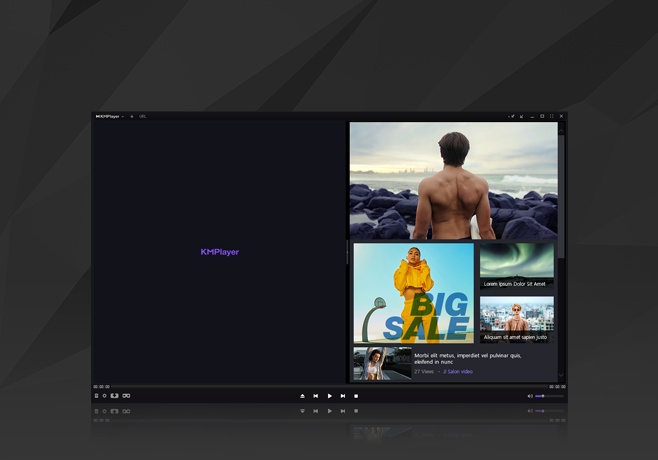
The KMPlayer is a versatile media player which can cover various types of container format such as DVD, AVI, MKV, MP4, FLV, Ogg Theora, OGM, 3GP, MPEG-1/2/4, WMV, RealMedia, and QuickTime among others. It handles a wide range of subtitles and allows you to capture audio, video, and screenshots in many ways. The player provides both internal and external filters with a fully controlled environment in terms of connections to other splitters, decoders, audio/video transform filters and renderers without grappling with the DirectShow merit system. Internal filters are not registered to user's system to keep it from being messed up with system filters.
Freeware
OS:
File size: 57MB
Old versions
Version history
Alternative software
OS:
File size: 57MB
Old versions
Version history
Alternative software
Screenshots


Latest version

Download
Download KMPlayer 2026.4.24.27 64-bit 57MB Win64
Download other versions
Download the old KMPlayer 4.2.2.6 Portable Win Portable
Download old versions

Software License
Supported operating systems
Version history / Release notes / Changelog / What's New
KMPlayer 2026
No changelog...
No changelog...
View full changelog
All features
Supported Files or Devices
* Incomplete/Damaged AVI file (Skip Damaged Frames)
* Locked Media Files while downloading or sharing (with realtime index rebuilding under certain condition: AVI downloading in consecutive order)
* Incoming Stream delivered via HTTP (ASF/OGG/MP3/AAC/MPEG PS/MPEG TS: Only works with KMP splitters)
* Directshow playback (avi, mkv, mov, mp4, 3gp, ogg theora, ogm, rmvb, mpeg1/2, vob, wmv, dvr-ms, http:// etc including almost every audio formats)
o Async File Source (network) filter for memory caching
o Compressed Audio Album Support (zip, rar)
o Shoutcast (Including NSV), Icecast
o DTS Wave, AC3, AAC, Ogg Vorbis, Monkey's Audio, Musepack, FLAC/Ogg FLAC, Modules (MOD, S3M, MTM, UMX, XM and IT), AMR, ALAC, WavPack, TTA etc
o Native (ansi/unicode) Cue Sheet Support
o Google Video (GVI), Flash Video (FLV), Nullsoft Streaming Video (NSV), PMP
* Real Engine + Directshow (needs Real Player or Alternative or its decoders)
o Supports the playback and seeking of multirate real media files (surestream clips) with KMP RealMedia splitter
o Almost all Real Media files are supported (directshow).
* QuickTime Engine + Directshow (needs QuickTime player or Alternative or its decoders)
o The verified MOV samples with KMP mp4/mov splitter (directshow)
+ MOV[H264/AVC1+AAC], MOV[H264+AC3]
+ MOV[SVQ1+A-law], MOV[SVQ1+IMA4], MOV[SVQ1+PCM]
+ MOV[SVQ3+QDM2], MOV[SVQ3+MP3], MOV[SVQ3+IMA4], MOV[SVQ3+QCLP]
+ MOV[MP4V+AAC], MOV[MP4V+MP3], MOV[MP4V+ALAC], MOV[MP4V+PCM]
+ MOV[RLE+AAC], MOV[MSVC+MP3], MOV[MPNG+QDM2], MOV[MPG1+MP2]
+ MOV[CVID+TWOS], MOV[CVID+PCM], MOV[MJPEG+PCM], MOV[DVC+PCM], MOV[H263+MU-law], MOV[SMC/RPZA+PCM]
o Almost all MP4s are supported(directshow).
* Mplayer Engine Support
* Winamp Input Plugin (decoder) Support
* DVD playback, ratDVD support (needs ratDVD filters)
o Audio CD (2000, XP only / Win9x-Support by winamp plugin)
o Video CD/SVCD/XCD : CDXA Format (2000, XP only)
o VCD Image File (BIN/ISO/IMG/NRG) ; NRG needs mplayer.dll
* WDM device support like TV/HDTV/Camera/Cam etc
* Adobe Flash (SWF)/FLC/FLI
* Various Image files like png, gif etc
* Incomplete/Damaged AVI file (Skip Damaged Frames)
* Locked Media Files while downloading or sharing (with realtime index rebuilding under certain condition: AVI downloading in consecutive order)
* Incoming Stream delivered via HTTP (ASF/OGG/MP3/AAC/MPEG PS/MPEG TS: Only works with KMP splitters)
* Directshow playback (avi, mkv, mov, mp4, 3gp, ogg theora, ogm, rmvb, mpeg1/2, vob, wmv, dvr-ms, http:// etc including almost every audio formats)
o Async File Source (network) filter for memory caching
o Compressed Audio Album Support (zip, rar)
o Shoutcast (Including NSV), Icecast
o DTS Wave, AC3, AAC, Ogg Vorbis, Monkey's Audio, Musepack, FLAC/Ogg FLAC, Modules (MOD, S3M, MTM, UMX, XM and IT), AMR, ALAC, WavPack, TTA etc
o Native (ansi/unicode) Cue Sheet Support
o Google Video (GVI), Flash Video (FLV), Nullsoft Streaming Video (NSV), PMP
* Real Engine + Directshow (needs Real Player or Alternative or its decoders)
o Supports the playback and seeking of multirate real media files (surestream clips) with KMP RealMedia splitter
o Almost all Real Media files are supported (directshow).
* QuickTime Engine + Directshow (needs QuickTime player or Alternative or its decoders)
o The verified MOV samples with KMP mp4/mov splitter (directshow)
+ MOV[H264/AVC1+AAC], MOV[H264+AC3]
+ MOV[SVQ1+A-law], MOV[SVQ1+IMA4], MOV[SVQ1+PCM]
+ MOV[SVQ3+QDM2], MOV[SVQ3+MP3], MOV[SVQ3+IMA4], MOV[SVQ3+QCLP]
+ MOV[MP4V+AAC], MOV[MP4V+MP3], MOV[MP4V+ALAC], MOV[MP4V+PCM]
+ MOV[RLE+AAC], MOV[MSVC+MP3], MOV[MPNG+QDM2], MOV[MPG1+MP2]
+ MOV[CVID+TWOS], MOV[CVID+PCM], MOV[MJPEG+PCM], MOV[DVC+PCM], MOV[H263+MU-law], MOV[SMC/RPZA+PCM]
o Almost all MP4s are supported(directshow).
* Mplayer Engine Support
* Winamp Input Plugin (decoder) Support
* DVD playback, ratDVD support (needs ratDVD filters)
o Audio CD (2000, XP only / Win9x-Support by winamp plugin)
o Video CD/SVCD/XCD : CDXA Format (2000, XP only)
o VCD Image File (BIN/ISO/IMG/NRG) ; NRG needs mplayer.dll
* WDM device support like TV/HDTV/Camera/Cam etc
* Adobe Flash (SWF)/FLC/FLI
* Various Image files like png, gif etc
Sections/Browse similar tools
Alternative to KMPlayer
(Latest version updated)BSPlayer (Aug 26, 2025)
GOM Encoder (May 3, 2021)
Kantaris Media Player (Sep 9, 2013)
Media Player Classic (Feb 14, 2010)
MPC-BE (Dec 30, 2025)
MPC-HC (Apr 20, 2026)
PotPlayer (Apr 29, 2026)
SMPlayer (Jun 8, 2025)
VLC media player (Dec 31, 2025)
Zoom Player (Apr 15, 2026)
Guides and How to's
Acronyms / Also Known As
Notify me when software updated or report software
| 67 reviews, Showing 1 to 5 reviews |
HI. I have a problem with KMplayer
• The download link doesn't work certainly. And when I copy a link, nothing starts to download. So I think this part of KMplayer is so weak. please fix it. Thanks.
• The download link doesn't work certainly. And when I copy a link, nothing starts to download. So I think this part of KMplayer is so weak. please fix it. Thanks.
Review by saeidxlf on
Nov 16, 2020 Version: latest version
OS: Windows 7 Ease of use: 8/10
Functionality: 8/10
Value for money: 8/10
Overall: 8/10
Missing Equalizer option.
Review by Aluth.com on
Apr 7, 2020 Version: 10
OS: Windows 10 64-bit Ease of use: 1/10
Functionality: 1/10
Value for money: 1/10
Overall: 1/10
There are two versions of this player. The 64 bit version is just MPC-HC cloned directly without changing much of the GUI. The 32 bit version is old PotPlayer without further improvements. The 32 bit version in particular is full of bugs. I use MPC-HC and PotPlayer every day. The KMPlayer dark theme is nice.
Review by Ziggy1978 on
Oct 18, 2019 Version: 4.2.2.6 (same for older versions)
OS: Windows 8 64-bit Ease of use: 8/10
Functionality: 5/10
Value for money: 5/10
Overall: 5/10
Rating by Arnold on
Sep 20, 2019 Version: 4.2.2.30
OS: Windows 10 64-bit Ease of use: 10/10
Functionality: 10/10
Value for money: 10/10
Overall: 10/10
I tried and used version KMPLayer 64x.2019.06.13.02. It's very nice and good. But i noticed two major minus. first; there is no "Fullscreen Stretch by Keeping AR" function. Second; there is no "Control Box" (including audio equaliser).
Review by Burt Sailor on
Jun 16, 2019 Version: KMPlayer 64x.2019.06.13.02
OS: Windows 10 64-bit Ease of use: 6/10
Functionality: 5/10
Value for money: 6/10
Overall: 6/10
| 67 reviews, Showing 1 to 5 reviews |
| 1 tool hits, Showing 1 to 1 tools |
Explanation:
NEW SOFTWARE= New tool since your last visit
NEW VERSION= New version since your last visit
NEW REVIEW= New review since your last visit
NEW VERSION= New version
Latest version
Version number / Beta version number / Update version number and when it whas released.
Type and download
NO MORE UPDATES? = The software hasn't been updated in over 2 years.
NO LONGER DEVELOPED = The software hasn't been updated in over 5 years.
RECENTLY UPDATED = The software has been updated the last 31 days.
Freeware = Download Free software.
Freeware Trialware = Download Free software but some parts are trial/shareware.
Free software = Download Free software and also open source code also known as FOSS (Free and Open Source Software).
Free software Trialware = Download Free software and also open source code but some parts are trial/shareware.
Freeware Ads = Download Free software but supported by advertising, usually with a included browser toolbar. It may be disabled when installing or after installation.
Free software Ads = Free Download software and open source code but supported by advertising, usually with a included browser toolbar. It may be disabled when installing or after installation.
Trialware = Also called shareware or demo. Free Trial version available for download and testing with usually a time limit or limited functions.
Payware = No demo or trial available.
Portable version = A portable/standalone version is available. No installation is required.
v1.0.1 = Latest version available.
Download beta = It could be a Beta, RC(Release Candidate) or an Alpha / Nightly / Unstable version of the software.
Download 15MB = A direct link to the software download.
Win = Windows download version for 32-bit and 64-bit Windows.
Win64 = Windows 64-bit download version for 64-bit Windows.
WinARM64 = Windows 64-bit ARM download version for Windows ARM64/AArch64.
Mac = Mac download version for 64-bit Mac OS Intel/ARM64/AArch64.
MacARM64 = Mac Silicon download version for 64-bit Mac OS ARM64/AArch64.
Mac64 = Mac OS download version for 64-bit Intel Mac OS.
Linux = Linux download version.
Linux64 = Linux download version for 64bit Linux.
Linux ARM = Linux download version for Linux ARM64/AArch64.
Portable = Portable version. No installation is required.
Ad-Supported = The software is bundled with advertising. Be careful when you install the software and disable addons that you don't want!
Visit developers site = A link to the software developer site.
Download (mirror link) = A mirror link to the software download. It may not contain the latest versions.
Download old versions = Free downloads of previous versions of the program.
Download 64-bit version = If you have a 64bit operating system you can download this version.
Download portable version = Portable/Standalone version meaning that no installation is required, just extract the files to a folder and run directly.
Portable version available = Download the portable version and you can just extract the files and run the program without installation.
Old versions available = Download old versions of the program.
Version history available = Complete changelog on our site.
= Windows version available.
 = Mac OS version available.
 = Linux version available.
Our hosted software are virus and malware scanned with several antivirus programs using www.virustotal.com. (NOTE! Just one virustotal warning is 99.9% a false positive. And some software might receive 2-6 warnings but it's if they are not all same virus/trojan then it's 99% false positives.)
Rating
Rating from 0-10.
NEW SOFTWARE= New tool since your last visit
NEW VERSION= New version since your last visit
NEW REVIEW= New review since your last visit
NEW VERSION= New version
Latest version
Version number / Beta version number / Update version number and when it whas released.
Type and download
NO MORE UPDATES? = The software hasn't been updated in over 2 years.
NO LONGER DEVELOPED = The software hasn't been updated in over 5 years.
RECENTLY UPDATED = The software has been updated the last 31 days.
Freeware = Download Free software.
Freeware Trialware = Download Free software but some parts are trial/shareware.
Free software = Download Free software and also open source code also known as FOSS (Free and Open Source Software).
Free software Trialware = Download Free software and also open source code but some parts are trial/shareware.
Freeware Ads = Download Free software but supported by advertising, usually with a included browser toolbar. It may be disabled when installing or after installation.
Free software Ads = Free Download software and open source code but supported by advertising, usually with a included browser toolbar. It may be disabled when installing or after installation.
Trialware = Also called shareware or demo. Free Trial version available for download and testing with usually a time limit or limited functions.
Payware = No demo or trial available.
Portable version = A portable/standalone version is available. No installation is required.
v1.0.1 = Latest version available.
Download beta = It could be a Beta, RC(Release Candidate) or an Alpha / Nightly / Unstable version of the software.
Download 15MB = A direct link to the software download.
Win = Windows download version for 32-bit and 64-bit Windows.
Win64 = Windows 64-bit download version for 64-bit Windows.
WinARM64 = Windows 64-bit ARM download version for Windows ARM64/AArch64.
Mac = Mac download version for 64-bit Mac OS Intel/ARM64/AArch64.
MacARM64 = Mac Silicon download version for 64-bit Mac OS ARM64/AArch64.
Mac64 = Mac OS download version for 64-bit Intel Mac OS.
Linux = Linux download version.
Linux64 = Linux download version for 64bit Linux.
Linux ARM = Linux download version for Linux ARM64/AArch64.
Portable = Portable version. No installation is required.
Ad-Supported = The software is bundled with advertising. Be careful when you install the software and disable addons that you don't want!
Visit developers site = A link to the software developer site.
Download (mirror link) = A mirror link to the software download. It may not contain the latest versions.
Download old versions = Free downloads of previous versions of the program.
Download 64-bit version = If you have a 64bit operating system you can download this version.
Download portable version = Portable/Standalone version meaning that no installation is required, just extract the files to a folder and run directly.
Portable version available = Download the portable version and you can just extract the files and run the program without installation.
Old versions available = Download old versions of the program.
Version history available = Complete changelog on our site.
= Windows version available. = Mac OS version available. = Linux version available.Our hosted software are virus and malware scanned with several antivirus programs using www.virustotal.com. (NOTE! Just one virustotal warning is 99.9% a false positive. And some software might receive 2-6 warnings but it's if they are not all same virus/trojan then it's 99% false positives.)
Rating
Rating from 0-10.
Browse software by sections
All In One Blu-ray Converters (9)
All In One DVD Converters (12)
All In One MKV to MP4, Blu-ray, UHD (11)
All In One Video Converters (19)
Animation (3D, 2D Animation) (12)
Audio Editors (22)
Audio Encoders (80)
Audio Players (19)
Authoring (Blu-ray, UHD, AVCHD) (13)
Authoring (DivX) (4)
Authoring (DVD) (26)
Authoring (SVCD, VCD) (9)
Bitrate Calculators (7)
Blu-ray to AVI, MKV, MP4 (15)
Blu-ray to Blu-ray, AVCHD (10)
Burn (CD,DVD,Blu-ray) (24)
Camcorders, DV, HDV, AVCHD (31)
Capture TV, DVD, VCR (30)
CD, DVD, Blu-ray recovery (3)
Codec Packs (6)
All In One DVD Converters (12)
All In One MKV to MP4, Blu-ray, UHD (11)
All In One Video Converters (19)
Animation (3D, 2D Animation) (12)
Audio Editors (22)
Audio Encoders (80)
Audio Players (19)
Authoring (Blu-ray, UHD, AVCHD) (13)
Authoring (DivX) (4)
Authoring (DVD) (26)
Authoring (SVCD, VCD) (9)
Bitrate Calculators (7)
Blu-ray to AVI, MKV, MP4 (15)
Blu-ray to Blu-ray, AVCHD (10)
Burn (CD,DVD,Blu-ray) (24)
Camcorders, DV, HDV, AVCHD (31)
Capture TV, DVD, VCR (30)
CD, DVD, Blu-ray recovery (3)
Codec Packs (6)
Codec, Video Identifiers (30)
Codecs (67)
Decrypters (DVD Rippers) (16)
Decrypters (UHD, Blu-ray Rippers) (8)
DigitalTV, DVB, IPTV (39)
DVD to DVD (20)
DVD to MP4, MKV, H264, H265 (16)
DVD to VCD, SVCD (5)
DVD to XviD, AVI, DivX (16)
ISO, Image (15)
Linux Video Tools (208)
MacOS Video Tools (244)
Media (Blu-ray, DVD, CD) (9)
Media Center, HTPC (24)
Other Useful Tools (140)
Photo Blu-ray, DVD, SlideShow (8)
Portable (Mobile, PSP) (35)
Region Free Tools (5)
Screen capture , Screen recording (27)
Screenshots , Thumbnails (13)
Codecs (67)
Decrypters (DVD Rippers) (16)
Decrypters (UHD, Blu-ray Rippers) (8)
DigitalTV, DVB, IPTV (39)
DVD to DVD (20)
DVD to MP4, MKV, H264, H265 (16)
DVD to VCD, SVCD (5)
DVD to XviD, AVI, DivX (16)
ISO, Image (15)
Linux Video Tools (208)
MacOS Video Tools (244)
Media (Blu-ray, DVD, CD) (9)
Media Center, HTPC (24)
Other Useful Tools (140)
Photo Blu-ray, DVD, SlideShow (8)
Portable (Mobile, PSP) (35)
Region Free Tools (5)
Screen capture , Screen recording (27)
Screenshots , Thumbnails (13)
Subtitle Editors, Converters (72)
Tag Editors (4)
Video De, Multiplexers (66)
Video Editors (Advanced, NLE) (35)
Video Editors (Basic) (56)
Video Editors (H264, MP4, MKV, MTS) (19)
Video Editors (Lossless) (4)
Video Editors (MPG, DVD) (16)
Video Editors (WMV, AVI) (15)
Video Encoders (AV1, VP8, VP9) (2)
Video Encoders (AVI, WMV) (38)
Video Encoders (H264, H265, MP4, MKV) (45)
Video Encoders (MPG, DVD) (23)
Video Encoders , Converters (155)
Video Frameservers (9)
Video Players (49)
Video Repair, Fix (24)
Video Scripting (10)
Video Streaming (21)
Video Streaming Downloaders (101)
Tag Editors (4)
Video De, Multiplexers (66)
Video Editors (Advanced, NLE) (35)
Video Editors (Basic) (56)
Video Editors (H264, MP4, MKV, MTS) (19)
Video Editors (Lossless) (4)
Video Editors (MPG, DVD) (16)
Video Editors (WMV, AVI) (15)
Video Encoders (AV1, VP8, VP9) (2)
Video Encoders (AVI, WMV) (38)
Video Encoders (H264, H265, MP4, MKV) (45)
Video Encoders (MPG, DVD) (23)
Video Encoders , Converters (155)
Video Frameservers (9)
Video Players (49)
Video Repair, Fix (24)
Video Scripting (10)
Video Streaming (21)
Video Streaming Downloaders (101)