
Help us keep the list up to date and submit new video software here.
Tool
Description
Type
Rating
Reviews
NextPVR (former GB-PVR) is a popular free personal video recorder application for Microsoft Windows, making it easy to watch or record live tv, and provides great features like series recordings, web scheduling, playing music, video and image files, Kodi/XBMC integration etc.
Freeware
OS:
File size: 1MB
Old versions
Version history
Alternative software
OS:
File size: 1MB
Old versions
Version history
Alternative software
Screenshots


Latest version

Download
Download NextPVR 7.0.5.260307 Windows 1MB Win
Download NextPVR 7.0.5.260307 Mac 64-bit
Download NextPVR 7.0.5.260307 Linux 64-bit
Download old versions

Software License
Supported operating systems
Version history / Release notes / Changelog / What's New
I've updated the NextPVR builds to the new v7.0.5.260307 release.
7.0.5
changes to Schedules Direct country processing
add Schedules Direct part numbers
check tuner before doing a OTA EPG update use another tuner if avaialable
Freesat scan could use two tuners
improved error checking of digital tuner use
support for SAT>IP DVB-T2
reduced logging including log to Linux system logs
fixed web client main page not always loading pending recordings
fixed import of All Channels recording from V4
power management change to stop Windows 11 from sleeping during remote playback.
improvement to XC login processing
fixed v7 issue not passing split a/v IPTV files to ffmpeg
reload HDPVR cache on changed settings.
add OpenTV guide for NZ
add new Koreasat DVB-S scan file for NZ
don't store ADS timing.info on Windows
fix in-progress recording start time issue after restart
minor settings look & feel improvements
added parameters to PreRecording script and allow it to run before Live TV
modify uniqueID OTA process
improve multi channel streaming of UDP and RTP.
allow NVIDIA nvenc encoding on x64 Linux
allow stream thumbnails to UI clients
improvements for in progress recordings to UI clients
delete short timing files
7.0.4
change requested by Schedules Direct for expired accounts
added message on Settings->Guide for SD login problems
web improvements for screen reader.
fixed a couple of typos
IPTV max connections not respecting post padding.
consistent processing of UK part numbers.
ATSC OTA updates could miss descriptions
ATSC OTA could miss minor channels.
reduce frequency of calls for m3u8 updates
ignore duplicate events (ie from bad XMLTV) when scheduling recordings
allow setting user-agent and other parameters on XC login.
EPG updates were creating extra rows for each show for many tuners.
first Windows install fail (fixed online)
SAT>IP scan EPG scan wasn't working
fixed downloading of gzip XMLTV files
non-series filename weren't being parsed for file system validity
create instant recordings in web Live TV.
fix for some UI client errors
channel paging in groups uses the group ist
improve Live TV stop cleanup
check existing HDHR status for legacy tuning
7.0.5
changes to Schedules Direct country processing
add Schedules Direct part numbers
check tuner before doing a OTA EPG update use another tuner if avaialable
Freesat scan could use two tuners
improved error checking of digital tuner use
support for SAT>IP DVB-T2
reduced logging including log to Linux system logs
fixed web client main page not always loading pending recordings
fixed import of All Channels recording from V4
power management change to stop Windows 11 from sleeping during remote playback.
improvement to XC login processing
fixed v7 issue not passing split a/v IPTV files to ffmpeg
reload HDPVR cache on changed settings.
add OpenTV guide for NZ
add new Koreasat DVB-S scan file for NZ
don't store ADS timing.info on Windows
fix in-progress recording start time issue after restart
minor settings look & feel improvements
added parameters to PreRecording script and allow it to run before Live TV
modify uniqueID OTA process
improve multi channel streaming of UDP and RTP.
allow NVIDIA nvenc encoding on x64 Linux
allow stream thumbnails to UI clients
improvements for in progress recordings to UI clients
delete short timing files
7.0.4
change requested by Schedules Direct for expired accounts
added message on Settings->Guide for SD login problems
web improvements for screen reader.
fixed a couple of typos
IPTV max connections not respecting post padding.
consistent processing of UK part numbers.
ATSC OTA updates could miss descriptions
ATSC OTA could miss minor channels.
reduce frequency of calls for m3u8 updates
ignore duplicate events (ie from bad XMLTV) when scheduling recordings
allow setting user-agent and other parameters on XC login.
EPG updates were creating extra rows for each show for many tuners.
first Windows install fail (fixed online)
SAT>IP scan EPG scan wasn't working
fixed downloading of gzip XMLTV files
non-series filename weren't being parsed for file system validity
create instant recordings in web Live TV.
fix for some UI client errors
channel paging in groups uses the group ist
improve Live TV stop cleanup
check existing HDHR status for legacy tuning
View full changelog
All features
Devices Supported
NextPVR supports a wide range of capture devices. Supported digital tuners include DVB-S/S2, SAT>IP, DVB-T/T2, DVB-C, DMB-T, ATSC and ClearQAM.
NextPVR also supports specialist component/HDMI capture devices (like the Hauppauge HDPVR, HDPVR2 and Colossus), and Copy-Freely devices (like the Hauppauge DCR-2650 and HDHomeRun Prime). Old-school analog and FM capture devices are also supported, if SoftPVR components are available on your PC.
User Interface
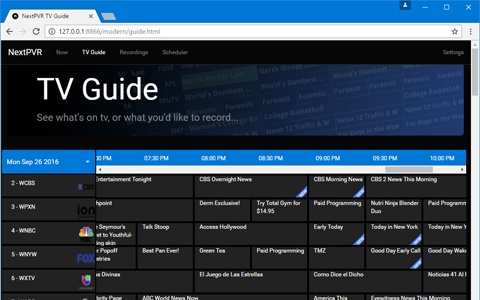
NextPVR's user interface is designed to be easy to use for the entire family. NextPVR's interface provides a TV Guide for scheduling recording, Recordings screen for watching/managing your recordings and schedule, and Library screens for watching movies, listening to music, and viewing photos.
Integration
NextPVR enables you to view it's user interface out to devices like Samsung TV and Blu-Ray players, and LG TVs. You can also use the great X-NEWA to access NextPVR's interface on any platform able to run Kodi/XBMC. If it better suits your needs, you can also use the built-in addons in Kodi/XBMC, or MediaBrowser3, to user the backend television services provided by NextPVR
NextPVR supports a wide range of capture devices. Supported digital tuners include DVB-S/S2, SAT>IP, DVB-T/T2, DVB-C, DMB-T, ATSC and ClearQAM.
NextPVR also supports specialist component/HDMI capture devices (like the Hauppauge HDPVR, HDPVR2 and Colossus), and Copy-Freely devices (like the Hauppauge DCR-2650 and HDHomeRun Prime). Old-school analog and FM capture devices are also supported, if SoftPVR components are available on your PC.
User Interface
NextPVR's user interface is designed to be easy to use for the entire family. NextPVR's interface provides a TV Guide for scheduling recording, Recordings screen for watching/managing your recordings and schedule, and Library screens for watching movies, listening to music, and viewing photos.
Integration
NextPVR enables you to view it's user interface out to devices like Samsung TV and Blu-Ray players, and LG TVs. You can also use the great X-NEWA to access NextPVR's interface on any platform able to run Kodi/XBMC. If it better suits your needs, you can also use the built-in addons in Kodi/XBMC, or MediaBrowser3, to user the backend television services provided by NextPVR
Sections/Browse similar tools
Alternative to NextPVR
(Latest version updated)Argus TV (Dec 27, 2014)
DVBViewer (Dec 22, 2025)
ProgDVB (Apr 14, 2026)
SmartDVB (Oct 3, 2019)
Guides and How to's
Acronyms / Also Known As
Notify me when software updated or report software
| 19 reviews, Showing 1 to 5 reviews |
nscripthelper.exe fails if your Windows doesn't have .NET Runtime 6.
Windows event log gives link to download .NET Runtime 6.
Software requirements needs to be updated.
Windows event log gives link to download .NET Runtime 6.
Software requirements needs to be updated.
Review by mstrof univrs on
Sep 7, 2022 Version: 6.0.0.220904
OS: Windows 10 Ease of use: 10/10
Functionality: 10/10
Value for money: 10/10
Overall: 10/10
I've been using NextPVR for over 10 years now. If you're primary requirement is to schedule and watch TV shows over the air, then I don't think there is any better software out there. It may lack some of the pzazz of some other media players but often that is all they are (media players) and don't offer intelligent scheduling of all your favourite TV shows from one or multiple TV tuners. For example did you know that if the channels you want to watch are on the same DVB mux, it can record multiple shows at the same time, all from a single tuner. It can avoid recording the same show, reschedule a show to resolve a conflict with recordings, keep the last X episodes of a series etc.
I would say the software is pretty much bullet-proof and I don't recall the last time I ever had the software barf on me. (There were a few issues with FF/RW when the playback code was rewritten but these gremlins are pretty much all ironed out now). You do however need to ensure that you have the necessary codecs installed (not supplied with NextPVR) if you wish to playback other formats as NextPVR just asks windows to use whatever the default codec is for that file type. Most folks use decoders from LAV , MS or various codec packs that are available.
If you just want software to playback movies that you have downloaded or ripped off a disc, NextPVR can cater for these files just fine although there may be other products that can provide more bling to your viewing experience.
As a true client/server app, it supports playback from other pcs/laptops/browsers and mobile devices (being actively developed).
The author has also been investing a lot of time in ramping up support for IPTV during the last 12 months.
I would prefer to call it donateware rather than freeware as I feel that regular users of the product should support the author who dedicates a huge amount of his time to this project and the forum is friendly, responsive and helpful.
I would say the software is pretty much bullet-proof and I don't recall the last time I ever had the software barf on me. (There were a few issues with FF/RW when the playback code was rewritten but these gremlins are pretty much all ironed out now). You do however need to ensure that you have the necessary codecs installed (not supplied with NextPVR) if you wish to playback other formats as NextPVR just asks windows to use whatever the default codec is for that file type. Most folks use decoders from LAV , MS or various codec packs that are available.
If you just want software to playback movies that you have downloaded or ripped off a disc, NextPVR can cater for these files just fine although there may be other products that can provide more bling to your viewing experience.
As a true client/server app, it supports playback from other pcs/laptops/browsers and mobile devices (being actively developed).
The author has also been investing a lot of time in ramping up support for IPTV during the last 12 months.
I would prefer to call it donateware rather than freeware as I feel that regular users of the product should support the author who dedicates a huge amount of his time to this project and the forum is friendly, responsive and helpful.
Review by gEd on
Jun 1, 2018 Version: 4.1.1
OS: Windows 10 64-bit Ease of use: 7/10
Functionality: 8/10
Value for money: 10/10
Overall: 9/10
It doesn't allow to import IPTV channels from m3u file, so it is useless.
Review by Pinto007 on
Dec 14, 2017 Version: 4.0.5
OS: Windows 7 64-bit Ease of use: 8/10
Functionality: 1/10
Value for money: 10/10
Overall: 1/10
excellent software, very stable and strong for long captures of 2-4 hours. This is base software for Capture4ME, GamerCap and perhaps Hauppauge Capture (for the HDPVR2). Increase bitrate from 9mbs as desired in C\Users\Public\NPVR\config.xml for 720p. Record with Recordings , Man-Rec (no preview window).
Review by texas1 on
Jan 12, 2015 Version: 3.3.8
OS: Windows 7 Ease of use: 9/10
Functionality: 10/10
Value for money: 10/10
Overall: 10/10
Tried and Tried to make it work with my Hauppauge 1600 and no dice. The older version works great. Maybe I am doing something wrong. Needs to have a downloadable instructions or something.
Review by Backpain on
Oct 18, 2010 Version: 1.5.33
OS: Windows 7 Ease of use: 1/10
Functionality: 1/10
Value for money: 10/10
Overall: 2/10
| 19 reviews, Showing 1 to 5 reviews |
| 1 tool hits, Showing 1 to 1 tools |
Explanation:
NEW SOFTWARE= New tool since your last visit
NEW VERSION= New version since your last visit
NEW REVIEW= New review since your last visit
NEW VERSION= New version
Latest version
Version number / Beta version number / Update version number and when it whas released.
Type and download
NO MORE UPDATES? = The software hasn't been updated in over 2 years.
NO LONGER DEVELOPED = The software hasn't been updated in over 5 years.
RECENTLY UPDATED = The software has been updated the last 31 days.
Freeware = Download Free software.
Freeware Trialware = Download Free software but some parts are trial/shareware.
Free software = Download Free software and also open source code also known as FOSS (Free and Open Source Software).
Free software Trialware = Download Free software and also open source code but some parts are trial/shareware.
Freeware Ads = Download Free software but supported by advertising, usually with a included browser toolbar. It may be disabled when installing or after installation.
Free software Ads = Free Download software and open source code but supported by advertising, usually with a included browser toolbar. It may be disabled when installing or after installation.
Trialware = Also called shareware or demo. Free Trial version available for download and testing with usually a time limit or limited functions.
Payware = No demo or trial available.
Portable version = A portable/standalone version is available. No installation is required.
v1.0.1 = Latest version available.
Download beta = It could be a Beta, RC(Release Candidate) or an Alpha / Nightly / Unstable version of the software.
Download 15MB = A direct link to the software download.
Win = Windows download version for 32-bit and 64-bit Windows.
Win64 = Windows 64-bit download version for 64-bit Windows.
WinARM64 = Windows 64-bit ARM download version for Windows ARM64/AArch64.
Mac = Mac download version for 64-bit Mac OS Intel/ARM64/AArch64.
MacARM64 = Mac Silicon download version for 64-bit Mac OS ARM64/AArch64.
Mac64 = Mac OS download version for 64-bit Intel Mac OS.
Linux = Linux download version.
Linux64 = Linux download version for 64bit Linux.
Linux ARM = Linux download version for Linux ARM64/AArch64.
Portable = Portable version. No installation is required.
Ad-Supported = The software is bundled with advertising. Be careful when you install the software and disable addons that you don't want!
Visit developers site = A link to the software developer site.
Download (mirror link) = A mirror link to the software download. It may not contain the latest versions.
Download old versions = Free downloads of previous versions of the program.
Download 64-bit version = If you have a 64bit operating system you can download this version.
Download portable version = Portable/Standalone version meaning that no installation is required, just extract the files to a folder and run directly.
Portable version available = Download the portable version and you can just extract the files and run the program without installation.
Old versions available = Download old versions of the program.
Version history available = Complete changelog on our site.
= Windows version available.
 = Mac OS version available.
 = Linux version available.
Our hosted software are virus and malware scanned with several antivirus programs using www.virustotal.com. (NOTE! Just one virustotal warning is 99.9% a false positive. And some software might receive 2-6 warnings but it's if they are not all same virus/trojan then it's 99% false positives.)
Rating
Rating from 0-10.
NEW SOFTWARE= New tool since your last visit
NEW VERSION= New version since your last visit
NEW REVIEW= New review since your last visit
NEW VERSION= New version
Latest version
Version number / Beta version number / Update version number and when it whas released.
Type and download
NO MORE UPDATES? = The software hasn't been updated in over 2 years.
NO LONGER DEVELOPED = The software hasn't been updated in over 5 years.
RECENTLY UPDATED = The software has been updated the last 31 days.
Freeware = Download Free software.
Freeware Trialware = Download Free software but some parts are trial/shareware.
Free software = Download Free software and also open source code also known as FOSS (Free and Open Source Software).
Free software Trialware = Download Free software and also open source code but some parts are trial/shareware.
Freeware Ads = Download Free software but supported by advertising, usually with a included browser toolbar. It may be disabled when installing or after installation.
Free software Ads = Free Download software and open source code but supported by advertising, usually with a included browser toolbar. It may be disabled when installing or after installation.
Trialware = Also called shareware or demo. Free Trial version available for download and testing with usually a time limit or limited functions.
Payware = No demo or trial available.
Portable version = A portable/standalone version is available. No installation is required.
v1.0.1 = Latest version available.
Download beta = It could be a Beta, RC(Release Candidate) or an Alpha / Nightly / Unstable version of the software.
Download 15MB = A direct link to the software download.
Win = Windows download version for 32-bit and 64-bit Windows.
Win64 = Windows 64-bit download version for 64-bit Windows.
WinARM64 = Windows 64-bit ARM download version for Windows ARM64/AArch64.
Mac = Mac download version for 64-bit Mac OS Intel/ARM64/AArch64.
MacARM64 = Mac Silicon download version for 64-bit Mac OS ARM64/AArch64.
Mac64 = Mac OS download version for 64-bit Intel Mac OS.
Linux = Linux download version.
Linux64 = Linux download version for 64bit Linux.
Linux ARM = Linux download version for Linux ARM64/AArch64.
Portable = Portable version. No installation is required.
Ad-Supported = The software is bundled with advertising. Be careful when you install the software and disable addons that you don't want!
Visit developers site = A link to the software developer site.
Download (mirror link) = A mirror link to the software download. It may not contain the latest versions.
Download old versions = Free downloads of previous versions of the program.
Download 64-bit version = If you have a 64bit operating system you can download this version.
Download portable version = Portable/Standalone version meaning that no installation is required, just extract the files to a folder and run directly.
Portable version available = Download the portable version and you can just extract the files and run the program without installation.
Old versions available = Download old versions of the program.
Version history available = Complete changelog on our site.
= Windows version available. = Mac OS version available. = Linux version available.Our hosted software are virus and malware scanned with several antivirus programs using www.virustotal.com. (NOTE! Just one virustotal warning is 99.9% a false positive. And some software might receive 2-6 warnings but it's if they are not all same virus/trojan then it's 99% false positives.)
Rating
Rating from 0-10.
Browse software by sections
All In One Blu-ray Converters (9)
All In One DVD Converters (12)
All In One MKV to MP4, Blu-ray, UHD (11)
All In One Video Converters (19)
Animation (3D, 2D Animation) (12)
Audio Editors (22)
Audio Encoders (80)
Audio Players (19)
Authoring (Blu-ray, UHD, AVCHD) (13)
Authoring (DivX) (4)
Authoring (DVD) (26)
Authoring (SVCD, VCD) (9)
Bitrate Calculators (7)
Blu-ray to AVI, MKV, MP4 (15)
Blu-ray to Blu-ray, AVCHD (10)
Burn (CD,DVD,Blu-ray) (24)
Camcorders, DV, HDV, AVCHD (31)
Capture TV, DVD, VCR (30)
CD, DVD, Blu-ray recovery (3)
Codec Packs (6)
All In One DVD Converters (12)
All In One MKV to MP4, Blu-ray, UHD (11)
All In One Video Converters (19)
Animation (3D, 2D Animation) (12)
Audio Editors (22)
Audio Encoders (80)
Audio Players (19)
Authoring (Blu-ray, UHD, AVCHD) (13)
Authoring (DivX) (4)
Authoring (DVD) (26)
Authoring (SVCD, VCD) (9)
Bitrate Calculators (7)
Blu-ray to AVI, MKV, MP4 (15)
Blu-ray to Blu-ray, AVCHD (10)
Burn (CD,DVD,Blu-ray) (24)
Camcorders, DV, HDV, AVCHD (31)
Capture TV, DVD, VCR (30)
CD, DVD, Blu-ray recovery (3)
Codec Packs (6)
Codec, Video Identifiers (30)
Codecs (67)
Decrypters (DVD Rippers) (16)
Decrypters (UHD, Blu-ray Rippers) (8)
DigitalTV, DVB, IPTV (39)
DVD to DVD (20)
DVD to MP4, MKV, H264, H265 (16)
DVD to VCD, SVCD (5)
DVD to XviD, AVI, DivX (16)
ISO, Image (15)
Linux Video Tools (208)
MacOS Video Tools (244)
Media (Blu-ray, DVD, CD) (9)
Media Center, HTPC (24)
Other Useful Tools (140)
Photo Blu-ray, DVD, SlideShow (8)
Portable (Mobile, PSP) (35)
Region Free Tools (5)
Screen capture , Screen recording (27)
Screenshots , Thumbnails (13)
Codecs (67)
Decrypters (DVD Rippers) (16)
Decrypters (UHD, Blu-ray Rippers) (8)
DigitalTV, DVB, IPTV (39)
DVD to DVD (20)
DVD to MP4, MKV, H264, H265 (16)
DVD to VCD, SVCD (5)
DVD to XviD, AVI, DivX (16)
ISO, Image (15)
Linux Video Tools (208)
MacOS Video Tools (244)
Media (Blu-ray, DVD, CD) (9)
Media Center, HTPC (24)
Other Useful Tools (140)
Photo Blu-ray, DVD, SlideShow (8)
Portable (Mobile, PSP) (35)
Region Free Tools (5)
Screen capture , Screen recording (27)
Screenshots , Thumbnails (13)
Subtitle Editors, Converters (72)
Tag Editors (4)
Video De, Multiplexers (66)
Video Editors (Advanced, NLE) (35)
Video Editors (Basic) (56)
Video Editors (H264, MP4, MKV, MTS) (19)
Video Editors (Lossless) (4)
Video Editors (MPG, DVD) (16)
Video Editors (WMV, AVI) (15)
Video Encoders (AV1, VP8, VP9) (2)
Video Encoders (AVI, WMV) (38)
Video Encoders (H264, H265, MP4, MKV) (45)
Video Encoders (MPG, DVD) (23)
Video Encoders , Converters (155)
Video Frameservers (9)
Video Players (49)
Video Repair, Fix (24)
Video Scripting (10)
Video Streaming (21)
Video Streaming Downloaders (101)
Tag Editors (4)
Video De, Multiplexers (66)
Video Editors (Advanced, NLE) (35)
Video Editors (Basic) (56)
Video Editors (H264, MP4, MKV, MTS) (19)
Video Editors (Lossless) (4)
Video Editors (MPG, DVD) (16)
Video Editors (WMV, AVI) (15)
Video Encoders (AV1, VP8, VP9) (2)
Video Encoders (AVI, WMV) (38)
Video Encoders (H264, H265, MP4, MKV) (45)
Video Encoders (MPG, DVD) (23)
Video Encoders , Converters (155)
Video Frameservers (9)
Video Players (49)
Video Repair, Fix (24)
Video Scripting (10)
Video Streaming (21)
Video Streaming Downloaders (101)