
Help us keep the list up to date and submit new video software here.
Tool
Description
Type
Rating
Reviews
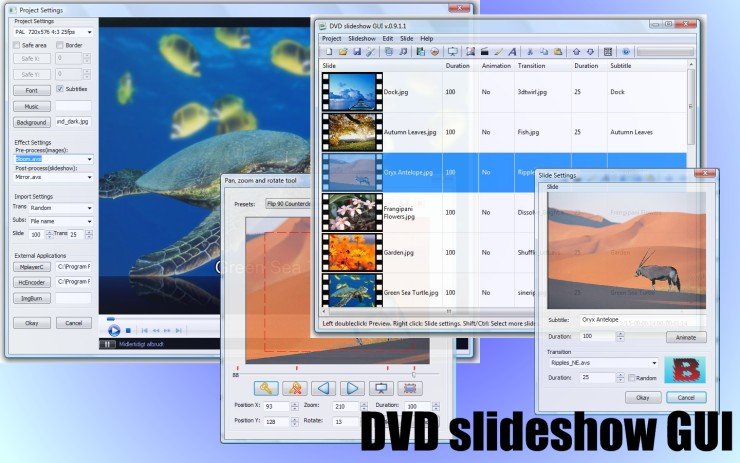
DVD slideshow GUI offers a very simple way to make your own slideshows. Just import photos and burn them as a slideshow on a DVD or Blu-ray! 237 transitions, 83 Effects you can add to the entire slideshow, 15 Motion Backgrounds(avs). Animate your overlapping images using zoom, pan and rotate. Add photos and EXIF data and alpha channel. Add videos(avi/avs) to you slideshow. Add music, motion backgrounds, borders and subtitles. Make your own transitions, effects and motion backgrounds. Export to dvd video(PAL/NTSC 4:3 16:9), BluRay, 720p, 1080p, dvd audio, dvd chapters, dvd subtitles, avi, flash for web, avisynthscript, storyboards, single images with backgrounds.
Freeware
OS:
File size: 25MB
Old versions
Version history
Alternative software
OS:
File size: 25MB
Old versions
Version history
Alternative software
Screenshots
Latest version
Download
Download DVD slideshow GUI 0.9.5.4 25MB Win
Download old versions

Software License
Supported operating systems
Version history / Release notes / Changelog / What's New
0.9.5.4
Updated:
- MPC-HC(works on Windows 8)
- VS-Filter for subtitles
- HcEnc: More stable when rendering HD
Bug fix:
- GFD chapterpoints
- Save External Applications
Updated:
- MPC-HC(works on Windows 8)
- VS-Filter for subtitles
- HcEnc: More stable when rendering HD
Bug fix:
- GFD chapterpoints
- Save External Applications
View full changelog
All features
# Import any type of image, any size.
# Import avi.
# Animate, Pan, Zoom, Rotate images.
# Change image order move, copy, paste for one or more slides.
# Resizing images/avi's within safearea.
# Exposition time for each slide.
# Transition time for each slide.
# 160 Transitions.
# Code your own avisynth transitions.
# Random transition.
# Text for each slide.
# Add border to image.
# Change fonts.
# Place text.
# Add textbox.
# Add background.
# Add wav music.
# Add effects to images.
# Add effects to the slideshow.
# Add your own avisynth, Free Frame, Photoshop CHA/AMP effects.
# Import Exif data with photos.
# Gui in english, dutch, french or danish.
# Import avi.
# Animate, Pan, Zoom, Rotate images.
# Change image order move, copy, paste for one or more slides.
# Resizing images/avi's within safearea.
# Exposition time for each slide.
# Transition time for each slide.
# 160 Transitions.
# Code your own avisynth transitions.
# Random transition.
# Text for each slide.
# Add border to image.
# Change fonts.
# Place text.
# Add textbox.
# Add background.
# Add wav music.
# Add effects to images.
# Add effects to the slideshow.
# Add your own avisynth, Free Frame, Photoshop CHA/AMP effects.
# Import Exif data with photos.
# Gui in english, dutch, french or danish.
Sections/Browse similar tools
Alternative to DVD slideshow GUI
(Latest version updated)DVD PixPlay (Oct 25, 2016)
Guides and How to's
How to make a menu slideshow DVD with freeware(DVD slideshow GUI , Gui for Dvdauthor, Imgburn)
- ReadHow to make a slide show with DVDslideshowGUI and burn a DVD-disc ready to play in a standalone DVD player with Img Burn. (flash)
- ReadHow to make a slideshow with DVD slideshow GUI
- ReadMaking a Photo Slideshow using DVD slideshown GUI
- ReadDVD slideshow GUI video tutorials
View all guides with guide description here
Acronyms / Also Known As
Notify me when software updated or report software
| 10 reviews, Showing 1 to 5 reviews |
Well folks,
I figured I'd give this one a go and its no dice for me. There are better free solutions out there and they are:
First, create your sildeshow using Windows Movie Maker 6.0 and save it using an HD template. There are 4 different HD versions included in this modified version that will install on any Win OS version:
http://movies.blainesville.com/p/wmm-60-on-windows-7.html
Note: All outputs are in the .wmv format except the DV-AVI selection which creats files too large to use in most cases.
Alternatively, you can use the Windows Live Movie Maker 12 which is part of the Windows Essentials Package here:
http://windows.microsoft.com/en-us/windows/movie-maker
Note: The installer will give you the option to only install Moviemaker and the outputs of your slideshow can be generated in either a .wmv or .mp4 format.
FYI, my preference is still WMM 6.0 because of the interface.
Next, download and install DVDStyler (or use the portable version) and use that, in conjunction with the videos you created, to make outstanding DVD videos.
Good luck,
gus
I figured I'd give this one a go and its no dice for me. There are better free solutions out there and they are:
First, create your sildeshow using Windows Movie Maker 6.0 and save it using an HD template. There are 4 different HD versions included in this modified version that will install on any Win OS version:
http://movies.blainesville.com/p/wmm-60-on-windows-7.html
Note: All outputs are in the .wmv format except the DV-AVI selection which creats files too large to use in most cases.
Alternatively, you can use the Windows Live Movie Maker 12 which is part of the Windows Essentials Package here:
http://windows.microsoft.com/en-us/windows/movie-maker
Note: The installer will give you the option to only install Moviemaker and the outputs of your slideshow can be generated in either a .wmv or .mp4 format.
FYI, my preference is still WMM 6.0 because of the interface.
Next, download and install DVDStyler (or use the portable version) and use that, in conjunction with the videos you created, to make outstanding DVD videos.
Good luck,
gus
Review by gus gusimio on
Jan 26, 2016 Version: 0.9.5.4
OS: Windows 10 64-bit Ease of use: 5/10
Functionality: 2/10
Value for money: 5/10
Overall: 3/10
I used it for thousands of pictures to create very simple slideshows. It is a very fast way to just backup your fotos together with some music to video, be it dvd or blueray. This version works well, practically no crashes. The generated video has very godd quality. It is a little slow because it is written in basic. I always export .avs files and later encode them to x264 in a batch job.
Animation is difficult to use, very slow and not reliable.
Has very good support from developer.
Animation is difficult to use, very slow and not reliable.
Has very good support from developer.
Review by george84 on
Dec 9, 2011 Version: 9.4.7
OS: WinXP Ease of use: 6/10
Functionality: 9/10
Value for money: 10/10
Overall: 7/10
I finally got the opportunity to test-drive DVDSlideshowGUI, with ~300 odd photos. I used the great random transition feature, and it was easy to go through and replace a few of the inappropriate transitions (eg get rid of "heart" yuck). I had full control over slide duration and transition duration. Added some Ken Burns effects to a handful of the photos. Added some music and used the very cool "Match To Audio Duration" feature. The entire process was very quick & easy & intuitive. This is fun software! Thanks very much to tintin for giving us this gem! I really hope he continues work on it. It's already superb as it is, and I ran into no bugs whatsoever, but it would be nice to see it continue to develop. What would be really cool (and I don't even know if this is possible or not) is the ability to manually "tap through" the slides in tempo with the background music, in real-time - or some other way of syncing up the slideshow to the beat of the music? Anyway fabulous software, and I give it 10 across the board. Thanks tintin!
Review by ZQX on
Apr 25, 2009 Version: 0.9.1.1
OS: WinXP Ease of use: 10/10
Functionality: 10/10
Value for money: 10/10
Overall: 10/10
Great tool - I especially like the photo animation features.
Review by ajbastien on
Oct 25, 2007 Version: 0.77 RC3
OS: WinXP Ease of use: 7/10
Functionality: 8/10
Value for money: 10/10
Overall: 8/10
I have several (both freeware and buyerbeware) cd/dvd slideshow creation programs that I have used over the years and each has had issues for my intended use.
DVD slideshow Gui used in conjuction with GUI for DVDauthor and Imageburn makes a nice package with reasonable flexibility and without a lot of work/thought on my part. I can import a directory of Jpegs, re-arrange order if desired, add some background music and individual photo subtitles if wanted and then export to GFD, creat DVD on HD and burn it with Imageburn. Total time including burn time less than 15 minutes.
Very few keystrokes required. When your brother-in-law says "Can you put these photos on a DVD for me quickly?"...try this one.
Don't be put off by the fact that there are three or four visible freeware programs involved, as the steps required in Gui for DVDAutor and Imageburn are not complex. Basically just point to folder on hard disk and execute.
You want more...It cost effective too...
The current version 77RC3 also uses the excellant HC encoder.
Great job guys...
DVD slideshow Gui used in conjuction with GUI for DVDauthor and Imageburn makes a nice package with reasonable flexibility and without a lot of work/thought on my part. I can import a directory of Jpegs, re-arrange order if desired, add some background music and individual photo subtitles if wanted and then export to GFD, creat DVD on HD and burn it with Imageburn. Total time including burn time less than 15 minutes.
Very few keystrokes required. When your brother-in-law says "Can you put these photos on a DVD for me quickly?"...try this one.
Don't be put off by the fact that there are three or four visible freeware programs involved, as the steps required in Gui for DVDAutor and Imageburn are not complex. Basically just point to folder on hard disk and execute.
You want more...It cost effective too...
The current version 77RC3 also uses the excellant HC encoder.
Great job guys...
Review by OldeMan on
Jul 25, 2007 Version: .77RC3
OS: WinXP Ease of use: 9/10
Functionality: 8/10
Value for money: 10/10
Overall: 9/10
| 10 reviews, Showing 1 to 5 reviews |
| 1 tool hits, Showing 1 to 1 tools |
Explanation:
NEW SOFTWARE= New tool since your last visit
NEW VERSION= New version since your last visit
NEW REVIEW= New review since your last visit
NEW VERSION= New version
Latest version
Version number / Beta version number / Update version number and when it whas released.
Type and download
NO MORE UPDATES? = The software hasn't been updated in over 2 years.
NO LONGER DEVELOPED = The software hasn't been updated in over 5 years.
RECENTLY UPDATED = The software has been updated the last 31 days.
Freeware = Download Free software.
Freeware Trialware = Download Free software but some parts are trial/shareware.
Free software = Download Free software and also open source code also known as FOSS (Free and Open Source Software).
Free software Trialware = Download Free software and also open source code but some parts are trial/shareware.
Freeware Ads = Download Free software but supported by advertising, usually with a included browser toolbar. It may be disabled when installing or after installation.
Free software Ads = Free Download software and open source code but supported by advertising, usually with a included browser toolbar. It may be disabled when installing or after installation.
Trialware = Also called shareware or demo. Free Trial version available for download and testing with usually a time limit or limited functions.
Payware = No demo or trial available.
Portable version = A portable/standalone version is available. No installation is required.
v1.0.1 = Latest version available.
Download beta = It could be a Beta, RC(Release Candidate) or an Alpha / Nightly / Unstable version of the software.
Download 15MB = A direct link to the software download.
Win = Windows download version for 32-bit and 64-bit Windows.
Win64 = Windows 64-bit download version for 64-bit Windows.
WinARM64 = Windows 64-bit ARM download version for Windows ARM64/AArch64.
Mac = Mac download version for 64-bit Mac OS Intel/ARM64/AArch64.
MacARM64 = Mac Silicon download version for 64-bit Mac OS ARM64/AArch64.
Mac64 = Mac OS download version for 64-bit Intel Mac OS.
Linux = Linux download version.
Linux64 = Linux download version for 64bit Linux.
Linux ARM = Linux download version for Linux ARM64/AArch64.
Portable = Portable version. No installation is required.
Ad-Supported = The software is bundled with advertising. Be careful when you install the software and disable addons that you don't want!
Visit developers site = A link to the software developer site.
Download (mirror link) = A mirror link to the software download. It may not contain the latest versions.
Download old versions = Free downloads of previous versions of the program.
Download 64-bit version = If you have a 64bit operating system you can download this version.
Download portable version = Portable/Standalone version meaning that no installation is required, just extract the files to a folder and run directly.
Portable version available = Download the portable version and you can just extract the files and run the program without installation.
Old versions available = Download old versions of the program.
Version history available = Complete changelog on our site.
= Windows version available.
 = Mac OS version available.
 = Linux version available.
Our hosted software are virus and malware scanned with several antivirus programs using www.virustotal.com. (NOTE! Just one virustotal warning is 99.9% a false positive. And some software might receive 2-6 warnings but it's if they are not all same virus/trojan then it's 99% false positives.)
Rating
Rating from 0-10.
NEW SOFTWARE= New tool since your last visit
NEW VERSION= New version since your last visit
NEW REVIEW= New review since your last visit
NEW VERSION= New version
Latest version
Version number / Beta version number / Update version number and when it whas released.
Type and download
NO MORE UPDATES? = The software hasn't been updated in over 2 years.
NO LONGER DEVELOPED = The software hasn't been updated in over 5 years.
RECENTLY UPDATED = The software has been updated the last 31 days.
Freeware = Download Free software.
Freeware Trialware = Download Free software but some parts are trial/shareware.
Free software = Download Free software and also open source code also known as FOSS (Free and Open Source Software).
Free software Trialware = Download Free software and also open source code but some parts are trial/shareware.
Freeware Ads = Download Free software but supported by advertising, usually with a included browser toolbar. It may be disabled when installing or after installation.
Free software Ads = Free Download software and open source code but supported by advertising, usually with a included browser toolbar. It may be disabled when installing or after installation.
Trialware = Also called shareware or demo. Free Trial version available for download and testing with usually a time limit or limited functions.
Payware = No demo or trial available.
Portable version = A portable/standalone version is available. No installation is required.
v1.0.1 = Latest version available.
Download beta = It could be a Beta, RC(Release Candidate) or an Alpha / Nightly / Unstable version of the software.
Download 15MB = A direct link to the software download.
Win = Windows download version for 32-bit and 64-bit Windows.
Win64 = Windows 64-bit download version for 64-bit Windows.
WinARM64 = Windows 64-bit ARM download version for Windows ARM64/AArch64.
Mac = Mac download version for 64-bit Mac OS Intel/ARM64/AArch64.
MacARM64 = Mac Silicon download version for 64-bit Mac OS ARM64/AArch64.
Mac64 = Mac OS download version for 64-bit Intel Mac OS.
Linux = Linux download version.
Linux64 = Linux download version for 64bit Linux.
Linux ARM = Linux download version for Linux ARM64/AArch64.
Portable = Portable version. No installation is required.
Ad-Supported = The software is bundled with advertising. Be careful when you install the software and disable addons that you don't want!
Visit developers site = A link to the software developer site.
Download (mirror link) = A mirror link to the software download. It may not contain the latest versions.
Download old versions = Free downloads of previous versions of the program.
Download 64-bit version = If you have a 64bit operating system you can download this version.
Download portable version = Portable/Standalone version meaning that no installation is required, just extract the files to a folder and run directly.
Portable version available = Download the portable version and you can just extract the files and run the program without installation.
Old versions available = Download old versions of the program.
Version history available = Complete changelog on our site.
= Windows version available. = Mac OS version available. = Linux version available.Our hosted software are virus and malware scanned with several antivirus programs using www.virustotal.com. (NOTE! Just one virustotal warning is 99.9% a false positive. And some software might receive 2-6 warnings but it's if they are not all same virus/trojan then it's 99% false positives.)
Rating
Rating from 0-10.
Browse software by sections
All In One Blu-ray Converters (9)
All In One DVD Converters (12)
All In One MKV to MP4, Blu-ray, UHD (11)
All In One Video Converters (19)
Animation (3D, 2D Animation) (12)
Audio Editors (22)
Audio Encoders (80)
Audio Players (19)
Authoring (Blu-ray, UHD, AVCHD) (13)
Authoring (DivX) (4)
Authoring (DVD) (26)
Authoring (SVCD, VCD) (9)
Bitrate Calculators (7)
Blu-ray to AVI, MKV, MP4 (15)
Blu-ray to Blu-ray, AVCHD (10)
Burn (CD,DVD,Blu-ray) (24)
Camcorders, DV, HDV, AVCHD (31)
Capture TV, DVD, VCR (30)
CD, DVD, Blu-ray recovery (3)
Codec Packs (6)
All In One DVD Converters (12)
All In One MKV to MP4, Blu-ray, UHD (11)
All In One Video Converters (19)
Animation (3D, 2D Animation) (12)
Audio Editors (22)
Audio Encoders (80)
Audio Players (19)
Authoring (Blu-ray, UHD, AVCHD) (13)
Authoring (DivX) (4)
Authoring (DVD) (26)
Authoring (SVCD, VCD) (9)
Bitrate Calculators (7)
Blu-ray to AVI, MKV, MP4 (15)
Blu-ray to Blu-ray, AVCHD (10)
Burn (CD,DVD,Blu-ray) (24)
Camcorders, DV, HDV, AVCHD (31)
Capture TV, DVD, VCR (30)
CD, DVD, Blu-ray recovery (3)
Codec Packs (6)
Codec, Video Identifiers (30)
Codecs (67)
Decrypters (DVD Rippers) (16)
Decrypters (UHD, Blu-ray Rippers) (8)
DigitalTV, DVB, IPTV (39)
DVD to DVD (20)
DVD to MP4, MKV, H264, H265 (16)
DVD to VCD, SVCD (5)
DVD to XviD, AVI, DivX (16)
ISO, Image (15)
Linux Video Tools (208)
MacOS Video Tools (244)
Media (Blu-ray, DVD, CD) (9)
Media Center, HTPC (24)
Other Useful Tools (140)
Photo Blu-ray, DVD, SlideShow (8)
Portable (Mobile, PSP) (35)
Region Free Tools (5)
Screen capture , Screen recording (27)
Screenshots , Thumbnails (13)
Codecs (67)
Decrypters (DVD Rippers) (16)
Decrypters (UHD, Blu-ray Rippers) (8)
DigitalTV, DVB, IPTV (39)
DVD to DVD (20)
DVD to MP4, MKV, H264, H265 (16)
DVD to VCD, SVCD (5)
DVD to XviD, AVI, DivX (16)
ISO, Image (15)
Linux Video Tools (208)
MacOS Video Tools (244)
Media (Blu-ray, DVD, CD) (9)
Media Center, HTPC (24)
Other Useful Tools (140)
Photo Blu-ray, DVD, SlideShow (8)
Portable (Mobile, PSP) (35)
Region Free Tools (5)
Screen capture , Screen recording (27)
Screenshots , Thumbnails (13)
Subtitle Editors, Converters (72)
Tag Editors (4)
Video De, Multiplexers (66)
Video Editors (Advanced, NLE) (35)
Video Editors (Basic) (56)
Video Editors (H264, MP4, MKV, MTS) (19)
Video Editors (Lossless) (4)
Video Editors (MPG, DVD) (16)
Video Editors (WMV, AVI) (15)
Video Encoders (AV1, VP8, VP9) (2)
Video Encoders (AVI, WMV) (38)
Video Encoders (H264, H265, MP4, MKV) (45)
Video Encoders (MPG, DVD) (23)
Video Encoders , Converters (155)
Video Frameservers (9)
Video Players (49)
Video Repair, Fix (24)
Video Scripting (10)
Video Streaming (21)
Video Streaming Downloaders (101)
Tag Editors (4)
Video De, Multiplexers (66)
Video Editors (Advanced, NLE) (35)
Video Editors (Basic) (56)
Video Editors (H264, MP4, MKV, MTS) (19)
Video Editors (Lossless) (4)
Video Editors (MPG, DVD) (16)
Video Editors (WMV, AVI) (15)
Video Encoders (AV1, VP8, VP9) (2)
Video Encoders (AVI, WMV) (38)
Video Encoders (H264, H265, MP4, MKV) (45)
Video Encoders (MPG, DVD) (23)
Video Encoders , Converters (155)
Video Frameservers (9)
Video Players (49)
Video Repair, Fix (24)
Video Scripting (10)
Video Streaming (21)
Video Streaming Downloaders (101)