
Help us keep the list up to date and submit new video software here.
Tool
Description
Type
Rating
Reviews
AvsPmod is a text editor built for AviSynth, a video scripting language. AvsPmod is built on the discontinued AvsP project. Requires AVISYNTH installed.
Free software
OS:
File size: 17MB
Portable version
Other versions
Old versions
Version history
OS:
File size: 17MB
Portable version
Other versions
Old versions
Version history
Screenshots

Latest version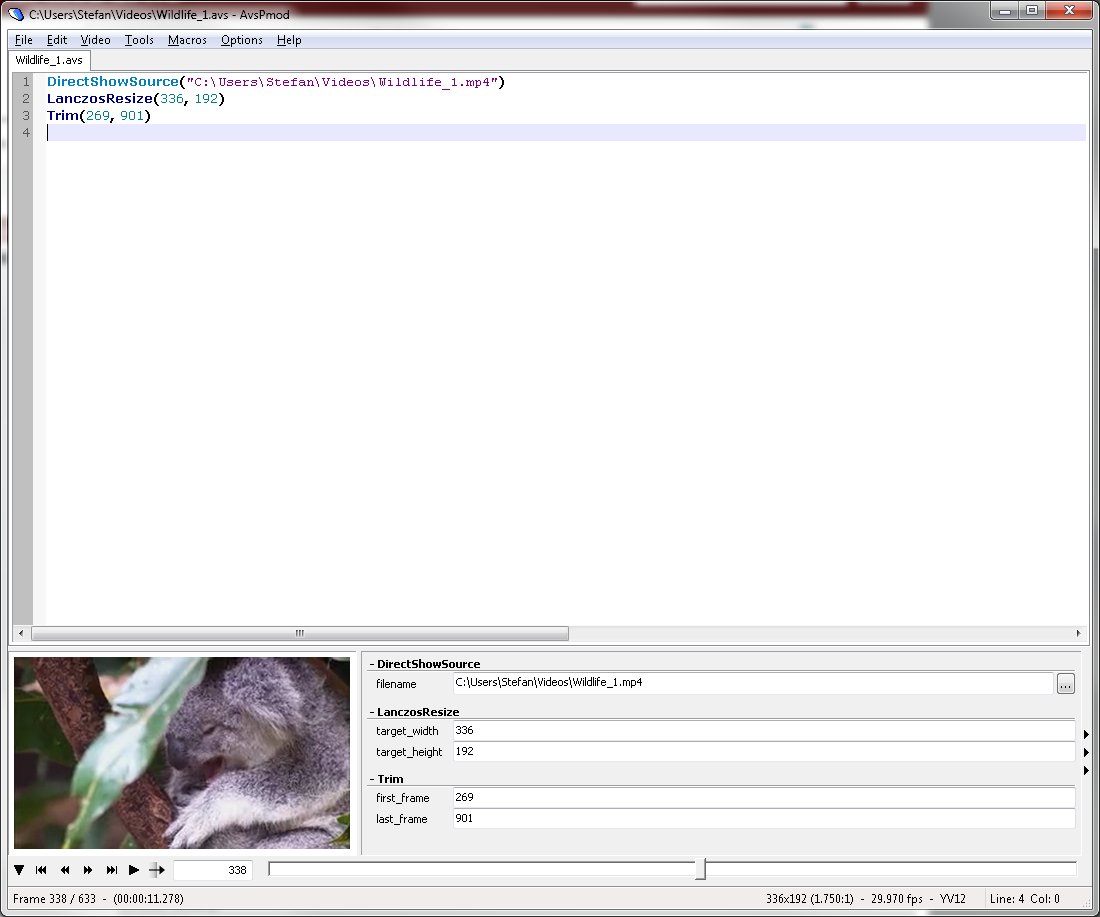

Download
Download AvsPmod 2.7.7.3 64-bit 19MB Win64 Portable
Download AvsPmod 2.7.7.3 17MB Win Portable
Download old versions
Software License
Supported operating systems
Windows More information and other downloads
Version history / Release notes / Changelog / What's New
--------------------------
Version 2.7.7.3 [2024-04-20]
--------------------------
* Audio mixer values for mix of left/right and center lowered (clipping minimized).
* Switching the 'Preview Filter' on/off is now faster if no change was made.
* Bugfix: tab context menu 'Close... > 'All unopened', either Error or tabs were no longer visible.
* Fix: Resize video window > 'Force' no resize if 'Split Clip' was used and the video dimensions changed.
* Fix: RGBPS/RGBPSA values -1, -1, -1, -1 were treated as errors.
Version 2.7.7.3 [2024-04-20]
--------------------------
* Audio mixer values for mix of left/right and center lowered (clipping minimized).
* Switching the 'Preview Filter' on/off is now faster if no change was made.
* Bugfix: tab context menu 'Close... > 'All unopened', either Error or tabs were no longer visible.
* Fix: Resize video window > 'Force' no resize if 'Split Clip' was used and the video dimensions changed.
* Fix: RGBPS/RGBPSA values -1, -1, -1, -1 were treated as errors.
View full changelog
All features
What is AvsP?
AvsP is at its core a tabbed text editor with features specific for creating AviSynth scripts. It has text editing features such as AviSynth-specific syntax highlighting and autocompletion to simplify the task of writing scripts. However, its primary advantage over other editors is its integrated video preview, which remains attached to the main window at all times. Comparing the visual results of several different scripts is as easy as writing the scripts into several different tabs and activating the video preview, switching between tabs gives instantaneous feedback on visual differences (anyone remember lining up multiple instances of VirtualDub and alt-tabbing?). Furthermore, the program offers a unique way for the user to define sliders for any number in the script, giving AviSynth a unique graphical interface never known before. The following are an outline of the program's main features:
Tabbed text editor
Avisynth-specific syntax highlighting and autocompletion
Integrated video preview for easy script comparison
Unique user-defined sliders for rapid filter setting comparison
Built-in crop editor in video preview
Bookmark any number of frames for quick access
Complete macro language using the Python programming language
Graphical front-end for command-line compression tool avs2avi
What is AvsPmod?
The AvsP project was abandoned by its original author by late 2007.
AvsPmod is an ongoing community effort to maintain and provide some enhancements to AvsP:
Improved syntax highlighting
Code folding
Improved function autocomplete
Importing of function definitions, including from online wiki
Snippets of text
Better Unicode support
HTML export and printing
Move, rename, group and undo close tabs
Video preview usability improvements
YUV -> RGB options for previewing
Support for AviSynth 2.6.0 new colorspaces
Autocrop
Bookmark titles
Improved macro API with several scripts included
Native *nix support through AvxSynth
Codebase updated to Python 2.7 and wxPython 2.8
Many bug fixes
AvsP is at its core a tabbed text editor with features specific for creating AviSynth scripts. It has text editing features such as AviSynth-specific syntax highlighting and autocompletion to simplify the task of writing scripts. However, its primary advantage over other editors is its integrated video preview, which remains attached to the main window at all times. Comparing the visual results of several different scripts is as easy as writing the scripts into several different tabs and activating the video preview, switching between tabs gives instantaneous feedback on visual differences (anyone remember lining up multiple instances of VirtualDub and alt-tabbing?). Furthermore, the program offers a unique way for the user to define sliders for any number in the script, giving AviSynth a unique graphical interface never known before. The following are an outline of the program's main features:
Tabbed text editor
Avisynth-specific syntax highlighting and autocompletion
Integrated video preview for easy script comparison
Unique user-defined sliders for rapid filter setting comparison
Built-in crop editor in video preview
Bookmark any number of frames for quick access
Complete macro language using the Python programming language
Graphical front-end for command-line compression tool avs2avi
What is AvsPmod?
The AvsP project was abandoned by its original author by late 2007.
AvsPmod is an ongoing community effort to maintain and provide some enhancements to AvsP:
Improved syntax highlighting
Code folding
Improved function autocomplete
Importing of function definitions, including from online wiki
Snippets of text
Better Unicode support
HTML export and printing
Move, rename, group and undo close tabs
Video preview usability improvements
YUV -> RGB options for previewing
Support for AviSynth 2.6.0 new colorspaces
Autocrop
Bookmark titles
Improved macro API with several scripts included
Native *nix support through AvxSynth
Codebase updated to Python 2.7 and wxPython 2.8
Many bug fixes
Sections/Browse similar tools
Alternative to AvsPmod
AviSynth Batch Scripter
AVSEdit
Guides and How to's
Acronyms / Also Known As
Download AvsPmod Portable download from the Download links under Download and Download other versions!
Notify me when software updated or report software
| 17 reviews, Showing 1 to 5 reviews |
Rating by HTG on
Oct 29, 2023 Version: 2.7.5.5
OS: Windows 10 64-bit Ease of use: 9/10
Functionality: 10/10
Value for money: 10/10
Overall: 9/10
Excellent. I wish I had known this tool before. The only thing I miss is a dozen of mini icons to reduce the number of clics to access a particular often used function. For instance, a "save script" icon would be nice... Of course the shortcuts such as Ctrl-S are there. But mini icons would be nice, too...
Review by Transatlantic on
Mar 19, 2022 Version: 2.7.0.9
OS: Windows 10 Ease of use: 10/10
Functionality: 9/10
Value for money: 10/10
Overall: 9/10
Rating by Transatlantic on
Mar 18, 2022 Version: 2.7.0.9
OS: Windows 10 Ease of use: 9/10
Functionality: 9/10
Value for money: 10/10
Overall: 9/10
Rating by Kakujitsu on
Jul 5, 2021 Version: 2.6.8.6
OS: Windows 10 64-bit Ease of use: 1/10
Functionality: 1/10
Value for money: 1/10
Overall: 1/10
Rating by Waffrette on
Feb 3, 2021 Version: AvsP 2.6.6.5
OS: Windows 10 64-bit Ease of use: 9/10
Functionality: 9/10
Value for money: 10/10
Overall: 9/10
| 17 reviews, Showing 1 to 5 reviews |
| 1 tool hits, Showing 1 to 1 tools |
Explanation:
NEW SOFTWARE= New tool since your last visit
NEW VERSION= New version since your last visit
NEW REVIEW= New review since your last visit
NEW VERSION= New version
Latest version
Version number / Beta version number / Update version number and when it whas released.
Type and download
NO MORE UPDATES? = The software hasn't been updated in over 2 years.
NO LONGER DEVELOPED = The software hasn't been updated in over 5 years.
RECENTLY UPDATED = The software has been updated the last 31 days.
Freeware = Download Free software.
Freeware Trialware = Download Free software but some parts are trial/shareware.
Free software = Download Free software and also open source code also known as FOSS (Free and Open Source Software).
Free software Trialware = Download Free software and also open source code but some parts are trial/shareware.
Freeware Ads = Download Free software but supported by advertising, usually with a included browser toolbar. It may be disabled when installing or after installation.
Free software Ads = Free Download software and open source code but supported by advertising, usually with a included browser toolbar. It may be disabled when installing or after installation.
Trialware = Also called shareware or demo. Free Trial version available for download and testing with usually a time limit or limited functions.
Payware = No demo or trial available.
Portable version = A portable/standalone version is available. No installation is required.
v1.0.1 = Latest version available.
Download beta = It could be a Beta, RC(Release Candidate) or an Alpha / Nightly / Unstable version of the software.
Download 15MB = A direct link to the software download.
Win = Windows download version. It works on 32-bit and 64-bit Windows.
Win64 = Windows 64-bit download version. It works only on 64-bit Windows.
Mac = Mac download version. It works on 32-bit and 64-bit Mac OS.
Mac64 = Mac OS download version. It works only on 64-bit Mac OS.
Linux = Linux download version.
Portable = Portable version. No installation is required.
Ad-Supported = The software is bundled with advertising. Be careful when you install the software and disable addons that you don't want!
Visit developers site = A link to the software developer site.
Download (mirror link) = A mirror link to the software download. It may not contain the latest versions.
Download old versions = Free downloads of previous versions of the program.
Download 64-bit version = If you have a 64bit operating system you can download this version.
Download portable version = Portable/Standalone version meaning that no installation is required, just extract the files to a folder and run directly.
Portable version available = Download the portable version and you can just extract the files and run the program without installation.
Old versions available = Download old versions of the program.
Version history available = Complete changelog on our site.
= Windows version available.
 = Mac OS version available.
 = Linux version available.
Our hosted software are virus and malware scanned with several antivirus programs using www.virustotal.com. (NOTE! Just one virustotal warning is 99.9% a false positive. And some software might receive 2-6 warnings but it's if they are not all same virus/trojan then it's 99% false positives.)
Rating
Rating from 0-10.
NEW SOFTWARE= New tool since your last visit
NEW VERSION= New version since your last visit
NEW REVIEW= New review since your last visit
NEW VERSION= New version
Latest version
Version number / Beta version number / Update version number and when it whas released.
Type and download
NO MORE UPDATES? = The software hasn't been updated in over 2 years.
NO LONGER DEVELOPED = The software hasn't been updated in over 5 years.
RECENTLY UPDATED = The software has been updated the last 31 days.
Freeware = Download Free software.
Freeware Trialware = Download Free software but some parts are trial/shareware.
Free software = Download Free software and also open source code also known as FOSS (Free and Open Source Software).
Free software Trialware = Download Free software and also open source code but some parts are trial/shareware.
Freeware Ads = Download Free software but supported by advertising, usually with a included browser toolbar. It may be disabled when installing or after installation.
Free software Ads = Free Download software and open source code but supported by advertising, usually with a included browser toolbar. It may be disabled when installing or after installation.
Trialware = Also called shareware or demo. Free Trial version available for download and testing with usually a time limit or limited functions.
Payware = No demo or trial available.
Portable version = A portable/standalone version is available. No installation is required.
v1.0.1 = Latest version available.
Download beta = It could be a Beta, RC(Release Candidate) or an Alpha / Nightly / Unstable version of the software.
Download 15MB = A direct link to the software download.
Win = Windows download version. It works on 32-bit and 64-bit Windows.
Win64 = Windows 64-bit download version. It works only on 64-bit Windows.
Mac = Mac download version. It works on 32-bit and 64-bit Mac OS.
Mac64 = Mac OS download version. It works only on 64-bit Mac OS.
Linux = Linux download version.
Portable = Portable version. No installation is required.
Ad-Supported = The software is bundled with advertising. Be careful when you install the software and disable addons that you don't want!
Visit developers site = A link to the software developer site.
Download (mirror link) = A mirror link to the software download. It may not contain the latest versions.
Download old versions = Free downloads of previous versions of the program.
Download 64-bit version = If you have a 64bit operating system you can download this version.
Download portable version = Portable/Standalone version meaning that no installation is required, just extract the files to a folder and run directly.
Portable version available = Download the portable version and you can just extract the files and run the program without installation.
Old versions available = Download old versions of the program.
Version history available = Complete changelog on our site.
= Windows version available. = Mac OS version available. = Linux version available.Our hosted software are virus and malware scanned with several antivirus programs using www.virustotal.com. (NOTE! Just one virustotal warning is 99.9% a false positive. And some software might receive 2-6 warnings but it's if they are not all same virus/trojan then it's 99% false positives.)
Rating
Rating from 0-10.
Browse software by sections
All In One Blu-ray Converters (10)
All In One DVD Converters (13)
All In One MKV to MP4, Blu-ray, UHD (11)
All In One Video Converters (19)
Animation (3D, 2D Animation) (11)
Audio Editors (21)
Audio Encoders (82)
Audio Players (19)
Authoring (Blu-ray, UHD, AVCHD) (15)
Authoring (DivX) (4)
Authoring (DVD) (26)
Authoring (SVCD, VCD) (9)
Bitrate Calculators (7)
Blu-ray to AVI, MKV, MP4 (15)
Blu-ray to Blu-ray, AVCHD (10)
Burn (CD,DVD,Blu-ray) (24)
Camcorders, DV, HDV, AVCHD (31)
Capture TV, DVD, VCR (31)
CD, DVD, Blu-ray recovery (3)
Codec Packs (6)
All In One DVD Converters (13)
All In One MKV to MP4, Blu-ray, UHD (11)
All In One Video Converters (19)
Animation (3D, 2D Animation) (11)
Audio Editors (21)
Audio Encoders (82)
Audio Players (19)
Authoring (Blu-ray, UHD, AVCHD) (15)
Authoring (DivX) (4)
Authoring (DVD) (26)
Authoring (SVCD, VCD) (9)
Bitrate Calculators (7)
Blu-ray to AVI, MKV, MP4 (15)
Blu-ray to Blu-ray, AVCHD (10)
Burn (CD,DVD,Blu-ray) (24)
Camcorders, DV, HDV, AVCHD (31)
Capture TV, DVD, VCR (31)
CD, DVD, Blu-ray recovery (3)
Codec Packs (6)
Codec, Video Identifiers (29)
Codecs (67)
Decrypters (DVD Rippers) (15)
Decrypters (UHD, Blu-ray Rippers) (8)
DigitalTV, DVB, IPTV (38)
DVD to DVD (20)
DVD to MP4, MKV, H264, H265 (16)
DVD to VCD, SVCD (5)
DVD to XviD, AVI, DivX (16)
ISO, Image (16)
Linux Video Tools (182)
MacOS Video Tools (224)
Media (Blu-ray, DVD, CD) (9)
Media Center, HTPC (37)
Other Useful Tools (135)
Photo Blu-ray, DVD, SlideShow (8)
Portable (Mobile, PSP) (35)
Region Free Tools (5)
Screen capture , Screen recording (27)
Screenshots , Thumbnails (13)
Codecs (67)
Decrypters (DVD Rippers) (15)
Decrypters (UHD, Blu-ray Rippers) (8)
DigitalTV, DVB, IPTV (38)
DVD to DVD (20)
DVD to MP4, MKV, H264, H265 (16)
DVD to VCD, SVCD (5)
DVD to XviD, AVI, DivX (16)
ISO, Image (16)
Linux Video Tools (182)
MacOS Video Tools (224)
Media (Blu-ray, DVD, CD) (9)
Media Center, HTPC (37)
Other Useful Tools (135)
Photo Blu-ray, DVD, SlideShow (8)
Portable (Mobile, PSP) (35)
Region Free Tools (5)
Screen capture , Screen recording (27)
Screenshots , Thumbnails (13)
Subtitle Editors, Converters (70)
Tag Editors (3)
Video De, Multiplexers (64)
Video Editors (Advanced, NLE) (33)
Video Editors (Basic) (52)
Video Editors (H264, MP4, MKV, MTS) (19)
Video Editors (MPG, DVD) (16)
Video Editors (WMV, AVI) (16)
Video Encoders (AV1, VP8, VP9) (2)
Video Encoders (AVI, WMV) (39)
Video Encoders (H264, H265, MP4, MKV) (45)
Video Encoders (MPG, DVD) (23)
Video Encoders , Converters (154)
Video Frameservers (9)
Video Players (46)
Video Repair, Fix (25)
Video Scripting (11)
Video Streaming (21)
Video Streaming Downloaders (110)
Virtualdub Tools (11)
Tag Editors (3)
Video De, Multiplexers (64)
Video Editors (Advanced, NLE) (33)
Video Editors (Basic) (52)
Video Editors (H264, MP4, MKV, MTS) (19)
Video Editors (MPG, DVD) (16)
Video Editors (WMV, AVI) (16)
Video Encoders (AV1, VP8, VP9) (2)
Video Encoders (AVI, WMV) (39)
Video Encoders (H264, H265, MP4, MKV) (45)
Video Encoders (MPG, DVD) (23)
Video Encoders , Converters (154)
Video Frameservers (9)
Video Players (46)
Video Repair, Fix (25)
Video Scripting (11)
Video Streaming (21)
Video Streaming Downloaders (110)
Virtualdub Tools (11)