
Help us keep the list up to date and submit new video software here.
Tool
Description
Type
Rating
Reviews
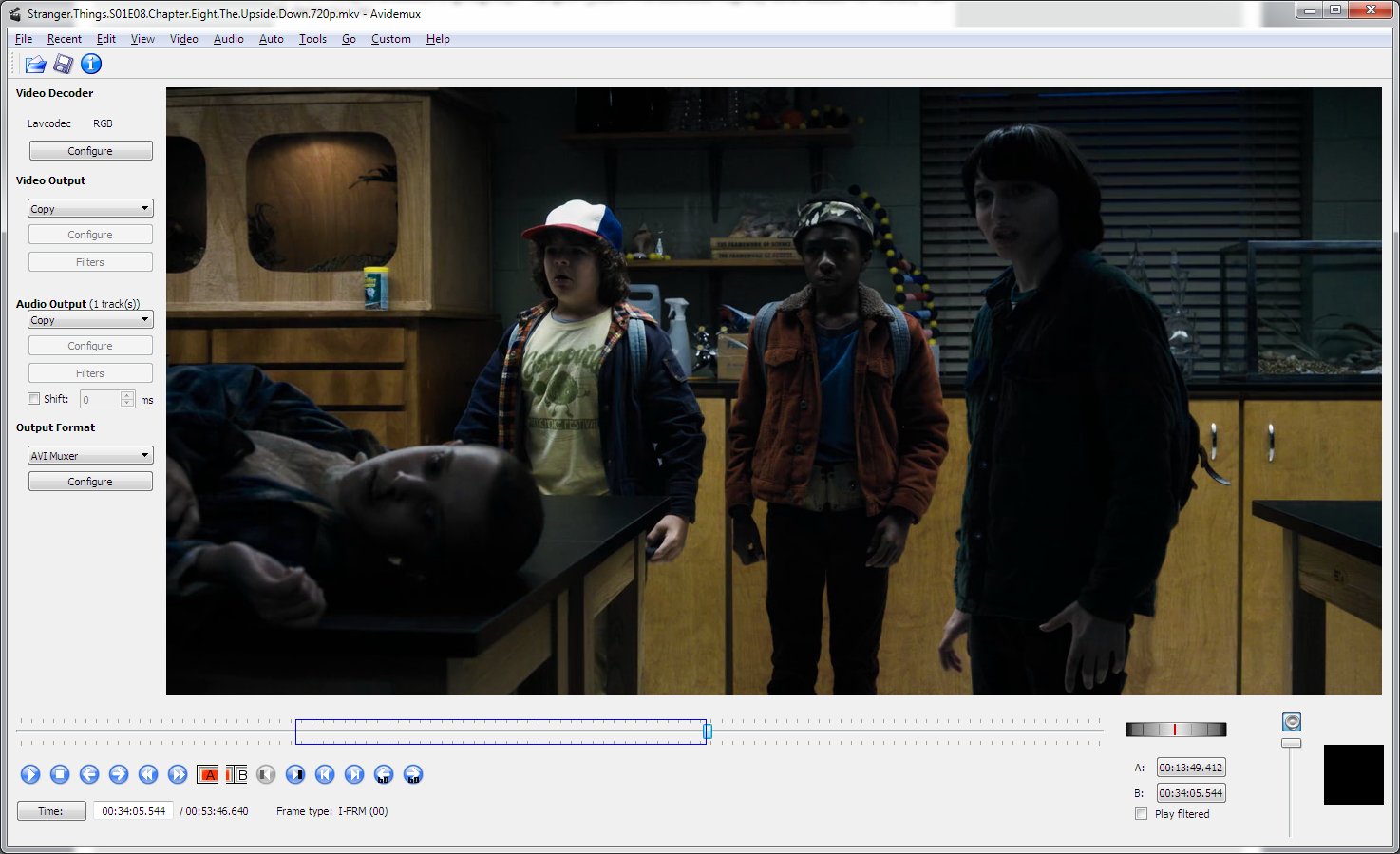
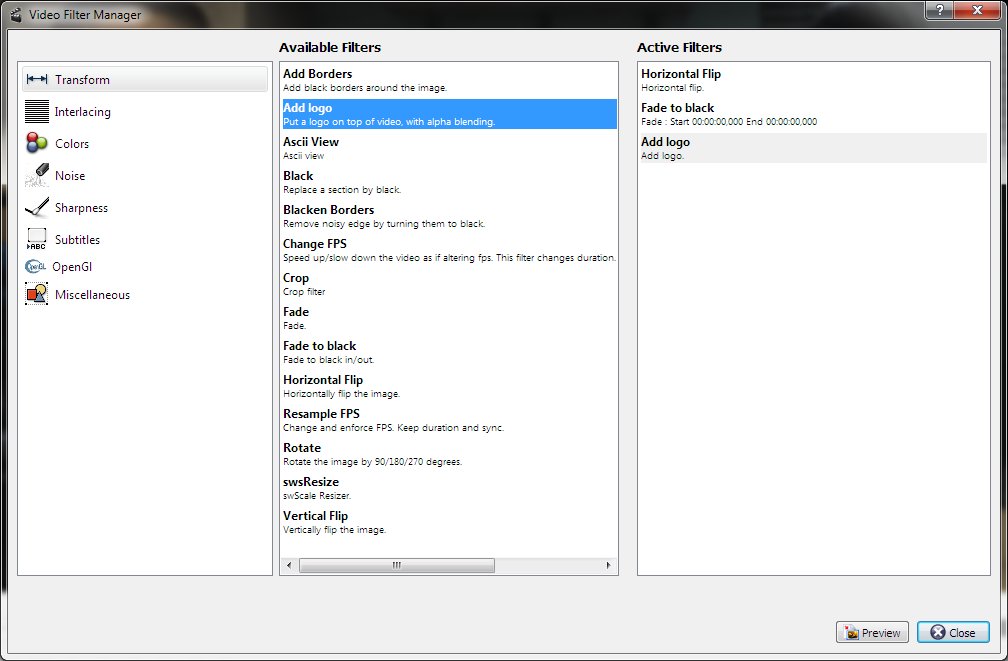
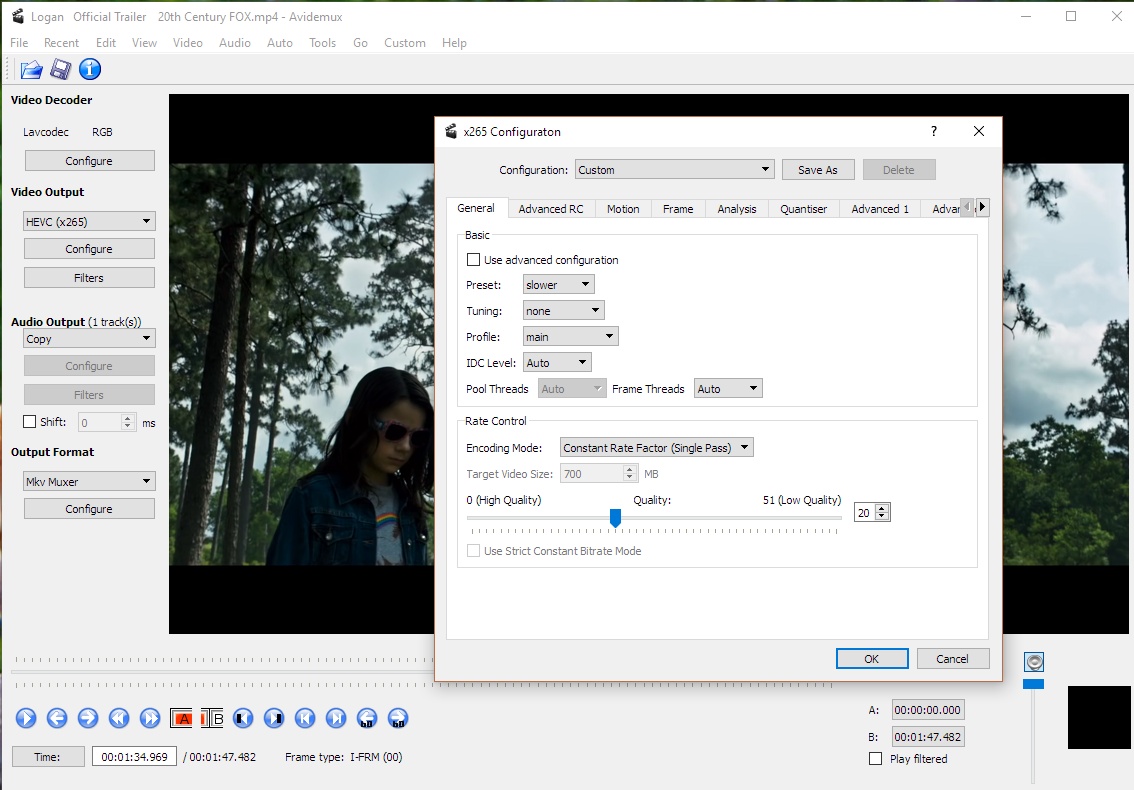
Avidemux is a free video editor designed for simple cutting, filtering and encoding tasks. Tasks can be automated using projects, job queue and powerful scripting capabilities. It supports most video formats like DVD, VOB, AVI, WMV, MPG, MP4, AVI, MOV, MKV, DV, FLV and codecs like H.264/AVC, H.265/HEVC, MPEG4 ASP(DivX, XviD), MPEG2, MJPEG, HUffYUV, PNG, YV12.
Free software
OS:


File size: 37MB
Beta version
Portable version
Old versions
Version history
Alternative software
OS:
File size: 37MB
Beta version
Portable version
Old versions
Version history
Alternative software
Screenshots


Latest version
Download
Download AviDemux 2.8.1 Windows 64-bit 38MB Win64
Download AviDemux 2.8.1 Mac 64-bit 43MB Mac64
Download AviDemux 2.8.1 Linux 64-bit 43MB Linux64
Download Beta, Portable and other versions
Portable 
Download AviDemux 2.8.2 Nightly 20260419 Windows 64-bit 37MB Win64
Download AviDemux 2.8.2 Nightly 20260419 Portable Windows 64-bit 37MB Win64
Portable Download AviDemux 2.8.2 Nightly 20260419 Linux 37MB Linux
Download AviDemux 2.8.1 for Windows 64-bit (GCC based)
Download AviDemux 2.7.4 for Windows 32-bit
Download more nightly beta builds here
Download old versions

Software License
Supported operating systems
Mac OS Linux Version history / Release notes / Changelog / What's New
2022-09-23: 2.8.1:
New Features
New HiDPI compatible button set
Fast method to add partial filters via CTRL+F shortcut
Audio department improvements
custom frame rate change (audio stretch with pitch control)
configurable compressor (DRC)
3-band equalizer
independent channel gain options
independent channel delay options
channel remap options
new downmix options: stereo headphone and headphone virtual surround
audio track configuration up to 32 tracks
volume setting is saved upon exit
Light and dark theme options in View menu
Option to remember selected resize method in "Resize", "Fit to size" and "Zoom" filters
New filter: 3D LUT
New filter: Decimate
New filter: Arbitrary Rotate
New video encoder: VideoToolbox HEVC ("ffVTEncHEVC", macOS only)
Other Enhancements
HDR tonemapping performance and quality improvements
Extended file info
Rotating mouse wheel over buttons to seek by 60 seconds cycles through 1/2/4/60 seconds seek modes
Support for decoding 8-bit VP9 in hardware via DXVA2 on Windows and via VDPAU on Linux with graphics cards featuring a VP9 decoder
Buttons to seek to selection start (A) and end (B) in on-the-fly video filter preview
Logo image in "Add logo" video filter configuration dialog is now scalable, can be repositioned by dragging
By default, on-the-fly preview in video filter configuration dialogs is now rendered using OpenGL to improve performance in HiDPI conditions
Bugfixes
Crash on copy to clipboard if selection extends to the end of video, a regression introduced in v2.8.0
Crashes in "Resample FPS" video filter with motion interpolation enabled
Crash on finishing encoding with the vp9 encoder
Avidemux falling victim to a crash in VA-API driver triggered by probing on application startup on Linux with some recent hardware
Crash loading MPEG-TS or MPEG-PS file with MPEG-1 video track and HW decoder via VDPAU enabled
Wrong number of channels or wrong channel layout with some E-AC3 streams
Reduced contrast and desaturated colors in loaded BMP images
Selection starting at zero and ending at the last picture of video cannot be deleted
Disabling B-frames breaks VideoToolbox HW encoder (macOS only)
Miscellaneous
Bundled FFmpeg libraries have been updated to 4.4.2 release.
New Features
New HiDPI compatible button set
Fast method to add partial filters via CTRL+F shortcut
Audio department improvements
custom frame rate change (audio stretch with pitch control)
configurable compressor (DRC)
3-band equalizer
independent channel gain options
independent channel delay options
channel remap options
new downmix options: stereo headphone and headphone virtual surround
audio track configuration up to 32 tracks
volume setting is saved upon exit
Light and dark theme options in View menu
Option to remember selected resize method in "Resize", "Fit to size" and "Zoom" filters
New filter: 3D LUT
New filter: Decimate
New filter: Arbitrary Rotate
New video encoder: VideoToolbox HEVC ("ffVTEncHEVC", macOS only)
Other Enhancements
HDR tonemapping performance and quality improvements
Extended file info
Rotating mouse wheel over buttons to seek by 60 seconds cycles through 1/2/4/60 seconds seek modes
Support for decoding 8-bit VP9 in hardware via DXVA2 on Windows and via VDPAU on Linux with graphics cards featuring a VP9 decoder
Buttons to seek to selection start (A) and end (B) in on-the-fly video filter preview
Logo image in "Add logo" video filter configuration dialog is now scalable, can be repositioned by dragging
By default, on-the-fly preview in video filter configuration dialogs is now rendered using OpenGL to improve performance in HiDPI conditions
Bugfixes
Crash on copy to clipboard if selection extends to the end of video, a regression introduced in v2.8.0
Crashes in "Resample FPS" video filter with motion interpolation enabled
Crash on finishing encoding with the vp9 encoder
Avidemux falling victim to a crash in VA-API driver triggered by probing on application startup on Linux with some recent hardware
Crash loading MPEG-TS or MPEG-PS file with MPEG-1 video track and HW decoder via VDPAU enabled
Wrong number of channels or wrong channel layout with some E-AC3 streams
Reduced contrast and desaturated colors in loaded BMP images
Selection starting at zero and ending at the last picture of video cannot be deleted
Disabling B-frames breaks VideoToolbox HW encoder (macOS only)
Miscellaneous
Bundled FFmpeg libraries have been updated to 4.4.2 release.
View full changelog
Sections/Browse similar tools
Linux Video Tools
MacOS Video Tools
Video Editors (Basic)
Video Editors (H264/MP4/MKV/MTS)
Video Editors (MPG/DVD)
Video Editors (WMV/AVI)
Video Encoders (AVI/WMV)
Video Encoders (H264/H265/MP4/MKV)
Video Encoders / Converters
Alternative to AviDemux
(Latest version updated)LosslessCut (Jan 29, 2026)
MPEG StreamClip (Aug 20, 2012)
VidCutter (Jun 16, 2021)
Virtualdub (Oct 13, 2014)
Virtualdub-MPEG2 (Sep 27, 2007)
VirtualDub2 (Dec 12, 2025)
VirtualdubMOD (Dec 25, 2007)
Guides and How to's
How to convert any video to AVI or MP4 with burned in subtitles
- ReadHow to encode 3D sterioscopic to 2D
- ReadHow to get started with avidemux, edit and convert any video format
- ReadHow to record streaming flash media, edit and save as AVI, MP4, etc
- ReadAviDemux video tutorials
View all guides with guide description here
Tool features - Convert
Acronyms / Also Known As
Download AviDemux Portable download from the Download links under Download and Download other versions!
Notify me when software updated or report software
| 250 reviews, Showing 1 to 5 reviews |
Rating by Wiz on
May 13, 2025 Version: 2.8.2 Nightly 241212
OS: Windows 7 64-bit Ease of use: 10/10
Functionality: 9/10
Value for money: 10/10
Overall: 10/10
Rating by grk on
Jan 26, 2025 Version: 2.8.1
OS: Windows 10 64-bit Ease of use: 10/10
Functionality: 10/10
Value for money: 10/10
Overall: 10/10
Rating by ufosergo@mail.ru on
Oct 26, 2024 Version: 2.8.1
OS: Windows 10 64-bit Ease of use: 10/10
Functionality: 10/10
Value for money: 10/10
Overall: 10/10
Used to be a great video editor but filters have been removed. The flip/mirror filter is gone for some reason.
Review by Dav on
May 29, 2024 Version: 2.8.1
OS: Linux Ease of use: 7/10
Functionality: 2/10
Value for money: 8/10
Overall: 2/10
the best video encoder and simple editor.
amazing UI. easy to use. with all of most used Filters. running stably.
recommend to all family users.
amazing UI. easy to use. with all of most used Filters. running stably.
recommend to all family users.
Review by joesr on
Feb 27, 2024 Version: 2.81
OS: Windows 10 64-bit Ease of use: 10/10
Functionality: 10/10
Value for money: 10/10
Overall: 10/10
| 250 reviews, Showing 1 to 5 reviews |
| 1 tool hits, Showing 1 to 1 tools |
Explanation:
NEW SOFTWARE= New tool since your last visit
NEW VERSION= New version since your last visit
NEW REVIEW= New review since your last visit
NEW VERSION= New version
Latest version
Version number / Beta version number / Update version number and when it whas released.
Type and download
NO MORE UPDATES? = The software hasn't been updated in over 2 years.
NO LONGER DEVELOPED = The software hasn't been updated in over 5 years.
RECENTLY UPDATED = The software has been updated the last 31 days.
Freeware = Download Free software.
Freeware Trialware = Download Free software but some parts are trial/shareware.
Free software = Download Free software and also open source code also known as FOSS (Free and Open Source Software).
Free software Trialware = Download Free software and also open source code but some parts are trial/shareware.
Freeware Ads = Download Free software but supported by advertising, usually with a included browser toolbar. It may be disabled when installing or after installation.
Free software Ads = Free Download software and open source code but supported by advertising, usually with a included browser toolbar. It may be disabled when installing or after installation.
Trialware = Also called shareware or demo. Free Trial version available for download and testing with usually a time limit or limited functions.
Payware = No demo or trial available.
Portable version = A portable/standalone version is available. No installation is required.
v1.0.1 = Latest version available.
Download beta = It could be a Beta, RC(Release Candidate) or an Alpha / Nightly / Unstable version of the software.
Download 15MB = A direct link to the software download.
Win = Windows download version for 32-bit and 64-bit Windows.
Win64 = Windows 64-bit download version for 64-bit Windows.
WinARM64 = Windows 64-bit ARM download version for Windows ARM64/AArch64.
Mac = Mac download version for 64-bit Mac OS Intel/ARM64/AArch64.
MacARM64 = Mac Silicon download version for 64-bit Mac OS ARM64/AArch64.
Mac64 = Mac OS download version for 64-bit Intel Mac OS.
Linux = Linux download version.
Linux64 = Linux download version for 64bit Linux.
Linux ARM = Linux download version for Linux ARM64/AArch64.
Portable = Portable version. No installation is required.
Ad-Supported = The software is bundled with advertising. Be careful when you install the software and disable addons that you don't want!
Visit developers site = A link to the software developer site.
Download (mirror link) = A mirror link to the software download. It may not contain the latest versions.
Download old versions = Free downloads of previous versions of the program.
Download 64-bit version = If you have a 64bit operating system you can download this version.
Download portable version = Portable/Standalone version meaning that no installation is required, just extract the files to a folder and run directly.
Portable version available = Download the portable version and you can just extract the files and run the program without installation.
Old versions available = Download old versions of the program.
Version history available = Complete changelog on our site.
= Windows version available.
= Mac OS version available.
= Linux version available.
Our hosted software are virus and malware scanned with several antivirus programs using www.virustotal.com. (NOTE! Just one virustotal warning is 99.9% a false positive. And some software might receive 2-6 warnings but it's if they are not all same virus/trojan then it's 99% false positives.)
Rating
Rating from 0-10.
NEW SOFTWARE= New tool since your last visit
NEW VERSION= New version since your last visit
NEW REVIEW= New review since your last visit
NEW VERSION= New version
Latest version
Version number / Beta version number / Update version number and when it whas released.
Type and download
NO MORE UPDATES? = The software hasn't been updated in over 2 years.
NO LONGER DEVELOPED = The software hasn't been updated in over 5 years.
RECENTLY UPDATED = The software has been updated the last 31 days.
Freeware = Download Free software.
Freeware Trialware = Download Free software but some parts are trial/shareware.
Free software = Download Free software and also open source code also known as FOSS (Free and Open Source Software).
Free software Trialware = Download Free software and also open source code but some parts are trial/shareware.
Freeware Ads = Download Free software but supported by advertising, usually with a included browser toolbar. It may be disabled when installing or after installation.
Free software Ads = Free Download software and open source code but supported by advertising, usually with a included browser toolbar. It may be disabled when installing or after installation.
Trialware = Also called shareware or demo. Free Trial version available for download and testing with usually a time limit or limited functions.
Payware = No demo or trial available.
Portable version = A portable/standalone version is available. No installation is required.
v1.0.1 = Latest version available.
Download beta = It could be a Beta, RC(Release Candidate) or an Alpha / Nightly / Unstable version of the software.
Download 15MB = A direct link to the software download.
Win = Windows download version for 32-bit and 64-bit Windows.
Win64 = Windows 64-bit download version for 64-bit Windows.
WinARM64 = Windows 64-bit ARM download version for Windows ARM64/AArch64.
Mac = Mac download version for 64-bit Mac OS Intel/ARM64/AArch64.
MacARM64 = Mac Silicon download version for 64-bit Mac OS ARM64/AArch64.
Mac64 = Mac OS download version for 64-bit Intel Mac OS.
Linux = Linux download version.
Linux64 = Linux download version for 64bit Linux.
Linux ARM = Linux download version for Linux ARM64/AArch64.
Portable = Portable version. No installation is required.
Ad-Supported = The software is bundled with advertising. Be careful when you install the software and disable addons that you don't want!
Visit developers site = A link to the software developer site.
Download (mirror link) = A mirror link to the software download. It may not contain the latest versions.
Download old versions = Free downloads of previous versions of the program.
Download 64-bit version = If you have a 64bit operating system you can download this version.
Download portable version = Portable/Standalone version meaning that no installation is required, just extract the files to a folder and run directly.
Portable version available = Download the portable version and you can just extract the files and run the program without installation.
Old versions available = Download old versions of the program.
Version history available = Complete changelog on our site.
= Windows version available. = Mac OS version available. = Linux version available.Our hosted software are virus and malware scanned with several antivirus programs using www.virustotal.com. (NOTE! Just one virustotal warning is 99.9% a false positive. And some software might receive 2-6 warnings but it's if they are not all same virus/trojan then it's 99% false positives.)
Rating
Rating from 0-10.
Browse software by sections
All In One Blu-ray Converters (9)
All In One DVD Converters (12)
All In One MKV to MP4, Blu-ray, UHD (11)
All In One Video Converters (19)
Animation (3D, 2D Animation) (12)
Audio Editors (22)
Audio Encoders (80)
Audio Players (19)
Authoring (Blu-ray, UHD, AVCHD) (13)
Authoring (DivX) (4)
Authoring (DVD) (26)
Authoring (SVCD, VCD) (9)
Bitrate Calculators (7)
Blu-ray to AVI, MKV, MP4 (15)
Blu-ray to Blu-ray, AVCHD (10)
Burn (CD,DVD,Blu-ray) (24)
Camcorders, DV, HDV, AVCHD (31)
Capture TV, DVD, VCR (30)
CD, DVD, Blu-ray recovery (3)
Codec Packs (6)
All In One DVD Converters (12)
All In One MKV to MP4, Blu-ray, UHD (11)
All In One Video Converters (19)
Animation (3D, 2D Animation) (12)
Audio Editors (22)
Audio Encoders (80)
Audio Players (19)
Authoring (Blu-ray, UHD, AVCHD) (13)
Authoring (DivX) (4)
Authoring (DVD) (26)
Authoring (SVCD, VCD) (9)
Bitrate Calculators (7)
Blu-ray to AVI, MKV, MP4 (15)
Blu-ray to Blu-ray, AVCHD (10)
Burn (CD,DVD,Blu-ray) (24)
Camcorders, DV, HDV, AVCHD (31)
Capture TV, DVD, VCR (30)
CD, DVD, Blu-ray recovery (3)
Codec Packs (6)
Codec, Video Identifiers (30)
Codecs (67)
Decrypters (DVD Rippers) (16)
Decrypters (UHD, Blu-ray Rippers) (8)
DigitalTV, DVB, IPTV (39)
DVD to DVD (20)
DVD to MP4, MKV, H264, H265 (16)
DVD to VCD, SVCD (5)
DVD to XviD, AVI, DivX (16)
ISO, Image (15)
Linux Video Tools (208)
MacOS Video Tools (244)
Media (Blu-ray, DVD, CD) (9)
Media Center, HTPC (24)
Other Useful Tools (140)
Photo Blu-ray, DVD, SlideShow (8)
Portable (Mobile, PSP) (35)
Region Free Tools (5)
Screen capture , Screen recording (27)
Screenshots , Thumbnails (13)
Codecs (67)
Decrypters (DVD Rippers) (16)
Decrypters (UHD, Blu-ray Rippers) (8)
DigitalTV, DVB, IPTV (39)
DVD to DVD (20)
DVD to MP4, MKV, H264, H265 (16)
DVD to VCD, SVCD (5)
DVD to XviD, AVI, DivX (16)
ISO, Image (15)
Linux Video Tools (208)
MacOS Video Tools (244)
Media (Blu-ray, DVD, CD) (9)
Media Center, HTPC (24)
Other Useful Tools (140)
Photo Blu-ray, DVD, SlideShow (8)
Portable (Mobile, PSP) (35)
Region Free Tools (5)
Screen capture , Screen recording (27)
Screenshots , Thumbnails (13)
Subtitle Editors, Converters (72)
Tag Editors (4)
Video De, Multiplexers (66)
Video Editors (Advanced, NLE) (35)
Video Editors (Basic) (56)
Video Editors (H264, MP4, MKV, MTS) (19)
Video Editors (Lossless) (4)
Video Editors (MPG, DVD) (16)
Video Editors (WMV, AVI) (15)
Video Encoders (AV1, VP8, VP9) (2)
Video Encoders (AVI, WMV) (38)
Video Encoders (H264, H265, MP4, MKV) (45)
Video Encoders (MPG, DVD) (23)
Video Encoders , Converters (155)
Video Frameservers (9)
Video Players (49)
Video Repair, Fix (24)
Video Scripting (10)
Video Streaming (21)
Video Streaming Downloaders (101)
Tag Editors (4)
Video De, Multiplexers (66)
Video Editors (Advanced, NLE) (35)
Video Editors (Basic) (56)
Video Editors (H264, MP4, MKV, MTS) (19)
Video Editors (Lossless) (4)
Video Editors (MPG, DVD) (16)
Video Editors (WMV, AVI) (15)
Video Encoders (AV1, VP8, VP9) (2)
Video Encoders (AVI, WMV) (38)
Video Encoders (H264, H265, MP4, MKV) (45)
Video Encoders (MPG, DVD) (23)
Video Encoders , Converters (155)
Video Frameservers (9)
Video Players (49)
Video Repair, Fix (24)
Video Scripting (10)
Video Streaming (21)
Video Streaming Downloaders (101)