
Help us keep the list up to date and submit new video software here.
Tool
Description
Type
Rating
Reviews
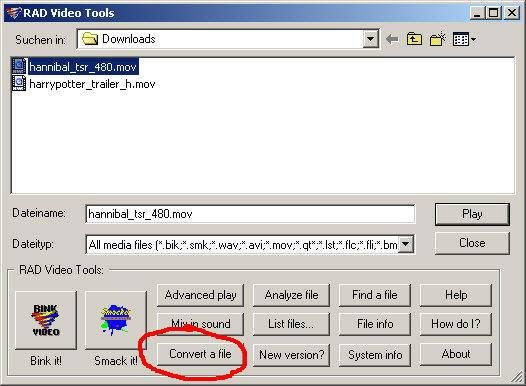
Rad Video Tools is a Bink(bik) and a Smacker(smk) video encoder. Bink Video - The Video Codec for Games. It can also convert your video to an exe file with builtin player and convert Quicktime MOV to AVI / DivX.
Freeware
OS:
File size: 1MB
Old versions
Version history
OS:
File size: 1MB
Old versions
Version history
Screenshots
Latest version
Download
Download Rad Video Tools 2026.10 1MB Win
Download old versions

Software License
Supported operating systems
Version history / Release notes / Changelog / What's New
Changes from 2026.09 to 2026.10 (10-27-2026)
Bink 2 can now compress video with an alpha plane 10% to 30% smaller at the same quality by using per-pixel-alpha-weights (which lets the color under fully transparent pixels is filled with whatever compresses best). Use /NoAlphaWeight (or the \"Do not use alpha plane for weighting\" option) to compress the hidden color as given instead. Premultiplied alpha is now handled explicitly on input and output (/AlphaPremulIn, /AlphaPremulOut, BINK_ALPHA_PREMULTIPLIED).
The video filters in the Bink and Bink converter are now an ordered list that you build in the window (or on the command line) - each filter can be added as many times as you like, each with its own settings and its own list of frames. Added bilateral denoise, temporal denoise, saturation, pad (letterbox), flips and rotations, point-sampled scale, and brightness fades (a start and end brightness over a frame range). Crop, scale and the existing filters take the same frame lists.
Frame lists replace the old start/end frame switches everywhere. Dta rates, peak rates, key frames and all the filters can be given for any set of frames and ranges - counted from the start (s10), from the end (e10) or as times (t5.5-t10, te30-te) - and /Include(frames) compresses only the listed frames of the input (sound included), so you can compress a section or test settings on a short piece. The data rate, key frame rate and key frame positions can each be set per range; the key frame hint file is gone.
The compressor and converter command line switches now have names (/DataRate, /Smooth, /Scale, /Crop, /Include, etc. - the \"...\" button in each window lists them all). The common short forms still work (/D, /M, /K, /P, /I, /T, /L, /O, /F, /A, /V and the /X /Y /W /H crop); /S and /E are replaced by /Include(start-end) and the other single-character filter switches by their names.
Bink compression is faster with more complete threading (the input conversion to YUV, the deblocking decisions and the alpha work all run on the worker threads now), the worker pool scales past 64 logical processors, and still images are decoded ahead of and written behind the compression on background threads. /CPUs# limits the thread count on every tool.
Bink 2 now compresses with 4 slices by default (was 2), so decoding spreads across more cores on current hardware. Use /Slices2 or /Slices3 for targets with fewer decoding cores.
Sound quality is is improved. The runtime mixer now resamples with a cubic filter (was linear) when a track's rate differs from the output rate, on all platforms and channel counts. The tools resample imported sound the same way, read and write 64-bit (RF64) WAV files over 4 GB, and gained /NormalizePeak#.# and /NormalizeLoudness#.# (LUFS) on every tool that writes sound, plus /AudioStartOffset#.# to shift the sound.
Added BinkSoundUseNull(freq, speakers) for a sound output with no device that still mixes and runs the post-mix callbacks - for tests, servers and tools.
The Bink logo movie is now vector. BinkLogoAddress() is replaced by BinkGetLogo() and BinkGetLogoYCrCbA(), which draw the logo as vector art at any size (as BGRA or as Bink YCrCbA planes). The Smacker player and the RAD Video Tools draw their logos the same way.
WebAssembly has replaced the Emscripten-specific build. There are both scalar and SIMD modules callable from JavaScript (no Emscripten necessary), plus static libraries for C/C++ projects that use their own toolchain. Wasm libs remain single-threaded. Emscripten still supported, of course, just not required.
SDR sources can be compressed into Bink 2 HDR files (SDR white maps to 80 nits; the compressor asks first, /NoAlphaWarn answers yes), from the tools and from the Premiere exporter, and the Bink player plays them at the Windows SDR white level. The D3D11 example restores SDR output correctly after HDR playback.
Premiere exporter: key frames can now be placed manually (a frame list).
Removed the Xbox One XDK builds (the GDK builds remain).
Fixes: BinkOpen from memory could crash when it was the first open in the process; minor Premiere exporter fixes opening a Bink with sound while another Bink's last close was shutting the sound device down, or changing the output format of a sound device kept open between movies, could leave the mixer in a bad state (now reopens cleanly, and a Bink whose sound can't be set up plays silently instead of half-mixed); image-sequence exports report a failed background write (disk full, bad path); list files that change format part way through now clip and compress; various Media Framework bugs on input and output; EXR input and output uses ZIP compression; WebAssembly cleanups and bugs fixes; various ancient formats removed from importing.
Smacker is now built into the RAD Video Tools instead of through the 32-bit path.
The 32-bit QuickTime import path is has also been replaced with a native QuickTime Animation (RLE) decoder, alongside the ProRes, PNG, JPEG and uncompressed QuickTime formats that already worked in 64-bit.
View full changelog
All features
Bink videos look amazing! Bink can scale its data rate from 1200 kps for 1280x720p videos down to 75 kps for Nintendo DS videos. Bink will always make the best possible video for your data rate.
Bink's SDK is simple and powerful. Your game is always in control - there are no callbacks or other difficult-to-debug constructs. Using Bink is like using a codec that you wrote yourself.
Bink is completely self-contained - it needs no special system software, it needs no other audio codec, it needs no other surrounding architecture. Just one small library and you are good to go - there are no external installation or dependencies.
Bink is super, super fast. In some cases, up to 10 times faster than other modern codecs. It's fast enough to use for in-game videos, as well as cut-scene videos.
Bink uses as little memory as possible. In some cases, up to 16 MB less than other codecs. You don't have to worry about a simple video codec hogging all your memory.
Bink runs on every platform. You can use the same API and data files on 14 different platforms.
Bink runs on most game engine middleware natively. Epic supplies pre-written Bink support for the Unreal Engine, for example.
Bink has a VBR psycho-acoustic based audio codec capable up to 15:1 compression built-in. You don't need to license another codec for your audio.
Bink can play many audio tracks at once - this allows the playback of 5.1 and 7.1 sound tracks (on supported platforms) as well as optional language tracks where you can turn on and off a language based on the system setting.
Bink runs on every game platform and is customized to take advantage of each one. It uses SPUs on PS3, VMX on Xbox360, SSE 2 on x86, massive assembly optimizations on Nintendo DS, etc.
Bink includes sound support for every platform it supports. We have 16 different modules for sound playback on the various platforms.
Bink is super robust. The fact that it ships in so many games makes it better and better - it just doesn't crash. Bink can also handle bad input data - it just keeps chugging along until the input data gets better again.
Sections/Browse similar tools
Guides and How to's
How to convert MOV to DivX/AVI with Rad Video Tools
- ReadRad Video Tools video tutorials
View all guides with guide description here
Tool features - Convert
Acronyms / Also Known As
Notify me when software updated or report software
| 7 reviews, Showing 1 to 5 reviews |
MP4 conversion doesn't work on some of the executable Bink videos, AVI conversion works with them.
Review by Doze_D on
Jan 23, 2023 Version: 2022.05
OS: Windows 11 64-bit Ease of use: 7/10
Functionality: 7/10
Value for money: 10/10
Overall: 6/10
Not a bad convertor. I recommend installing version 1.300s or lower as they have the conversion options. Seems it was taken out in later versions.
Review by Bassquake on
Mar 21, 2022 Version: 1.300s
OS: WinXP Ease of use: 8/10
Functionality: 8/10
Value for money: 10/10
Overall: 8/10
Rating by PU User on
Dec 8, 2021 Version: 2021.10
OS: Windows 10 64-bit Ease of use: 1/10
Functionality: 1/10
Value for money: 1/10
Overall: 1/10
I tried to convert a 701 MB .MOV file which had a 5 minute playtime to .avi and got a humongous 4 GB .avi file. I tried twice with different output resolutions, same thing. Either it doesn't work right or it's too complicated for me to understand.
Review by JohnnyBob on
Jul 4, 2012 Version: 199r
OS: WinXP Ease of use: 1/10
Functionality: 1/10
Value for money: 1/10
Overall: 1/10
this tool is amazing. after 2 days of trying to make TMPGEnc, WinAvi, AVS, Magic Video Converter and some other tools produce a simple .mov to .avi compilation I.ve found this tool superior to all of the above ones. TMPGEnc crushes with the popular "invalid sample format error" that seems to be quite a common problem without universal solution. The rest of the bunch either crushed or produced movie with no sound.
RAD said there's something muddy in the source's audio but magically crunched the video with no problem. It just works.
RAD said there's something muddy in the source's audio but magically crunched the video with no problem. It just works.
Review by klmnt on
Sep 2, 2008 Version: 1.9h
OS: Vista Ease of use: 10/10
Functionality: 9/10
Value for money: 10/10
Overall: 10/10
| 7 reviews, Showing 1 to 5 reviews |
| 1 tool hits, Showing 1 to 1 tools |
Explanation:
NEW SOFTWARE= New tool since your last visit
NEW VERSION= New version since your last visit
NEW REVIEW= New review since your last visit
NEW VERSION= New version
Latest version
Version number / Beta version number / Update version number and when it whas released.
Type and download
NO MORE UPDATES? = The software hasn't been updated in over 2 years.
NO LONGER DEVELOPED = The software hasn't been updated in over 5 years.
RECENTLY UPDATED = The software has been updated the last 31 days.
Freeware = Download Free software.
Freeware Trialware = Download Free software but some parts are trial/shareware.
Free software = Download Free software and also open source code also known as FOSS (Free and Open Source Software).
Free software Trialware = Download Free software and also open source code but some parts are trial/shareware.
Freeware Ads = Download Free software but supported by advertising, usually with a included browser toolbar. It may be disabled when installing or after installation.
Free software Ads = Free Download software and open source code but supported by advertising, usually with a included browser toolbar. It may be disabled when installing or after installation.
Trialware = Also called shareware or demo. Free Trial version available for download and testing with usually a time limit or limited functions.
Payware = No demo or trial available.
Portable version = A portable/standalone version is available. No installation is required.
v1.0.1 = Latest version available.
Download beta = It could be a Beta, RC(Release Candidate) or an Alpha / Nightly / Unstable version of the software.
Download 15MB = A direct link to the software download.
Win = Windows download version for 32-bit and 64-bit Windows.
Win64 = Windows 64-bit download version for 64-bit Windows.
WinARM64 = Windows 64-bit ARM download version for Windows ARM64/AArch64.
Mac = Mac download version for 64-bit Mac OS Intel/ARM64/AArch64.
MacARM64 = Mac Silicon download version for 64-bit Mac OS ARM64/AArch64.
Mac64 = Mac OS download version for 64-bit Intel Mac OS.
Linux = Linux download version.
Linux64 = Linux download version for 64bit Linux.
Linux ARM = Linux download version for Linux ARM64/AArch64.
Portable = Portable version. No installation is required.
Ad-Supported = The software is bundled with advertising. Be careful when you install the software and disable addons that you don't want!
Visit developers site = A link to the software developer site.
Download (mirror link) = A mirror link to the software download. It may not contain the latest versions.
Download old versions = Free downloads of previous versions of the program.
Download 64-bit version = If you have a 64bit operating system you can download this version.
Download portable version = Portable/Standalone version meaning that no installation is required, just extract the files to a folder and run directly.
Portable version available = Download the portable version and you can just extract the files and run the program without installation.
Old versions available = Download old versions of the program.
Version history available = Complete changelog on our site.
= Windows version available.
 = Mac OS version available.
 = Linux version available.
Our hosted software are virus and malware scanned with several antivirus programs using www.virustotal.com. (NOTE! Just one virustotal warning is 99.9% a false positive. And some software might receive 2-6 warnings but it's if they are not all same virus/trojan then it's 99% false positives.)
Rating
Rating from 0-10.
NEW SOFTWARE= New tool since your last visit
NEW VERSION= New version since your last visit
NEW REVIEW= New review since your last visit
NEW VERSION= New version
Latest version
Version number / Beta version number / Update version number and when it whas released.
Type and download
NO MORE UPDATES? = The software hasn't been updated in over 2 years.
NO LONGER DEVELOPED = The software hasn't been updated in over 5 years.
RECENTLY UPDATED = The software has been updated the last 31 days.
Freeware = Download Free software.
Freeware Trialware = Download Free software but some parts are trial/shareware.
Free software = Download Free software and also open source code also known as FOSS (Free and Open Source Software).
Free software Trialware = Download Free software and also open source code but some parts are trial/shareware.
Freeware Ads = Download Free software but supported by advertising, usually with a included browser toolbar. It may be disabled when installing or after installation.
Free software Ads = Free Download software and open source code but supported by advertising, usually with a included browser toolbar. It may be disabled when installing or after installation.
Trialware = Also called shareware or demo. Free Trial version available for download and testing with usually a time limit or limited functions.
Payware = No demo or trial available.
Portable version = A portable/standalone version is available. No installation is required.
v1.0.1 = Latest version available.
Download beta = It could be a Beta, RC(Release Candidate) or an Alpha / Nightly / Unstable version of the software.
Download 15MB = A direct link to the software download.
Win = Windows download version for 32-bit and 64-bit Windows.
Win64 = Windows 64-bit download version for 64-bit Windows.
WinARM64 = Windows 64-bit ARM download version for Windows ARM64/AArch64.
Mac = Mac download version for 64-bit Mac OS Intel/ARM64/AArch64.
MacARM64 = Mac Silicon download version for 64-bit Mac OS ARM64/AArch64.
Mac64 = Mac OS download version for 64-bit Intel Mac OS.
Linux = Linux download version.
Linux64 = Linux download version for 64bit Linux.
Linux ARM = Linux download version for Linux ARM64/AArch64.
Portable = Portable version. No installation is required.
Ad-Supported = The software is bundled with advertising. Be careful when you install the software and disable addons that you don't want!
Visit developers site = A link to the software developer site.
Download (mirror link) = A mirror link to the software download. It may not contain the latest versions.
Download old versions = Free downloads of previous versions of the program.
Download 64-bit version = If you have a 64bit operating system you can download this version.
Download portable version = Portable/Standalone version meaning that no installation is required, just extract the files to a folder and run directly.
Portable version available = Download the portable version and you can just extract the files and run the program without installation.
Old versions available = Download old versions of the program.
Version history available = Complete changelog on our site.
= Windows version available. = Mac OS version available. = Linux version available.Our hosted software are virus and malware scanned with several antivirus programs using www.virustotal.com. (NOTE! Just one virustotal warning is 99.9% a false positive. And some software might receive 2-6 warnings but it's if they are not all same virus/trojan then it's 99% false positives.)
Rating
Rating from 0-10.
Browse software by sections
All In One Blu-ray Converters (9)
All In One DVD Converters (12)
All In One MKV to MP4, Blu-ray, UHD (11)
All In One Video Converters (19)
Animation (3D, 2D Animation) (13)
Audio Editors (23)
Audio Encoders (80)
Audio Players (19)
Authoring (Blu-ray, UHD, AVCHD) (13)
Authoring (DivX) (4)
Authoring (DVD) (26)
Authoring (SVCD, VCD) (9)
Bitrate Calculators (7)
Blu-ray to AVI, MKV, MP4 (15)
Blu-ray to Blu-ray, AVCHD (10)
Burn (CD,DVD,Blu-ray) (24)
Camcorders, DV, HDV, AVCHD (31)
Capture TV, DVD, VCR (30)
CD, DVD, Blu-ray recovery (3)
Codec Packs (6)
Codec, Video Identifiers (31)
Codecs , Renderers (68)
Decrypters (DVD Rippers) (16)
Decrypters (UHD, Blu-ray Rippers) (8)
DigitalTV, DVB, IPTV (40)
DVD to DVD (20)
DVD to MP4, MKV, H264, H265 (16)
DVD to VCD, SVCD (5)
DVD to XviD, AVI, DivX (16)
ISO, Image (14)
Linux Video Tools (218)
MacOS Video Tools (252)
Media (Blu-ray, DVD, CD) (9)
Media Center, HTPC (25)
Other Useful Tools (136)
Photo Blu-ray, DVD, SlideShow (8)
Portable (Mobile, PSP) (35)
Region Free Tools (5)
Screen capture , Screen recording (25)
Screenshots , Thumbnails (13)
Subtitle Editors, Converters (71)
Tag Editors (4)
Video Compare Software (6)
Video Demultiplexers, Multiplexers (66)
Video Editors (Advanced, NLE) (37)
Video Editors (Basic) (58)
Video Editors (H264, MP4, MKV, MTS) (21)
Video Editors (Lossless) (7)
Video Editors (MPG, DVD) (16)
Video Editors (WMV, AVI) (15)
Video Encoders (AV1, VP8, VP9) (2)
Video Encoders (AVI, WMV) (38)
Video Encoders (H264, H265, MP4, MKV) (45)
Video Encoders (MPG, DVD) (23)
Video Encoders , Converters (155)
Video Frameservers (9)
Video Players (49)
Video Repair, Fix (24)
Video Scripting (10)
Video Streaming (20)