
Help us keep the list up to date and submit new video software here.
Tool
Description
Type
Rating
Reviews
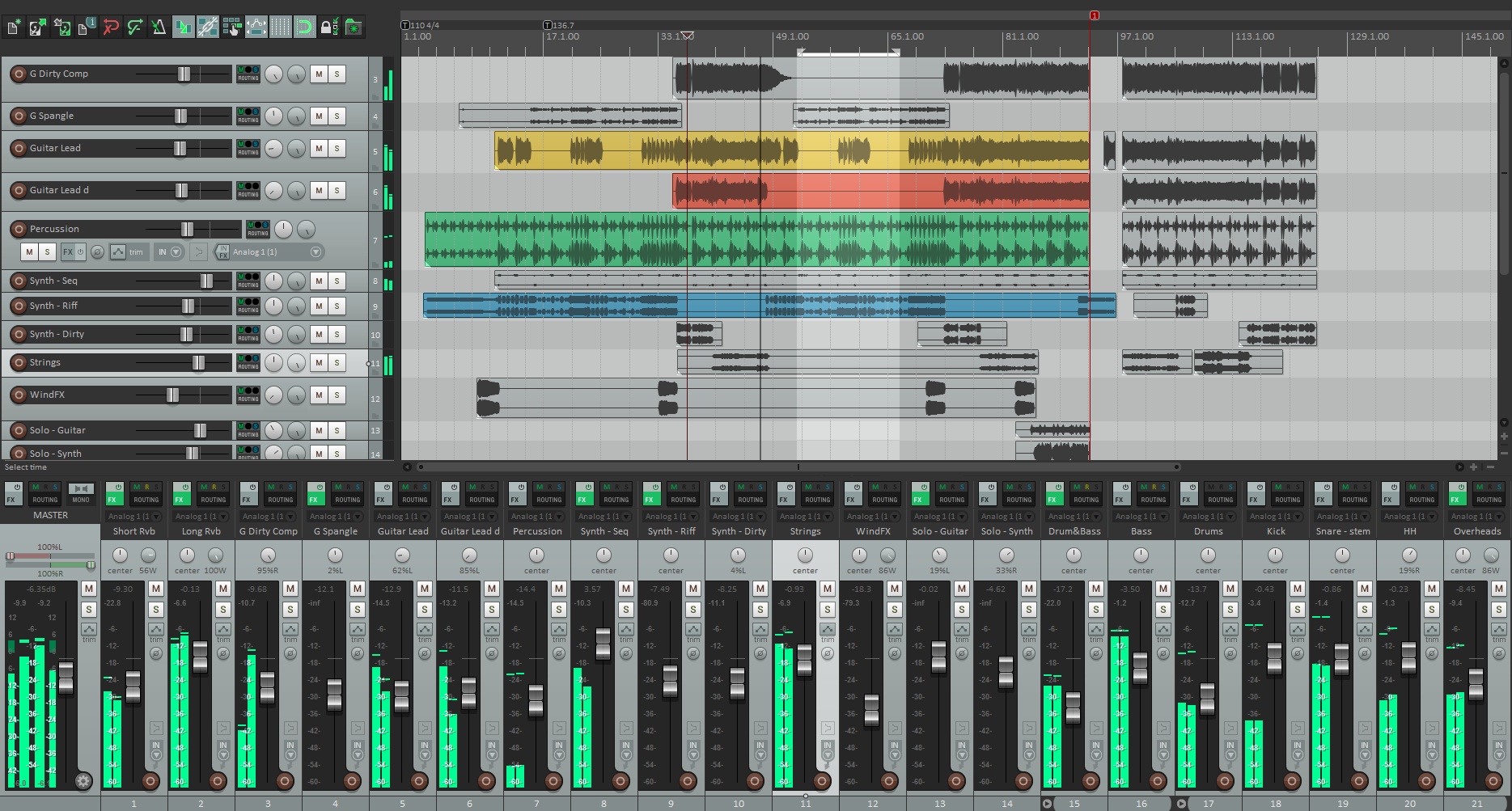
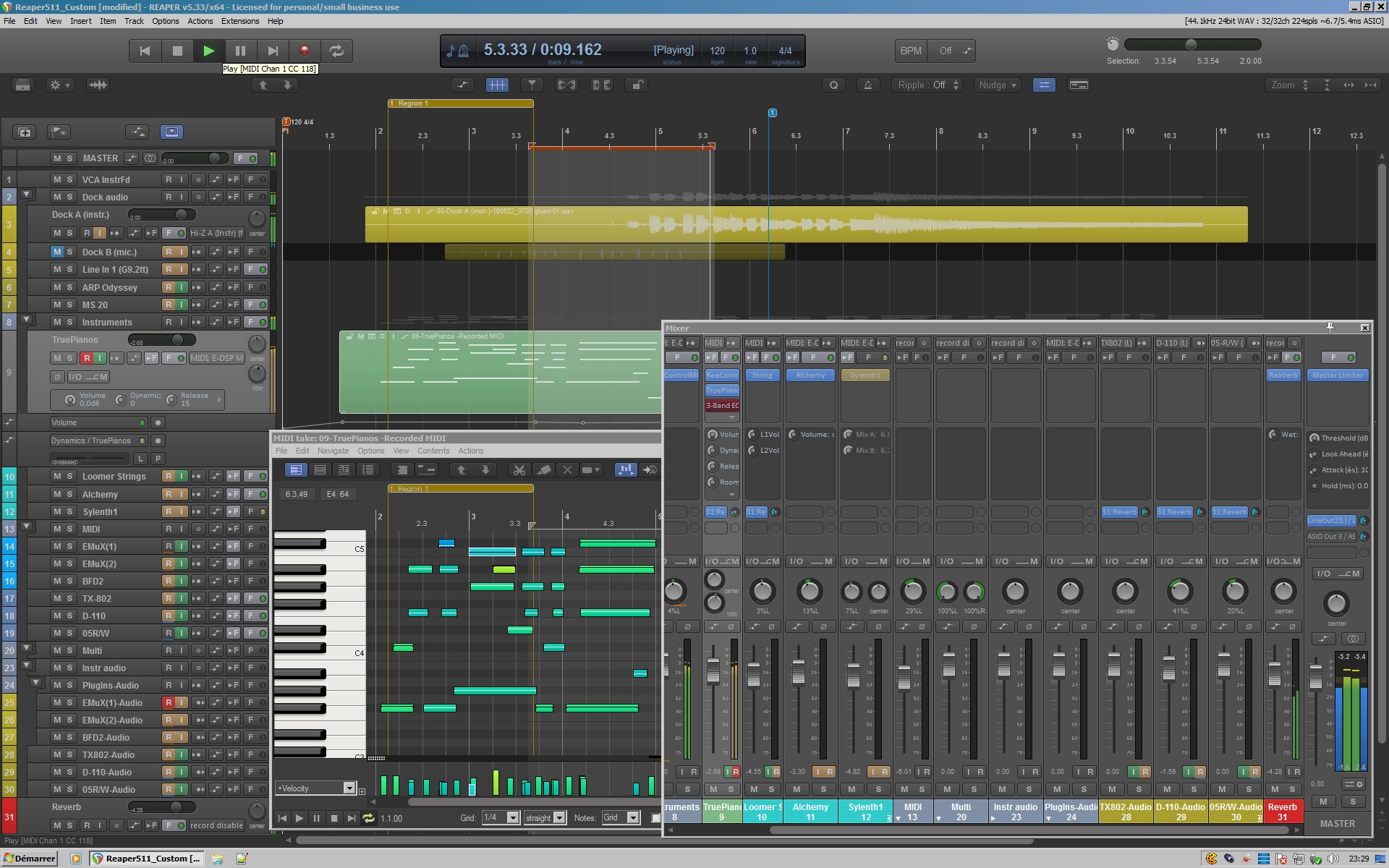
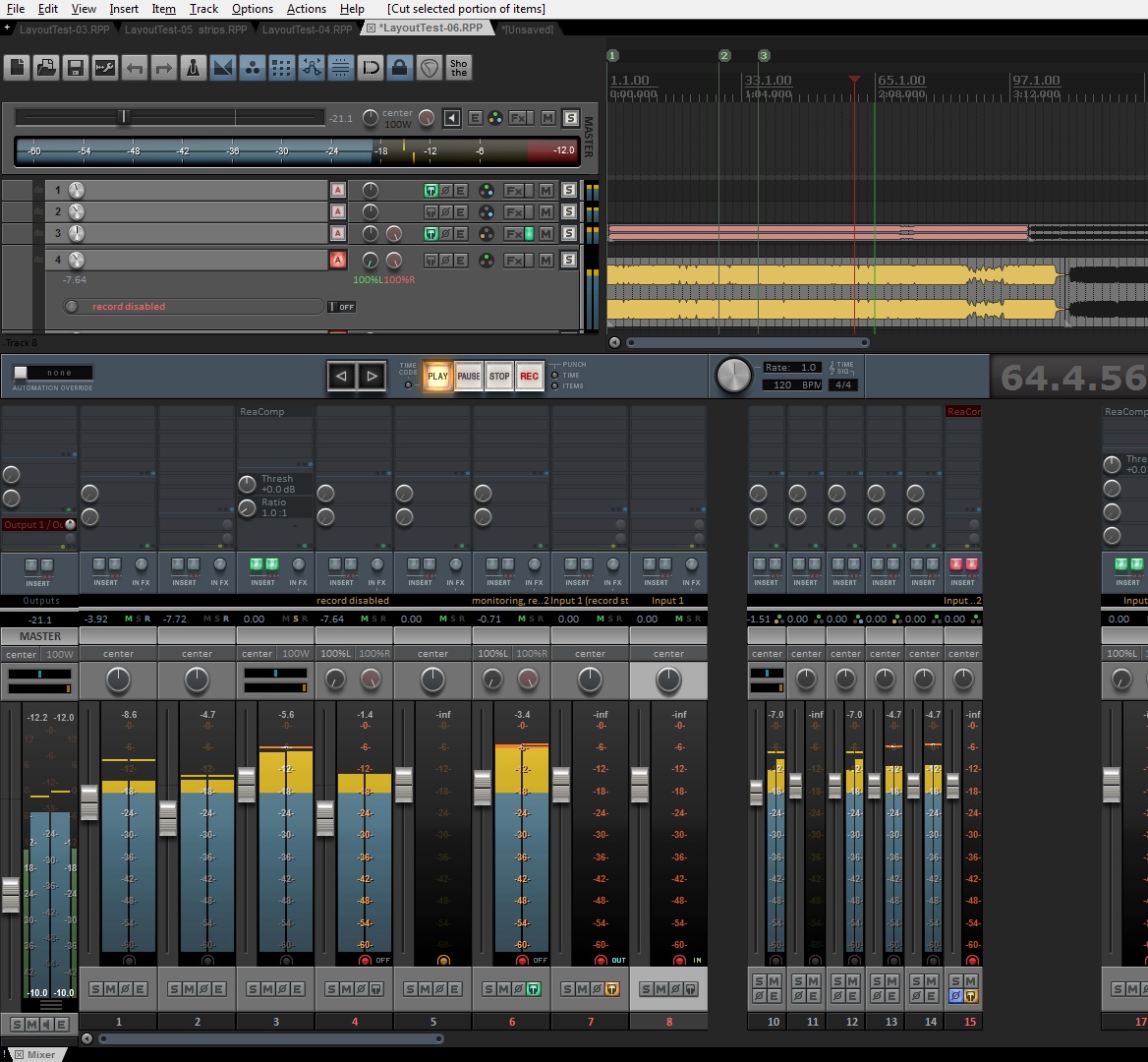
REAPER is a powerful application for multitrack recording and editing of audio. It will accept avi, mpg or wmv files & give you a video preview, thus enabling you to mix extra tracks in with your source audio!. You cannot perform any video editing within Reaper, but you can work on the soundtrack. You can edit the existing soundtrack, and/or add create new tracks and media items to be mixed with it.
Screenshots
Latest version
Download
Download Reaper 7.84 Windows 64-bit 16MB Win64

Download Reaper 7.84 Mac 64-bit 16MB Mac64

Download Reaper 7.84 Linux 64-bit 16MB Linux64

Download other versions
Download Reaper 7.84 Linux ARM 16MB Linux ARM64
Download old versions

Software License
Supported operating systems
Mac OS Linux Version history / Release notes / Changelog / What's New
REAPER 7.84: OK Computer
7.84
Actions: fix actions to move left/right by grid when snap disabled and cursor is already on a grid division •
Envelopes: add preference for envelope point edits to delete other envelope points that are passed through •
Envelopes: soft-snap envelope point edits to existing points
FX browser: fix VST folder view of .vst3 directories
JSFX: config-options can support -preserve-all which will not reset any plug-in state on configuration change
JSFX: remove chmaha ports (7.83 addition) from installer/disk image/etc •
JSFX: when instantiating new DPI-aware plug-in UIs, scale by hidpi
Render: fix render time remaining display when 2nd pass render is enabled
plus 7.83 changes:
7.84
Actions: fix actions to move left/right by grid when snap disabled and cursor is already on a grid division •
Envelopes: add preference for envelope point edits to delete other envelope points that are passed through •
Envelopes: soft-snap envelope point edits to existing points
FX browser: fix VST folder view of .vst3 directories
JSFX: config-options can support -preserve-all which will not reset any plug-in state on configuration change
JSFX: remove chmaha ports (7.83 addition) from installer/disk image/etc •
JSFX: when instantiating new DPI-aware plug-in UIs, scale by hidpi
Render: fix render time remaining display when 2nd pass render is enabled
plus 7.83 changes:
View full changelog
Sections/Browse similar tools
Alternative to Reaper
(Latest version updated)Kristal Audio Engine (Jan 4, 2006)
Wavosaur (May 20, 2023)
Guides and How to's
Notify me when software updated or report software
| 48 reviews, Showing 1 to 5 reviews |
Hi would I be able to edit like a Song/ the audio and take the voice out of the song but keep the music can that be done or would you need a other software
Review by barry25 on
Jan 11, 2025 Version: 12
OS: Windows 11 Ease of use: 10/10
Functionality: 10/10
Value for money: 9/10
Overall: 8/10
Having been in the "computer music" industry since 1987, I've witnessed the evolution of software, from early "trackers" to fully functional Digital Audio Workstations (DAWs). Over the years, I’ve worked with a variety of tools, including Pro 16, Pro 24, and Cubase for Atari and PC, as well as Cool Edit Pro, Adobe Audition, Triple DAT, and Pro Tools. Each of these platforms has had its strengths, but they also came with significant frustrations.
Common issues I've encountered include:
Incompatibility with previous versions, often rendering older projects unusable (Cubase).
Proprietary file formats that don’t play well with other software.
Bloated installation files due to intrusive DRM software.
Background processes that tax system resources.
Hardware exclusivity.
Exorbitant update costs.
Incompatibility of expensive plugins with newer software versions.
These challenges often turned me from a multimedia engineer into a reluctant software specialist, diverting my focus from creativity to troubleshooting.
By 2006, after nearly two decades of navigating these obstacles—and after countless prayers that expensive updates would simply work—I began searching for an alternative. That’s when I discovered Reaper. Initially, I ran it alongside Pro Tools and Adobe Audition, but by 2012, I had become so impressed with Reaper's performance that I made the switch, abandoning Pro Tools and Adobe Audition altogether.
One of the first things that stood out was Reaper’s remarkably small installation size—far less than 2GB. Initially, I was skeptical; how could something so lightweight be a full-featured DAW? But I soon realized Reaper was more than just a versatile tool—it became the cornerstone of my studio setup. By 2014, I completed my first project entirely in Reaper and have since removed all Avid and Steinberg products from my system.
Reaper delivers on promises that other DAWs often fail to fulfill, even after costly upgrades. It’s a comprehensive solution, offered at an incredibly affordable price, with regular updates driven by user feedback. These updates have consistently improved the software without bogging down system resources or requiring constant investment.
One of Reaper’s standout features is its compatibility with both 32-bit and 64-bit plugins, something no other DAW offers. Beyond handling both MIDI and audio seamlessly, Reaper also excels at video editing. Its lightweight CPU usage allows for smooth 4K video rendering without issue, making it a capable tool for basic video editing as well.
In terms of cost, my 12 years with Reaper have cost me less than half of what a single Pro Tools update once did. Additionally, with the wealth of tutorials available, Reaper is one of the easiest DAWs to learn and use.
As a professional with over 35 years of experience in radio, TV, film sound editing, mixing, artist production, and music composition, I can confidently say that Reaper is a game-changer in the world of multimedia software.
Common issues I've encountered include:
Incompatibility with previous versions, often rendering older projects unusable (Cubase).
Proprietary file formats that don’t play well with other software.
Bloated installation files due to intrusive DRM software.
Background processes that tax system resources.
Hardware exclusivity.
Exorbitant update costs.
Incompatibility of expensive plugins with newer software versions.
These challenges often turned me from a multimedia engineer into a reluctant software specialist, diverting my focus from creativity to troubleshooting.
By 2006, after nearly two decades of navigating these obstacles—and after countless prayers that expensive updates would simply work—I began searching for an alternative. That’s when I discovered Reaper. Initially, I ran it alongside Pro Tools and Adobe Audition, but by 2012, I had become so impressed with Reaper's performance that I made the switch, abandoning Pro Tools and Adobe Audition altogether.
One of the first things that stood out was Reaper’s remarkably small installation size—far less than 2GB. Initially, I was skeptical; how could something so lightweight be a full-featured DAW? But I soon realized Reaper was more than just a versatile tool—it became the cornerstone of my studio setup. By 2014, I completed my first project entirely in Reaper and have since removed all Avid and Steinberg products from my system.
Reaper delivers on promises that other DAWs often fail to fulfill, even after costly upgrades. It’s a comprehensive solution, offered at an incredibly affordable price, with regular updates driven by user feedback. These updates have consistently improved the software without bogging down system resources or requiring constant investment.
One of Reaper’s standout features is its compatibility with both 32-bit and 64-bit plugins, something no other DAW offers. Beyond handling both MIDI and audio seamlessly, Reaper also excels at video editing. Its lightweight CPU usage allows for smooth 4K video rendering without issue, making it a capable tool for basic video editing as well.
In terms of cost, my 12 years with Reaper have cost me less than half of what a single Pro Tools update once did. Additionally, with the wealth of tutorials available, Reaper is one of the easiest DAWs to learn and use.
As a professional with over 35 years of experience in radio, TV, film sound editing, mixing, artist production, and music composition, I can confidently say that Reaper is a game-changer in the world of multimedia software.
Review by Raphael J. on
Oct 15, 2024 Version: 7.25
OS: Windows 11 64-bit Ease of use: 10/10
Functionality: 10/10
Value for money: 10/10
Overall: 10/10
Does seem to need a lot of fixes from each released version to the next! A lot may be minor, but puts me off buying it as I've had crashes in my system.
Review by A. Peterson on
Apr 19, 2024 Version: 7.15
OS: Windows 10 64-bit Ease of use: 5/10
Functionality: 7/10
Value for money: 6/10
Overall: 6/10
Rating by Daz on
Jan 11, 2024 Version: 7.08
OS: Windows 11 64-bit Ease of use: 10/10
Functionality: 10/10
Value for money: 10/10
Overall: 10/10
Let's be objective now! Fixes are for rare bugs which you might not encounterand as the software is evolving or developing. Not easy to use I concede, but one must spend time on anything in life. There's a helluva lot of hard work involved in producing quality software like this-go to its website and just read its help guide to see its functions. Taken onboard these things Realer is impressive!
Review by B Allan on
Nov 28, 2023 Version: 7.06
OS: Windows 10 64-bit Ease of use: 7/10
Functionality: 9/10
Value for money: 9/10
Overall: 9/10
| 48 reviews, Showing 1 to 5 reviews |
| 1 tool hits, Showing 1 to 1 tools |
Explanation:
NEW SOFTWARE= New tool since your last visit
NEW VERSION= New version since your last visit
NEW REVIEW= New review since your last visit
NEW VERSION= New version
Latest version
Version number / Beta version number / Update version number and when it whas released.
Type and download
NO MORE UPDATES? = The software hasn't been updated in over 2 years.
NO LONGER DEVELOPED = The software hasn't been updated in over 5 years.
RECENTLY UPDATED = The software has been updated the last 31 days.
Freeware = Download Free software.
Freeware Trialware = Download Free software but some parts are trial/shareware.
Free software = Download Free software and also open source code also known as FOSS (Free and Open Source Software).
Free software Trialware = Download Free software and also open source code but some parts are trial/shareware.
Freeware Ads = Download Free software but supported by advertising, usually with a included browser toolbar. It may be disabled when installing or after installation.
Free software Ads = Free Download software and open source code but supported by advertising, usually with a included browser toolbar. It may be disabled when installing or after installation.
Trialware = Also called shareware or demo. Free Trial version available for download and testing with usually a time limit or limited functions.
Payware = No demo or trial available.
Portable version = A portable/standalone version is available. No installation is required.
v1.0.1 = Latest version available.
Download beta = It could be a Beta, RC(Release Candidate) or an Alpha / Nightly / Unstable version of the software.
Download 15MB = A direct link to the software download.
Win = Windows download version for 32-bit and 64-bit Windows.
Win64 = Windows 64-bit download version for 64-bit Windows.
WinARM64 = Windows 64-bit ARM download version for Windows ARM64/AArch64.
Mac = Mac download version for 64-bit Mac OS Intel/ARM64/AArch64.
MacARM64 = Mac Silicon download version for 64-bit Mac OS ARM64/AArch64.
Mac64 = Mac OS download version for 64-bit Intel Mac OS.
Linux = Linux download version.
Linux64 = Linux download version for 64bit Linux.
Linux ARM = Linux download version for Linux ARM64/AArch64.
Portable = Portable version. No installation is required.
Ad-Supported = The software is bundled with advertising. Be careful when you install the software and disable addons that you don't want!
Visit developers site = A link to the software developer site.
Download (mirror link) = A mirror link to the software download. It may not contain the latest versions.
Download old versions = Free downloads of previous versions of the program.
Download 64-bit version = If you have a 64bit operating system you can download this version.
Download portable version = Portable/Standalone version meaning that no installation is required, just extract the files to a folder and run directly.
Portable version available = Download the portable version and you can just extract the files and run the program without installation.
Old versions available = Download old versions of the program.
Version history available = Complete changelog on our site.
= Windows version available.
= Mac OS version available.
= Linux version available.
Our hosted software are virus and malware scanned with several antivirus programs using www.virustotal.com. (NOTE! Just one virustotal warning is 99.9% a false positive. And some software might receive 2-6 warnings but it's if they are not all same virus/trojan then it's 99% false positives.)
Rating
Rating from 0-10.
NEW SOFTWARE= New tool since your last visit
NEW VERSION= New version since your last visit
NEW REVIEW= New review since your last visit
NEW VERSION= New version
Latest version
Version number / Beta version number / Update version number and when it whas released.
Type and download
NO MORE UPDATES? = The software hasn't been updated in over 2 years.
NO LONGER DEVELOPED = The software hasn't been updated in over 5 years.
RECENTLY UPDATED = The software has been updated the last 31 days.
Freeware = Download Free software.
Freeware Trialware = Download Free software but some parts are trial/shareware.
Free software = Download Free software and also open source code also known as FOSS (Free and Open Source Software).
Free software Trialware = Download Free software and also open source code but some parts are trial/shareware.
Freeware Ads = Download Free software but supported by advertising, usually with a included browser toolbar. It may be disabled when installing or after installation.
Free software Ads = Free Download software and open source code but supported by advertising, usually with a included browser toolbar. It may be disabled when installing or after installation.
Trialware = Also called shareware or demo. Free Trial version available for download and testing with usually a time limit or limited functions.
Payware = No demo or trial available.
Portable version = A portable/standalone version is available. No installation is required.
v1.0.1 = Latest version available.
Download beta = It could be a Beta, RC(Release Candidate) or an Alpha / Nightly / Unstable version of the software.
Download 15MB = A direct link to the software download.
Win = Windows download version for 32-bit and 64-bit Windows.
Win64 = Windows 64-bit download version for 64-bit Windows.
WinARM64 = Windows 64-bit ARM download version for Windows ARM64/AArch64.
Mac = Mac download version for 64-bit Mac OS Intel/ARM64/AArch64.
MacARM64 = Mac Silicon download version for 64-bit Mac OS ARM64/AArch64.
Mac64 = Mac OS download version for 64-bit Intel Mac OS.
Linux = Linux download version.
Linux64 = Linux download version for 64bit Linux.
Linux ARM = Linux download version for Linux ARM64/AArch64.
Portable = Portable version. No installation is required.
Ad-Supported = The software is bundled with advertising. Be careful when you install the software and disable addons that you don't want!
Visit developers site = A link to the software developer site.
Download (mirror link) = A mirror link to the software download. It may not contain the latest versions.
Download old versions = Free downloads of previous versions of the program.
Download 64-bit version = If you have a 64bit operating system you can download this version.
Download portable version = Portable/Standalone version meaning that no installation is required, just extract the files to a folder and run directly.
Portable version available = Download the portable version and you can just extract the files and run the program without installation.
Old versions available = Download old versions of the program.
Version history available = Complete changelog on our site.
= Windows version available. = Mac OS version available. = Linux version available.Our hosted software are virus and malware scanned with several antivirus programs using www.virustotal.com. (NOTE! Just one virustotal warning is 99.9% a false positive. And some software might receive 2-6 warnings but it's if they are not all same virus/trojan then it's 99% false positives.)
Rating
Rating from 0-10.
Browse software by sections
All In One Blu-ray Converters (9)
All In One DVD Converters (12)
All In One MKV to MP4, Blu-ray, UHD (11)
All In One Video Converters (19)
Animation (3D, 2D Animation) (13)
Audio Editors (23)
Audio Encoders (80)
Audio Players (19)
Authoring (Blu-ray, UHD, AVCHD) (13)
Authoring (DivX) (4)
Authoring (DVD) (26)
Authoring (SVCD, VCD) (9)
Bitrate Calculators (7)
Blu-ray to AVI, MKV, MP4 (15)
Blu-ray to Blu-ray, AVCHD (10)
Burn (CD,DVD,Blu-ray) (24)
Camcorders, DV, HDV, AVCHD (31)
Capture TV, DVD, VCR (30)
CD, DVD, Blu-ray recovery (3)
Codec Packs (6)
All In One DVD Converters (12)
All In One MKV to MP4, Blu-ray, UHD (11)
All In One Video Converters (19)
Animation (3D, 2D Animation) (13)
Audio Editors (23)
Audio Encoders (80)
Audio Players (19)
Authoring (Blu-ray, UHD, AVCHD) (13)
Authoring (DivX) (4)
Authoring (DVD) (26)
Authoring (SVCD, VCD) (9)
Bitrate Calculators (7)
Blu-ray to AVI, MKV, MP4 (15)
Blu-ray to Blu-ray, AVCHD (10)
Burn (CD,DVD,Blu-ray) (24)
Camcorders, DV, HDV, AVCHD (31)
Capture TV, DVD, VCR (30)
CD, DVD, Blu-ray recovery (3)
Codec Packs (6)
Codec, Video Identifiers (31)
Codecs (67)
Decrypters (DVD Rippers) (16)
Decrypters (UHD, Blu-ray Rippers) (8)
DigitalTV, DVB, IPTV (40)
DVD to DVD (20)
DVD to MP4, MKV, H264, H265 (16)
DVD to VCD, SVCD (5)
DVD to XviD, AVI, DivX (16)
ISO, Image (14)
Linux Video Tools (220)
MacOS Video Tools (252)
Media (Blu-ray, DVD, CD) (9)
Media Center, HTPC (25)
Other Useful Tools (136)
Photo Blu-ray, DVD, SlideShow (8)
Portable (Mobile, PSP) (35)
Region Free Tools (5)
Screen capture , Screen recording (25)
Screenshots , Thumbnails (13)
Codecs (67)
Decrypters (DVD Rippers) (16)
Decrypters (UHD, Blu-ray Rippers) (8)
DigitalTV, DVB, IPTV (40)
DVD to DVD (20)
DVD to MP4, MKV, H264, H265 (16)
DVD to VCD, SVCD (5)
DVD to XviD, AVI, DivX (16)
ISO, Image (14)
Linux Video Tools (220)
MacOS Video Tools (252)
Media (Blu-ray, DVD, CD) (9)
Media Center, HTPC (25)
Other Useful Tools (136)
Photo Blu-ray, DVD, SlideShow (8)
Portable (Mobile, PSP) (35)
Region Free Tools (5)
Screen capture , Screen recording (25)
Screenshots , Thumbnails (13)
Subtitle Editors, Converters (72)
Tag Editors (4)
Video Compare Software (6)
Video Demultiplexers, Multiplexers (66)
Video Editors (Advanced, NLE) (37)
Video Editors (Basic) (58)
Video Editors (H264, MP4, MKV, MTS) (21)
Video Editors (Lossless) (7)
Video Editors (MPG, DVD) (16)
Video Editors (WMV, AVI) (15)
Video Encoders (AV1, VP8, VP9) (2)
Video Encoders (AVI, WMV) (38)
Video Encoders (H264, H265, MP4, MKV) (45)
Video Encoders (MPG, DVD) (23)
Video Encoders , Converters (156)
Video Frameservers (9)
Video Players (48)
Video Repair, Fix (24)
Video Scripting (10)
Video Streaming (20)
Tag Editors (4)
Video Compare Software (6)
Video Demultiplexers, Multiplexers (66)
Video Editors (Advanced, NLE) (37)
Video Editors (Basic) (58)
Video Editors (H264, MP4, MKV, MTS) (21)
Video Editors (Lossless) (7)
Video Editors (MPG, DVD) (16)
Video Editors (WMV, AVI) (15)
Video Encoders (AV1, VP8, VP9) (2)
Video Encoders (AVI, WMV) (38)
Video Encoders (H264, H265, MP4, MKV) (45)
Video Encoders (MPG, DVD) (23)
Video Encoders , Converters (156)
Video Frameservers (9)
Video Players (48)
Video Repair, Fix (24)
Video Scripting (10)
Video Streaming (20)