
Help us keep the list up to date and submit new video software here.
Tool
Description
Type
Rating
Reviews
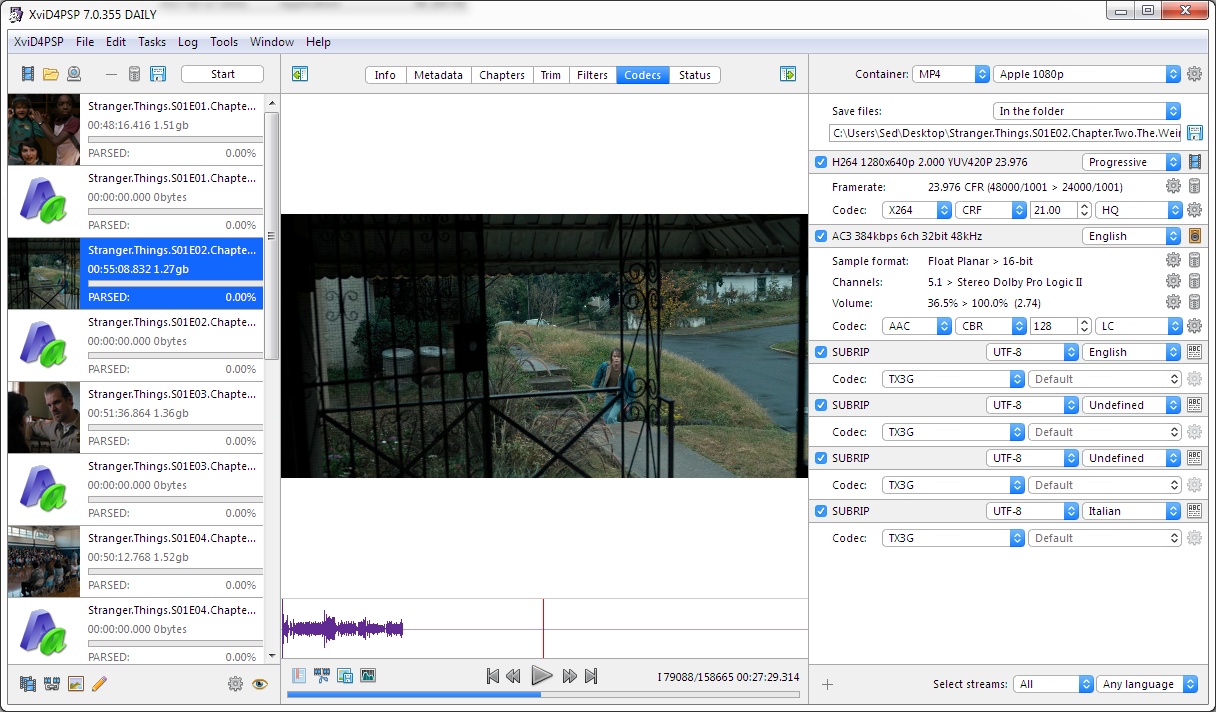
XviD4PSP 8.1 is a program for convenient and high-quality video and audio conversion. Completely new version. It does not depend on system codecs and any system components – everything is inside. Does not require installation. It works independently of versions 5/6/7/8.0. Pro versions costs $20.
Freeware Trialware $20
OS:


File size: 64MB
Beta version
Portable version
Other versions
Old versions
Version history
Alternative software
OS:
File size: 64MB
Beta version
Portable version
Other versions
Old versions
Version history
Alternative software
Screenshots


Latest version
Download
Download XviD4PSP 8.2.9 Windows 64-bit 64MB Win64
Portable 
Download XviD4PSP 8.2.9 Mac 64-bit 64MB Mac64
Download XviD4PSP 8.2.9 Linux 64-bit 64MB Linux64
Download Beta, Portable and other versions
Download XviD4PSP 8.2.10 Beta Portable Windows 64-bit 64MB Win64
Portable Download XviD4PSP 8.2.10 Beta Windows ARM 64-bit 64MB WinARM64
Download XviD4PSP 8.2.10 Beta Mac Silicon ARM 64MB MacARM64
Download XviD4PSP 8.2.10 Beta Linux 64MB Linux
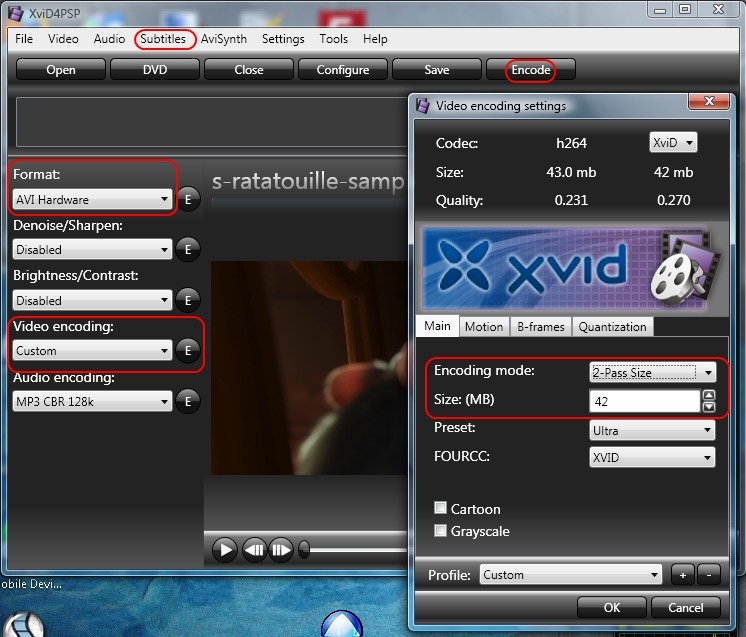
Download Xvid4PSP 5.10.346 Win - The old good free Xvid4PSP5, see bottom screenshot ->
Download old versions

Software License
Supported operating systems
Mac OS Linux More information and other downloads
Version history / Release notes / Changelog / What's New
A beta build is ready: XviD4PSP 8.2.10
Published on April 23, 2026 • Updated on April 23, 2026 • By Winnydows • 1 minute read
Fixed the loss of anamorphic aspect ratio with the Pixel Format and Overlay filters.
Fixed the crash when adding files to AVI DV PAL/NTSC and other presets with mandatory interlace.
Fixed the import of tasks.
Published on April 23, 2026 • Updated on April 23, 2026 • By Winnydows • 1 minute read
Fixed the loss of anamorphic aspect ratio with the Pixel Format and Overlay filters.
Fixed the crash when adding files to AVI DV PAL/NTSC and other presets with mandatory interlace.
Fixed the import of tasks.
View full changelog
All features
Minimal requirements to system (version 8.1):
macOS 10.11+.
Windows 10/11 64-bit.
Linux Ubuntu 20.04.
Minimal requirements to system (version 8.0):
macOS 10.9+.
Windows Vista/7/8/10/11.
Linux Linux Ubuntu 20.04.
Import formats:
AVI DIVX ASF MPG MPE M2V MPEG VOB TS M2P D2V MOV QT 3GP HDMOV RM RAM RMVB RPX SMI SMIL MKV OGM WMV DVR-MS FLV …
Almost any input format.
Export formats:
AC3, AAC, MP3, MP2, MP4, M4V, M4A, OGG, WAV, WMA, AMR, AVI, DV, FLV, MPEGTS, MPEGPS, MKV, MKA, MOV, FLV, 3GP, WEBM, WMV, ASF , DV…
Device presets:
Sony: PSP, PS3, Ericsson K610, Ericsson K800.
Apple: iPod, iPod Touch, iPhone, iPad, Apple TV, iMovie iOS.
Nokia: Nokia N8, Nokia N900, Nokia 5700, Nokia S60v5, Nokia X6.
: Xbox 360, You-Tube, DVD Player SD, DVD Player HD, iRiver Clix 2, HTC Touch Diamond 2, Samsung Galaxy Tab 1010, Archos 5G, BlackBerry 8100, BlackBerry 8800, BlackBerry 8830, LG Prada, Motorola K1 and many other devices.
Advantages of 8.1 over version 8.0:
The program is completely rewritten in the most modern language — Swift.
Unlike 8.0, the stability of the program no longer depends on the system – 8.1 is equally stable on all systems.
For Windows systems, the program is based on native MSVC components.
Improved work with HTTPS sources of meta-information.
Added multi-line editing of text fields.
Added support for WEBP images.
Added activation management.
Added a noise control filter.
Added video creation from a sequence of images.
Fixed multi-pass encoding with the AVC1 codec.
Full support for working with exceptions.
You can now disable updates regardless of the status of the program.
Hardware decoding support is implemented.
Advantages of 8.0 over version 7.0:
The program has been completely rewritten using the latest technologies.
Based on the updated coding core.
Added support for working with HDR.
Saving and loading tasks.
Ultra fast log without loss of speed independent of the number of messages.
The log is always saved even when the program crashes.
Added more types of deinterlace.
Tasks can now be dragged with the mouse on all platforms.
A completely new and flexible Metadata tab.
The preview is now able to show the volume pattern.
Unified management of filters and streams.
A new, faster and more reliable update system.
Ultra fast interface.
Native view on all platforms.
Support for working with the macOS Mojave dark theme.
Now it also works on Linux.
Can decode video with variable frame size.
It is able to limit the load on the processor.
Can encode video with hardware codecs: VideoToolbox, NVENC.
Can open and encode VapourSynth scripts.
More complete settings for XviD, x265 codecs.
Can change the location of the media stream.
The frame rate filter can create VFR and interpolate intermediate frames.
The encoding speed test allows you to test the encoding speed of a video card.
Advantages of 7.0 over version 6.0:
It does not have any dependencies and does not require installation – it works on a bare system.
It works not only on Windows, but also on Mac.
The latest versions of encoders and decoders.
Reads and decodes more formats and codecs.
More encoders: x262, x264 10-bit, x265, high-quality AAC-HE/LC codec.
The x26X codec family can accept any settings via the CLI interface.
Can do 2X deinterlace without loss of smoothness and in different ways.
More deinterlace filters.
Processes interlace rollers without loss of quality and interlace.
Knows how to work with metadata.
Can download meta data about a file/movie/series from the Internet.
You can transfer metadata from one file to another.
You can add/remove covers.
You can add attachments.
Can work with bookmarks – copying, creating, parsing, exporting.
A separate and more accurate engine for reading BluRay and DVD.
Perfect synchronization when working with BluRay consisting of a large number of chunks.
Copes better with copying – does not spoil the smoothness and copies more types of streams.
Can copy using a decoder (Smart mode) – accurate recovery of damaged or crooked timecodes.
It has flexible step presets for codecs.
It can combine different types of files.
It can dynamically analyze the compression quality with any PSNR codec and SSIM metrics.
If there is a source code, it can analyze the quality in already transcoded files.
Changes to filter settings dynamically modify the format preset.
You can slice one or more files by multiple crop points.
Can digest more file types and decode more rare codecs.
Contains more information scanners – compressibility, GOP, bitrate, etc.
Full support for working with subtitles.
Advantages of 6.0 over version 5.0:
Does not depend on system codecs.
With each new update, you get the latest versions of codecs.
More compact program size.
More convenient batch processing.
Significantly faster work with files.
You can create a preset format for your device yourself.
More settings for the x264 codec.
Quick volume scan.
A quick scan of the interlace.
The widest range of formats and codecs for output (so far only proven ones have been unlocked).
Supports multiple audio tracks.
You can stop encoding at any time and get a 100% working file.
Quick real-time preview for all filters.
Visual crop.
A quick autocrop with an analysis of the entire movie.
Predictable result.
Working with text subtitles.
Allows you to translate the program into your native language yourself.
More formats for output.
The transition to the preview by key and by regular frames.
Works when UAC is enabled.
Works with network drives.
Does not create temporary files.
Can be run without installing dependencies and bypassing system damage – PORTABLE build.
Supports Unicode paths.
Can quickly do visual scanning of the interleace.
Can draw spectrograms for audio tracks.
It is able to show the result of downmix and channel remap in real time.
It has a built-in media player that does not require the installation of codecs.
The installer can download and install all the necessary dependencies by itself.
Why 7.0 is more compact than 5.0:
6.0 and 7.0 does not include any foreign programs – only lib components that take up ten times less space, since they do not duplicate pieces of code, do not contain a GUI and are compiled into a single core. At the same time, the internal potential of the 7th version is several times higher than that of the 5th – full control over all processes – practically unlimited ability to develop.
macOS 10.11+.
Windows 10/11 64-bit.
Linux Ubuntu 20.04.
Minimal requirements to system (version 8.0):
macOS 10.9+.
Windows Vista/7/8/10/11.
Linux Linux Ubuntu 20.04.
Import formats:
AVI DIVX ASF MPG MPE M2V MPEG VOB TS M2P D2V MOV QT 3GP HDMOV RM RAM RMVB RPX SMI SMIL MKV OGM WMV DVR-MS FLV …
Almost any input format.
Export formats:
AC3, AAC, MP3, MP2, MP4, M4V, M4A, OGG, WAV, WMA, AMR, AVI, DV, FLV, MPEGTS, MPEGPS, MKV, MKA, MOV, FLV, 3GP, WEBM, WMV, ASF , DV…
Device presets:
Sony: PSP, PS3, Ericsson K610, Ericsson K800.
Apple: iPod, iPod Touch, iPhone, iPad, Apple TV, iMovie iOS.
Nokia: Nokia N8, Nokia N900, Nokia 5700, Nokia S60v5, Nokia X6.
: Xbox 360, You-Tube, DVD Player SD, DVD Player HD, iRiver Clix 2, HTC Touch Diamond 2, Samsung Galaxy Tab 1010, Archos 5G, BlackBerry 8100, BlackBerry 8800, BlackBerry 8830, LG Prada, Motorola K1 and many other devices.
Advantages of 8.1 over version 8.0:
The program is completely rewritten in the most modern language — Swift.
Unlike 8.0, the stability of the program no longer depends on the system – 8.1 is equally stable on all systems.
For Windows systems, the program is based on native MSVC components.
Improved work with HTTPS sources of meta-information.
Added multi-line editing of text fields.
Added support for WEBP images.
Added activation management.
Added a noise control filter.
Added video creation from a sequence of images.
Fixed multi-pass encoding with the AVC1 codec.
Full support for working with exceptions.
You can now disable updates regardless of the status of the program.
Hardware decoding support is implemented.
Advantages of 8.0 over version 7.0:
The program has been completely rewritten using the latest technologies.
Based on the updated coding core.
Added support for working with HDR.
Saving and loading tasks.
Ultra fast log without loss of speed independent of the number of messages.
The log is always saved even when the program crashes.
Added more types of deinterlace.
Tasks can now be dragged with the mouse on all platforms.
A completely new and flexible Metadata tab.
The preview is now able to show the volume pattern.
Unified management of filters and streams.
A new, faster and more reliable update system.
Ultra fast interface.
Native view on all platforms.
Support for working with the macOS Mojave dark theme.
Now it also works on Linux.
Can decode video with variable frame size.
It is able to limit the load on the processor.
Can encode video with hardware codecs: VideoToolbox, NVENC.
Can open and encode VapourSynth scripts.
More complete settings for XviD, x265 codecs.
Can change the location of the media stream.
The frame rate filter can create VFR and interpolate intermediate frames.
The encoding speed test allows you to test the encoding speed of a video card.
Advantages of 7.0 over version 6.0:
It does not have any dependencies and does not require installation – it works on a bare system.
It works not only on Windows, but also on Mac.
The latest versions of encoders and decoders.
Reads and decodes more formats and codecs.
More encoders: x262, x264 10-bit, x265, high-quality AAC-HE/LC codec.
The x26X codec family can accept any settings via the CLI interface.
Can do 2X deinterlace without loss of smoothness and in different ways.
More deinterlace filters.
Processes interlace rollers without loss of quality and interlace.
Knows how to work with metadata.
Can download meta data about a file/movie/series from the Internet.
You can transfer metadata from one file to another.
You can add/remove covers.
You can add attachments.
Can work with bookmarks – copying, creating, parsing, exporting.
A separate and more accurate engine for reading BluRay and DVD.
Perfect synchronization when working with BluRay consisting of a large number of chunks.
Copes better with copying – does not spoil the smoothness and copies more types of streams.
Can copy using a decoder (Smart mode) – accurate recovery of damaged or crooked timecodes.
It has flexible step presets for codecs.
It can combine different types of files.
It can dynamically analyze the compression quality with any PSNR codec and SSIM metrics.
If there is a source code, it can analyze the quality in already transcoded files.
Changes to filter settings dynamically modify the format preset.
You can slice one or more files by multiple crop points.
Can digest more file types and decode more rare codecs.
Contains more information scanners – compressibility, GOP, bitrate, etc.
Full support for working with subtitles.
Advantages of 6.0 over version 5.0:
Does not depend on system codecs.
With each new update, you get the latest versions of codecs.
More compact program size.
More convenient batch processing.
Significantly faster work with files.
You can create a preset format for your device yourself.
More settings for the x264 codec.
Quick volume scan.
A quick scan of the interlace.
The widest range of formats and codecs for output (so far only proven ones have been unlocked).
Supports multiple audio tracks.
You can stop encoding at any time and get a 100% working file.
Quick real-time preview for all filters.
Visual crop.
A quick autocrop with an analysis of the entire movie.
Predictable result.
Working with text subtitles.
Allows you to translate the program into your native language yourself.
More formats for output.
The transition to the preview by key and by regular frames.
Works when UAC is enabled.
Works with network drives.
Does not create temporary files.
Can be run without installing dependencies and bypassing system damage – PORTABLE build.
Supports Unicode paths.
Can quickly do visual scanning of the interleace.
Can draw spectrograms for audio tracks.
It is able to show the result of downmix and channel remap in real time.
It has a built-in media player that does not require the installation of codecs.
The installer can download and install all the necessary dependencies by itself.
Why 7.0 is more compact than 5.0:
6.0 and 7.0 does not include any foreign programs – only lib components that take up ten times less space, since they do not duplicate pieces of code, do not contain a GUI and are compiled into a single core. At the same time, the internal potential of the 7th version is several times higher than that of the 5th – full control over all processes – practically unlimited ability to develop.
Sections/Browse similar tools
All In One Video Converters
Linux Video Tools
MacOS Video Tools
Portable (Mobile/PSP)
Video Encoders (H264/H265/MP4/MKV)
Video Encoders / Converters
Alternative to XviD4PSP
(Latest version updated)AudioMuxer (Sep 21, 2020)
AutoGK (Feb 1, 2009)
AVS Video Converter (Feb 20, 2026)
clever FFmpeg-GUI (Apr 25, 2026)
CloneDVD mobile (May 18, 2016)
DVD Swarm (Mar 17, 2011)
FairUse Wizard (Aug 21, 2012)
FastFlix (Mar 22, 2026)
FFCoder (Feb 16, 2013)
FFmpeg Batch Converter (Mar 19, 2026)
H.264 Encoder (May 11, 2017)
HandBrake (Mar 22, 2026)
Libre AV Converter (Oct 2, 2023)
MediaCoder (Jan 16, 2026)
Nero Platinum (Nov 4, 2024)
ShanaEncoder (Mar 10, 2025)
Shutter Encoder (Apr 7, 2026)
SimpleDivX (Aug 25, 2007)
StaxRip (Apr 7, 2026)
TEncoder (Nov 30, 2015)
Total Video Converter (Nov 11, 2024)
TX264 (Oct 8, 2014)
VidCoder (Apr 23, 2026)
Video to Video Converter (Jun 9, 2013)
WinFF (Jun 12, 2017)
XMedia Recode (Apr 8, 2026)
Guides and How to's
How to convert any video to AVI or MP4 with burned in subtitles
- ReadHow to convert any video to high quality flash, MP4 with H264 video and AAC audio, and put on your site
- ReadHow to convert any video to MP4 iPod, iPhone, PS3, XboX 360 using free tools
- ReadHow to convert DVD to DV-AVI with optional burned in subtitles
- ReadHow to cut out clips from DVDs and convert to AVI, MP4 using free software
- ReadXviD4PSP video tutorials
View all guides with guide description here
Tool features - Convert
3GP to AVC, 3GP to AVI, 3GP to FLV, 3GP to H264, 3GP to MP4, 3GP to MPG, ASF to AVC, ASF to AVI, ASF to FLV, ASF to H264, ASF to MP4, ASF to MPG, AVI to AVC, AVI to AVI, AVI to FLV, AVI to H264, AVI to MP4, AVI to MPG, DivX to AVC, DivX to AVI, DivX to FLV, DivX to H264, DivX to MP4, DivX to MPG, DVB to AVC, DVB to AVI, DVB to FLV, DVB to H264, DVB to MP4, DVB to MPG, DV to AVC, DV to AVI, DV to FLV, DV to H264, DV to MP4, DV to MPG, FLV to AVC, FLV to AVI, FLV to H264, FLV to MP4, FLV to MPG, HDTV to AVC, HDTV to AVI, HDTV to FLV, HDTV to H264, HDTV to MP4, HDTV to MPG, MOV to AVC, MOV to AVI, MOV to FLV, MOV to H264, MOV to MP4, MOV to MPG, MKV to AVI, MKV to DivX, MKV to H264, MKV to MP4, MKV to MPG, MKV to XviD, MPG to AVC, MPG to AVI, MPG to FLV, MPG to H264, MPG to MP4, MPG to MPG, OGM to AVC, OGM to AVI, OGM to FLV, OGM to H264, OGM to MP4, OGM to MPG, RM to AVC, RM to AVI, RM to FLV, RM to H264, RM to MP4, RM to MPG, VOB to AVC, VOB to AVI, VOB to FLV, VOB to H264, VOB to MP4, VOB to MPG, TS to AVC, TS to AVI, TS to FLV, TS to H264, TS to MP4, TS to MPG, WMV to AVC, WMV to AVI, WMV to FLV, WMV to H264, WMV to MP4, WMV to MPG, XviD to AVC, XviD to AVI, XviD to FLV, XviD to H264, XviD to MP4, XviD to MPG
Acronyms / Also Known As
Download XviD4PSP Portable download from the Download links under Download and Download other versions!
Notify me when software updated or report software
| 166 reviews, Showing 1 to 5 reviews |
I’m currently using Xvid4PSP version 5.10.346, which I have updated by replacing older plugins and libraries with newer versions. This includes codecs such as Nero AAC, FFMpeg (version 0.8), x264, x265, XviD, LAME, QAAC, as well as Avisynth (with MMX support), FFMS2-2.4, and L-SMASH libraries.
Despite its age, the program remains highly competitive and comparable to much newer and more advanced video conversion tools. Its flexibility and reliability make it a solid choice even today.
Despite its age, the program remains highly competitive and comparable to much newer and more advanced video conversion tools. Its flexibility and reliability make it a solid choice even today.
Review by Psychonix on
Nov 25, 2025 Version: Stáhnout Xvid4PSP 5.10.346
OS: Windows 11 64-bit Ease of use: 10/10
Functionality: 10/10
Value for money: 10/10
Overall: 10/10
I have a pro version.
There are many free video encoder GUIs.
But honestly none of these are so easy, fast and handy like this app.
Seriously. Many people are crying that is no longer free, or that it's crashing.
But for me it just works. I love the simple interface. All modern codecs are available. Along with Nvidia GPU ones.
I really recommend this app. I'm using it for many years.
There are many free video encoder GUIs.
But honestly none of these are so easy, fast and handy like this app.
Seriously. Many people are crying that is no longer free, or that it's crashing.
But for me it just works. I love the simple interface. All modern codecs are available. Along with Nvidia GPU ones.
I really recommend this app. I'm using it for many years.
Review by Genbu on
Mar 5, 2025 Version: 8.1.103
OS: Windows 11 64-bit Ease of use: 10/10
Functionality: 10/10
Value for money: 10/10
Overall: 10/10
It's really a great program. It seems that the author put a lot of effort into creating and developing this program. Unfortunately, there is a problem in the latest version. It cuts off 15 frames from the end of the video. This did not happen in the version 8.1.80 pro .THANK YOU SO MUCH ...
Review by AbuDhifaf on
Aug 9, 2024 Version: XviD4PSP 8.1.84 pro
OS: Windows 10 64-bit Ease of use: 10/10
Functionality: 10/10
Value for money: 10/10
Overall: 10/10
Excellent THANK YOU SO MUCH ....
Review by AbuDhifaf on
Mar 28, 2024 Version: 8.1
OS: Windows 10 64-bit Ease of use: 10/10
Functionality: 10/10
Value for money: 10/10
Overall: 10/10
Rating by MLGMAN on
Jan 6, 2024 Version: 8.1.65
OS: MacOSX Ease of use: 10/10
Functionality: 10/10
Value for money: 10/10
Overall: 10/10
| 166 reviews, Showing 1 to 5 reviews |
| 1 tool hits, Showing 1 to 1 tools |
Explanation:
NEW SOFTWARE= New tool since your last visit
NEW VERSION= New version since your last visit
NEW REVIEW= New review since your last visit
NEW VERSION= New version
Latest version
Version number / Beta version number / Update version number and when it whas released.
Type and download
NO MORE UPDATES? = The software hasn't been updated in over 2 years.
NO LONGER DEVELOPED = The software hasn't been updated in over 5 years.
RECENTLY UPDATED = The software has been updated the last 31 days.
Freeware = Download Free software.
Freeware Trialware = Download Free software but some parts are trial/shareware.
Free software = Download Free software and also open source code also known as FOSS (Free and Open Source Software).
Free software Trialware = Download Free software and also open source code but some parts are trial/shareware.
Freeware Ads = Download Free software but supported by advertising, usually with a included browser toolbar. It may be disabled when installing or after installation.
Free software Ads = Free Download software and open source code but supported by advertising, usually with a included browser toolbar. It may be disabled when installing or after installation.
Trialware = Also called shareware or demo. Free Trial version available for download and testing with usually a time limit or limited functions.
Payware = No demo or trial available.
Portable version = A portable/standalone version is available. No installation is required.
v1.0.1 = Latest version available.
Download beta = It could be a Beta, RC(Release Candidate) or an Alpha / Nightly / Unstable version of the software.
Download 15MB = A direct link to the software download.
Win = Windows download version for 32-bit and 64-bit Windows.
Win64 = Windows 64-bit download version for 64-bit Windows.
WinARM64 = Windows 64-bit ARM download version for Windows ARM64/AArch64.
Mac = Mac download version for 64-bit Mac OS Intel/ARM64/AArch64.
MacARM64 = Mac Silicon download version for 64-bit Mac OS ARM64/AArch64.
Mac64 = Mac OS download version for 64-bit Intel Mac OS.
Linux = Linux download version.
Linux64 = Linux download version for 64bit Linux.
Linux ARM = Linux download version for Linux ARM64/AArch64.
Portable = Portable version. No installation is required.
Ad-Supported = The software is bundled with advertising. Be careful when you install the software and disable addons that you don't want!
Visit developers site = A link to the software developer site.
Download (mirror link) = A mirror link to the software download. It may not contain the latest versions.
Download old versions = Free downloads of previous versions of the program.
Download 64-bit version = If you have a 64bit operating system you can download this version.
Download portable version = Portable/Standalone version meaning that no installation is required, just extract the files to a folder and run directly.
Portable version available = Download the portable version and you can just extract the files and run the program without installation.
Old versions available = Download old versions of the program.
Version history available = Complete changelog on our site.
= Windows version available.
= Mac OS version available.
= Linux version available.
Our hosted software are virus and malware scanned with several antivirus programs using www.virustotal.com. (NOTE! Just one virustotal warning is 99.9% a false positive. And some software might receive 2-6 warnings but it's if they are not all same virus/trojan then it's 99% false positives.)
Rating
Rating from 0-10.
NEW SOFTWARE= New tool since your last visit
NEW VERSION= New version since your last visit
NEW REVIEW= New review since your last visit
NEW VERSION= New version
Latest version
Version number / Beta version number / Update version number and when it whas released.
Type and download
NO MORE UPDATES? = The software hasn't been updated in over 2 years.
NO LONGER DEVELOPED = The software hasn't been updated in over 5 years.
RECENTLY UPDATED = The software has been updated the last 31 days.
Freeware = Download Free software.
Freeware Trialware = Download Free software but some parts are trial/shareware.
Free software = Download Free software and also open source code also known as FOSS (Free and Open Source Software).
Free software Trialware = Download Free software and also open source code but some parts are trial/shareware.
Freeware Ads = Download Free software but supported by advertising, usually with a included browser toolbar. It may be disabled when installing or after installation.
Free software Ads = Free Download software and open source code but supported by advertising, usually with a included browser toolbar. It may be disabled when installing or after installation.
Trialware = Also called shareware or demo. Free Trial version available for download and testing with usually a time limit or limited functions.
Payware = No demo or trial available.
Portable version = A portable/standalone version is available. No installation is required.
v1.0.1 = Latest version available.
Download beta = It could be a Beta, RC(Release Candidate) or an Alpha / Nightly / Unstable version of the software.
Download 15MB = A direct link to the software download.
Win = Windows download version for 32-bit and 64-bit Windows.
Win64 = Windows 64-bit download version for 64-bit Windows.
WinARM64 = Windows 64-bit ARM download version for Windows ARM64/AArch64.
Mac = Mac download version for 64-bit Mac OS Intel/ARM64/AArch64.
MacARM64 = Mac Silicon download version for 64-bit Mac OS ARM64/AArch64.
Mac64 = Mac OS download version for 64-bit Intel Mac OS.
Linux = Linux download version.
Linux64 = Linux download version for 64bit Linux.
Linux ARM = Linux download version for Linux ARM64/AArch64.
Portable = Portable version. No installation is required.
Ad-Supported = The software is bundled with advertising. Be careful when you install the software and disable addons that you don't want!
Visit developers site = A link to the software developer site.
Download (mirror link) = A mirror link to the software download. It may not contain the latest versions.
Download old versions = Free downloads of previous versions of the program.
Download 64-bit version = If you have a 64bit operating system you can download this version.
Download portable version = Portable/Standalone version meaning that no installation is required, just extract the files to a folder and run directly.
Portable version available = Download the portable version and you can just extract the files and run the program without installation.
Old versions available = Download old versions of the program.
Version history available = Complete changelog on our site.
= Windows version available. = Mac OS version available. = Linux version available.Our hosted software are virus and malware scanned with several antivirus programs using www.virustotal.com. (NOTE! Just one virustotal warning is 99.9% a false positive. And some software might receive 2-6 warnings but it's if they are not all same virus/trojan then it's 99% false positives.)
Rating
Rating from 0-10.
Browse software by sections
All In One Blu-ray Converters (9)
All In One DVD Converters (12)
All In One MKV to MP4, Blu-ray, UHD (11)
All In One Video Converters (19)
Animation (3D, 2D Animation) (12)
Audio Editors (22)
Audio Encoders (80)
Audio Players (19)
Authoring (Blu-ray, UHD, AVCHD) (13)
Authoring (DivX) (4)
Authoring (DVD) (26)
Authoring (SVCD, VCD) (9)
Bitrate Calculators (7)
Blu-ray to AVI, MKV, MP4 (15)
Blu-ray to Blu-ray, AVCHD (10)
Burn (CD,DVD,Blu-ray) (24)
Camcorders, DV, HDV, AVCHD (31)
Capture TV, DVD, VCR (30)
CD, DVD, Blu-ray recovery (3)
Codec Packs (6)
All In One DVD Converters (12)
All In One MKV to MP4, Blu-ray, UHD (11)
All In One Video Converters (19)
Animation (3D, 2D Animation) (12)
Audio Editors (22)
Audio Encoders (80)
Audio Players (19)
Authoring (Blu-ray, UHD, AVCHD) (13)
Authoring (DivX) (4)
Authoring (DVD) (26)
Authoring (SVCD, VCD) (9)
Bitrate Calculators (7)
Blu-ray to AVI, MKV, MP4 (15)
Blu-ray to Blu-ray, AVCHD (10)
Burn (CD,DVD,Blu-ray) (24)
Camcorders, DV, HDV, AVCHD (31)
Capture TV, DVD, VCR (30)
CD, DVD, Blu-ray recovery (3)
Codec Packs (6)
Codec, Video Identifiers (30)
Codecs (67)
Decrypters (DVD Rippers) (16)
Decrypters (UHD, Blu-ray Rippers) (8)
DigitalTV, DVB, IPTV (39)
DVD to DVD (20)
DVD to MP4, MKV, H264, H265 (16)
DVD to VCD, SVCD (5)
DVD to XviD, AVI, DivX (16)
ISO, Image (15)
Linux Video Tools (208)
MacOS Video Tools (244)
Media (Blu-ray, DVD, CD) (9)
Media Center, HTPC (24)
Other Useful Tools (140)
Photo Blu-ray, DVD, SlideShow (8)
Portable (Mobile, PSP) (35)
Region Free Tools (5)
Screen capture , Screen recording (27)
Screenshots , Thumbnails (13)
Codecs (67)
Decrypters (DVD Rippers) (16)
Decrypters (UHD, Blu-ray Rippers) (8)
DigitalTV, DVB, IPTV (39)
DVD to DVD (20)
DVD to MP4, MKV, H264, H265 (16)
DVD to VCD, SVCD (5)
DVD to XviD, AVI, DivX (16)
ISO, Image (15)
Linux Video Tools (208)
MacOS Video Tools (244)
Media (Blu-ray, DVD, CD) (9)
Media Center, HTPC (24)
Other Useful Tools (140)
Photo Blu-ray, DVD, SlideShow (8)
Portable (Mobile, PSP) (35)
Region Free Tools (5)
Screen capture , Screen recording (27)
Screenshots , Thumbnails (13)
Subtitle Editors, Converters (72)
Tag Editors (4)
Video De, Multiplexers (66)
Video Editors (Advanced, NLE) (35)
Video Editors (Basic) (56)
Video Editors (H264, MP4, MKV, MTS) (19)
Video Editors (Lossless) (4)
Video Editors (MPG, DVD) (16)
Video Editors (WMV, AVI) (15)
Video Encoders (AV1, VP8, VP9) (2)
Video Encoders (AVI, WMV) (38)
Video Encoders (H264, H265, MP4, MKV) (45)
Video Encoders (MPG, DVD) (23)
Video Encoders , Converters (155)
Video Frameservers (9)
Video Players (49)
Video Repair, Fix (24)
Video Scripting (10)
Video Streaming (21)
Video Streaming Downloaders (101)
Tag Editors (4)
Video De, Multiplexers (66)
Video Editors (Advanced, NLE) (35)
Video Editors (Basic) (56)
Video Editors (H264, MP4, MKV, MTS) (19)
Video Editors (Lossless) (4)
Video Editors (MPG, DVD) (16)
Video Editors (WMV, AVI) (15)
Video Encoders (AV1, VP8, VP9) (2)
Video Encoders (AVI, WMV) (38)
Video Encoders (H264, H265, MP4, MKV) (45)
Video Encoders (MPG, DVD) (23)
Video Encoders , Converters (155)
Video Frameservers (9)
Video Players (49)
Video Repair, Fix (24)
Video Scripting (10)
Video Streaming (21)
Video Streaming Downloaders (101)