
Help us keep the list up to date and submit new video software here.
Tool
Description
Type
Rating
Reviews
TMPGEnc DVD Author 3 with DivX Authoring offers many new features and some terrific advancements over its predecessors. It is the ultimate all-in-one DVD authoring solution for any video enthusiast, whether you're a beginner or experienced videographer. Enjoy new features such as DivX® authoring, HDV capture, more import formats, up to two subtitle streams, and more! Builtin DVD editing, import DVD-Video, VOB Files, DVD-VR, DVD-RAM. Add 2 audio tracks and 2 subtitle streams. This product has been discontinued and replaced by TMPGEnc Authoring Works.
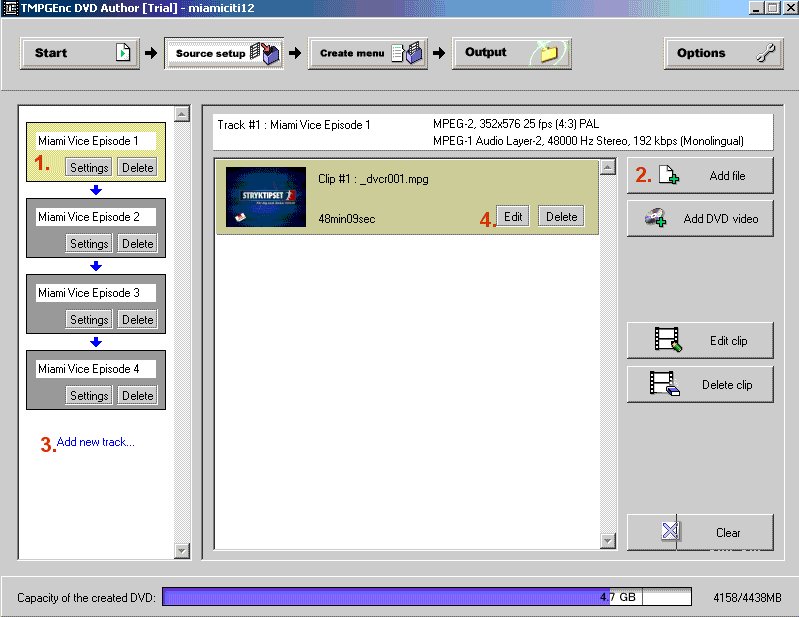
Screenshots
Latest version
Download
Software License
Supported operating systems

More information and other downloads
Get the old Tmpgenc DVD Author 2.0 if you don't need DivX or an all-in-one converter.
Version history / Release notes / Changelog / What's New
TMPGEnc DVD Author 3 with DivX® Authoring Version 3.1.2.176 - June 10th, 2008
Improved Validation system updated to support content-regulated network environment.
Improved Validation system updated to support content-regulated network environment.
View full changelog
Sections/Browse similar tools
Guides and How to's
Audio Compilations on DVD Guide
- ReadHow to convert interlaced PAL DVD to NTSC DVD
- ReadHow to quickly convert VCD to DVD
- ReadTMPGEnc DVD Author 3 (DivX Author): DivX Authoring Guide
- ReadTMPGEnc DVD Author 3: DVD Authoring Guide
- ReadTMPGEnc DVD Author video tutorials
View all guides with guide description here
Tool features - Convert
Tool features, DVD Author(BETA!):
Import program video stream, Import elemantary streams, Import DVD-Video, MPEG2 video, MPEG1 video, VCD video (no video reconverting), WAV/PCM audio, MPEG1 Layer 2 audio, AC3 5.1 audio, AC3 Stereo/Mono audio, Menus, Motion menus, Template menus, Several tracks / separate VTS, Chapters, Chapter editor, Chapter screenshot for menus, Video editor, Anamorphic 16:9, Burn, Audio MPEG1 encoder, Audio AC3 Stereo/Mono encoder - AC3 Plugin., Import MPEG1(VCD), Author tool still active,
Acronyms / Also Known As
Notify me when software updated or report software
| 130 reviews, Showing 1 to 5 reviews |
Do not use this product if you intend to burn DL DVDs. I had issues with DL burning of DVD but it failed always after burning first layer and not to mention pathetic technical support.
Review by jeet49 on
Jul 12, 2010 Version: 4.0.11.39
OS: Windows 7 64-bit Ease of use: 8/10
Functionality: 6/10
Value for money: 4/10
Overall: 5/10
I purchased this product 2 versions ago and have never been disappointed. The codecs used are first-rate and produce quality images consistently, much better than similarly-priced offerings and hugely better than the "free" products.
Most of the time I take my old mini VCR camera tapes or old VCR-based movies, feed them into my Toshiba D-VR6KC VCR and DVD player/recorder and cut a DVD-RW copy. Then feed that (and other) DVD into TMPGEnc's product and produce a dual-layer DVD suitable for viewing on European DVD players and TVs (original in North American standard).
Horsepower helps but, no matter the time taken, the output quality is excellent! The interface takes a bit to get used to it, but if you aren't (like me) a video nerd and just want a one-click product ... this is it.
The only thing I don't like is that firing up the program involves it making a quick internet connection to the vendor's site to verify you are licensed for the product. I understand the need to prevent piracy, and as it only takes a second or two it's hardly an inconvenience, but what happens if the vendor goes tits up? Is our investment lost?
Most of the time I take my old mini VCR camera tapes or old VCR-based movies, feed them into my Toshiba D-VR6KC VCR and DVD player/recorder and cut a DVD-RW copy. Then feed that (and other) DVD into TMPGEnc's product and produce a dual-layer DVD suitable for viewing on European DVD players and TVs (original in North American standard).
Horsepower helps but, no matter the time taken, the output quality is excellent! The interface takes a bit to get used to it, but if you aren't (like me) a video nerd and just want a one-click product ... this is it.
The only thing I don't like is that firing up the program involves it making a quick internet connection to the vendor's site to verify you are licensed for the product. I understand the need to prevent piracy, and as it only takes a second or two it's hardly an inconvenience, but what happens if the vendor goes tits up? Is our investment lost?
Review by burpnrun on
Dec 13, 2007 Version: 3.1.1.174
OS: WinXP Ease of use: 8/10
Functionality: 10/10
Value for money: 10/10
Overall: 9/10
to add srt files select edit menue import subtitles select srt you will find this works fine TMPGEnc DVD Author 3 is an ok prog
Review by dessieclive on
Sep 7, 2007 Version: 309 166
OS: WinXP Ease of use: 9/10
Functionality: 9/10
Value for money: 9/10
Overall: 9/10
Unable to import known good .srt subtitle files, no
information to be found on just what the program is
looking for. Poor documentation in this respect.
Program is improving, but still has long way to go.
information to be found on just what the program is
looking for. Poor documentation in this respect.
Program is improving, but still has long way to go.
Review by wa5dxp on
Aug 29, 2007 Version: 3.0.8.158
OS: WinXP Ease of use: 8/10
Functionality: 8/10
Value for money: 5/10
Overall: 7/10
Please fix crashing problem that occurs while editing menu
Review by hgh on
Aug 10, 2007 Version: 308185
OS: WinXP Ease of use: 9/10
Functionality: 7/10
Value for money: 6/10
Overall: 7/10
| 130 reviews, Showing 1 to 5 reviews |
| 1 tool hits, Showing 1 to 1 tools |
Explanation:
NEW SOFTWARE= New tool since your last visit
NEW VERSION= New version since your last visit
NEW REVIEW= New review since your last visit
NEW VERSION= New version
Latest version
Version number / Beta version number / Update version number and when it whas released.
Type and download
NO MORE UPDATES? = The software hasn't been updated in over 2 years.
NO LONGER DEVELOPED = The software hasn't been updated in over 5 years.
RECENTLY UPDATED = The software has been updated the last 31 days.
Freeware = Download Free software.
Freeware Trialware = Download Free software but some parts are trial/shareware.
Free software = Download Free software and also open source code also known as FOSS (Free and Open Source Software).
Free software Trialware = Download Free software and also open source code but some parts are trial/shareware.
Freeware Ads = Download Free software but supported by advertising, usually with a included browser toolbar. It may be disabled when installing or after installation.
Free software Ads = Free Download software and open source code but supported by advertising, usually with a included browser toolbar. It may be disabled when installing or after installation.
Trialware = Also called shareware or demo. Free Trial version available for download and testing with usually a time limit or limited functions.
Payware = No demo or trial available.
Portable version = A portable/standalone version is available. No installation is required.
v1.0.1 = Latest version available.
Download beta = It could be a Beta, RC(Release Candidate) or an Alpha / Nightly / Unstable version of the software.
Download 15MB = A direct link to the software download.
Win = Windows download version for 32-bit and 64-bit Windows.
Win64 = Windows 64-bit download version for 64-bit Windows.
WinARM64 = Windows 64-bit ARM download version for Windows ARM64/AArch64.
Mac = Mac download version for 64-bit Mac OS Intel/ARM64/AArch64.
MacARM64 = Mac Silicon download version for 64-bit Mac OS ARM64/AArch64.
Mac64 = Mac OS download version for 64-bit Intel Mac OS.
Linux = Linux download version.
Linux64 = Linux download version for 64bit Linux.
Linux ARM = Linux download version for Linux ARM64/AArch64.
Portable = Portable version. No installation is required.
Ad-Supported = The software is bundled with advertising. Be careful when you install the software and disable addons that you don't want!
Visit developers site = A link to the software developer site.
Download (mirror link) = A mirror link to the software download. It may not contain the latest versions.
Download old versions = Free downloads of previous versions of the program.
Download 64-bit version = If you have a 64bit operating system you can download this version.
Download portable version = Portable/Standalone version meaning that no installation is required, just extract the files to a folder and run directly.
Portable version available = Download the portable version and you can just extract the files and run the program without installation.
Old versions available = Download old versions of the program.
Version history available = Complete changelog on our site.
= Windows version available.
 = Mac OS version available.
 = Linux version available.
Our hosted software are virus and malware scanned with several antivirus programs using www.virustotal.com. (NOTE! Just one virustotal warning is 99.9% a false positive. And some software might receive 2-6 warnings but it's if they are not all same virus/trojan then it's 99% false positives.)
Rating
Rating from 0-10.
NEW SOFTWARE= New tool since your last visit
NEW VERSION= New version since your last visit
NEW REVIEW= New review since your last visit
NEW VERSION= New version
Latest version
Version number / Beta version number / Update version number and when it whas released.
Type and download
NO MORE UPDATES? = The software hasn't been updated in over 2 years.
NO LONGER DEVELOPED = The software hasn't been updated in over 5 years.
RECENTLY UPDATED = The software has been updated the last 31 days.
Freeware = Download Free software.
Freeware Trialware = Download Free software but some parts are trial/shareware.
Free software = Download Free software and also open source code also known as FOSS (Free and Open Source Software).
Free software Trialware = Download Free software and also open source code but some parts are trial/shareware.
Freeware Ads = Download Free software but supported by advertising, usually with a included browser toolbar. It may be disabled when installing or after installation.
Free software Ads = Free Download software and open source code but supported by advertising, usually with a included browser toolbar. It may be disabled when installing or after installation.
Trialware = Also called shareware or demo. Free Trial version available for download and testing with usually a time limit or limited functions.
Payware = No demo or trial available.
Portable version = A portable/standalone version is available. No installation is required.
v1.0.1 = Latest version available.
Download beta = It could be a Beta, RC(Release Candidate) or an Alpha / Nightly / Unstable version of the software.
Download 15MB = A direct link to the software download.
Win = Windows download version for 32-bit and 64-bit Windows.
Win64 = Windows 64-bit download version for 64-bit Windows.
WinARM64 = Windows 64-bit ARM download version for Windows ARM64/AArch64.
Mac = Mac download version for 64-bit Mac OS Intel/ARM64/AArch64.
MacARM64 = Mac Silicon download version for 64-bit Mac OS ARM64/AArch64.
Mac64 = Mac OS download version for 64-bit Intel Mac OS.
Linux = Linux download version.
Linux64 = Linux download version for 64bit Linux.
Linux ARM = Linux download version for Linux ARM64/AArch64.
Portable = Portable version. No installation is required.
Ad-Supported = The software is bundled with advertising. Be careful when you install the software and disable addons that you don't want!
Visit developers site = A link to the software developer site.
Download (mirror link) = A mirror link to the software download. It may not contain the latest versions.
Download old versions = Free downloads of previous versions of the program.
Download 64-bit version = If you have a 64bit operating system you can download this version.
Download portable version = Portable/Standalone version meaning that no installation is required, just extract the files to a folder and run directly.
Portable version available = Download the portable version and you can just extract the files and run the program without installation.
Old versions available = Download old versions of the program.
Version history available = Complete changelog on our site.
= Windows version available. = Mac OS version available. = Linux version available.Our hosted software are virus and malware scanned with several antivirus programs using www.virustotal.com. (NOTE! Just one virustotal warning is 99.9% a false positive. And some software might receive 2-6 warnings but it's if they are not all same virus/trojan then it's 99% false positives.)
Rating
Rating from 0-10.
Browse software by sections
All In One Blu-ray Converters (9)
All In One DVD Converters (12)
All In One MKV to MP4, Blu-ray, UHD (11)
All In One Video Converters (19)
Animation (3D, 2D Animation) (12)
Audio Editors (22)
Audio Encoders (80)
Audio Players (19)
Authoring (Blu-ray, UHD, AVCHD) (13)
Authoring (DivX) (4)
Authoring (DVD) (26)
Authoring (SVCD, VCD) (9)
Bitrate Calculators (7)
Blu-ray to AVI, MKV, MP4 (15)
Blu-ray to Blu-ray, AVCHD (10)
Burn (CD,DVD,Blu-ray) (24)
Camcorders, DV, HDV, AVCHD (31)
Capture TV, DVD, VCR (30)
CD, DVD, Blu-ray recovery (3)
Codec Packs (6)
All In One DVD Converters (12)
All In One MKV to MP4, Blu-ray, UHD (11)
All In One Video Converters (19)
Animation (3D, 2D Animation) (12)
Audio Editors (22)
Audio Encoders (80)
Audio Players (19)
Authoring (Blu-ray, UHD, AVCHD) (13)
Authoring (DivX) (4)
Authoring (DVD) (26)
Authoring (SVCD, VCD) (9)
Bitrate Calculators (7)
Blu-ray to AVI, MKV, MP4 (15)
Blu-ray to Blu-ray, AVCHD (10)
Burn (CD,DVD,Blu-ray) (24)
Camcorders, DV, HDV, AVCHD (31)
Capture TV, DVD, VCR (30)
CD, DVD, Blu-ray recovery (3)
Codec Packs (6)
Codec, Video Identifiers (30)
Codecs (67)
Decrypters (DVD Rippers) (16)
Decrypters (UHD, Blu-ray Rippers) (8)
DigitalTV, DVB, IPTV (39)
DVD to DVD (20)
DVD to MP4, MKV, H264, H265 (16)
DVD to VCD, SVCD (5)
DVD to XviD, AVI, DivX (16)
ISO, Image (15)
Linux Video Tools (208)
MacOS Video Tools (244)
Media (Blu-ray, DVD, CD) (9)
Media Center, HTPC (24)
Other Useful Tools (140)
Photo Blu-ray, DVD, SlideShow (8)
Portable (Mobile, PSP) (35)
Region Free Tools (5)
Screen capture , Screen recording (27)
Screenshots , Thumbnails (13)
Codecs (67)
Decrypters (DVD Rippers) (16)
Decrypters (UHD, Blu-ray Rippers) (8)
DigitalTV, DVB, IPTV (39)
DVD to DVD (20)
DVD to MP4, MKV, H264, H265 (16)
DVD to VCD, SVCD (5)
DVD to XviD, AVI, DivX (16)
ISO, Image (15)
Linux Video Tools (208)
MacOS Video Tools (244)
Media (Blu-ray, DVD, CD) (9)
Media Center, HTPC (24)
Other Useful Tools (140)
Photo Blu-ray, DVD, SlideShow (8)
Portable (Mobile, PSP) (35)
Region Free Tools (5)
Screen capture , Screen recording (27)
Screenshots , Thumbnails (13)
Subtitle Editors, Converters (72)
Tag Editors (4)
Video De, Multiplexers (66)
Video Editors (Advanced, NLE) (35)
Video Editors (Basic) (56)
Video Editors (H264, MP4, MKV, MTS) (19)
Video Editors (Lossless) (4)
Video Editors (MPG, DVD) (16)
Video Editors (WMV, AVI) (15)
Video Encoders (AV1, VP8, VP9) (2)
Video Encoders (AVI, WMV) (38)
Video Encoders (H264, H265, MP4, MKV) (45)
Video Encoders (MPG, DVD) (23)
Video Encoders , Converters (155)
Video Frameservers (9)
Video Players (49)
Video Repair, Fix (24)
Video Scripting (10)
Video Streaming (21)
Video Streaming Downloaders (101)
Tag Editors (4)
Video De, Multiplexers (66)
Video Editors (Advanced, NLE) (35)
Video Editors (Basic) (56)
Video Editors (H264, MP4, MKV, MTS) (19)
Video Editors (Lossless) (4)
Video Editors (MPG, DVD) (16)
Video Editors (WMV, AVI) (15)
Video Encoders (AV1, VP8, VP9) (2)
Video Encoders (AVI, WMV) (38)
Video Encoders (H264, H265, MP4, MKV) (45)
Video Encoders (MPG, DVD) (23)
Video Encoders , Converters (155)
Video Frameservers (9)
Video Players (49)
Video Repair, Fix (24)
Video Scripting (10)
Video Streaming (21)
Video Streaming Downloaders (101)